Author’s note: Why can you spot an AI-made webpage at a glance? The idea behind Hallmark, an open-source design skill, is to pick a theme first, then have the agent inspect and fix the page in a real browser. This article covers how to install and invoke it, its two usage paths, the checks it runs, model costs, and what it can’t control.
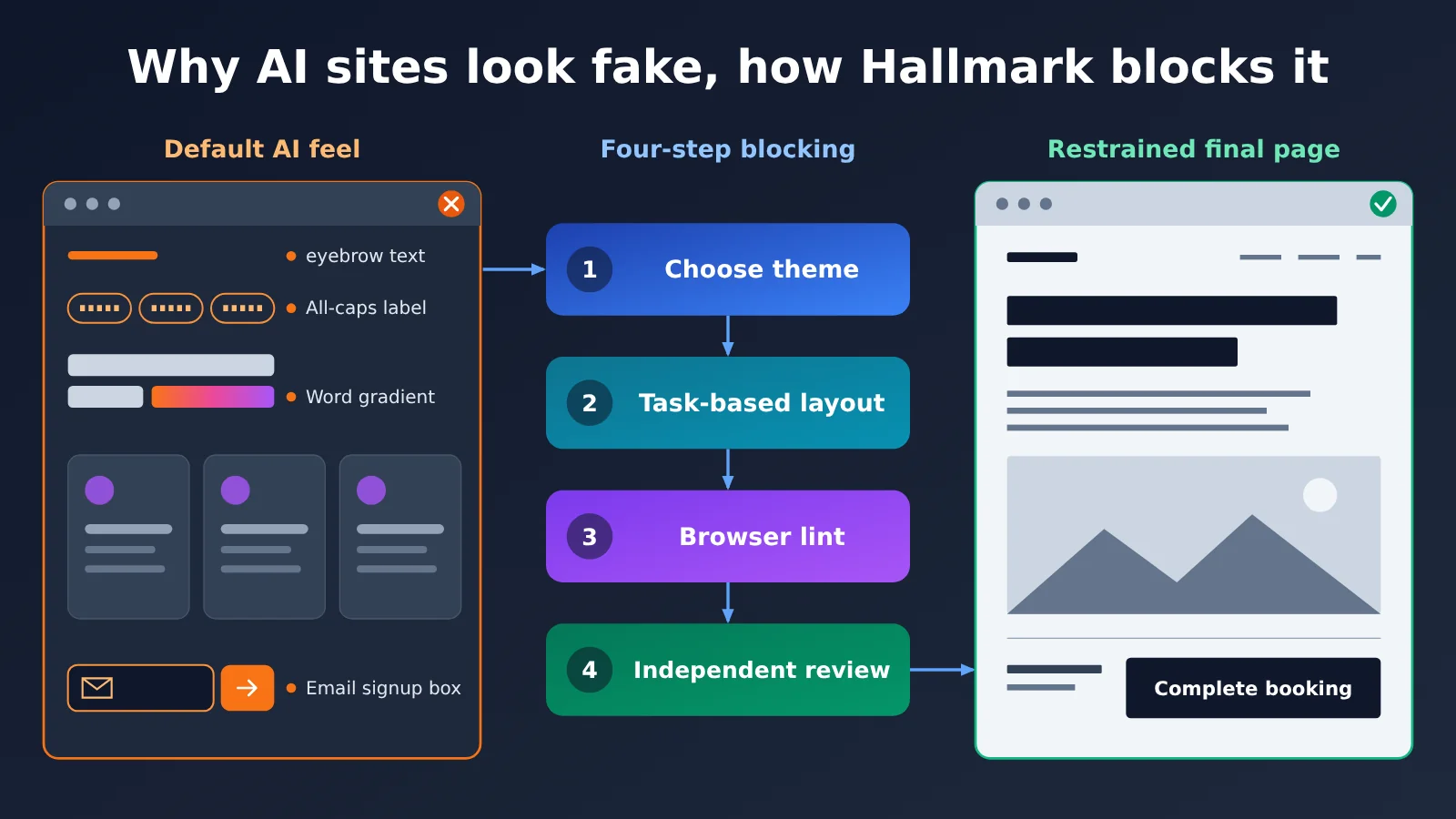
When you use Claude Code or Cursor to build a landing page, a portfolio, or a product page, a lot of people hit the same wall: everything works, but the moment the page opens you get an unmistakable AI flavor. The usual tells are a tiny eyebrow line above every heading, all-caps letter-spaced labels everywhere, and exactly one word in the headline dipped in a gradient. The hero doesn’t fill the viewport, a newsletter signup box is permanently bolted to the bottom, and the form pops a “thanks!” after submit while actually sending nothing anywhere.
These patterns aren’t exactly mistakes — the problem is that they’re the model’s default output. In April 2026, Together AI open-sourced Hallmark. The GitHub description reads “Anti-AI-slop design skill for Claude Code, Cursor, and Codex.” As of 2026-11-23, the GitHub API shows 59,555 stars and 3,258 forks, under the MIT license.
To be clear up front: this is not a magic plugin that stops looking like AI the moment you install it. Hallmark does two things — it uses themes and task constraints to rein in the model’s default patterns, and it uses a linter plus an independent review pass to catch known problems. Whether the page actually looks good is still a human judgment call. This article keeps what it can catch and what it can’t in separate buckets.
Key takeaways: After reading this, you’ll be able to install and invoke Hallmark, know how to choose between the Real Assets and Custom paths, understand which problems it checks for, and pick the right model for each build stage.
Websites Made by AI Look Fake at First Glance: Hallmark Key Facts
Here’s a quick table to get the basics of Hallmark. The numbers below come from the GitHub API and the project’s own README.
| Item | Details |
|---|---|
| Project | Hallmark by Together AI, repo Nutlope/hallmark |
| What it is | A design skill that rejects AI-generated-looking design; supports Claude Code, Codex, Cursor, and OpenCode |
| Timeline | Created 2026-04-27, last pushed 2026-11-11 |
| Version | No GitHub release; the README calls the current version v2 |
| Community stats | 59,555 stars / 3,258 forks / 55 open issues (2026-11-23) |
| License and language | MIT, primary language CSS |
| Requirements | Node 18+; rendering checks also need puppeteer-core and Chrome |
Four Changes in Hallmark v2
According to the README, v2 ships with 50 themes. Each theme includes a material (paper, fonts, color palette, surfaces, components, textures) and a finished-page image. Each theme is a file under references/themes/ no larger than 8KB, and the build reads only one of them. Themes only set the “feel” — they don’t dictate which modules a page contains or in what order. That point matters: if structure also came from a template, you’d just get another flavor of sameness.
The second change is layout driven by the task. A booking page ends with a completed booking, a shop page ends with a completed purchase, a subscription page ends with a completed subscription. The primary action sits where it normally belongs for that category, and the page ends on that action, instead of going through the motions and stuffing another email signup box at the bottom. The third and fourth changes are two new paths: Custom (no theme, design only from the prompt) and Your real product (give it a URL, dev server, or app, and it takes screenshots itself). In addition, the README says it includes 755 openly licensed photos, selected by theme and credited on the page.
Why AI webpages give themselves away: Hallmark’s checklist
The source of that “AI feel” comes down to one sentence: when a model doesn’t get specific enough constraints, it falls back to the most common patterns in its training data. Hallmark turns those high-frequency patterns into detectable rules.
| Typical AI tell | What readers see | How Hallmark handles it |
|---|---|---|
| Every heading has an eyebrow above it | Monotonous hierarchy, looks like a template | Listed as a default cliché and flagged during lint |
| Letter-spaced all-caps micro-labels | Over-decorated, zero information value | Same as above — keep only if there’s a reason |
| Only one colored word in a heading | An instantly recognizable “AI heading” | Flagged as a typical problem |
| Whole page is empty boxes or just photos | Content feels hollow, like placeholders | During pre-check, ask the user for real assets instead of making them up |
| Hero doesn’t fill the screen | First screen feels loose, with no focal point | Build the hero separately first, render it first, and cold-review it |
| Email subscription at the bottom of every page | A cliché unrelated to the business | Lay out by task, and end with the page’s core action |
| Form says thank you but doesn’t send | Fake functionality | Check whether the form actually submits |
Hallmark’s Three-Level Gate
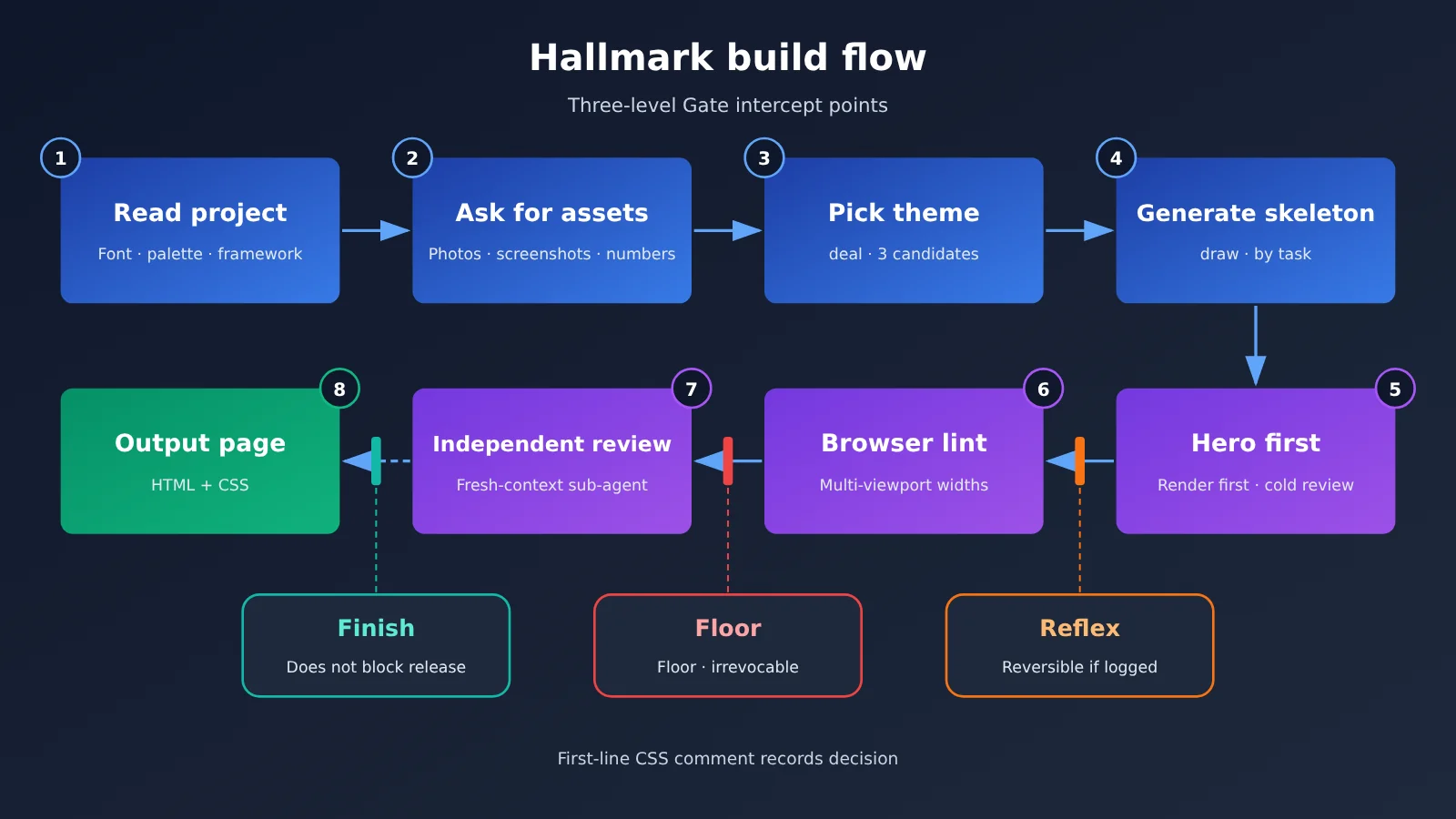
Not every problem is equally serious. Hallmark splits its checks into three levels — a design that gets closer to a real design review than a one-size-fits-all rule table does:
| Level | Meaning | Typical content | Can it be overridden? |
|---|---|---|---|
| Floor | The bottom line — never ship | Contrast, focus states, reduced motion, fabricated facts, broken mobile layout | No |
| Reflex | The clichés models default into | Eyebrow, all-caps labels, single-color words, etc. | Yes, once you have a reason on record |
| Finish | Craft details | Polish-level issues | Doesn’t block a release |
The Reflex level deserves a few more words. It acknowledges that these patterns aren’t outright wrong: some brands really do suit all-caps labels, and some pages really do need a subscribe box. The rule only asks you to state your reasoning and write it down, so it doesn’t get carried into the page by default just because “nobody thought about it.” Which also means a human still makes the final call.
Breaking Down the Hallmark Build Process
According to the README, a full build breaks down into these steps:
- Pre-flight: read the project — read the existing fonts, color palette, and framework, plus the locked design conventions in design.md.
- Ask for assets only once — ask you for photos, screenshots, and real numbers. Anything you don’t provide won’t be invented.
- Pick a theme and skeleton —
scripts/theme.mjs dealoffers three suitable themes, anddrawgenerates the page skeleton for the task. - Hero first — build and render the first screen on its own first, then do one cold review.
- Browser lint —
scripts/sloplint.mjs --renderchecks at 8 widths (as the README itself notes). - Independent review — hand the page to a fresh-context sub-agent and have it re-examine the page with a context that hasn’t been “led astray” by the earlier conversation.
Every page produced is self-contained HTML and CSS, and the first line of the CSS comment records the design decisions that were made, so it’s easy for you to trace back later and easy to modify down the road.
Hallmark Quick Start: Installation and Invocation
Installing Hallmark
The easiest way is a single command: npx skills add nutlope/hallmark -g. With -g, it installs for all projects; without it, it only installs in the current project. You’ll need Node 18+. If you want to use a real browser for rendering checks and screenshots, you’ll also need to run npm i -g puppeteer-core and install Chrome. If either is missing, static checks still run — you just lose the rendering layer.
| Install method | Command | Install location / invocation name |
|---|---|---|
| Global install (recommended) | npx skills add nutlope/hallmark -g |
Claude Code: ~/.claude/skills/hallmark; Codex CLI: ~/.agents/skills/hallmark |
| Install for just one harness | npx skills add nutlope/hallmark -g --agent claude-code |
You can swap in codex, opencode, cursor, or github-copilot |
| Claude Code plugin | /plugin marketplace add nutlope/hallmark, then /plugin install hallmark@hallmark |
Invoked as /hallmark:hallmark |
| Install from a clone | node skills/hallmark/scripts/install.mjs |
Validates each theme and reference before copying |
| Check on edit | install-hook.mjs |
Adds an on-edit Floor check to Claude Code |
Cursor and OpenCode will automatically find the copy above, so there’s no need to install it again.
Common Hallmark Commands
Once it’s installed, these are the entry points you’ll use most day-to-day:
- Create a new page: In the agent, type
/hallmarkand then describe what the page needs to accomplish. If the skill doesn’t trigger automatically, you can call it by name, for exampleuse hallmark to build .... - Redesign an existing page:
/hallmark redesign <path>keeps the original content and wiring, and only reworks the look. The official FAQ specifically notes that redesign must be invoked by name. - Report only:
/hallmark audit <path>reports issues without changing code—good for getting a baseline first. - Standalone lint:
node skills/hallmark/scripts/sloplint.mjs <file-or-dir> --rendercan check any page, not necessarily one generated by Hallmark.
It’s a good idea to run audit or sloplint on your existing pages first to see which level the issues cluster at, then decide whether to redesign or just make local changes.
🚀 Getting started tip: Hallmark itself doesn’t need an API key, but the Claude Code driving it needs to be able to call a model. You can sign up at APIYI (apiyi.com) and claim free trial credits, then use a small page to run the whole “audit → redesign → sloplint” flow end to end before deciding which model tier to use later.
Two Routes: Real Assets vs Custom
Your real product route is for teams that already have a product. Give it a URL, a local dev server, or an app, and it takes screenshots itself and reads design tokens and design.md. With the real photos and numbers you provide, the page won’t end up with made-up customer logos and “trusted by 10,000+ users.” In terms of results, this route does the most to remove the AI feel, because the emptiness usually comes from fabricated content, not just from layout.
Custom route is for new projects that don’t have a visual direction yet. It skips the 50 themes and designs solely from the prompt, but still follows the same rules and checks. For photos, photos.json lists images from Wikimedia Commons; the repo itself doesn’t store image files. Each image keeps its own license (CC0, public domain, CC BY, or CC BY-SA), and you provide attribution when you use it. The project explicitly doesn’t use Unsplash, Pexels, or Pixabay, because those platforms’ terms don’t allow AI tools to select images. The official FAQ also notes that the image key is optional, and no two people will get the same page.
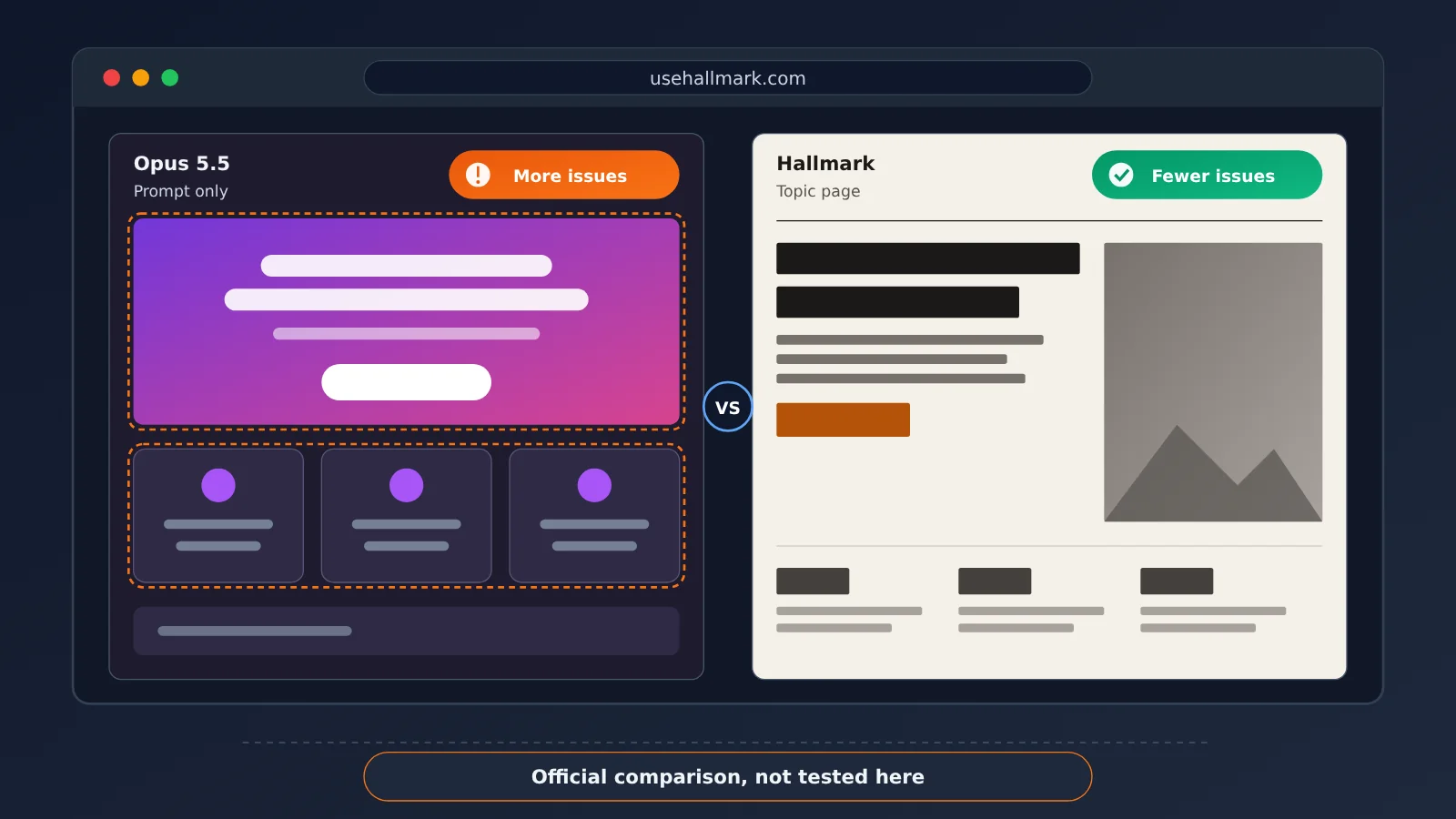
The image above is the official comparison page from usehallmark.com. What the official copy is saying: the same prompt produces two pages; on the left is the result Opus 5.5 generated from the prompt on its own, and on the right is a Hallmark theme page under the same prompt, with the issue count coming from Hallmark’s own linter. This is the official self-description, not a test run by this article. Using your own linter to score your own solution is inherently biased, so take it with a grain of salt.
Model and Cost Selection for Hallmark Page Building
A lot of people overlook one thing: a single Hallmark build isn’t just a simple back-and-forth Q&A. The pre-check has to read the project, the hero has to render and then get cold-reviewed, the sloplint results get sent back to the model, and the fresh-context sub-agent re-reads the page all over again. Context gets loaded repeatedly, which is exactly why cache-read pricing is worth paying attention to.
The prices in the table below come from the APIYI model pricing overview (data updated 2026-11-22), in USD per 1M tokens. The suggested stages are recommendations based on how the workflow is structured, not official rules.
| Model | Input | Output | Cache Read | Suggested Stage |
|---|---|---|---|---|
| claude-opus-5-5 | $4 | $20 | $0.2 | Theme selection, hero cold review, key redesign decisions |
| claude-sonnet-5-5 | $2 | $10 | $0.1 | Daily page building, iterating on lint results |
| claude-haiku-5-5 | $0.1 | $0.5 | $0.01 | Audit report organization, summarizing after batch sloplint runs (≤100K input tier) |
💡 Selection tip: You can allocate models by stage. Give Opus the above-the-fold and overall direction, Sonnet the heavy iteration, and Haiku the routine checks. With APIYI apiyi.com, a single key lets you switch between these three Claude tiers, making it easy to compare the same page’s results and cost at different tiers.
Connecting Claude Code with APIYI
Connecting Claude Code only takes two environment variables: ANTHROPIC_AUTH_TOKEN=sk-... and ANTHROPIC_BASE_URL=https://api.apiyi.com. Note that you should use the root domain here, without adding /v1. On first use, write {"hasCompletedOnboarding": true} into ~/.claude.json to skip the onboarding flow. If you’ve also written an OpenAI-compatible script — say, to batch-call models and summarize audit reports — the base_url for that should be https://api.apiyi.com/v1. Don’t mix the two up.
APIYI’s ClaudeCode group comes with an automatic 5% discount (95% of the list price), and it stacks with recharge bonuses. That said, APIYI’s official docs include a candid caveat: for long-context tasks like coding or deep agent exploration, pay-as-you-go usage adds up fast — $5 might not get you through a single deep research run. If your usage is heavy and you’re able to connect directly to the official site, a subscription is more economical. Also, APIYI is a gateway, not a model host, so upstream providers’ content policies, rate limits, and outages are passed straight through.
💰 Cost tip: Run a complete page on APIYI apiyi.com using the free credits first, get a clear picture of the actual token consumption for one build, and then decide between pay-as-you-go and a subscription. That’s more reliable than recharging based on gut feeling.
Hallmark’s Impact on Independent Developers
Impact on developers
- Aesthetic issues become rules: Before, you could only say “this feels AI-generated”; now you can turn that into actionable feedback, like “the eyebrow is on line X” or “the layout breaks at this viewport.”
- Assets become the first priority: The mechanism that asks for assets once and doesn’t invent them forces you to prepare real screenshots and data upfront.
- The lint works on its own: Even if you don’t use Hallmark to generate pages, you can still use sloplint as a pre-launch check.
What it can’t cover
Hallmark’s limits also need to be spelled out. It can stop known patterns, but not “new patterns that haven’t been added to the rules yet.” Models will probably slowly develop new default patterns. It also can’t decide for you whether the brand tone is right, whether the copy lands, or whether the information architecture fits your users. Finish-level issues don’t block publishing, and Reflex can be overridden with a reason. These design choices themselves make one thing clear: the final judgment stays with people.
FAQ
Q1: What is Hallmark?
Hallmark is a design skill open-sourced by Together AI, and it supports Claude Code, Codex, Cursor, and OpenCode. Through theme constraints, task-specific layout, browser lint, and independent review, it cuts down on the usual clichés in AI-generated web pages. It’s released under the MIT license.
Q2: How is Hallmark different from skills like frontend-design?
The README lists its inspirations as Impeccable, frontend-design, Open Design, Kami, taste-skill, Web Interface Guidelines, and others. Hallmark’s difference is that it pushes the checks down to real multi-width rendering in an actual browser, split into three Gate levels — Floor, Reflex, and Finish — rather than stopping at prompt-level style guidance.
Q3: What version is Hallmark at right now?
The repo hasn’t published a GitHub release, and the README calls the current version v2. The most recent push was on 2026-11-11.
Q4: What kinds of pages is Hallmark suited for?
– **Landing pages and product pages**: task-specific layout, wrapped up with the core conversion action.
– **Portfolios**: use the Custom route or a theme to set a visual direction.
– **Redesigns of existing sites**: use `/hallmark redesign
Q5: Does Hallmark need an API key? Where do the models come from?
Hallmark itself doesn’t need an API key, and the image key for photos is optional too. But the Claude Code running it needs model credits. You can get a key and free trial credits through APIYI apiyi.com, then configure ANTHROPIC_BASE_URL as described above and you’re good to go — the ClaudeCode group comes with a default 5% discount.
Q6: Roughly how much does one page build cost?
That depends on the project size, the number of iteration rounds, and the model you pick, so there’s no fixed number. The build process reads the project and the rendered output over and over, and long-context consumption isn’t cheap — the official docs warn that $5 may not be enough to get through a single deep task. My advice: first use APIYI apiyi.com with a small page to measure your real consumption, then pair Opus, Sonnet, and Haiku by stage.
Q7: Can I still use Hallmark without Chrome?
Yes. Without puppeteer-core and Chrome, the static checks still run, but the `–render` multi-width rendering checks and screenshot features are missing, and your ability to catch hero-section cold-review and responsive issues drops off noticeably.
Q8: If I use Hallmark, is it guaranteed not to look AI-made?
No, it isn’t. It blocks known clichés and baseline problems, but brand tone, copy quality, and information architecture still need human judgment. The issue counts on the official comparison page are also self-reported using the team’s own linter, so treat it as a checking tool, not a replacement for a designer.
Core Takeaways: De-Slopping AI-Built Web Pages
- The “AI look” comes from default patterns: an eyebrow, all-caps labels, a single colored word, a subscription box at the bottom — those are the classic tells.
- Themes control texture, not structure: the README claims 50 themes, each under 8KB, and only one gets read at build time.
- Layout follows the task: pages close on the core action — booking, buying, subscribing.
- Three gates sort severity: Floor never lets anything through, Reflex can be overridden with a reason, Finish doesn’t block shipping.
- Real materials matter most: ask for assets once, never invent facts or numbers.
- Pick models by stage: one APIYI key lets you switch between Opus, Sonnet, and Haiku.
- Humans still sign off: the official comparison is self-reported, and the final design judgment is yours.
Summary
Hallmark’s approach to the “AI-built pages that look fake at a glance” problem is refreshingly pragmatic:
- Constrain first: themes pin down the texture, the task decides the structure, and the model isn’t free to drift back to its default patterns.
- Then check: lint in a real browser at multiple widths, sorting problems into Floor, Reflex, and Finish.
- Then review: hand it to a fresh-context subagent for a second pass, and write the decisions into CSS comments.
For indie developers, the safest way to start is: run sloplint or audit on your existing page as a health check first, then decide whether a redesign is worth it. It catches a whole class of common problems, but whether a page actually moves people is still something you have to look at and fix yourself.
If you need model credits ready for Claude Code, APIYI (apiyi.com) is a fast way to validate results. The platform offers free test credits and a unified interface — get one page working end to end first, then plan your long-term usage.
📚 References
-
GitHub – Hallmark: The official open-source repository
- Link:
github.com/Nutlope/hallmark - Notes: The README covers installation instructions, v2 changes, the build process, and checks
- Link:
-
Hallmark official website: Official comparison page, theme showcase, and FAQ
- Link:
usehallmark.com - Notes: The issue counts shown on the comparison page are officially self-reported — they come from Hallmark’s own linter
- Link:
-
Hallmark photo list: An index of openly licensed image libraries
- Link:
github.com/Nutlope/hallmark/blob/main/skills/hallmark/scripts/photos.json - Notes: The list of Wikimedia Commons photos, along with each one’s license
- Link:
Author: APIYI Technical Team
Technical discussion: For model pricing and Claude Code integration instructions, check the docs.apiyi.com documentation center — and feel free to reach out to us via the APIYI official website homepage.