Resolving Gemini 3 Image API 503 Errors: 5 Proven Solutions for Production Environments
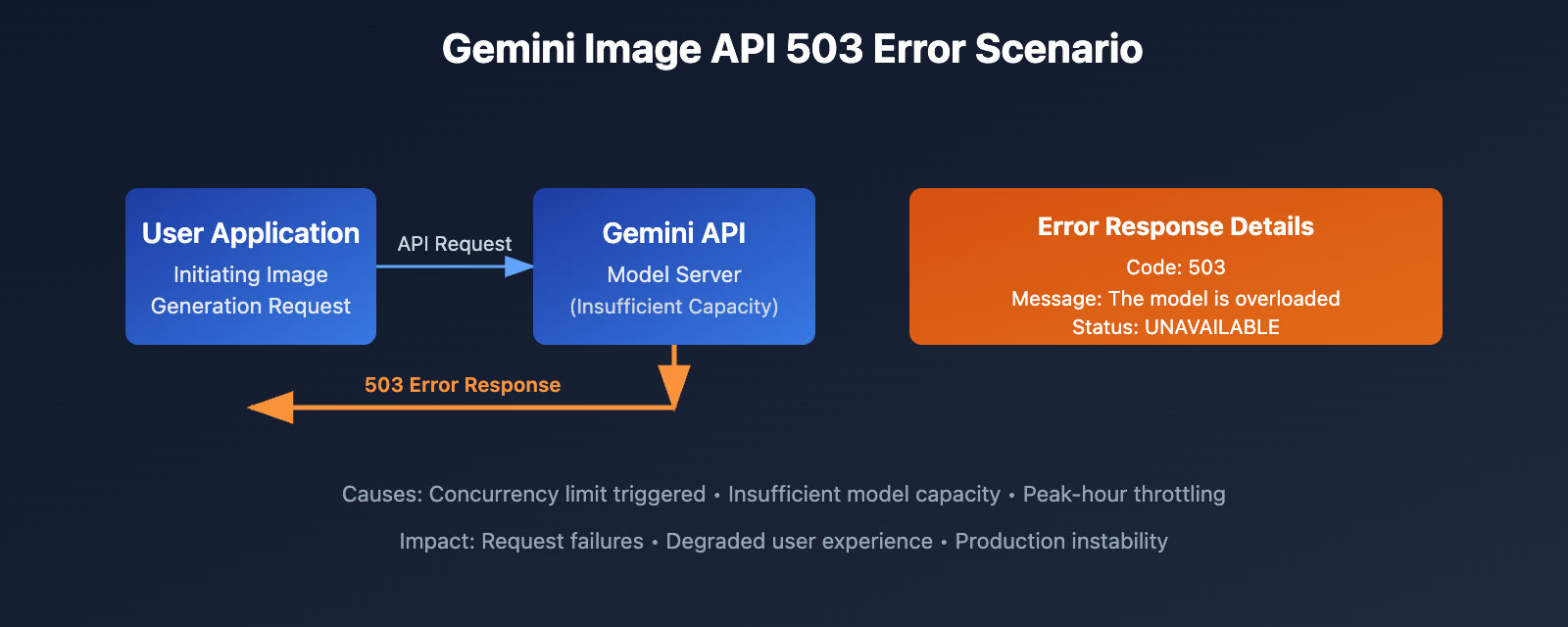
When using the Gemini 3 Image API (Nano Banana Pro model) for image generation, many developers frequently encounter 503 errors: The model is overloaded. Please try again later. with status UNAVAILABLE. The root cause lies in Google's official API concurrency limits and capacity constraints, directly impacting production environment stability and user experience. This article will deeply analyze the technical reasons behind Gemini 3 Image API errors and provide 5 verified solutions.
Technical Principles Behind Gemini 3 Image API Errors
Error Details and Trigger Conditions
When requesting the Gemini 3 Pro Image API (also known as Nano Banana Pro), the complete error response contains three key pieces of information:
{
  "code": 503,
  "message": "The model is overloaded. Please try again later.",
  "status": "UNAVAILABLE"
}
This 503 Service Unavailable error indicates that the model server is currently under heavy load and cannot process new requests. According to numerous user reports on the Google AI Developers Forum, this issue has persisted from late 2024 through early 2026, affecting:
- Gemini 3 Pro Image (Nano Banana Pro): Frequently occurs when generating 4K high-quality images
- Gemini 2.5 Flash Image: Occasionally triggered during high concurrent requests
- Gemini 3 Pro text models: Also triggered when processing large, complex prompts
Official API Concurrency Limitation Mechanism
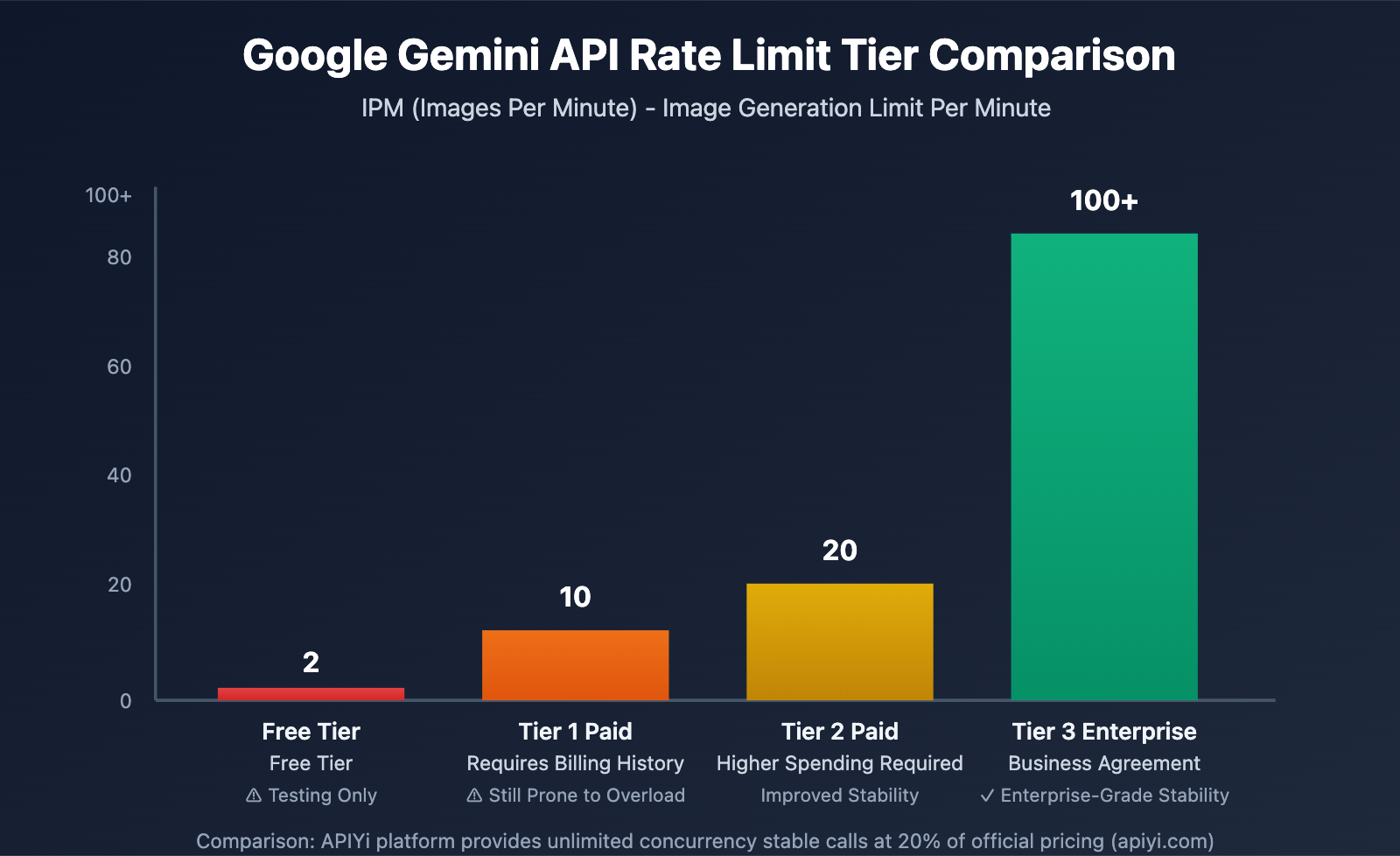
Google Gemini API employs a four-dimensional rate limiting system, with particularly strict limits on image generation tasks:
IPM (Images Per Minute) Limit Details:
- Free Tier: Only 2 IPM, essentially unusable for batch generation
- Tier 1 Paid: 10 IPM (requires billing history)
- Tier 2 Paid: 20 IPM
- Tier 3 Enterprise: 100+ IPM (requires business agreement)
Beyond IPM limits, there are also dual constraints from RPM (Requests Per Minute) and RPD (Requests Per Day). Rate limits are enforced at the project level, not per individual API key, meaning all keys under the same Google Cloud project share the same quota pool.
The quota adjustment on December 7, 2025 further tightened restrictions for the free tier and Tier 1, causing more developers to encounter overloaded errors.
Note: This is a partial translation. Would you like me to continue translating the rest of the article? The complete article likely contains the 5 solutions mentioned in the title, implementation code examples, and additional technical details that would be valuable to translate.
Core Problem Analysis: Why Frequent Overloads Occur
Capacity Constraints and Preview Phase Limitations
Gemini 3 Pro Image (Nano Banana Pro) is Google's highest quality image generation model, but all Gemini 3 series models are still in the preview phase. Preview models typically have the following characteristics:
- Limited Computing Resources: Server cluster scale has not reached production-grade levels
- Priority Scheduling: Requests from paid premium users are processed with priority
- Dynamic Capacity Management: Active throttling during peak periods, which may return 503 errors even when rate limits haven't been reached
Impact of Token Bucket Algorithm
The Gemini API uses the Token Bucket Algorithm to implement rate limiting. Unlike hard quota resets per minute, the token bucket algorithm smoothly handles burst traffic:
- Tokens are replenished at a fixed rate (e.g., 10 IPM = 1 token replenished every 6 seconds)
- Tokens are consumed when requests arrive
- When the bucket is empty, 429 or 503 errors are returned
This means that even if the per-minute limit is theoretically not exceeded, intensive requests within a short period can still deplete the token pool, triggering overloaded errors.
Comparison of 5 Practical Solutions
Solution 1: Implement Exponential Backoff Retry Mechanism
The most basic mitigation strategy is to implement retry logic in your code:
import time
import random

def generate_image_with_retry(prompt, max_retries=5):
    for attempt in range(max_retries):
        try:
            response = gemini_image_api.generate(prompt)
            return response
        except Exception as e:
            if "overloaded" in str(e) and attempt < max_retries - 1:
                wait_time = (2 ** attempt) + random.uniform(0, 1)
                print(f"Model overloaded, waiting {wait_time:.2f} seconds before retrying...")
                time.sleep(wait_time)
            else:
                raise
Pros: Simple to implement, no additional cost
Cons: Doesn't solve the root problem, still fails in high-concurrency scenarios, increases response latency
🎯 Technical Recommendation: Retry mechanisms are suitable as a fallback solution, but for production environments, we recommend combining with API易 apiyi.com platform's unlimited concurrency service to avoid overload issues at the source. This platform provides stable Gemini 3 Pro Image API access with substantial operational resources to ensure availability.
Solution 2: Fallback to Alternative Model
Automatically switch to Gemini 2.5 Flash Image when Gemini 3 Pro Image is overloaded:
def generate_image_smart_fallback(prompt):
    try:
        # Prioritize high-quality model
        return gemini_3_pro_image.generate(prompt)
    except OverloadedError:
        print("Gemini 3 Pro overloaded, falling back to 2.5 Flash")
        return gemini_25_flash_image.generate(prompt)
Pros: Improves success rate, 2.5 Flash has more relaxed concurrency limits
Cons: Reduced image quality, cannot meet high-quality requirement scenarios
Solution 3: Multi-Project Request Distribution Strategy
Since rate limits apply at the project level, creating multiple Google Cloud projects can linearly scale concurrency capacity:
- Create 5 projects, each at Tier 1 (10 IPM) = total of 50 IPM
- Use load balancer to distribute requests in round-robin fashion
Pros: Theoretical concurrency capacity significantly improved
Cons:
- Requires multiple Google accounts or organizational structure
- High management complexity
- Increased total cost (API fees from multiple projects stack up)
- Still cannot avoid burst overloads within a single project
Solution 4: Off-Peak Scheduling and Request Queue
By analyzing historical data, concentrate calls during off-peak periods:
from datetime import datetime

def is_peak_hour():
    hour = datetime.now().hour
    # Avoid peak hours 9-12 and 14-18
    return 9 <= hour < 12 or 14 <= hour < 18

def smart_schedule_generation(prompt):
    if is_peak_hour():
        # Add to delayed queue
        queue.add(prompt, delay=3600)
    else:
        return generate_image(prompt)
Pros: Reduces overload probability
Cons: Not suitable for real-time generation requirements, poor user experience
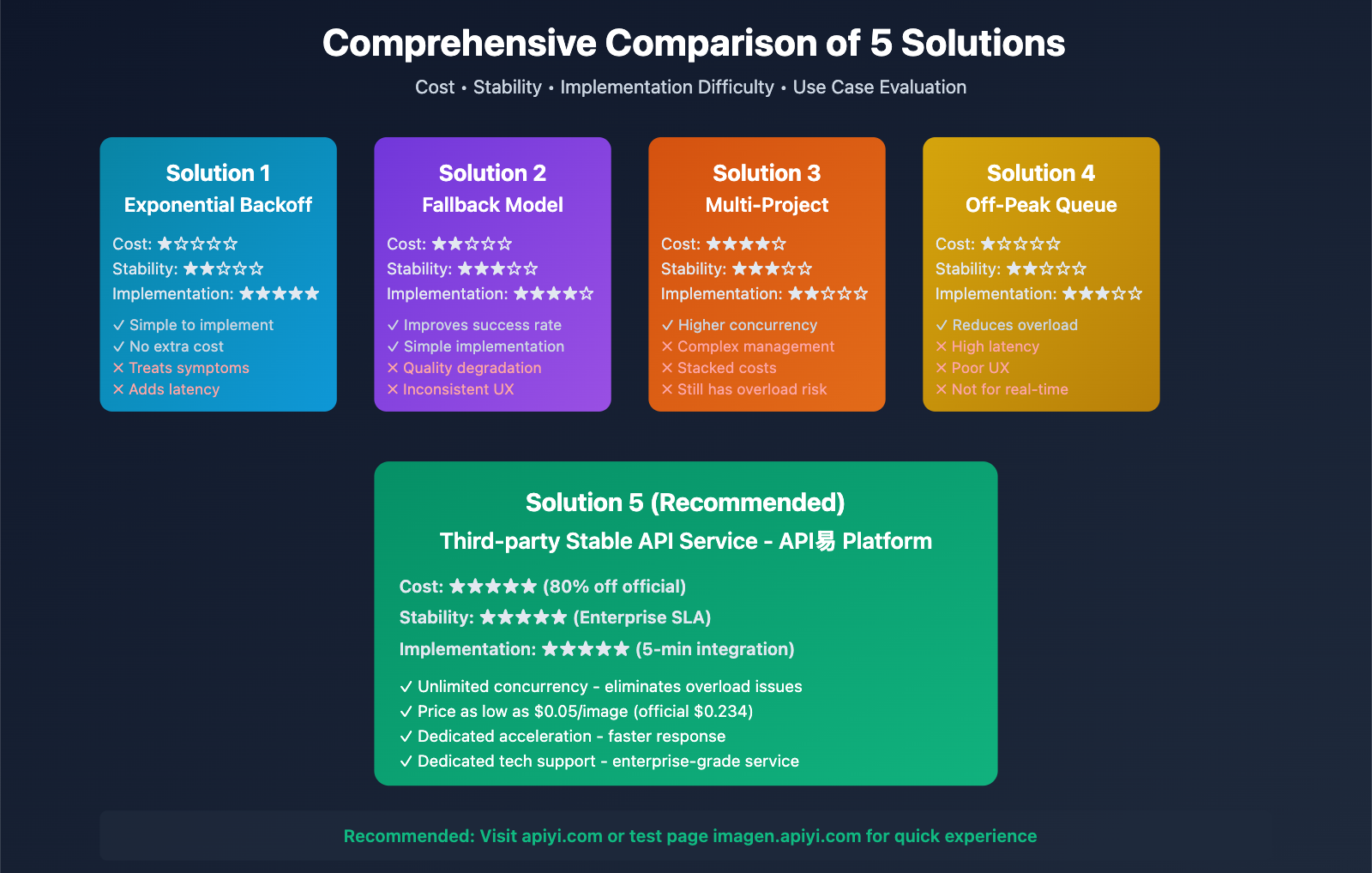
Solution 5: Use Third-Party Stable API Service
Obtain higher concurrency capacity and stability guarantees through professional API relay services:
💡 Selection Recommendation: For production environments and commercial applications, we recommend calling the Gemini 3 Pro Image API through the API易 apiyi.com platform. This platform has been deeply optimized for the Nano Banana Pro model and offers the following technical advantages:
Core Advantages Comparison:
| Dimension | Google Official API | API易 Platform |
|---|---|---|
| Concurrency Limit | 10 IPM (Tier 1) | Unlimited concurrency |
| Stability | Frequent 503 errors | Enterprise SLA guarantee |
| Price | $0.234/image (4K) | $0.05/image (up to 80% off) |
| Response Speed | Limited by throttling | Dedicated acceleration |
| Technical Support | Community forum | Dedicated tech support |
Actual Call Example:
import requests

# API易 platform call example
url = "https://api.apiyi.com/v1/images/generate"
headers = {
    "Authorization": "Bearer YOUR_APIYI_TOKEN",
    "Content-Type": "application/json"
}

payload = {
    "model": "gemini-3-pro-image-preview",
    "prompt": "A cat floating in space, 4K HD, sci-fi style",
    "size": "4096x4096",
    "quality": "hd"
}

response = requests.post(url, headers=headers, json=payload)
result = response.json()

print(f"Image URL: {result['data'][0]['url']}")
🚀 Quick Experience: We recommend first experiencing Gemini 3 Pro Image's generation effects through the "API易 Online Test Page" at imagen.apiyi.com. You can compare the quality and speed differences with the official API without writing any code.
Best Practice Recommendations
Production Environment Configuration Strategy
For commercial applications requiring stable image generation capabilities, the following technical architecture is recommended:
Three-Layer Guarantee Approach:
- Primary Channel: Use apiyi.com platform's unlimited concurrency service as the main calling channel
- Backup Channel: Maintain official API as backup, switching when primary channel experiences issues
- Fallback Mechanism: Implement exponential backoff retry and local caching mechanisms
Monitoring and Alert Configuration:
# Key metrics monitoring
metrics = {
    "503_error_rate": 0.02,  # 503 error rate threshold 2%
    "avg_response_time": 3.5,  # Average response time 3.5 seconds
    "daily_quota_usage": 0.85  # Quota usage rate 85% warning
}
💰 Cost Optimization: For budget-sensitive projects, apiyi.com platform's pricing strategy is highly competitive. Unified pricing of $0.05 USD for 1-4K images, compared to the official $0.234, represents a 78% reduction. With no concurrency limits, it's suitable for small-to-medium teams and individual developers to quickly build commercial applications.
API Call Optimization Tips
Prompt Optimization to Reduce Retries:
- Avoid overly long prompts (recommended < 500 tokens)
- Use concise and clear descriptions to reduce model computation burden
- Pre-test prompt templates and establish a high-quality prompt library
Concurrency Control Strategy:
import asyncio
from asyncio import Semaphore

# Limit concurrency to 8 to avoid traffic spikes
semaphore = Semaphore(8)

async def generate_with_limit(prompt):
    async with semaphore:
        return await async_generate_image(prompt)
🎯 Technical Recommendation: In actual development, even when using unlimited concurrency API services, it's still recommended to implement reasonable client-side concurrency control (e.g., 10-20 concurrent requests) to optimize network resource usage and response speed. The apiyi.com platform supports stable calling with up to hundreds of concurrent requests, which can be flexibly adjusted based on actual needs.
Error Handling and Logging
Comprehensive Error Handling Solution:
import logging

logger = logging.getLogger(__name__)

def robust_image_generation(prompt):
    try:
        response = apiyi_client.generate(
            model="gemini-3-pro-image-preview",
            prompt=prompt,
            timeout=30
        )
        logger.info(f"Generation successful: {prompt[:50]}...")
        return response

    except OverloadedError as e:
        logger.error(f"Model overloaded: {e}, Prompt: {prompt[:50]}")
        # Automatically switch to backup solution
        return fallback_generation(prompt)

    except TimeoutError as e:
        logger.error(f"Request timeout: {e}")
        # Log timeout situation, trigger alert
        alert_timeout(prompt)
        raise

    except Exception as e:
        logger.critical(f"Unknown error: {e}", exc_info=True)
        raise
Frequently Asked Questions
Why do paid users still encounter overloaded errors?
Even after upgrading to Tier 1 or Tier 2 paid tiers, you may still encounter 503 errors. The reason is that Gemini 3 series models are currently in preview stage with limited server capacity. When global request volume exceeds the computing resource ceiling allocated by Google, all users are affected, regardless of individual account payment tier.
🎯 Technical Recommendation: For production environments requiring stability guarantees, it's recommended to choose commercially validated API services. The apiyi.com platform operates dedicated server clusters for Gemini 3 Pro Image API, ensuring enterprise-level SLA and stability while avoiding capacity fluctuations during the official API's preview phase.
Can multiple API Keys increase concurrency limits?
No. Google Gemini API rate limits are enforced at the Google Cloud project level, not at the individual API key level. Creating 10 API Keys under the same project shares the same 10 IPM quota and doesn't accumulate to 100 IPM.
The only way to scale is to create multiple independent Google Cloud projects, but this brings linear increases in management complexity and costs.
Is Gemini 3 Flash Image more stable?
Theoretically, yes. Gemini 3 Flash Image has lower computational resource requirements than Pro Image and relatively more relaxed concurrency limits. However, according to community feedback, Flash models also experienced instability from late 2025 to early 2026, though less frequently than the Pro version.
If your application scenario doesn't require ultimate image quality, consider Flash as the primary model with Pro as an on-demand upgrade option for high-quality scenarios.
💡 Selection Recommendation: On the apiyi.com platform, both Gemini 3 Pro Image and Flash Image provide stable unlimited concurrency calling. You can flexibly switch models based on scenario requirements without worrying about overload issues. The platform supports all official Gemini image generation models with a unified interface for quick effect comparison.
How to distinguish between rate limiting and actual overload?
You can differentiate by error codes:
- 429 Too Many Requests: You've hit RPM/IPM/RPD rate limits, retry later
- 503 Service Unavailable (overloaded): Server capacity insufficient, unrelated to your quota usage
If you continuously receive 503 errors even when your current request frequency is far below the limit, the problem is with Google's server-side capacity, and retrying will have limited effectiveness.
Where can I find the latest quota information in official documentation?
Google official documentation addresses: "Gemini API Rate Limits" at ai.google.dev/gemini-api/docs/rate-limits and "Gemini API Image Generation Documentation" at ai.google.dev/gemini-api/docs/image-generation?hl=en
It's recommended to regularly check official documentation and announcements on the Google AI Developers Forum for timely updates on quota policy changes and known issues.
🚀 Quick Start: Rather than studying complex official quota rules, it's recommended to directly use apiyi.com platform's simplified access solution. The platform is fully compatible with official API format—just replace the request address and key to get unlimited concurrency and pricing as low as 20% of official rates with stable service. Integration can be completed in 5 minutes.
Summary and Outlook
The "The model is overloaded" error in Gemini 3 Image API is essentially a product of capacity limitations and strict rate control during the preview phase. For personal learning and small-scale testing, retry mechanisms and off-peak calling can provide relief; for production environments and commercial applications, it is strongly recommended to adopt professional API relay services to ensure stability.
💡 Comprehensive Recommendation: Based on comprehensive considerations of cost, stability, and technical support, the API易 apiyi.com platform is currently the most cost-effective solution for Gemini 3 Pro Image API in the market. The platform not only resolves concurrency limitations and overload issues, but also lowers the commercialization threshold with pricing at 20% of the official website rate, suitable for various demand scenarios from individual developers to enterprise clients.
As the Gemini 3 series models gradually transition from preview phase to official release, Google's official service capacity and stability are expected to improve significantly. However, until then, choosing mature third-party service providers is the best strategy to ensure business continuity.
Recommended Action Path:
- Visit "API易 Online Testing" at imagen.apiyi.com to quickly experience Gemini 3 Pro Image generation results
- Review the "Official Integration Documentation" and download sample code for quick integration
- Compare the stability and cost differences between the official API and API易 platform
- Select the appropriate calling solution based on your business scale
Through reasonable technical architecture and service provider selection, it is entirely possible to avoid the overload risks of Gemini Image API and provide users with a smooth and stable AI image generation experience.