Author’s note: deepseek-flash now has built-in web search, but the thinking toggle changes how it searches, billing is counted per query, and the next turn keeps only the answer body. This article explains the three ways it differs from ordinary tool calling, and when you shouldn’t let the model search for itself.
On 2026-11-13, DeepSeek officially announced that it was opening up the App’s chat capabilities to the API. This time, only deepseek-flash gets this capability, corresponding to version DeepSeek-V4.1-Flash-1017. Declare a deepseek_web_search, and deepseek-flash can go online by itself; tool calls and context assembly are all handled server-side.
Many people will read this as “flip a switch, and the rest works like ordinary function calling.” This isn’t a simple switch. Whether thinking is on changes how it searches; the count shown in the response isn’t the count you’re billed for; and by the next turn, everything the model searched, read, and thought through is no longer in context.
Key takeaway: By the end of this article, you’ll know how deepseek-flash differs from ordinary tool calling in three places—thinking, billing, and the next turn—and you’ll be able to judge when to let the model search for itself and when the program should do the searching.
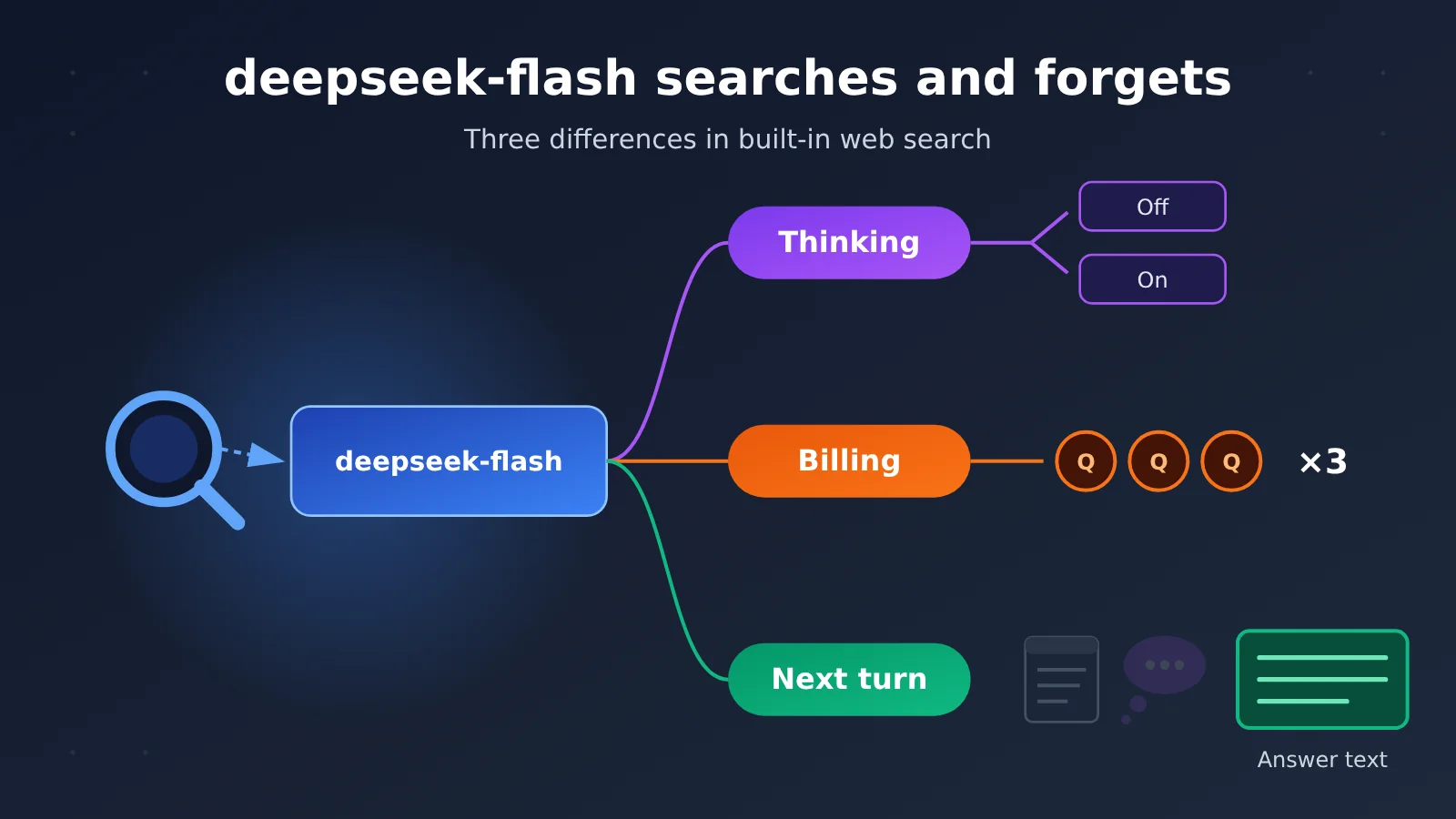
deepseek-flash Searches and Forgets: Three Core Points
Here’s the conclusion up front. The table below lists the three differences between deepseek-flash’s built-in search and the “model initiates a call, program executes it, result comes back” flow you’re already familiar with.
| Point | How deepseek-flash actually behaves | How it differs from a regular function call |
|---|---|---|
| Thinking | With thinking off, it’s a web or image search with citations; with thinking on, it becomes a deep-thinking search | The same tool declaration turns into two different flows depending on the thinking switch |
| Billing | Built-in search is counted per query — three queries in one search counts as three | It’s not “one call equals one charge,” and the count in usage doesn’t equal the number of billable events |
| Next turn | Search results, opened pages, and thinking don’t carry over to the next turn — only the answer body is kept | With a regular function call, you usually write the result back into history yourself, so you can keep it |
Where deepseek-flash’s Three Differences Come From
All three come from the same design decision: tool calls happen on the server side. You never see the intermediate tool call messages, and you don’t get a say in which content gets written back into history. The server does the searching, page reading, and context assembly for you — and once the answer is done, the intermediate steps are thrown away along with it.
That makes integration effortless, at the cost of giving up some control. Which queries get sent, which pages get opened, and whether the next turn can still reference the previous turn’s original text — the server decides all of it. Once you understand this, the next three sections will all click into place.
How the deepseek-flash thinking switch changes search
The official “Build a Chatbot” docs spell out the contrast clearly: declare deepseek_web_search the same way, but flip the thinking switch, and the behavior changes.
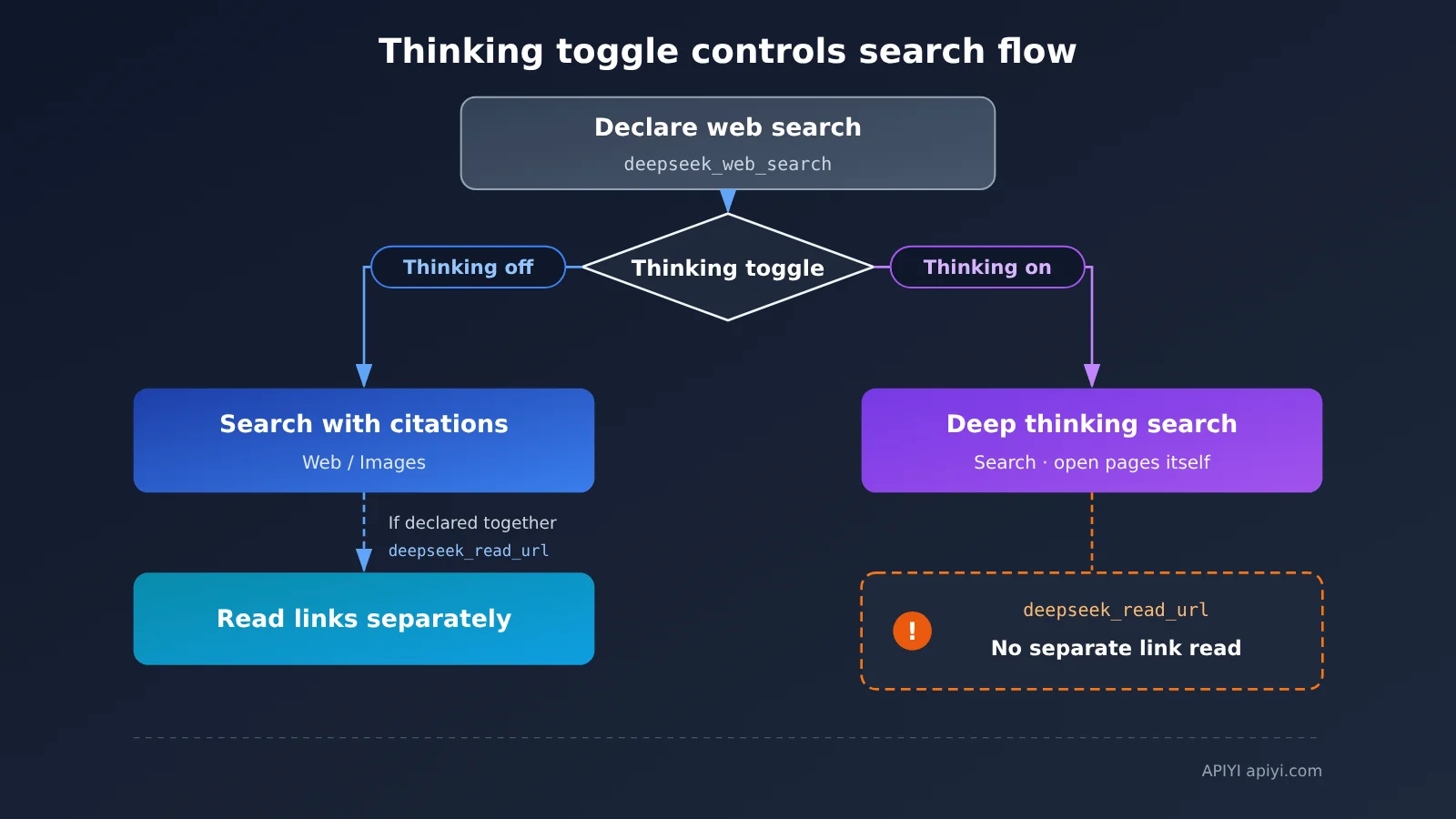
| Thinking switch | Declared tools | Actual behavior | Does it read links separately? |
|---|---|---|---|
| Off | deepseek_web_search |
Searches the web or images based on the question; answers come with citations | Not applicable |
| Off | deepseek_web_search + deepseek_read_url |
Searches with citations, and links in the user message are fetched separately | Yes |
| On | deepseek_web_search |
Deep-thinking search: it searches and opens pages on its own during multi-step reasoning | The model decides which pages to open |
| On | deepseek_web_search + deepseek_read_url |
Still deep-thinking search | No — links aren’t read separately |
| Any | Only deepseek_read_url |
Detects links in the user message and fetches them | Yes |
Two pitfalls of deepseek-flash deep-thinking search
The first pitfall is link reading. A user pastes a link, and you assume that declaring deepseek_read_url means that page will definitely be read. But as soon as thinking is on and deepseek_web_search is declared at the same time, this turn goes through deep-thinking search, links are no longer read separately, and whether to open that page becomes a decision the model makes during reasoning. If your product promises “paste a link and it reads the source,” either turn thinking off, or declare only deepseek_read_url for that turn.
The second pitfall is parameters. Once deepseek_web_search or deepseek_read_url is on, safety_check is set to high, or title is enabled, the server ignores a batch of sampling parameters such as temperature and top_p — and the three protocols don’t ignore exactly the same list. max_tokens (or max_output_tokens under the Responses protocol) still takes effect, but it caps the output of each individual reasoning step within a turn, not the total for the whole turn. So in deep-thinking search, using max_tokens to estimate a per-turn cost ceiling isn’t accurate.
How does deepseek-flash web-search billing actually work?
Billing is where mistakes happen most often, because there are two separate counting units at play here. Let’s take them one at a time.
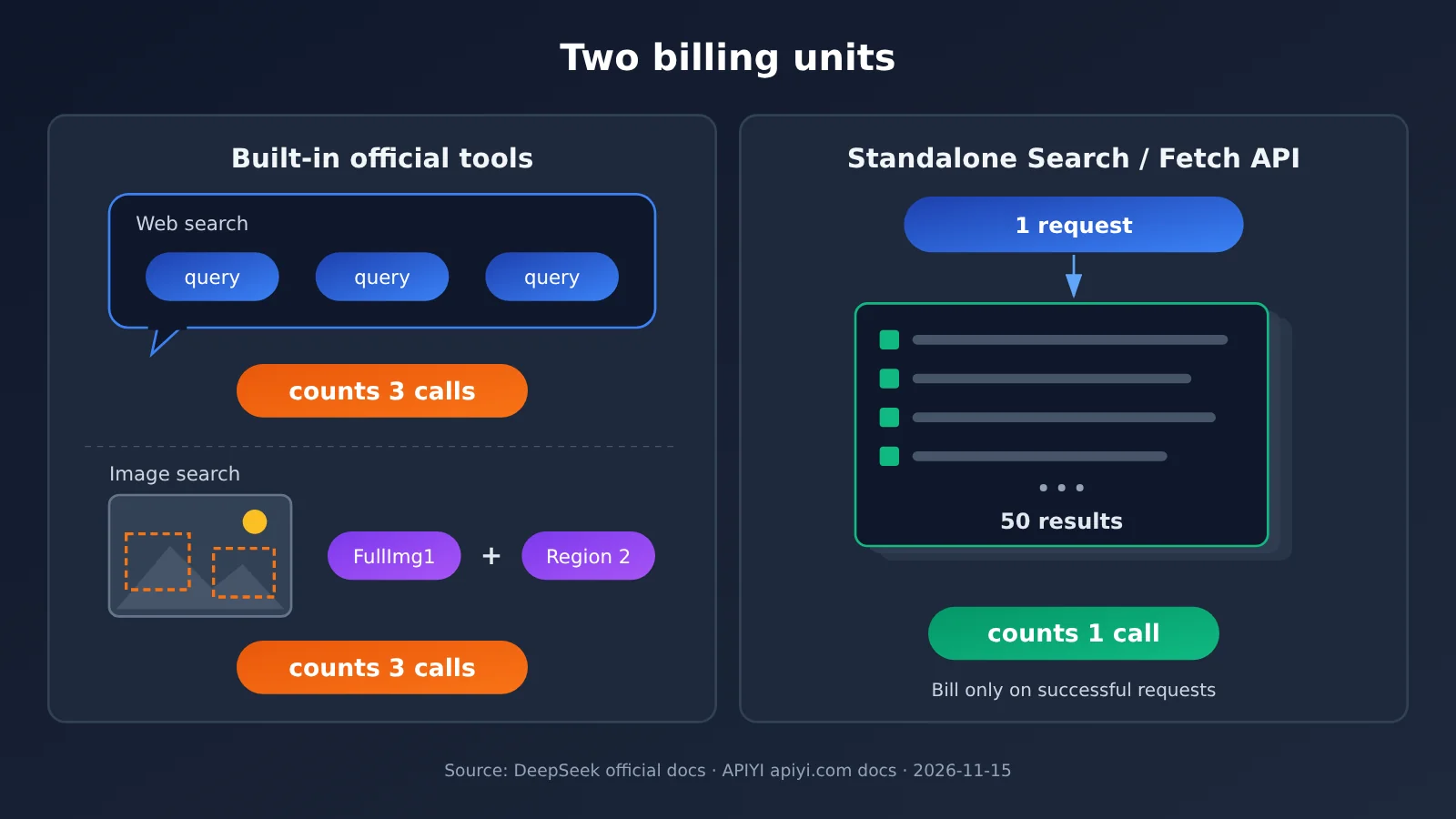
| Scenario | Counting unit | What counts as one | When it isn’t billed |
|---|---|---|---|
| Built-in web search | query | One search that returns results counts once per query inside it | Failures, no results |
| Built-in image search | image + region | Each image counts as 1, and each region the model outlines in the image adds another 1 | Failures, no results |
| Built-in link reading | successfully fetched page | If it’s fetched, it’s billed — including pages later swapped for url_not_allowed or unavailable after a safety review |
Links that can’t be fetched |
| Repeated visits in deep-thinking search | actual fetches | Only the fetch that truly pulls content from the web is billed | Reopening the same page, moving within the page, content already brought back with the search results |
| Standalone Search / Fetch API | successful request | Only an HTTP 200 with results counts as one; count doesn’t change the price of that request |
Failures, empty results, timeouts |
On the official pricing page (2026-11-15), Search (text and image) and Web fetch are both $0.75 per 1,000 calls. The unit price is the same, but “one” for built-in tools means one query, while “one” for the standalone API means one successful request — the two counts aren’t directly comparable.
Don’t misread deepseek-flash’s usage fields
The returned usage contains two sets of fields that look alike but mean different things:
| Field | Meaning | Usable for reconciliation? |
|---|---|---|
web_search_requests |
Number of search-result blocks for display, including errors | No |
web_fetch_requests |
Number of fetch-result blocks for display, including errors | No |
tool_search |
Billable search count | Yes |
tool_fetch |
Billable fetch count | Yes |
tool_image_search |
Billable image search count | Yes |
If you track usage by web_search_requests, your numbers may run high because it includes failed result blocks — and it also doesn’t tell you how many queries were in a single search. For reconciliation, use the three tool_* fields.
Tool fees are charged on top of token fees. deepseek-flash’s official token pricing has peak and off-peak rates: peak is Monday–Friday UTC 01:00–04:00 and 06:00–10:00 (excluding Chinese statutory holidays), and all other times are off-peak, at half the peak price.
Why does deepseek-flash “forget” on the next turn?
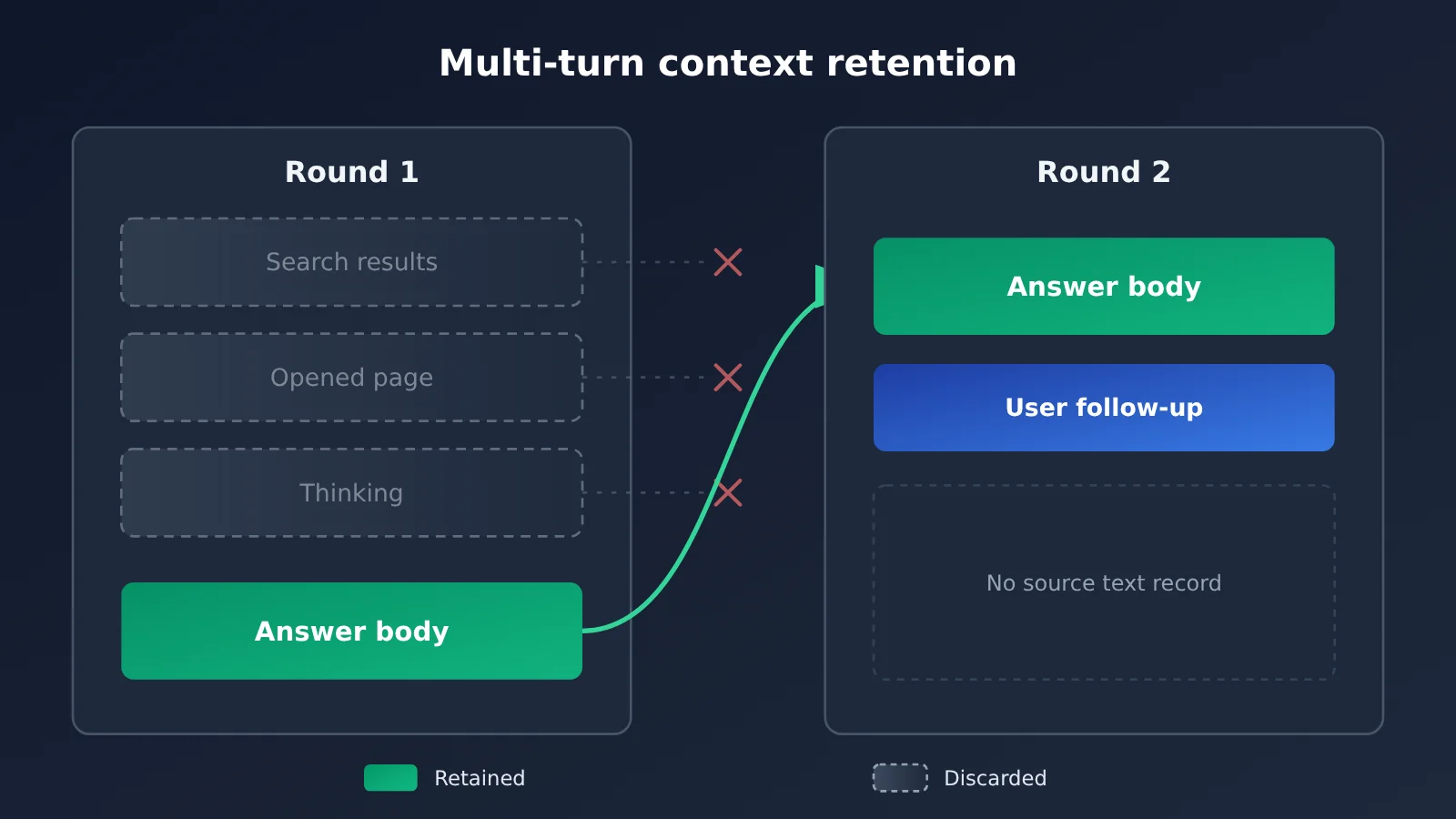
The official docs spell it out: in a multi-turn conversation, the search results, opened pages, and thinking from the previous turn don’t carry into the next turn’s context — only the body of the answer does.
So the “forgetting” in the title means the context gets cleared, not that the model failed to find anything. Last turn it might have read five pages and quoted three passages, but what it holds going into the next turn is just the answer it wrote itself. When the user follows up with “what did the second source say exactly?”, the model either searches again (racking up another round of tool fees) or just guesses based on its own answer.
When you shouldn’t let deepseek-flash search on its own
In the following cases, it’s better to have your program decide what to search rather than leaving it up to the model:
- You need to reference original text across turns: for example, regulatory clauses, contracts, or Q&A over long documents, where the next turn still has to answer based on the original text.
- You need predictable billing: with deep-thinking search, you can’t control in advance how many queries it fires off or how many pages it opens.
- You need to restrict information sources: only certain sites are allowed, or certain sites must be excluded.
- A pasted link has to be read in full: when thinking is enabled, the link may not get fetched separately.
- Your key isn’t from the official DeepSeek site: the platform you’re using may not have the built-in tools wired up — the next section covers the details.
deepseek-flash Quick Start: How Do You Keep a Web Page Around?
If you want to keep a web page in the context window, the trick is to split “searching” from “answering”: your program calls the search and fetch endpoints, assembles the page body into messages itself, and then hands it to deepseek-flash to answer. That way the original page text lives in the history you save yourself, so it doesn’t disappear on the next turn.
APIYI (apiyi.com) already has two standalone endpoints available: deepseek-search and deepseek-fetch, launched on 2026-10-21. They aren’t chat models, they don’t consume tokens, and they’re billed per successful request — same billing rules as the official standalone endpoints. Here’s how it works:
- Create a new token in the APIYI console and pick
defaultorsvipas the group. Using the ClaudeCode group returns a 503, with the exact errorno available channels for model deepseek-search. - Search:
POSTto/v1/tools/searchwith the base URLhttps://api.apiyi.com. The request body doesn’t need amodelfield. queryis required, 1–128 characters, and supportssite:,-site:, quotes,lang:,after:,before:counttakes 1–50, defaults to 10, and doesn’t affect pricingneed_contentdefaults tofalse; set it to true to return the page body along with the resultslocalizationtakes the user’s IP — passing a language code likezh-CNreturns a 400- Fetch: pick the link you want to read and
POSTto/v1/tools/fetch.urlmust be an http or https address with a domain, up to 8192 characters, and can’t contain a username or password. - Answer: put the trimmed page body into
messagesas a single message, calldeepseek-flash, and set the OpenAI-compatiblebase_urltohttps://api.apiyi.com/v1. - Persist: write that page body into your own conversation history and keep carrying it on the next turn — or keep only a summary to control tokens.
Upstream rate limits per the docs: Search at 100 QPS, Fetch at 25 QPS, plus separate per-domain limits. The docs’ retest also flags two things: garbled keywords can still return a handful of results and get billed as usual; and some sites return the homepage for pages that don’t exist (a soft 404), which Fetch bills as a successful request. It’s worth filtering the links yourself before fetching.
🎯 Technical tip: If you need to quote the original text across multiple turns, first run the whole “search → fetch → deepseek-flash” chain on APIYI (apiyi.com) using the free trial credit for new users. Once you’ve confirmed the body truncation length and the billed request count match your expectations, go live.
What to Watch Out For When Your deepseek-flash Key Isn’t From the Official Site
To be clear: as of 2026-11-15, neither APIYI’s master model list nor its live updates state that deepseek-flash supports deepseek_web_search. The latest DeepSeek-related item in the live updates is the Economy edition launch on 2026-11-11; as of November 13, this App API still hadn’t appeared. So when you call deepseek-flash on APIYI, you can’t assume that declaring deepseek_web_search will make it search on its own. Right now, it’s positioned as an answer model.
The table below contains pricing data as of 2026-11-15. Token prices are in USD per 1 million tokens, and per-request model prices are in USD per request:
| Model | APIYI apiyi.com list price | Official-site comparison | Notes |
|---|---|---|---|
deepseek-flash |
Input 0.3, output 1.2, cache read 0.006 | Peak rates are the same at 0.3 / 1.2 / 0.006; off-peak is half price | The master list doesn’t show the off-peak half-price rate |
deepseek-search |
0.0009 / request (that is, 0.90 / 1,000 requests) | 0.75 / 1,000 requests | Only in the default and svip groups |
deepseek-fetch |
0.0009 / request (that is, 0.90 / 1,000 requests) | 0.75 / 1,000 requests | Only in the default and svip groups |
The $0.90 per 1,000 requests shown on the capabilities page and the $0.0009 per request in the master list are the same list price. According to APIYI’s documentation, once the top-up bonus is included, large top-up customers pay about $0.75 per 1,000 requests, matching the official site; regular users pay about $0.82 per 1,000 requests. Those two figures reflect the bonus and are not the list price in the master list. Prices include tax, and invoices can be issued.
Also, OCR, ASR, and TTS aren’t available on APIYI yet; we’ll make them available as soon as possible. Model names and prices are subject to the platform’s model list.
💡 Recommendation: If your use case needs the official site’s built-in search, where the model runs multiple search steps itself, you’ll currently need an official-site key. If you care more about being able to retain the original text and having predictable billing, use APIYI apiyi.com’s standalone endpoints with deepseek-flash for answers—the whole workflow stays in your hands.
FAQ
Q1: What is deepseek-flash’s built-in search?
It’s a server-side tool called `deepseek_web_search` on deepseek-flash (V4.1-Flash-1017), and it works across all three protocols: Messages, Responses, and Chat Completions. The server handles both the tool call and the context stitching, and the tool fee is charged separately on top of the token fee.
Q2: What’s the difference between deepseek-flash searching on its own and calling Search / Fetch from code?
Built-in search is billed per query, and intermediate results don’t carry over to the next turn. The standalone endpoints are billed per successful request, `count` doesn’t affect the price, and you decide whether to keep the returned body text. The former is easier to integrate; the latter gives you more control.
Q3: When was deepseek-flash’s web-connected capability released?
DeepSeek officially released it on 2026-11-13 (22:24 Beijing time), with the news page and changelog both going up the same day. The `deepseek-search` and `deepseek-fetch` endpoints on APIYI went live on 2026-10-21, which is a separate event from this release.
Q4: Can the economy version or V4 Pro search on its own?
The official docs state that this conversational capability is only available on deepseek-flash, so don’t assume it applies to deepseek-v4-pro or economy IDs. APIYI’s economy model `deepseek-v4-1-flash-economy-261017` loads the same weights as V4.1-Flash-1017, just with slower speed. The documented estimate is about 2 seconds to first token and about 15 milliseconds per token. It is not a search endpoint.
Q5: On APIYI, how do I get deepseek-flash to answer based on web pages?
Call `/v1/tools/search` and `/v1/tools/fetch` with a `default` or `svip` token, splice the body text into the messages, then call `deepseek-flash`. For the specific parameters, see the DeepSeek Search / Fetch page in the APIYI docs center at apiyi.com.
Q6: What safety settings should I pay attention to when offering a service to the public?
The official requirements say you must enable `safety_check` when serving the public (the docs example uses level `high`), and you must handle content safety review, Large Language Model registration, and AI labeling yourself. Once it’s enabled, sampling parameters like `temperature` are ignored, and when the model refuses to answer, `stop_reason` is `refusal`. Model safety is billed by output tokens, with no separate unit price listed.
Q7: Am I charged if a query returns no results at all?
Built-in search isn’t billed when it fails or returns no results. The standalone endpoints only charge when there’s an HTTP 200 with results; 400s and fetch-failure 404s aren’t billed. However, the docs’ retest notes that garbled keywords and soft 404s may still get billed.
deepseek-flash Searches and Forgets: Key Takeaways
- Thinking changes how search works: With thinking off, you get a search with citations; with thinking on, you get a multi-step, deep-thinking search.
- Links don’t always get read: When thinking is on and
deepseek_web_searchis declared, it won’t fetch links separately. - Billing is per query: Three queries in one search count as three. Failed or empty results aren’t charged.
- Check the
toolfield for reconciliation:web_search_requestsis display-only; for billable counts, look at fields liketool_search. - Only the answer remains next turn: Web pages, page content, and thinking are all discarded. “Forgetting” refers to the context.
- Want to keep a webpage? Search it yourself: On APIYI apiyi.com, use
deepseek-searchplusdeepseek-fetch, then hand the results to deepseek-flash.
Summary
deepseek-flash searches and forgets. Keep three things in mind:
- Thinking: The same
deepseek_web_searchdeclaration takes two different flows depending on the thinking toggle, and link-reading behavior changes with it. - Billing: Built-in tools count by query, image, and selected area; standalone endpoints count by successful request. Don’t mix the two units.
- Next turn: Only the answer body is retained. If you need to cite original text across turns, your application should handle the search and save the content itself.
If your API key is on APIYI, the current docs don’t say that deepseek-flash has built-in search integrated. You can first run the standalone endpoints plus deepseek-flash combo using APIYI apiyi.com’s free quota, then decide whether you need the official built-in search.
📚 References
- DeepSeek News Page (2026-11-13): Announcement about opening up App capabilities to the API
- Link:
api-docs.deepseek.com/zh-cn/news/news261113 -
Note: Confirms that only deepseek-flash carries this capability set
-
DeepSeek Build a Chatbot Guide: How the thinking toggle behaves in combination with tools
- Link:
api-docs.deepseek.com/guides/build_a_chatbot -
Note: Rules for deep-thinking search, link reading, and multi-turn context
-
DeepSeek Web Tools Guide: Usage and Billing for built-in tools
- Link:
api-docs.deepseek.com/guides/web_tools -
Note: Billed per query, and what the usage fields mean
-
DeepSeek Pricing Page: Token prices, peak and off-peak rates, per-tool unit prices
- Link:
api-docs.deepseek.com/quick_start/pricing -
Note: Data as of 2026-11-15
-
APIYI DeepSeek Search / Fetch Docs: Parameters and billing for the standalone endpoints
- Link:
docs.apiyi.com/api-capabilities/deepseek-search-fetch/overview -
Note: Group requirements, parameter limits, and documentation re-test notes
-
APIYI Model List: Real-time models and prices
- Link:
docs.apiyi.com/models - Note: This list is the authoritative source for models and prices
Author: APIYI Technical Team
Technical Discussion: Feel free to reach out to us through the APIYI apiyi.com homepage. For more resources, visit the docs.apiyi.com documentation center.