

Summary: The Google Decisions API scores fixed choices directly and doesn’t generate text. This article uses public pricing to estimate its cost for classification, moderation, and routing tasks, and combines official and third-party data to explain where it fits and where it doesn’t.
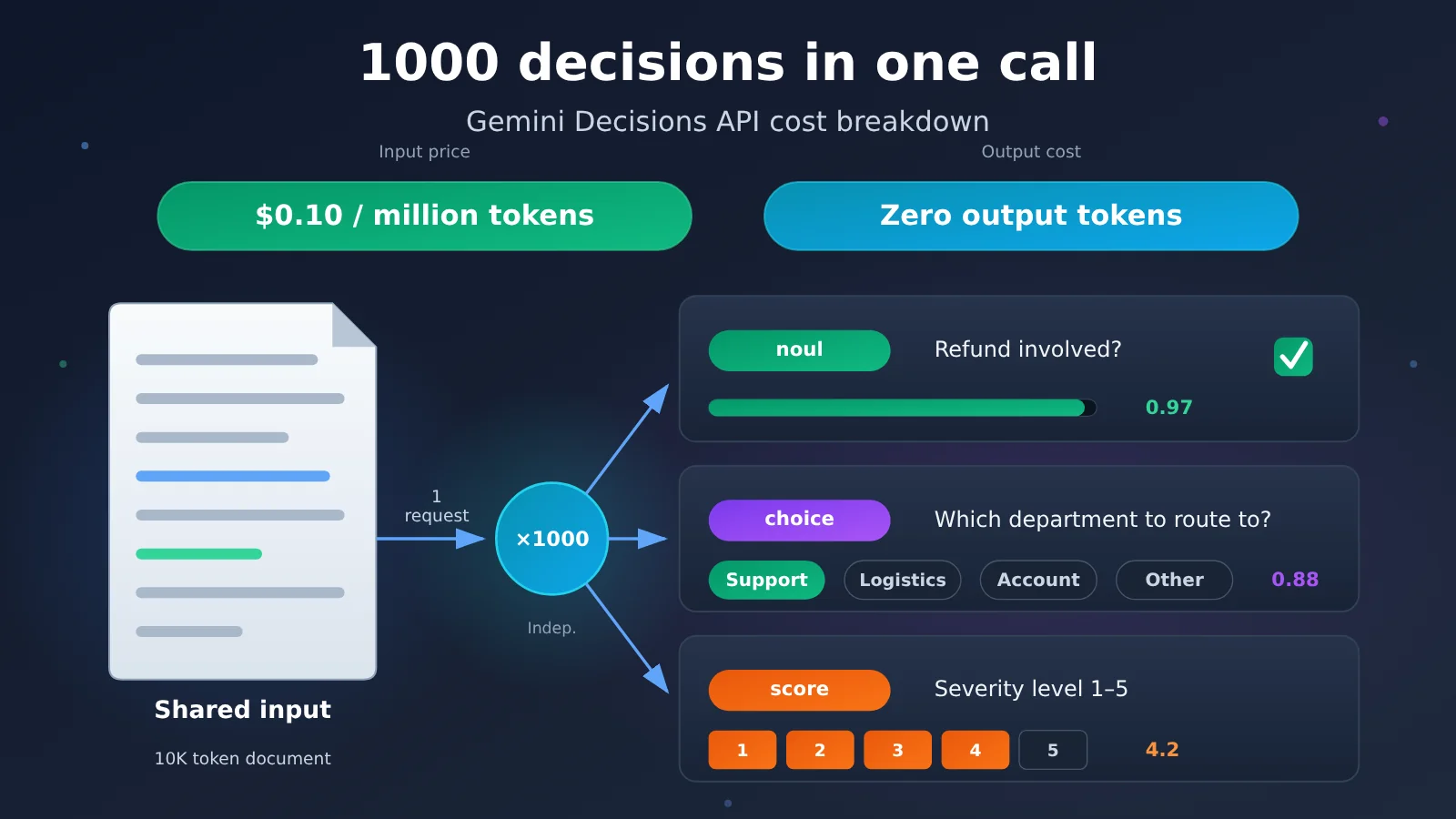
Bottom line first: On November 11, 2026, Google released the Gemini Decisions API (model ID gemini-decision-1). It can complete 1 to 1,000 independent judgments on the same input in a single request. Input pricing is $0.10 per million tokens, with no generative output token fees. Based on public pricing, checking 1,000 rules against the same 10K-token document costs about 1/20 of what Gemini 3.5 Flash-Lite would cost, a theoretical saving of 94.9%. Classifying 1,000 messages once each yields a theoretical saving of 73.1%. Google’s official tests put the cost advantage at about 4.7x. In a third-party single-question real-world test, that advantage was about 1.5x. The best fit for cost reduction is tasks limited to classification, moderation, and routing, where answers can be constrained in advance to fixed choices.
The rest of this article first explains how the API works and its three decision types, then uses reproducible formulas to estimate costs for three typical business scenarios, and explains the gap between the official “about 5x” claim and third-party real-world results. Next, it compares Google’s published speed data with Artificial Analysis’s independent evaluation to discuss whether accuracy meets production requirements. Finally, it provides a minimal invocation example, a model-selection table, and a pre-launch cost checklist.
To Know: Terminology Primer
| Term | Explanation |
|---|---|
| Decisions API | A decision endpoint from Google that returns results and probabilities directly for a fixed set of options |
| Gemini Decision 1 | The dedicated model powering this API, with model ID gemini-decision-1 |
| Token | The basic unit for model processing and billing; text, images, and other inputs are all converted into Tokens |
| Shared Input | The single input shared by all decisions within one request |
| Closed-set Decision | A decision where the answer space is fixed in advance, e.g. “yes/no” or “pick one of A/B/C” |
| noul | A binary decision that returns the probability of “Yes” |
| choice | Pick one item from 2–255 predefined options |
| score | Score on a predefined ordinal scale; the result is a weighted expected value |
| Confidence | The model’s estimate of the probability that the selected result is correct |
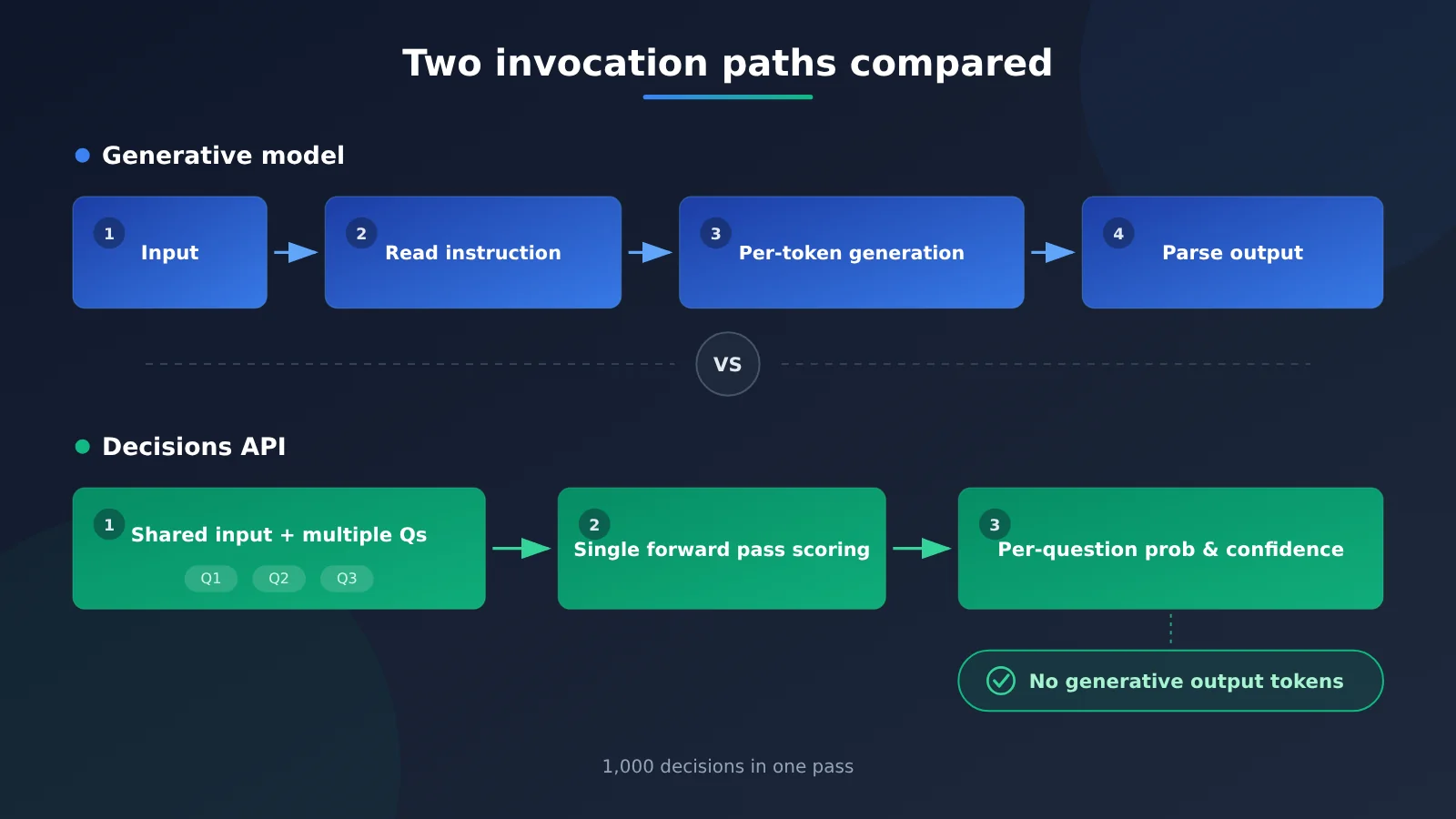
| Single Forward Pass | The model scores every option in one computation, with no token-by-token text generation |
| Context Window | The total amount of content a single request can hold; 262,144 Tokens for this model |
| TPM / RPM | Tokens per minute / requests per minute — the throughput ceiling |
1 What Google Released: Gemini Decisions API Answers Yes/No Questions
1.1 How Gemini Decision 1 Differs from Traditional Generative Models
The Gemini Decisions API became available on November 11, 2026 through Gemini Developer API v1beta, with the REST endpoint POST https://generativelanguage.googleapis.com/v1beta/decisions. Its core job is to make probabilistic decisions over predefined options, returning the decision result, the probability of each option, confidence, and Token usage. Inputs can be text, images, audio, video, and PDFs.
The traditional generative model workflow for classification tasks is: read the content, understand the instructions, then generate a response Token by Token — and the developer still has to parse that response. The Decisions API changes this to: read the shared content, then score the predefined options for each question directly. Classification, moderation, and routing tasks only need a single label or a yes/no. Generating a long answer burns output costs and slows down the response. Skipping that step is exactly where its cost and latency savings come from.
1.2 What the Three Decision Types Cover
Take a customer service message as an example: “I bought a pair of earbuds last week and the left one has no sound. I submitted a refund request three days ago and nobody has responded. If this isn’t handled I’m filing a complaint with the platform.” For this single message, you can pose three independent questions in the same request.
| Decision type | Example question | What it returns | Typical tasks |
|---|---|---|---|
| noul | Does this message involve a refund? | The probability of “Yes”, e.g. 0.97 | Whether it’s a policy violation, whether pricing is mentioned, whether escalation is needed |
| choice | Which team should handle this: after-sales / logistics / account / other? | “After-sales” is selected, along with the probability of each option | Ticket routing, article classification, Agent tool selection |
| score | How severe is this complaint on a 1–5 scale? | The weighted expected value computed from the probabilities of each level, e.g. 4.2 | Relevance, severity, lead priority scoring |
choice supports 2–255 options, and score supports 2–255 levels. Because score returns an expected value computed from the probability of each level, you can use it directly for ranking or thresholding — no need to dig a number out of a paragraph of commentary.
2 How Much Can Google Decisions API Really Save? Running the Numbers for Three Business Scenarios
2.1 Why Shared Inputs Can Reduce Token Consumption
The Decisions API billing structure has three key traits: shared inputs are billed only once per request, each question’s own instructions are still billed as input tokens, and the decision result incurs no generative output charges. For comparison, Gemini 3.5 Flash-Lite’s official list pricing is $0.30 per million input tokens and $2.50 per million output tokens (official pricing dated November 13, 2026).
Let S be the number of tokens in a shared input, Q be the number of independent questions about that input, Tq be the average number of tokens per question, To be the average number of output tokens per question for a generative model, and N be the number of input sets. Under the simplifying assumption that “both interfaces have the same billable input tokens”:
Decisions API cost  C_D = N × (S + Q×Tq) × 0.10 / 1,000,000
Flash-Lite cost     C_F = N × [ (S + Q×Tq) × 0.30 + Q×To × 2.50 ] / 1,000,000
Savings rate        = (1 − C_D / C_F) × 100%
This is a calculation model for understanding the mechanics; Google does not provide a fixed savings rate. The two interfaces will each have their own instruction encoding and formatting overhead, so actual costs should be based on the billable tokens returned by each.
2.2 From one decision to 1,000 decisions: how the cost changes
The table below is a theoretical example derived from public pricing, and it hasn’t been load-tested in practice. In scenario ①, all 1,000 decisions target the same document — they’re 1,000 independent questions asked about a single input, which is a completely different workload from “analyzing 1,000 documents once each.”
| Business scenario | Main assumptions | Decisions API | Flash-Lite | Theoretical savings |
|---|---|---|---|---|
| ① One document checked against 1,000 rules | 10K-token document, 20 tokens per rule, 20 output tokens per Flash-Lite call, both consolidated into a single request | $0.003 | $0.059 | 94.9% |
| ② 1,000 messages each classified once | 300 tokens per message, 50 tokens for the decision instruction, 10 output tokens from Flash-Lite | $0.035 | $0.130 | 73.1% |
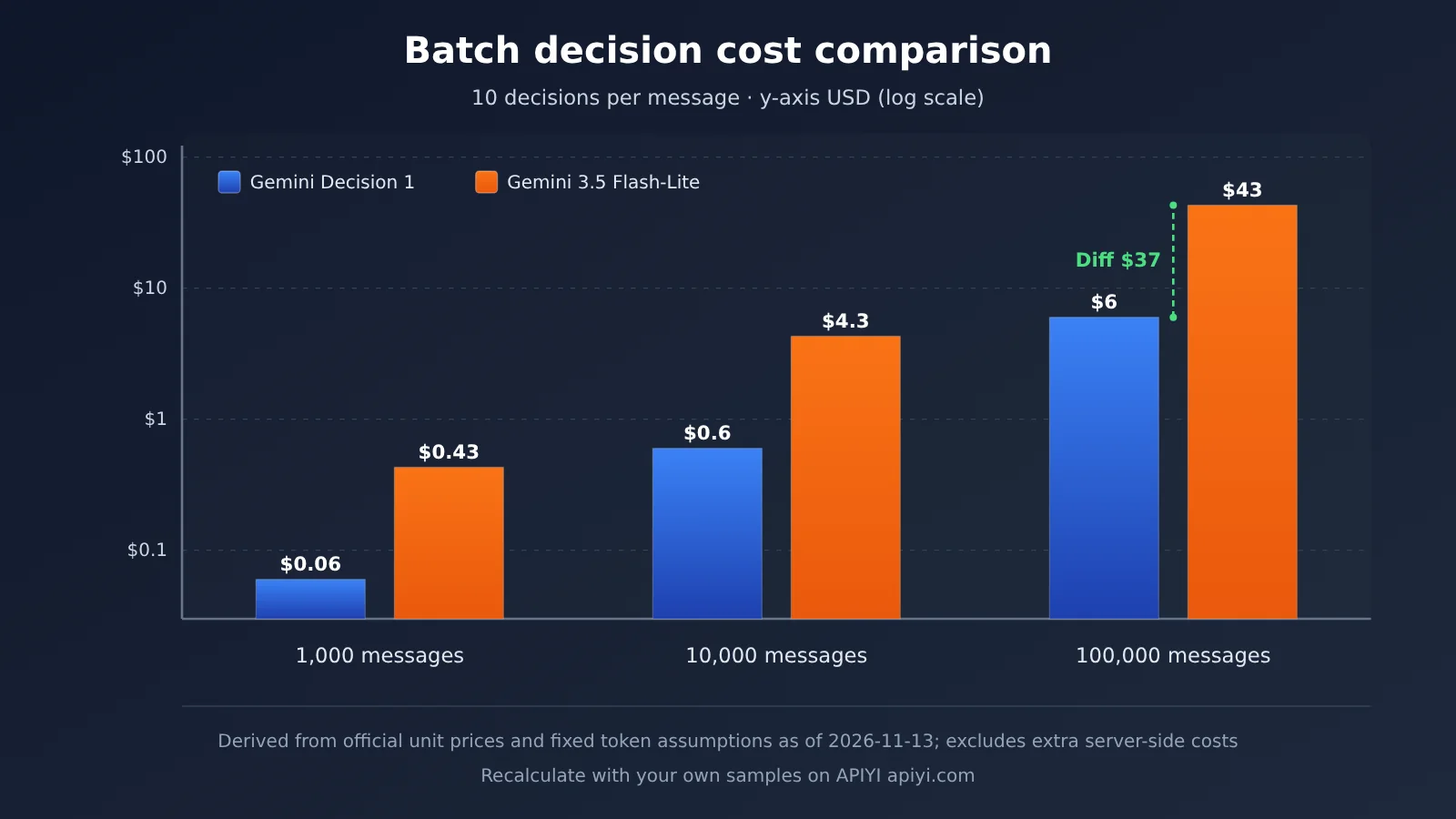
| ③ 1,000 messages each subjected to 10 decisions | 300 tokens per message, 30 tokens per decision, 10 output tokens per Flash-Lite call, one request per message | $0.060 | $0.430 | 86.0% |
These three scenarios illustrate two things. In scenario ②, each request carries only a single question, yet it still delivers a theoretical saving of 73.1% — the input price drops to one-third, and the output cost falls to zero. Scenarios ① and ③ save even more because the shared input gets amortized across multiple questions, while Flash-Lite has to generate output for every question.
Scaling up with the parameters from scenario ③: processing 100,000 messages with 1 million decisions total, the model invocation cost for Decisions API comes to $6, versus $43 for Flash-Lite — a difference of $37. That figure covers only model invocation fees; it doesn’t include retries, human review after misjudgments, upgrading to a stronger model, transmission and storage, or engineering rework.
If you want to recalculate with your own business samples, start by running the same batch of data through a generative model, record the actual input and output tokens, then plug them into the formula above. With APIYI apiyi.com, a single key lets you call Gemini, GPT, Claude, and many other generative models, making it easy to quickly establish this cost baseline.
2.3 Why Google’s “About 5x” Isn’t a Universal Answer
At launch, Google announced that in its official tests, Decision 1 cost about 1/4.7 of Gemini 3.5 Flash-Lite. Independent tester RanThis offered another set of numbers on November 12, 2026, using real API calls: 100 English messages and 20 Vietnamese messages, with each request making only one binary judgment.
- Accuracy: Out of 100 English judgments, Decision 1 got 99 right, and Flash-Lite got 98 right.
- Cost: The estimated cost per thousand English judgments was $0.0113 and $0.0166, respectively—Decision 1 was about 32% lower, roughly a 1.5x difference.
- Latency: The median single-request latency was 0.18 seconds and 0.58 seconds, respectively.
- Token overhead: Decision 1 billed an average of about 113 input tokens per request, while Flash-Lite billed about 47 input tokens plus 1 output token.
The reason for the gap is clear: the Decisions interface’s own instruction and formatting overhead more than doubled the billed input tokens, offsetting part of the per-token price advantage. When the input is very short, only one question is asked each time, and the generative model only needs to output a single token, the savings are smallest. When RanThis merged 10 questions from the same email into a single Decision 1 request and compared that with 10 separate Flash-Lite requests, the gap widened to about 5.4x; in that comparison, Flash-Lite did not do the same merging, so it was a comparison between different request patterns.
So the variables that affect actual savings are: the length of the shared input, the number of questions per input, the output length of the generative model, whether both sides did request merging, and the interface’s own fixed overhead. Formula derivations, official benchmarks, and third-party measurements come from different conditions, so they should be evaluated separately when choosing a model.
3 Making 1,000 Judgments in a Single Request: What Work Is the Decisions API Actually Suited For?
3.1 Document Review: One Document, Many Rules
The structure that benefits most from shared input is “long document + many rules.” A contract, tender document, or product spec has to be checked line by line against a compliance checklist: does it include a breach-of-contract clause, does it stipulate cross-border data transfer, does the payment term exceed 60 days, is the signing date missing, and so on. The longer the document and the more rules there are, the more thoroughly the shared input gets amortized—the 94.9% theoretical savings in scenario ① is exactly the result of this structure.
Another advantage of this kind of task is that the results drop straight into a table. Each rule maps to one noul judgment that returns a probability and confidence level, and the program can flag each item as “pass / fail / needs review” based on a threshold. Reviewers only look at the items that need review.
3.2 Agent Routing and Content Classification
At every step, an agent has to decide what to do next: whether to search the web, whether to run code, whether to hand off to another tool. These judgments have fixed options, are called frequently, and are latency-sensitive—a good fit for handling in one shot with choice. Google’s disclosed internal use cases cluster here too: Gemini Notebook uses it to select a model and thinking level based on the nature of the question, cutting latency by up to 40% for ordinary queries; Google Search uses it to run safety checks on MCP tools and identify adversarial content; and CC uses it to quickly pick a reaction from more than 200 candidate emoji. These are Google’s own numbers—actual results for outside developers depend on their own workloads.
Content production workflows are another extension. Once a piece of AI news has been collected, the system needs to judge whether it’s a new event, whether it’s relevant to developers, whether it involves API pricing, whether there’s an official source, whether it’s suitable to write up as a tutorial, and then score its content value. These six conditions are independent of each other, so they can go into a single Decisions request to do the screening, and the topics that pass then go to a generative model for research, writing, and polishing. This is an example design based on the API’s capabilities. In the latter, generation stage, you can switch between models on demand through APIYI apiyi.com to compare writing quality and cost.
3.3 Three Boundaries of 1,000 Questions
- The questions must be independent of each other. Judgments within the same request can’t read each other’s results. Workflows with sequential dependencies—like “first decide whether this is a complaint, then grade it by complaint type”—need the program to combine the results and, if necessary, send another request.
- 1,000 questions share a 262,144-token context window. The shared input and all the questions together occupy that window, so the longer the instructions for each question, the shorter the document you can fit.
- The official low-latency figures only cover small requests. In Google’s tests, latency stayed roughly flat for 1–100 questions per request with a context of up to 16K tokens. With 1,000 questions and a near-full context, you’ll need to measure latency yourself.
4 Beyond Low Cost: Can Gemini Decisions API’s Accuracy and Speed Meet Production Requirements?
4.1 Google’s Published Speed and Internal Usage Data
Google’s published median model compute time is 50–100 ms, with end-to-end latency of 150–250 ms. The test conditions were 1–100 questions per request and a context of no more than 16K tokens. These numbers suggest it fits into real-time pipelines, such as routing at each Agent step or instantly triaging user messages. RanThis’s measured median latency of 0.18 seconds for a single question also falls near this range.
4.2 What Third-Party Benchmarks Tell Us
The initial results from Artificial Analysis’s Decision Index v2.1 use a blended calculation of raw scores and actual tasks. The costs in the table below are blended costs for the benchmark tasks, which are a different measure from the “price per million tokens.”
| Decision model | Overall score | Time per task | Estimated cost per million tasks | AA-Paperclip 15-item all-correct rate |
|---|---|---|---|---|
| Drex Max v1.1 | 72.62 | 283 ms | $103 | 63% |
| TypeSafe Jev 1.14 | 66.23 | 92 ms | $156 | 35.5% |
| Gemini Decision 1 | 65.98 | 211 ms | $345 | 33% |
| GPT-6 Luna (Decisions) | 60.25 | 206 ms | $339 | — |
Two things stand out. First, Gemini Decision 1 has a low per-token price, but under this task distribution, its estimated cost per million tasks is higher than Drex Max and Jev, showing that request patterns and task structure can change the final economics. Second, in the AA-Paperclip document test, the share of documents where Decision 1 completed all 15 judgments in one pass and got every one right was 33%. Getting multiple judgments done in one pass saves cost, but the accuracy of each individual judgment still needs to be validated separately.
4.3 Using Confidence Scores to Prevent Errors from Being Auto-Executed
Confidence is the model’s probability estimate of its own result, and you can use it to decide which results to execute automatically and which to send to a human. When you go live, we recommend pairing it with three practices:
- Set a confidence threshold: For example, if a refund decision’s confidence is below 0.85, route it to a human; only auto-tag or dispatch when it’s above the threshold.
- Add an “other” option to choice fields: When none of the options fit, the model will still pick one of them. Adding “other / cannot determine” can catch some out-of-scope inputs; you can also add a separate noul for range checks.
- Keep code-level constraints for high-risk actions: For actions like refund amounts, account bans, and compliance blocks, you should still have hard-coded rules and human review in addition to the model’s judgment.
5 How Should Developers Use and Choose the Gemini Decisions API?
5.1 How to Send Your First Request
The official docs require Python google-genai SDK 3.2 or later, and also support the JavaScript SDK and REST. To get started, you’ll need an API key from Google AI Studio. The example below follows the official SDK structure and runs both a binary decision and a classification decision on the same news item. We haven’t actually called or verified this in this article, so refer to the official developer guide for the exact field names.
from google import genai

client = genai.Client(http_options={"api_version": "v1beta"})

result = client.decisions.create(
    model="gemini-decision-1",
    # input: shared input used by all questions; billed only once
    input="Google released a new AI API with official pricing and developer documentation.",
    # questions: independent decisions; the key is the question ID
    questions={
        "has_api_pricing": {
            "type": "noul",
            "instructions": "Does this news mention API pricing?",
        },
        "category": {
            "type": "choice",
            "instructions": "Which news category fits best?",
            "criteria": {
                "model": "An AI model launch",
                "api": "An API or developer tool",
                "business": "Business or finance news",
            },
        },
    },
)

print(result.answers)  # decision result, option probabilities, and confidence for each question
print(result.usage)    # billed token usage; this is the basis for cost accounting
Here’s what the four key fields do: input holds shared content, questions holds independent questions (see the official guide for how to define levels for the score type), answers reads the decision results and probabilities, and usage reads billed tokens. When estimating costs, always use the actual values from usage. Section 2.3 already explained that fixed API overhead can significantly affect per-question cost.
For a cost comparison, you’ll also need a generative model baseline. Below, we use the OpenAI-compatible endpoint to call Flash-Lite through APIYI for the same classification, and record token usage:
import openai

client = openai.OpenAI(
    api_key="YOUR_API_KEY",
    base_url="https://api.apiyi.com/v1"  # APIYI OpenAI-compatible endpoint
)

resp = client.chat.completions.create(
    model="gemini-3.5-flash-lite",  # use the actual model name in the platform's model list
    messages=[{
        "role": "user",
        "content": "News: Google released a new AI API with official pricing.\n"
                   "Q1 mentions API pricing? Answer yes/no.\n"
                   "Q2 category: model/api/business. Answer one word each line."
    }],
    max_tokens=10,
)
print(resp.choices[0].message.content)
print(resp.usage)  # input and output tokens; plug these into the formula in Section 2.1
View the batch comparison script: calculate the cost for both APIs on the same batch of samples
import openai

PRICE_IN, PRICE_OUT = 0.30, 2.50   # Flash-Lite official standard price, USD per million tokens
DECISION_IN = 0.10                 # Decision 1 input price; output isn't billed

gen_client = openai.OpenAI(
    api_key="YOUR_API_KEY",
    base_url="https://api.apiyi.com/v1"
)

def flash_lite_cost(samples, questions, model="gemini-3.5-flash-lite"):
    """Merge all questions for each sample into a single generative request and accumulate the actual billed cost"""
    total = 0.0
    for text in samples:
        prompt = text + "\n" + "\n".join(
            f"Q{i+1}: {q} Answer briefly." for i, q in enumerate(questions)
        )
        r = gen_client.chat.completions.create(
            model=model,
            messages=[{"role": "user", "content": prompt}],
            max_tokens=10 * len(questions),
        )
        total += (r.usage.prompt_tokens * PRICE_IN
                  + r.usage.completion_tokens * PRICE_OUT) / 1_000_000
    return total

def decision_cost(usage_input_tokens_list):
    """Pass in the input tokens from the usage returned by each Decisions API call and calculate the total cost"""
    return sum(t * DECISION_IN for t in usage_input_tokens_list) / 1_000_000
🚀 Quick start tip: Start by picking 200–500 real business samples, run a generative model to establish baseline accuracy and Token usage, then compare that against the Decisions API’s
usage. APIYI apiyi.com offers an OpenAI-compatible interface and free trial credits for new users, making it a great fit for knocking out this baseline test quickly.
5.2 When to choose the Decisions API, and when to stick with a generative model
| Task type | Recommended approach | Why |
|---|---|---|
| Reviewing the same long document against multiple rules | Decisions API | Shared input amortizes cost, and the judgments are independent of each other |
| Agent tool routing, model selection | Decisions API | Fixed options, low latency |
| Content safety and violation checks | Decisions API | Multiple independent noul conditions, so you can route by confidence |
| Customer service ticket classification, e-commerce after-sales labels | Decisions API | Fixed label set |
| Topic selection, lead priority scoring | Decisions API | A good fit for scoring on a predefined scale |
| Summarization, rewriting, writing | Generative model | Needs to output natural language |
| Complex research, argumentation, proposing new ideas | Generative model | Needs open-ended reasoning |
| Workflows where judgments depend on each other in sequence | Programmatic orchestration + multiple requests, or a generative model | Questions within the same request can’t reference one another |
A generative model’s structured output (JSON Schema) can also constrain answers to a fixed format, but it still generates content token by token and bills by output, and probabilities require extra handling to get at. The Decisions API returns the probability and confidence for each option directly, with output not billed — the trade-off is that it can only answer questions whose options you’ve defined in advance.
5.3 What other costs should you factor in before launch?
Beyond the per-unit price, the following items directly affect the “total cost per correct decision”:
- Actual token spend: always trust
usageas the source of truth. In short-input, single-question scenarios, fixed overhead accounts for the largest share. - Request limits: The free tier allows 200 RPM, 50,000 TPM, and 10,000 RPD; paid Tier 1 allows 1,500 RPM, 1 million TPM, and 50,000 RPD. Long-context requests tend to hit the TPM cap first.
- No caching or batch processing: Context Caching, the Batch API, and Flex/Priority inference aren’t supported, so repeatedly reusing the same long document won’t get you any cache discount.
- Feature constraints: You can’t include media content in the question prompt, and you can’t pass in the full conversation history, thinking, or tool-call blocks directly. Multi-turn conversations need to be flattened into text input first.
- Misclassification and manual review: The share of low-confidence cases escalated to humans, plus rework costs after a bad decision, need to be baked into your unit cost.
- Data handling terms: On the free tier, your data may be used to improve Google products; the official pricing table indicates the paid tiers aren’t used for this purpose. Confirm which tier you’re on before processing customer documents.
- Engineering work: Rewriting your prompts into noul / choice / score questions, plus building out thresholds and fallback logic, all require development effort.
If you plan to access the API through a third-party API platform, check that it supports the dedicated /v1beta/decisions endpoint — platforms that only support Chat Completions can’t call the Decisions API directly. Before using APIYI (apiyi.com), you can look up the model and endpoint list in the documentation center, or contact the platform to confirm support.
6 Conclusion: Classification, Moderation, and Routing Tasks Can Go to the Gemini Decisions API
Back to the question in the title — there are three takeaways:
- Fixed-option tasks are worth prioritizing for the Decisions API. Based on public pricing, per-question classification theoretically saves about 73%, and auditing a thousand rules against the same long document theoretically saves about 95%; third-party per-question measurements show an advantage of roughly 32%.
- “One input, multiple independent questions” is the structure with the biggest cost potential. Shared input is billed only once — the more questions you ask, the longer the input, and the longer the generative model’s output, the bigger the gap gets.
- The ultimate yardstick is total cost per correct decision in production. Token unit price and the 1,000-question cap are just the starting point; accuracy, the share of human review left after confidence-based routing, quotas, and engineering costs all combine to determine the real payoff.
A safer path looks like this: first establish a baseline with the generative model on real samples, then compare usage and accuracy on the Decisions API, and design the judgment layer separately from the generation layer. For model selection and cost comparison in the generation layer, you can use a unified interface through APIYI apiyi.com.
📚 References
- Google Gemini Decisions API Developer Guide and Pricing Table: interface capabilities, limits, quotas, and official pricing
- Link:
ai.google.dev -
Notes: model IDs, question types, context window, rate limits, and SDK usage
-
Google Official Blog Announcement Post: release date, latency figures, and internal use cases
- Link:
blog.google -
Notes: 50–100 ms compute time, roughly 4.7x cost advantage, Gemini Notebook and other cases
-
Gemini Decisions API REST Endpoint
- Link:
generativelanguage.googleapis.com/v1beta/decisions -
Notes: the official endpoint for REST-based calls
-
Artificial Analysis Decision Index v2.1: third-party evaluation of decision models
- Link:
artificialanalysis.ai -
Notes: composite score, task latency, cost per million tasks, and AA-Paperclip all-correct rate
-
RanThis Independent Test (2026-11-12): a small-scale test based on real calls
- Notes: per-question cost, latency, and token overhead comparison, plus results from combined multi-question requests
Author: APIYI Technical Team
Technical discussion: Feel free to contact us via the APIYI apiyi.com homepage — more integration resources are available at the docs.apiyi.com documentation center


