Author’s note: if your agent still uses client.chat.completions.create with tools, switching to GPT-6.1 will land you at a very specific fork. Plain text still works, but tool calls need a different endpoint.
Why Tool Calling Gets Blocked at the Endpoint After Upgrading to GPT-6.1
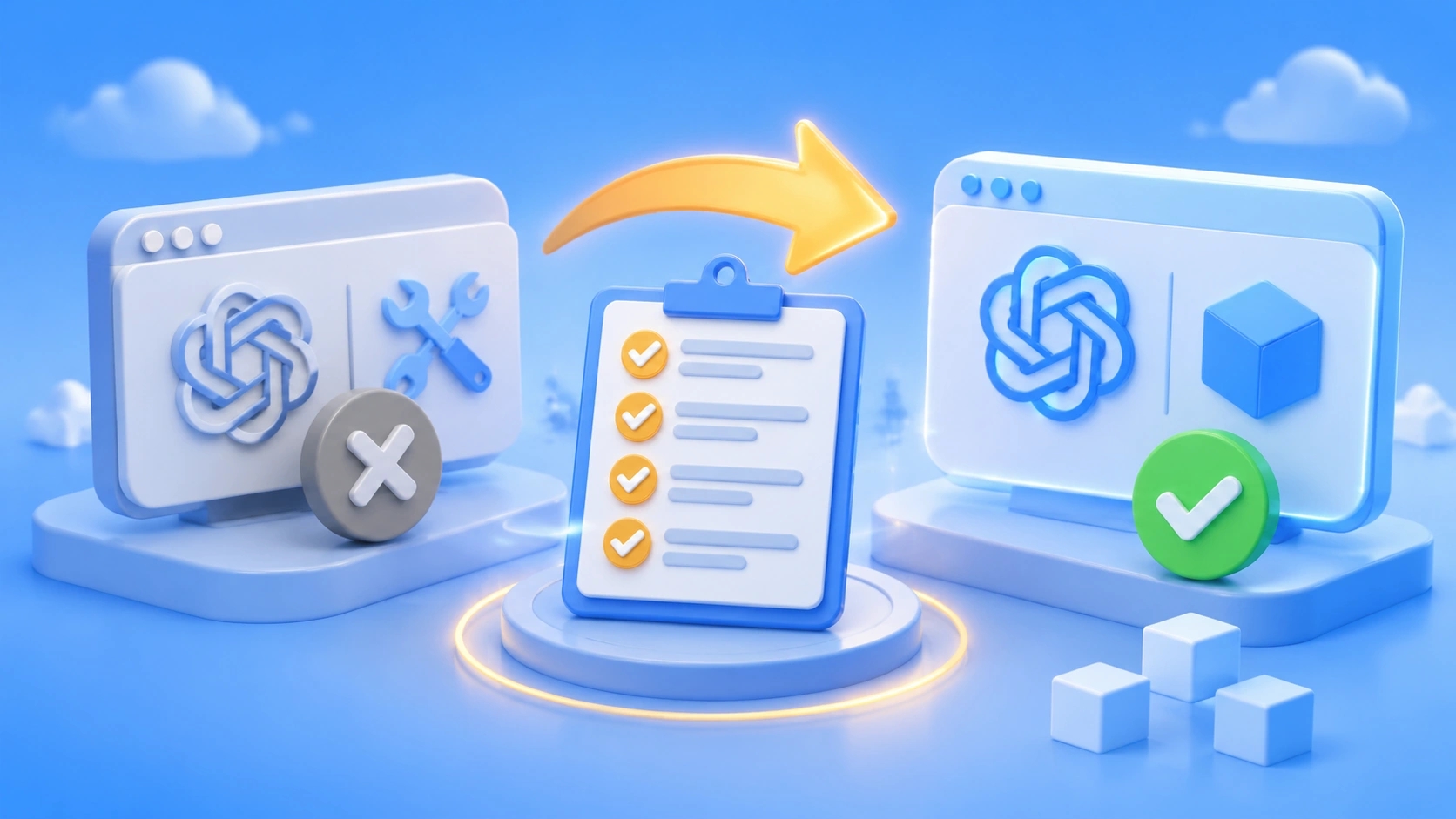
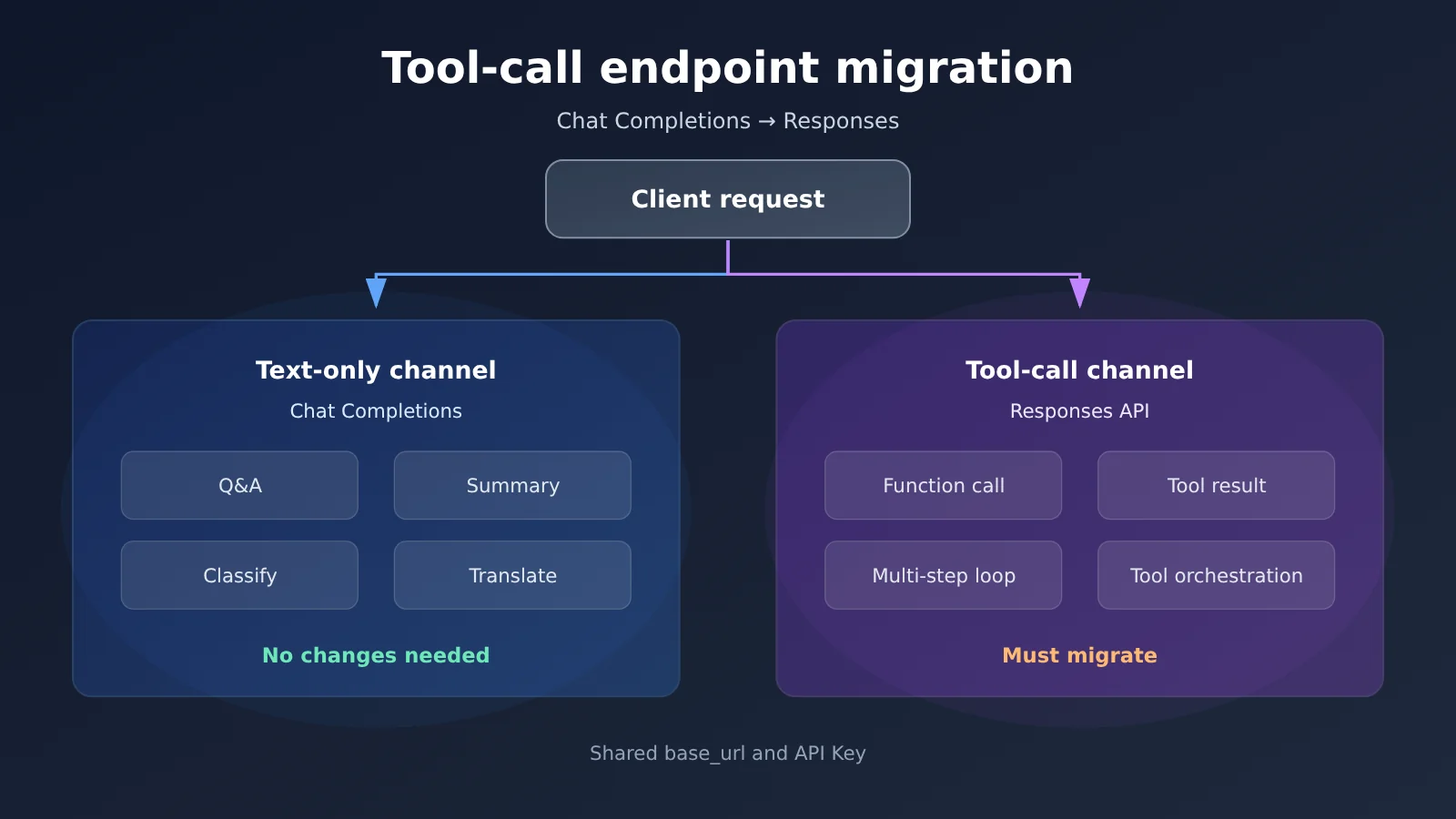
Here’s the short version: GPT-6 Astra, GPT-6.1 Sol, and GPT-6.1 Terra all support Chat Completions, but tool calling has to go through the Responses API. In practice, that means plain conversation can stay on Chat within the same codebase, but as soon as you need to attach functions, read tool outputs, or run a multi-turn tool loop, the request has to go to the Responses endpoint.
This isn’t a compatibility issue you can work around with a parameter tweak. Rewriting how you pass tools won’t help, and neither will adding tool_choice. For these three models, Chat Completions simply doesn’t offer tool calling. What you actually need to change is the endpoint itself, plus the request/response structure around it. If you want to try both endpoints side by side with your own API key, you can use the unified entry point at APIYI (apiyi.com). Point base_url to https://api.apiyi.com/v1 and switch models just by changing the model ID.
There’s another trap on the side: GPT-6 Sol and GPT-6 Luna. On Chat Completions, these two can do function calling, but only when reasoning_effort is set to none. In other words, they can call tools through Chat, but at the cost of turning reasoning off. If you need to keep reasoning on, you’ll have to go back to Responses as well. People overlook this detail all the time, and the result is code that runs fine but produces worse output.
Key takeaway: By the end of this article, you’ll be able to tell which category your tool-calling chain falls into, and move your requests from the Chat endpoint to the Responses endpoint without tearing up your overall architecture.
GPT-6.1 Tool Calling: Key Takeaways
The table below shows which endpoint each of the three models (plus two older ones) belongs to. Find your model here first, then move on to the migration steps.
| Model | Chat Completions (text only) | Chat Completions (tool calling) | Endpoint for tool calling |
|---|---|---|---|
| gpt-6.1-sol | Supported | Not supported | Responses |
| gpt-6.1-terra | Supported | Not supported | Responses |
| gpt-6-astra | Supported | Not supported | Responses |
| gpt-6-sol | Supported | Only when reasoning_effort is none |
Responses (if you need to preserve reasoning) |
| gpt-6-luna | Supported | Only when reasoning_effort is none |
Responses (if you need to preserve reasoning) |
Division of Labor: Chat for Text, Responses for Tools
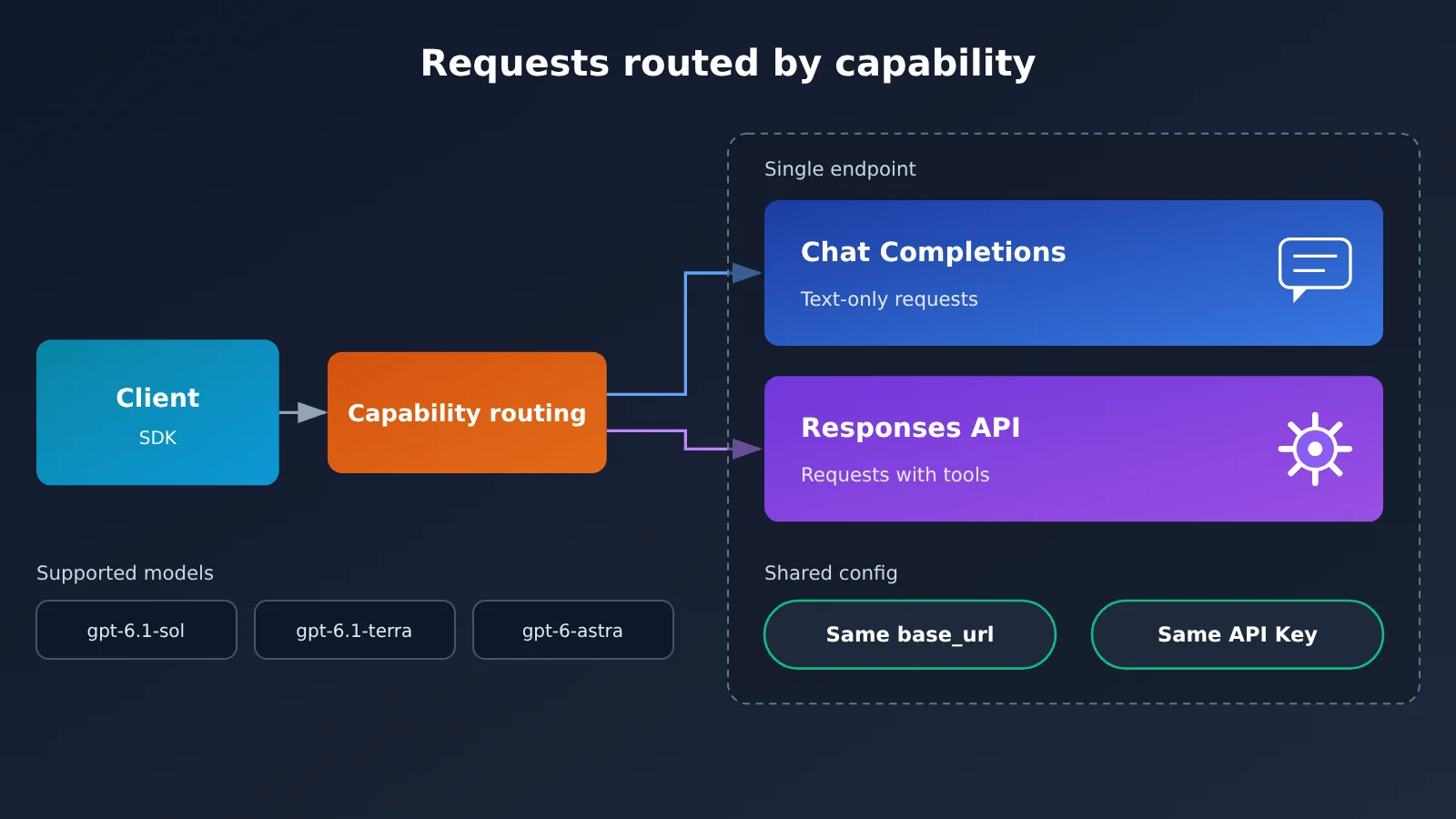
In one sentence: on the GPT-6 series, Chat Completions has been reduced to a text-only channel, and tool calling has been split out into Responses. The impact on existing projects is tiered. Services that only do Q&A, summarization, or classification need almost no changes. Services that build agents, use function calling, or orchestrate multi-step tool workflows have to migrate.
If your team has already wrapped the API in an SDK layer, the good news is that the migration surface is smaller than you’d expect. The model IDs stay the same, authentication stays the same, and so does base_url. What changes is mostly the request body structure and how you feed tool results back. So the real work isn’t “switching models,” it’s “changing how you call them.”
How to Choose Among the Three Main Models
GPT-6.1 Sol and GPT-6.1 Terra are the twin workhorses of this generation, and they differ mainly in positioning and cost. GPT-6 Astra is the previous generation’s flagship. It still supports text-only Chat and tool calling via Responses, so it suits projects that are already running stably and that you don’t want to overhaul. When choosing, look at your tool-calling frequency first, then the per-request context length, and only then the unit price. Tool calling usually involves multiple round trips, which amplifies token consumption.
For specific pricing, check the pricing table later in this article, or verify the billing rates currently in effect in the APIYI apiyi.com documentation, so you don’t budget against outdated prices.
The 5 Changes to Make for GPT-6.1 Tool Calling
This is the most practical section in the whole article. Once you’ve made these 5 changes, a typical tool-calling loop will move from the Chat endpoint to the Responses endpoint.
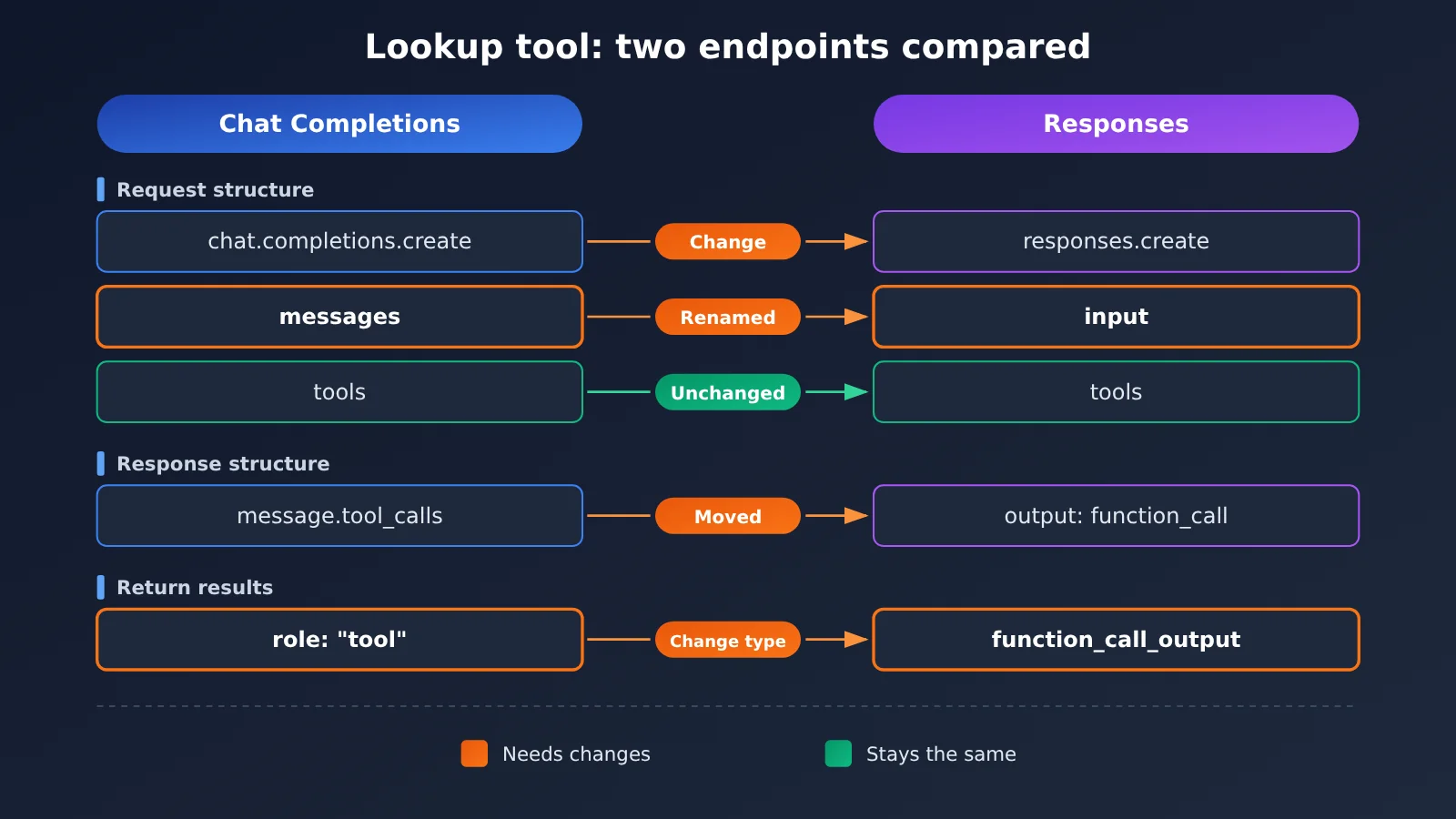
| # | What Changes | Chat Completions | Responses |
|---|---|---|---|
| 1 | Call method | client.chat.completions.create |
client.responses.create |
| 2 | Input carrier | messages array |
input parameter |
| 3 | Tool declaration | tools (kept) |
tools (mostly the same structure) |
| 4 | Feeding tool results back | Message with role: "tool" |
Item of type function_call_output |
| 5 | Multi-turn context | Manually assemble the full messages |
Chain with previous_response_id |
Changes 1 and 2 are the easiest to miss. Plenty of people update the tools structure and assume the migration is done, only to find the SDK method never changed and their requests are still hitting chat.completions. The method determines the endpoint, so if you don’t change the method, the endpoint won’t change either.
Change 4 is where migrations most often get stuck. With Chat, you push the tool’s execution result back into messages as a role: "tool" message. With Responses, you carry the call items the model returned back as-is, then add a function_call_output item. Leave one out or get the order wrong by even one position, and the model may issue the same call again.
Change 5 falls into the “optional, but recommended” category. Responses lets you pick up from the previous turn with previous_response_id, so you don’t have to resend the entire message history every time. For Agents that run many tool rounds, this has a bigger impact on cost than switching models does.
🎯 Technical tip: The easiest way to validate during migration is to run the old and new pipelines in parallel against the same batch of requests, then compare tool hit rates and response structures. With the unified interface at APIYI (apiyi.com), you can skip the hassle of managing keys across multiple platforms. Configure it once and you can compare the actual output of Responses and Chat side by side.
Getting Started with GPT-6.1 Tool Calling
A Minimal Example of Calling a Tool
Say you have a function tool for checking order status. It’s called get_order_status and takes an order number as input. Only two things need to change: how you make the call, and how you feed results back.
- Leave your client initialization as it is. Use your own key for
api_keyand setbase_urltohttps://api.apiyi.com/v1, so any model behind the OpenAI-compatible interface can be called directly. - For the model ID, use
gpt-6.1-sol(orgpt-6.1-terra, orgpt-6-astra). All three use Responses for tool calling. - Replace the old
client.chat.completions.create(...)withclient.responses.create(...), and swap themessagesparameter forinput. - Pass
toolsin as before. You don’t need to rewrite the tool descriptions or the parameter schema. - In the returned
output, find the item whose type isfunction_call, pull out the tool name and arguments, and run your order-lookup function locally. - Append the result back as a
function_call_output, then make a second request to get the final answer.
Of these six steps, the ones you truly have to change are steps 3 and 6. Steps 1 and 2 are configuration, and steps 4 and 5 are just your Chat-era habits reading from a different place.
🚀 Quick Start: If you don’t want to build your own test environment, you can claim free test credits at APIYI (apiyi.com) and run through the order-lookup example above once before touching your production code. That’s the lowest-risk way to do it.
An even easier approach is to decouple the tool layer from the model layer first. Keep your tool definitions in one place and wrap the call entry point in a single function that decides internally: plain text goes through Chat, and requests with tools go through Responses. That way the migration only touches the wrapper layer, and your business code doesn’t need a single line changed.
GPT-6.1 Model Pricing and Selection (2026-11-12)
The table below reflects pricing in effect as of 2026-11-12. All prices are in USD per 1M tokens.
| Model | Input | Output | Cache Read | Recommended Endpoint |
|---|---|---|---|---|
| gpt-6.1-sol | $2 | $10 | $0.1 | responses |
| gpt-6.1-terra | $1 | $5 | $0.05 | responses |
| gpt-6-luna | $0.1 | $0.5 | $0.01 | chat (with reasoning_effort set to none) or responses |
Here’s the practical takeaway: GPT-6.1 Terra costs exactly half as much as Sol for both input and output. For workloads with lots of tool-call turns and highly repetitive context, Terra is often the better default tier. GPT-6 Luna is a full order of magnitude cheaper, so it’s a good fit for lightweight tasks like classification and extraction. That leaves Sol or Terra free for the tool orchestration steps that actually need reasoning.
The cache read column deserves a closer look. Tool calling naturally produces a lot of repeated prefixes: system prompts, tool definitions, conversation history. Once those hit the cache, they cost roughly one-twentieth of the regular input price. So if you use previous_response_id in Responses to carry context forward, you save on more than just bandwidth. You save real money too.
💰 Cost tip: If you need to split budgets by project, calling models through a single unified API key on APIYI (apiyi.com) lets you track usage across multiple models in one place. Combined with pay-as-you-go billing, it’s easier to work out what your tool calls really cost.
GPT-6.1 Tool Calling FAQ
Q1: What is GPT-6.1, and how does it relate to GPT-6?
GPT-6.1 is an iteration of the GPT-6 series. It currently includes two models: GPT-6.1 Sol and GPT-6.1 Terra. The GPT-6 series includes GPT-6 Astra, GPT-6 Sol, and GPT-6 Luna. They all share the same Responses tool-calling channel, and the differences mostly come down to capability positioning and pricing.
Q2: Why can’t I call tools through Chat Completions? Did I get a parameter wrong?
It’s not a parameter problem. On Chat Completions, GPT-6 Astra, GPT-6.1 Sol, and GPT-6.1 Terra only offer plain-text capabilities, and tool calling is restricted to the Responses API. Changing `tools` or `tool_choice` won’t make a difference. You need to switch the SDK method from `chat.completions.create` to `responses.create`.
Q3: Can GPT-6 Sol and GPT-6 Luna do function calling in Chat?
Yes, but only when `reasoning_effort` is set to `none`. If you need to keep reasoning effort on, these two models also have to go through Responses. This restriction is the easiest one to miss during migration, because it doesn’t throw an error. The results just won’t match what you expect.
Q4: Do I need to change the model ID when migrating to Responses?
No. Keep the model IDs as `gpt-6.1-sol`, `gpt-6.1-terra`, and `gpt-6-astra`. The `base_url` and authentication method stay the same too. What you actually need to change is the invocation method, the input payload, and the structure used to send tool results back.
Q5: How do I quickly verify that tool calling works after migration?
I recommend running a smoke test with a simple order-lookup tool. First, confirm the request actually hit the Responses endpoint. Next, confirm the returned `output` contains a `function_call` item. Finally, confirm that after you send back the `function_call_output`, the model gives a final answer. If all three steps pass, the pipeline works. You can get a test key on APIYI (apiyi.com) and run through this whole check.
Q6: Do plain-text services need to migrate to Responses too?
No. Plain-text Chat Completions still works for all three main models, so services that only handle Q&A, summarization, or translation can stay exactly as they are. Only requests that involve `tools` have to move, which is why the impact of this change is tiered.
Q7: How do I keep context costs under control in multi-turn tool calling?
Use `previous_response_id` to carry over the previous turn instead of resending the full history every time. That makes it easier for the repeated prefix to hit the cache, and the cached-read price is far lower than the input price. Take `gpt-6.1-sol` as an example: input costs $2 while cached reads cost $0.1, which is a pretty big gap.
Q8: Are there any known pitfalls with the Responses migration?
Two are pretty typical. The first is changing only the `tools` structure without changing the invocation method, so the request still lands on the Chat endpoint. The second is reusing the old `role: “tool”` format when sending tool results back, which leaves the model unable to see the output, so it keeps making the same call again. Also, if your team mixes in models like GPT-6 Sol that require `reasoning_effort` to be `none`, it’s best to enforce a uniform constraint in your wrapper layer. Otherwise you’ll end up with the same tool working on some models but not on others.
GPT-6.1 Tool Calling Key Takeaways
- Endpoints have split: For GPT-6.1 Sol, Terra, and GPT-6 Astra, text goes through Chat, but tools must go through Responses.
- One exception: GPT-6 Sol and GPT-6 Luna can still do function calling on Chat, but
reasoning_efforthas to be set tonone. - Five changes: the invocation method, the
inputcarrier, thetoolsdeclaration,function_call_outputwrite-back, andprevious_response_idchaining. - Model IDs stay the same: Your
base_urland key don’t change, so migration only touches your wrapper layer. - Cost comes down to caching: Tool-calling prefixes repeat a lot, and cache reads cost roughly one-twentieth of the input price.
- Three-step verification: Confirm the endpoint, confirm there’s a
function_callinoutput, and confirm you get the final reply after writing results back. - Getting started: Use the free credits at APIYI (apiyi.com) to get a small order-lookup tool working first, then migrate your production pipeline.
Summary
The core change comes down to one sentence: GPT-6.1 moves tool calling from Chat Completions to Responses, while plain text capabilities stay where they were. Three takeaways follow from that:
- Sort first, then migrate: Services that only handle text don’t need to change, but any request carrying
toolshas to switch endpoints. - Change the method, not just the parameters:
client.responses.createis the real endpoint switch, and thetoolsstructure is just along for the ride. - Result write-back is where things break most:
function_call_outputreplacesrole: "tool", and both the order and completeness need to be right.
If your project already runs tool calling in production, we’d suggest picking one minimal tool for a canary rollout and switching everything over once you’ve confirmed the pipeline works. To save time on juggling multiple platform keys and environment setups, you can use APIYI (apiyi.com) to compare real Responses and Chat output with a single key. Just point base_url to https://api.apiyi.com/v1.
References
- OpenAI Official Model Documentation: Endpoint capabilities for the GPT-6 and GPT-6.1 series, including the restriction that tool calling must go through Responses
- Link:
developers.openai.com/api/docs/guides/latest-model -
Note: The primary source for determining whether a given model supports function calling in Chat Completions
-
APIYI Models and Pricing Documentation: Input, output, and cache-read prices for each model, plus recommended endpoints
- Link:
docs.apiyi.com/models - Note: Use this to verify the billing terms that take effect on 2026-11-12 and the recommended endpoints
Author: APIYI Technical Team
Technical Support: Get in touch with us on the APIYI homepage at apiyi.com. For more API details, visit the docs.apiyi.com documentation center.