On November 9, 2026, Google Cloud announced two new system configurations for its eighth-generation TPUs: TPU 8tx and TPU 8i Max. TPU 8i Max integrates two TPU 8i chips in a single package, doubling compute capacity, on-chip SRAM, and HBM bandwidth. It’s designed for workloads involving long context windows, high concurrency, and collaborative multi-Agent reasoning.
This isn’t just a launch focused on raw compute power. Google’s official announcement, AMD’s accompanying partnership announcement, and brief reports from several media outlets have all confirmed the news. Rather than listing chip specs, this article uses a practical KV Cache calculation to explain one key shift: the bottleneck in Agent inference is moving from “how fast can we compute?” to “can we get data to the compute units in time?”
What you’ll learn: By the end, you’ll be able to estimate how much GPU memory a long-context request needs, understand what causes the memory wall, and assess what a system design like TPU 8i Max could mean for your Agent service.
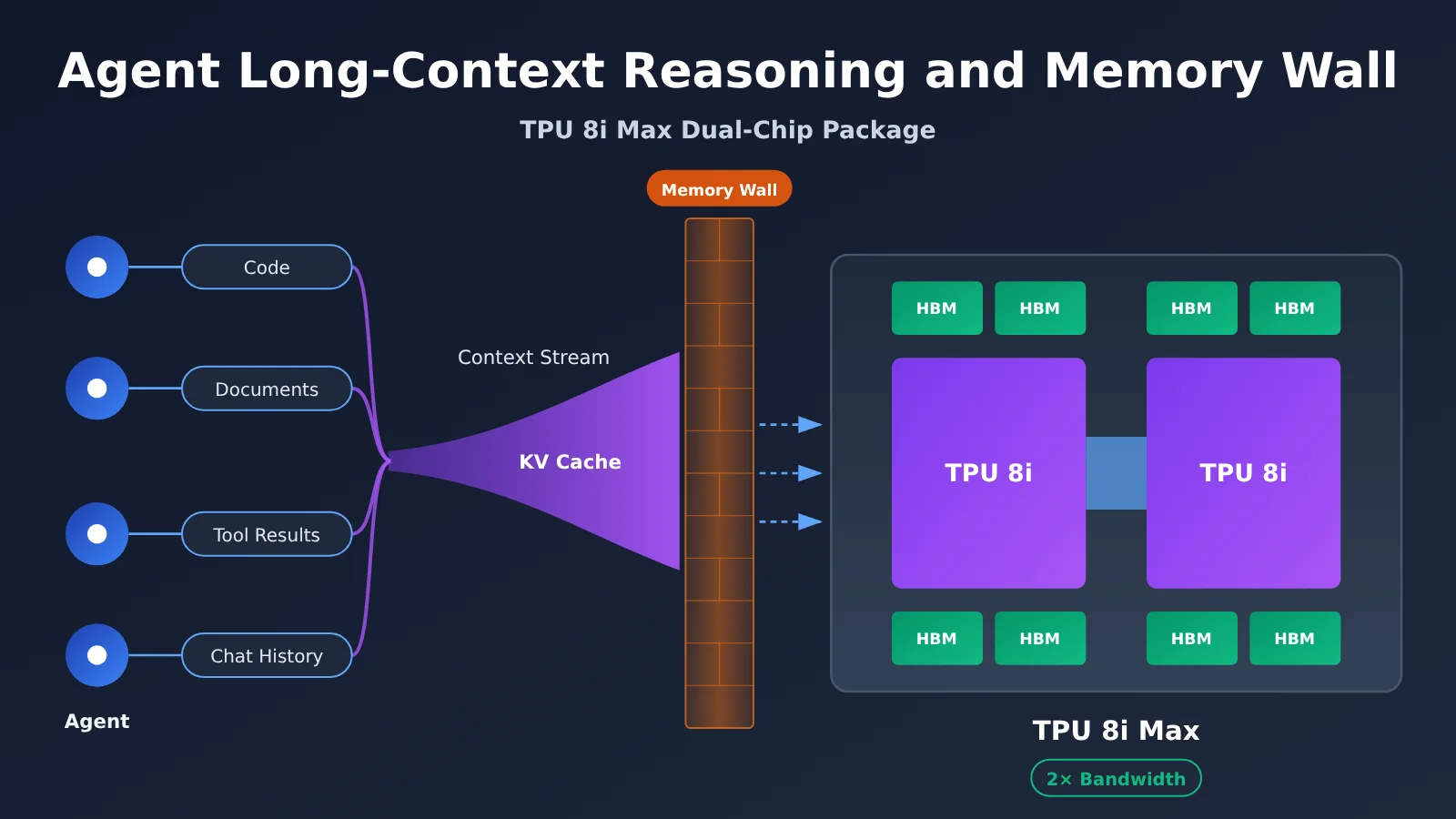
TPU 8i Max and Agent Long-Context Workloads: Key Facts at a Glance
| Item | Details |
|---|---|
| Announcement date | November 9, 2026 |
| Announced by | Google Cloud |
| Product type | A system configuration of the eighth-generation TPU, not a newly designed standalone chip |
| Packaging | Two TPU 8i chips integrated into a single package |
| Improvements officially confirmed | 2× the compute, SRAM, and HBM bandwidth of TPU 8i |
| Specifications disclosed in media briefings | 384 GB HBM, 17.2 TB/s HBM bandwidth, 768 MB SRAM |
| Target workloads | Long-context processing, high-concurrency inference, multi-Agent collaboration, long-video analysis, and more |
| Availability | The official product page says “Coming soon”; pricing and a GA date haven’t been announced |
It’s worth noting that Google’s announcement deliberately distinguishes between a chip and a system. Chip design cycles take years, while system configurations can adapt more quickly to new workloads by adjusting packaging, memory, networking, and security components. TPU 8i Max is an example of this approach: it uses the same silicon as TPU 8i, with changes at the packaging and system levels.
Why Agent Long-Context Workloads Use More Memory Than Regular Chat
Regular chat is typically a series of “question and answer” exchanges. The context grows slowly, and the state can be discarded when the conversation ends. Agents work differently. They break a goal into subtasks, continually read external materials, call tools, and continue reasoning based on the results. They also preserve state while waiting for results. Each step’s output gets added to the context, so it keeps growing.
For example, a software development Agent might need to keep all of the following in context during a single task:
- Codebase: Hundreds of source files and their dependencies
- Project documentation: Architecture guides, interface specifications, and coding standards
- Conversation history: Multiple rounds of clarifications and requested changes
- Tool results: Build logs, test output, and error stack traces
- Sub-Agent outputs: Results returned by Sub-Agents handling testing, review, and refactoring
Concurrency makes the challenge even greater. When a primary Agent spawns four Sub-Agents, the system now has five independent contexts running at once. Each context must stay in memory during inference. That’s why Google lists “multi-Agent collaboration on large software projects” as a typical TPU 8i Max workload. It’s worth clarifying that Google’s reference to “million-token-scale context” describes a target use case, not a published fixed maximum context length.
How KV Cache Grows Linearly with Long Agent Contexts
What KV Cache Does
When a Transformer generates each new token, it uses the current token’s Query to score its attention against the Keys of all previous tokens, then uses the resulting weights to compute a weighted sum of their Values. Recomputing the Keys and Values for the entire history every time a new token is generated would make the computational cost grow rapidly with sequence length. KV Cache avoids this by storing and reusing the Keys and Values already computed for previous tokens, trading memory for compute.
The tradeoff is that cache usage keeps growing with context length and the number of concurrent requests. The estimate below corresponds to vLLM’s KV Cache memory layout:
M_KV = 2 × L × H_KV × D × B × T × N
| Parameter | Meaning | Llama 3.1 70B value |
|---|---|---|
| 2 | Separate caches for Keys and Values | 2 |
| L | Number of Transformer layers | 80 |
| H_KV | Number of Key/Value attention heads | 8 (GQA) |
| D | Dimension of each KV Head | 128 |
| B | Bytes per element | 2 (BF16) |
| T | Number of tokens per request | Varies by scenario |
| N | Number of concurrent requests | Varies by scenario |
KV Cache Calculation Example for Llama 3.1 70B
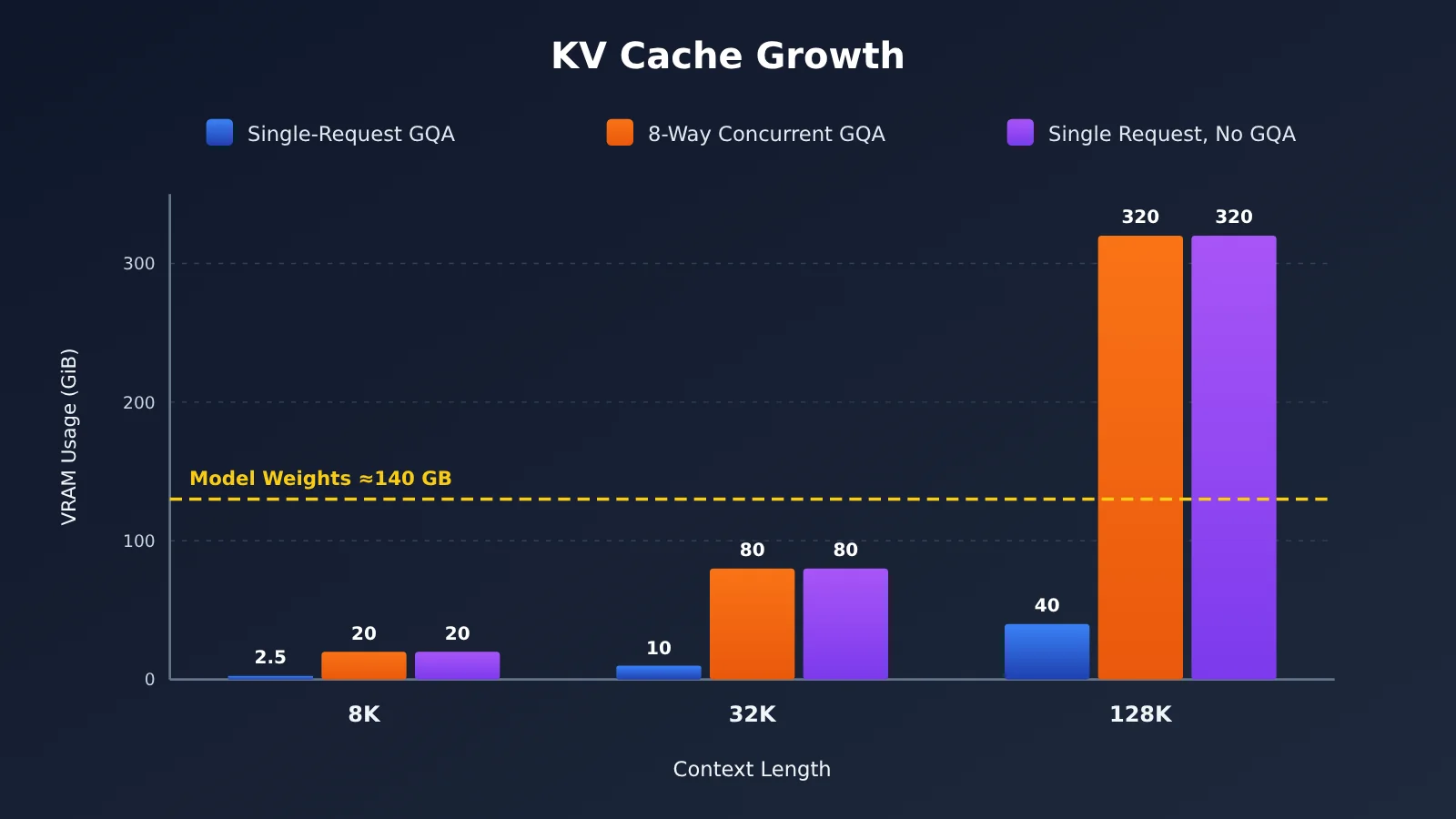
First, calculate the memory for a single token: 2 × 80 × 8 × 128 × 2 = 327,680 bytes, or about 320 KiB per token. That might not seem like much, but it adds up quickly as the context length grows.
| Scenario | Context length | Concurrency | Theoretical KV Cache |
|---|---|---|---|
| Short task | 8K | 1 | 2.5 GiB |
| Medium coding task | 32K | 1 | 10 GiB |
| Long-context agent | 128K | 1 | 40 GiB |
| Multiple agents in parallel | 128K | 8 | 320 GiB |
These figures cover only the KV Cache; they don’t include model weights, runtime workspaces, or fragmentation overhead. For comparison, the weights alone for a 70B-parameter model take about 140 GB when stored in BF16. In other words, the KV Cache for eight concurrent 128K sessions is already more than twice the size of the model weights.
How GQA Affects KV Cache Memory Usage
Llama 3.1 70B has 64 Attention Heads but only 8 KV Heads. This is GQA (Grouped-Query Attention): every 8 Query heads share a set of Keys and Values. Be sure to use 8, not 64, in the calculation; otherwise, the result will be 8 times too high.
A counterfactual makes the value of GQA clear. If the model used standard multi-head attention, with all 64 heads maintaining their own KV, the KV Cache for a single 128K request would grow from 40 GiB to 320 GiB—equal to the total usage for eight concurrent GQA requests. MQA reduces the number of KV Heads even further, to just 1, saving more memory, though its impact on model quality needs to be weighed. KV Cache quantization can reduce memory usage further—for example, moving from BF16 to 8-bit halves it—but the resulting precision loss needs to be evaluated.
You can reuse the formula in the script below to quickly estimate the KV Cache size for your own model at different context lengths and concurrency levels:
def kv_cache_gib(layers, kv_heads, head_dim, bytes_per_elem, tokens, concurrency=1):
    """Estimate the KV Cache in GiB using M_KV = 2 × L × H_KV × D × B × T × N."""
    total = 2 * layers * kv_heads * head_dim * bytes_per_elem * tokens * concurrency
    return total / (1024 ** 3)

# Llama 3.1 70B: 80 layers, 8 KV Heads, dimension 128, BF16
for ctx in (8_192, 32_768, 131_072):
    print(f"{ctx:>7} tokens -> {kv_cache_gib(80, 8, 128, 2, ctx):.1f} GiB")

print("8 concurrent x 128K ->", kv_cache_gib(80, 8, 128, 2, 131_072, 8), "GiB")
print("FP8 KV quantization at 128K ->", kv_cache_gib(80, 8, 128, 1, 131_072), "GiB")
What Exactly Is the Memory Wall in Agent Long-Context Reasoning?
Capacity, Bandwidth, and SRAM Are Three Independent Dimensions
The most common misconception about the memory wall is treating “more memory” and “faster memory” as the same thing. In reality, an AI accelerator’s memory system involves at least three independent metrics:
| Metric | What it determines | What it means for Agents |
|---|---|---|
| HBM capacity | How much data can fit | How many model weights and KV Cache entries can be kept at once, and how many concurrent contexts the system can support |
| HBM bandwidth | How much data can be moved per unit of time | Whether weights and KV Cache can be delivered to the compute cores quickly for each generated Token |
| On-chip SRAM | High-speed storage closest to the compute cores | Whether frequently used data can stay on-chip, reducing the wait caused by repeated HBM access |
HBM is essentially DRAM that uses stacked layers and advanced packaging to enable highly parallel access. SRAM is faster and closer to the compute units, but its capacity is limited by its high cost per unit and physical area. That’s why modern accelerators use a memory hierarchy rather than focusing on maximizing the capacity of a single type of memory.
Prefill and Decode Have Very Different Data Requirements
LLM inference has two stages. During Prefill, the system processes the entire input context at once and builds the KV Cache. Since many Tokens can be processed in parallel, this is a typical compute-intensive task. During Decode, the system generates output one Token at a time. Each step processes just one new Token, but must read all the weights and the entire KV Cache. The computation is relatively small, while the amount of data moved is large, making Decode a bandwidth-intensive task.
Here’s a simplified estimate to illustrate the pressure Decode faces. A single 128K request has a KV Cache of about 40 GiB (about 43 GB), which must be read in full to generate each Token. With the TPU 8i’s HBM bandwidth of about 8.6 TB/s per chip, reading the KV Cache alone takes about 5 milliseconds. At the TPU 8i Max’s 17.2 TB/s, the lower bound is about 2.5 milliseconds. This is only a theoretical lower bound that ignores weight reads, compute overlap, and parallel sharding. But it’s enough to show that as context length grows, Decode time is increasingly dominated by data movement rather than computation.
Why Do Compute Units “Wait for Data”?
When compute cores can perform far more operations per second than memory can supply data, the compute units sit idle waiting. That’s the memory wall. For Agents, long contexts increase the amount of data that must be read at each Decode step. High concurrency increases the amount of KV Cache that must stay in memory. And multi-round reasoning requires the cache to be read and updated repeatedly. Together, these factors make the marginal gains from simply increasing peak compute lower and lower.
🎯 Technical tip: Before evaluating your Agent application, test time to first Token (TTFT) and output speed at different context lengths. Look at how latency changes as the context grows. With APIYI at apiyi.com, you can use the same API key to switch between Claude, Gemini, GPT, and other models, making it easier to compare their long-context performance.
How the Dual-Chip TPU 8i Max Package Expands Memory Bandwidth
How Two TPU 8i Chips Work Together
The TPU 8i Max is the fourth system configuration in the eighth-generation TPU lineup. Google found that when multiple agents work on large codebases, long videos, or complex documents at the same time, the bottleneck is often not compute power, but how quickly chips can read and exchange data. Its solution is to integrate two low-latency TPU 8i chips into a single package, packing twice as much silicon into the same rack footprint.
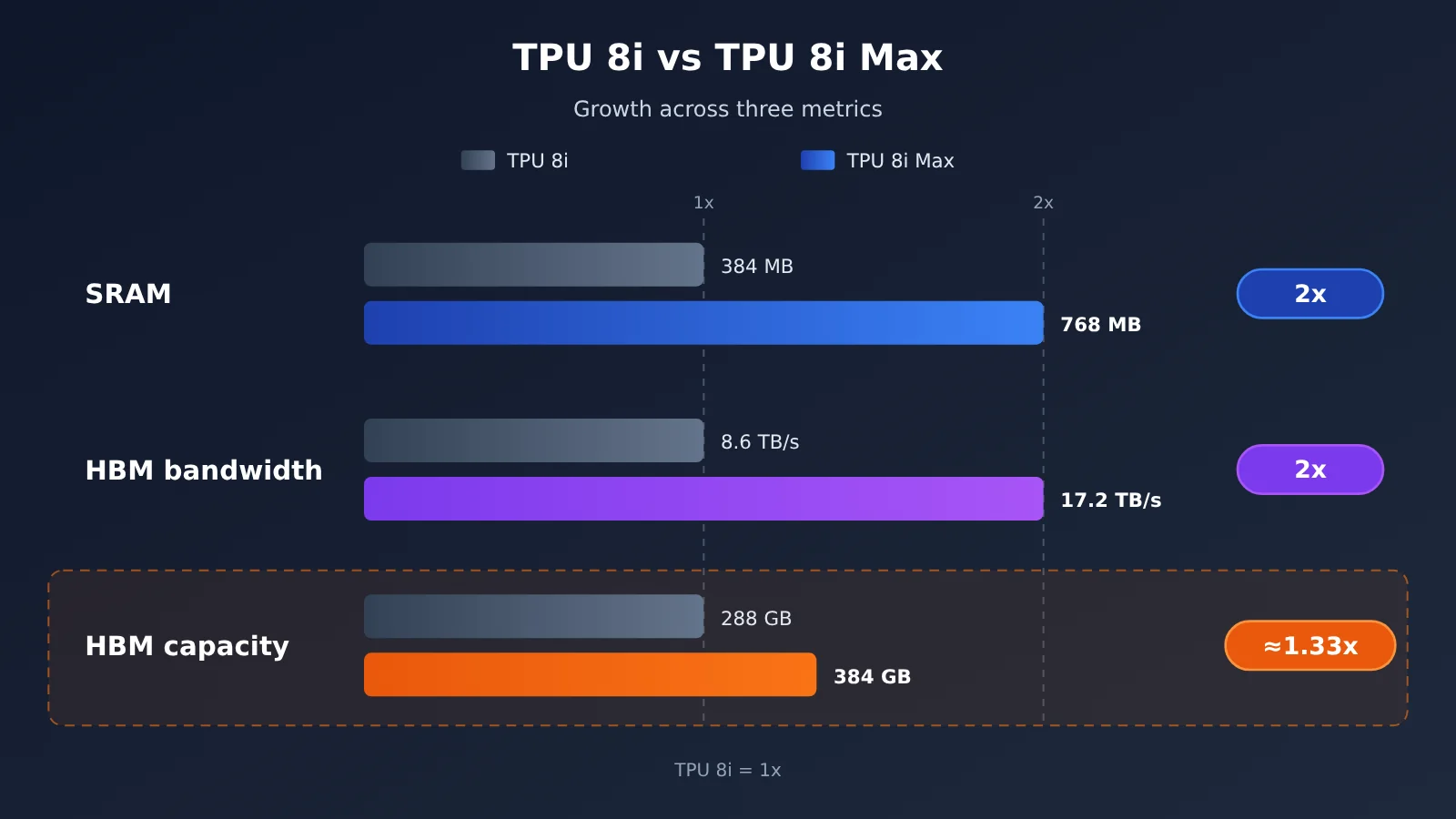
| Metric | TPU 8i | TPU 8i Max | Change |
|---|---|---|---|
| Chip package | Single chip | Dual chip | — |
| Compute | Baseline | 2× | Doubled |
| On-chip SRAM | 384 MB | 768 MB | Doubled |
| HBM bandwidth | 8,601 GB/s | 17,200 GB/s | Approximately doubled |
| HBM capacity | 288 GB | 384 GB | Approximately 33% higher |
Note: The TPU 8i figures are from Google’s April 2026 architecture article. The absolute figures for TPU 8i Max were reported in a media briefing on November 9. The official announcement explicitly confirms that compute, SRAM, and HBM bandwidth are doubled.
Why Scaling Them Together Matters More Than Adding Compute Alone
If compute increases on its own, the decode stage becomes even more constrained by bandwidth. If bandwidth increases on its own, the compute units may not get enough work. The TPU 8i Max scales compute, SRAM, and HBM bandwidth by roughly similar amounts, keeping the ratio of “data supply speed to compute speed” close to the original design balance. The doubled SRAM also keeps more frequently accessed data on-chip, further reducing trips to and from HBM.
HBM Capacity Increases by Only About 33%—Not 2×
This is the detail that’s easiest to get wrong. HBM bandwidth doubles, from about 8.6 TB/s to 17.2 TB/s, but HBM capacity goes from 288 GB to just 384 GB—an increase of only about 33%. In light of the figures above, here’s what that means: the TPU 8i Max has more bandwidth per gigabyte of memory, so it can read the same amount of KV Cache faster. But the increase in the total context it can hold at once is much smaller than the increase in bandwidth.
In other words, the TPU 8i Max’s main benefit isn’t doubling the context limit for a single model. It’s making the system more efficient at hosting and processing many concurrent contexts. When capacity isn’t enough, software techniques such as KV Cache offloading, quantization, and multi-chip partitioning are still needed.
Memory Architecture Comparison: GPU vs. TPU 8i Max
To understand where the TPU 8i Max fits, we can use NVIDIA’s latest Rubin architecture as a GPU reference point.
| Dimension | NVIDIA Rubin GPU | Google TPU 8i Max |
|---|---|---|
| Measurement unit | Single GPU | Dual-TPU chip package |
| HBM capacity | 288 GB HBM4 | 384 GB HBM (reported by media) |
| HBM bandwidth | 22 TB/s | 17.2 TB/s (reported by media) |
| On-chip memory | Depends on the specific architecture configuration | 768 MB SRAM (reported by media) |
| Interconnect | NVLink 6 | Boardfly low-latency network (TPU 8i architecture) |
| Software ecosystem | CUDA and mainstream inference engines | JAX, TorchTPU, vLLM / SGLang TPU backends |
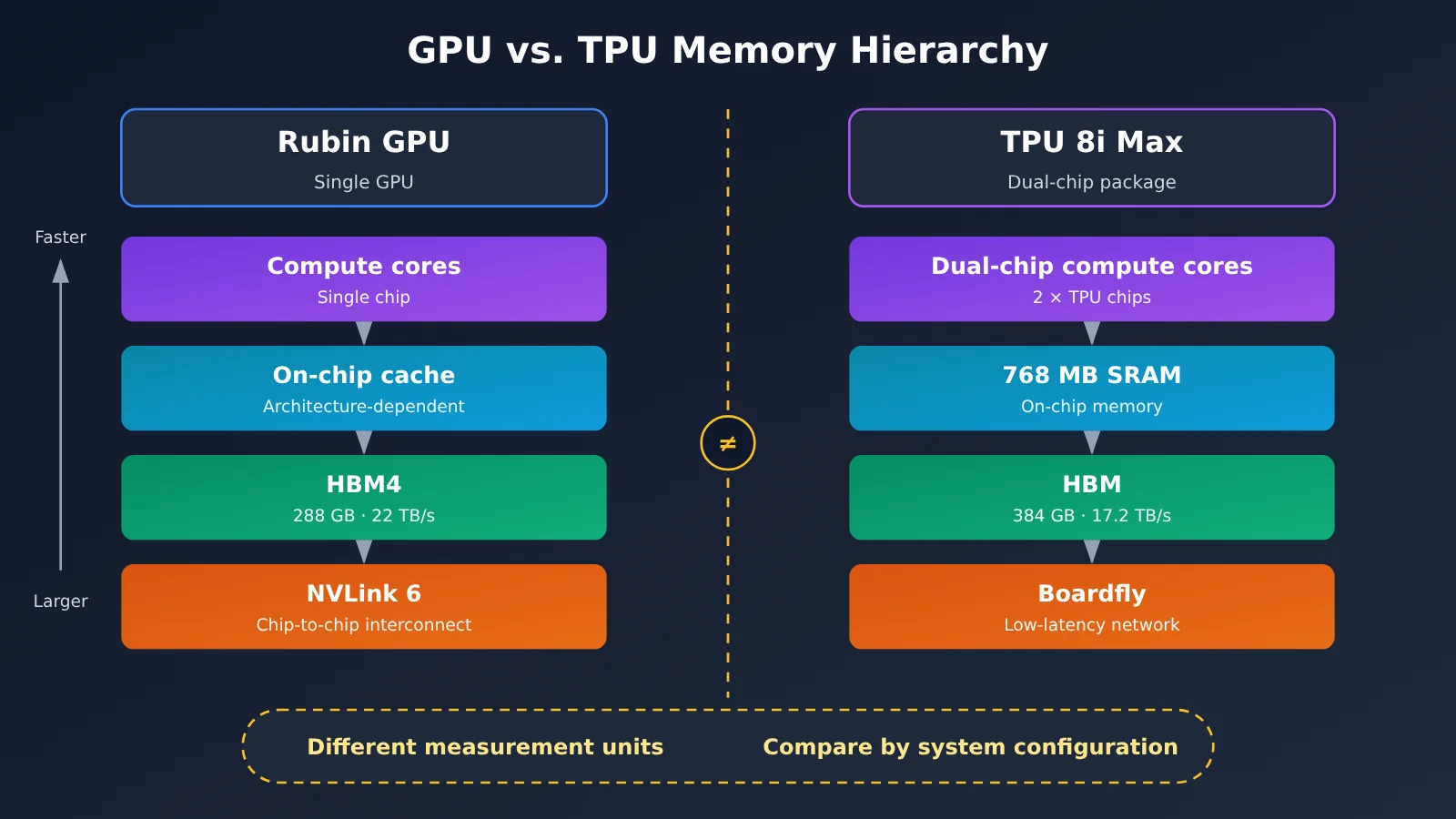
This table isn’t a straightforward ranking. The 384 GB and 288 GB figures compare a dual-chip package with a single GPU, and the two systems also differ in HBM generation, interconnect, compute architecture, and overall configuration. Rubin has higher bandwidth per GPU, while the TPU 8i Max has more capacity—but neither figure can be considered in isolation from system scale.
The more meaningful comparison is how many effective concurrent contexts an entire system can reliably support within the same power, rack space, and cost constraints—and the throughput, latency, and energy efficiency it can sustain while serving those contexts. As of November 10, 2026, there are no independently verifiable public benchmarks for the TPU 8i Max. System-level comparisons like this will have to wait for data from its commercial launch.
💡 Recommendation: For most teams building agents through APIs, you don’t need to decide whether the underlying hardware runs on GPUs or TPUs. It’s more practical to compare the latency and pricing of different models with long contexts. You can test multiple models in parallel through APIYI’s unified interface at apiyi.com, using prompts based on your real business needs.
Analyzing the Impact of TPU 8i Max on Agent Developers
Distinguishing Context Window, Actual Concurrency, and Inference Latency
A model’s advertised context window only tells you how much it can theoretically hold. It doesn’t mean the server can support a given number of concurrent sessions at that context length, nor does it guarantee acceptable latency. As the calculations above show, the KV cache for eight sessions with the same 128K context is eight times larger than for one session. Developers should consider these three metrics separately:
- Context window: The maximum range the model can process, which determines how much information you can fit into a single request
- Actual concurrency: How many long-running sessions can be sustained simultaneously on the available hardware; this is constrained by HBM capacity
- Inference latency: TTFT is affected by the amount of Prefill computation, while token generation speed depends on bandwidth and KV cache size
Three Mitigation Techniques Gaining Traction
Hardware is only half the solution to the memory wall; the other half is software. Google’s TPU Sync, along with TPU versions of vLLM and SGLang, focuses on the following techniques:
| Technique | Problem it solves | Trade-offs and considerations |
|---|---|---|
| KV Cache Offloading | Moves temporarily unused cache from HBM to host DRAM, SSD, or shared storage to overcome capacity limits | Restoring the cache takes time and depends on efficient DMA and asynchronous transfers |
| KV Cache Quantization | Reduces the number of bytes per element, directly lowering capacity and bandwidth usage | Requires evaluating the impact on accuracy |
| Prefill / Decode Disaggregation | Deploys compute-intensive Prefill and bandwidth-intensive Decode on separate nodes | Requires fast KV Cache transfers between nodes |
| Prefix Caching | Reuses identical system prompts and conversation prefixes to avoid repeated Prefill | Depends on how often request prefixes are repeated |
Google’s published TPU Sync results show that KV Cache transfer latency can be reduced by more than 90%, while prefix caching for 64K contexts can reduce TTFT by up to 90%. However, these tests were run on the seventh-generation Ironwood TPU, and the actively validated hardware currently listed in the GitHub README is v7x and v6e. These results shouldn’t be taken as TPU 8i Max performance figures.
Real-World Performance and Resource Costs
For API callers, these underlying optimizations ultimately show up in two ways: whether latency stays stable for long-context requests, and whether costs go down when billing is based on tokens. You can apply the same “use less memory” idea in your own applications: trim system prompts and keep prefixes stable to hit the cache, summarize tool outputs before adding them back to the context, and pass sub-agents only the snippets they need instead of the entire conversation history.
The example below measures time to first token (TTFT) at different context lengths using streaming output, so you can see how context growth affects prefill:
import time
import openai

client = openai.OpenAI(
    api_key="YOUR_API_KEY",
    base_url="https://api.apiyi.com/v1"  # APIYI OpenAI-compatible endpoint
)

def measure_ttft(context: str, model: str = "gpt-4o-mini") -> float:
    start = time.perf_counter()
    stream = client.chat.completions.create(
        model=model,
        messages=[{"role": "user", "content": context + "\n请用一句话总结上文。"}],
        stream=True,
    )
    for chunk in stream:
        if chunk.choices and chunk.choices[0].delta.content:
            return time.perf_counter() - start
    return -1.0

print(f"TTFT: {measure_ttft('示例代码片段 ' * 2000):.2f}s")
View batch testing code for multiple models and context lengths
import time
import openai

client = openai.OpenAI(
    api_key="YOUR_API_KEY",
    base_url="https://api.apiyi.com/v1"  # Switch between providers with a single key
)

MODELS = ["gpt-4o-mini", "claude-sonnet-4", "gemini-2.5-flash"]
LENGTHS = [1_000, 5_000, 20_000]  # Number of repeated snippets, used to approximate context growth

def run_once(model: str, repeat: int) -> dict:
    context = "def handler(event):\n    return process(event)\n" * repeat
    start = time.perf_counter()
    first, tokens = None, 0
    try:
        stream = client.chat.completions.create(
            model=model,
            messages=[{"role": "user", "content": context + "\n指出上面代码的潜在问题。"}],
            stream=True,
            max_tokens=200,
        )
        for chunk in stream:
            if chunk.choices and chunk.choices[0].delta.content:
                tokens += 1
                if first is None:
                    first = time.perf_counter() - start
        total = time.perf_counter() - start
        return {"model": model, "repeat": repeat, "ttft": first, "total": total, "chunks": tokens}
    except Exception as e:
        return {"model": model, "repeat": repeat, "error": str(e)}

for m in MODELS:
    for n in LENGTHS:
        print(run_once(m, n))
🚀 Get started quickly: Sign up at APIYI (apiyi.com) to get free testing credits. Keep
base_urlin the script set tohttps://api.apiyi.com/v1, and you can get TTFT curves for multiple models at different context lengths in just a few minutes.
Industry Impact
- Faster system-level customization: Google’s approach of using “the same silicon, different systems” to quickly launch configurations for specialized workloads shows that accelerator competition is shifting from individual chip specs to system design.
- Hardware-software co-design is becoming standard: TPU 8i Max launched alongside TPU Sync, Agent Compute Engine, and a TPU inference engine. Overcoming the memory wall depends on both hardware bandwidth and software scheduling.
- Commercial availability is still in its early stages: Like the 8t, 8i, and 8tx, TPU 8i Max is marked as Coming soon. There’s no public pricing or official availability date yet, so its real-world value for money remains to be tested.
Frequently Asked Questions
Q1: What is TPU 8i Max?
TPU 8i Max is a configuration of Google’s eighth-generation TPU system, announced on November 9, 2026. It integrates two TPU 8i chips in a single package, doubling the TPU 8i’s compute capacity, on-chip SRAM, and HBM bandwidth. It’s designed primarily for inference workloads involving long contexts, high concurrency, and collaboration among multiple agents. It’s not an entirely new chip design.
Q2: Has TPU 8i Max doubled its HBM capacity?
No. According to media briefings, HBM capacity increases from 288 GB to 384 GB, or about 33%. What doubles is HBM bandwidth (from about 8.6 TB/s to 17.2 TB/s) and SRAM (from 384 MB to 768 MB). Capacity and bandwidth are separate metrics and shouldn’t be confused.
Q3: Can I use TPU 8i Max now, and how much does it cost?
As of November 10, 2026, Google Cloud’s official product page lists TPU 8i Max as Coming soon. Google hasn’t announced public pricing or an official GA date, and there are no independently verifiable performance tests available. For now, the only information to go on is Google’s official announcement and the specs in media briefings.
Q4: Can TPU 8i Max let a single model support a context window of one million tokens?
Google lists million-token contexts as a target use case, but this isn’t a published fixed maximum context length. The model itself determines how much context it can process. The hardware determines how much concurrency it can sustain at that length and whether latency remains acceptable.
Q5: How can application developers check how long contexts affect latency?
The most direct approach is to measure TTFT and output speed using real business contexts of different lengths:
1. Visit APIYI at apiyi.com to register, then get an API Key and free testing credits.
2. Use the test script in this article and set `base_url` to `https://api.apiyi.com/v1`.
3. Use the same set of contexts with multiple models and compare how latency increases as context length grows.
Q6: What are the limitations of KV Cache quantization and offloading?
Quantization directly reduces memory and bandwidth usage, but it can affect accuracy, so you’ll need to evaluate it on your target tasks. Offloading can overcome HBM capacity limits, but restoring data takes time. If transfers between memory tiers aren’t fast enough, offloading can actually increase latency. Both approaches need to be tuned for your concurrency levels and latency targets.
Agent Long-Context and TPU 8i Max: Key Takeaways
- The bottleneck is shifting: Agent inference is moving from simply adding more compute toward balancing compute with the supply of data from memory.
- KV Cache grows linearly: Llama 3.1 70B uses about 320 KiB per Token, or roughly 40 GiB for a single 128K request.
- GQA matters: With 8 KV heads, the cache uses just one-eighth the memory of standard multi-head attention.
- Decode is bandwidth-bound: Every generated Token requires reading the entire KV Cache. With long contexts, bandwidth becomes the main driver of latency.
- Balanced scaling: TPU 8i Max doubles compute, SRAM, and HBM bandwidth in step, while HBM capacity increases by only about 33%.
- Software matters too: Offloading, quantization, Prefill/Decode separation, and prefix caching are the main ways to ease the memory wall.
- Test it yourself: Use APIYI apiyi.com’s unified interface to measure long-context latency across multiple models.
Summary
Key points about the memory wall in long-context Agent inference:
- Where the pressure comes from: Codebases, tool results, and sub-Agent outputs keep accumulating. Combined with concurrency across multiple Agents, this can multiply KV Cache usage.
- The hardware approach: TPU 8i Max doesn’t just add more compute. It scales compute, SRAM, and HBM bandwidth together to keep data supply balanced with compute.
- The limits: HBM capacity gains are modest, and the product isn’t commercially available yet. Its practical value still needs to be validated with system-level benchmarks.
For most developers, the more practical approach right now is to understand the cost structure of KV Cache, control context growth at the application level, and keep tracking long-context latency and pricing for model services. We recommend using APIYI apiyi.com to compare multiple models with real business data. The platform offers an OpenAI-compatible API and free credits for new users.
📚 References
- Google Cloud Blog – Introducing TPU 8tx and TPU 8i Max: The official technical announcement for this release
- Link:
cloud.google.com/blog/topics/ai-infrastructure/tpu-8tx-and-tpu-8i-max -
Note: Confirms the dual-chip package and doubled compute, SRAM, and HBM bandwidth
-
Google Cloud – Inside the eighth-generation TPU: An in-depth look at the eighth-generation TPU architecture
- Link:
cloud.google.com/blog/products/compute/tpu-8t-and-tpu-8i-technical-deep-dive -
Note: Original TPU 8i specifications and the Boardfly network architecture
-
Google Cloud – Introducing TPU Sync: A library for KV cache and weight transfer
- Link:
cloud.google.com/blog/topics/ai-infrastructure/introducing-tpu-sync-fast-kv-cache-and-weight-transfer-on-tpu -
Note: Multilevel memory hierarchy and KV cache offloading test data (based on Ironwood)
-
Network World – Google targets AI’s next infrastructure bottlenecks: Media briefing coverage
- Link:
networkworld.com/article/4245897 -
Note: Absolute figures for TPU 8i Max HBM capacity and bandwidth, as well as SRAM
-
Google TPU Sync GitHub: Open-source repository
- Link:
github.com/google/tpu-sync - Note: Hardware compatibility and development status
Author: APIYI Technical Team
Technical inquiries: Contact us on the APIYI homepage. For more integration resources, visit the documentation center at docs.apiyi.com.