Author’s note: Drawing on official demos and third-party tests by Zhidx and TOKRACE, this article examines LongCat-2.5’s real-world capabilities in screenshot-to-webpage conversion, interactive pages, and 3D generation, along with typical failures and the limits of what can be accepted for delivery.
Meituan officially released LongCat-2.5 on 2026-11-02, highlighting Visual Coding as one of its key capabilities. Its demos included a real-time fluid simulation, a 3D display of the Sanxingdui bronze sacred tree, and an event invitation page generated from a photo. For many frontend developers, the first question was: if you give it a design mockup or a webpage screenshot, can it produce a webpage that’s ready to deliver?
This isn’t an article that simply repeats the official promotion. Official demos are selected success stories, while third-party tests include both highly polished results and projects with dimensions off by a factor of 1,000. This article compares both types of evidence and explains which conclusions are supported—and which aren’t yet.
What you’ll get: By the end, you’ll know what LongCat-2.5’s visual coding can do, the five dimensions to check when accepting a webpage for delivery, and which steps still need human review.
LongCat-2.5 Visual Coding at a Glance
Here’s a summary of the publicly available facts relevant to visual coding. The information comes from Meituan’s official technical blog, API documentation, and launch coverage. Model weights weren’t available for download at launch, so an “available official API” doesn’t mean the model is open source.
| Item | Publicly Available Information |
|---|---|
| Official release date | 2026-11-02 (the Preview version became available on the API platform on 2026-09-25) |
| Released by | Meituan LongCat team |
| Model size | 1.6T total parameters, approximately 48B activated per Token; sparse MoE architecture |
| Context window | 1,048,576 Tokens (approximately 1M) |
| Visual input | Images in PNG, JPG, JPEG, WebP, and GIF formats; video via URL |
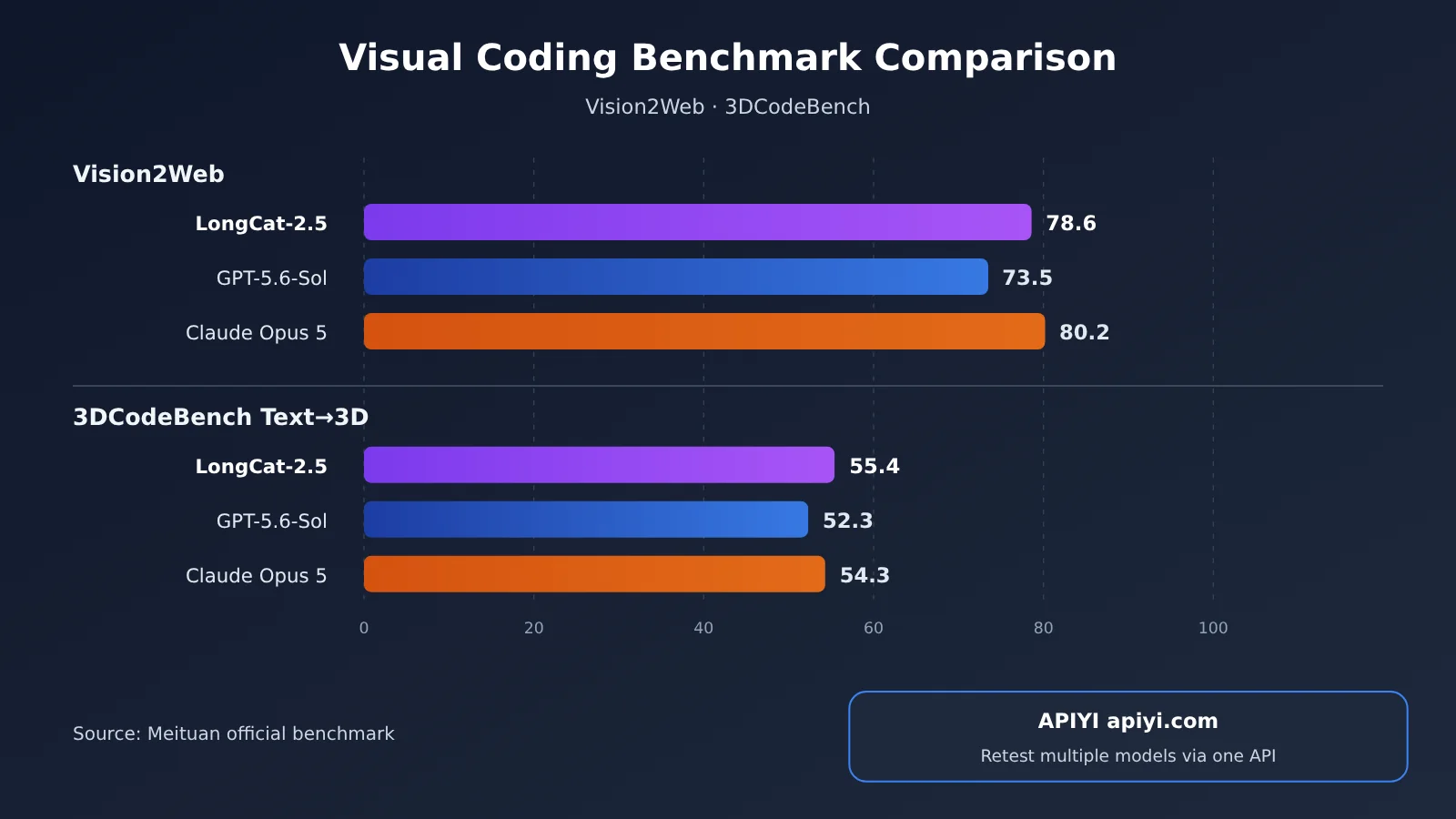
| Visual coding benchmarks | Vision2Web 78.6, 3DCodeBench Text→3D 55.4 (official table) |
| API formats | OpenAI-compatible and Anthropic-compatible |
| Open-source status | Final release weights weren’t available at launch; the team says they’ll be released later |
One important distinction: the official documentation supports image and video understanding, but that doesn’t mean LongCat-2.5 provides image generation or video generation APIs. The images and videos seen in third-party tests were rendered by tools such as Blender and browsers after the model wrote the code.
Screenshot Recreation and Web Design from Visual References Aren’t the Same
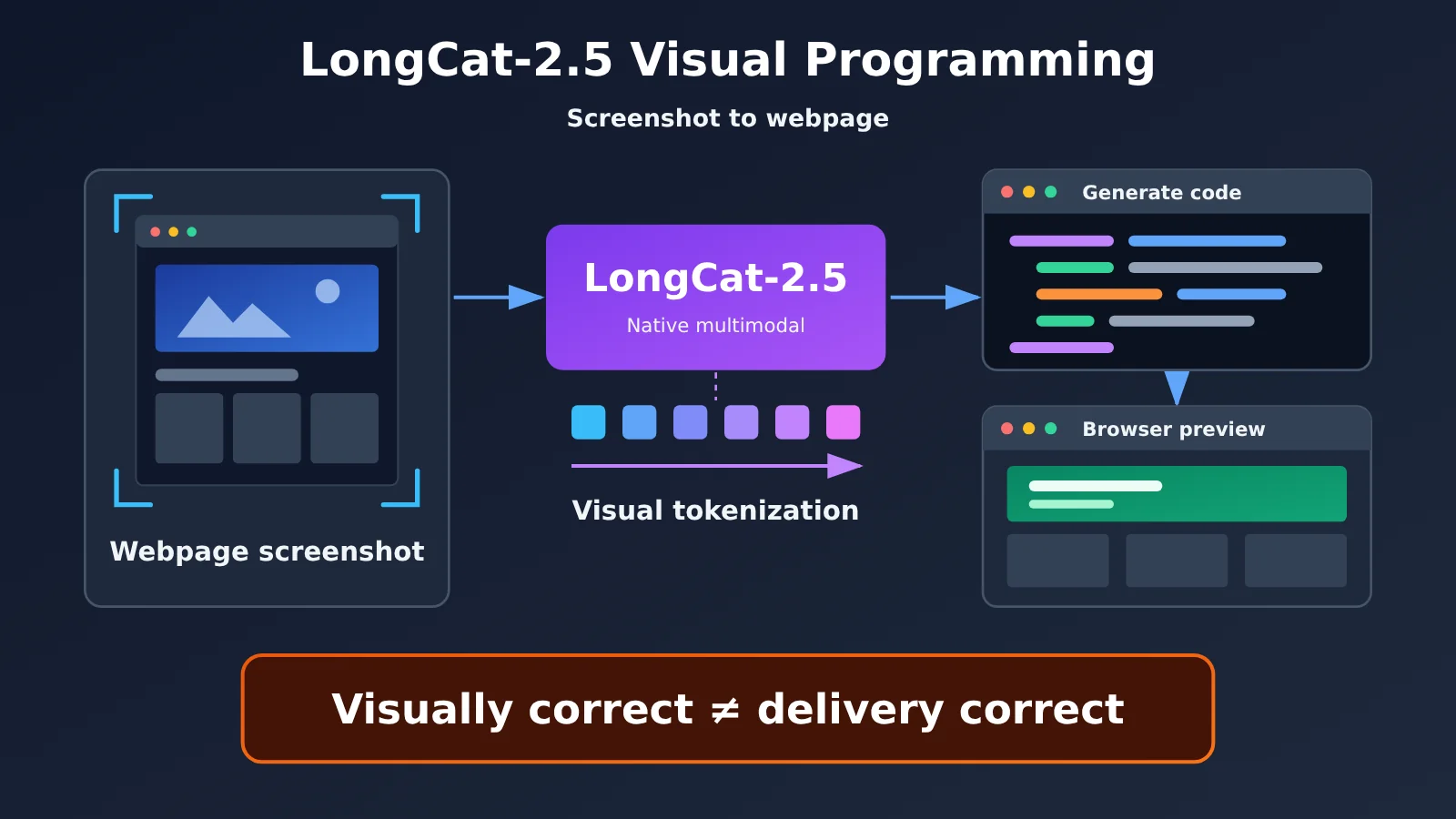
Before discussing “turning screenshots into web pages,” it’s important to distinguish between two types of tasks. The first is generation from a visual reference: provide a photo of a venue or an image that conveys a mood, along with written requirements, and ask the model to design a web page in a matching style. This gives the model freedom to design the layout; the result is successful as long as it captures the right feel.
The second is faithful screenshot recreation: provide a screenshot of an existing web page and ask the model to match its layout, spacing, fonts, interactions, and responsive behavior as closely as possible. The acceptance criteria are much stricter, and any deviation can be noticeable. The official event invitation page example falls into the first category. There aren’t yet enough independent examples to establish LongCat-2.5’s general accuracy on the second, let alone claim it can achieve pixel-perfect recreation.
How LongCat-2.5 Handles Visual Tokens
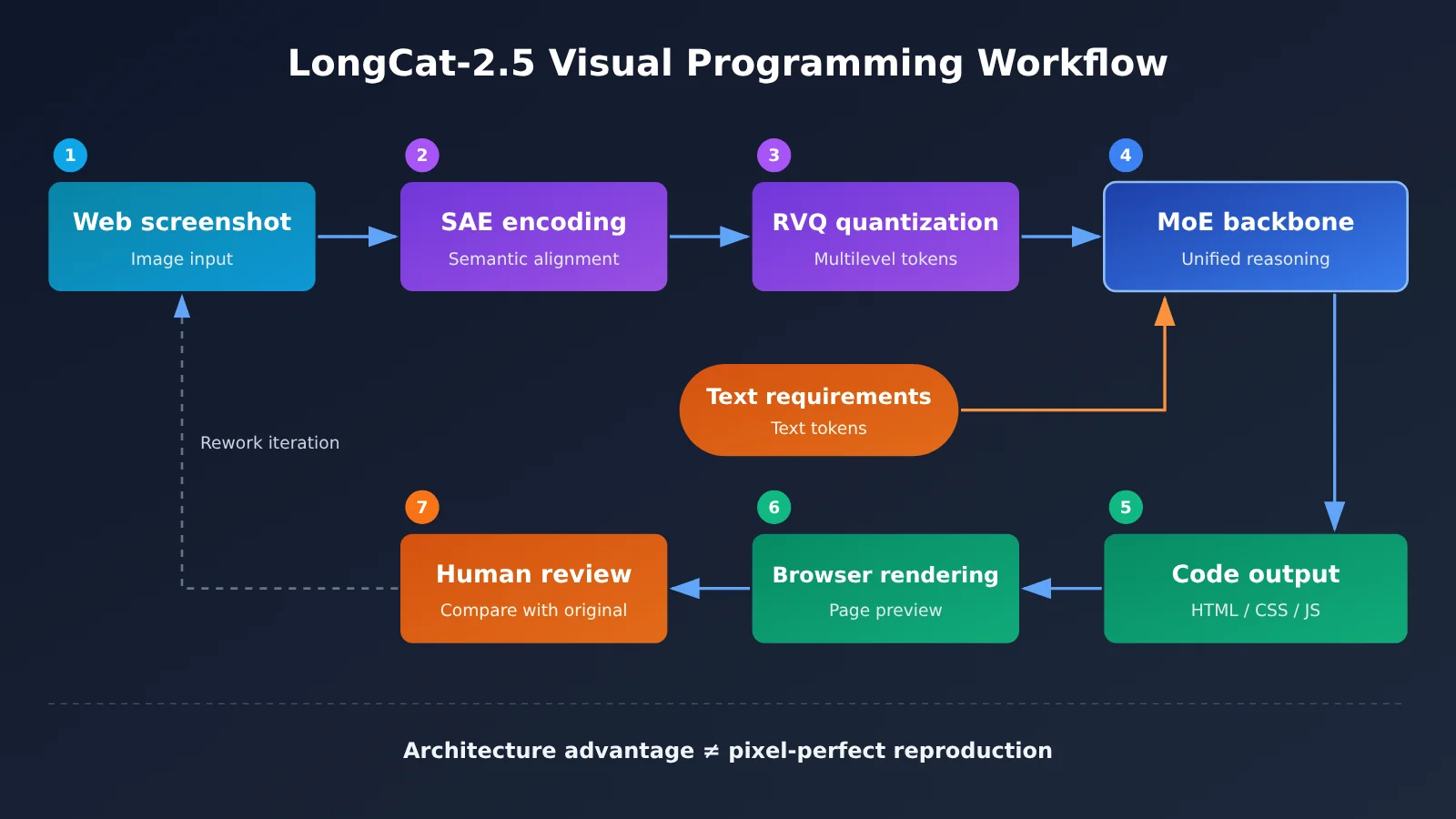
LongCat-2.5’s “native multimodal” capability comes from how it processes images. According to the team, the model first uses an SAE (Semantic Alignment Encoder) to extract visual features. It then uses RVQ (Residual Vector Quantization) to encode those features into multilevel discrete Tokens, which enter the backbone model alongside text Tokens for unified processing.
The design also includes native-resolution visual discretization, offline precomputation of visual Tokens, and joint learning of visual codebook Embeddings with the backbone model. For developers, the key takeaway is that an image isn’t “translated into a text description” before being passed to the model. Instead, it participates in reasoning and code generation in a form closer to its native representation. Still, an architectural advantage only provides a foundation—it doesn’t mean every screenshot can be recreated accurately.
How to Interpret LongCat-2.5’s Vision2Web Results
Meituan has published results for two benchmarks directly related to visual programming. All figures below come from its evaluation table. The comparison covers only the two other models listed in that table, not every model available as of 2026-11-03.
| Benchmark | LongCat-2.5 | GPT-5.6-Sol | Claude Opus 5 | Evaluation notes |
|---|---|---|---|---|
| Vision2Web | 78.6 | 73.5 | 80.2 | Claude Code v2.1.7, 256K sequence length, top_k=50 |
| 3DCodeBench Text→3D | 55.4 | 52.3 | 54.3 | Generating 3D code from text |
| DeepSWE v1.1 (reference) | 64.6 | 72.7 | 68.8 | Fixing issues in real-world repositories, mini-swe-agent |
By the numbers, LongCat-2.5 leads the models in the official comparison table on Text→3D. On Vision2Web, it scores 5.1 points higher than GPT-5.6-Sol but 1.6 points lower than Claude Opus 5. DeepSWE is a useful reference: visual programming still has to translate into production code, and LongCat-2.5 trails GPT-5.6-Sol by 8.1 points on fixing issues in real-world software repositories.
More importantly, benchmark scores aren’t the same as pixel-level fidelity or product acceptance rates. LongCat-2.5’s default evaluation settings enable thinking, with temperature=1.0 and top_p=0.95. Some scores for other models come from public reports, while others were tested by Meituan, so the test conditions aren’t entirely consistent.
💡 Choosing a model: Public leaderboards are only a reference. What really matters is testing models against your own screenshots and requirements. With an OpenAI-compatible aggregation interface like APIYI apiyi.com, you can use the same test script to compare outputs from multiple vision models before choosing your primary model.
LongCat-2.5 Visual Coding Case Comparison: Successes and Failures
The cases below come from three sources. The official examples are selected successes, while 智东西 and TOKRACE conducted small-sample third-party tests. The strength of the evidence varies, so keep those differences in mind.
| Source | Task | Requirements | Observed result |
|---|---|---|---|
| Official showcase | Real-time fluid simulation | Interactive fluid simulation webpage | Mouse clicks and drags trigger fluid effects |
| Official showcase | Event invitation webpage | Venue photos + natural-language requirements | Matching visual style, with a registration form, attendee list management, and export |
| 智东西 | Pelican riding a bicycle animation | HTML animation | Clear subject and consistent style, though the scarf was slightly misplaced |
| TOKRACE | Chinese event poster SVG | Preserve 6 specified Chinese text passages | All 6 were correct and appeared exactly once, with a clear layout |
| TOKRACE | Quarterly data chart SVG | Draw a bar chart from supplied data | Proportions and total of 84 were correct, but the model invented a fiscal year, a dollar unit, and a data source |
| TOKRACE | 3D planetary gearbox | 140mm dimensions and video delivery | Gear teeth were broken, 140mm was written as 140m, and no video was delivered |
| TOKRACE | Two-bedroom spatial model | Model an interior layout | No openings were made for doors or windows, the bed overlapped a partition wall, and the second bedroom was positioned incorrectly |
Official Showcase: Successful Examples of Visual References + Interactive Logic
The official blog lists eight end-to-end tasks. Those directly related to web development include a fluid simulation, a 3D display of the Sanxingdui bronze sacred tree, an urban planning model, Chinese-inspired visual design, and an event invitation page. The Sanxingdui example had to handle 3D structure, materials, and rotation and zoom interactions. The event page had to turn the mood of a photo into a page style while supporting registration, attendee list management, and spreadsheet export.
These examples show that LongCat-2.5 can turn visual requirements into runnable frontend code. But they don’t prove that it can build every interactive website in one attempt, or that the resulting pages meet commercial production performance standards.
Zhidx Test: Strong Overall Results, but Some Details Need Work
On 2026-11-02, Zhidx asked LongCat-2.5 to generate an HTML animation of a pelican riding a bicycle. The reporter found the animation well executed overall, with a clear subject, consistent style, and rich detail, though part of the scarf was slightly out of place.
In another task involving a PowerPoint presentation on Amazon’s third-quarter earnings, the analysis framework was complete, with trend charts, structural diagrams, and risk warnings. The reporter’s initial comparison found no obvious data errors. The issues were mostly in the presentation: some slides were too dense, the font was too small, and a few conclusions were stated too definitively. There’s a lesson here for web development too: content that’s broadly correct doesn’t necessarily have an acceptable layout or readability.
TOKRACE Test: Clearer Constraints, Higher Success Rates
TOKRACE connected LongCat-2.5 to Claude Code and used it with Blender and a browser to complete 15 creative tasks: six 3D projects, four educational videos, four static SVGs, and one animation. The successful cases shared a common trait: clear constraints and simple structures.
- Parametric bookshelf: The 0.8 m three-compartment version and the 1.0 m four-compartment version had correct dimensions, the 18 mm board thickness met the requirements, and all six requested views were delivered. The task took about 36 minutes, 47 requests, and 69,708 output tokens.
- Chinese event poster: Completed in about three minutes and 10 requests. All six Chinese text sections were preserved correctly, and the icons didn’t crowd the body text.
- Four-second cycling animation: The wheels, pedals, and legs moved in sync. The testers checked 40 points in time and found a maximum deviation of about 0.19 px between the feet and pedals, though the light-colored subject had low contrast.
The failures exposed some easily overlooked problems in visual programming. In the planetary gearbox task, the three planet gears were positioned roughly correctly, but 140 mm was entered as 140 m—a 1,000-fold unit error—and the requested video wasn’t delivered. The two-bedroom model “looked like a living room,” but had structural errors: doors and windows had no openings, the bed overlapped a partition wall, and some camera views were blocked by walls. In the clock SVG, the hands were correctly positioned at 9:41, but the numbers overlapped the thick tick marks.
TOKRACE also compared results with thinking mode on and off. With thinking enabled, some layouts were clearer, but reasoning and request costs could rise significantly. In the pelican-on-a-bicycle SVG comparison, the image was produced on the first request with thinking off, but only on the fifth request with thinking on. That’s an observation from a single task, not enough to establish average success rates for either setting.
Five Acceptance Criteria for LongCat-2.5 Visual Coding
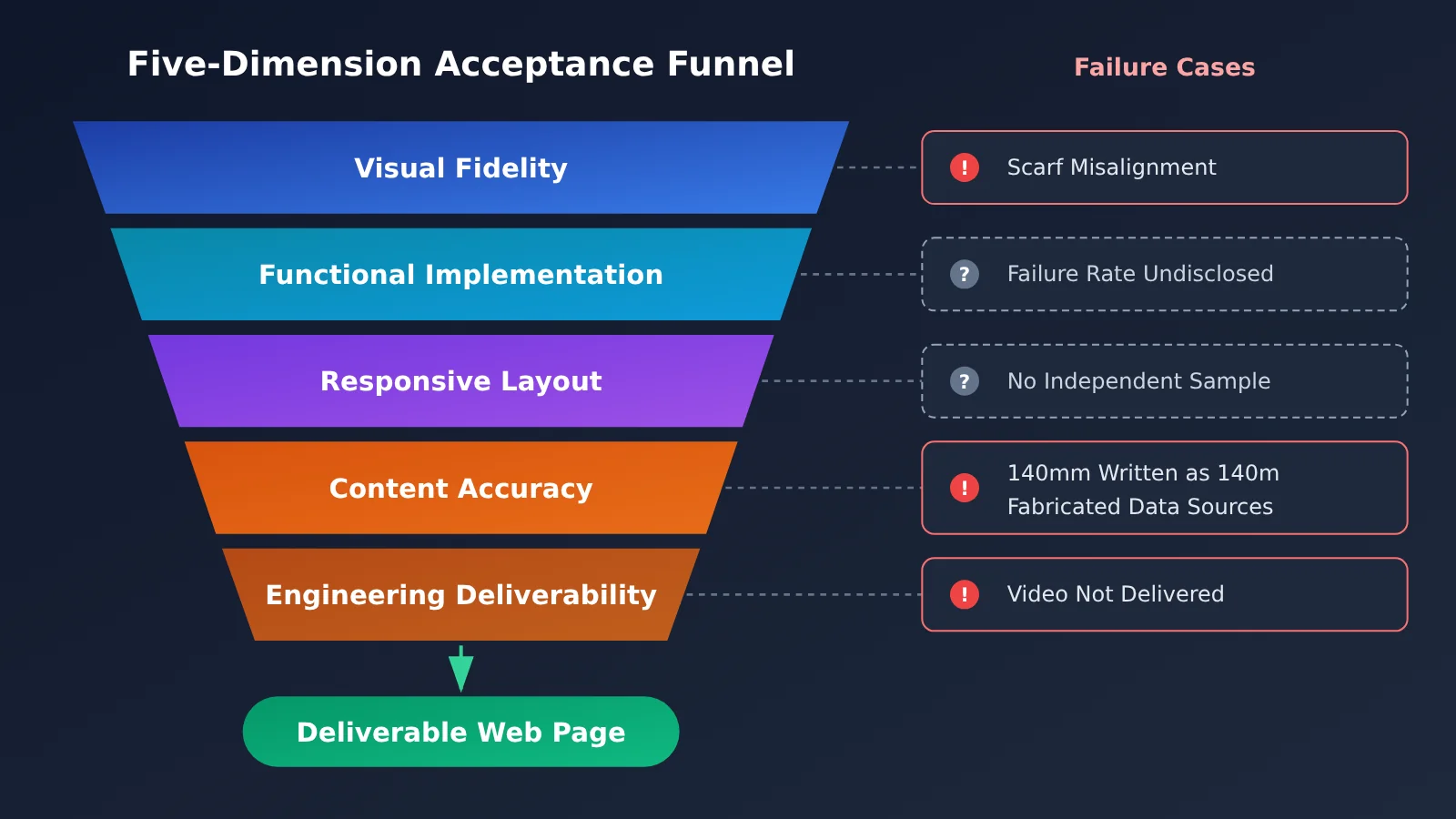
The cases above show that there are at least four hurdles between “looks right” and “ready to deliver.” The framework below is an engineering checklist based on those cases, not an official LongCat evaluation standard.
| Acceptance criterion | What to check | Risks revealed in the cases | Suggested checks |
|---|---|---|---|
| Visual fidelity | Colors, layout, typography, spacing, graphics | Misaligned scarf; numbers overlapping tick marks | Overlay the result with the original image and compare screenshots section by section |
| Functionality | Clicks, navigation, forms, state changes | Failure rates weren’t disclosed in the official showcase | Manually walk through the main flow and write simple E2E tests |
| Responsive layout | Overflow or overlapping elements at different screen widths | Independent samples are currently lacking | Check at least three breakpoints: mobile, tablet, and desktop |
| Content accuracy | Numbers, units, copy, sources | Fabricated fiscal year and data sources; 140mm written as 140m | Verify every piece of text and every unit |
| Engineering deliverability | Dependency installation, running, building, and file completeness | Video not delivered; long-running task interrupted by a timeout | Check each item against a delivery checklist |
Of these five criteria, content accuracy and engineering deliverability are the easiest to overlook in AI-generated results. A page with attractive colors and smooth animations can distract you from a fabricated data source or a missing file. When converting a screenshot into a webpage, it’s worth checking “what the model added” as a separate item.
How to Test LongCat-2.5 Screenshot-to-Webpage Conversion via API
If you want to test LongCat-2.5 with your own designs, you can send an image and text instructions using the OpenAI-compatible format. Images can be supplied as Base64 or public URLs, with a maximum size of 10 MB per image and up to 50 images per request. An original aspect ratio greater than 200:1 will cause an error, so you’ll need to split long screenshots first.
As of the verification date for this article (2026-11-03), we haven’t confirmed whether LongCat-2.5 is available on APIYI. Check the APIYI model list for current availability. The script below uses the standard OpenAI format, so you can first use it with a vision model already available on the platform to test the workflow. Once LongCat-2.5 is available, you’ll only need to replace the model name.
Minimal Example
import base64, openai

client = openai.OpenAI(api_key="YOUR_API_KEY", base_url="https://api.apiyi.com/v1")
img = base64.b64encode(open("screenshot.png", "rb").read()).decode()

resp = client.chat.completions.create(
    model="LongCat-2.5",  # Use the actual name from the APIYI model list
    messages=[{"role": "user", "content": [
        {"type": "text", "text": "按截图复刻为单文件 HTML,只用截图中出现的文字,不要补充任何数据"},
        {"type": "image_url", "image_url": {"url": f"data:image/png;base64,{img}"}}
    ]}],
)
print(resp.choices[0].message.content)
View the full implementation (including acceptance constraints and retries)
import base64
import time
import openai
from pathlib import Path

client = openai.OpenAI(
    api_key="YOUR_API_KEY",
    base_url="https://api.apiyi.com/v1"  # APIYI OpenAI-compatible endpoint
)

SYSTEM_PROMPT = """你是前端工程师。根据截图生成单文件 HTML(内联 CSS/JS)。
硬性要求:
1. 只使用截图中可见的文字,禁止补充数据、单位、来源或年份
2. 无法辨认的文字用 [待确认] 占位
3. 支持 375px / 768px / 1440px 三个断点
4. 代码末尾用注释列出:你做的假设、未实现的交互"""

def encode_image(path: str) -> str:
    data = Path(path).read_bytes()
    if len(data) > 10 * 1024 * 1024:
        raise ValueError("单张图片超过 10MB,请压缩后再试")
    return base64.b64encode(data).decode()

def screenshot_to_html(path: str, model: str = "LongCat-2.5",
                       retries: int = 3) -> str:
    img = encode_image(path)
    messages = [
        {"role": "system", "content": SYSTEM_PROMPT},
        {"role": "user", "content": [
            {"type": "text", "text": "请复刻这张网页截图。"},
            {"type": "image_url",
             "image_url": {"url": f"data:image/png;base64,{img}"}},
        ]},
    ]
    for i in range(retries):
        try:
            resp = client.chat.completions.create(
                model=model, messages=messages, max_tokens=16000
            )
            return resp.choices[0].message.content
        except openai.RateLimitError:
            time.sleep(2 ** i)  # Exponential backoff for 429 rate limits
    raise RuntimeError("多次重试失败")

if __name__ == "__main__":
    html = screenshot_to_html("screenshot.png")
    Path("output.html").write_text(html, encoding="utf-8")
    print("已生成 output.html,请按五维清单验收")
Two design choices in the code are worth noting. First, the system prompt explicitly prohibits adding data, units, or sources. This directly guards against the fabricated fiscal years and data sources seen in the TOKRACE chart example. Second, it asks the model to list its assumptions at the end of the code, making it easier for a reviewer to spot what it guessed. For the exact request structure for thinking mode, consult LongCat’s official parameter documentation rather than copying another model’s reasoning parameters.
🚀 Quick start: Consider claiming free testing credits for new users through APIYI at apiyi.com. Run the full workflow with 3–5 screenshots of varying complexity (landing pages, forms, and dashboards), then score the results against the five-dimensional checklist before deciding whether to add it to your production workflow.
LongCat-2.5 Visual Programming Impact Analysis
Impact on Front-End Developers
- Faster prototyping: Quickly generate interactive pages from visual references for project demos, first drafts of campaign pages, and internal tools. The official event invitation page and the TOKRACE poster examples both fall into this category.
- Review work doesn’t go away: The model can create pages that “look right,” but errors in units, copy, and structural relationships can be harder to spot. Developers will spend less time writing code and more time defining constraints and reviewing results.
- Clearer constraints lead to better results: The bookshelf example performed well when given explicit dimensions and a delivery checklist. Vague requirements leave more room for the model to improvise.
Impact on AI Coding Workflows
The official LongCat-2.5 documentation provides integration guides for tools such as Claude Code, Codex, OpenCode, and Cline. Usually, you only need to change the Base URL, API key, and model name. This means visual programming can fit into an existing agent workflow rather than requiring a separate chat window. However, API format compatibility doesn’t mean every tool feature and parameter works identically. Long-running tasks can also time out or be interrupted, which is why some of TOKRACE’s video tasks weren’t completed.
On cost, the official limited-time promotional prices are currently ¥2.00 for cache-miss input, ¥0.04 for cache-hit input, and ¥8.00 for output per million tokens. Check the official platform and your bill for actual charges. A multi-round task like the bookshelf example generated nearly 70,000 output tokens, so when planning visual programming jobs at scale, request volume and output length deserve more attention than the unit price.
When to Use LongCat-2.5 for Screenshot-to-Webpage Tasks
Taken together, the evidence points to three categories of use:
| Category | Typical Scenarios | Recommended Approach |
|---|---|---|
| Ready to use | First drafts of campaign pages, SVG posters, simple interactive animations, internal demo pages | Check the visuals and copy after generation |
| Requires human review | Recreating a screenshot as a production page, data charts, responsive landing pages, multi-step forms | Review each item against the five-dimension checklist, paying special attention to data and units |
| Not recommended as a primary solution | High-precision engineering dimensions, spatial structure design, brand pages requiring pixel-perfect reproduction, unattended long-running tasks | Use it for drafts only; have a person complete the final deliverable |
💰 Cost tip: Visual programming often takes multiple iterations. Start with a small batch of screenshots to estimate the average token usage per page. APIYI apiyi.com offers pay-as-you-go pricing and consolidated billing, making it easier to compare per-page costs across models.
Frequently Asked Questions
Q1: Can LongCat-2.5 turn a screenshot directly into a complete webpage?
It can generate a working webpage, but don’t assume it’s ready to deliver as-is. Official demos and third-party tests show that it can turn visual references into interactive frontend code. However, there are no independent samples establishing its general accuracy at replicating screenshots, and there’s no basis for claiming pixel-perfect reproduction.
Q2: How does LongCat-2.5 compare with Claude Opus 5 on Vision2Web?
In the official table, LongCat-2.5 scores 78.6, Claude Opus 5 scores 80.2, and GPT-5.6-Sol scores 73.5. LongCat-2.5 leads on Text→3D, but it still trails Claude Opus 5 slightly on Vision2Web. These figures were published by Meituan, and the testing conditions aren’t entirely consistent, so it’s worth retesting with your own tasks.
Q3: What are the most common failures in LongCat-2.5’s visual coding?
TOKRACE testing found four main types: unit errors (writing 140mm as 140m), spatial errors (a bed overlapping a partition), fabricated content (adding a nonexistent data source to a chart), and incomplete deliverables (failing to generate a requested video). These issues often aren’t visually obvious, so you’ll need to check for them specifically.
Q4: Can I invoke LongCat-2.5 through APIYI?
As of 2026-11-03, LongCat-2.5’s availability on APIYI hasn’t been confirmed. Check the live model list at APIYI, apiyi.com, for the latest information. In the meantime, you can use the OpenAI-compatible script in this article with a visual model already available on the platform to test your acceptance workflow. Once LongCat-2.5 is available, just replace the model name.
Q5: Is it better to enable thinking mode when turning screenshots into webpages?
There’s no universal answer. TOKRACE observed clearer layouts in some cases with thinking enabled, but costs could rise significantly. In a pelican SVG comparison, disabling thinking produced a successful image on the first attempt. Test both modes with the same set of screenshots on APIYI at apiyi.com, then decide based on actual success rates and token consumption.
Q6: Can LongCat-2.5 generate images or videos?
The official API supports image and video understanding, not generation. The images, videos, and 3D visuals in third-party tests were rendered by tools such as browsers and Blender using code written by the model. They shouldn’t be considered native image generation capabilities.
LongCat-2.5 Visual Coding: Key Takeaways
- What it does: LongCat-2.5 can turn visual references into working webpage code, but that doesn’t mean it can reproduce screenshots pixel-perfectly.
- Official scores: It scored 78.6 on Vision2Web, slightly below Claude Opus 5, and 55.4 on Text→3D, leading the official comparison table.
- Where it succeeds: Tasks with clear constraints and simple structures tend to produce more complete results, such as poster SVGs and parametric bookshelves.
- Where it falls short: Units, spatial relationships, fabricated content, and incomplete deliverables are the main risks.
- How to evaluate it: Check five areas individually: visual fidelity, functionality, responsiveness, content accuracy, and engineering completeness.
- How to get started: Use an OpenAI-compatible script on APIYI apiyi.com to set up a test workflow. Check the model list for LongCat-2.5 availability.
Summary
The key conclusions about LongCat-2.5’s screenshot-to-webpage capabilities are:
- Prototyping isn’t the same as production-ready delivery: Official examples and third-party tests demonstrate its visual coding capabilities, but there’s still a significant gap between a screenshot and a launch-ready page.
- Getting the visuals right is only the first step: Interactions, responsiveness, content accuracy, and engineering completeness all need separate checks. It’s especially easy to overlook what the model added on its own.
- Use constraints to improve reliability: Specify dimensions, copy, breakpoints, and a delivery checklist, and tell the model not to add data in the prompt. This can significantly reduce errors caused by creative interpretation.
If you’re planning to bring visual coding into your daily development workflow, start by testing a small sample of your own screenshots, then define where to use it based on the three tiers discussed in this article. We recommend using APIYI apiyi.com to compare the real-world performance of multiple vision models through a unified interface. The platform offers free credits for new users, making it easier to test at a low cost.
📚 References
- LongCat-2.5 official technical blog: Model architecture, benchmarks, and official demos
- Link:
longcat.ai/blog/longcat-2.5 -
Details: Original source for Vision2Web and 3DCodeBench results and evaluation conditions
-
Meituan technical team blog: LongCat-2.5 visual token technology
- Link:
tech.meituan.com/2026/11/02/Meituan-LongCat-2.5.html -
Details: An introduction to visual encoding mechanisms such as SAE and RVQ
-
LongCat visual understanding API documentation: Image and video input limits
- Link:
longcat.ai/platform/docs/image-video-understanding -
Details: Limits on image formats, file sizes, quantities, and aspect ratios
-
Zhidx hands-on report: Pelican animation and financial report PowerPoint tests
- Link:
tech.ifeng.com/c/8xjHpT7wJEN -
Details: A media perspective on using the official release
-
TOKRACE official release test: Records of 15 creative tasks
- Link:
www.tokrace.com/zh-CN/guides/longcat-2-5-release - Details: Includes original images, projects, and execution logs, covering both successful and failed cases
Author: APIYI Technical Team
Technical discussions: Visit the APIYI homepage at apiyi.com to contact us. For more integration resources, see the documentation center at docs.apiyi.com.