Summary: This article takes the sentence “blend these two images together for me” and breaks it into the executable chain inside an Agent — showing where the money goes, and how to stop wasting it by leaning on Skills and prompt constraints.
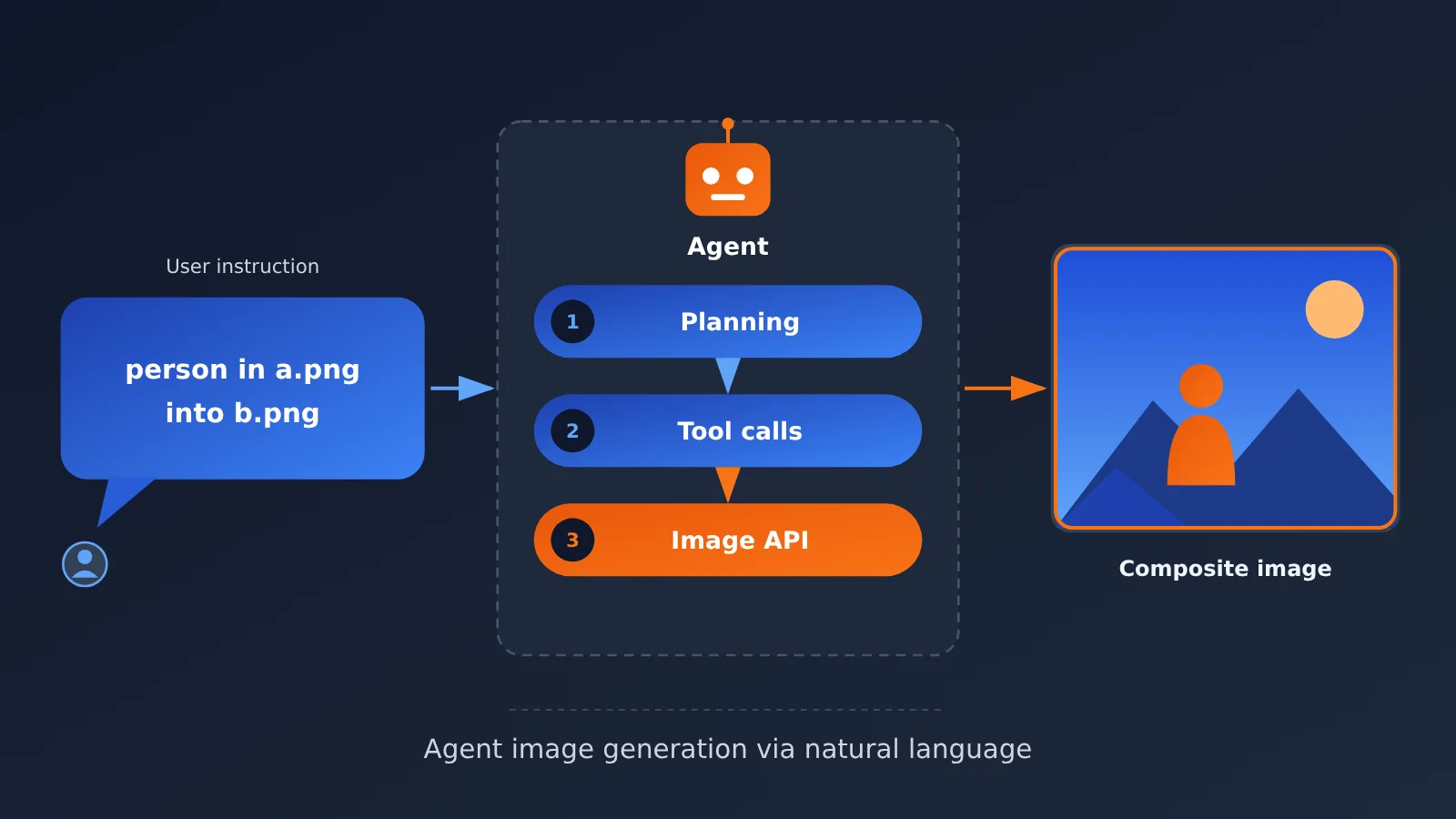
Agent Natural-Language Image Generation: The Bottom Line First
An Agent can’t generate images on its own — it has to call an image model to deliver anything. Behind a single natural-language instruction, there are usually three stages in sequence: planning, tool invocation, and the image API call. The first two are handled by the text model and the client and are billed by token; only the last stage actually produces pixels.
Two conditions decide whether your costs stay low: whether the Agent knows where the files are, and whether it knows how to call the image endpoint. When it knows neither, the Agent starts scanning directories, hunting through docs, and writing scripts — and the text-side spend often runs several times higher than the image itself, sometimes without a single image to show for it. Bake the calling pattern into a Skill, then use the prompt to pin down files and turn limits, and you can squeeze that exploration cost right down. APIYI apiyi.com ships ready-made GPT-Image Skills, and the default model is billed per call — a good fit for everyday image generation and batch experimentation.
Agent Natural-Language Image Generation Knowledge Map
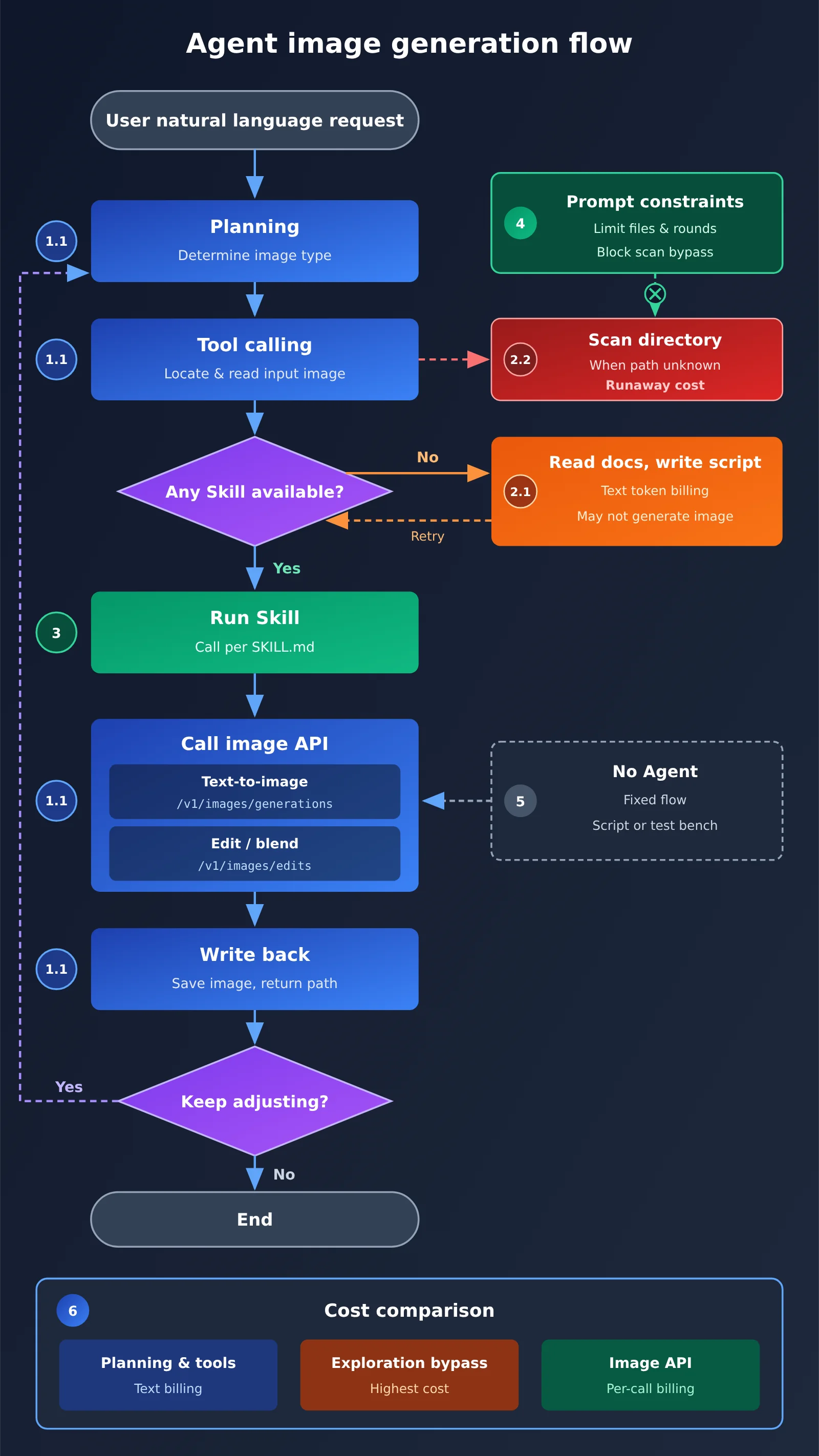
Figure note: The main trunk is “request → planning → tool invocation → image API → write-back”. Runaway costs are concentrated in two side paths: scanning directories when the path is unclear, and repeatedly reading docs, writing scripts, and trial-and-error when a Skill is missing. Sections 3 and 4 use Skills and prompt constraints to cut off these two side paths, Section 5 gives the option to bypass the Agent entirely, and Section 6 turns the judgment into numbers with a price table.
Agent Natural Language Image Generation Chapter Index
- 1 Pipeline Breakdown: Get clear first on the six stages of Agent image generation and how each stage is billed — this is the foundation for every judgment that follows.
- 2 Where the Cost Goes: Use a real “image blending” log to show why text-side exploration costs more than image generation itself, and explain why the Agent scans the project.
- 3 Replace Exploration with a Skill: In response to the problem in section 2, provide a directly executable Skill approach and Images API code.
- 4 Prompt Constraints: Complementary to section 3, restrict files, tools, and turns to keep the Agent from falling back into the scanning side path.
- 5 When Not to Use an Agent: Reference as needed; suitable for fixed workflows, batch tasks, and prompt validation.
- 6 Cost Comparison and Selection: Summarize prices and give actionable selection criteria and acceptance methods.
To Know: Terms Related to Agent Image Generation
| Term | Brief Explanation |
|---|---|
| Agent | A model client that can plan on its own, call tools, and execute tasks over multiple turns, such as Codex |
| Skill | A SKILL.md description plus a script that fixes “how to call the API” so the Agent can execute it directly |
| Fixed base | Content that must be re-read every turn, such as system prompts, tool definitions, AGENTS.md, and project context |
| Cache write | The billing process when context first enters the cache; it happens again after a cold start or cache invalidation |
| mask | A mask image in image editing that specifies the regions that can be modified |
1. The Six-Stage Pipeline for Agent Natural-Language Image Generation
1.1 Breaking Down the Agent Image Generation Pipeline Stage by Stage
The user describes the goal in natural language — for example, “put the person from a.png into the scene from b.png” — and the Agent then works through the following sequence:
- Receive the request: read your natural-language description.
- Plan: decide whether this is text-to-image, image editing, or multi-image fusion, and determine which inputs are needed.
- Tool invocation: locate files, read images, and if necessary list directories or search the codebase. When the Agent isn’t sure where a file lives, it scans the project first — this is the step where things most easily get out of hand.
- Decide how to invoke: if a ready-made Skill exists, run it directly; if not, look up docs, write scripts, and try out parameters — all of these actions are billed as text tokens.
- Call the image API: text-to-image goes through
/v1/images/generations, while image editing and multi-image fusion go through/v1/images/edits. - Write back the result: save the image and return the path or preview to the conversation; if further tweaks are needed, move on to the next round.
1.2 Cost of Each Stage in Agent Image Generation
The table below maps each stage to who executes it, what gets billed, and the usual problems. As you can see, only stage 5 actually spends money on generating an image — every other stage spends text tokens.
| Stage | Who executes it | What gets billed | Common problems |
|---|---|---|---|
| Planning | Text model | Input + output | Full context has to be sent every round |
| Tool invocation | Agent client | Tool results become input for the next round | Scanning directories, reading large files |
| Doc lookup / script writing | Text model | Input + output | Repeated trial and error; you may never get an image at all |
| Calling the image API | Image model | Per image or per image token | Unfamiliar parameters, unsupported sizes |
| Write-back | Client | Usually no extra charge | Large image transfers time out |
⚠️ Note: Don’t use the Responses
image_generationbuilt-in tool in Codex. It carries a fixed tool fee every time, and its behavior is inconsistent across different pipelines; when you need to generate an image, call/v1/images/*directly or use the Skill from Section 3.
2. Where Do the Costs of Agent Natural-Language Image Generation Go?
2.1 A Real Case: The Bill for a Single Image Composite
On 2026-11-27 (UTC+8), a user was doing image compositing in Codex, and the logs showed two completely different groups of requests. One group was the Agent planning and reading files; the other was the actual image generation.
| Time window | Requests | Scale | Cost |
|---|---|---|---|
| 09:16–10:15 | 47 /v1/responses requests (gpt-6.2-astra) |
About 2.2 million input tokens, with output per turn ranging from a few dozen to more than a thousand tokens | About $3.3 |
| Another window, about 6 minutes | 8 /v1/images/edits requests (gpt-image-2.6-sunburst) |
About 27,000 input tokens and 10,000 output tokens | About $0.54 |
This log tells us two things. First, there were no image requests at all during that hour; all 47 were text requests, meaning the task never even reached the image API. Second, the text side cost about $3.3 for the hour, while the 8 actual image-generation requests totaled about $0.54. The exploration cost was several times the cost of the images themselves.
This is default Agent behavior: if it’s not sure where a file is, it scans first; if it doesn’t know how to call an API, it checks the docs first. The only difference is whether someone handed it that information in advance.
2.2 Why Does the Agent Scan the Entire Project?
The Agent loop itself comes with several structural costs. You need to understand them to address the root cause:
- Uncertain file locations: The Agent’s first instinct is to list directories and search for filenames, not to ask you a question.
- A large fixed base: The system prompt, tool definitions,
AGENTS.md, and project context all have to be reread every turn. - Context grows monotonically: Every tool result gets appended to the next round’s input. The more turns there are, the more expensive each turn becomes.
- New sessions also cost money: Starting a new conversation only clears the history; the fixed base still has to be written to the cache again.
In the case above, the Agent’s per-turn input climbed from about 30,000 tokens to about 63,000. Over 59 minutes, there were also 4 cache writes starting from 0 (the initial cold start plus 3 rebuilds). These are all normal costs of the Agent loop and have nothing to do with whether the model is genuine. For Codex’s cost characteristics, see the OpenAI Codex integration guide: docs.apiyi.com/scenarios/programming/codex-cli
3. Exploring Skills as a Replacement for Agent-Driven Image Generation
3.1 What the GPT-Image Skill Offers
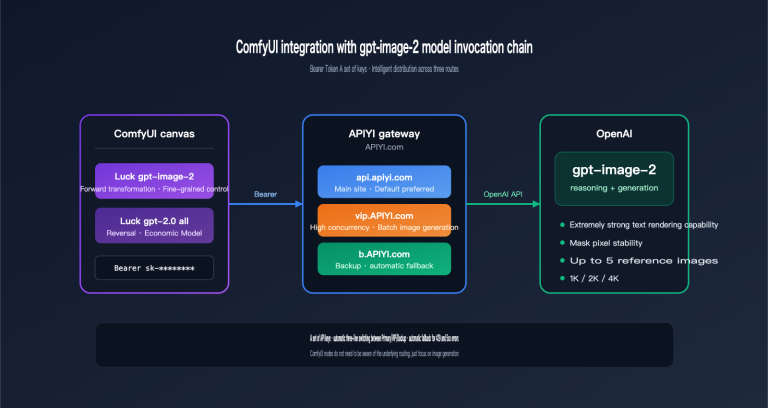
APIYI’s GPT-Image Skills bakes “how to call the API” into a SKILL.md plus a script. The Agent reads the instructions and can execute right away — no more hunting through docs or writing scaffolding. Here’s what it gives you:
- The default model is
gpt-image-2.6-all, billed per call at $0.025/image — the cheapest way to experiment. - One script covers 11 models plus 1 alias.
- The
-iparameter can be repeated for up to 16 input images, so multi-image fusion works out of the box. - When you need the official quality tiers or a precise
mask, use--modelto switch togpt-image-2.6-flareorgpt-image-2.6-sunburst.
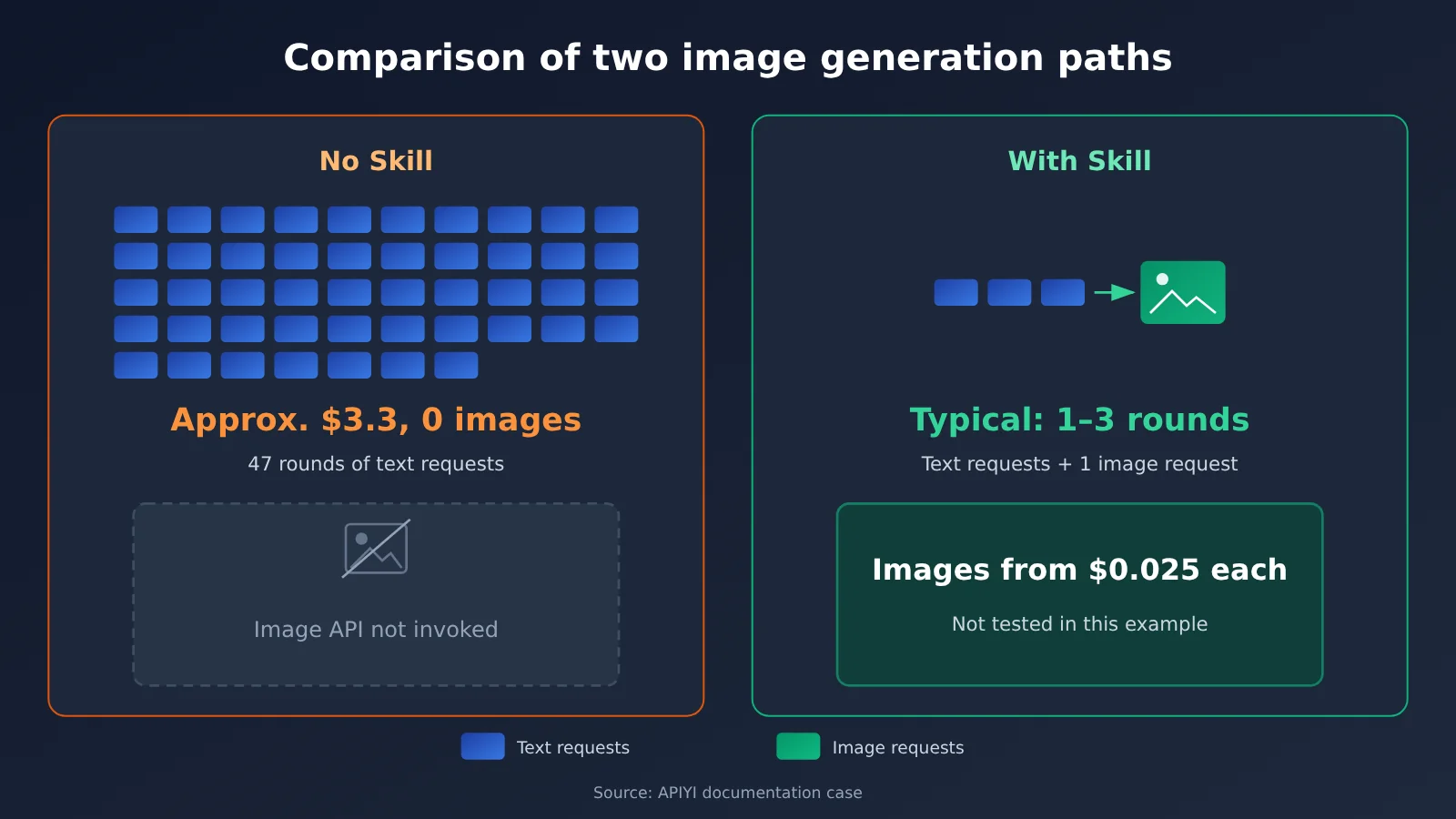
The image above compares the two paths. The numbers on the left come from the real logs in Section 2.1; the right side shows the Skill’s typical round count and starting price, which weren’t measured in that particular case.
| Path | Text rounds | Image calls | Result in this case |
|---|---|---|---|
| No Skill, figuring it out yourself | Many (47 rounds here) | Possibly never | About $3.3, 0 images |
| With Skill, following the instructions | Few (typically 1–3) | Starting at 1 | Not measured here; images from $0.025 each |
Having a Skill still costs money: the Agent’s text rounds are billed as usual, and images are still billed per image or per token. What you save is the “read the docs, write scaffolding, tweak parameters over and over” stretch.
3.2 Three Steps to Install a Skill
Installing takes just three steps: create a Skill directory, write a .env file in that directory (fill in the API key; variable names follow SKILL.md), and hand the directory to the Agent. For full instructions and the parameter table, see the GPT-Image series Agent Skill documentation: docs.apiyi.com/api-capabilities/gpt-image-2/skills
Once you’ve handed it over to the Agent, just give it instructions using “Template 4” in Section 4. The Agent will follow SKILL.md instead of figuring out the API on its own.
3.3 Calling the Images API Directly Without a Skill
If your Agent platform doesn’t support Skills yet, you can hand it the code below and have it call the multi-image fusion endpoint directly. This works when you know the paths to both input images and you’re using gpt-image-2.6-sunburst, a model that supports editing.
import base64
import openai

client = openai.OpenAI(
    api_key="YOUR_API_KEY",
    base_url="https://api.apiyi.com/v1"  # APIYI OpenAI-compatible endpoint
)

result = client.images.edit(
    model="gpt-image-2.6-sunburst",
    image=[open("/path/a.png", "rb"), open("/path/b.png", "rb")],
    prompt="把第一张图的人物放进第二张图的场景,保留第二张图的光线和色调",
)

data = result.data[0]
if getattr(data, "b64_json", None):
    with open("/path/out.png", "wb") as f:
        f.write(base64.b64decode(data.b64_json))
    print("已保存 /path/out.png")
else:
    print("图片地址:", data.url)
Validation is simple: an image appears at the output path, and a /v1/images/edits entry shows up in your billing. If you only see a /v1/responses entry, the Agent is still in the exploration phase.
🚀 Quick start: New users can sign up at APIYI (apiyi.com) to get free trial credits. A single key covers both text and image models. Start with the default
gpt-image-2.6-allto get the whole pipeline working, then switch to the quality tier you need.
4. Prompt Constraints for Agent Natural Language Image Generation
4.1 Four Prompt Templates You Can Copy
The Skill handles “how to call it,” while prompt constraints handle “don’t go hunting around.” The four templates below can be used on their own or combined.
Template 1: Precise image generation, pin down the files and tools
Only process the two images I specify: /path/a.png and /path/b.png.
Don't scan directories, don't read other files, don't modify code.
Put the person from a.png into the scene from b.png, keeping b.png's lighting and color tone.
Call /v1/images/edits directly, use model gpt-image-2.6-sunburst, and output to /path/out.png.
When done, reply only with the output path and cost — don't explain the process.
Template 2: No project scanning
Don't run ls, find, grep, or any directory scan.
Only use the file paths and parameters I give you in the message; if a path is missing, ask me first — don't go find it yourself.
Template 3: Limit rounds and output
This task allows at most 5 rounds of tool calls: only reading the 2 files I specify and calling the image API once.
If you go over that, stop and ask me — don't keep scanning.
Execute directly: don't restate the requirements, don't offer solution comparisons, don't output intermediate reasoning.
Template 4: Force the Skill
Use APIYI's gpt-image-2 Skill, default to gpt-image-2.6-all, and output just 1 image.
Don't look up the API docs yourself, don't scaffold a new project — just follow SKILL.md directly.
4.2 Write the Constraints into AGENTS.md
For projects that generate images often, you can put the constraints from Template 2 and Template 3 into the project root’s AGENTS.md — that’s more reliable than repeating them verbally every time. One thing to keep in mind: AGENTS.md is part of the fixed base and gets read on every round, so keep it to a few dozen lines. Otherwise it ends up driving up the cost of each round.
5. When You Don’t Need an Agent to Generate Images from Natural Language
5.1 Validating prompts: use AI Image Master
If you only want to validate a prompt or compare how different models perform, the web-based test console AI Image Master (imagen.apiyi.com) is a better fit. It uses the same APIYI key and the same set of image endpoints, so you only pay for images — no text model costs. Images are still billed at the selected model’s price; it isn’t a separate, cheaper channel.
5.2 Batch and production: write a script
When image generation follows a fixed workflow, the Agent’s planning ability doesn’t come into play — it just adds text overhead. Use the table below to decide:
| Scenario | Recommended approach | Why |
|---|---|---|
| Ad-hoc, one-off natural-language image edits | Agent + Skill | Convenient interaction, exploration cost stays manageable |
| Validating prompts, comparing models | AI Image Master | No text model fees |
| Batch and scheduled jobs | Call /v1/images/* directly from a script |
Predictable cost, retries on failure, easy-to-reconcile billing |
| Production pipelines | Scripts + queue + monitoring | More controllable than an Agent |
6. Cost Comparison and Model Selection for Agent-Driven Natural-Language Image Generation
6.1 Text and image model pricing
The table below summarizes the pricing for the text and image models used in the examples, making it easy to estimate the cost on both sides of a single image-generation task.
| Model | Billing | Price | Available platform |
|---|---|---|---|
gpt-5.6-luna |
Per token | $0.2 / $1.2 per 1M (input / output) | APIYI |
gpt-6.2-sol |
Per token | $2 / $10 per 1M | APIYI |
gpt-6.2-astra |
Per token | $8 / $40 per 1M | APIYI |
gpt-image-2.6-all |
Per image | $0.025 / image | APIYI |
gpt-image-2.6-flare |
Per token | About $0.006–0.21 / image (1K tier) | APIYI |
gpt-image-2.6-sunburst |
Per token | About $0.006–0.21 / image (1K tier) | APIYI |
List prices are aligned with the official site and may change as the official site adjusts; the figures above are for reference only — refer to the model pricing section at APIYI apiyi.com. After the top-up bonus, your effective price is roughly 83–91% of list price.
6.2 A practical way to decide
Before you start, ask three questions: is the input file path clear, is the GPT-Image Skill already installed in the Agent, and does this task need the Agent’s interactive capability? If all three are yes, issue the instruction using “Template 1 + Template 4”; if the path isn’t clear, fill it in first and then give the instruction; if the task is a fixed workflow, go straight to the scripts or the web console from section 5.
When the task is done, check the bill: ideally you’ll see a few /v1/responses calls plus one or a handful of /v1/images/*, and the text-side cost shouldn’t be noticeably higher than the image-side cost. If text requests pile up into a long chain with no image requests, go back to section 4 and tighten the constraints. With this approach, you can run both text planning and image generation on APIYI apiyi.com with a single key, and keep the cost of each image generation within a predictable range.
Author: APIYI technical team
Technical discussion: For more Skill parameters and image editing details, see the documentation center at docs.apiyi.com