
Summary: When a Responses stream ends, use the last protocol terminal state you received to judge the server-side outcome, then run your own business checks to decide whether the task is truly done. This rule works for both APIs.
Let’s start with the conclusion. The Responses streaming APIs of LongCat 2.5 and DeepSeek V4.1 Flash share three semantic terminal states with identical names: receiving response.completed means the service reports success, receiving response.incomplete means the service reports truncation, and receiving response.failed means the service reports failure. If the connection closes, times out, or gets reset by a proxy and no terminal state ever arrives, that falls into a fourth category: the local connection broke and the result is unconfirmed. That’s a different thing from a truncation the server explicitly reported.
There’s also one precondition that changes the answer: server-side success doesn’t equal business success. completed only means the model finished this request normally. Whether the body satisfies your structural constraints, whether the tools actually finished running after the function call, and whether the result was idempotently written to storage — all of that has to be verified separately on the client side.
The information in this article was verified on 2026-11-25 (Beijing time), and the scope is limited to the two vendors’ native Responses APIs. The event sequences in this article are constructed samples for adapter acceptance testing, not captured traces from live traffic.
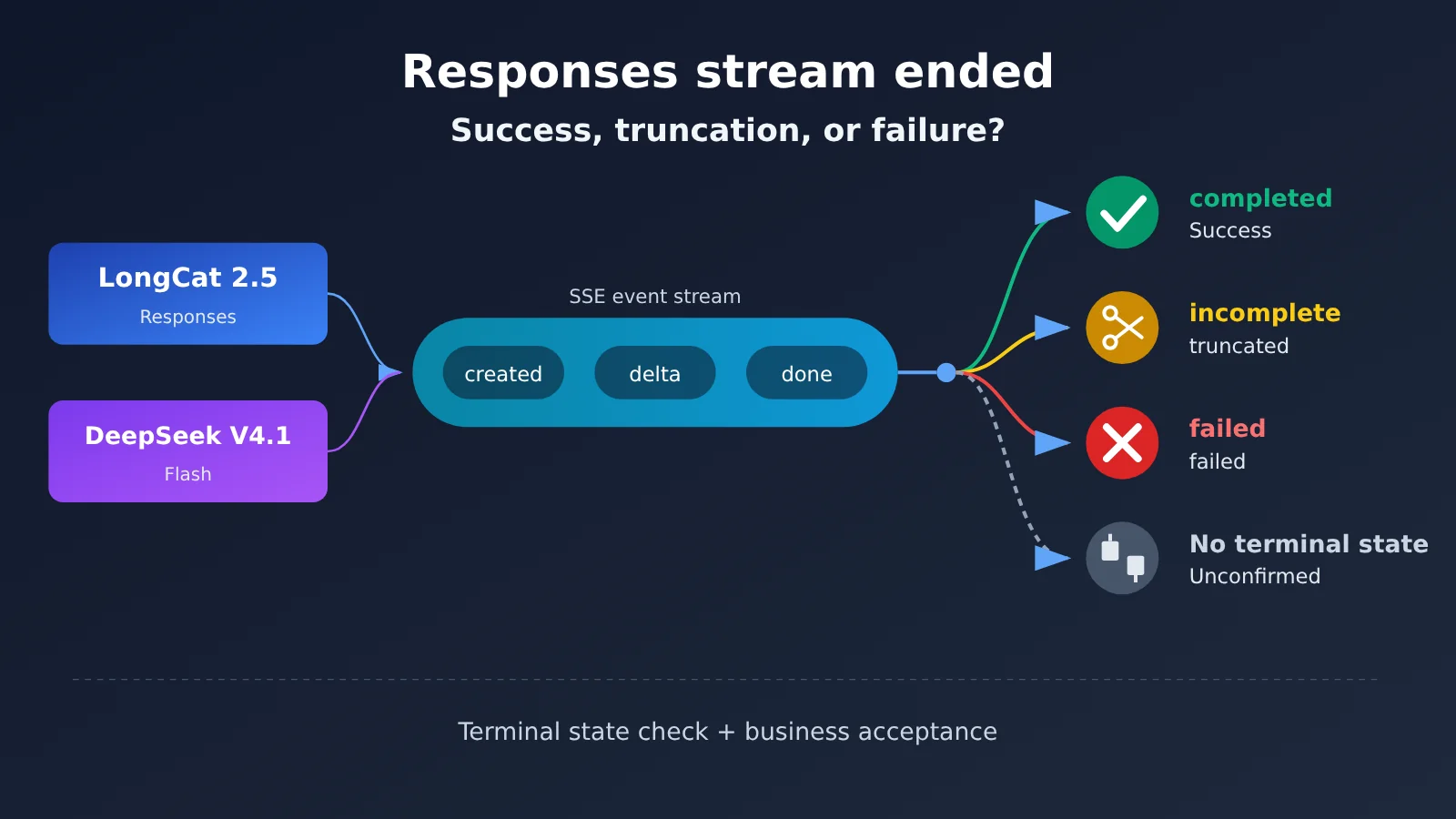
Knowledge Map: The 4 Decision Paths After a Responses Stream Ends
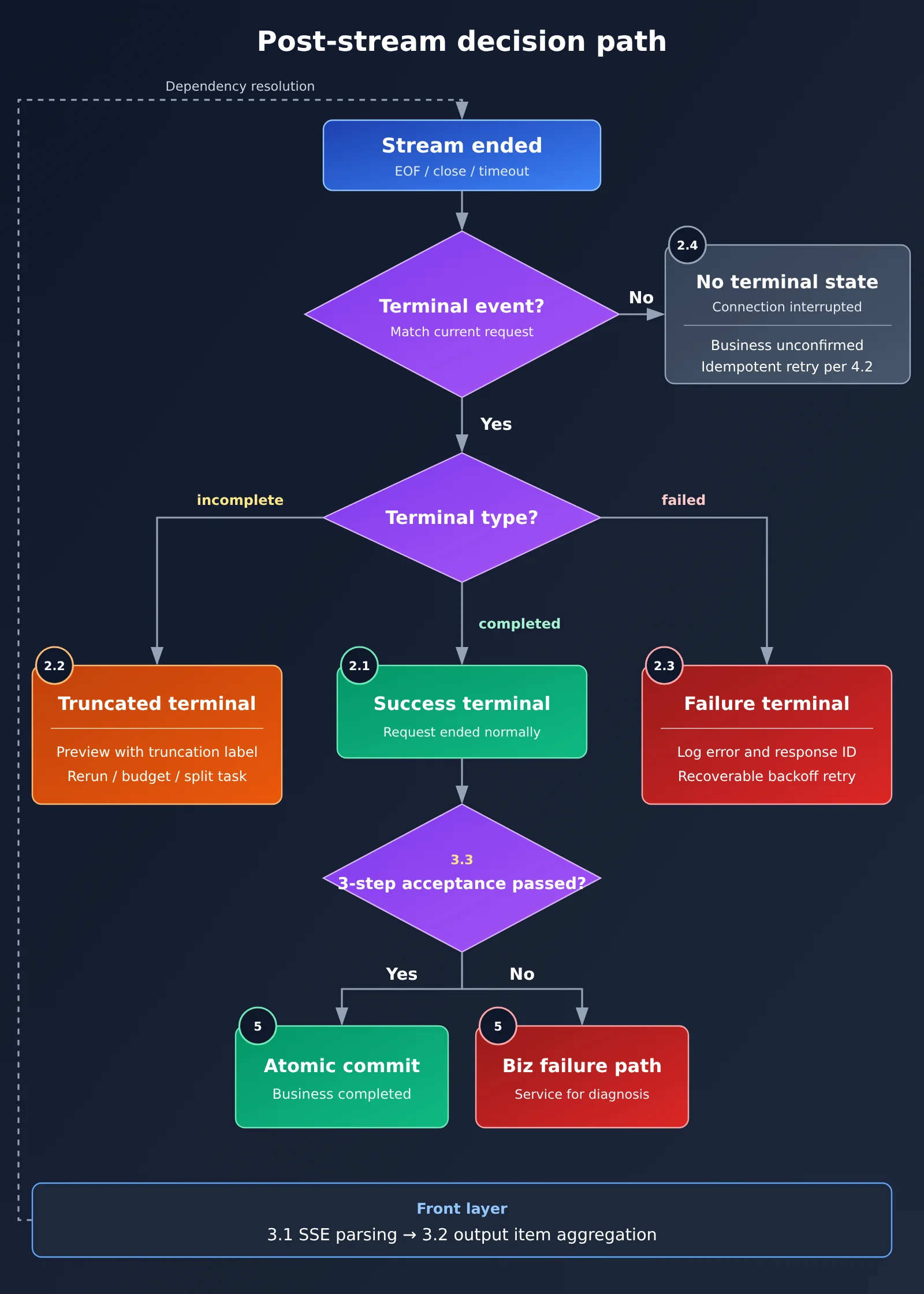
Figure note: starting from “stream has ended”, first ask whether a terminal event arrived, then look at its type; only the completed branch still has to pass the three business acceptance checks before it can reach “business complete”. Neither the no-terminal-state branch nor the truncated branch can be treated as complete; the failed branch keeps the error details and then moves on to the retry decision.
Index: reading order for the 6 sections in this article
- 1 Interface and comparison baseline: first pin down both vendors’ endpoints, model names, and streaming mode, so that everything after compares the same kind of task.
- 2 The four end states: the heart of this article’s decision logic, mapping to the four exits of the knowledge map.
- 3 From network chunks to business delivery: explains parsing, aggregation, and success acceptance — the prerequisites for the 2.1 branch to reach “business complete”.
- 4 Broken streams and retries: what to do after 2.3 and 2.4 — how to retry, and why you can’t resume a stream.
- 5 Persistence and metrics: store terminal-state records and business results separately, and use two metrics to locate problems.
- 6 Acceptance examples and code: a constructed event sequence and a Python reference implementation to check whether the rules above actually hold up.
Sections 1 through 3 are best read in order; sections 4 and 5 can be looked up as needed when you’re wiring up retries and monitoring; section 6 is for cross-referencing while writing unit tests.
To Know: the 5 terms you need to follow this article
| Term | Plain explanation |
|---|---|
| SSE | Server-Sent Events: the server keeps pushing data over a single long-lived HTTP connection as “event chunks”, separated by blank lines |
| Terminal event | A lifecycle event in the stream that declares the final result of this response — in this article, completed, incomplete, and failed |
| Output item | A single response can contain multiple output items, such as text messages, reasoning content, and function calls, each starting and ending independently |
| Idempotency key | A unique identifier the business side assigns to a given task; submitting the same key repeatedly only takes effect once |
sequence_number |
The event sequence number, used to investigate out-of-order or missing events; DeepSeek’s documentation states that it increases monotonically |
1 Responses API conventions for LongCat 2.5 and DeepSeek V4.1 Flash
1.1 Responses endpoints and models for both providers
Both providers offer first-party Responses endpoints. Set stream: true in the request body and you can receive lifecycle events, text deltas, and tool events incrementally over SSE. One thing to watch is the model name: on DeepSeek’s side, you call the deepseek-flash alias. According to the official model page, it currently points to DeepSeek-V4.1-Flash-1017; the alias target may change with future releases.
| Item | LongCat 2.5 | DeepSeek V4.1 Flash | Source |
|---|---|---|---|
| Endpoint | POST https://api.longcat.chat/openai/v1/responses |
POST https://api.deepseek.com/responses |
Official Responses docs from both providers |
| Model parameter | LongCat-2.5 |
deepseek-flash (currently points to DeepSeek-V4.1-Flash-1017) |
Official API and model pages |
| Streaming flag | stream: true |
stream: true |
Official docs |
| Terminal states: success / truncation / failure | completed / incomplete / failed | completed / incomplete / failed | Official event list |
data: [DONE] end marker |
Confirmed by one of the three terminal states in the event list | Explicitly absent from Responses; only Chat Completions has this convention | Official docs |
| Event sequence number | Each event’s data includes type and sequence_number |
Sequence numbers increase monotonically | Official docs |
| Stream continuation / conversation storage | Refer to the current version’s docs; not inferred in this article | Stateless; previous_response_id and conversation are not supported |
DeepSeek support matrix |
Earlier comparison articles attributed Responses capabilities only to DeepSeek in their basic integration sections. LongCat now officially has a named Responses endpoint and a complete terminal-event table, so integration and termination rules should be based directly on the latest first-party docs from both providers.
1.2 Comparison basis: same task, same event-classification rules
When comparing the two, use the same plain-text task in both requests, changing only the model name and service URL, and keep the client-side event-classification code exactly the same. That way, if the two show different terminal-state distributions on the same kind of task, the difference can plausibly come from the service side rather than from your having written two separate parsers for them.
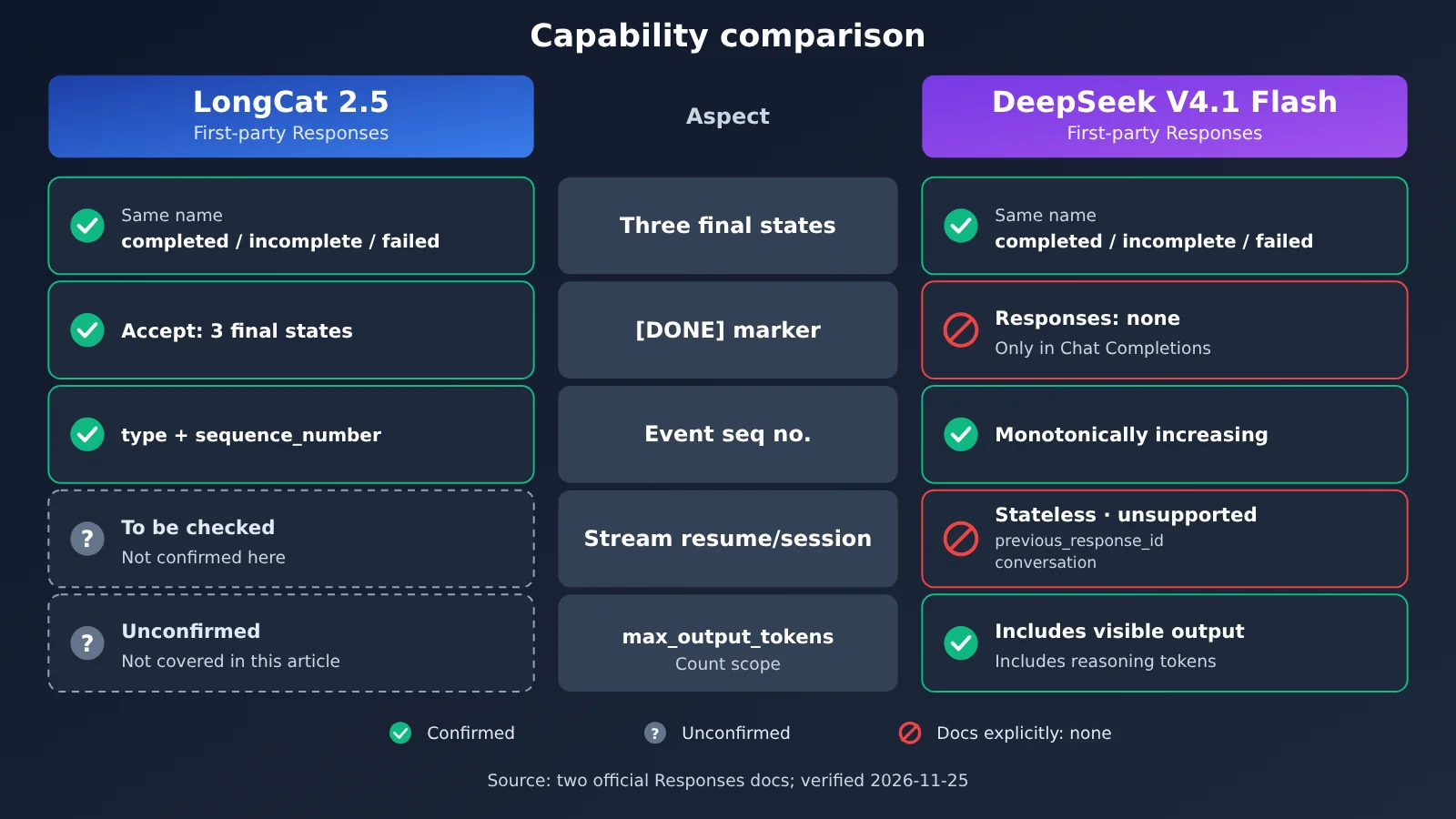
Figure caption: The two providers use exactly the same terminal-state names. The differences are concentrated in the end-marker convention, continuation support, and output-budget conventions. The materials for this article don’t cover LongCat’s continuation and storage capabilities, so they’re marked “to be checked” rather than “not supported”.
2. How to Determine the 4 End States of a Responses Stream
| End state | Trigger | Response object content | Business handling |
|---|---|---|---|
| 2.1 Success terminal state | Receives response.completed |
Full response object and usage |
Enter 3.3 business acceptance |
| 2.2 Truncated terminal state | Receives response.incomplete |
Full response object, possibly including already-generated content | Tagged preview; decide whether to rerun, adjust budget, or split |
| 2.3 Failure terminal state | Receives response.failed |
Full response object carrying error |
Log the error category and response ID; retry based on recoverability |
| 2.4 No terminal state | Connection closed, read timeout, or proxy reset, with no terminal state received | None | Business stays “unconfirmed”; handle per 4.2 |
2.1 completed: The success terminal state reported by the service
Both of the original vendor docs state that the response.completed event carries the full response object and usage. Your client should pull the needed body text or tool calls from this full object, then move on to the next step depending on the task type—rather than relying only on the incremental text accumulated earlier.
2.2 incomplete: Truncation explicitly signaled by the service
The typical cause given in the docs is hitting max_output_tokens. This event also carries a full response object, which may already contain partially generated content that you can show to interactive users as a preview marked “truncated”. Whether the next step is to rerun, raise the budget, or split the task should be decided separately. In DeepSeek’s interface definition, max_output_tokens covers both visible output and reasoning tokens, so tasks with longer reasoning are more likely to be truncated before the body text even shows up.
2.3 failed: Failure after the stream opens
The full response object in response.failed carries an error. You should keep the error category and response identifier for diagnosis, then decide whether to retry with backoff based on whether the error is recoverable. Either way, the business completion status stays “not passed”. The text already pushed before the failure can help with debugging, but you can’t deliver it as a result.
2.4 No terminal state: Local connection interruption or an unconfirmed result
If the stream reads to the end but there’s no terminal state at all, that’s just something you observed on the client side—you can’t determine whether the server finished executing or whether you were billed. Classifying this as its own case is the only way to tell “truncation explicitly signaled by the service” apart from “the client is missing the tail event”. In particular, DeepSeek’s Responses interface has no data: [DONE], so don’t apply the Chat Completions end convention here, and don’t assume a normal finish just because you hit EOF.
3 The Responses Stream: From Network Chunks to Business Delivery
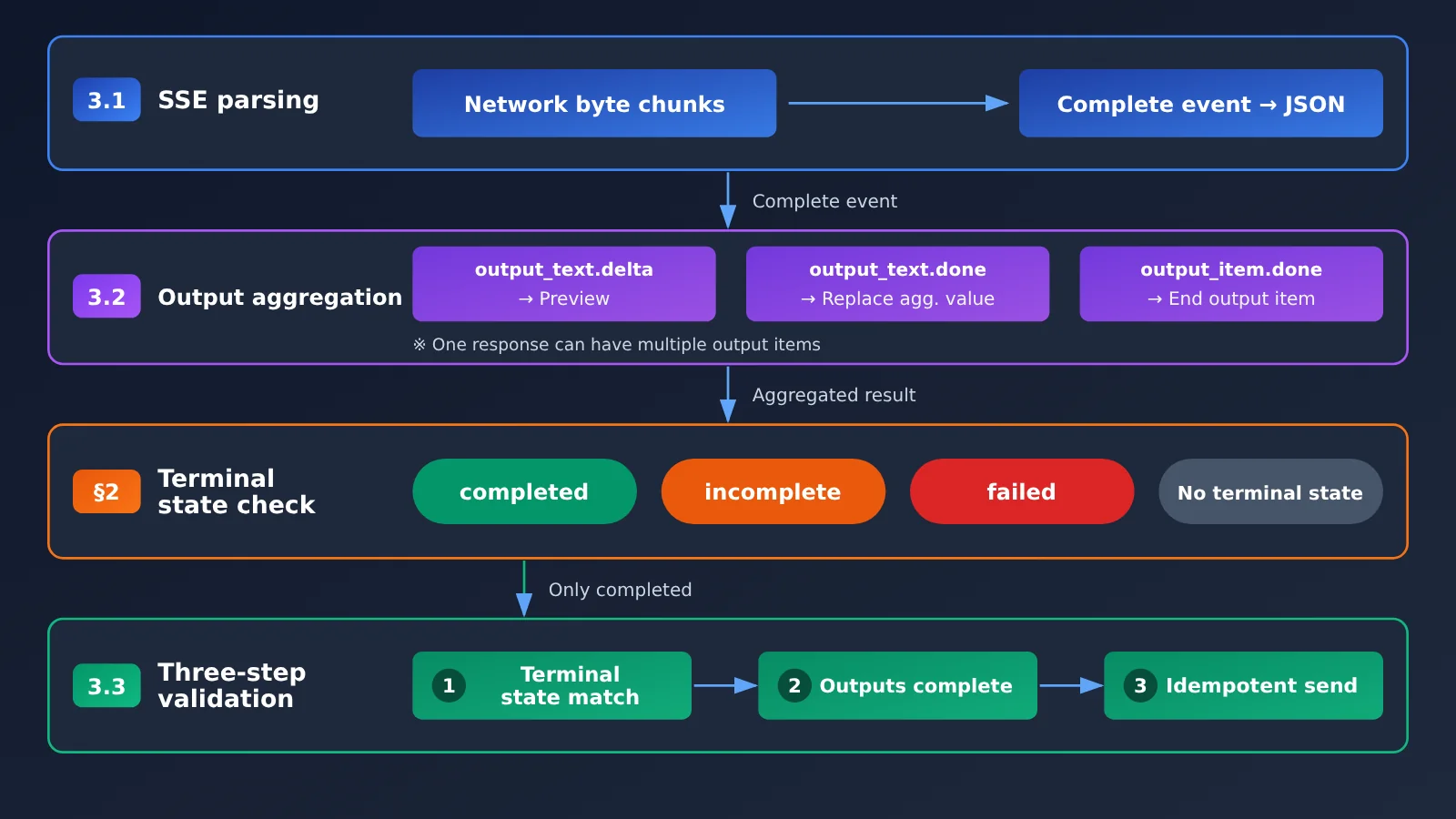
Figure notes: the parsing layer guarantees complete events, the aggregation layer guarantees that each output item’s content has no duplicates and no gaps, terminal state determination looks only at lifecycle events, and in the end only completed enters the three-step business acceptance.
3.1 The SSE parsing layer: assemble the full event first, then parse the JSON
Network chunk boundaries don’t line up with SSE event boundaries. The UTF-8 bytes of a single character may be split across two chunks, and a data: line may straddle chunks. The parser should first use an incremental decoder to recover characters, then split events on blank lines, and only then parse JSON after merging the multiple data: lines within the same event. Lines that start with a colon are comments, often used as heartbeats, and can simply be ignored.
Per the WHATWG SSE parsing standard, an incomplete event that hasn’t been terminated by a blank line when the stream ends should be discarded. That lines up with the rule in this article: only a terminal event that arrives complete and parses successfully counts.
3.2 Output item aggregation: replace on done, don’t append again
response.output_text.delta is good for driving a live preview, response.output_text.done closes out a text segment, and response.output_item.done closes out a single output item. A single response may contain multiple output items, and more output can still follow after one item finishes — so output_item.done is not the signal that the whole response is over.
If the client consumes both the deltas and the completed content, then when a done event arrives it should replace that item’s aggregated value with the completed content; otherwise the body gets duplicated. Diagnostic logs should keep response.id, sequence_number, the output item identifier, its type, and its terminal status. Whether you’re reading raw SSE or SDK objects, take the event-type field at the correct level.
3.3 The three acceptance steps for success
Once you receive completed, run these three acceptance steps:
- Terminal state matches: confirm this is a successful terminal state that matches the current request, and that the response ID matches the one recorded in
response.created. - Outputs are complete: check the output types in the terminal object. When the task calls for a structured body, parse the full body and validate the business constraints; when the task needs tool results, first confirm the full invocation parameters, record the call identifier, execute the tool that’s already been authorized, and then issue the follow-up model request.
- Idempotent commit: write the result to storage along with a business idempotency key.
With this design, even if a successful response contains only one legitimate function call, the task can still move forward, and downstream state won’t get marked complete ahead of time. Structurally, LongCat’s assistant text lives in the content[].text of the message item; DeepSeek represents function calls and function results as the corresponding input and output items, linked by call_id.
4 Retrying After a Responses Stream Breaks
4.1 The HTTP 200 at stream open isn’t the final result
An HTTP 200 only means the stream was established successfully. Once the stream is open, the server can still report failure through the protocol’s terminal state. DeepSeek’s official Web Tools documentation describes what happens when generation times out or gets interrupted: the Responses SSE stream can end with response.failed, along with usage information. So “status code 200 + some body text” isn’t a reliable sign of success.
4.2 Tell old requests from new ones with attempt numbers and idempotency keys
When a network failure keeps the client from receiving the tail of the stream, the client has no way of knowing whether the server already ran the request or already recorded usage. A good practice is to give every request an attempt number, with the same task sharing a single business idempotency key: on retry the attempt number goes up, while the idempotency key stays the same. For any step with external side effects — writing to a database, sending a notification, invoking a tool — check whether a saved result already exists before you retry.
4.3 A truncated or broken response can’t be used as an entry point for resuming the stream
The DeepSeek Responses API is stateless, and both previous_response_id and conversation are unsupported, so you can’t take a truncated or broken response ID and resume the stream with it automatically. Follow-up requests have to carry explicit input and context again. Whether LongCat supports resuming and storage should be confirmed against its current documentation — don’t infer it from how DeepSeek behaves.
Persisting the terminal state of a Responses stream separately from the business result
We recommend keeping one record per attempt: create the record when you enter the stream, and fill in the server-side response ID once you receive response.created. After the stream ends, write the terminal state and the local end reason. Record business status and validation errors separately.
| Field | When it’s written | Purpose |
|---|---|---|
attempt_id, idempotency_key |
Before sending the request | Tell new requests apart from replays and keep submission idempotent |
response_id |
When response.created arrives |
Cross-check against the terminal object and correlate with server-side logs |
last_sequence_number |
Every event | Locate where the connection dropped and catch out-of-order events |
terminal_event |
When the terminal state arrives | completed / incomplete / failed / none |
local_end_reason |
When the stream ends | Read to completion, read timeout, transport error, user cancellation |
business_status, validation_errors |
After acceptance checks | Passed, failed, unconfirmed, plus the reason |
Task applications usually hit three combinations. The first: the service ends normally and business validation passes, so you can commit atomically. The second: the service ends normally, but the extracted result is missing required values — the response is still useful for pinpointing the issue, and the business flow takes the agreed failure path. The third: you have a body preview but never receive a completion event, so business status stays unconfirmed; the UI can keep the fragment already shown and flag the connection as interrupted.
Watch two metrics side by side — service completion rate and business acceptance pass rate — and you can separate three kinds of problems: a change in output structure drags down the latter without touching the former; an insufficient budget for long content pushes up the truncation ratio; and flakiness in the transport component shows up as a rising share of responses with no terminal state.
6 Acceptance Examples and Code for Determining When a Responses Stream Ends
6.1 Five Constructed Event Sequences
The sequences below omit the response. prefix. They’re constructed examples for adapter unit tests:
| No. | Event sequence | Expected determination | Acceptance checks |
|---|---|---|---|
| S1 | created → output_text.delta → output_text.done → completed | Success | Preview first, then deliver after verifying the complete output object; merge multiple text segments in a stable order and don’t mix in reasoning text |
| S2 | created → output_text.delta → incomplete | Truncated | Keep details about the reason; the preview carries a truncation label; confirm context and output limits before adjusting the budget |
| S3 | created → output_text.delta → failed | Failure | Existing text is only for debugging; classify based on error details |
| S4 | created → output_text.done → EOF | No terminal state | Proves that complete text does not equal a complete run |
| S5 | created → function_call_arguments.delta → function_call_arguments.done → completed | Model request succeeded, task not complete | The overall task is complete only after tool execution finishes; log the request terminal state and task result separately |
6.2 Edge Cases Worth Additional Testing
- Split UTF-8 characters, multi-line
data:spanning chunks, pure heartbeat streams, and the normal case where “the connection closes right after a read chunk that carries a terminal event.” - The response reports truncation after producing only reasoning output items, with no displayable body content in the terminal state — the body preview should remain empty.
- When an unknown intermediate event type is received, the parser continues consuming the subsequent known lifecycle events.
- When a proxy sits on the connection path, observe whether it buffers multiple data chunks before delivering them together; this changes when the increments become visible, but doesn’t change the terminal-state determination.
- If a transport error occurs only after the terminal state has been fully parsed and validated, handle it according to the established commit rules, and log the disconnect point as a supplementary note.
- For active cancellation, distinguish between “user cancellation” and “client read timeout” — neither counts toward platform failure statistics.
6.3 Python Reference Implementation
The implementation below depends only on httpx, and both providers share the same event classification logic. For the auth header format and other optional request body fields, refer to each provider’s official documentation; the code is intended only for properly authorized development and troubleshooting.
import codecs
import json
import httpx

ENDPOINTS = {
    "longcat": ("https://api.longcat.chat/openai/v1/responses", "LongCat-2.5"),
    "deepseek": ("https://api.deepseek.com/responses", "deepseek-flash"),
}
TERMINAL = {
    "response.completed": "completed",
    "response.incomplete": "incomplete",
    "response.failed": "failed",
}

def iter_sse_data(byte_chunks):
    """Restore arbitrarily split byte chunks into the data text of complete SSE events."""
    decoder = codecs.getincrementaldecoder("utf-8")()
    buf, data_lines = "", []
    for chunk in byte_chunks:
        buf += decoder.decode(chunk)
        *lines, buf = buf.split("\n")
        for line in lines:
            line = line.rstrip("\r")
            if line == "":                      # blank line: event ends
                if data_lines:
                    yield "\n".join(data_lines)
                    data_lines = []
            elif line.startswith(":"):          # comment / heartbeat
                continue
            elif line.startswith("data:"):
                v = line[5:]
                data_lines.append(v[1:] if v.startswith(" ") else v)
    # Per the standard, incomplete events not terminated by a blank line at EOF are discarded

def run_attempt(provider, api_key, prompt, max_output_tokens=1024, timeout=60):
    url, model = ENDPOINTS[provider]
    rec = {"provider": provider, "response_id": None, "last_seq": None,
           "terminal": None, "local_end": None, "preview": "", "final": None}
    payload = {"model": model, "input": prompt, "stream": True,
               "max_output_tokens": max_output_tokens}
    headers = {"Authorization": f"Bearer {api_key}"}
    try:
        with httpx.stream("POST", url, json=payload,
                          headers=headers, timeout=timeout) as r:
            r.raise_for_status()               # 200 only means the stream was opened successfully
            for data in iter_sse_data(r.iter_bytes()):
                try:
                    ev = json.loads(data)
                except json.JSONDecodeError:
                    continue
                etype = ev.get("type")
                rec["last_seq"] = ev.get("sequence_number", rec["last_seq"])
                if etype == "response.created":
                    rec["response_id"] = ev.get("response", {}).get("id")
                elif etype == "response.output_text.delta":
                    rec["preview"] += ev.get("delta", "")
                elif etype in TERMINAL:
                    rec["terminal"] = TERMINAL[etype]
                    rec["final"] = ev.get("response")
                    break                      # stop reading once a terminal state arrives
                # Ignore other events (including unknown types) and keep consuming
        rec["local_end"] = "terminal" if rec["terminal"] else "eof_without_terminal"
    except httpx.ReadTimeout:
        rec["local_end"] = "read_timeout"
    except httpx.TransportError:
        rec["local_end"] = "transport_error"
    return rec

def extract_message_text(final):
    """Take only the text from message items to avoid mixing in reasoning content."""
    parts = []
    for item in (final or {}).get("output", []):
        if item.get("type") == "message":
            for c in item.get("content", []):
                if "text" in c:
                    parts.append(c["text"])
    return "".join(parts)

def classify(rec):
    if rec["terminal"] is None:
        return "unconfirmed"                   # 2.4: business state stays unconfirmed
    if rec["terminal"] != "completed":
        return rec["terminal"]                 # 2.2 truncation / 2.3 failure
    final = rec["final"] or {}
    if rec["response_id"] and final.get("id") != rec["response_id"]:
        return "mismatch"                      # 3.3 step 1 failed
    return "completed_pending_validation"      # proceed to 3.3 steps 2 and 3
The return value of classify is only the service-side determination. After completed_pending_validation, you still need to hook in your own business validation — for example, validating the JSON structure of the result from extract_message_text, or finding a function call in the output items, executing the tool, and finally submitting with an idempotency key. For the S4 sequence, this code returns unconfirmed even if the preview already contains a complete sentence.
The final verification method: feed the five sequences from 6.1 and the edge cases from 6.2 into iter_sse_data and classify, then confirm that each sample’s verdict matches the “expected verdict” in the table—and that the business status only becomes complete after all three steps in 3.3 pass.
References
- LongCat Responses API Documentation: request URL, stream event list, and output structure
- Link:
longcat.ai/platform/docs/api/responses
- Link:
- DeepSeek Responses API Reference: request parameters and the
max_output_tokensdefinition- Link:
api-docs.deepseek.com/api/create-response/
- Link:
- DeepSeek Responses Guide: stream events, sequence numbers, stateless mode, and support matrix
- Link:
api-docs.deepseek.com/guides/responses_api/
- Link:
- DeepSeek Models and Pricing: current target of
deepseek-flash- Link:
api-docs.deepseek.com/quick_start/pricing/
- Link:
- DeepSeek Web Tools: failure terminal state when generation times out or is interrupted
- Link:
api-docs.deepseek.com/guides/web_tools/
- Link:
- WHATWG SSE Parsing Standard: event boundaries and EOF handling rules
- Link:
html.spec.whatwg.org/multipage/server-sent-events.html
- Link:
Author: APIYI Team