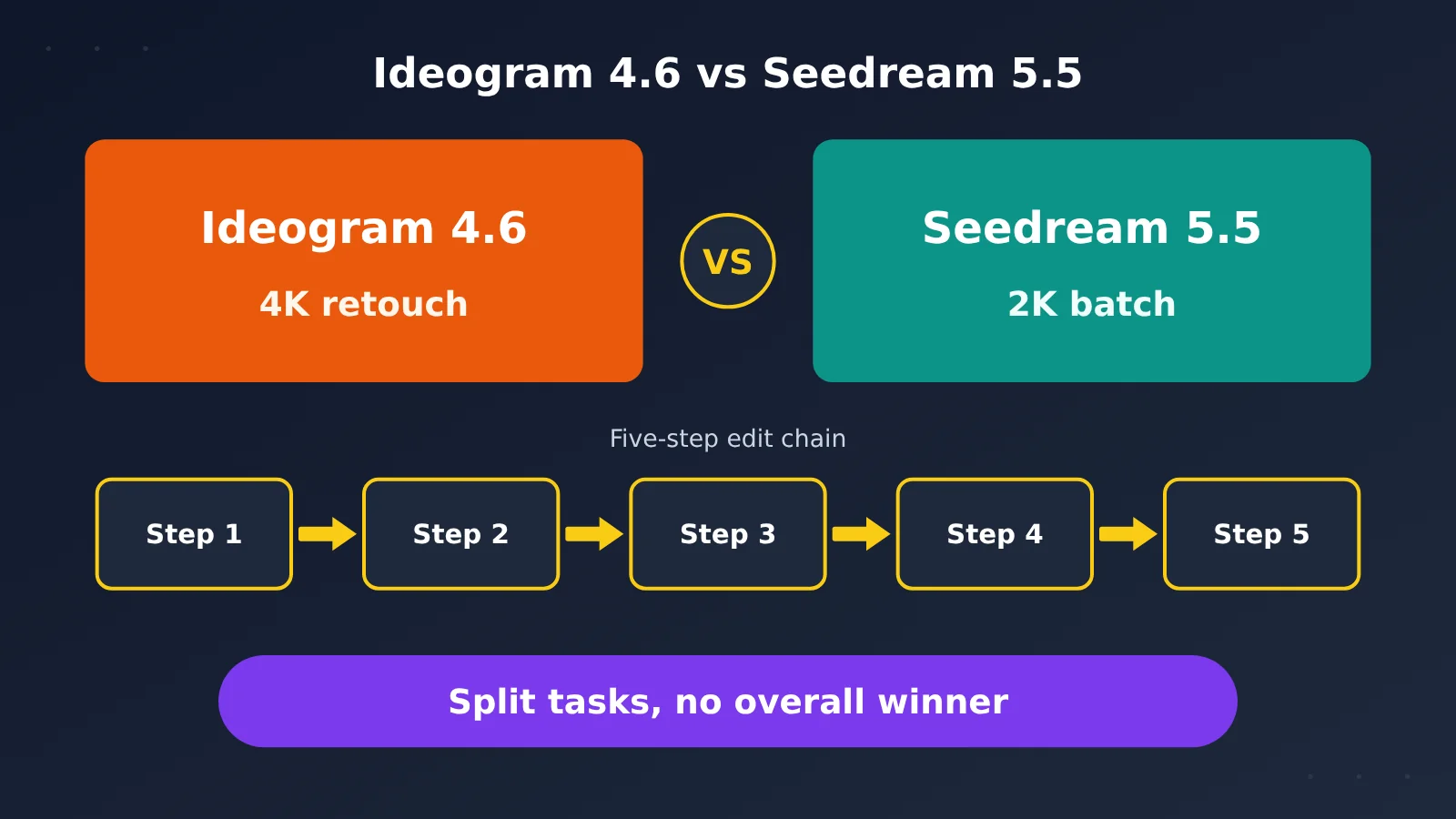
Author’s note: Which model should you choose when editing the same product image across five rounds? Using two third-party leaderboards and the cost breakdown for the same job, this article breaks down how Ideogram 4.6 and Seedream 5.5 divide responsibilities between 4K refinement and 2K batch work, and provides a reusable five-step self-test method.
The same product image goes through five consecutive edits: swap the background, change the brand color, add small selling-point copy, change the model’s outfit, and produce the final version. By the fifth round, does the model’s face still look like the same person, and is the small text on the bottle still legible? Teams working on e-commerce visuals and image-editing pipelines all run into this question. In November, two models each offered their own answer: ByteDance released Seedream 5.5 on 2026-11-09, and Ideogram released Ideogram 4.6 on 2026-11-19.
This article compares Ideogram 4.6 and Seedream 5.5 across four dimensions—multi-step consistency, single-edit quality, output resolution, and total cost for the same job—to answer how work should be divided between 4K refinement and 2K batch processing.
This is not an article that declares an overall winner. The two third-party leaderboards point in opposite directions. We’ll clarify that conflict first, then offer division-of-labor suggestions based on specific tasks.
Core value: By the end of this article, you’ll have a task-by-task comparison table, a cost breakdown calculated by number of rounds and number of images, and a five-step self-test method you can run on your own images to reach a conclusion.
Ideogram 4.6 vs Seedream 5.5: the core differences
Let’s start with the big picture. The benchmark scores in the table below come from third parties, the prices come from each vendor’s official pricing, and the “best for” column is my own judgment.
| Dimension | Ideogram 4.6 | Seedream 5.5 | Best for |
|---|---|---|---|
| Release date | 2026-11-19 | 2026-11-09 | — |
| Official pitch | Precise editing + native 4K | Multi-turn editing that preserves unedited regions, up to 100 turns; native RGBA | — |
| Output resolution | 2K or 4K, up to 4096×4096 | 1K / 1.5K / 2K plus custom sizes | Pick 4.6 for finished 4K output |
| Local editing | Precise Edit, optional mask, output matches source image dimensions | No mask; edits go through the same generation endpoint, with the changed area described in the prompt | Pick 4.6 for precise region selection |
| Transparent background | background supports auto / transparent / opaque |
Native RGBA, full and semi-transparency, up to 100 layers | Pick Seedream for layered or semi-transparent assets |
| Rapidata multi-step face drift | 1892 ±32, #1 | 1805 ±29, #3 | Pick 4.6 for long edit chains |
| AA single edit | 1089 ±14, #31 | 1159 ±14, #8 | Pick Seedream for one-shot edits |
| AA text-to-image | 985 ±13, #69 | 1134 ±12, #14 | Pick Seedream for general image generation |
| Price per single 2K image | $0.10 on the High tier | $0.035 | Pick Seedream if you’re cost-sensitive |
| Available platforms | Ideogram official API plus partners such as Leonardo, Runway, and fal | APIYI apiyi.com (two channels at the same price), ByteDance official channels | — |
How Ideogram 4.6 and Seedream 5.5 are positioned differently
Ideogram positions 4.6 as “the new frontier of precise editing, now with native 4K,” emphasizing a marked drop in pixel drift outside the edited region along with better color accuracy. That native 4K isn’t upscaling a small image first — skin and fabric textures are generated directly at full resolution. This tells you 4.6 is a model built around editing; its main goal isn’t to compete with general-purpose models on text-to-image.
Seedream 5.5 brings three upgrades: pixel-level preservation of unedited regions across multi-turn edits (up to 100 turns), native RGBA transparent output (up to 100 layers), and more realistic lighting, materials, and skin texture along with crisper small text. It covers more ground — text-to-image, single edits, and transparent assets all work — and it costs less.
Ideogram 4.6 vs. Seedream 5.5 Leaderboard Data: Why the Two Leaderboards Reach Opposite Conclusions
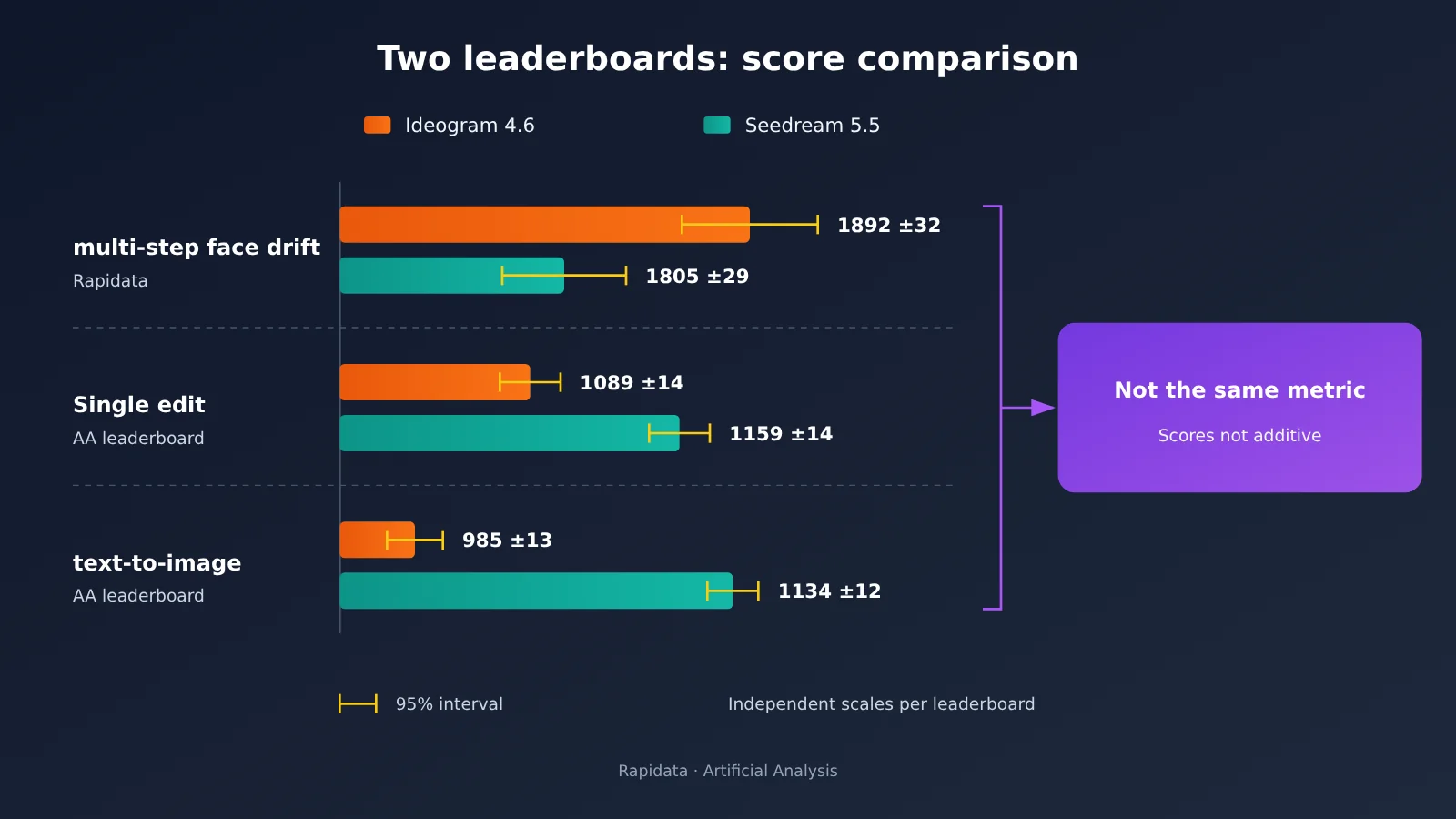
The chart data comes from public leaderboards by Rapidata and Artificial Analysis (retrieved on 2026-11-26). If you want to reproduce this difference with your own business images, you can first run the control group on APIYI apiyi.com using Seedream 5.5.
| Leaderboard | What it measures | Ideogram 4.6 | Seedream 5.5 | Do intervals overlap? | Gap |
|---|---|---|---|---|---|
| Rapidata Multi-step Image Edit | Whether the face still looks like the original after 5 edit steps | 1892 ±32, win rate 86.3% | 1805 ±29, win rate 83.7% | No overlap | Ideogram 4.6 leads by 87 points |
| AA-Image-Editing v2.1 | Blind-vote preference for single edits | 1089 ±14, rank 31 | 1159 ±14, rank 8 | No overlap | Seedream leads by 70 points |
| AA-Image-T2I v2.1 | Blind-vote preference for text-to-image | 985 ±13, rank 69 | 1134 ±12, rank 14 | No overlap | Seedream leads by 149 points |
Rapidata Multi-Step Face Drift Leaderboard: Ideogram 4.6 Leads by 87 Points
The Rapidata leaderboard is called Multi-step Image Edit, but what it actually tests is quite narrow. The test uses 199 photos of real people, each paired with a 5-step editing chain that changes only clothing, objects, and text—never the face. At each step, the model’s own output from the previous round is fed back in as input, and in the end people blind-vote on “which face after step 5 looks more like the original.” The test collected 413,667 judgments and 76,714 pairwise comparisons, fitted into Elo scores using the Bradley–Terry model.
So what it measures is face identity drift—that is, whether a person can still be recognized after errors accumulate across multiple editing rounds. The lower bound of 4.6’s range is about 1860, and the upper bound of Seedream 5.5’s range is about 1834. The two don’t overlap, so this gap can be considered real. Note, though, that 4.6’s range overlaps with that of the previous generation, 4.5 (1866 ±30), so this leaderboard can’t tell which Ideogram generation is stronger.
AA Single-Edit and Text-to-Image Leaderboards: Seedream 5.5 Leads by 70 and 149 Points
Both Artificial Analysis leaderboards use blind head-to-head voting, measuring “which image people prefer from a single generation or a single edit.” On the single-edit leaderboard, Seedream 5.5 leads by 70 points, 1159 to 1089; on the text-to-image leaderboard, it leads by 149 points, 1134 to 985. Both pairs of ranges don’t overlap either.
There’s also a detail that’s easy to overlook: 4.6 scores only 985 on the AA text-to-image leaderboard, lower than 4.5’s 1017; on the single-edit leaderboard it’s 1089, only slightly higher than 4.5’s 1064. This suggests that the improvements in the 4.6 generation are basically concentrated in the stability of multi-round edits, and general aesthetic preference hasn’t risen along with it.
Ideogram 4.6 vs. Seedream 5.5: You Can’t Merge Two Leaderboards into One Ranking
The conflict between these two leaderboards isn’t actually a contradiction, because they’re asking different questions. AA asks “does this single image look good?” Rapidata asks “by the fifth edit, is it still the same person?” A model that produces a more appealing first-round output won’t necessarily hold the details by round five.
So don’t add the two leaderboard scores together or average them — Elo scores are only meaningful for comparisons within the same leaderboard. Also, the per-thousand-image prices on the AA leaderboard ($220/1k for 4.6 editing, $28/1k for Seedream editing) are normalized from each vendor’s default settings, so you can’t just combine them with official per-image pricing either.
How to Read the Vendors’ Self-Reported Numbers
Both vendors published their own internal test data, but it’s all self-reported, not third-party measurement:
- Ideogram 4.6 (self-reported, High tier, same batch of edit requests, usable-rate from 4.5 → 4.6): brand-color recoloring 46% → 83%, fixing small product defects 61% → 86%, product shots 66% → 88%, still recognizable after changing a person’s scene 69% → 85%, editing only the painted region 82% → 90%. The vendor didn’t disclose the criteria for “usable,” and the comparison baseline is its own previous generation, not other vendors’ models.
- Seedream 5.5 (self-reported, MagicArena): compared against Seedream 5.0 Pro, GPT Image 2.5, and Nano Banana 2.1; severe text corruption rate 0.4%, minor corruption rate 1.7%.
These two sets of numbers are useful for figuring out “which kinds of tasks it invested effort in,” but not for cross-model rankings.
Ideogram 4.6 vs. Seedream 5.5 Cost Comparison: Running the Numbers on the Same Job
Looking only at the per-image price, Seedream’s $0.035 and Ideogram’s $0.10 seem like only a 2–3x difference. But image editing is billed per round, and Ideogram’s Precise Edit has its own separate pricing tier. So below, we’ll calculate based on a concrete job: editing the same product image for five consecutive rounds.
| Same job (official prices, USD) | Seedream 5.5 (2K) | Ideogram 4.6 (2K High) | Ideogram 4.6 (4K High) |
|---|---|---|---|
| Single image generation | $0.035 | $0.10 | $0.20 |
| Single edit round | $0.043 (input 0.008 + output 0.035) | $0.22 (Precise Edit) | $0.60 (Precise Edit) |
| One 5-round edit chain | About $0.215 | About $1.10 | About $3.00 |
| 100 SKUs, 5 edit rounds each | About $21.5 | About $110 | About $300 |
| 5-round chains per $10 | About 46 | About 9 | About 3 |
| 2K images per $10 | About 285 | 100 | — |
Once you break it down by rounds and image counts, the gap becomes much clearer. For the same $10, Seedream can run about 46 five-round edit chains, while Ideogram 2K High can only run about 9, and 4K High about 3. At the 2K tier, Ideogram’s cost per chain is about 5x Seedream’s; at the 4K tier, it’s about 14x.
Ideogram does have cheaper tiers: Low-tier edits cost $0.03, while Very low-tier edits cost $0.008. However, the 1892 score on the Rapidata leaderboard corresponds to Precise Edit with High Quality, so you’ll need to test for yourself whether consistency still holds after downgrading. Also note that Ideogram bills at the 4K tier once output exceeds 2048×2048.
Seedream 5.5 has two channels at the same price on APIYI: seedream-5-5-261028 (BytePlus, ap-southeast-1) and doubao-seedream-5-5-261028 (Volcano Engine, cn-beijing). Their parameters and pricing are the same; the difference is how strict their moderation is. Pricing is $0.020 per image at 1K/1.5K, $0.035 per image at 2K and custom sizes, and $0.008 per input reference image; if you don’t pass size, it’s billed at the 2K tier by default. To make a call, set base_url to https://api.apiyi.com/v1 and send a request to /v1/images/generations. For detailed pricing, see the model list on APIYI apiyi.com. Ideogram 4.6 isn’t listed on APIYI yet. We’ll get this model listed as soon as possible; refer to the platform’s model list for the model ID and pricing.
🚀 Quick start: If you happen to have a batch of 2K product images that need editing, sign up at APIYI apiyi.com and claim your free trial credits first. Run a five-round chain with
seedream-5-5-261028to see whether the detail in round 5 meets your requirements, then decide which images need to be upgraded to 4K retouching.
Recommended Division of Work: Ideogram 4.6 vs. Seedream 5.5
Jobs That Suit Ideogram 4.6
- 4K final delivery: Posters, key visuals, and print materials that need native 4K, so skin and fabric textures aren’t produced by upscaling.
- Long edit chains where faces must stay stable: You’re swapping outfits, props, and text on a model image over and over. Ideogram 4.6 leads on the Rapidata leaderboard, and the confidence intervals don’t overlap.
- Precise regional editing: You need a mask to isolate the area to change, with output at the same size as the source image and everything else left exactly as it was.
- Localized retouching on large images: Source images up to 8192×8192 are supported. Combined with
context_window=autoand a mask, you can change just one region without shrinking the whole image.
Jobs That Suit Seedream 5.5
- 2K batch generation: E-commerce detail pages and social media assets — lots of images to produce, and per-image cost matters.
- Single-pass edits and general text-to-image: On both AA leaderboards, Seedream shows stronger blind-test preference.
- Transparent PNGs and layered assets: Native RGBA supports semi-transparency, up to 100 layers — a good fit for stickers, icons, and compositing assets.
- Budget-friendly multi-round editing: Five rounds cost about $0.215. You can run every SKU through it first, then pick out a handful of images to refine.
| Task | Recommended | Key basis |
|---|---|---|
| Same model image edited 5+ rounds | Ideogram 4.6 | Rapidata 1892 vs. 1805, non-overlapping intervals |
| One-time background swap and text change | Seedream 5.5 | AA single-edit 1159 vs. 1089 |
| Generating marketing images from scratch | Seedream 5.5 | AA text-to-image 1134 vs. 985 |
| 4K print or key visual final assets | Ideogram 4.6 | Native 4K, up to 4096×4096 |
| Semi-transparent PNGs, layered assets | Seedream 5.5 | Native RGBA, up to 100 layers |
| Batch editing hundreds of SKUs | Seedream 5.5 | ~$0.215 for 5 rounds, about one-fifth of 4.6’s 2K tier |
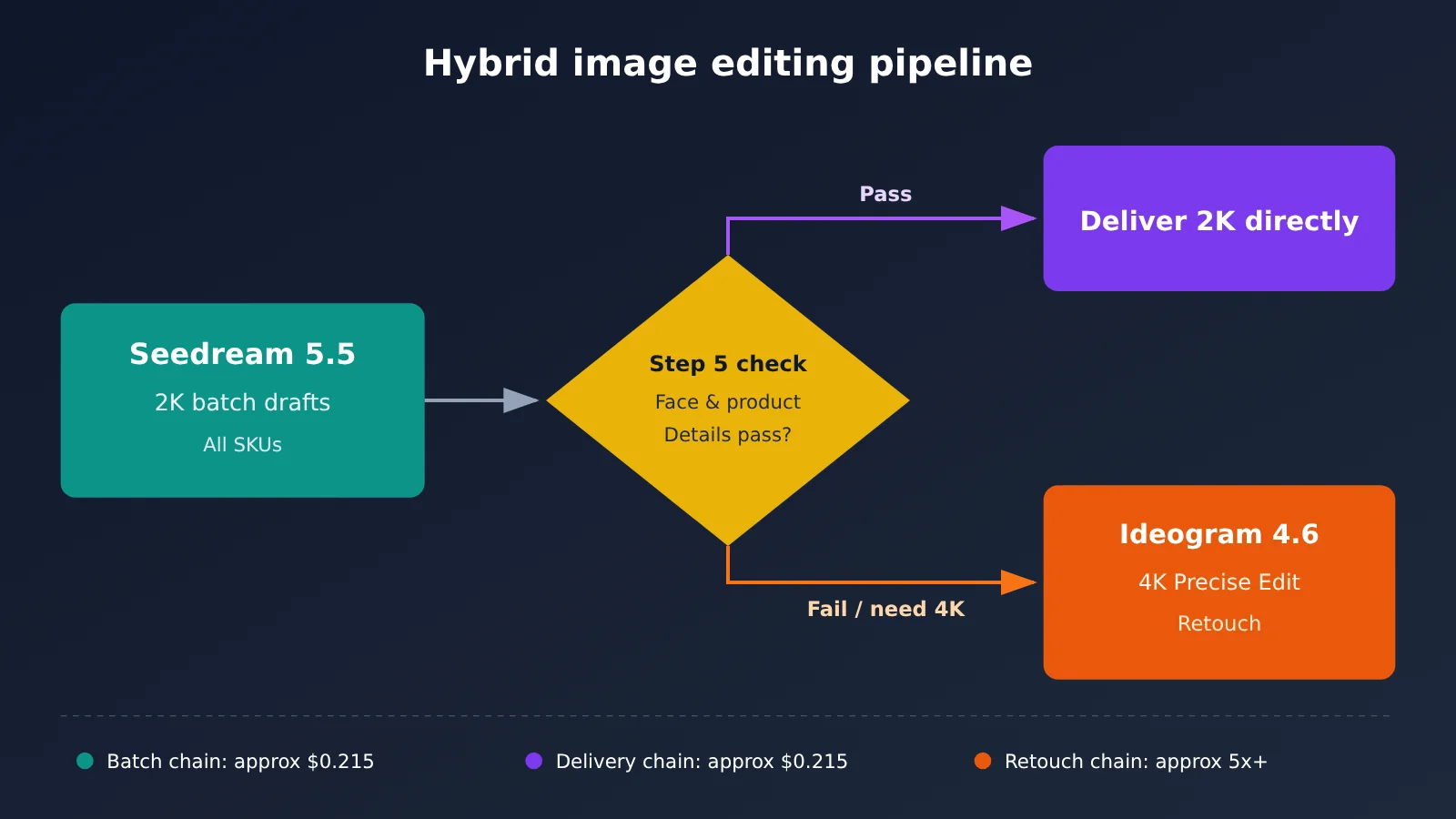
The more practical approach is a hybrid pipeline: run every SKU through Seedream 5.5 at 2K batch quality first, then hand only the main images, the images that need 4K delivery, and the ones that show obvious drift by round 5 over to Ideogram 4.6 for refinement. That way most images are produced at Seedream’s cost, and Ideogram spend only goes to the small number of images that genuinely need it.
How to Test Ideogram 4.6 and Seedream 5.5 Yourself: A 5-Step Image Editing Method
Leaderboards only tell you the general direction—your own images are what settle the final verdict. The method below borrows Rapidata’s testing approach and extends the checks from faces to product details:
- Pick images: Prepare 10 to 20 representative images from your business. Ideally, they should include both model faces and products with logos and small text.
- Write a solid 5-step edit chain: For example, swap the background, change the brand color, add a line of selling-point copy, change the outfit, and adjust the lighting. Use exactly the same instructions for both models.
- Use the previous step’s output as the input for every step—don’t go back to the original image. That’s how you can see errors accumulate. For Seedream, send requests to
/v1/images/generationsthrough the base_urlhttps://api.apiyi.com/v1, passing the previous output as the reference image; Ideogram uses the official Precise Edit endpoint. - Only look at step 5: Put the step 5 result next to the original image and check whether the face still belongs to the same person and whether the product logo, color code, and small text have drifted.
- Judge with cost in mind: Look at the pass rate and the cost of each chain together to answer “how much does each qualified chain cost?”
| Model | Parameter or behavior | Watch out when testing |
|---|---|---|
| Seedream 5.5 | n is silently ignored |
Only 1 image per request; batch image generation requires loop calls |
| Seedream 5.5 | sequential_image_generation |
Passing any value returns 400, so don’t pass this parameter |
| Seedream 5.5 | watermark defaults to true |
Explicitly disable it for final image generation |
| Seedream 5.5 | Transparent output | You need to explicitly set background: transparent and specify PNG format |
| Seedream 5.5 | Too many pixels or an aspect ratio over 16:1 | Returns 400 and doesn’t charge you |
| Ideogram 4.6 | Source image larger than 4096×4096 | Scales down to 4096×4096 by default; to keep the original size, use context_window=auto with a mask, or directly specify y_min,x_min,y_max,x_max |
| Ideogram 4.6 | dry_run=true |
Returns a quote only, with no generation—good for estimating 4K cost first |
| Ideogram 4.6 | Very low setting | Supports a maximum of 2K only |
Seedream doesn’t have a mask, so the area to change can only be described in the prompt. That means when writing instructions in step 3, also spell out what stays unchanged—for example, note that “the person’s face and the product bottle remain unchanged.” That’s what makes the comparison between the two fair.
Frequently Asked Questions (FAQ)
Q1: Ideogram 4.6 vs Seedream 5.5 — which one is better?
There’s no clear overall winner. On face consistency after multi-step image edits, Ideogram 4.6 leads the Rapidata leaderboard (1892 vs 1805); on single edits and text-to-image, Seedream 5.5 leads the AA leaderboard (1159 vs 1089, and 1134 vs 985). Pick based on the specific task, not the overall ranking.
Q2: What’s the difference between Rapidata’s and AA’s “image editing” leaderboards?
Rapidata’s Multi-step Image Edit benchmark measures face identity drift after a 5-step editing chain; AA’s Image Editing benchmark measures general aesthetic preference for single edits. The two boards have similar names, but they’re measuring completely different things — and the scores aren’t interchangeable.
Q3: How much does it cost to run 5 consecutive edits with Seedream 5.5?
At the 2K tier, each round needs 1 input image at $0.008 plus 1 output image at $0.035, so 5 rounds comes to about $0.215 total. On APIYI apiyi.com, the `seedream-5-5-261028` and `doubao-seedream-5-5-261028` channels are priced the same — new users can start with the free quota and run a 5-round chain to validate.
Q4: Which one should I pick for transparent PNG assets?
Both support transparent backgrounds. Seedream 5.5 offers native RGBA, supports semi-transparency and up to 100 layers, and costs just $0.035 per 2K image — a better fit for batch-producing stickers, icons, and composite assets. If your transparent assets also need 4K retouching, then consider Ideogram 4.6.
Q5: How do I get started calling Seedream 5.5 quickly?
1. Register an account on APIYI apiyi.com and get an API key;
2. Set base_url to `https://api.apiyi.com/v1` and model to `seedream-5-5-261028`;
3. Call `/v1/images/generations`, pass `size` as needed, and turn off `watermark`.
Image editing goes through the same endpoint — just pass in the reference image.
Q6: What are Ideogram 4.6’s known limitations?
On the AA text-to-image leaderboard, 4.6 ranks only 69th (985 points), below the previous generation 4.5 — a sign that it isn’t well suited as a general-purpose image model. High-tier costs are also noticeably higher, at $0.60 per 4K edit. Its claimed availability improvement is self-reported by the vendor, compared against its own 4.5, with no published criteria for how it was measured.
Q7: What should I watch out for with Seedream 5.5?
Seedream 5.5 has no mask, so local edits rely entirely on prompt descriptions; the `n` parameter is ignored, and `sequential_image_generation` throws an error with any value; watermarking is on by default. For multi-step face consistency it ranks third on the Rapidata leaderboard, 87 points behind Ideogram 4.6 — so when doing long-chain portrait retouching, pay close attention to the result at step 5.
Ideogram 4.6 vs Seedream 5.5: Key Takeaways
- No universal winner: The two third-party leaderboards reach opposite conclusions, and that’s because they aren’t measuring the same thing.
- For long-chain edits, look at Rapidata: Ideogram 4.6 leads 1892 to 1805, with non-overlapping confidence intervals.
- For one-shot generation, look at AA: Seedream 5.5 leads by 70 points on single edits and by 149 points on text-to-image.
- Cost is per chain: Five rounds of editing runs about $0.215 on Seedream, versus roughly $1.10 on Ideogram at 2K and $3.00 at 4K.
- 4.6 is positioned as an editing specialist: Its AA text-to-image score is actually lower than 4.5’s — the gains are concentrated in multi-turn editing stability.
- A hybrid pipeline gives you the best value: Run 2K batches on Seedream, then use Ideogram to polish the handful of 4K hero images.
- Your own tests are the final word: Run 5 steps with your own images, and focus on checking faces and product details at step 5.
Summary
The division of labor between Ideogram 4.6 and Seedream 5.5 boils down to three points:
- Use Ideogram 4.6 for 4K finals and long-chain edits: Native 4K plus Precise Edit, with multi-step face consistency leading on third-party leaderboards.
- Use Seedream 5.5 for 2K batches, transparent PNGs, and cost-sensitive work: It earns higher preference on single edits and text-to-image, and five rounds of editing cost about one-fifth of what 4.6’s 2K tier does.
- Read the two leaderboards separately instead of merging them into one ranking: Rapidata measures face drift, AA measures single-shot preference — each one only answers its own question.
What really decides your choice is how your own images hold up at step 5. A good starting point: use the free tier on APIYI apiyi.com to run the full 5-step self-test on Seedream 5.5, then hand off the images that fall short or need 4K delivery to Ideogram 4.6 for polishing, and finally make your decision based on “cost per qualifying chain.”
📚 References
-
Seedream 5.5 Official Blog: Multi-round editing, native RGBA, and MagicArena’s officially reported data
- Link:
seed.bytedance.com/en/blog/more-realistic-images-more-stable-editing-across-100-rounds-introducing-seedream-5-5 - Note: Screenshots of the official page can be used to cross-check the three upgrade descriptions
- Link:
-
Ideogram 4.6 Official Model Page: Specs, quality tiers, and pricing table
- Link:
ideogram.ai/models/4.6 - Note: Screenshots of the official page can be used to verify the 4K specs and Precise Edit pricing
- Link:
-
Ideogram Official X Announcement: Release notes for 4.6
- Link:
x.com/ideogram_ai/status/2123461101224624402 - Note: Release info from 2026-11-19 and the list of partner platforms
- Link:
-
Rapidata Multi-Step Edit Leaderboard: Face identity drift leaderboard for 5-step editing chains
- Link:
benchmark.ai/multi-step-image-edit - Note: Screenshots of the leaderboard page can be used to verify the 1892 and 1805 scores and their intervals
- Link:
-
Artificial Analysis Image Leaderboard: AA-Image-T2I v2.1 and AA-Image-Editing v2.1
- Note: The data in this article was read on 2026-11-26; leaderboard scores change as more samples are added
Author: APIYI Technical Team
Technical Inquiries: Feel free to reach us through the APIYI website homepage. For more materials, visit the docs.apiyi.com documentation center.