Author’s note: This is a review of Ideogram 4.6 aimed at e-commerce imagery, product shots, and poster iteration workflows. We’ll walk through three separate sets of numbers: the vendor’s own self-reported usable-output rate, Rapidata’s multi-step face-drift leaderboard, and Artificial Analysis’s two general-purpose leaderboards — then close with a “switch” or “don’t switch” call for each kind of task.
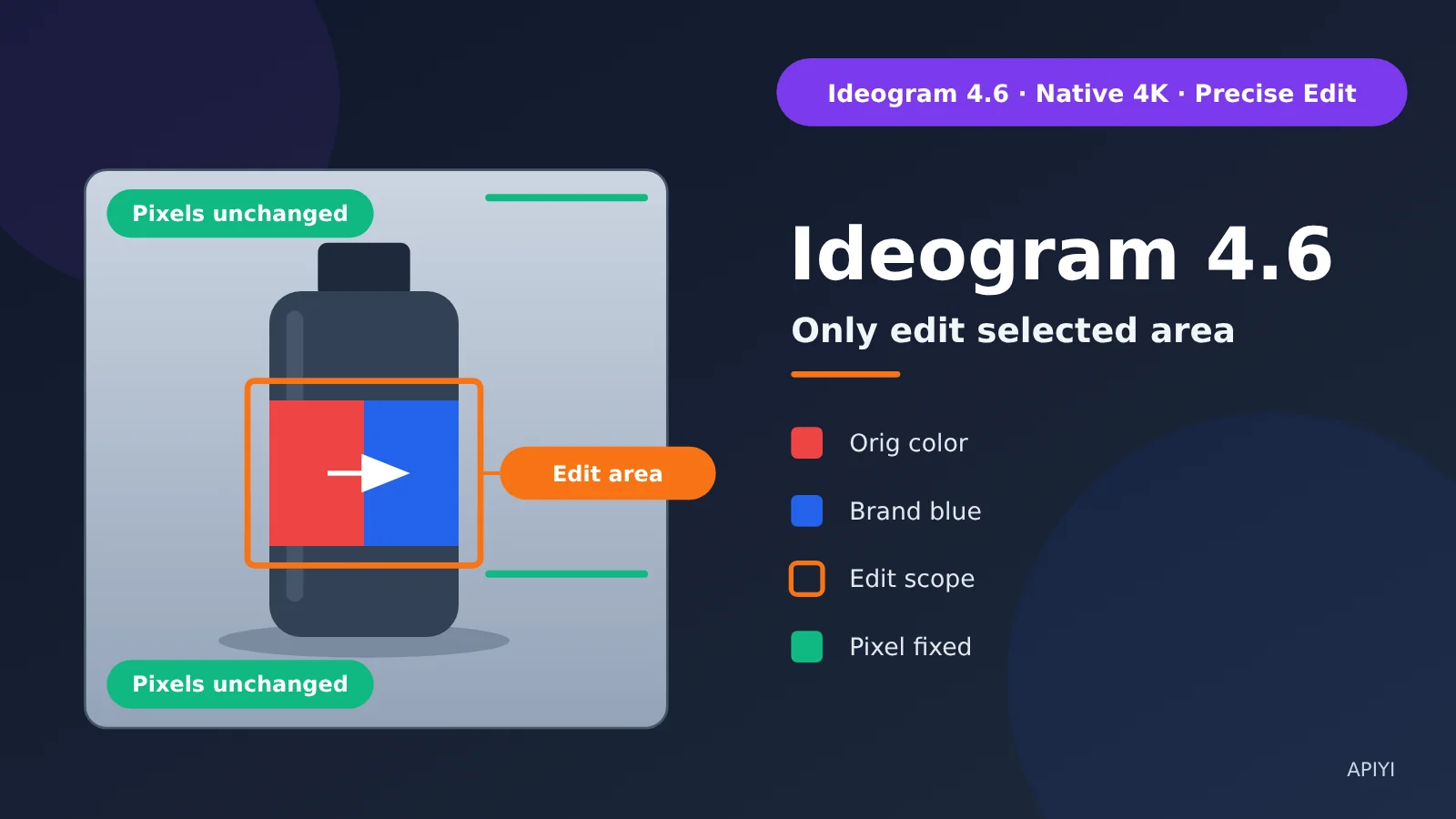
Ideogram announced Ideogram 4.6 on its official X account on 2026-11-19. It’s an image generation and editing model, and this release upgraded exactly two things. First, native 4K: skin and fabric textures are generated directly at full resolution, not rendered small and then upscaled. Second, Precise Edit: officially, pixel drift outside the edited region drops noticeably, and color accuracy improves. On pricing, High tier 4K text-to-image is $0.20 per image, High tier 4K Precise Edit is $0.60 per image, and the cheapest tier comes in at $0.008 per image.
This isn’t a recap of the launch press release. Wherever we cite the vendor’s improvement figures, we’ll label them “official self-reported.” The third-party leaderboards fall into two families with completely different methodologies — we’ll cover them separately below rather than mashing them together into some single “number one.”
Core takeaway: if you’re holding a base image you can’t redraw and need to keep changing colors, swapping props, and fixing imperfections, this review will tell you whether Ideogram 4.6 is the right tool for the job. If what you want is one stunning image generated from scratch, the conclusion may be exactly the opposite.
Ideogram 4.6 Core Features: Two Endpoints + Four Quality Tiers
Ideogram 4.6 is now live in the Ideogram app and API, and it’s also integrated into partner platforms including Leonardo, Runway, fal, Comfy, Runware, Scenario, Invideo, MyDesigns, Sociaro, Moda, HeyGen, and Luma. For developers, what really matters is two endpoints and a handful of key parameters. Start with the spec table.
| Spec | Ideogram 4.6 parameter | What it means for iterative image editing |
|---|---|---|
| Output resolution | 2K or 4K, up to 4096×4096; the Very low tier tops out at 2K | Deliverables are ready to ship, so you skip the upscaling step |
| Quality tiers | Very low / Low / Medium / High | Low tiers for drafts, High for finals |
| Source image count | Generate endpoint accepts up to 5 (the first is the image being edited, the rest are references); with a mask, up to 3 more | You can feed a product shot and a style reference at the same time |
| Precise Edit source image limit | 50MB, 67,108,864 pixels (that is, 8192×8192) | Even 8K print-ready base images can be uploaded |
| Background mode | auto / transparent / opaque |
Transparent-background product shots in a single step |
| Prompt format | Natural language or structured JSON | Great for templated batch calls |
Ideogram 4.6 Generate Endpoint: Text-to-Image and Reference-Guided Generation
Generate lives at POST https://api.ideogram.ai/v2/image/generate/ideogram-4-6. The request format is multipart/form-data, and authentication goes in the Api-Key request header. If you don’t pass any source images, it’s plain text-to-image. If you do, the first image is the one being edited and the ones after it are references — handy for tasks like “swap this garment’s fabric for the one in the reference image.”
Calls return synchronously by default, but you can also go async or use a webhook and then fetch the result with GET /v2/generations/{id}. There’s a genuinely useful little parameter, dry_run=true: it returns a quote only and doesn’t actually generate anything. Run it once before a batch job and you’ll know up front what that batch is going to cost.
Ideogram 4.6 Precise Edit: mask and context_window Are the Real Story
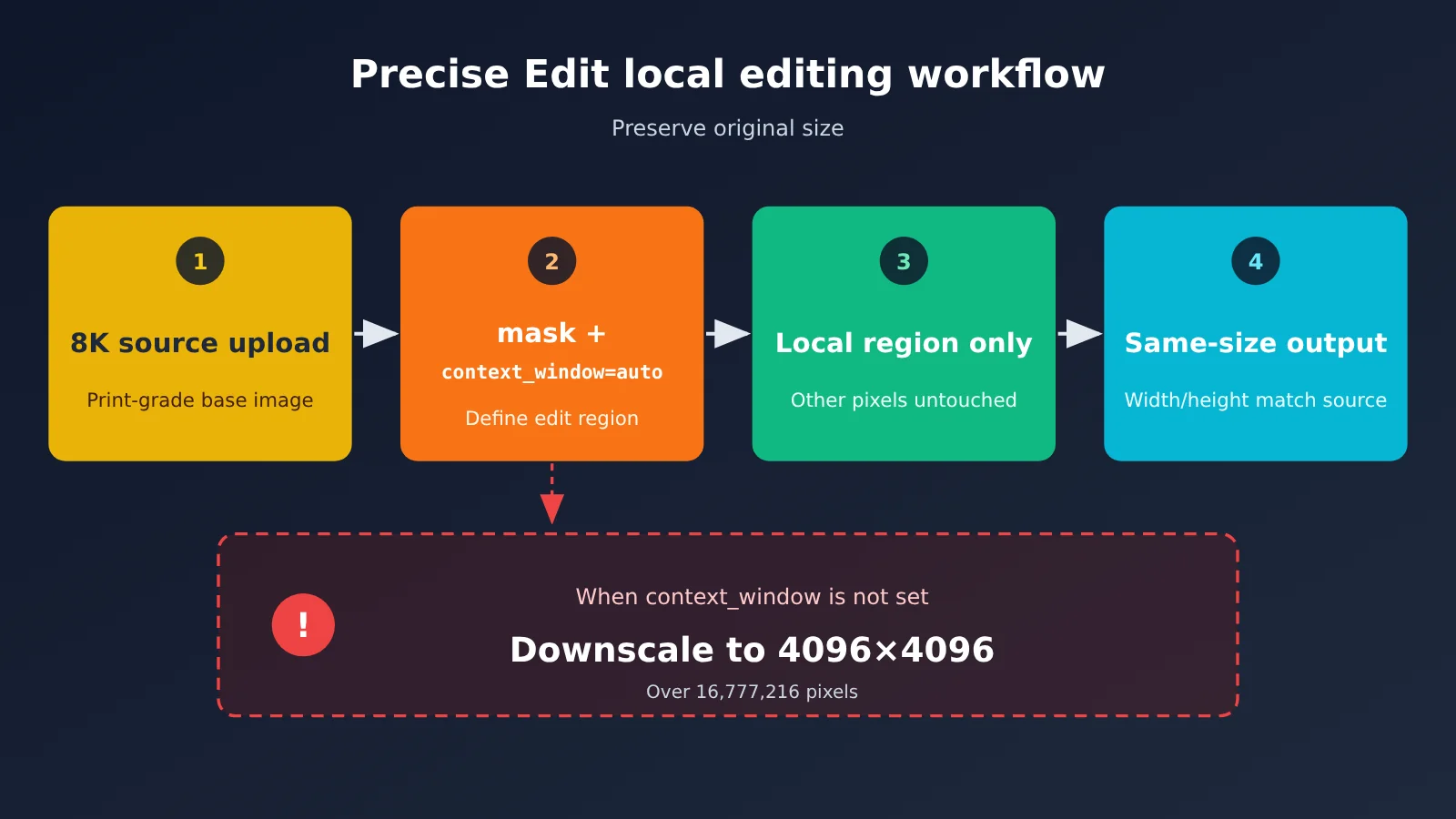
The precise-edit endpoint is POST https://api.ideogram.ai/v2/image/precise-edit/ideogram-4-6. The mask is optional, and output dimensions always match the source image’s width and height. That’s a big deal for e-commerce teams: the edited image can drop straight into the original’s slot without re-aligning the layout.
Here’s a common trap. When a source image exceeds 16,777,216 pixels (that is, 4096×4096), it gets downscaled to 4096×4096 by default. If your base image is a 6K or 8K print file and you want to keep the original size, you have to use context_window=auto together with a mask, or pass y_min,x_min,y_max,x_max yourself to box out the region. That way the model only processes the area inside the box and returns the remaining pixels untouched. That’s how “only the part you asked for gets changed” actually works in engineering terms.
🎯 Technical tip: When you build an image-editing pipeline, split “generation” and “editing” into two separate steps and pick a model for each. For the generation step, you can use the image models available on APIYI apiyi.com to quickly produce base images, then hand the editing step to a dedicated precise-edit model — that gives you better control over both cost and quality.
Ideogram 4.6 Benchmark Data: You Have to Read the Three Sets Separately
This section is the heart of the article. Right now there are three sources of data on Ideogram 4.6: the official self-reported numbers, the Rapidata multi-step image-editing leaderboard, and the Artificial Analysis general leaderboard. They each measure different things, and their conclusions can even contradict one another — read them mixed together and you’ll definitely walk away with the wrong take.
Official self-report: pass rate of 4.6 vs. 4.5 on the same batch of requests
Ideogram ran the same batch of image-editing requests through 4.5 and 4.6 at the High setting, then counted the share that came out “usable.” Two caveats worth stressing: this is official self-reported data, not an independent third-party test, and the company hasn’t published the criteria for what counts as “usable.” On top of that, these numbers only compare its own two generations — there’s no comparison against other vendors.
| Task type (official self-report) | Ideogram 4.5 | Ideogram 4.6 | Improvement |
|---|---|---|---|
| Recoloring to brand color codes | 46% | 83% | +37 percentage points |
| Fixing small product flaws | 61% | 86% | +25 percentage points |
| Product shots | 66% | 88% | +22 percentage points |
| Person still recognizable after a scene change | 69% | 85% | +16 percentage points |
| Editing only the masked area | 82% | 90% | +8 percentage points |
The biggest jump is “recoloring to brand color codes,” going from under half to over 80%. That’s precisely the most common need in e-commerce design: one product that has to ship in ten colorways. That said, since the judging criteria aren’t public, these numbers are better used to gauge direction than to treat as a precise promise.
Rapidata Multi-Step Editing Leaderboard: What It Really Tests Is Face Identity Drift
The Multi-step Image Edit leaderboard that Rapidata runs on benchmark.ai sounds like a general-purpose editing leaderboard, but what it actually measures is face identity drift. The test works like this: take 199 real photos, pair each with a 5-step editing chain that only changes clothes, objects, and text — never the face; at each step, feed the model its own previous output as input; finally, have humans blindly choose “which face looks more like the original after step 5.” The whole test involved 413,667 judgments and 76,714 comparisons, fitted into Elo scores using a Bradley–Terry model. Updated 2026-11-10.
| Rank | Model | Elo (±95% interval) | Win rate |
|---|---|---|---|
| 1 | Ideogram 4.6 (Precise Edit, High Quality) | 1892 ±32 | 86.3% |
| 2 | Ideogram 4.5 (High Quality, High Precision) | 1866 ±30 | 86.1% |
| 3 | Seedream 5.5 | 1805 ±29 | 83.7% |
| 4 | FLUX 3 Image | 1697 | — |
| 11 | GPT Image 2.6 Sunburst (Max Quality, High Reasoning) | 1001 | — |
| 12 | Nano Banana Pro | 987 | — |
You need to read this leaderboard’s conclusion carefully. Ideogram 4.6 leads third-place Seedream 5.5 by 87 points, and their intervals don’t overlap — that advantage is real. But the intervals for 4.6 and 4.5 overlap between 1860–1896, so this leaderboard can’t tell which of the two generations is stronger. The accurate takeaway is: “The Ideogram series clearly leads in face preservation after multi-step edits,” not “4.6 beats 4.5.”
Artificial Analysis’s Two General Leaderboards: Single-Shot Blind Voting, 4.6 Ranks Near the Bottom
Artificial Analysis is a different setup: users blind-pick one of two images, which measures general preference for a single output and doesn’t involve multi-step accumulation. On 2026-11-26, we checked the AA-Image-T2I v2.1 (text-to-image) and AA-Image-Editing v2.1 (single edit) leaderboards. Here’s what we found.
| Leaderboard | Ideogram 4.6 (High) | Ideogram 4.5 (High) | Top model |
|---|---|---|---|
| AA-Image-Editing v2.1 single edit | 1089 ±14, #31, 4,207 samples | 1064 ±14, #40 | MAI-Image-2.7, 1217 |
| AA-Image-T2I v2.1 text-to-image | 985 ±13, #69, 4,237 samples | 1017 ±14, #50 | GPT Image 2.6 Sunburst (max), 1264 |
The numbers aren’t pretty, but we shouldn’t dodge them. On single edit, 4.6 scores 25 points higher than 4.5 and moves up from #40 to #31—real progress, but still more than 100 points behind the top spot. On text-to-image, 4.6’s 985 actually falls below 4.5’s 1017, dropping to #69. Seedream 5.5, Nano Banana 2.1, and Kling Image 4.0 are clearly ahead on both leaderboards.
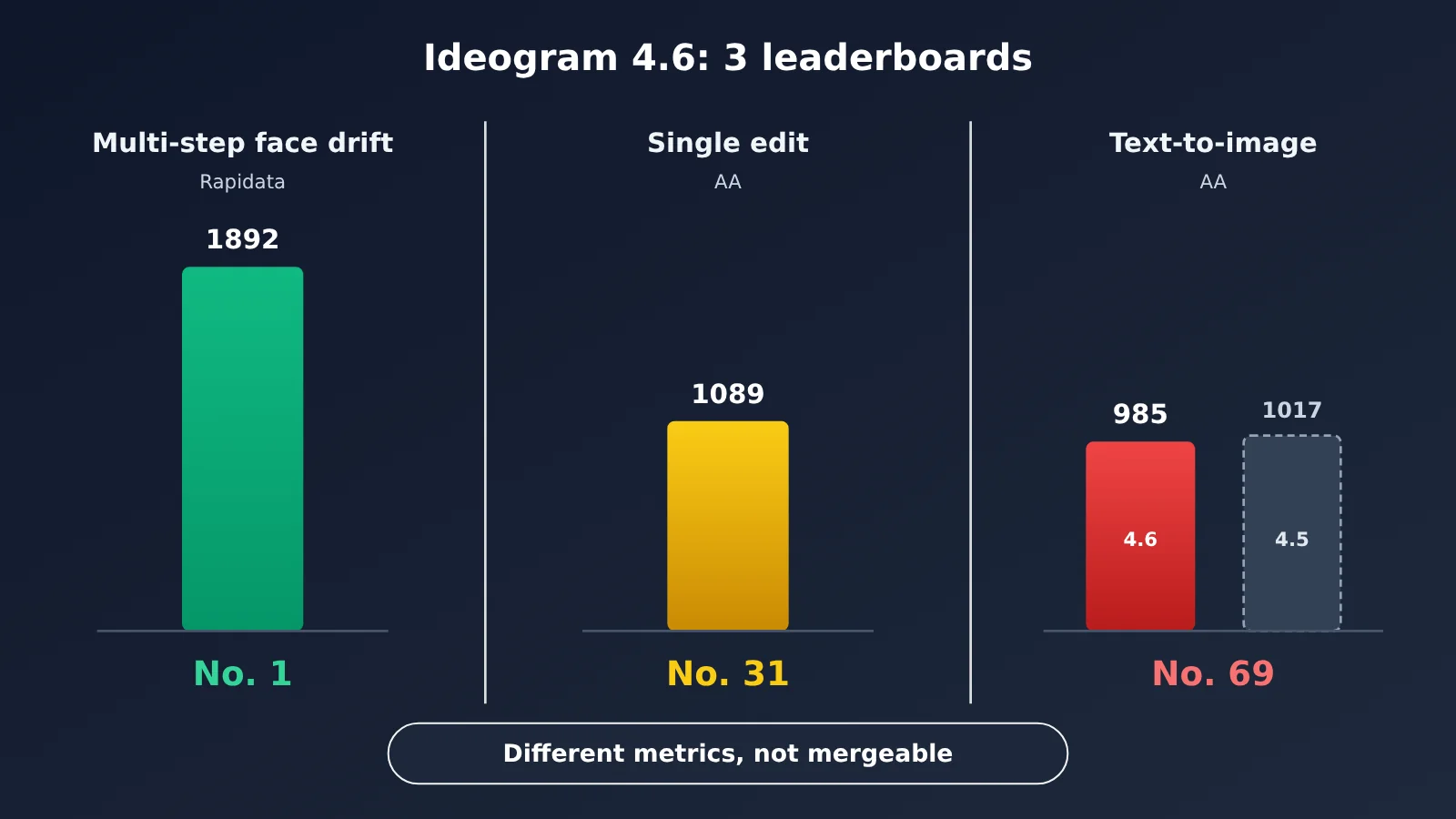
💡 Comparison note: Looking at all three leaderboards together, the conclusion is clear: Ideogram 4.6 is a specialist at “multi-round edits that don’t drift,” not an all-around champion. If you want to validate this on your own material, you can first run the same set of edit tasks with models like Seedream 5.5 and Nano Banana 2.1 on APIYI apiyi.com as a baseline for comparison.
Ideogram 4.6 Pricing and Access
The table below shows the official API’s per-image prices in USD. Per the official notes: Edit pricing applies to both Precise Edit and Generate with a source image; any output larger than 2048×2048 is always billed at the 4K tier.
| Quality tier | Generate 1K/2K | Generate 4K | Generate with source image / Precise Edit 1K/2K | Generate with source image / Precise Edit 4K |
|---|---|---|---|---|
| Very low | 0.008 | No 4K | 0.008 | No 4K |
| Low | 0.03 | 0.06 | 0.03 | 0.06 |
| Medium | 0.06 | 0.12 | 0.06 | 0.20 |
| High | 0.10 | 0.20 | 0.22 | 0.60 |
Note that the “$100 / $220 per thousand images” figures listed on the AA leaderboard are normalized to each provider’s default settings; they can’t be directly converted into a single value against the official per-image prices in the table above. What really affects your budget is High-tier 4K Precise Edit: $0.60 per image, three times the price of 4K text-to-image at the same tier. If a product image needs five rounds of edits, that’s $3 per image.
About APIYI availability: Ideogram 4.6 isn’t listed yet, but we’ll add this model as soon as possible; model versions and pricing are subject to the platform’s model list. At present, APIYI apiyi.com offers the following image models that are available and can be used for comparison on similar tasks. They all use the OpenAI-compatible interface—just set base_url to https://api.apiyi.com/v1:
seedream-5-5-261028: $0.020 per image for 1K/1.5K, $0.035 per image for 2K/custom, and $0.008 per input image. It ranks 3rd on the Rapidata multi-step image-editing leaderboard and is the closest comparison baseline to Ideogram.gemini-nano-banana-2.1: $0.045 per call, with better general preference performance on single edits.gpt-image-2.6-all: $0.025 per call, from the same model family as the No. 1 model on the AA text-to-image leaderboard.MAI-Image-2.7: $0.12 per call, No. 1 on the AA single-edit leaderboard;MAI-Image-2.7-Flashis $0.06 per call.
💰 Cost optimization: Precise Edit is billed per image, and the per-image price isn’t cheap. We recommend first validating your requirements on APIYI apiyi.com with per-call models, figuring out which images really need multiple rounds of refinement, and then handing those images to a dedicated precise-editing model. That way you avoid paying the highest tier for an entire batch.
Ideogram 4.6 Pros and Cons: A Task-by-Task Checklist
No “it depends” hedging. Here’s a clear verdict for each task.
Tasks where Ideogram 4.6 is worth switching for
- Iterating on the same product shot over and over: say, one product in multiple colorways, or several rounds of swapping props. The Rapidata leaderboard shows it holds original details through multi-step edits, a good margin ahead of the third-place model, and its own reported color-change success rate jumped from 46% to 83%.
- Needing deliverable-ready 4K output: native 4K, no upscaling — fabric and skin texture are generated at full resolution. Hero images, long detail-page graphics, and print assets all benefit.
- Large canvases where you only change a small area:
context_window=autoplus a mask lets you edit one region of an 8K source image and get everything else back pixel-for-pixel. That’s an engineering advantage almost no one else offers. - Multi-round edits involving real human models: changing outfits, swapping hand-held items, editing text — the face stays intact. That’s exactly what the Rapidata leaderboard tests.
Tasks where Ideogram 4.6 isn’t worth switching for
- Generating images from scratch: on the AA text-to-image leaderboard, 4.6 ranks 69th, scoring below 4.5. If zero-to-one generation is your main workflow, moving to 4.6 is a step backwards.
- Chasing quality preference on single edits: on the AA single-edit leaderboard, 4.6 sits at 31st, behind MAI-Image-2.7, GPT Image 2.6 Sunburst, and Seedream 5.5.
- Budget-constrained batch editing: precise 4K edits on the High tier run $0.60 per image, and costs climb fast across multiple rounds.
- Already using 4.5 for multi-step edits: on the Rapidata leaderboard the two generations’ confidence intervals overlap. Upgrading purely for “steadier faces” isn’t a strong enough reason. Native 4K and color-change accuracy are the real arguments for upgrading.
Frequently Asked Questions (FAQ)
Q1: What type of model is Ideogram 4.6?
Ideogram 4.6 is an image generation and editing model released by Ideogram on 2026-11-19, focused on native 4K output and precise editing. It offers two API endpoints, Generate and Precise Edit, and comes in four quality tiers: Very low, Low, Medium, and High.
Q2: Is Ideogram 4.6 the strongest image editing model right now?
It depends on what you’re measuring. It ranks No. 1 on Rapidata’s multi-step editing face-drift leaderboard, but that leaderboard only looks at whether faces still resemble the original after 5 editing steps. On Artificial Analysis’s general single-edit leaderboard, it ranks only No. 31. If you want to compare it against similar models, you can use APIYI (apiyi.com) to call Seedream 5.5, MAI-Image-2.7, and other available models on the same set of assets.
Q3: How is Ideogram 4.6 better than 4.5?
All five officially self-reported usability rates improved, with brand-color-code recoloring rising from 46% to 83%—the biggest gain. On the AA single-edit leaderboard, 4.6 scores 25 points higher than 4.5. But on the AA text-to-image leaderboard, 4.6 actually scores 32 points lower, and on the Rapidata leaderboard the two generations’ score ranges overlap, so there’s no clear winner.
Q4: What’s the difference between native 4K and upscaling to 4K?
The official description says native 4K means textures such as skin and fabric are generated directly at full resolution, rather than rendering a small image first and then upscaling it. Upscaling can only add interpolated detail, while natively generated textures look more realistic. Note: if output exceeds 2048×2048, you’ll be billed at the 4K tier.
Q5: How can I use the API to validate a similar task first?
You can start by registering at APIYI (apiyi.com) and claiming free test credits. Set `base_url` to `https://api.apiyi.com/v1`, then use `seedream-5-5-261028` or `gemini-nano-banana-2.1` to run 5 consecutive edits on your product base image and record the distortion level after each round. You can use these results as a comparison baseline when you later integrate a dedicated precise-editing model.
Q6: What are the known limitations of Ideogram 4.6?
– It ranks low in general text-to-image preference rankings, so it’s not suitable as your primary image generation model.
– When the source image exceeds 4096×4096, it’s downscaled by default; you must use `context_window` to keep the original dimensions.
– The official usability improvements don’t come with published evaluation criteria, so they’re only for reference.
– High-tier 4K precise editing costs 3× the unit price of High-tier 4K text-to-image.
Ideogram 4.6 Key Takeaways
- Positioning: A specialized image-editing model, not a general image-quality upgrade.
- Two upgrades: Native 4K without upscaling, and precise editing that only touches the mask area.
- Third-party strength: Ranked No. 1 on Rapidata’s multi-step face drift leaderboard with 1,892 points.
- Third-party weakness: AA text-to-image score of 985, ranking No. 69—lower than 4.5.
- Large-image tip: Use
context_window=autowith a mask to edit just one section of an 8K base image. - Validation path: First use APIYI apiyi.com’s available image models to establish an image-editing comparison baseline.
Summary
Ideogram 4.6’s value is clear: If you need to repeatedly edit the same image and want a 4K final product, it’s worth switching to; if you’re generating from scratch and chasing single-pass image quality, it’s not worth switching. Looking at the three datasets separately removes any ambiguity: the official self-reported recolor usability rate has improved substantially, Rapidata proves that multi-round editing stays consistent, and AA shows that it doesn’t lead in general image-quality preference.
Before getting started, I recommend three checks:
- Check your task structure: Do you need to edit the same image over multiple rounds, or generate in batches from scratch? The latter rules it out immediately.
- Check the source image size: If the base image exceeds 4096×4096, add
context_window=autoand a mask to the request; otherwise it will be downscaled. - Run a quote first: Use
dry_run=trueto estimate the cost of the whole batch, then decide between Medium and High tiers.
Remember one price anchor: High-tier 4K precise editing costs $0.60 per image; five rounds of editing means $3 per image. Before integration, I recommend first using APIYI apiyi.com’s available image models to get the image-editing workflow running end to end, and confirm which images truly need high-precision multi-round editing.
📚 References
-
Official Ideogram Model Page: Ideogram 4.6 specs and pricing table
- Link:
ideogram.ai/models/4.6 - Description: First-hand source for resolutions, quality tiers, source image limits, and per-image pricing
- Link:
-
Official Ideogram X Announcement: 2026-11-19 launch announcement
- Link:
x.com/ideogram_ai/status/2123461101224624402 - Description: Original wording of the official positioning “precise editing + native 4K”
- Link:
-
Rapidata Multi-Step Image Editing Leaderboard: Face identity drift evaluation
- Link:
benchmark.ai/multi-step-image-edit - Description: Evaluation methodology and Elo rankings based on 199 real-person photos and 5-step editing chains
- Link:
-
Artificial Analysis Image Leaderboard: AA-Image-T2I v2.1 and AA-Image-Editing v2.1
- Link:
artificialanalysis.ai - Description: General preference rankings from single blind head-to-head comparisons
- Link:
Author: APIYI Technical Team
Technical Discussion: Feel free to contact us via the APIYI official website homepage. For more models and integration guides, visit the docs.apiyi.com documentation center.