
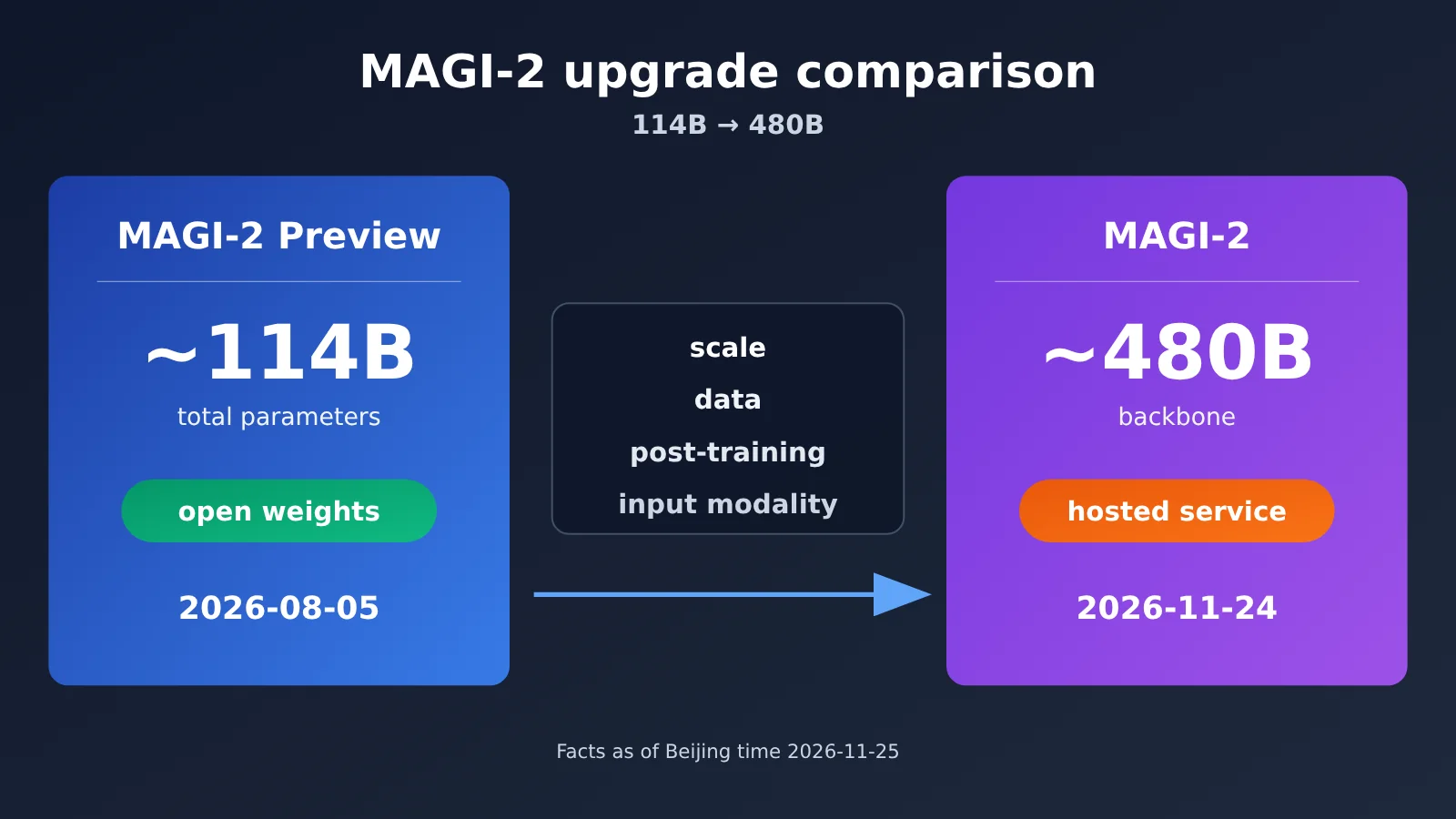
The upgrade from MAGI-2 Preview to MAGI-2 breaks down into three layers. The first is scale: the backbone grows from roughly 114B to roughly 480B, activated parameters per token increase from roughly 6B to roughly 28B, and pretraining data is about 3x that of Preview. The second is usable capability: the flagship hosted service supports 4–30 second generation, up to 20 image, video, and audio references, and can edit existing videos; Preview’s public inference package only covers 10-second text-to-video and single first-frame image-to-video. The third is access. As of November 25, 2026, the only version you can download weights for and reproduce locally is the 114B Preview. The 480B flagship is currently used through Sand.ai’s API and the Higgsfield product entry point, and both companies list open weights as a future arrangement.
One thing needs to be clear up front: 1080p and synchronized audio-video generation were already available in Preview, and they aren’t new flagship capabilities. The flagship’s higher quality scores aren’t just because it has more parameters either; data, post-training, and super-resolution all changed at the same time.
What will you learn from this article?
- Which specs are confirmed for each model generation, which numbers are vendor approximations, and which claims differ across sources.
- What changed in model structure, training system, and data plan on the way from 114B to 480B.
- The specific differences in generation duration, conditional inputs, editing capabilities, and audio-video delivery specs.
- The hardware you need to deploy Preview locally, the weight size, and the experiment conditions you should record.
- How to cite Elo quality scores correctly and how to design a fair version comparison test.
Article index: “To Know” first explains terms like MoE, activated parameters, and refiner, while “Impact at a Glance” explains what this change means for different audiences. The “Objective Facts” section lists release and access methods, scale and structure, generation capabilities, deployment requirements, and quality evidence in order, all traceable to official sources. The “Analysis and Judgment” section offers model selection advice and a comparison test plan, plus a sample code block for organizing test prompts. It ends with FAQs and references.
What You Need to Know First to Compare MAGI-2 with Preview
| Concept | Brief explanation |
|---|---|
| Total parameters / backbone parameters | The full parameter count of the generation backbone — 114B and 480B here — excluding helper components like the text encoder and VAE |
| Active parameters | The experts and other parameters a single token actually engages during computation: roughly 6B for Preview, about 28B for the flagship model |
| Multi-head latent-space MoE | Splits the token representation into multiple subspaces, with each “head” choosing its own experts, so different parts of the same token can route through different experts |
| Single-stream Transformer | Text, visual frames, and audio all go into one shared token sequence and are processed together, rather than being split into separate branches |
| Head Parallel | Sand.ai’s training parallelism scheme: first swap token slices across devices based on head ownership, then complete expert routing locally |
| Refiner | The post-processing model in Preview that lifts the backbone’s low-resolution output to the 1080p tier and doubles the frame rate |
| VAE stride | The compression factor of the video VAE, which determines the pixel dimensions it can output directly |
| First frame / first-and-last frame / reference image | Three different image conditions: the first frame fixes the starting point of the shot, first-and-last frames fix both the start and the end, and a reference image only supplies character or scene information |
| Elo | A relative score on an arena leaderboard, computed from paired blind comparisons and not directly comparable across different leaderboards |
| Open weights | The model parameter files can be downloaded publicly; Preview’s weights page lists Apache-2.0 |
MAGI-2 Upgrade Impact at a Glance
- Researchers: The traceable weights and code currently cover only the 114B Preview. For now, studying the architecture, reproducing training conclusions, or running ablation experiments has to be based on Preview. Conclusions about the 480B model can only cite the vendor’s public description.
- Video creators: The flagship model brings longer duration, references from multiple assets, shot arrangement, and editing of existing video—well suited to multi-shot short films. If you’re only making a 10-second single-shot video, the gap between the two generations mainly shows up in visual texture and motion quality.
- Developers: The flagship model is used through a hosted API, so you don’t need to prepare 8 Hopper GPUs. The trade-off is that you can’t control the underlying pipeline, and you need to handle input roles and parameters according to the provider’s rules.
- Self-deployment teams: The full Preview repository is about 307 GB, the official requirement is 8 Hopper GPUs, and component licenses also need to be recorded item by item.
MAGI-2 and MAGI-2 Preview: The Objective Facts
MAGI-2: The Two Releases and How to Access Them
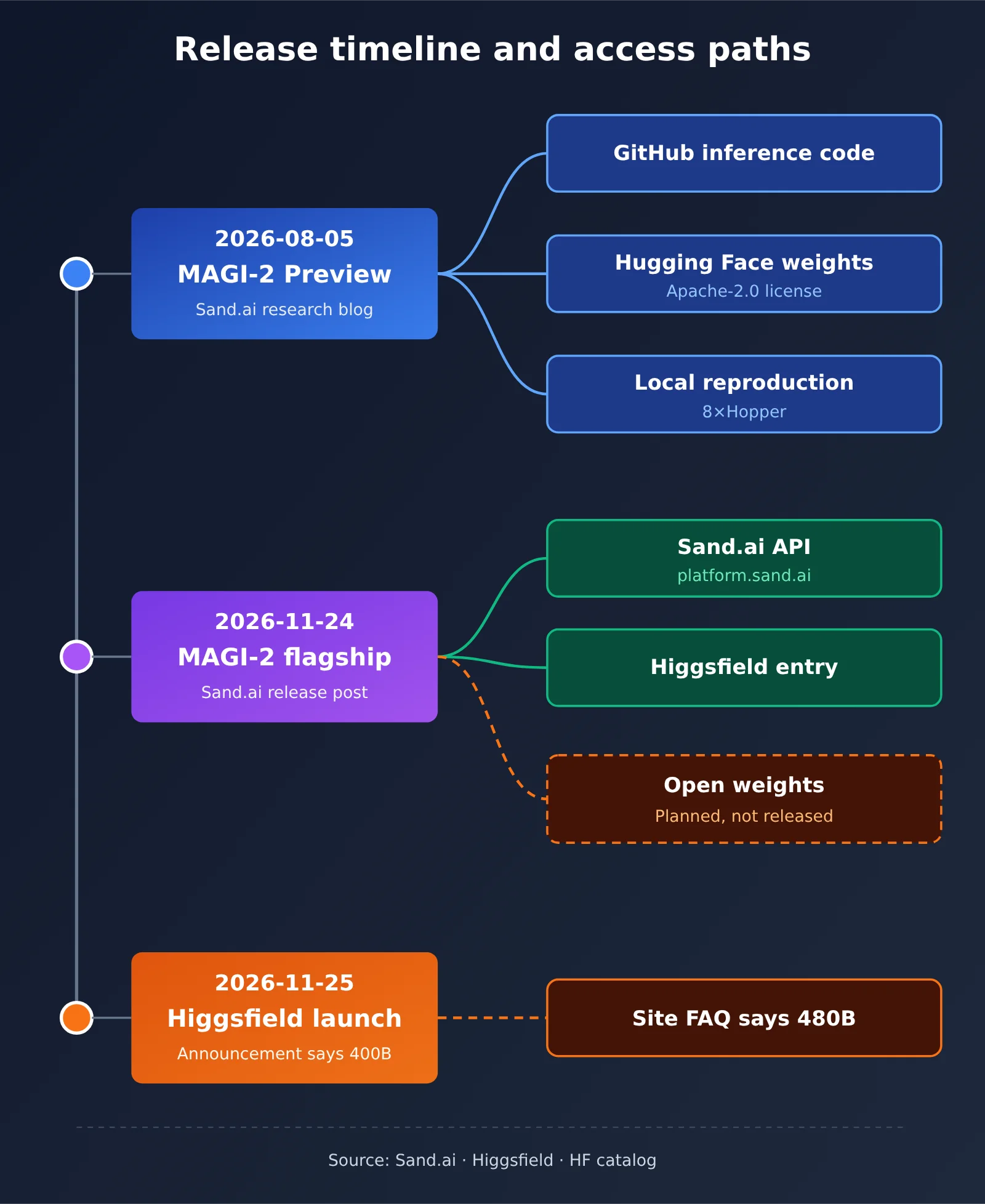
MAGI-2 Preview was released on August 5, 2026. According to the Sand.ai research blog, its specs are roughly 114B total backbone parameters and about 6B activated parameters per token. It was positioned as a stage-gate validation of the architecture, training system, and data approach. The inference code is on GitHub, the base weights are under Sand.ai’s official Hugging Face account, and the weights page is marked Apache-2.0. The pinned revision file tree shows the generation backbone, refiner, and auxiliary components.
The MAGI-2 flagship release post is dated November 24, 2026. Sand.ai lists 480B backbone parameters, about 28B activated parameters, and around 4 trillion pretraining tokens. The numbers differ across sources: Higgsfield’s November 25 launch announcement says 400B, while the same site’s product FAQ says 480B; both give about 28B activated parameters. The “114B to 480B” comparison in this article’s title uses the figures from the same launch graphic from developer Sand.ai.
| Item | MAGI-2 Preview | MAGI-2 flagship |
|---|---|---|
| Release date | 2026-08-05 | 2026-11-24 (Sand.ai date) |
| Total backbone parameters | About 114B | About 480B (Higgsfield announcement says 400B; FAQ says 480B) |
| Activated parameters per token | About 6B | About 28B |
| Pretraining data | Specific token count not separately listed | About 4T tokens, roughly 3× Preview |
| Weight status | Open; weights page marked Apache-2.0 | Not open; listed as a future plan |
| Access methods | GitHub code + Hugging Face weights, local deployment | Sand.ai API, Higgsfield product entry |
Table note: All specs are approximate figures provided by the vendor. On November 25, Sand.ai’s official Hugging Face account listed only two models: MAGI-2 Preview and MAGI-1.
MAGI-2 Scale and Architecture: From 114B to 480B
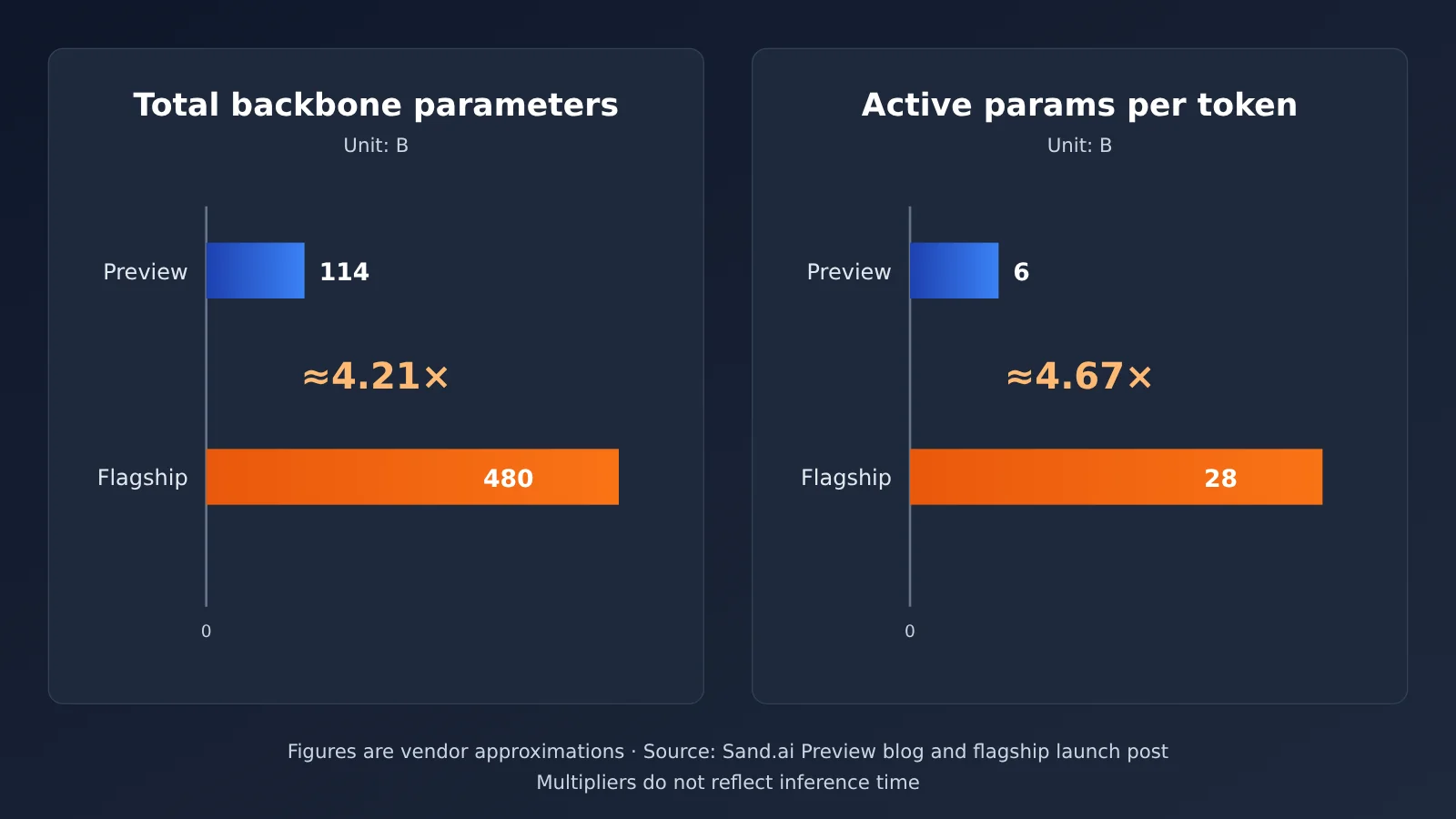
Using the vendor’s approximate figures, the backbone parameters grew about 4.21× (480÷114), while the activated parameters grew about 4.67× (28÷6). Both generations are single-stream Transformers, and both use multi-head latent-space mixture-of-experts. Activated parameters only describe the compute path for a single token — end-to-end compute also depends on attention, sequence length, and the number of denoising steps, so you can’t use this multiplier to estimate how long a single task will take.
Preview disclosed its exact configuration. The model has 40 layers in total: the middle 36 are multi-head MoE layers, and the first and last 2 are dense. Routing splits the representation into 12 subspaces of 256 dimensions; each head holds 256 expert units, and each token picks Top-6 within every head. That gives each sparse layer 3,072 expert units, of which a token activates 72. These layer counts, head counts, and the Top-6 setting belong to Preview alone. The eight-head experiment mentioned in the flagship release post was a controlled comparison, not the flagship’s official configuration.
On the training side, Head Parallel lets the shape of the communication tensors be determined in advance, and cross-device traffic doesn’t grow with Top-k, which reduces the risk of waiting on straggler GPUs. Sand.ai reports that in a 480B pretraining run with identical total FLOPs and each architecture using its optimal configuration, it trains roughly 22% faster than single-head LatentMoE. That number measures training throughput — it has nothing to do with how long a user waits for video generation.
Data and post-training changed too. The flagship’s data pipeline is described as roughly 1 billion samples, averaging about 4,000 tokens each, annotated in three weeks. Building on Preview’s approach of preserving complex clips, the flagship also brings in multi-person interaction, rapid cuts, on-screen text, and complex audio. Reinforcement learning is used more heavily for lighting, materials, and audiovisual texture. The flagship’s super-resolution stage also re-injects the original reference image to make small faces and small text easier to read.
MAGI-2 Generation Capability Comparison
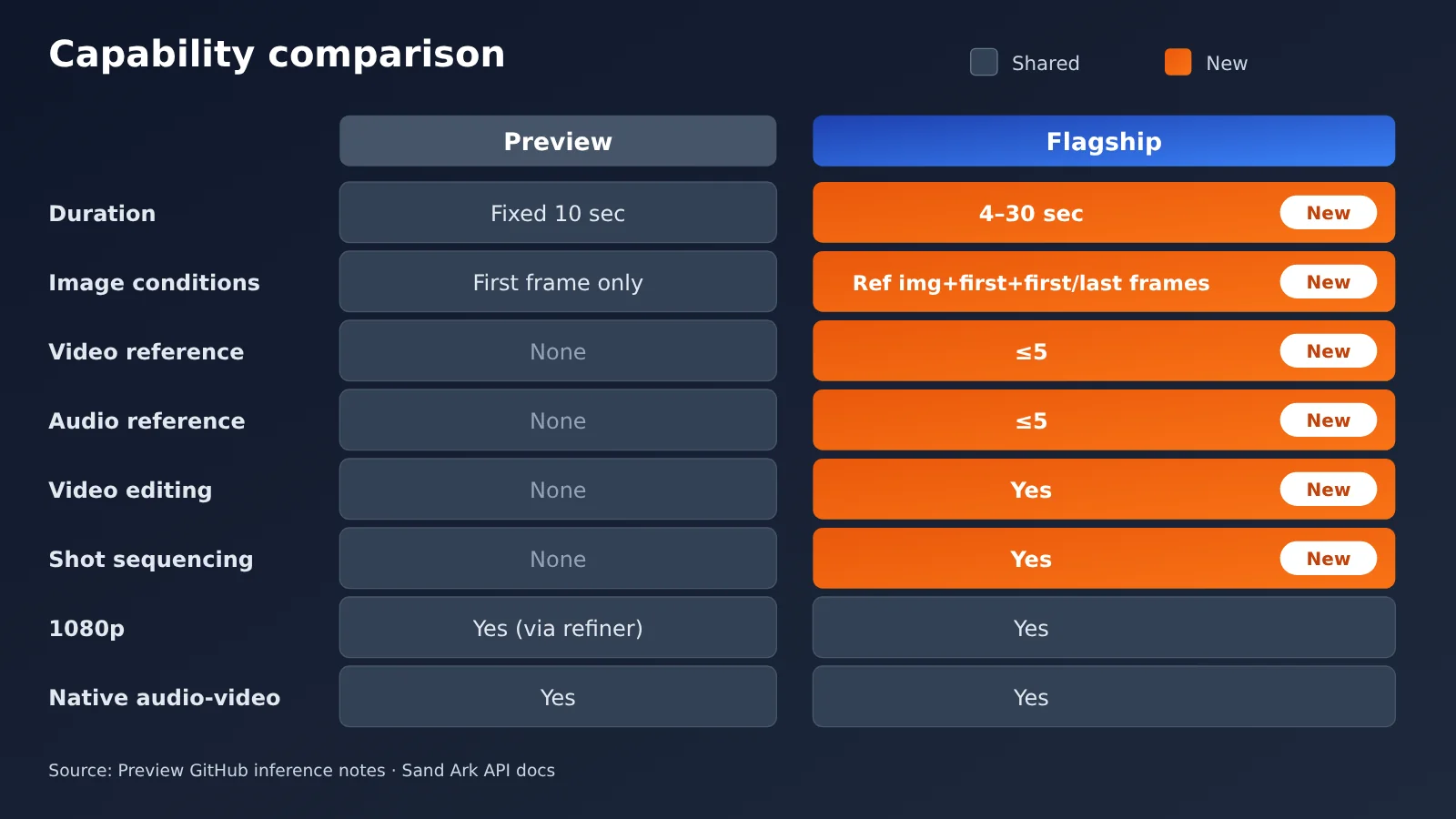
| Task | 114B Preview Public Inference Package | 480B Flagship Public Service Specifications |
|---|---|---|
| Text-to-video | Text input, fixed 10 seconds | Text input; Sand Ark API supports 4–30 seconds |
| Image control | Text + one first-frame image | Regular reference image, first frame, or first-and-last frames; exact rules vary by entry point |
| References and editing | Only T2V and I2V from a single first frame | Up to 20 total image, video, and audio references (10 images, 5 videos, 5 audio clips); supports targeted editing of existing videos |
| Visuals and audio | Native audio-visual, 12.5 fps in the base stage, reaching the 1080p tier at 25 fps after the refiner | Native audio-visual, rated 1080p at 25 fps with six aspect ratios; supports dialogue lip-sync, Foley, ambient sound, and music |
| Timing | Fixed 10-second single shot | Can describe action, camera movement, and cuts along a timeline, accommodating multiple segments within the same scene |
Preview output pixel dimensions are constrained by the VAE stride; if you need exact dimensions, you can resample before writing out the video. The flagship’s Ark mode requires assigning an explicit role to regular reference images. If you pass only one image with no role and no other media, the system treats it as a first frame. First-and-last-frame mode accepts only frame bitmaps and optional text.
MAGI-2 Preview Local Deployment Requirements
The Preview model repository is about 307 GB overall. It includes 56 backbone safetensors shards plus their index, 3 refiner shards plus their index, the text encoder, audio VAE, video VAE, and accelerated decoder. The backbone alone is about 228 GB, and the refiner is about 13.5 GB. The text encoder is Qwen3.5-27B, the video VAE comes from Wan2.2-TI2V-5B, and the audio VAE comes from Stable Audio Open. When recording licenses, note that the Sand repo is labeled Apache-2.0, while the original Stable Audio Open repo uses the Stability AI Community License; list the two separately.
The officially required environment is 8 NVIDIA Hopper GPUs, Python 3.12, and a recent CUDA toolchain, with ffmpeg used to mux audio into MP4. The defaults are 100 steps for backbone generation and 5 steps for refinement. The existing turbo_vae only speeds up the decoding stage. The step distillation mentioned in the repo targets the backbone and refiner and is planned for later. The default pipeline moves the backbone and refiner on and off the GPU at different stages, so you can’t estimate per-GPU VRAM from the total repository size or the active parameter count.
| Deployment item | Confirmed information |
|---|---|
| GPU | 8 × NVIDIA Hopper |
| Runtime environment | Python 3.12, a recent CUDA toolchain, ffmpeg |
| Weight size | Whole repo about 307 GB; backbone about 228 GB; refiner about 13.5 GB |
| Default steps | 100 steps for generation, 5 steps for refinement |
| Prompt | Built-in text-to-video and first-frame templates; external prompt enhancement is optional, and if left blank, the original prompt is used |
| Recommended records | Container commit hash, config, weight revision, seed, output size, whether the prompt was rewritten |
How to Cite MAGI-2 Quality Evidence
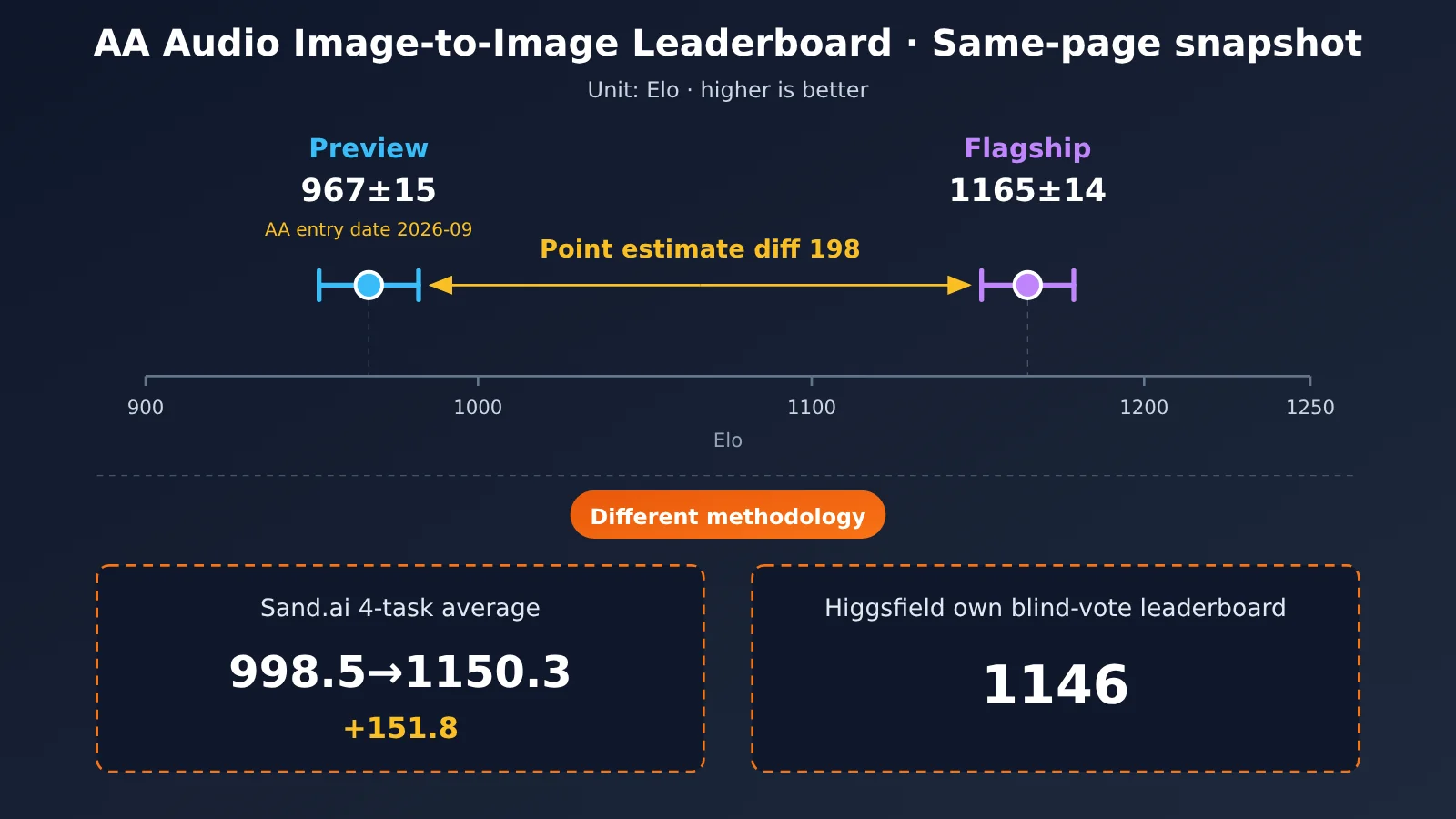
Sand.ai averaged the four tasks in AA Video Arena v2.1 — audio image-to-video, silent image-to-video, silent text-to-video, and audio text-to-video — and reports a score rising from 998.5 to 1150.3, a gain of +151.8 Elo. In the same page snapshot of the Artificial Analysis audio image-to-video leaderboard, the flagship sits at 1165±14 and Preview at 967±15, a point-estimate gap of 198. AA timestamps this Preview entry as September 2026, so when you cite it you should note which version of the model the leaderboard actually evaluated. The 1146 that Higgsfield published comes from its own blind-voting leaderboard, which isn’t the same measurement basis as AA — the two can’t be compared side by side.
Sand.ai also showed probe cases from the flagship’s early pretraining stage with prompt enhancement turned off, including Sudoku, autocompletion of dialogue storyboards, and cross-lingual dialogue. The team notes that after post-training focused on visual presentation, some of these abilities became harder to elicit.
MAGI-2 Upgrade Analysis
What Going from 114B to 480B Really Means
From what we can actually observe, the flagship’s main improvements are in its task scope: longer durations, a wider variety of input conditions, video editing, and control over the final output. For tasks that both generations can handle — like a 10-second single shot — the roughly 150–200-point gap in Elo reflects a quality preference. That gap stems from capacity, data, reinforcement learning, and the super-resolution approach all at once, and it shouldn’t be chalked up entirely to the roughly 4x jump in parameter count. This is an inference drawn from the official description; Sand.ai hasn’t published any per-item ablation results.
Selection Advice
If your work is mostly multi-asset short films, needs shot cuts, or requires localized edits to existing footage, the flagship hosted service’s 30-second duration and multimodal reference are more useful. If you need to inspect weights, reproduce inference, or study MoE routing, Preview is currently your only option. If your team has eight Hopper GPUs but only needs 10-second previews, Preview works too — just factor in the operational overhead and the workload of component license review. And if the flagship weights do eventually get released, this judgment will need to be reassessed.
MAGI-2 Comparison Test Quick Start
The test plan below is an example built from the docs for both generations — it’s not a completed hands-on run. The shared group uses the same first frame of a person and the same 10-second instruction, something like “open the door, say one short line, and stop.” The flagship has to be set to first-frame mode too, otherwise you’re comparing two different reference conditions. Things to watch: whether the person’s appearance stays consistent, whether the hand-to-door contact looks plausible, and whether lip sync and audio timing line up. Also note whether reference audio was used, and whether the foley matches the on-screen action. The new group tests the flagship’s 30-second mixed reference on its own — feed in the character image, scene image, and audio sketch in stages, then check whether character identity and props stay consistent across the cuts.
In both groups, the prompt fed into the generation backbone has to be identical. You can start by using a general-purpose Large Language Model to generate a structured, time-segmented prompt, then freeze it and use that same copy on both sides. The code below calls a general-purpose chat model, not MAGI-2. The model name is just an example — go with whatever is actually available in your console.
import openai

client = openai.OpenAI(
    api_key="YOUR_API_KEY",
    base_url="https://api.apiyi.com/v1"  # APIYI OpenAI-compatible endpoint
)

resp = client.chat.completions.create(
    model="gpt-4o-mini",  # example model name, swap in what your console actually lists
    messages=[{"role": "user", "content":
        "把以下镜头写成 0-10 秒按秒分段的视频提示词:人物开门,说一句短台词后停下。"}]
)
print(resp.choices[0].message.content)
View the full code: generate a fixed prompt and write out the experiment manifest
import json, hashlib, datetime
import openai

client = openai.OpenAI(
    api_key="YOUR_API_KEY",
    base_url="https://api.apiyi.com/v1"
)

def build_prompt(scene: str, seconds: int, model: str = "gpt-4o-mini") -> str:
    """Use a general-purpose Large Language Model to rewrite the scene description into a time-segmented prompt (example)"""
    r = client.chat.completions.create(
        model=model,
        messages=[
            {"role": "system", "content": "你是视频分镜助手,只输出按秒分段的镜头描述。"},
            {"role": "user", "content": f"时长 {seconds} 秒:{scene}"},
        ],
    )
    return r.choices[0].message.content.strip()

def manifest(prompt: str, group: str, target: str, **extra) -> dict:
    """Record the fields needed for reproducibility, so the two generations can be compared side by side"""
    return {
        "group": group,                 # shared_10s / flagship_30s
        "target": target,               # preview_local / flagship_hosted
        "prompt": prompt,
        "prompt_sha256": hashlib.sha256(prompt.encode()).hexdigest(),
        "prompt_rewritten_by_external_llm": True,
        "image_condition": extra.get("image_condition", "first_frame"),
        "reference_audio": extra.get("reference_audio", False),
        "seed": extra.get("seed"),
        "container_commit": extra.get("container_commit"),
        "weight_revision": extra.get("weight_revision"),
        "output_size": extra.get("output_size"),
        "created_at": datetime.datetime.now().isoformat(),
    }

if __name__ == "__main__":
    p = build_prompt("人物开门,说一句短台词并停下", 10)
    records = [
        manifest(p, "shared_10s", "preview_local", seed=42,
                 weight_revision="2dea51b64db47ee5b4402d36fd90829a0c58913b"),
        manifest(p, "shared_10s", "flagship_hosted", seed=None),
    ]
    with open("magi2_compare_manifest.json", "w", encoding="utf-8") as f:
        json.dump(records, f, ensure_ascii=False, indent=2)
    print("清单已写出,两侧使用同一份提示词。")
🚀 Quick start: Prep work like tidying up prompts and batch-generating shot descriptions can be handled through APIYI apiyi.com — one key, several general-purpose Large Language Models, and new users get free trial credits. For MAGI-2 itself, go through the official Sand.ai or Higgsfield entry points.
Changes Worth Watching Going Forward
Three things are worth watching next: when the 480B weights will be released and under what license terms, how step distillation progresses for the Preview backbone and refiner, and more apples-to-apples data on the AA leaderboard. None of these have happened yet, so the outcome is uncertain.
MAGI-2 vs. MAGI-2 Preview: Common Questions
Q1: Is 480B or 400B correct?
The developer, Sand.ai, says 480B in its release post, and the Higgsfield product FAQ also says 480B. Only Higgsfield’s launch announcement says 400B. This article uses the 480B figure while noting that the numbers don’t agree.
Q2: Can I download the 480B flagship weights now?
No. As of November 25, the flagship weights are listed as a future item; what you can download is the 114B Preview.
Q3: Is 1080p something new in the flagship?
No. Preview can already reach the 1080p tier at 25 fps once the refiner is enabled, and it natively generates audio and video together.
Q4: Can APIYI invoke MAGI-2?
This article does not confirm that MAGI-2 is available on APIYI, nor did we run any tests through APIYI — please refer to the model list in the apiyi.com console. The confirmed flagship access points right now are the Sand.ai API and Higgsfield.
Q5: When comparing the two generations, should prompt enhancement be on?
We recommend turning it off, or fixing a single external rewrite result and recording whether a rewrite occurred. If you need a Large Language Model to clean up prompts, you can generate them through APIYI apiyi.com and lock them down so both sides share the same version.
Q6: Can active parameters be used to estimate generation speed?
No. Time also depends on attention computation, sequence length, and denoising steps. The 22% training speedup only tells you about training throughput; actual wait times need to be measured on the corresponding service.
Overall, going from 114B to 480B, the biggest change is the range of tasks it can handle, while the weights are still stuck at the Preview generation. Researchers who need traceable weights should pick Preview; production teams that need 30-second finished videos from multiple assets should pick the flagship hosted service. If you want to build a test pipeline comparing the two generations, auxiliary work like prompt cleanup and checklist logging can be handled by general models accessed through APIYI apiyi.com, while conclusions about MAGI-2 itself should still be based on actual tests through official channels.
References
- Sand.ai MAGI-2 Preview Research Blog: architecture tables and data sections
- Link:
sand.ai/blog/magi-2-preview
- Link:
- Sand.ai MAGI-2 Flagship Release: scale, training system, and average Elo across four tasks
- Link:
sand.ai/blog/magi-2
- Link:
- MAGI-2 Preview Official Code: inference instructions and configuration files
- Link:
github.com/SandAI-org/MAGI-2-preview
- Link:
- MAGI-2 Preview Official Weights: model card and file tree
- Link:
huggingface.co/sand-ai/MAGI-2-preview
- Link:
- Sand Ark API Documentation: duration, reference count, and input rules
- Link:
platform.sand.ai/docs/ark-generations
- Link:
- Higgsfield Launch Announcement and Product Introduction
- Link:
higgsfield.ai/announcing-magi-2,higgsfield.ai/magi-2-intro
- Link:
- Artificial Analysis Audio-Enabled Image-to-Video Leaderboard
- Link:
artificialanalysis.ai/video/leaderboard/image-to-video
- Link:
- Head Parallel Methodology Paper
- Link:
arxiv.org/abs/2602.04870
- Link:
Author: APIYI Technical Team
Technical Inquiries: Feel free to reach out to us through the homepage of APIYI at apiyi.com. For more integration resources, visit the documentation center at docs.apiyi.com