Summary: This article uses “what you already know before the request” to decide whether document Q&A should use Gemini File Slicing, traditional file slicing, or RAG—and how the three can work together.
Bottom line first: If you already know which file, page, cell range, or time range contains the evidence, use Gemini File Slicing to have the server read the original document directly. If the application needs to decide the actual content of a slice before sending it, or needs to produce slice files that can be saved and reused, do traditional file slicing locally or on a service you manage. If you don’t know where the evidence is and need to find it across a batch of materials, use RAG to retrieve candidates first, then answer or hand them to slicing for a closer read.
There are three dividing lines between them: whether the location is known, whether the application must control the slice, and whether the source is a single file or a corpus. In real systems, the most common pattern is a combination: RAG finds, File Slicing reads, and traditional slicing handles delivery and data minimization.
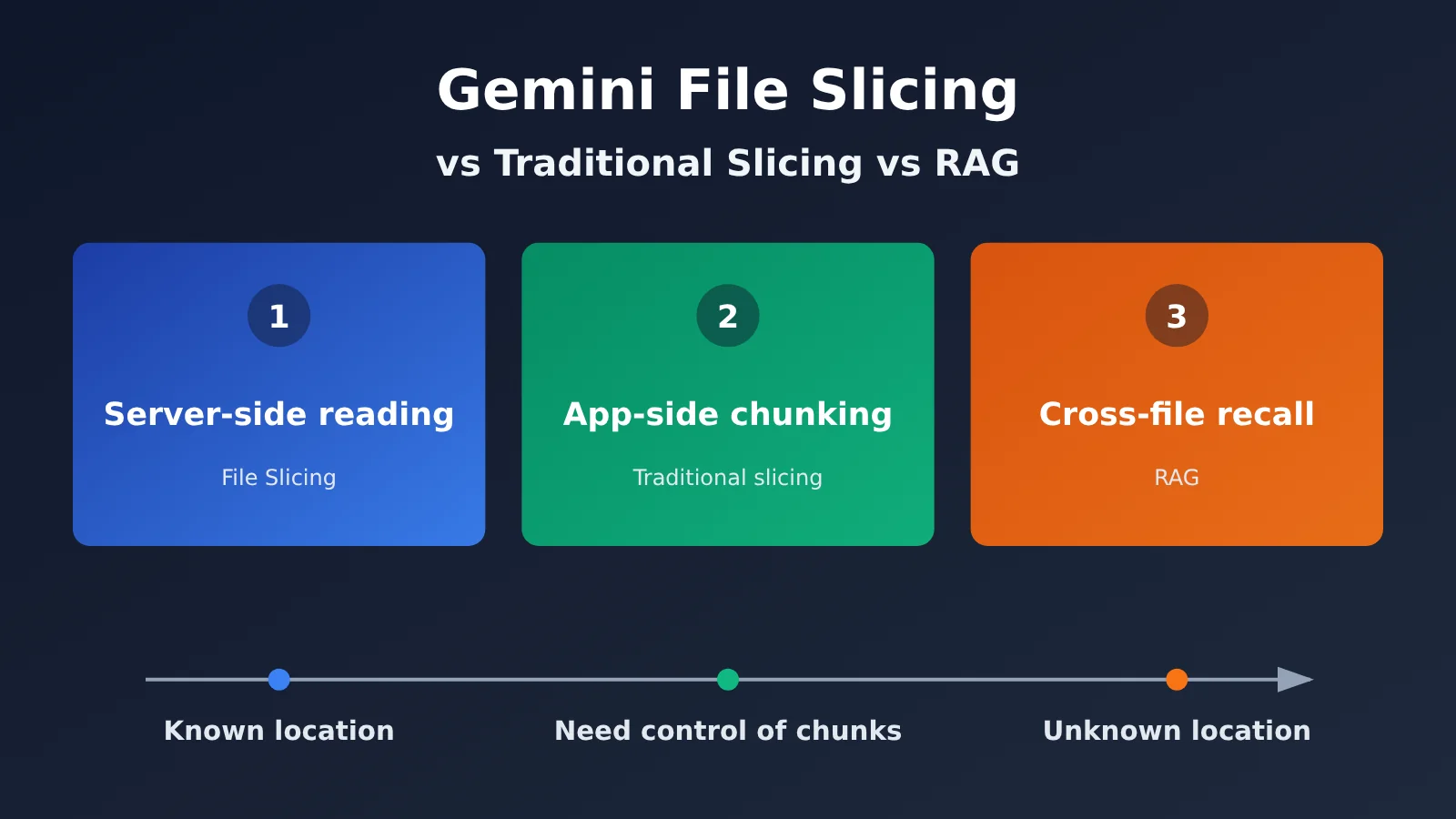
Knowledge Map: Choosing Between Gemini File Slicing, Traditional Slicing, and RAG
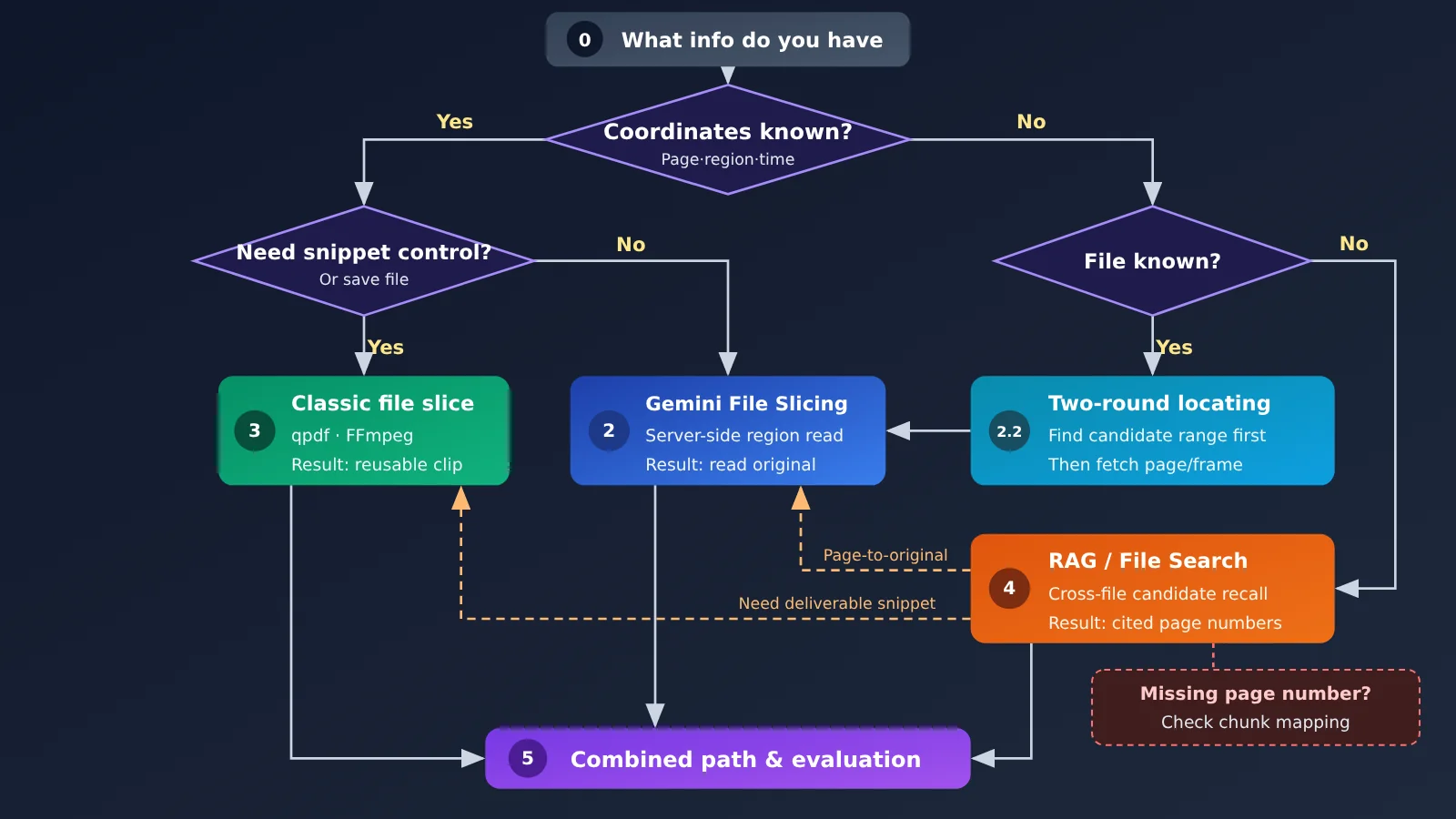
Diagram notes: This decision diagram uses “is the evidence location known” as the first check. When coordinates are known, you choose between “server-side close reading” (Section 2) and “application-side slicing” (Section 3) based on whether you need to control the snippet. When coordinates are unknown but the file is known, you follow the two-round localization in Section 2.2. When neither coordinates nor files are known, you enter the RAG flow in Section 4, and hits flow back to Section 2 or Section 3. Section 5 maps these paths onto concrete scenarios and gives you a way to evaluate them.
Index and reading order:
- 1 What each of the three approaches operates on: establish a shared frame of reference first — what addresses each approach needs before the request, what material it sends to the model, and what the application has to maintain.
- 2 Gemini File Slicing: how to do close reading when coordinates are known, and how to localize over two rounds when they aren’t.
- 3 Traditional file slicing: generating snippets on the application side, suited to data minimization and reuse scenarios, with runnable code.
- 4 RAG and File Search: cross-file recall, plus multimodal scope, retention periods, and billing rules.
- 5 Combined paths and evaluation: four typical scenarios, plus a reusable method for testing your selection.
Section 1 is the foundation for every comparison that follows. Sections 2 through 4 are parallel and can be consulted as needed. Section 5 builds on the conclusions of the previous three sections.
What You Need to Know: Key Terms for Understanding Gemini File Slicing and RAG
| Term | Plain-language explanation |
|---|---|
| File Slicing | Gemini API’s multimodal file processing and slicing capability. You specify pages, cell ranges, or time ranges of the original file in a request, and the server extracts or renders the selected portion. |
| Content layer | The different representations that can be read from the same selection—for example, a PDF’s page image (page_image), table values or formulas, or a video’s audio track or frames. |
| File URI | The reference address you get after uploading a file to the Files API. It can be reused across multiple requests; regular uploads are valid for 48 hours. |
| RAG | Retrieval-augmented generation: first retrieve relevant snippets from an external evidence collection, then pass both the evidence and the question to the generative model. |
| File Search | A Google-hosted RAG implementation. It automatically chunks, embeds, and indexes content when imported, and returns results with citations. |
| Coordinate mapping | The correspondence between a segment and the original file version, page number, cell address, or timestamp—used to trace an answer back to its source. |
1. What Gemini File Slicing, Traditional Slicing, and RAG Each Process
On November 18, 2026, the Gemini API changelog listed multimodal file processing and slicing. On November 23, Google published a feature article explaining how server-side page selection, cell selection, time ranges, and content layers work. With this capability, “cut out a portion and send it to the model”—something you previously had to do app-side—now has a server-side path too.
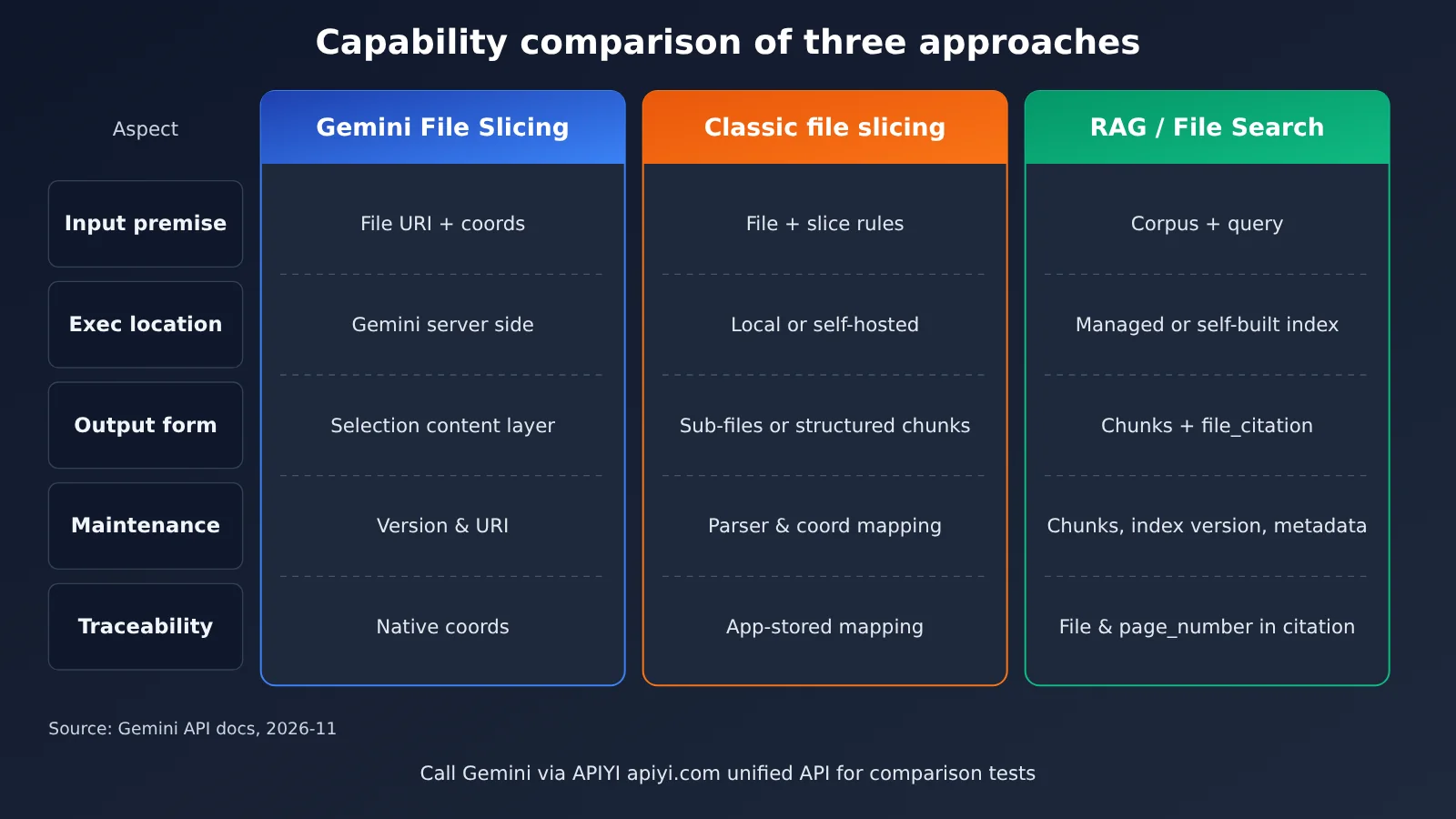
When comparing these three approaches, it helps to use the same three questions: What address do you have before the query? What material is ultimately sent to the generative model? And what objects does the app need to maintain long term?
| Approach | Address known before the query | Material sent to the generative model | Objects the app must maintain |
|---|---|---|---|
| Gemini File Slicing | File URI, plus page number, table address, or time range | The selection and content layer rendered or extracted by the server | Original file version, URI, range, and content layer |
| Traditional file slicing | File and slicing rules, computable app-side | Newly generated subfile, or selected text, rows/columns, or media segments | Parsing and transcoding pipeline; mapping between segments and original coordinates |
| RAG | Corpus and question; specific evidence is determined at query time | Retrieved passages, images, or other indexed content | Document collection, chunks, index version, sources, and query strategy |
As the table shows, the core difference among the three is where the address comes from. File Slicing requires you to bring coordinates in with the request. Traditional slicing computes coordinates from app-side rules. RAG’s coordinates are a product of retrieval.
2 Gemini File Slicing: Server-Side Deep Reading When the Range Is Known
2.1 Use Gemini File Slicing Directly When the Coordinates Are Clear
File Slicing is for cases where the page, row/column, or time coordinates are known and the application can point the API to the full original file. The server handles rendering or extracting the selected region, so the application doesn’t have to maintain its own PDF renderer, spreadsheet parser, or media transcoder.
The three examples below cover documents, spreadsheets, and audio/video:
- Financial report PDF: The reconciliation tool has already recorded that the notes are on pages 18–21 of this PDF version. You can use the
page_imagecontent layer to read the page images and preserve the table’s visual structure. - Budget workbook: If you know the target is the second sheet, you can request an A1 range and read the values, formulas, or rendered view in it.
- Editing system: A system that already has a timeline can have Gemini read a segment of audio or video and select one or more available content layers, such as image only or audio track only.
A URI obtained from a single upload can be referenced repeatedly across multiple requests. The same annual report can be deep-read page range by page range without re-uploading. The source file still has to meet the official limits on format, size, and length. For the exact parameter names and values, refer to Gemini’s document processing page.
2.2 When You Only Know the File, Not the Coordinates: Two-Round Localization
Often you only know that the target is somewhere in a file, but not which page it’s on. Google’s recommended approach has two rounds: the first round extracts text, an outline, or a transcript to find a candidate range; the second round requests page images or video frames for that candidate range and does visual deep reading.
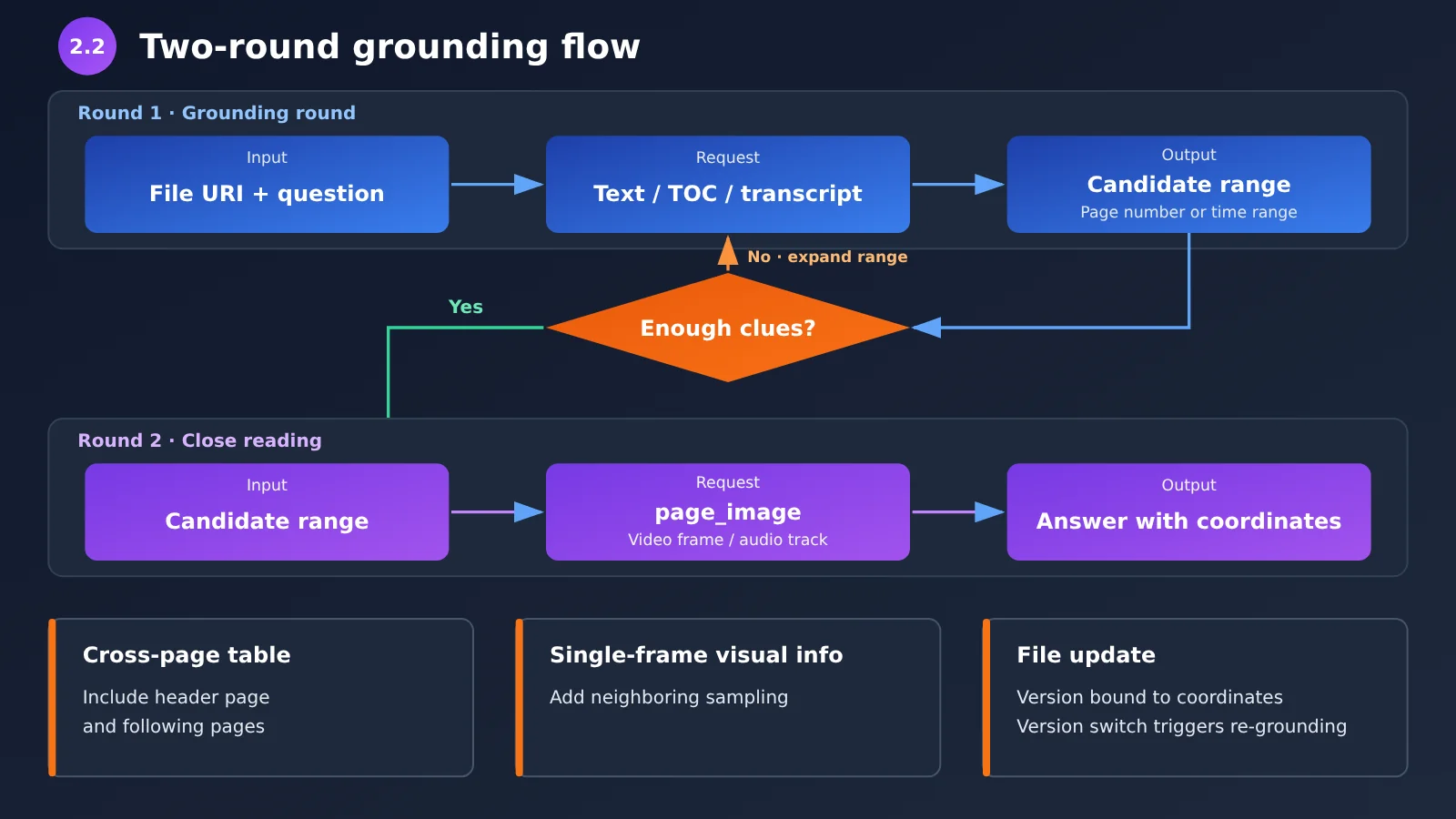
This pattern only works if the text, outline, or transcript from the localization round contains enough clues. A few cases need extra handling:
- Cross-page tables: During deep reading, include both the page with the header and the following pages; otherwise the model can’t see the column names.
- Visual information that appears in only one frame: Add sampling near the matching timestamp.
- Source files that keep getting updated: Save the file version and coordinates together. When the version changes, re-localize against the new file instead of reusing the old page numbers.
2.3 URI Lifecycle in Gemini File Slicing
For ordinary uploaded files, the URI is valid for 48 hours, and you need to re-upload after it expires. For a product-grade persistent file identifier, your application’s own asset library should provide it. A typical approach is to store a mapping of “business file ID → file version → currently valid URI” in the asset library, check whether the URI has expired before making a request, and re-upload if necessary.
3 Traditional file slicing: creating clips on the application side
3.1 Slicing PDFs and media with qpdf and FFmpeg
Traditional slicing is characterized by clips being generated by the application, which can be saved, inspected, and distributed. qpdf’s --pages can write pages 18 through 21 of the source file into a new sub-PDF. FFmpeg uses -ss to specify the start of the segment and -t to set its duration.
When video needs precise boundaries, consider input seeking and keyframes: when copying the bitstream directly, the start point is affected by the keyframe position; re-encoding can land exactly on the intended point, but takes longer. The following script records the mapping between clips and their original coordinates, making it easy to trace back to the full source after the model responds.
import json
import subprocess

def slice_pdf(src: str, pages: str, out: str, version: str) -> dict:
    # Select pages from the source PDF to create a child file, e.g. pages="18-21"
    subprocess.run(["qpdf", "--empty", "--pages", src, pages, "--", out], check=True)
    return {"slice": out, "source": src, "version": version, "pages": pages}

def slice_media(src: str, start: str, seconds: int, out: str, reencode: bool) -> dict:
    cmd = ["ffmpeg", "-y", "-ss", start, "-i", src, "-t", str(seconds)]
    # Copying the bitstream is faster, but the start point depends on keyframes; re-encoding gives more precise boundaries
    cmd += ["-c:v", "libx264", "-c:a", "aac"] if reencode else ["-c", "copy"]
    subprocess.run(cmd + [out], check=True)
    return {"slice": out, "source": src, "start": start, "duration_s": seconds}

mapping = [
    slice_pdf("report_v3.pdf", "18-21", "notes_p18_21.pdf", version="v3"),
    slice_media("meeting.mp4", "00:12:00", 90, "clip_1200.mp4", reencode=True),
]
json.dump(mapping, open("slice_map.json", "w"), ensure_ascii=False, indent=2)
3.2 Table slicing: preserve addresses, units, and formula sources
When you slice a workbook into rows and columns, keep the sheet name, the original cell addresses, the units row, and the relevant formula sources. openpyxl with data_only=True reads the calculated values Excel has saved, while data_only=False keeps formula expressions. These two representations support different kinds of checks: the first is good for verifying numbers, and the second is good for auditing calculation logic.
Also keep in mind that converting to flat text loses some of the visual layout—merged cells, color coding, legends, and so on. If your judgment depends on that visual information, and the selected range is already clear, you can switch to File Slicing and read the rendered view.
Local processing has four main advantages: you can choose the output format based on content, trim irrelevant columns, normalize encoding, and reuse the same excerpt file across different programs. When business requirements call for data minimization before upload, you can generate the actual excerpt first, then inspect its body text, metadata, and attached content. One caveat: qpdf’s documentation describes how document-level information is retained when selecting pages, so the extracted subfile may still carry some metadata from the original. The tradeoff is that your application has to maintain the parser, error handling, page mapping, and media transcoding.
3.3 Send local excerpts to Gemini
Once the excerpt is generated, you can send the structured text along with coordinates to Gemini through an OpenAI-compatible interface, and ask the model to cite the original cell addresses in its answer.
import openai
from openpyxl import load_workbook

def sheet_range_to_text(path: str, sheet_idx: int, cell_range: str) -> str:
    vals = load_workbook(path, data_only=True).worksheets[sheet_idx]      # saved values
    forms = load_workbook(path, data_only=False).worksheets[sheet_idx]    # formula expressions
    lines = [f"# 表名: {vals.title}  区域: {cell_range}"]
    for row_v, row_f in zip(vals[cell_range], forms[cell_range]):
        for cv, cf in zip(row_v, row_f):
            formula = cf.value if isinstance(cf.value, str) and cf.value.startswith("=") else ""
            lines.append(f"{cv.coordinate}\t{cv.value}\t{formula}")
    return "\n".join(lines)

client = openai.OpenAI(
    api_key="YOUR_API_KEY",
    base_url="https://api.apiyi.com/v1",  # APIYI OpenAI-compatible endpoint
)

excerpt = sheet_range_to_text("budget_2026.xlsx", 1, "A1:F40")
resp = client.chat.completions.create(
    model="gemini-2.5-flash",  # Use a Gemini model available in the APIYI model list
    messages=[
        {"role": "system", "content": "只依据给定片段回答,引用单元格地址。"},
        {"role": "user", "content": excerpt + "\n\n问题:哪些行的实际支出超过预算?"},
    ],
)
print(resp.choices[0].message.content)
🚀 Quick-start tip: The local slicing plus OpenAI-compatible call path has the lowest migration cost—you only need to replace
base_urlin your existing code. You can apply for free testing credits at APIYI apiyi.com, run the flow end to end with your own real spreadsheet and PDF excerpts, and then decide which parts are worth moving to server-side slicing.
4 RAG and File Search: Finding Unknown Evidence Across Files
4.1 How RAG Works and the File Search Managed Implementation
The core job of RAG on the application side is to build a queryable external evidence collection for your materials, pull out the relevant content per question, and then hand the evidence and the question together to the generation model. Retrieval usually spans multiple files, and a single large document set works the same way.
Google’s File Search is a managed implementation. Chunking, embedding, and indexing happen automatically at import time, and you can configure the maximum token count per chunk and the overlap between adjacent chunks. Projects can store custom metadata such as source date and document category, and narrow the scope with metadata_filter at request time. The returned file_citation carries evidence information such as the file name; for paginated materials like PDFs it may also give a page_number — and that page number is exactly the coordinate you hand off to File Slicing.
4.2 RAG’s Multimodal Scope, Retention, and Capacity
File Search can use gemini-embedding-2 to support native image retrieval while keeping the earlier text-only embedding option. The current guide lists raw audio and video files as unsupported inputs. The workaround is to use transcripts with original timestamps, or extracted keyframes, to build locatable material.
Imported data in the index is retained until you actively delete it, so when your materials update, you need to manage new and old version entries yourself. The official single-file limit is 100 MB, and the total capacity of a project’s index is divided into tiers. An index suits collections that need repeated Q&A. To verify effectiveness, use samples you can check — for example, whether the target passage makes it into the candidates, and whether the correct version and source are cited.
4.3 Cost Baselines for the Three Document Processing Approaches
As of November 24, 2026, File Search’s public billing includes two parts: the embedding usage for initial index building, and the regular tokens for retrieved materials and model responses. Storage and embeddings generated at query time are free. Using standard paid embedding prices as an example:
| Embedding Model | Input Type | Standard Paid Price (per million input tokens) | Notes |
|---|---|---|---|
gemini-embedding-001 |
Text | $0.15 | Legacy text embedding |
gemini-embedding-2 |
Text | $0.20 | Supports native image retrieval |
gemini-embedding-2 |
Image | $0.45 | Supports native image retrieval |
Table note: prices come from Gemini’s official pricing page, data date 2026-11-24; storage and embeddings generated at query time are free; retrieved materials and answers are billed at the regular token rate of the generation model used.
The cost variables differ across the three approaches. File Slicing’s main variables are page count, interval length, and the content layer you choose. Traditional chunking adds local processing and storage overhead on top of that. RAG adds the embedding cost of building and updating the index. I’d recommend comparing everything with a single metric: “total cost per thousand successful answers” — amortize the cost of building and updating the index across query volume, then add the actual usage from the second-pass close reading of the source text.
💰 Cost estimation tip: The generation model’s tokens are often the bulk of the total cost. You can call the same set of Gemini models on a pay-as-you-go basis through APIYI apiyi.com, run “direct slice close reading” and “retrieve-then-close-read” paths on the same set of questions, and compare real bills rather than estimates.
5 Combining Gemini File Slicing, Traditional Chunking, and RAG
5.1 How the Four Typical Scenarios Fit Together
The table below applies the conclusions from the previous three sections to specific scenarios. “Primary approach” refers to the part that does the main work, while “supporting approach” refers to the part that fills in the gaps.
| Scenario | Primary approach | Supporting approach | What the application handles |
|---|---|---|---|
| Single manual with known page numbers | File Slicing reads the page directly | Use retrieval to find candidates for scattered exception clauses; use traditional chunking when an excerpt must be delivered | Save the original file version and cited page numbers |
| Multi-version policy library | RAG: filter by effective date and business line, then recall | Use File Slicing to read page images and verify the body text | Map cited page numbers to the currently authorized PDF version |
| Large volume of recorded material | RAG retrieves timestamped transcripts | File Slicing reads the audio track or video frames for the matched interval; transcode locally when delivering an excerpt | Save the original file identifier and start/end times for each transcript segment |
| Cross-spreadsheet exact calculation | Calculation in the application-side spreadsheet data pipeline | Use spreadsheet slicing for formulas and legends in small ranges; use retrieval to locate relevant files | Output results with clear fields and units, then hand them to the model for explanation |
A few details are worth expanding on:
- Multi-version policy library: File Search only provides retrieval and citations; the application itself must handle the mapping from “location → original version.” If the result lacks a page number, you can use the original chunk mapping retained by the application to supplement the location, or first check the table of contents and text within the candidate file—that is, go back to the two-round location process in Section 2.2.
- Recorded material: Text that appears on screen but is never spoken won’t be covered by the transcript, so you’ll need to read it from the visuals or rely on a dedicated key-frame index.
- Cross-spreadsheet calculation: Joining multiple workbooks by key and calculating every row is deterministic computation. Leave it to the data pipeline; the model is only responsible for explaining the results.
💡 Choosing the Right Setup: In a combined pipeline, you can use different Gemini models for retrieval, close reading, and explanation. With APIYI (apiyi.com), you can switch models using a single API key, making it easy to compare the performance and cost of each stage.
5.2 Evaluating Three Document Processing Approaches with a Fixed Question Set
For a selection evaluation, you can lock down a set of questions that come with evidence locations, covering page images, tables, audio recordings, and indexed content across different data formats. Each question is pre-labeled with the correct source file, evidence location, and version, and then you track these metrics: how many times the correct evidence was retrieved, the number of invocation calls and re-reads per answer, input and output usage, and whether the source version can be re-checked.
Different question types test different parts of the pipeline: questions that compare how policies apply across multiple regions test cross-document recall; questions that hand you a page number test coordinate-level close reading; large files that can be pre-processed test local slicing data delivery. The key is to log the two error types separately: “located correctly but answered wrong” and “evidence was never read before generation.” The first tells you to improve the prompt or the model; the second tells you to improve retrieval or slicing.
import json
import openai

client = openai.OpenAI(api_key="YOUR_API_KEY", base_url="https://api.apiyi.com/v1")

def judge(case: dict, retrieved: list[dict], answer: str) -> str:
    hit = any(r["file"] == case["file"] and r["version"] == case["version"]
              and r["loc"] == case["loc"] for r in retrieved)
    if not hit:
        return "evidence_missed"      # evidence not read before generation → fix retrieval/slicing
    return "ok" if case["expect"] in answer else "answer_wrong"  # located correctly but answered wrong → fix prompt/model

def run(case: dict, retrieved: list[dict], model: str) -> dict:
    ctx = "\n".join(f"[{r['file']}@{r['version']} {r['loc']}] {r['text']}" for r in retrieved)
    resp = client.chat.completions.create(
        model=model,
        messages=[{"role": "user", "content": f"{ctx}\n\n问题:{case['q']}"}],
    )
    ans = resp.choices[0].message.content
    return {"id": case["id"], "verdict": judge(case, retrieved, ans),
            "in_tokens": resp.usage.prompt_tokens, "out_tokens": resp.usage.completion_tokens}

case = {"id": "p-018", "q": "附注三的递延税项余额是多少?", "file": "report",
        "version": "v3", "loc": "p18-21", "expect": "递延"}
retrieved = [{"file": "report", "version": "v3", "loc": "p18-21", "text": "……附注三……"}]
print(json.dumps(run(case, retrieved, "gemini-2.5-flash"), ensure_ascii=False))
🎯 Evaluation tip: Run the same question set once on each of the three paths, then aggregate the proportions of
evidence_missedandanswer_wrongalong with token usage — that shows you where to invest. Once the question set is working, you can re-test on APIYI apiyi.com with different Gemini models to confirm whether the conclusions hold across models.
How to Validate Your Gemini File Slicing vs. RAG Strategy
Let’s wrap things up with a validation routine: pull questions from your test set whose “evidence location is known” and confirm they’re handled by File Slicing or traditional chunking, rather than taking a detour through retrieval first. Then pull questions whose “evidence location is unknown” and confirm that the RAG citations map back to the current version of the source document, and that the second-pass close reading pulls the correct content. If both types of questions consistently land on the right file, version, and coordinates, your division of labor is sound. If one type keeps producing evidence_missed, go back to the corresponding branch in your knowledge map and adjust that link.
If you want to get this comparison running with the least rework, start with the OpenAI-compatible endpoint at APIYI apiyi.com and validate each path against real documents.
References
- Gemini API changelog: release notes for multimodal file processing and slicing
- Link:
aistudio.google.com/docs/changelog
- Link:
- Google Developers Blog — File Slicing deep dive: server-side selection of pages, cells, time ranges, and content layers, plus a two-pass locating example
- Link:
blog.google/innovation-and-ai/technology/developers-tools/file-slicing-controls
- Link:
- Gemini document processing / video understanding / audio documents: regions, content layers, and limits
- Link:
aistudio.google.com/docs/document-processing
- Link:
- Gemini File Search guide: chunk configuration, metadata filtering, cited page numbers, multimodal scope, retention, and billing
- Link:
aistudio.google.com/docs/file-search
- Link:
- Gemini pricing and Files API: embedding pricing and uploaded-file retention periods
- Link:
aistudio.google.com/docs/pricing
- Link:
- qpdf page-selection manual / FFmpeg options manual / openpyxl tutorial: local chunking tools
- Links:
qpdf.readthedocs.io,ffmpeg.org/ffmpeg.html,openpyxl.readthedocs.io
- Links:
- The original RAG paper: Retrieval-Augmented Generation for Knowledge-Intensive NLP Tasks
- Link:
arxiv.org/abs/2005.11401
- Link:
Author: APIYI technical team
Technical discussion: Feel free to reach us through the APIYI apiyi.com homepage. More integration resources are available at the docs.apiyi.com documentation center.