Author’s note: At GitHub Universe and Ignite 2026, Microsoft turned “multi-model routing” into an official product. This article unpacks how Fusion works, uses a three-tier price spread to show exactly where the savings come from, and explains the rules you’ll need to build into your business layer if you roll your own routing.
A few conclusions up front. Routing isn’t free magic—Fusion charges based on the models it actually uses. The savings come from the price gap—a cheaper model doesn’t mean the same results; routing saves money because the same batch of tokens can differ by as much as 80x between the flagship tier and the budget tier. The gateway won’t handle cross-vendor fallback for you—which model gets the request, and where it falls back to on failure, are things you have to write into your code yourself.
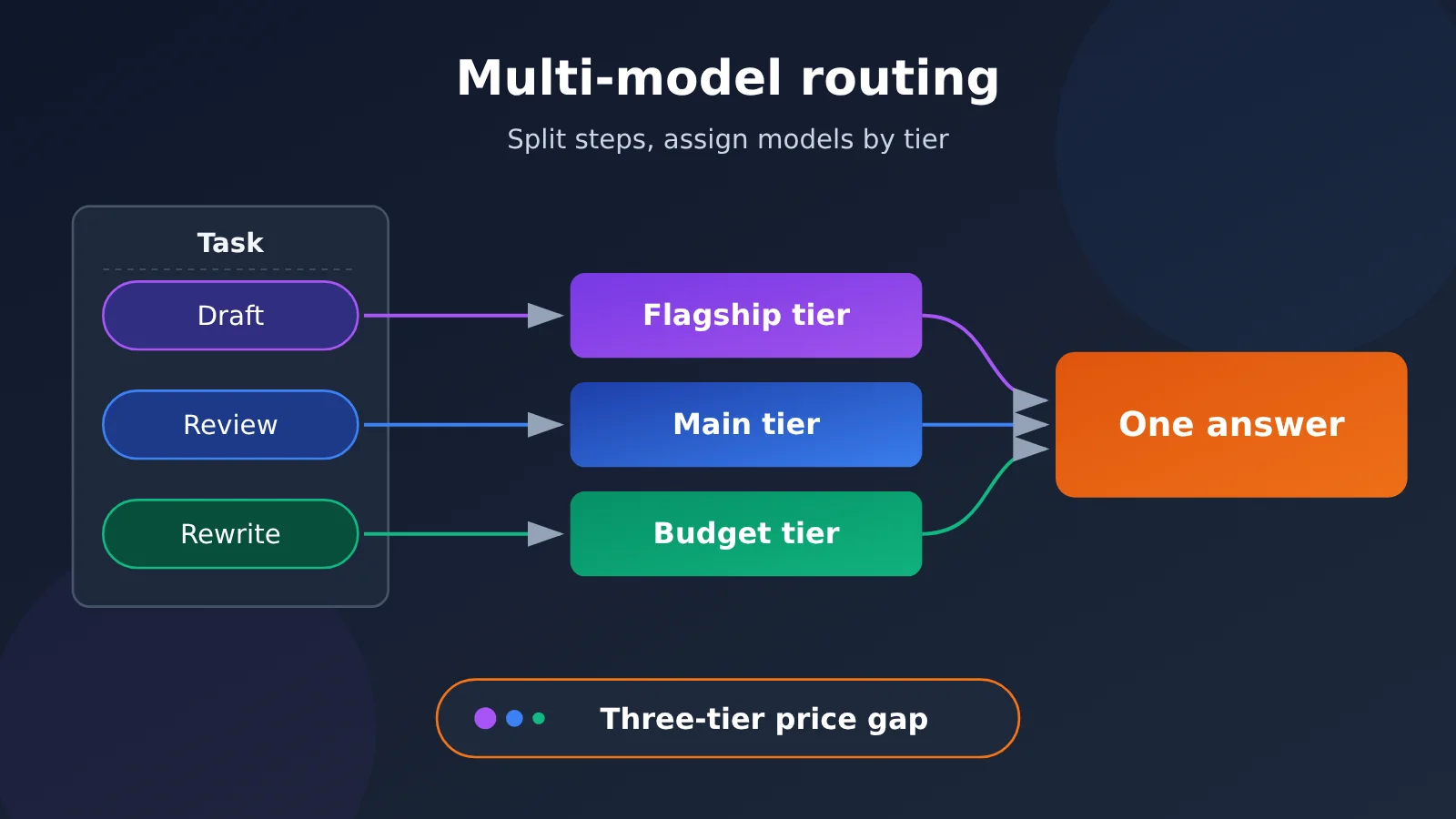
If you’re stuck deciding whether your AI app should “use the flagship for everything” or “plug in a cheap model to pick up the slack,” start with the approach Microsoft laid out at Ignite 2026: break a task into several steps, hand each step to the right model, and merge the results into one answer.
This isn’t hearsay. GitHub Copilot Fusion went GA at GitHub Universe on 2026-10-28, and the Ignite keynote on 2026-11-17 put it front and center again. This article rounds up what’s publicly known so far about multi-model routing, then uses a price table you can recalculate yourself to show which costs you need to work out before you build your own routing.
Core takeaway: After reading this, you’ll be able to tell which steps in your own app are worth handing to the flagship tier and which can go to the budget tier—and you’ll know which layer the routing rules should live in.
Multi-Model Routing at a Glance: What Copilot Fusion Actually Does
Let’s start with the public facts. The table below draws on the GitHub changelog, Microsoft’s Ignite 2026 Book of News, the Microsoft Copilot blog, and The Neuron’s analysis published on 2026-11-17.
| Item | Details | Source |
|---|---|---|
| Product | GitHub Copilot Fusion, Microsoft’s composite model capability | GitHub docs / The Neuron |
| GA date | 2026-10-28, GitHub Universe | GitHub changelog |
| How it works | Selects and coordinates multiple models per task, then outputs a single answer | The Neuron’s analysis, consistent with GitHub docs |
| Billing | Charged by the models it actually uses, not a flat price | The Neuron, original text |
| Local + cloud routing | Experimental preview, covering Copilot CLI, Copilot app, VS Code | GitHub changelog 2026-10-28 |
| Contemporaneous routing products | Foundry model router covers the top 50 models; Copilot Auto dynamically picks models and thinking levels | Book of News / Microsoft Copilot blog |
The Three Multi-Model Orchestration Patterns in Copilot Fusion
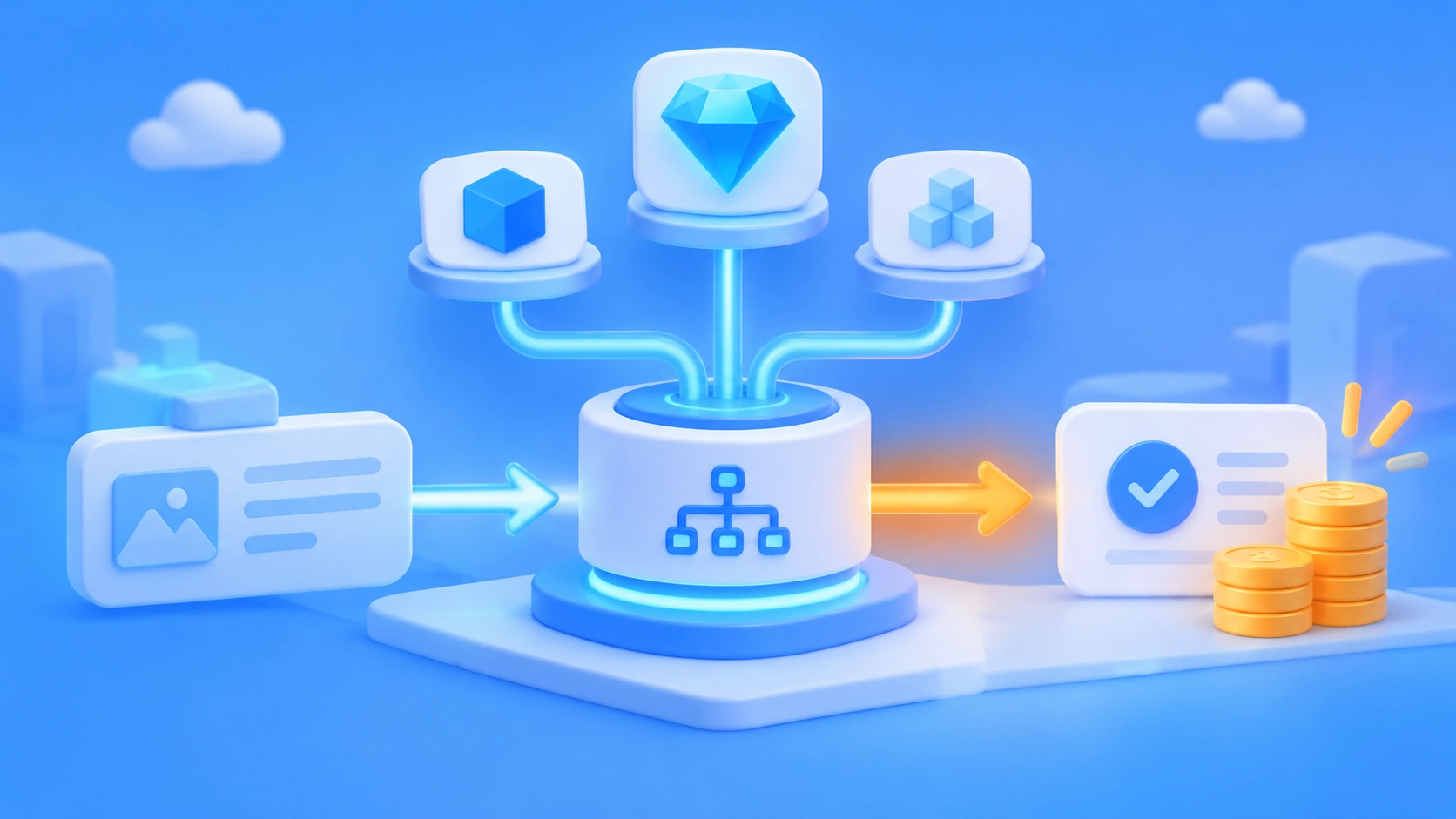
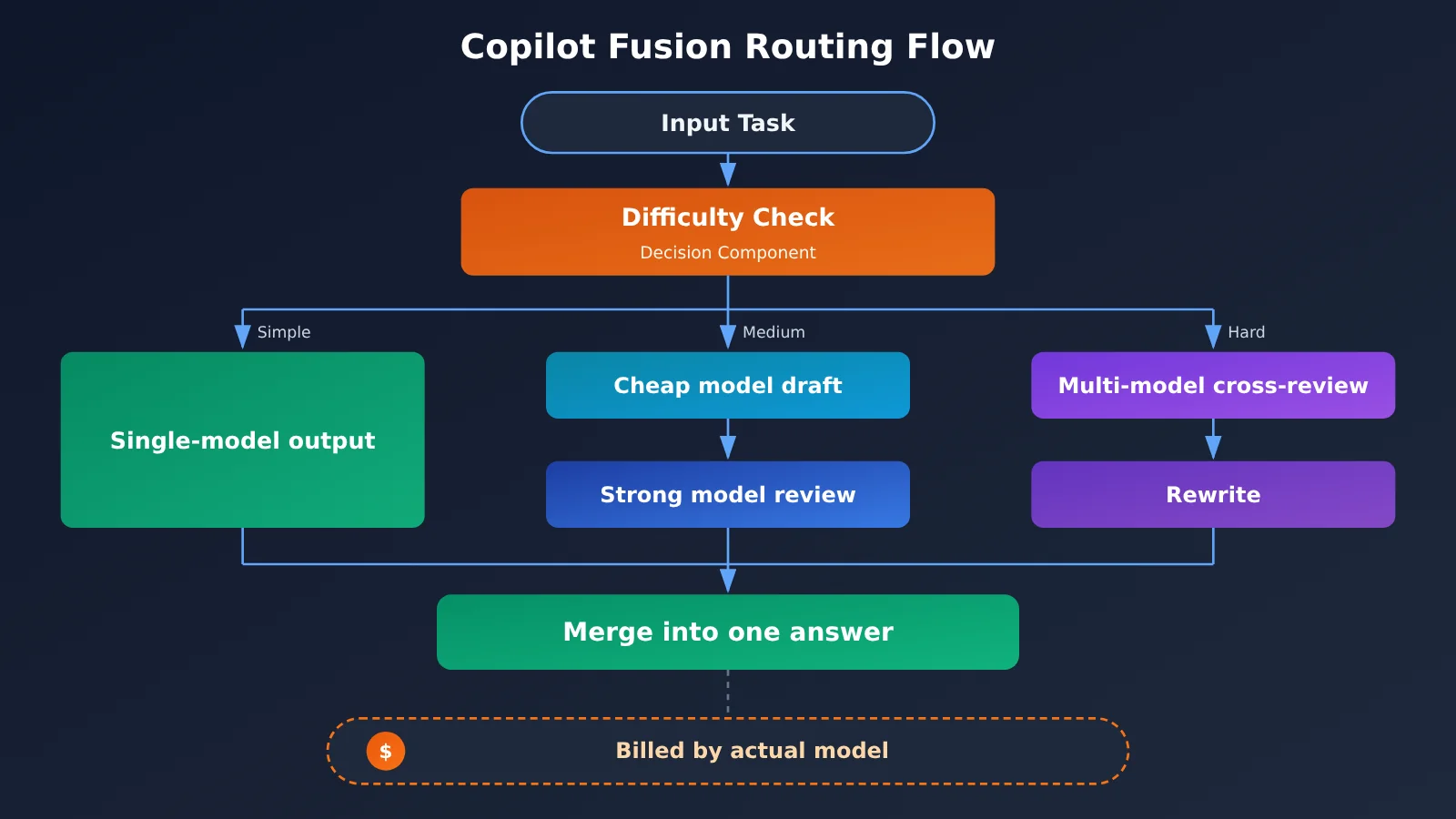
According to The Neuron, Fusion has several ways of handling a task. It can dispatch a single model to finish it, or have a cheaper model draft first and then escalate to a stronger model for review, or have several models critique each other before rewriting. Whichever path it takes internally, the user ends up with just one answer.
The key here is “splitting” and “dispatching.” Fusion didn’t find one all-powerful model; it breaks the task into steps and assigns each step to a model tier matched to its difficulty. Decision-1.1, also announced at Ignite, decides how much reasoning effort a given step deserves, and Auto in Copilot then uses that to dynamically select the model and thinking level. Routing itself has become something that needs to be designed.
Local Models Are Now Part of Multi-Model Routing
The 2026-10-28 changelog also notes that Fusion now supports intelligent routing between local and cloud models, currently in experimental preview. The official example of a local model is MAI Code 1.1 Flash, running on NVIDIA RTX Spark and extending to the AMD Ryzen AI Max series. With this, even simple steps may never leave your machine.
Microsoft’s Multi-Model Routing Benchmarks: All Vendor-Reported
Both Microsoft and GitHub published benchmark numbers. Every figure below is vendor-reported, measuring public benchmarks under specific configurations and not independently reproduced by third parties:
- Ignite keynote (Nadella’s script, vendor-reported): On the day of the keynote, Fusion was listed as the top coding agent on Terminal-Bench, 5 points above Claude Code at less than half the cost.
- GitHub’s own figures (vendor-reported, relayed by The Neuron): On the Artificial Analysis Coding Agent Index, Fusion Max was within 2 points of Claude Code running Opus 5.5 Max, at roughly half the average API cost per task and about 40% less time.
These numbers show that for coding tasks under specific configurations, a routing approach can achieve “comparable scores at half the cost.” But they don’t transfer directly to your business. Your task distribution, prompts, and acceptance criteria all differ from the benchmarks, and a vendor’s benchmark gains don’t mean your tasks will see the same improvement.
Why multi-model routing saves money: do the math on the three tiers first
Routing saves money not because “cheap models perform just as well,” but because the same stretch of tokens costs wildly different amounts depending on the tier. As long as most of the simple steps go to the cheap tier, the total bill drops noticeably. The catch is that those steps have to be ones that never needed flagship capability in the first place.
Three-tier model price list
The table below comes from the model master list on APIYI apiyi.com, verified at 2026-11-22 09:58 (UTC+8), in USD per million tokens. Prices change, so before you launch, go by the live data in the master list.
| Tier | Model ID | Input | Output | Cache read |
|---|---|---|---|---|
| Flagship | gpt-6.2-astra |
8 | 40 | 0.4 |
| Flagship | gpt-6-astra |
10 | 50 | 1 |
| Flagship | claude-fable-5-2 |
8 | 40 | 0.2 |
| Workhorse | gpt-6.2-sol |
2 | 10 | 0.1 |
| Workhorse | claude-opus-5-5 |
4 | 20 | 0.2 |
| Workhorse | qwen4-max |
1.5 | 4.5 | 0.075 |
| Workhorse | deepseek-v4-pro |
1.32 | 3.96 | 0.044 |
| Budget | gpt-6.1-terra |
1 | 5 | 0.05 |
| Budget | gpt-6-luna |
0.1 | 0.5 | 0.01 |
| Budget | deepseek-v4-flash |
0.44 | 1.32 | 0.01408 |
| Budget | deepseek-v4.1-flash |
0.3 | 1.2 | 0.006 |
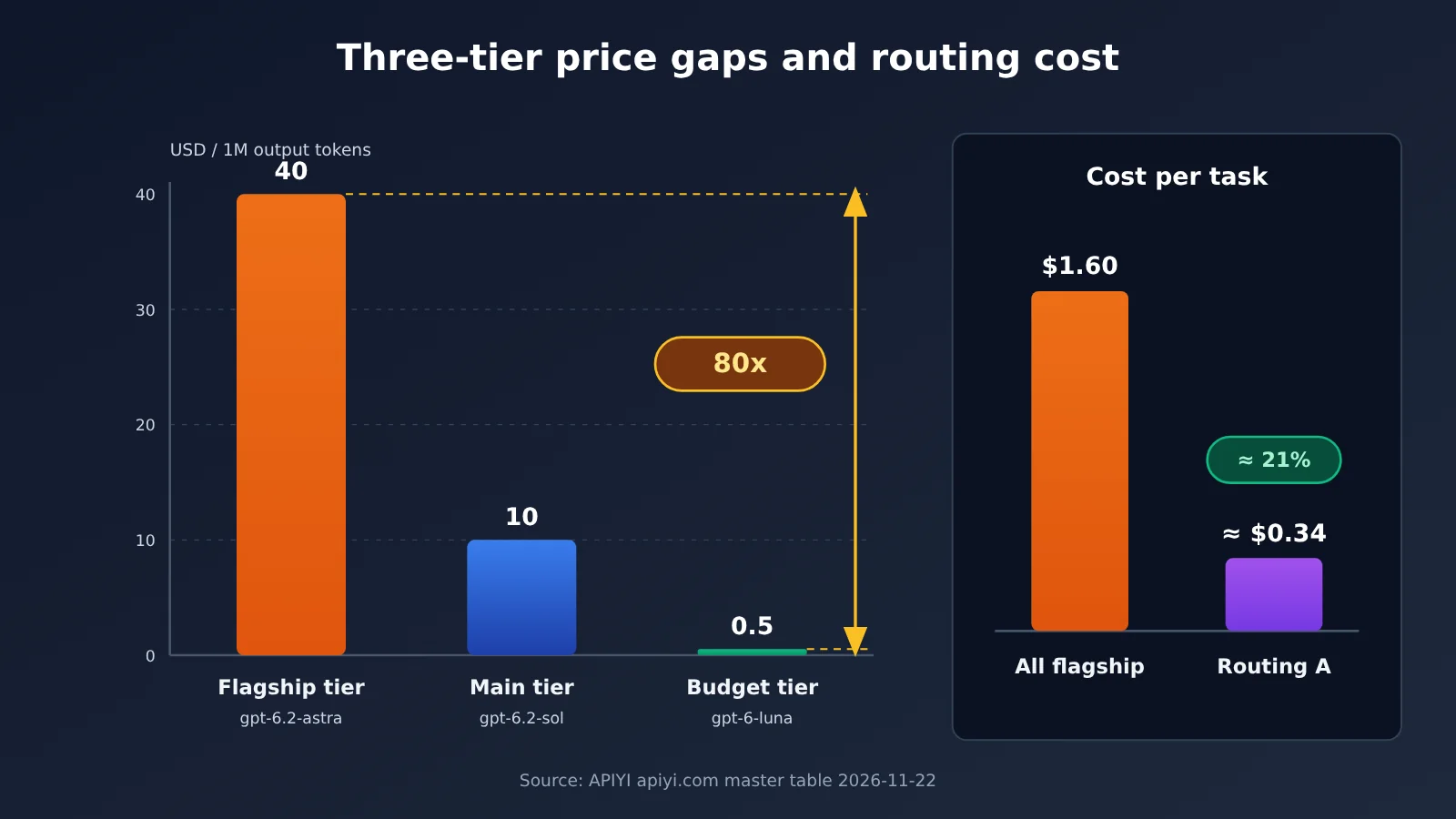
Put the two ends side by side: for the same million output tokens, gpt-6.2-astra charges $40 while gpt-6-luna charges $0.5 — an 80x difference. On the input side it’s 8 versus 0.1, also 80x. There’s roughly a 4x gap between flagship and workhorse as well, for example gpt-6.2-astra versus gpt-6.2-sol.
Where Does the Price Gap Come From?
Price gaps between tiers mainly reflect differences in inference cost and product positioning. Flagship models usually have more parameters, consume more compute per token, and use more resources for long reasoning chains and complex tool calls, so vendors price them based on “the hardest task.” The budget tier targets high-frequency, low-difficulty calls; the model is smaller, the cost per token is lower, so the price is lower too.
So what you’re buying with the price gap is a higher capability ceiling, not “the same result at a discount.” What routing needs to do is keep the flagship’s capability ceiling from being wasted on simple steps like formatting cleanup, field extraction, and draft generation.
Run the Multi-Model Routing Numbers on the Same Token Volume
Say a task consumes 100,000 input tokens and 20,000 output tokens in total. This is just the math—we’re not discussing quality here:
| Approach | Allocation | Input cost | Output cost | Total per task |
|---|---|---|---|---|
| All flagship | All handled by gpt-6.2-astra |
0.1 × 8 = 0.80 | 0.02 × 40 = 0.80 | About $1.60 |
| Routing A | 80% to gpt-6-luna, 20% to gpt-6.2-astra |
0.008 + 0.16 | 0.008 + 0.16 | About $0.34 |
| Routing B | 80% to gpt-6-luna, 20% to the main tier gpt-6.2-sol |
0.008 + 0.04 | 0.008 + 0.04 | About $0.10 |
Routing A’s per-task cost is about 21% of the all-flagship approach. The real bill will be somewhat higher than this ideal number, for three reasons:
- Checking steps cost money too: When a stronger model reviews a cheaper model’s draft, it has to read the context again.
- The budget tier fails sometimes: If a draft doesn’t pass, you need to retry or escalate. The higher the failure rate, the less you save.
- Cache reads can shave off a bit more: Repeated system prompts and document context can go through cache reads. For the flagship tier
claude-fable-5-2, a cache read costs just 0.2.
So the right order is: first measure how much of your own tasks consists of simple steps and how high the budget tier’s pass rate is, then decide the routing ratio—not assume 80% up front.
💰 Cost tip: Recalculate the table above with your own task data—it’ll be more useful than any benchmark. On APIYI apiyi.com, use the free trial credits for new users to run the flagship, main, and budget tiers separately. Record pass rates and token usage, and you’ll have the numbers figured out quickly.
Multi-Model Routing Impact Analysis: What It Means for Developers
Impact 1: The gateway won’t fall back for you—multi-model routing rules belong in your business layer
This is the easiest point to overlook. Fusion’s routing logic lives inside Microsoft’s own products. When you call the API, you don’t automatically get that capability.
Take APIYI as an example. The documentation is clear: the platform doesn’t offer automatic model routing such as auto or auto:free, nor does it support cross-provider fallback fields such as models, route, or provider. Rules like “who handles this step,” “who do we fall back to after a failure,” and “under what conditions do we upgrade to the flagship model” all have to be written in your own business layer.
The upside is that switching costs are very low. With the same API key and the same base_url https://api.apiyi.com/v1, you can switch between the models above—changing models usually just means changing the model field. You define the rules, and the unified interface makes executing them simple enough.
Impact 2: the routing layer must branch by protocol — you can’t just swap the model name
Different vendors’ models recommend different endpoints, and this is the most common pitfall when you build your own routing:
| Model family | Recommended endpoint | What the routing layer needs to watch for |
|---|---|---|
gpt-6 series |
responses (marked ★ in the master table) |
Parse the request body and response structure according to the responses protocol |
claude series |
chat/completions or messages |
When you choose messages, system prompts and content block syntax are different |
qwen4-max |
Supports all three: responses, chat, and messages | Can follow the main pipeline’s protocol, lowest migration cost |
If a routing rule reassigns a step from gpt-6.2-astra to claude-opus-5-5 and you only change model without changing the endpoint, you’ll likely get a response in an unexpected format — or even a direct error. The more robust approach is to build a “model → protocol” mapping table at the business layer, with each branch handling its own request assembly and result parsing. You can maintain this mapping table against the endpoint annotations in the APIYI apiyi.com master table.
Impact 3: a ready-to-use draft of multi-model routing rules
Below is a draft of rules that assigns models by step difficulty — a good starting point. You should validate the specific model names against your own task’s pass rate:
- Classification, extraction, formatting: assign to the cheap tier first, such as
gpt-6-lunaordeepseek-v4.1-flash, validate results with a schema, and escalate if they don’t pass. - Drafting and routine generation: assign to the main tier, such as
gpt-6.2-solorqwen4-max; the latter supports all three endpoint types, making integration the least hassle. - Complex reasoning, critical checks: hand to the flagship tier, such as
gpt-6.2-astraorclaude-fable-5-2, reading only the draft and necessary context, and try to hit cache reads. - Fallback strategy: prepare a cross-vendor backup model within the same tier — for example, fall back to
deepseek-v4-proifgpt-6.2-solfails. Write the fallback logic in your code, and remember to switch the protocol branch at the same time. - Accounting: log
model, input/output tokens, and whether an escalation happened at each step, then review the routing ratios weekly.
Client initialization only needs one line, for example OpenAI(api_key="YOUR_API_KEY", base_url="https://api.apiyi.com/v1"). After that, each step passes a different model according to the rules, and you just switch to the responses endpoint when calling the gpt-6 series.
🎯 Selection advice: pick the model first, check pricing and protocol, then write the rules. In the APIYI apiyi.com model master table, you can see all three price tiers and the recommended endpoints at the same time — one key is enough to get the rule draft running, with no need to open accounts and integrate separately for each vendor.
Impact Four: Industry Impact — From “Choosing the Strongest Model” to “Designing the Division of Labor”
Foundry model router covers the top 50 models, Copilot Auto dynamically selects thinking tiers, and Fusion has models review each other and then rewrite. Looking at these together, the direction big tech is heading is clear: beyond capability competition, orchestration itself has become a product. For developers, “use flagship models for everything” is no longer the default safe option — it’s a choice you now need to justify with your bill.
At the same time, keep a cool head. Routing isn’t necessarily better than just using a flagship. When a task has few steps, concentrated difficulty, or a low pass rate on the cheap tier, the extra calls and complexity introduced by routing can eat back the money you saved.
Frequently Asked Questions (FAQ)
Q1: Is Copilot Fusion’s multi-model routing free?
No. According to The Neuron, Fusion charges for the models it actually uses. The way it saves money is by handing some steps to cheaper models — not by being free.
Q2: Microsoft says it’s 5 points higher than Claude Code at less than half the cost — is that credible?
This is Microsoft’s own claim in its Ignite keynote, based on a specific configuration on Terminal-Bench, and there’s currently no third-party reproduction. It works as a directional reference, but you shouldn’t treat it as evidence that your tasks will see the same improvement.
Q3: If I build my own multi-model routing, can a gateway automatically fall back across vendors?
Don’t count on the gateway for that. APIYI does not offer automatic routing features like `auto`, nor does it support fallback fields like `models`, `route`, or `provider` — fallback rules have to live in your business layer. What the platform provides is a unified interface: on APIYI apiyi.com you switch models with the same Key, and your fallback logic only needs to change `model` and the corresponding protocol branch.
Q4: How can I quickly validate how the three tiers of models perform on my own tasks?
1. Sign up at APIYI apiyi.com and claim the free trial quota for new users.
2. Set base_url to `https://api.apiyi.com/v1` and pick one model each from the flagship, workhorse, and cheap tiers.
3. Run the same batch of real tasks on each, record pass rate, token usage, and latency, then do the math using the table in this article.
Q5: What are the drawbacks of multi-model routing?
– **Higher complexity**: You have to maintain model-to-protocol mappings, validation, and fallback logic.
– **Hidden costs**: Reviews and retries generate extra tokens.
– **Performance variability**: The cheap tier has a higher failure rate on hard problems, so you must set escalation conditions.
For tasks with few steps and concentrated difficulty, just using a suitable workhorse tier is often more cost-effective.
—
## Multi-Model Routing: Key Takeaways
– **What Fusion actually does**: it splits a task into steps, assigns a model to each step, merges the results into one answer, and bills you for the models that were used.
– **Take benchmark scores with a grain of salt**: the Terminal-Bench and Coding Agent Index numbers are all vendor self-reported.
– **The savings come from the price gap**: flagship and budget tiers differ by 80x on both input and output pricing — but they don’t deliver the same results.
– **Do the math before fixing ratios**: recompute with your own task pass rates and token usage instead of copying the 80% figure.
– **Rules belong in the business layer**: the gateway has no cross-vendor automatic fallback field, so upgrades and downgrades are yours to write.
– **Branch on protocol**: the `gpt-6` family goes through `responses`, while the `claude` family goes through chat or messages.
– **How to get started**: run all three tiers with a single key on APIYI apiyi.com, then lock in your routing rules.
—
## Summary
The core points of multi-model routing:
1. **Routing isn’t magic**: Copilot Fusion does task decomposition, model scheduling, and answer merging, and you pay for the models actually used — Microsoft’s benchmark scores are self-reported.
2. **The price gap defines the room to save**: the same stretch of tokens can cost 80x more on the flagship tier than on the budget tier, so handing the genuinely simple steps to the cheap tier changes your bill noticeably.
3. **The rules are in your hands**: the gateway doesn’t handle cross-vendor fallback, so model selection, escalation conditions, and protocol branches all have to be implemented in the business layer.
Our suggestion: pick one real business workflow, break it into three steps — “classification and extraction, drafting, critical checks” — then test all three model tiers on each step before deciding whether routing is worth it. We recommend validating this through APIYI apiyi.com: the same base_url and the same key cover every model mentioned in this article, and switching models only means changing one field.
—
## 📚 References
1. **GitHub changelog (2026-10-28)**: Copilot Fusion GA, plus an experimental preview of intelligent routing between local and cloud models
– Notes: covers the support scope for MAI Code 1.1 Flash, NVIDIA RTX Spark, and AMD Ryzen AI Max
2. **Microsoft Ignite 2026 Book of News and the Microsoft Copilot blog (2026-11-17)**: Foundry model router, Copilot Auto, Decision-1.1
– Notes: Microsoft’s official framing for its routing products
3. **Nadella’s Ignite 2026 keynote transcript**: Fusion’s ranking and cost claims on Terminal-Bench
– Notes: official, self-reported figures
4. **The Neuron (2026-11-17)**: a breakdown of how Copilot Fusion works and how it’s billed, relaying GitHub’s Coding Agent Index data
– Notes: third-party media analysis, consistent with GitHub’s documentation
5. **APIYI model master table (2026-11-22 09:58 UTC+8)**: pricing for the three model tiers, recommended endpoints, and gateway boundary notes
– Link: `apiyi.com`
– Notes: the data source for the price-gap calculations and protocol comparisons in this article
—
> **Author**: APIYI Technical Team
> **Technical discussion**: Feel free to reach out to us via the APIYI homepage — more integration resources are available at the docs.apiyi.com documentation center