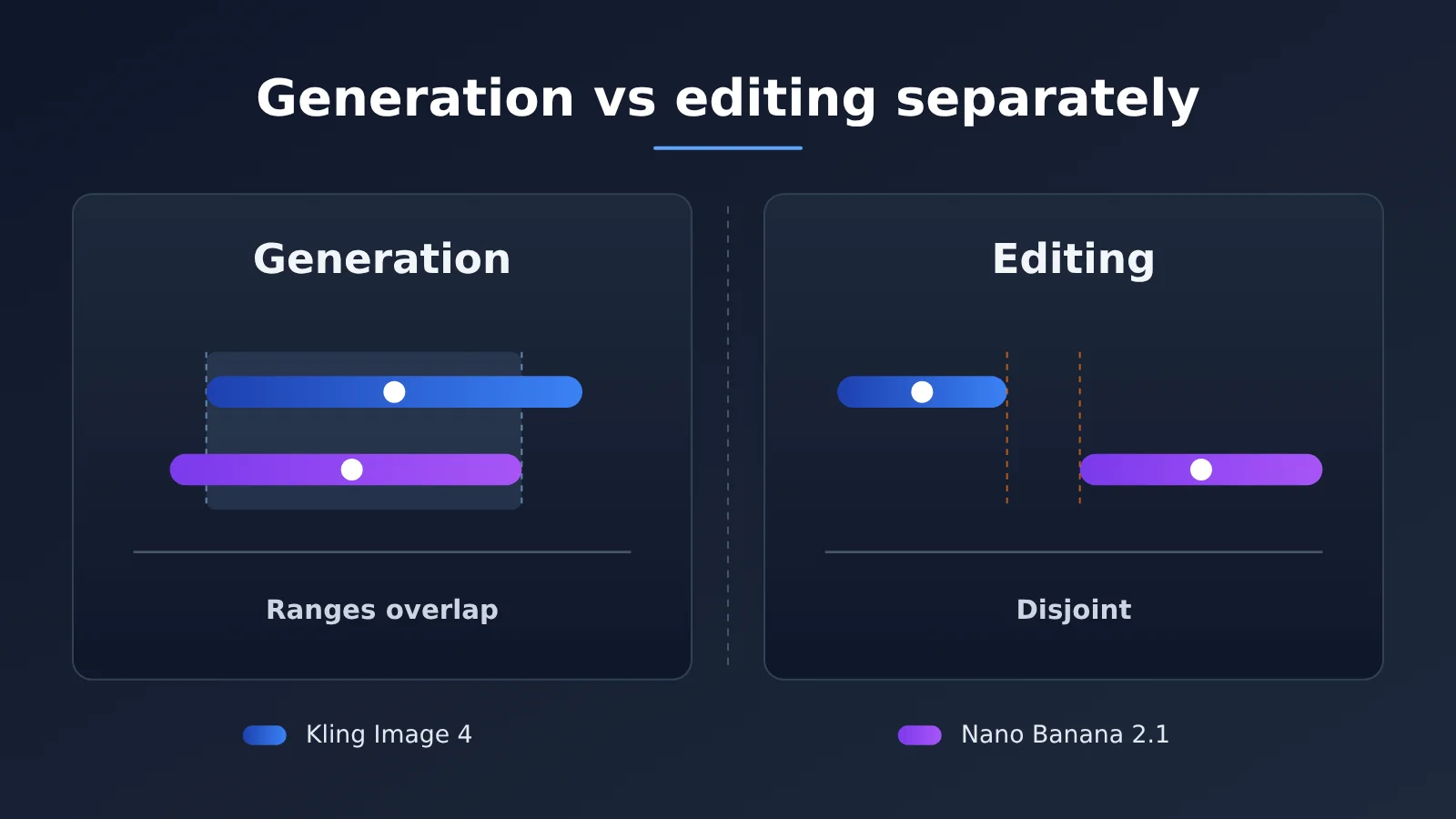
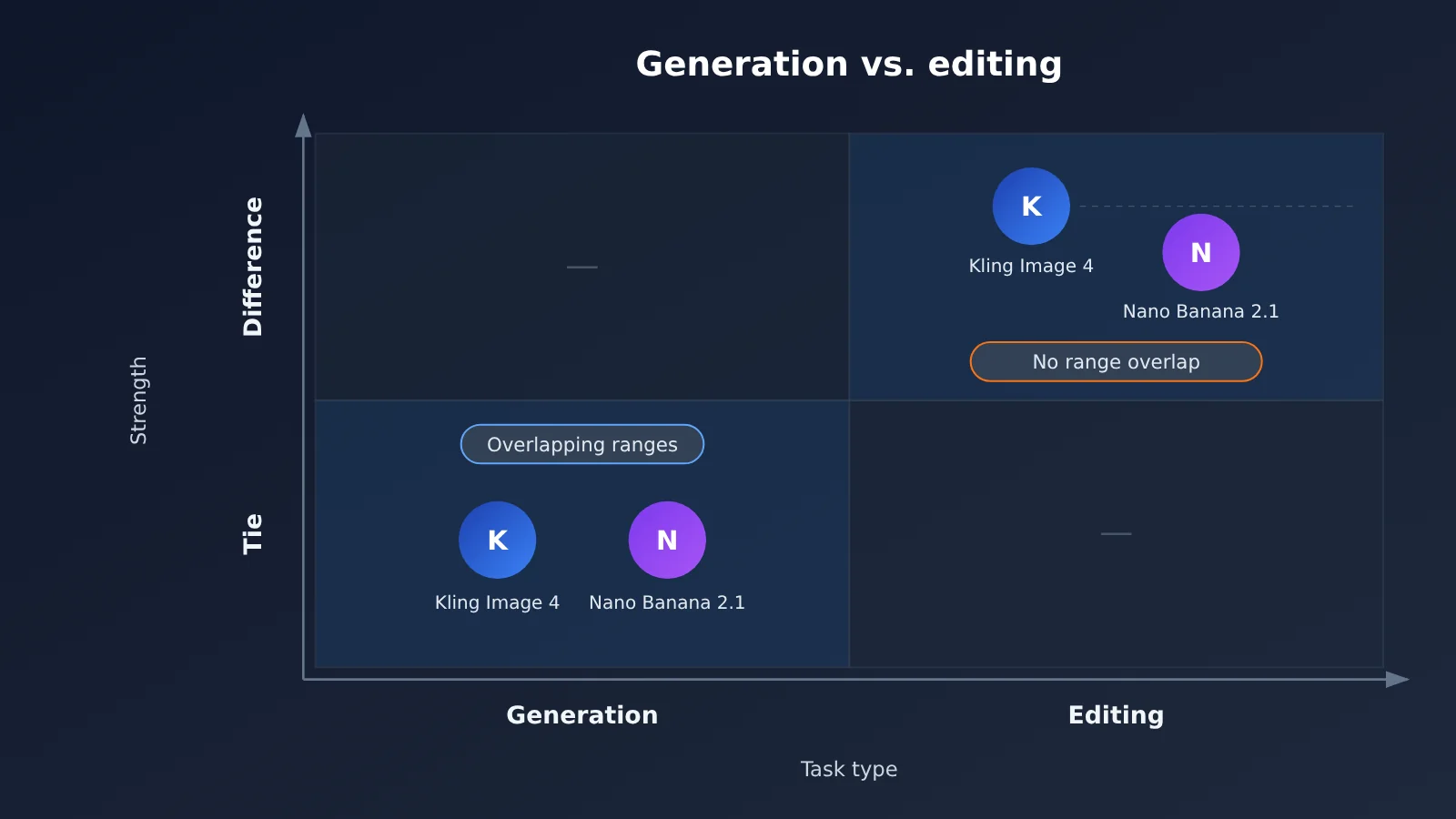
Author’s note: The text-to-image score ranges for Kling Image 4 and Nano Banana 2.1 overlap, while their image-editing score ranges do not. Comparing them by task is more useful than asking “which one is stronger overall.”
When choosing between Kling Image 4 and Google’s image model, many people just grab a single leaderboard score and draw a conclusion. But these two models are not the same: their text-to-image score ranges overlap, while their image-editing score ranges do not. If you compare the two task types together, it’s easy to reach the wrong conclusion.
This is not an article declaring a winner. According to Google’s current description, its latest and best image model is Nano Banana 2.1, not the earlier Pro. This article compares only these two: Kling Image 4 and Nano Banana 2.1. It separates “generation” and “editing” and looks at how to read the leaderboard data for each.
The key takeaway: After reading this, you’ll have a breakdown you can use directly in model selection: treat text-to-image as a tie between the two, and treat image editing as having a clear gap. Then, using cost basis and invocation method, decide which model your project should integrate first.
Kling Image 4 vs Nano Banana 2.1: Core Differences — First, Let’s Align the Names
Before comparing anything, we need to confirm which two models we’re actually comparing. The Nano Banana series has several versions, and Kling’s image models are still iterating. If the names don’t line up, every conclusion that follows will be off track.
| Comparison Item | Kling Image 4 | Nano Banana 2.1 |
|---|---|---|
| Name on the leaderboard | Kling Image 4.0 | Nano Banana 2.1 |
| Model positioning | Kling’s new-generation image model | An update to Google’s high-efficiency line, officially released 2026-10-06 |
| Text-to-image rank range | 6–9 | 7–10 |
| Image-editing rank range | 5–7 | 8–13 |
| Reference image limit | Refer to official documentation | Up to 14 reference images |
| Available platforms | Official channels; not yet available on APIYI, but it will be added as soon as possible | Official channels; per-call billing on APIYI apiyi.com |
Why We’re Comparing Nano Banana 2.1, Not Nano Banana Pro
A lot of people assume “the strongest Banana is Pro,” but that impression is already outdated. As of 2026-11-19, Google calls Nano Banana 2.1 (model name gemini-nano-banana-2.1) the best image model available right now. It’s an update to the high-efficiency product line — not the next generation of Pro.
Pro (gemini-3-pro-image) was released earlier. On the same text-to-image leaderboard, it scores 1119 with a rank range of 15–22, clearly trailing the two models discussed in this article. Pitting Pro against Kling Image 4 would skew the conclusion heavily toward Kling and wouldn’t be fair to Google either. So every mention of “Banana” below refers to Nano Banana 2.1.
Rank Ranges Matter More Than a Single Rank
The table above lists “rank ranges,” not a fixed rank. This kind of arena-style leaderboard estimates scores from a large number of pairwise blind votes, and every score carries uncertainty. A rank range means: within the range of statistical fluctuation, this is where the model might land.
When reading a leaderboard, look at the range first, then the point estimate — that’s the premise behind all the judgments in this article. When the ranges of two models overlap, a small difference in score may just be noise; only when the ranges are completely separate can you say with reasonable confidence that a gap exists.
Kling Image 4 vs Nano Banana 2.1 Text-to-Image Comparison: Overlapping Intervals
Let’s start with image generation — plain text prompt to image. That’s the capability most people care about first, and it’s also where these two models are closest.
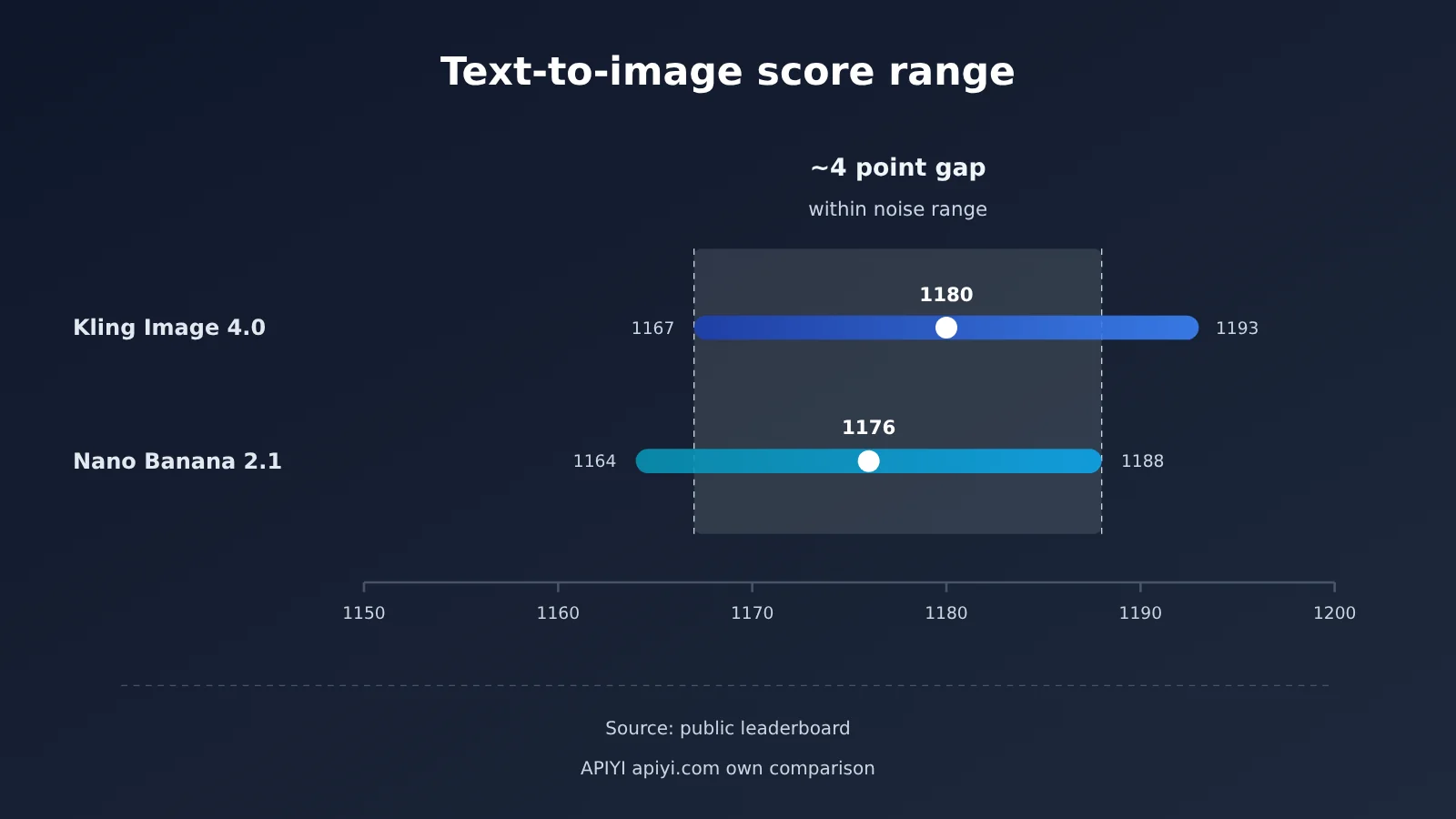
| Text-to-Image Metric | Kling Image 4.0 | Nano Banana 2.1 |
|---|---|---|
| Score (point estimate) | 1180 | 1176 |
| Confidence interval | 1167–1193 | 1164–1188 |
| Sample size | 5550 | 6793 |
| Rank range | 6–9 | 7–10 |
| Interval relationship | Overlaps with the other | Overlaps with the other |
Why you can’t write this up as a Kling win in text-to-image
The two point estimates are only about 4 points apart. Kling’s interval is 1167–1193, Nano Banana 2.1’s is 1164–1188 — the two ranges mostly overlap. The rank ranges look the same way: one is 6–9, the other 7–10, with a big stretch of overlap in the middle.
That tells you the 4-point gap falls inside statistical noise. Swap in another batch of voting samples and the ordering could easily flip. So the claim that “Kling Image 4 is stronger at text-to-image” doesn’t hold up. A more accurate way to put it: on this text-to-image leaderboard, the two sit in the same tier, and there’s no way to tell which is higher.
Same tier for text-to-image — so what should you look at when choosing?
When the overall scores can’t separate them, your selection criteria need to shift to something more concrete. These points are worth more of your time than leaderboard scores:
- Style preferences: Take the prompt types you use most in your own work (product shots, portraits, illustrations, posters), run a batch of each, and see which model’s default aesthetic is closer to what you want.
- Text and layout: If text needs to appear in the images, put together a separate set of text-bearing prompts to check.
- Reference image capability: Nano Banana 2.1 supports up to 14 reference images, which suits workflows that need multiple assets to constrain style or subject.
- Resolution tiers: Nano Banana 2.1 has no 512 tier; the lowest it goes is 1K. If you only need small thumbnails, factor that in.
Kling Image 4 vs. Nano Banana 2.1 for Image Editing: Non-Overlapping Intervals
Now let’s look at image editing — modifying an existing image based on instructions, like changing the background, editing a local area, or adjusting the style. This is a completely different situation from text-to-image.
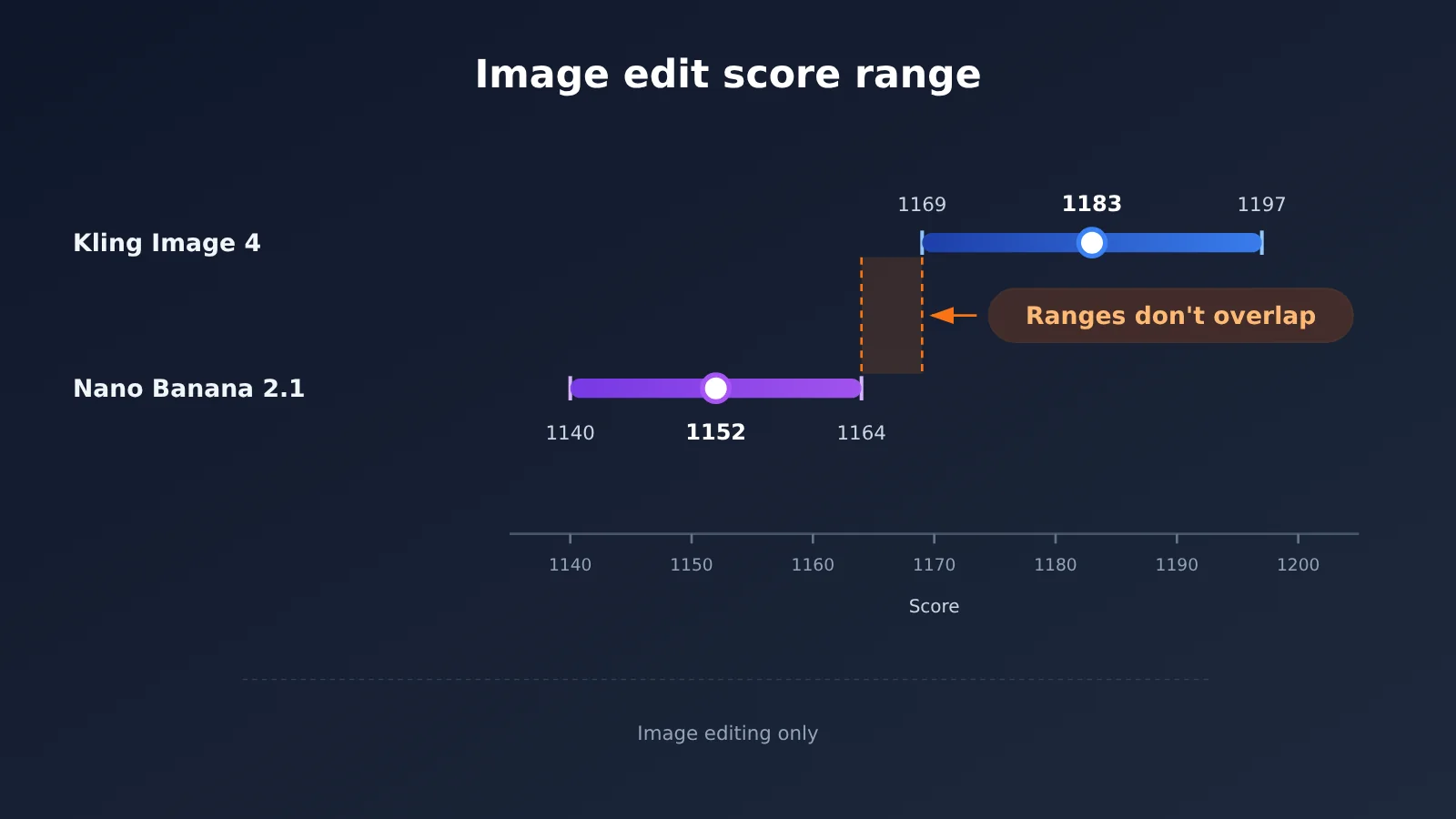
| Image-editing metric | Kling Image 4 | Nano Banana 2.1 |
|---|---|---|
| Score (point estimate) | 1183 | 1152 |
| Confidence interval | 1169–1197 | 1140–1164 |
| Sample size | 5628 | 7606 |
| Rank range | 5–7 | 8–13 |
| Interval relationship | No overlap with the other model | No overlap with the other model |
Why We Can Make This Call on Image Editing
Kling’s image-editing interval has a lower bound of 1169, while Nano Banana 2.1’s interval has an upper bound of 1164 — there’s a gap between the two. Sample sizes on both sides are above 5,000, so this isn’t a fluke from a small number of votes.
So on this image-editing leaderboard, we can say with reasonable confidence: Kling Image 4’s image-editing score is higher than Nano Banana 2.1’s. The rank ranges back this up too: Kling sits at 5–7, while Nano Banana 2.1 is at 8–13 — again, no overlap.
Higher Image-Editing Scores Don’t Mean It’s Better Overall
We need to be clear about the scope of this conclusion. It only covers image-editing tasks, and only under this leaderboard’s evaluation method. It doesn’t support the claim that “Kling Image 4 is stronger overall,” because the two are tied on image generation. It also doesn’t mean “Nano Banana 2.1 can’t be used for image editing” — its rank range of 8–13 is still toward the top of the leaderboard.
For model selection, the right way to read this is: if your business is mainly image editing, Kling Image 4 is worth evaluating first; if it’s mainly image generation, the two should be compared on equal footing.
Kling Image 4 vs. Nano Banana 2.1 Cost Basis: Align Before Comparing
Price is the part of this comparison that’s easiest to misread. Leaderboard prices, official prices, and platform prices each use their own calculation basis, so if you just subtract one number from another, you’ll probably end up with the wrong conclusion.
| Price Source | Kling Image 4 | Nano Banana 2.1 |
|---|---|---|
| Text-to-image leaderboard list price | $63 per thousand images (1024-normalized price) | $33.60 per thousand images |
| Image-editing leaderboard list price | $66 per thousand images (1024-normalized price) | $33.60 per thousand images |
| Official per-image price | 2K: around $0.061 based on a $300 image package at $0.00384 per credit | 1K $0.0336, 2K $0.0504, 4K $0.113 |
| APIYI platform | Not listed yet, will be listed ASAP | gemini-nano-banana-2.1 at $0.045 per call |
What leaderboard prices actually mean
Nano Banana 2.1’s $33.60 per thousand images on the leaderboard corresponds to Google’s 1K tier at $0.0336 per image — not the 2K or 4K price. Kling’s $63 and $66 on the leaderboard are prices normalized to 1024 resolution, which also isn’t the official 2K price.
The two sets of numbers come from different billing systems: one is priced by resolution tier, the other is converted from credit packages. So this article doesn’t draw a conclusion about “who’s cheaper.” When comparing costs, you should first pin down the resolution and call volume you’ll actually use, then apply each provider’s own billing rules.
Where per-call pricing applies
gemini-nano-banana-2.1 on APIYI is billed per call at $0.045 each time, with no distinction by resolution. That means how it relates to official resolution-based pricing depends on what image size you generate.
If you mostly generate 1K images, the official 1K price of $0.0336 per image is lower than the per-call price. The higher the resolution, the more cost-effective per-call billing becomes compared with the official pricing — most noticeably against the official 4K price of $0.113. So “$0.045 per call” shouldn’t be read as cheaper than the official pricing in every scenario; it’s better suited to cases with a lot of high-resolution demand.
How to Call Kling Image 4 and Nano Banana 2.1 via API
APIYI can already call Nano Banana 2.1 right now. Kling Image 4 isn’t listed yet — we’ll get it up as soon as we can. For model IDs and pricing, refer to the platform’s model list.
Here’s a minimal text-to-image example. The endpoint is OpenAI SDK-compatible; you just swap the base_url and model name:
from openai import OpenAI

client = OpenAI(
    api_key="YOUR_API_KEY",
    base_url="https://api.apiyi.com/v1"  # APIYI unified endpoint
)

resp = client.chat.completions.create(
    model="gemini-nano-banana-2.1",
    messages=[{"role": "user", "content": "雨后窗台上的橘猫,电影感侧光,2K"}]
)
print(resp.choices[0].message)
Image editing requires passing in both the original image and the edit instruction. The snippet below shows how a multimodal message is structured — for specific parameters and response fields, check the platform docs:
from openai import OpenAI

client = OpenAI(
    api_key="YOUR_API_KEY",
    base_url="https://api.apiyi.com/v1"
)

resp = client.chat.completions.create(
    model="gemini-nano-banana-2.1",
    messages=[{
        "role": "user",
        "content": [
            {"type": "text", "text": "把背景换成黄昏海边,主体保持不变"},
            {"type": "image_url", "image_url": {"url": "https://example.com/input.png"}}
        ]
    }]
)
print(resp.choices[0].message)
Once Kling Image 4 goes live, the same code only needs the model field changed — that lets you run both models against the same batch of editing tasks and compare them side by side.
🚀 Quick start: It’s worth running through Nano Banana 2.1’s image generation and editing flows first on APIYI apiyi.com using the free trial credits for new users, and getting your prompts and evaluation samples in order. When Kling Image 4 launches, you can reuse that same sample set for a head-to-head comparison.
Kling Image 4 vs. Nano Banana 2.1: Which Scenarios Each One Fits
Based on the data above, scenario recommendations should also be split by “generating images” and “editing images” rather than written as “pick one universal winner.”
Scenarios where Kling Image 4 deserves a first look
- Products built around image editing: for example, e-commerce background swaps, local retouching, style transfer. Its editing score range doesn’t overlap with Nano Banana 2.1, so these tasks are worth evaluating on Kling first.
- Mixed pipelines where editing dominates: when you do both generation and editing but edit more often, Kling’s edge on editing becomes more obvious.
Scenarios where Nano Banana 2.1 deserves a first look
- Mostly text-to-image with multiple reference image constraints: up to 14 reference images, well suited to batch generation that needs consistent characters or brand elements.
- Lots of high-resolution generation: billed per call on APIYI, so the higher the resolution, the better the value compared with the official site.
- Want to integrate right away: it’s already callable through APIYI, so there’s no need to wait for it to go live.
Scenarios where you should compare both
- Pure text-to-image work: the two overlap on text-to-image, and the leaderboard can’t separate them, so run a blind evaluation with your own prompt set before deciding.
Kling Image 4 vs Nano Banana 2.1: Decision Recommendations
Here’s the earlier reasoning condensed into a decision table. Each row addresses one task type only — no overall ranking.
| Your primary task | Leaderboard finding | Recommended action |
|---|---|---|
| Pure text-to-image | Intervals overlap, same tier | Run a blind eval with your own prompts; compare style and cost basis |
| Mostly image editing | Intervals don’t overlap, Kling scores higher | Evaluate Kling Image 4 first |
| Generation with multiple reference images | Not directly covered by the leaderboard | Look at Nano Banana 2.1’s 14-reference-image capability |
| High-resolution batch generation | Different pricing basis | Compare per-call billing against the official 4K unit price, then decide |
| Both generation and editing | The two findings differ | Route by task type — no need to pick just one |
That last row is the important one. Generation is a tie while editing shows a gap — which means a single system can route requests to different models based on task type. That fits what the data shows far better than agonizing over “which one to pick.”
💡 Recommendation: Model selection ultimately comes back to your own business samples. Start by connecting Nano Banana 2.1 through APIYI apiyi.com using a unified interface, and set up a framework that evaluates generation and editing separately. Then, once Kling Image 4 is available, fill in the other side of the comparison.
Frequently Asked Questions (FAQ)
Q1: What are Kling Image 4 and Nano Banana 2.1?
Kling Image 4 is Kling’s next-generation image model, listed on the leaderboard as Kling Image 4.0. Nano Banana 2.1 is an update to Google’s high-efficiency image line, officially released on 2026-10-06, and Google currently calls it its best image model.
Q2: Which one is stronger, Kling Image 4 or Nano Banana 2.1?
There’s no single answer to this — you have to look at it case by case. On text-to-image, their score ranges overlap, and a gap of about 4 points falls within the noise margin, so they can be treated as the same tier. On image editing, the score ranges don’t overlap, and Kling Image 4 comes out higher.
Q3: Why not compare it against Nano Banana Pro?
Pro (`gemini-3-pro-image`) was released earlier than 2.1. On the text-to-image leaderboard it scores 1119, with a rank range of 15–22. By Google’s current statement, the newest and best is Nano Banana 2.1. Comparing against Pro would mean picking the wrong model to benchmark against.
Q4: Can I call these two models on APIYI?
Nano Banana 2.1 is already available through APIYI at apiyi.com, under the model name `gemini-nano-banana-2.1`. Kling Image 4 isn’t listed yet — we’ll get it up as soon as we can. For model versions and pricing, refer to the platform’s model list.
Q5: Does $0.045 per call always mean it’s cheaper than the official site?
No. The official site prices by resolution: $0.0336 per image at 1K, which is lower than the per-call price. The higher the resolution, the more cost-effective per-call billing becomes relative to the official site — most noticeably when compared with the official 4K pricing. We’d suggest figuring out your usual resolution first, then doing the math. New users can validate their workflow on APIYI at apiyi.com using the free trial credits.
Q6: Can the per-thousand-image prices on the leaderboard be compared directly?
Not directly. Nano Banana 2.1’s $33.60 per thousand images corresponds to Google’s 1K pricing. Kling’s $63 and $66 per thousand images are normalized 1024 prices, not the official 2K pricing. The two are measured on different bases, so this article doesn’t use them to judge which is cheaper.
Q7: What limitations does each model have?
Nano Banana 2.1 has no 512 tier — it starts at 1K at minimum — and caps reference images at 14. Kling Image 4 currently can’t be called on APIYI yet; you’ll need to wait for it to be listed. Also, the leaderboard reflects popular-preference voting; your own business samples are the real basis for a decision.
Kling Image 4 and Nano Banana 2.1: Key Takeaways
- What’s being compared: on the Banana side we’re using Nano Banana 2.1, not the older Pro version.
- Text-to-image: the scoring bands overlap — the roughly 4-point gap sits inside the noise, so treat them as the same tier.
- Image editing: the scoring bands don’t overlap, and Kling Image 4 comes out higher.
- No overall ranking: generation is a tie, editing shows a gap — neither model wins across the board.
- Pricing basis: leaderboard unit prices, list prices on the official site, and per-call prices all use different bases, so don’t subtract one from another.
- How to get started: Nano Banana 2.1 can be called per use through APIYI at apiyi.com; Kling Image 4 is still waiting to go live.
Summary
When comparing Kling Image 4 and Nano Banana 2.1, the most important thing is to split the tasks apart:
- Treat generation as a tie: the text-to-image scoring bands overlap, so let your own blind test with your own prompts decide.
- Treat editing as showing a real gap: the editing scoring bands don’t overlap and Kling Image 4 comes out higher, so businesses built mainly around editing should evaluate it first.
- Align the cost basis first: settle resolution, billing method, and call volume before arguing about whether it’s worth the money.
A more practical approach is to route requests by task type rather than forcing a choice between models. I’d recommend wiring Nano Banana 2.1 in through APIYI at apiyi.com first, setting up a workflow that evaluates generation and editing separately, then adding the Kling Image 4 comparison once it launches.
📚 References
-
Artificial Analysis Text-to-Image Leaderboard: Text-to-image scores, confidence intervals, sample sizes, and rank ranges for Kling Image 4.0 and Nano Banana 2.1
- Link:
artificialanalysis.ai/image/leaderboard/text-to-image - Purpose: Used to determine whether the two models’ text-to-image score ranges overlap
- Link:
-
Artificial Analysis Image Editing Leaderboard: Image editing scores and interval data for both models
- Link:
artificialanalysis.ai/image/leaderboard/editing - Purpose: Used to determine whether the two models’ image editing score ranges overlap
- Link:
Author: APIYI Technical Team
Technical inquiries: Feel free to contact us through the APIYI homepage. For more resources, visit the docs.apiyi.com documentation center.