作者注:详解如何用 Nano Banana Pro 生成科研机制图、通路图、实验流程图等学术插图,附完整提示词模板和 API 调用代码,通过 API易平台仅需 $0.05/张。
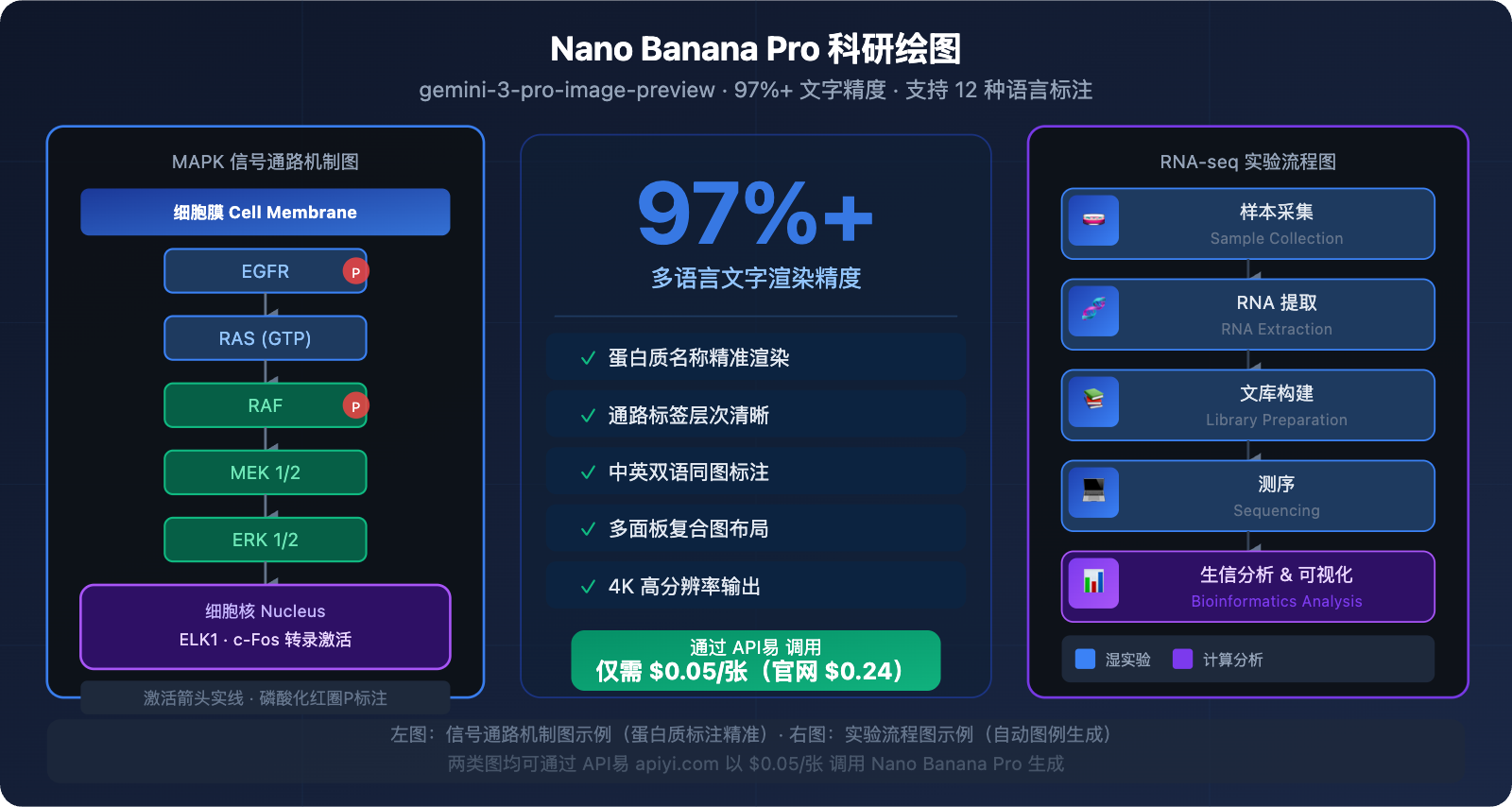
画一张 SCI 论文配图,过去要花几天找设计师或者自己手动用 BioRender 拼图。现在,Nano Banana Pro 可以直接根据文字描述生成包含精准标注的科研机制图——文字渲染准确率达 97%+,蛋白质名称、通路标签、双语注释全部正确渲染,不再出现乱码。
核心价值:读完本文,你将掌握 5 类科研绘图场景的完整提示词模板,以及通过 API易 以 $0.05/张调用 Nano Banana Pro API 批量生成的完整代码。
Nano Banana Pro 科研绘图核心能力
| 能力维度 | 表现 | 科研价值 |
|---|---|---|
| 多语言文字渲染 | 97%+ 精度,12 种语言 | 蛋白质名称、通路标签精准无乱码 |
| 科学标注理解 | 深度训练于学术文献和教材 | 能理解 MAPK、PI3K 等专业术语 |
| 多面板构图 | 支持复合图布局与视觉层次 | 直接生成论文 Figure 1 格式 |
| 高分辨率输出 | 1K / 2K / 4K 三档 | 满足期刊投稿图像质量要求 |
| 文字嵌入图像 | 自动生成标注块、图例 | 省去后期 PS 添字步骤 |
为什么科研绘图首选 Nano Banana Pro?
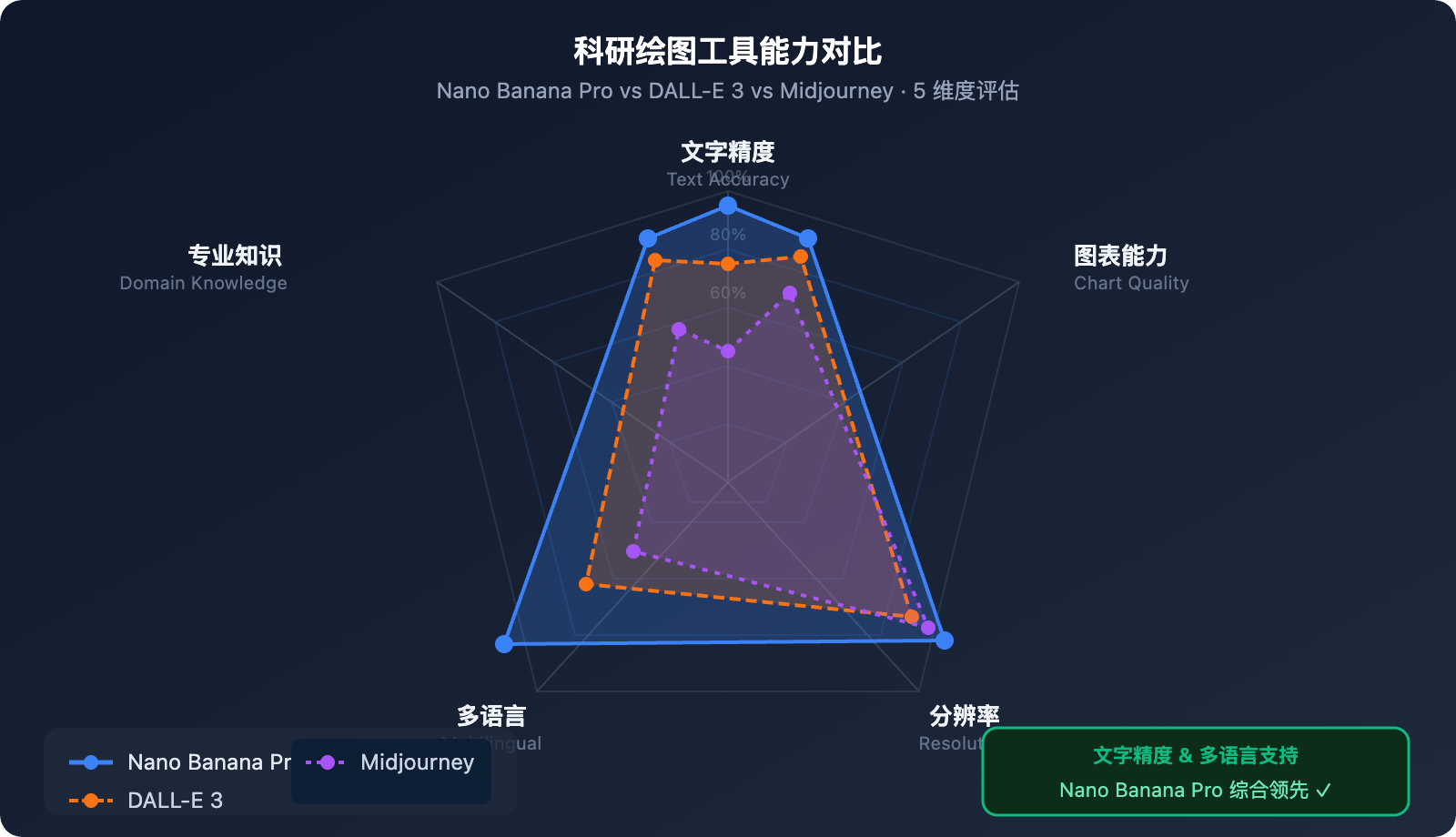
科研图表对 AI 图像工具提出了极高要求:不仅要画面美观,更要文字标注精准、专业术语正确、信息层次清晰。这正是 Nano Banana Pro 相比其他工具的决定性优势。
对比同类工具:DALL-E 3 在解剖图真实感上略胜,但处理含大量科学标注的复合图时文字经常出错;Midjourney 擅长艺术风格但标注能力弱;Adobe Firefly 偏向商业设计场景。Nano Banana Pro 是目前唯一一款在科学文字渲染 + 专业知识理解上同时达到高水准的 AI 图像模型。
Google 还基于同一套模型推出了 PaperBanana 框架——专为从方法论描述文本自动生成学术插图而设计,在 NeurIPS 2025 的 584 份样本中进行了系统测试,可见其在学术场景的战略定位。
5 类科研绘图场景与提示词模板
场景一:细胞信号通路机制图
适用场景:细胞生物学、分子生物学论文,展示信号级联、蛋白质磷酸化通路。
提示词模板:
Create a scientific mechanism diagram illustrating the MAPK/ERK signaling pathway.
Style: Clean white background academic illustration, suitable for SCI publication.
Layout: Vertical cascade flow from top (receptor) to bottom (nucleus).
Elements:
- Cell membrane at top with RTK receptor labeled "EGFR"
- Signal cascade: RAS → RAF → MEK → ERK with phosphorylation arrows
- Each protein shown as rounded rectangle with proper label
- Arrow styles: solid for activation, dashed for inhibition
- Nucleus at bottom with transcription factor labeled "ELK1"
Colors: Blue for membrane proteins, green for cytoplasmic kinases, red for nuclear targets
Text: All labels in English, 12pt equivalent, clearly legible
Resolution: 4K, aspect ratio 3:4
中文简化版提示词:
绘制 MAPK/ERK 信号通路机制图,学术论文插图风格,白色背景。
从上到下纵向排列:细胞膜(含 EGFR 受体)→ RAS → RAF → MEK → ERK → 细胞核(ELK1)。
每个蛋白质用圆角矩形表示,标注清晰,激活箭头实线,抑制箭头虚线。
蓝色膜蛋白,绿色胞质激酶,红色核转录因子。4K 分辨率,3:4 比例。
💡 提示:对于分子通路图,建议在提示词中明确指定每个节点的蛋白质名称,Nano Banana Pro 会正确渲染专业术语。通过 API易 apiyi.com 调用,每张 4K 通路图仅需 $0.05,批量生成多个通路变体成本极低。
场景二:实验流程图(Experimental Workflow)
适用场景:方法论章节,展示实验步骤、样本处理流程、仪器操作序列。
提示词模板:
Design a scientific experimental workflow diagram for RNA-seq analysis pipeline.
Style: Professional flowchart, dark blue background (#0f172a), white and light blue elements.
Steps (left to right, 6 steps):
1. "Sample Collection" - test tube icon
2. "RNA Extraction" - spiral RNA icon
3. "Library Preparation" - fragment icons
4. "Sequencing" - chip/sequencer icon
5. "Bioinformatics Analysis" - computer/code icon
6. "Data Visualization" - chart icon
Each step: rounded rectangle box, icon above, step name below, connected by arrows
Color coding: wet lab steps in blue, computational steps in purple
Add percentage labels for typical time allocation at each step
4K resolution, 16:9 aspect ratio, publication quality
场景三:细胞生物学结构插图
适用场景:教学材料、综述论文,展示细胞器结构、组织解剖、亚细胞定位。
提示词模板:
Create a detailed cell biology illustration showing mitochondrial structure and function.
Style: Scientific textbook illustration, clean white background.
Main elements:
- Cross-section view of mitochondrion (oval shape, 60% of frame)
- Outer membrane and inner membrane clearly labeled
- Cristae structure visible with labels
- ATP synthase complexes on inner membrane (labeled "ATP Synthase")
- Electron transport chain components (Complex I-IV) on inner membrane
- Matrix labeled with "TCA Cycle" and Krebs cycle intermediates
- Small arrows showing electron flow and proton gradient
- Legend box (bottom right): color key for different components
Text: All anatomical labels in English, bilingual caption below in Chinese and English
4K resolution, 4:3 aspect ratio
关键提示技巧:在描述细胞结构时,使用截面视图(cross-section view) 更能展示内部结构;加入双语标注(bilingual caption) 可直接用于中文期刊投稿。
场景四:数据可视化信息图
适用场景:结果展示、综述摘要,将复杂数据关系转化为直观视觉图表。
提示词模板:
Create a scientific infographic summarizing CRISPR-Cas9 gene editing efficiency data.
Style: Modern scientific infographic, dark background (#1a1a2e), high contrast.
Layout: 2x2 grid of mini-charts:
Top-left: Bar chart "Editing Efficiency by Cell Type" - HEK293/iPSC/T-cell/Primary Neuron
Top-right: Pie chart "Off-target Distribution" - 3 categories with percentages
Bottom-left: Line graph "Efficiency Over Time (Days 1-14)" - two conditions
Bottom-right: Comparison table "sgRNA Design Methods" - 3 methods, 3 metrics
Color scheme: Blue (#3b82f6) for primary data, Green (#10b981) for positive results
All axis labels, titles, and data values visible and correctly spelled
Include figure title at top: "CRISPR-Cas9 Editing Performance Summary"
4K resolution, 16:9 aspect ratio
场景五:双语学术海报
适用场景:学术会议、研究展示,需要同时呈现中英双语内容的专业海报。
提示词模板:
Design a bilingual academic conference poster for a cancer immunotherapy study.
Style: Professional academic poster, dark navy background, white and gold accents.
Layout (top to bottom):
- Title bar: "Targeting PD-L1 in Triple-Negative Breast Cancer" (English)
          "靶向 PD-L1 治疗三阴性乳腺癌" (Chinese, below English)
- Author line: "[Author Names] · [Institution] · [Conference Name] 2026"
- 3-column body:
  Left: "Background / 研究背景" - 3 bullet points each language
  Middle: Central mechanism diagram (simplified PD-1/PD-L1 pathway)
  Right: "Results / 研究结果" - 2 key bar charts with bilingual labels
- Bottom: "Conclusion / 结论" banner with key finding
- QR code (bottom right) with caption "Scan for full paper"
Colors: Navy #0f172a background, gold #f59e0b accents, white text
All Chinese and English text must be correctly rendered and readable
4K resolution, 2:3 portrait aspect ratio (A0 poster format)
Nano Banana Pro 科研绘图 API 快速上手
环境准备
pip install google-generativeai pillow
极简调用示例(生成一张机制图)
import google.generativeai as genai
import base64

# 通过 API易 调用,价格 $0.05/张(官网 $0.24)
genai.configure(
    api_key="YOUR_APIYI_KEY",
    client_options={"api_endpoint": "vip.apiyi.com"}
)

model = genai.GenerativeModel("gemini-3-pro-image-preview")

prompt = """
Create a scientific MAPK/ERK signaling pathway diagram.
White background, academic publication style.
Show: EGFR → RAS → RAF → MEK → ERK → ELK1 cascade.
Each protein labeled clearly, arrows show activation/inhibition.
4K resolution, 3:4 aspect ratio, SCI journal quality.
"""

response = model.generate_content(
    prompt,
    generation_config=genai.GenerationConfig(
        response_modalities=["IMAGE"],
        resolution="4K",
        aspect_ratio="3:4"
    )
)

for part in response.candidates[0].content.parts:
    if part.inline_data:
        with open("mapk_pathway.png", "wb") as f:
            f.write(base64.b64decode(part.inline_data.data))
        print("机制图已生成:mapk_pathway.png")
🚀 快速开始:在 API易 apiyi.com 注册获取 API Key,复制上方代码替换
YOUR_APIYI_KEY即可运行。平台提供免费测试额度,5 分钟内即可生成第一张科研图。
查看完整批量生成代码(含多场景、自动命名、错误重试)
import google.generativeai as genai
import base64
import os
import time
from typing import Optional

# 初始化客户端 - API易 apiyi.com,$0.05/张
genai.configure(
    api_key="YOUR_APIYI_KEY",
    client_options={"api_endpoint": "vip.apiyi.com"}
)
model = genai.GenerativeModel("gemini-3-pro-image-preview")


def generate_scientific_figure(
    prompt: str,
    output_filename: str,
    resolution: str = "4K",
    aspect_ratio: str = "4:3",
    max_retries: int = 3
) -> Optional[str]:
    """
    生成科研图表

    Args:
        prompt: 图表描述(英文效果更佳)
        output_filename: 输出文件名(.png)
        resolution: 1K / 2K / 4K
        aspect_ratio: 16:9 / 4:3 / 3:4 / 1:1
        max_retries: 失败重试次数

    Returns:
        成功返回文件路径,失败返回 None
    """
    for attempt in range(max_retries):
        try:
            response = model.generate_content(
                prompt,
                generation_config=genai.GenerationConfig(
                    response_modalities=["IMAGE"],
                    resolution=resolution,
                    aspect_ratio=aspect_ratio
                )
            )
            for part in response.candidates[0].content.parts:
                if part.inline_data and part.inline_data.mime_type.startswith("image/"):
                    os.makedirs(os.path.dirname(output_filename) or ".", exist_ok=True)
                    with open(output_filename, "wb") as f:
                        f.write(base64.b64decode(part.inline_data.data))
                    return output_filename
        except Exception as e:
            print(f"  尝试 {attempt + 1}/{max_retries} 失败: {e}")
            if attempt < max_retries - 1:
                time.sleep(5)
    return None


# 预定义科研图表任务列表
FIGURE_TASKS = [
    {
        "name": "MAPK信号通路图",
        "filename": "figures/fig1_mapk_pathway.png",
        "resolution": "4K",
        "aspect_ratio": "3:4",
        "prompt": """
        Scientific diagram: MAPK/ERK signaling pathway.
        White background, academic style.
        Top to bottom: EGFR receptor → RAS (GTP-bound) → RAF → MEK1/2 → ERK1/2 → nucleus (ELK1, c-Fos).
        Each component: rounded rectangle, bold protein name label.
        Activation arrows: solid black. Phosphorylation: circled 'P' symbol in red.
        Color: blue membrane, green cytoplasm proteins, red nuclear targets.
        Add "MAPK/ERK Signaling Pathway" title at top.
        Publication quality, 4K.
        """
    },
    {
        "name": "RNA-seq实验流程图",
        "filename": "figures/fig2_rnaseq_workflow.png",
        "resolution": "4K",
        "aspect_ratio": "16:9",
        "prompt": """
        Scientific workflow diagram: RNA-seq analysis pipeline.
        Dark blue background, white icons and text.
        6 steps left to right with connecting arrows:
        1. Sample Collection (test tube icon)
        2. RNA Extraction (helix icon)
        3. Library Prep (fragment icon)
        4. Sequencing (chip icon)
        5. Bioinformatics (terminal icon)
        6. Visualization (chart icon)
        Steps 1-4 in blue (wet lab), steps 5-6 in purple (computational).
        Each step: icon + step name + time estimate below.
        Title: "RNA-seq Analysis Workflow". 4K, 16:9.
        """
    },
    {
        "name": "线粒体结构图",
        "filename": "figures/fig3_mitochondria.png",
        "resolution": "4K",
        "aspect_ratio": "4:3",
        "prompt": """
        Scientific cell biology illustration: mitochondrion cross-section.
        White background, textbook illustration style.
        Detailed cross-section showing: outer membrane, inner membrane, cristae,
        matrix with TCA cycle label, ATP synthase complexes (labeled) on inner membrane,
        electron transport chain (Complex I-IV, labeled individually).
        Small curved arrows showing proton gradient and electron flow.
        Legend bottom-right: color key.
        Bilingual labels: English primary, Chinese translation in parentheses.
        Title: "Mitochondrial Structure and Function / 线粒体结构与功能".
        4K, 4:3 ratio.
        """
    },
]


def batch_generate_figures(tasks: list, output_dir: str = "figures") -> dict:
    """批量生成科研图表"""
    results = {"success": [], "failed": []}
    total = len(tasks)

    print(f"\n开始批量生成 {total} 张科研图表...")
    print(f"平台: API易 apiyi.com | 单价: $0.05/张 | 预计总成本: ${total * 0.05:.2f}\n")

    for i, task in enumerate(tasks, 1):
        print(f"[{i}/{total}] 正在生成: {task['name']}")
        path = generate_scientific_figure(
            prompt=task["prompt"],
            output_filename=task.get("filename", f"{output_dir}/figure_{i:02d}.png"),
            resolution=task.get("resolution", "4K"),
            aspect_ratio=task.get("aspect_ratio", "4:3")
        )
        if path:
            results["success"].append({"name": task["name"], "path": path})
            print(f"  ✓ 完成: {path}")
        else:
            results["failed"].append(task["name"])
            print(f"  ✗ 失败: {task['name']}")
        # 避免触发速率限制
        if i < total:
            time.sleep(2)

    print(f"\n生成完毕: 成功 {len(results['success'])} 张,失败 {len(results['failed'])} 张")
    print(f"实际成本: ${len(results['success']) * 0.05:.2f}")
    return results


if __name__ == "__main__":
    results = batch_generate_figures(FIGURE_TASKS)
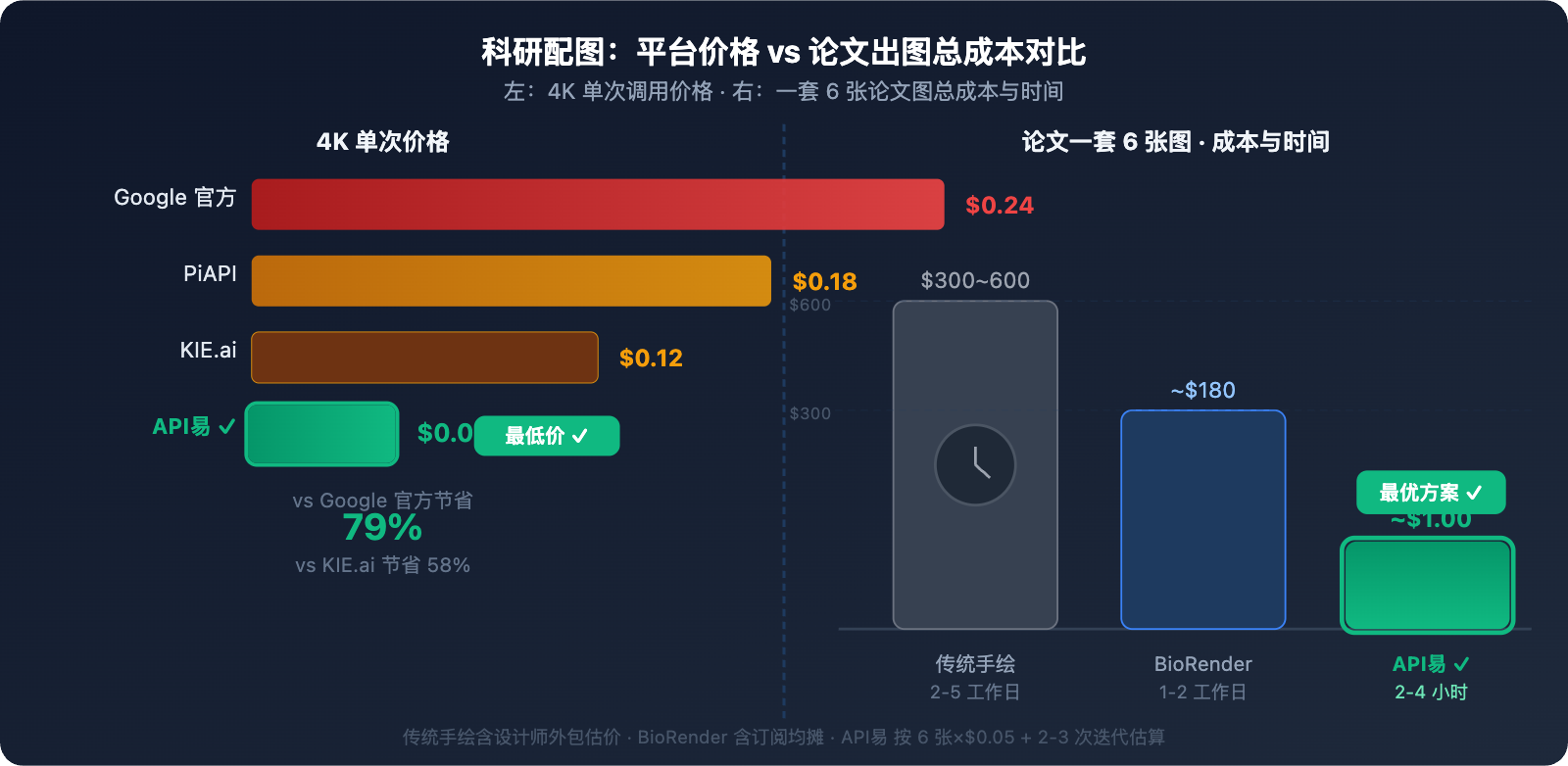
💰 成本对比:生成 20 张科研图(论文一套完整配图),Google 官方需 $4.80,通过 API易 apiyi.com 仅需 $1.00,节省 79%。对于需要频繁迭代修改的科研场景,成本优势极为显著。
科研绘图提示词进阶技巧
提示词结构公式
优质科研图提示词 = 主题定义 + 风格规格 + 元素清单 + 标注要求 + 分辨率参数
| 要素 | 示例 | 作用 |
|---|---|---|
| 主题定义 | "Scientific diagram of CRISPR-Cas9 mechanism" | 告知模型专业领域 |
| 风格规格 | "White background, academic publication style" | 控制整体视觉风格 |
| 元素清单 | "Show: Cas9 protein, sgRNA, target DNA, PAM sequence" | 确保关键内容不遗漏 |
| 标注要求 | "All components labeled in English, bilingual Chinese caption" | 精准控制文字内容 |
| 分辨率参数 | "4K resolution, 16:9 aspect ratio" | 满足投稿规格 |
常见错误与修复
问题 1:文字标注位置错乱
❌ 错误提示: "label the proteins"
✅ 修复提示: "Each protein shown as rectangle with bold label text centered inside,
              all labels: Arial 12pt equivalent, black text on white background"
问题 2:通路方向混乱
❌ 错误提示: "show the signaling cascade"
✅ 修复提示: "Top-to-bottom vertical flow: step 1 at top → step 2 → step 3 at bottom,
              directional arrows pointing downward between each component"
问题 3:颜色缺乏区分度
❌ 错误提示: "use different colors for each component"
✅ 修复提示: "Color coding: membrane proteins #3b82f6 (blue), cytoplasmic #10b981 (green),
              nuclear #f97316 (orange), inhibitory elements #ef4444 (red)"
不同学科场景的分辨率与宽高比推荐
科研图表的宽高比直接影响排版效果,以下是按投稿场景整理的推荐参数:
| 使用场景 | 推荐宽高比 | 推荐分辨率 | 说明 |
|---|---|---|---|
| 期刊单栏图 | 4:3 |
4K | Nature/Science 单列插图 |
| 期刊双栏图 | 16:9 |
4K | 跨栏宽幅复合图 |
| 竖版机制图 | 3:4 |
4K | 信号通路、树状图等纵向图 |
| 学术会议海报 | 2:3 |
4K | A0/A1 尺寸海报(竖版) |
| PPT/幻灯片配图 | 16:9 |
2K | 演讲演示用图 |
| 方形示意图 | 1:1 |
2K | 社媒发布或补充材料 |
| 横幅流程图 | 21:9 |
4K | 长流程实验步骤图 |
从提示词到发表:一套论文配图的完整工作流
以一篇细胞生物学论文为例,完整配图流程:
Step 1:规划图表结构(无 API 成本)
确定需要的图表类型和数量:
- Figure 1: 研究模型机制图(信号通路)→ 3:4 竖版
- Figure 2: 实验设计流程图 → 16:9 横版
- Figure 3A-C: 数据结果多面板图 → 16:9,2×3 布局
- Supplementary: 细胞结构示意图 × 2 → 4:3
共 6 张图,API易 总成本:$0.30
Step 2:逐张生成并迭代(每次 $0.05)
# 生成 → 检查 → 修改提示词 → 再生成
# 典型迭代次数:2-3 次/张,单图总成本 $0.10-0.15
Step 3:准确性核查(必须步骤)
对照 KEGG / UniProt / Reactome 数据库核查:
- 蛋白质名称拼写 ✓
- 通路方向和箭头含义 ✓
- 相互作用关系正确性 ✓
Step 4:格式处理
4K PNG → 期刊要求 300 DPI TIFF(使用 GIMP 或 Photoshop 转换)
如需矢量图:可将 PNG 导入 Adobe Illustrator 进行追踪
🎯 效率对比:传统手工绘制一套 6 张论文配图需 2-5 个工作日,使用 Nano Banana Pro + API易 整套流程约 2-4 小时,成本不到 $1。建议通过 API易 apiyi.com 获取 API Key 后按本文模板直接套用,大幅压缩论文准备周期。
平台价格与 API 对比
| 调用方式 | 4K 单价 | 稳定性 | 格式支持 | 适合场景 |
|---|---|---|---|---|
| Google 官方 | $0.24/次 | ★★★★★ | 原生格式 | 企业大额预算 |
| API易 | $0.05/次 | ★★★★★ | 原生格式 ✅ | 科研批量生成 |
| KIE.ai | $0.12/次 | ★★★☆☆ | 自定义格式 | 偶发使用 |
| PiAPI | $0.18/次 | ★★★★☆ | 自定义格式 | 商业场景 |
🎯 选择建议:对于科研人员和实验室来说,论文修改往往需要反复调整图表,批量生成需求大。建议通过 API易 apiyi.com 接入,以最低成本完成批量出图。平台支持谷歌原生 Gemini 格式,无需格式转换,直接兼容本文所有代码示例。
常见问题
Q1:Nano Banana Pro 生成的科研图可以直接投稿 SCI 期刊吗?
可以使用,但需注意以下几点:
- 准确性核查必须:AI 生成的通路图可能存在细节错误(如异常分支、虚构蛋白互作),投稿前务必与权威数据库(UniProt、KEGG、Reactome)比对验证
- 分辨率符合要求:选择 4K 输出,大多数期刊要求 300 DPI 以上,4K 图像充分满足
- AI 使用声明:Nature、Science 等顶刊要求在方法部分声明使用 AI 工具生成插图
- 矢量图需求:部分期刊要求提供 SVG/EPS 矢量格式,Nano Banana Pro 输出为光栅图,此类期刊需额外处理
通过 API易 apiyi.com 调用生成的图像与官方质量完全一致,适合用于预印本、非顶刊投稿及教学材料。
Q2:如何生成多面板复合图(如 Figure 1A-1F)?
Nano Banana Pro 支持在单张图像中生成多面板布局,提示词需明确指定:
Create a multi-panel scientific figure (2 rows × 3 columns, labeled A-F):
Panel A (top-left): [描述A图内容]
Panel B (top-center): [描述B图内容]
Panel C (top-right): [描述C图内容]
Panel D (bottom-left): [描述D图内容]
Panel E (bottom-center): [描述E图内容]
Panel F (bottom-right): [描述F图内容]
Each panel: white background, bold letter label top-left (A, B, C...),
thin gray border between panels, consistent color scheme.
4K resolution, 16:9 aspect ratio.
如果各子图内容差异较大,也可分别生成后用 Python PIL 拼合,通过 API易 apiyi.com 批量生成多子图成本仅 $0.30(6 张×$0.05)。
Q3:中文标注总是出现乱码或显示不全,怎么解决?
Nano Banana Pro 的中文渲染能力优秀,但需要正确的提示词写法:
- 明确声明语言:在提示词中加入
"Chinese text must be correctly rendered in Simplified Chinese characters" - 指定字体风格:
"Use standard Song/Hei font style for Chinese labels" - 控制文字密度:中文标注不要过多,重要标注保留,次要信息改用图例
- 双语策略:英文主标注 + 中文括号补充,如
"Mitochondria (线粒体)",英文主导时中文渲染更稳定
如问题仍存在,可先生成英文版图,再通过 API易 apiyi.com 发起图生图请求,要求"在此图基础上将所有英文标注替换为中文"。
总结
用 Nano Banana Pro 做科研绘图的核心要点:
- 文字精度是最大优势:97%+ 多语言准确率,蛋白质名称、通路标签精准渲染,优于所有同类工具
- 5 类场景各有专属提示词结构:信号通路图用"纵向级联流"模板,实验流程图用"横向步骤流",复合图明确面板布局
- 价格选 API易:$0.05/张(官网 $0.24),批量生成论文配图成本降低 79%,支持谷歌原生格式直接调用
- 投稿前务必核查准确性:AI 图像可能含有专业细节错误,需对照权威数据库验证
推荐通过 API易 apiyi.com 搭建科研绘图自动化工作流,将本文代码保存为模板,按需替换提示词批量生成,显著提升论文准备效率。
参考资料
-
Google Gemini API 图像生成文档
- 链接:
ai.google.dev/gemini-api/docs/image-generation - 说明:Nano Banana Pro 官方参数说明,含科学图像生成最佳实践
- 链接:
-
Google PaperBanana 框架介绍
- 链接:
the-decoder.com/googles-paperbanana-uses-five-ai-agents-to-auto-generate-scientific-diagrams - 说明:Google 面向学术插图自动生成的多智能体框架技术细节
- 链接:
-
Nano Banana Pro 生命科学应用评测
- 链接:
intuitionlabs.ai/articles/gemini-nano-banana-pro-life-sciences - 说明:针对细胞生物学、分子生物学场景的系统性能测评
- 链接:
-
API易平台接入文档
- 链接:
docs.apiyi.com - 说明:API Key 获取、Gemini 原生格式接入说明和定价详情
- 链接:
作者:技术团队
技术交流:欢迎在评论区分享你的科研绘图作品,更多 AI 绘图技巧可访问 API易 apiyi.com 技术社区