Author's Note: A deep dive into why the Gemini API returns the finishReason: OTHER error during image generation. We'll cover copyright risks, content moderation, and how to fix it—or use APIYI as a reliable alternative.
While generating images with the Gemini API, you might suddenly hit a weird error: finishReason: "OTHER", content.parts: null, with no image returned. This article breaks down the real reason behind this error and how to steer clear of copyright-related blocks.
Key Takeaway: By the end of this post, you'll understand Gemini's multi-layered content moderation system, why characters from Disney or Marvel trigger blocks, and how to use image generation APIs while staying compliant.
Deep Dive: Decoding the finishReason OTHER Error
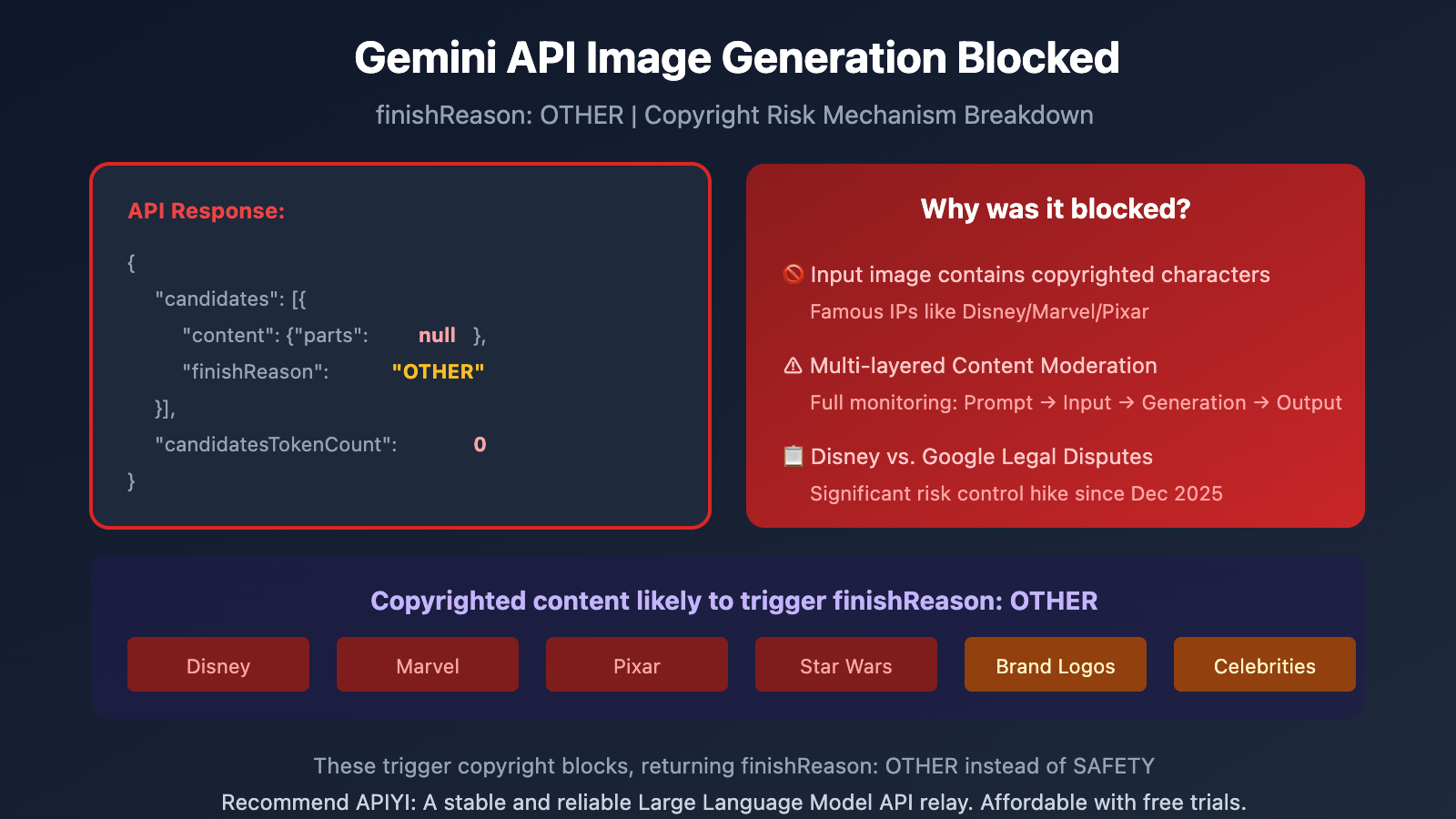
When you get the following response, it means Google's content moderation system has intercepted your image generation:
{
  "candidates": [
    {
      "content": {
        "parts": null
      },
      "finishReason": "OTHER",
      "index": 0
    }
  ],
  "usageMetadata": {
    "promptTokenCount": 306,
    "candidatesTokenCount": 0,
    "totalTokenCount": 478,
    "thoughtsTokenCount": 172
  },
  "modelVersion": "gemini-3-pro-image-preview"
}
| Field | Meaning | Description |
|---|---|---|
finishReason: "OTHER" |
Non-standard termination | Doesn't fall under STOP, SAFETY, or MAX_TOKENS |
content.parts: null |
No content returned | The image was intercepted and won't be generated |
candidatesTokenCount: 0 |
Output tokens: 0 | Confirms that no actual content was created |
thoughtsTokenCount: 172 |
Thought tokens consumed | The model tried to generate it but was stopped mid-process |
Why "OTHER" and not "SAFETY"?
The Gemini API has several finishReason values:
| finishReason | Scenario |
|---|---|
STOP |
Generation completed normally |
SAFETY |
Triggered safety filters (NSFW, violence, hate speech, etc.) |
MAX_TOKENS |
Reached maximum token limit |
RECITATION |
Triggered copyright content duplication detection |
OTHER |
Copyright, trademark, or uncategorized content moderation |
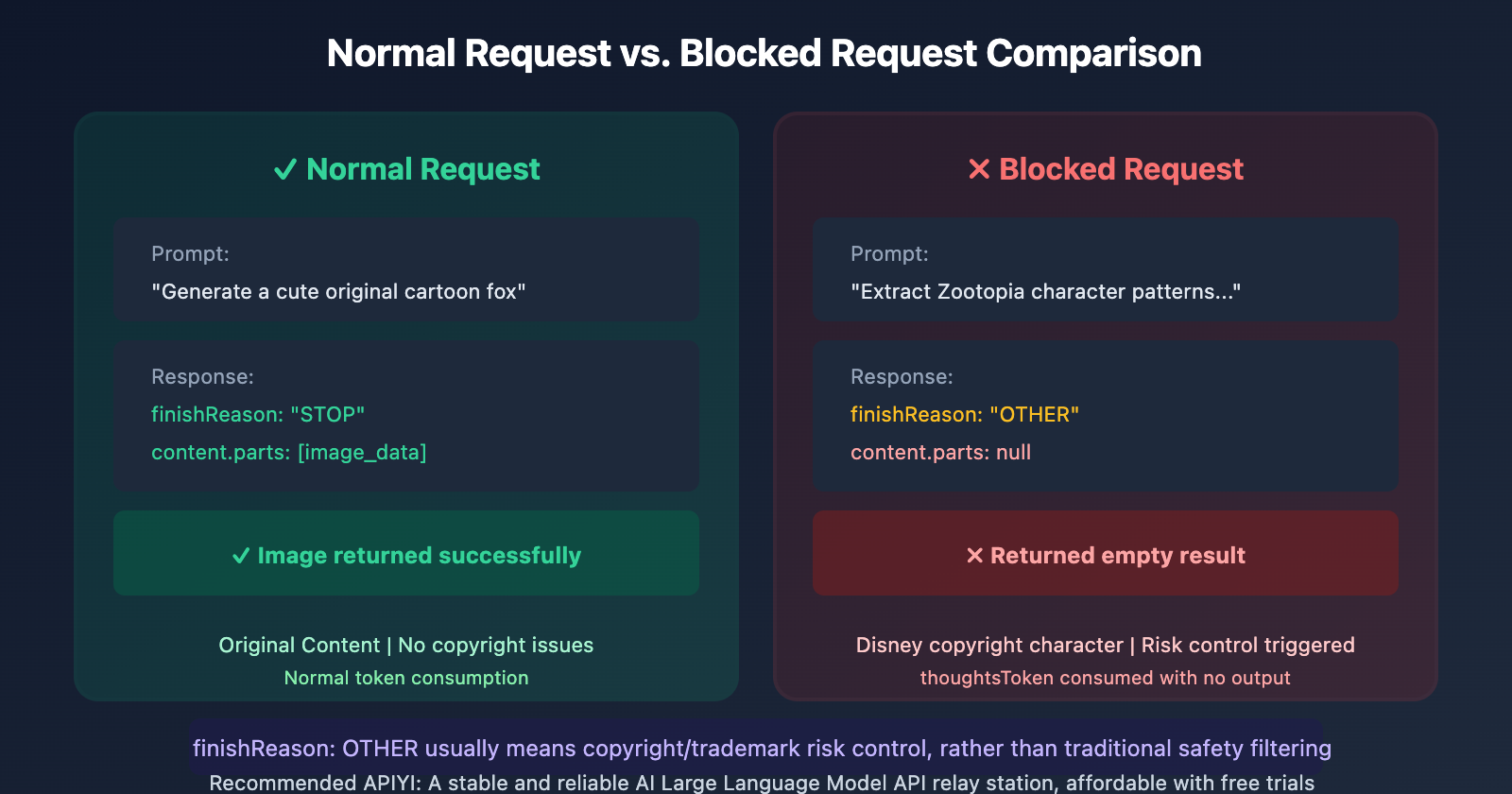
finishReason: OTHER usually implies a hit on copyright or trademark-related risk controls, rather than standard safety content filtering.
Why Disney Characters Get Blocked
Case Study: Zootopia Image Extraction Failure
A user tried using the following prompt to process an image of a character from Zootopia:
"Strictly extract the patterns from the provided image, accurately identifying and completely restoring design elements like textures and patterns, ensuring nothing is missing or distorted. Remove wrinkles. Restore it as a flat printed image that fills the entire frame."
Result: finishReason: OTHER, and the image generation failed.
Root Cause Analysis
| Reason | Description |
|---|---|
| Copyrighted Character Recognition | Gemini recognizes well-known IP characters from Disney, Marvel, Pixar, etc. |
| Trademark Protection | Characters like Nick Wilde and Judy Hopps are registered trademarks of Disney. |
| Legal Risk Avoidance | In December 2025, Disney sent a cease and desist letter to Google regarding infringement. |
| Multi-layer Filtering | Even if the prompt passes, the request can still be intercepted during the generation process. |
The Disney vs. Google Copyright Dispute
On December 10, 2025, Disney sent a cease and desist letter to Google, alleging that Gemini AI was infringing on Disney's copyrights on a massive scale:
- This involves characters from The Avengers, Star Wars, and more.
- Disney provided evidence of Gemini-generated images of characters like Darth Vader.
- Consequently, Google tightened its risk controls for well-known IP characters.
This explains why image processing involving characters from Disney, Marvel, or Pixar is now frequently blocked.
Gemini API's Multi-layer Content Moderation Mechanism
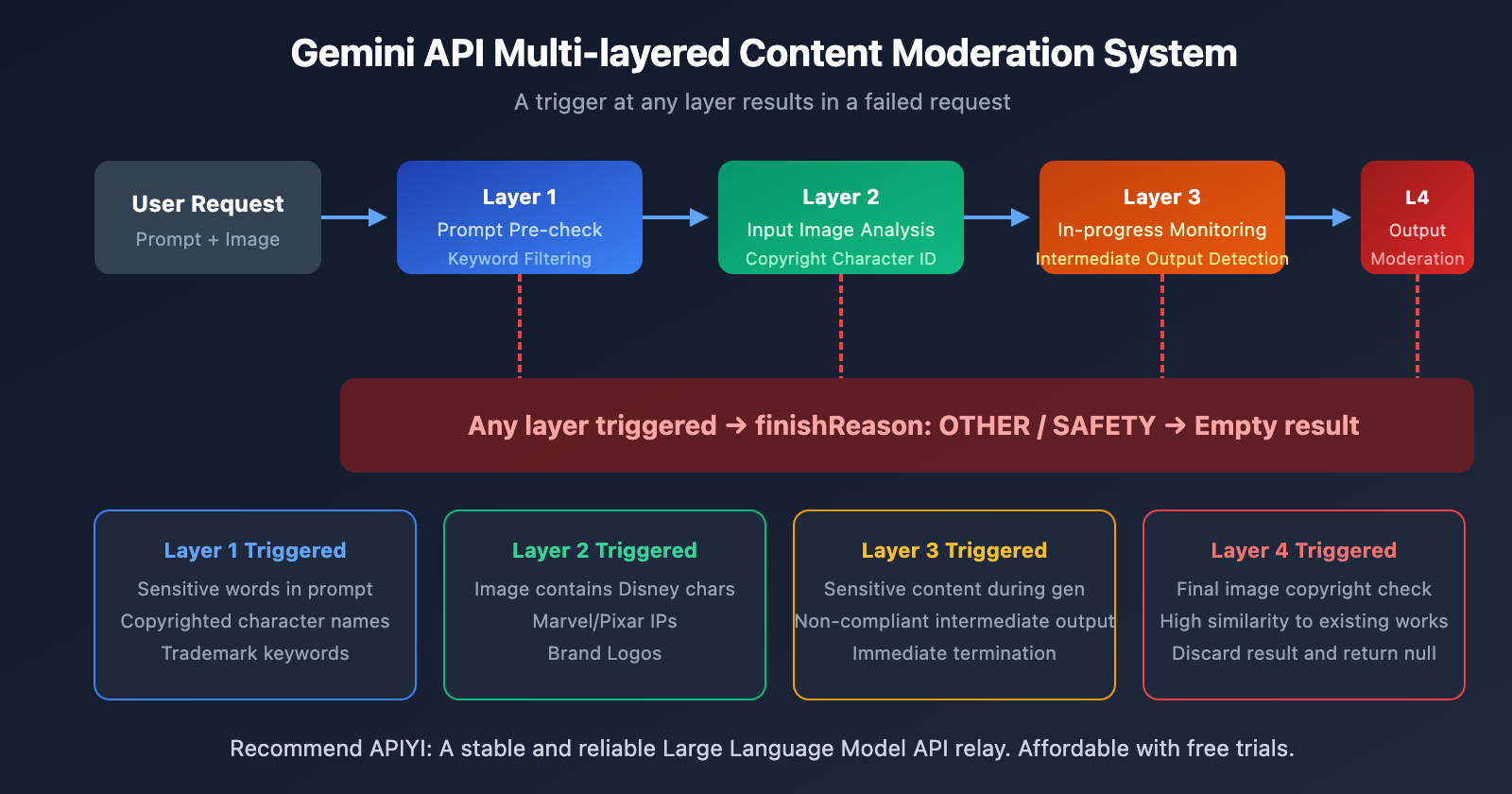
Gemini's image generation uses a multi-layered filtering system. If any layer is triggered, the request fails:
Layer 1: Prompt Pre-check
Before the model is even called, the system checks if the prompt contains:
- Sensitive keywords (NSFW, violence, hate speech)
- Copyrighted character names (Disney, Marvel, etc.)
- Trademarked keywords
Layer 2: Input Image Analysis
If a reference image is uploaded, the system analyzes its content to:
- Identify copyrighted characters within the image
- Detect trademarked logos
- Determine if it's a protected work of art
Layer 3: Generation Monitoring
Even if the first two layers pass, the system continues to monitor the process:
- If the intermediate output contains sensitive content, it terminates immediately.
- If the output shows a high similarity to known copyrighted works, it refuses to return the result.
Layer 4: Output Review
Once generation is complete, there's one final check:
- Copyright detection is performed on the generated image.
- Non-compliant images are discarded, returning an empty result.
What content easily triggers finishReason OTHER?
Based on user feedback and official policies, the following content is most likely to be blocked:
| Category | Specific Examples | Risk Level |
|---|---|---|
| Disney Characters | Mickey Mouse, Zootopia, Frozen | 🔴 Extremely High |
| Marvel Characters | Iron Man, Spider-Man, Captain America | 🔴 Extremely High |
| Pixar Characters | Toy Story, Cars | 🔴 Extremely High |
| Star Wars | Darth Vader, Yoda, Stormtroopers | 🔴 Extremely High |
| Japanese Anime | Certain famous IPs (depending on the case) | 🟡 Medium |
| Celebrity Likeness | Stars, political figures | 🟡 Medium |
| Brand Logos | Nike, Apple, Coca-Cola | 🟡 Medium |
| Original Artwork | Replications of works by famous painters | 🟡 Medium |
Scenarios prone to accidental triggers
Even if you don't have any bad intentions, the following scenarios might still trigger risk controls:
- Pattern extraction: Extracting print patterns from clothing or merchandise.
- Style transfer: Making an image look like the art style of a famous IP.
- Background replacement: Processing background images that contain copyrighted characters.
- Image retouching: Adjusting or enhancing images that feature characters.
5 Solutions
Solution 1: Adjust your prompts
Avoid directly mentioning the names of copyrighted characters; use generic descriptions instead:
# ❌ Prone to being blocked
prompt = "Extract the pattern of Judy from Zootopia"

# ✅ A safer way
prompt = "Extract the cartoon rabbit pattern from the image and restore it as a flat printed graphic"
Solution 2: Avoid uploading copyrighted images
If possible, use images that don't contain obvious copyrighted characters for your testing.
Solution 3: Use general image processing tools
For tasks like pattern extraction or wrinkle removal, you might consider:
- Adobe Photoshop's Content-Aware Fill
- Professional print pattern extraction software
- Generic image super-resolution tools
Solution 4: Adjust Safety Settings (limited effect)
While you can try adjusting the safety settings, they have limited impact on copyright-related risk controls:
from google.generativeai.types import HarmCategory, HarmBlockThreshold

safety_settings = {
    HarmCategory.HARM_CATEGORY_HARASSMENT: HarmBlockThreshold.BLOCK_NONE,
    HarmCategory.HARM_CATEGORY_HATE_SPEECH: HarmBlockThreshold.BLOCK_NONE,
    HarmCategory.HARM_CATEGORY_SEXUALLY_EXPLICIT: HarmBlockThreshold.BLOCK_NONE,
    HarmCategory.HARM_CATEGORY_DANGEROUS_CONTENT: HarmBlockThreshold.BLOCK_NONE,
}
Note: Copyright-related blocks cannot be bypassed through Safety Settings; it's a hard restriction.
Solution 5: Use APIYI's Gemini API (Recommended)
APIYI (apiyi.com) provides a relay for the full Gemini API series, offering the same model capabilities with a more stable calling experience:
import openai

client = openai.OpenAI(
    api_key="YOUR_APIYI_KEY",
    base_url="https://vip.apiyi.com/v1"
)

response = client.chat.completions.create(
    model="gemini-3-pro-image-preview",
    messages=[
        {
            "role": "user",
            "content": "Generate an original cartoon city market scene featuring fox and rabbit characters"
        }
    ]
)
Suggestion: Access the Gemini API through APIYI (apiyi.com) to enjoy more stable service and technical support. Prices are only about 20% of the official site ($0.05 per 4K image), and you won't have to worry about credit card binding issues.
How to Tell Why a Request Was Blocked
Checking Response Fields
def analyze_response(response):
    candidate = response.candidates[0]

    # Check finishReason
    finish_reason = candidate.finish_reason

    # Check if there's content
    has_content = candidate.content and candidate.content.parts

    # Check promptFeedback
    block_reason = getattr(response.prompt_feedback, 'block_reason', None)

    print(f"finishReason: {finish_reason}")
    print(f"Has content: {has_content}")
    print(f"Block reason: {block_reason}")

    if finish_reason == "OTHER" and not has_content:
        print("⚠️ Likely triggered copyright/trademark risk control")
    elif finish_reason == "SAFETY":
        print("⚠️ Triggered safety content filtering")
Common Error Code Reference Table
| Response Features | Most Likely Cause | Suggested Action |
|---|---|---|
finishReason: OTHER, parts: null |
Copyright/Trademark risk control | Change the image or modify the prompt |
finishReason: SAFETY |
Content safety filtering | Adjust Safety Settings |
blockReason: PROHIBITED_CONTENT |
Explicit violation of usage policy | Check the prompt and image |
finishReason: RECITATION |
Triggered copyright recitation detection | Modify the prompt phrasing |
error 503: Model overloaded |
Service overloaded | Try again later or use APIYI |
FAQ
Q1: Why do identical requests sometimes succeed and sometimes fail?
Gemini's content moderation involves a bit of randomness, which could be due to:
- Model version updates changing moderation strategies.
- Temporary server-side filtering rule adjustments.
- Subtle differences in input images leading to different judgements.
It's a good idea to use a retry mechanism to handle these occasional failures.
Q2: I just want to remove wrinkles from an image; why is it still being blocked?
If the input image contains copyrighted characters, even if your intent is perfectly legal (like removing wrinkles or color grading), it'll still trigger risk control. That's because the system analyzes the content of the input image itself, not just your prompt.
We recommend using images that don't contain copyrighted characters or sticking to professional image editing software.
Q3: Will APIYI’s Gemini API have the same restrictions?
APIYI provides a relay service for the Gemini API. Since the underlying models are the same, the copyright-related risk control mechanisms are also consistent. However, APIYI offers several advantages:
- Lower pricing (at 20% of the official cost)
- No need to link an international credit card
- Chinese technical support
- A more stable service experience
Visit apiyi.com to learn more.
Summary
Key takeaways for the Gemini API image generation finishReason: OTHER error:
- Copyright risk control is the main culprit: Famous IP characters like Disney, Marvel, and Pixar will trigger these controls.
- Multi-layered filtering: Monitoring happens throughout the entire process, from the prompt to the final output; any stage can trigger an interception.
- Cannot be fully bypassed: Safety Settings don't affect copyright restrictions, as these are strictly for legal compliance.
- Recommendations:
- Avoid processing images that contain copyrighted characters.
- Refine your prompts to use more general descriptions.
- Use APIYI (apiyi.com) for a more stable service experience.
For developers who need to use Gemini image generation extensively, we recommend calling the API via APIYI (apiyi.com). 4K images are only $0.05 each (80% off the official price), with support for Alipay/WeChat and Chinese technical support.
📚 References
-
Gemini API Safety Settings Documentation: Configuring safety settings
- Link:
ai.google.dev/gemini-api/docs/safety-settings - Description: Official explanation for safety filtering configurations.
- Link:
-
Gemini Content Generation API Documentation:
finishReasonenum values- Link:
ai.google.dev/api/generate-content - Description: Meanings of various
finishReasoncodes.
- Link:
-
Generative AI Prohibited Use Policy: Google's usage policies
- Link:
support.google.com/gemini/answer/16625148 - Description: Detailed descriptions of content restrictions.
- Link:
Author: Technical Team
Technical Discussion: Feel free to discuss Gemini API issues in the comments. For more resources, visit the APIYI (apiyi.com) technical community.