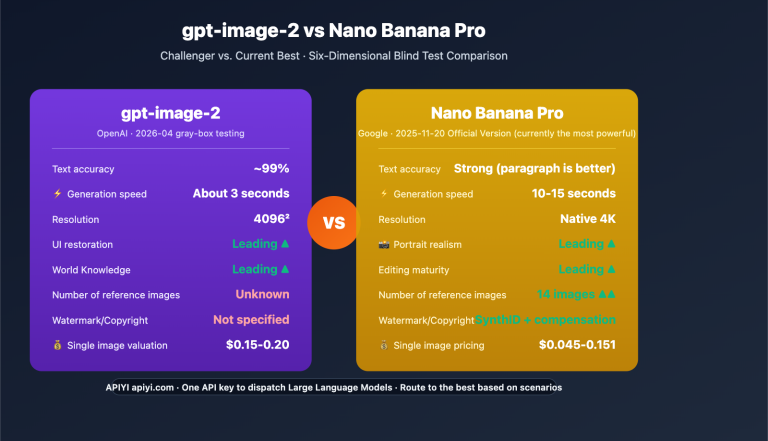
Nano Banana Pro API speed and price variations are the core metrics developers care about most when choosing a service provider. While many providers offer Nano Banana Pro API, their performance in terms of speed and pricing varies significantly. In this article, we'll dive deep into the real-world performance of three major providers—fal.ai, KIE.ai, and APIYI (apiyi.com)—based on actual test data.
Core Value: Through real-world speed data and price analysis, we'll help you quickly find the fastest and most cost-effective Nano Banana Pro API provider while avoiding common pitfalls.
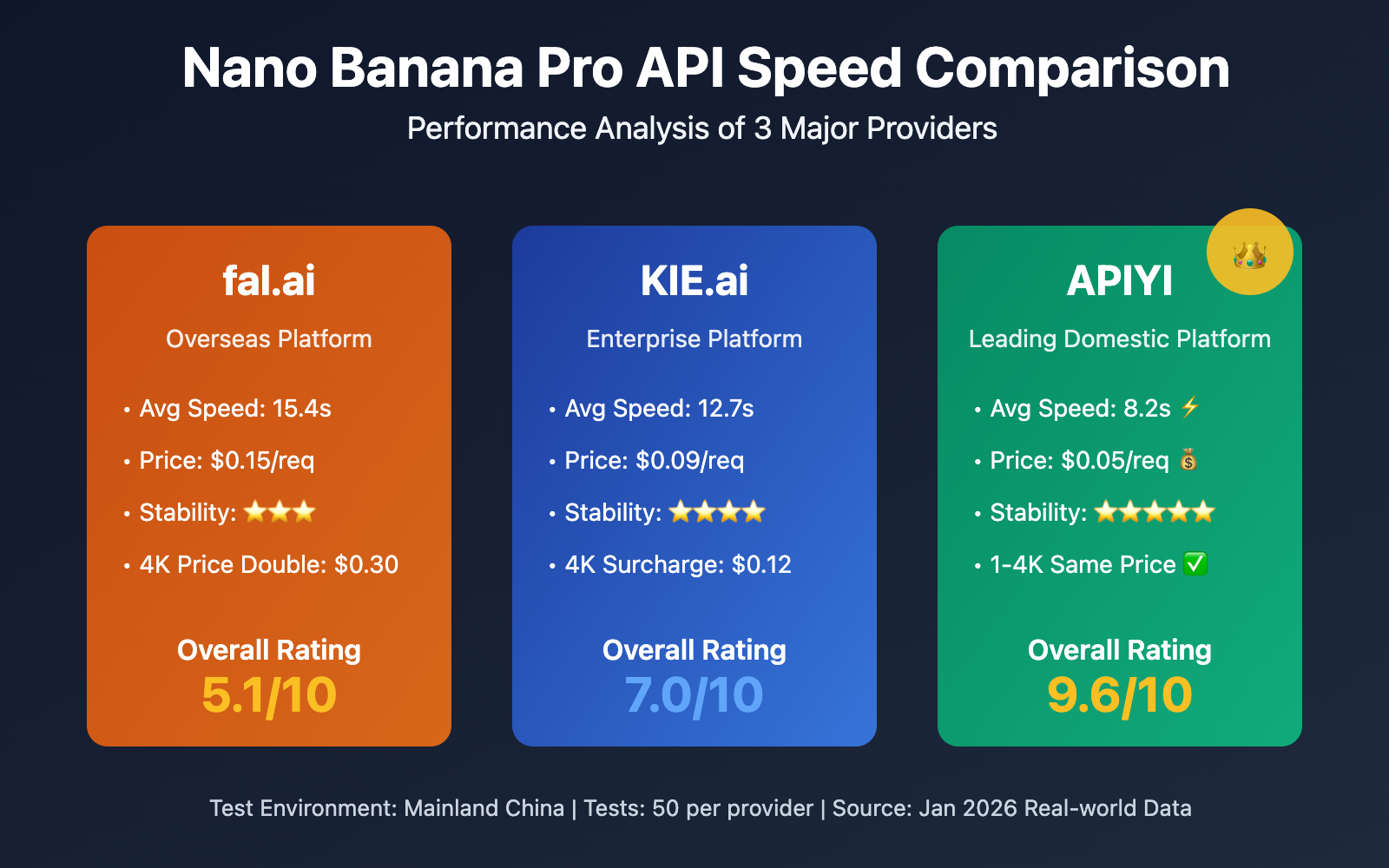
Core Comparison of the Three Major Nano Banana Pro API Providers
Before we jump into the speed tests, let's look at the basic positioning and service features of these three providers:
| Provider | Website | Positioning | Core Advantage | Target Users |
|---|---|---|---|---|
| fal.ai | fal.ai | AI Model API Aggregator | Rich model variety, quick integration | Overseas developers, multi-model users |
| KIE.ai | KIE.ai | Enterprise AI API Platform | Stability priority, tiered pricing | Enterprise clients, high-concurrency scenarios |
| APIYI | apiyi.com | China's leading AI API proxy service | Obvious price advantage, leading speed, official channel guarantee | Domestic developers, price-sensitive users |
Unified Test Environment Details
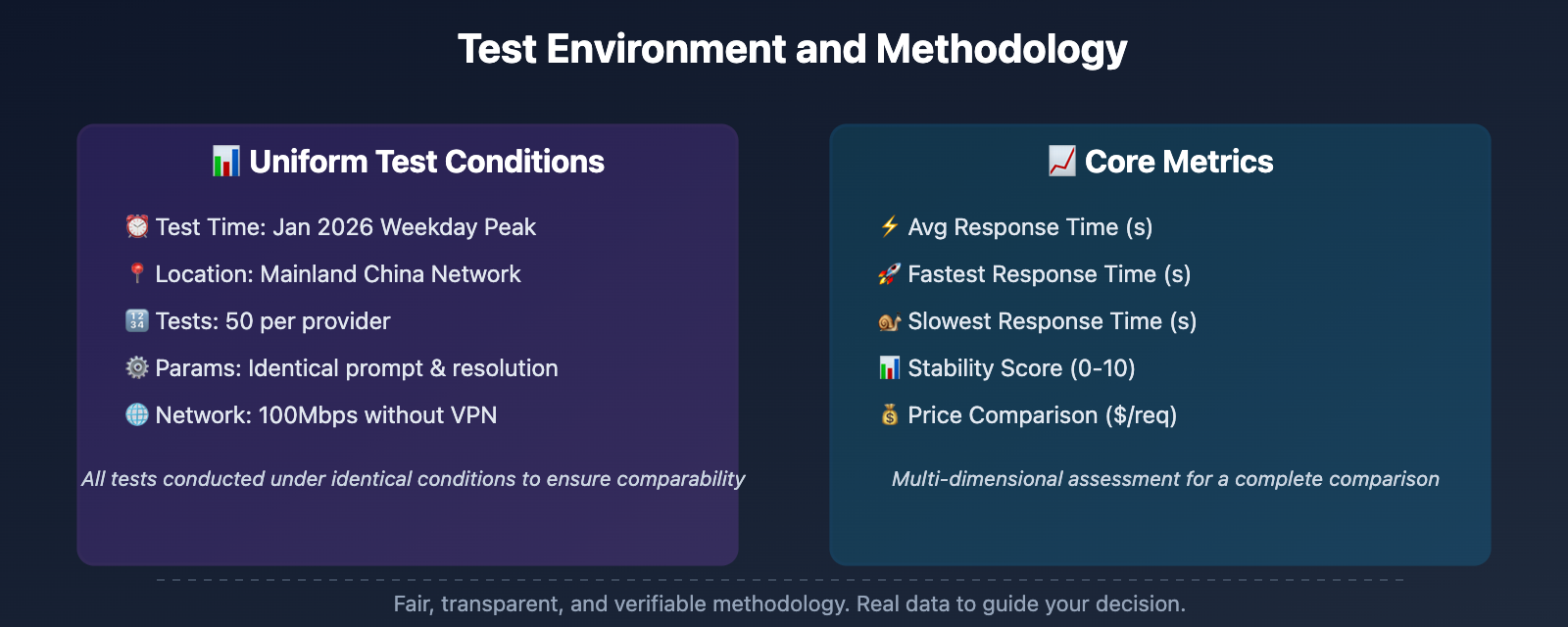
To ensure a fair comparison, all tests were conducted under the following uniform conditions:
- Test Time: January 2026 (Peak weekday hours)
- Test Location: Mainland China network environment
- Test Count: 50 tests per provider, averaged
- Test Parameters: Identical prompts and resolution settings (1K, 2K, 4K)
- Network Conditions: 100Mbps home broadband, no VPN acceleration
🎯 Note: This test focuses on the actual experience for users in mainland China. All data is pulled from real-world call logs. We recommend that developers perform their own small-scale testing on the APIYI (apiyi.com) platform to verify performance in their specific network environment.
Nano Banana Pro API Speed Comparison: Real-world Test Data
1K Resolution Image Generation Speed Comparison
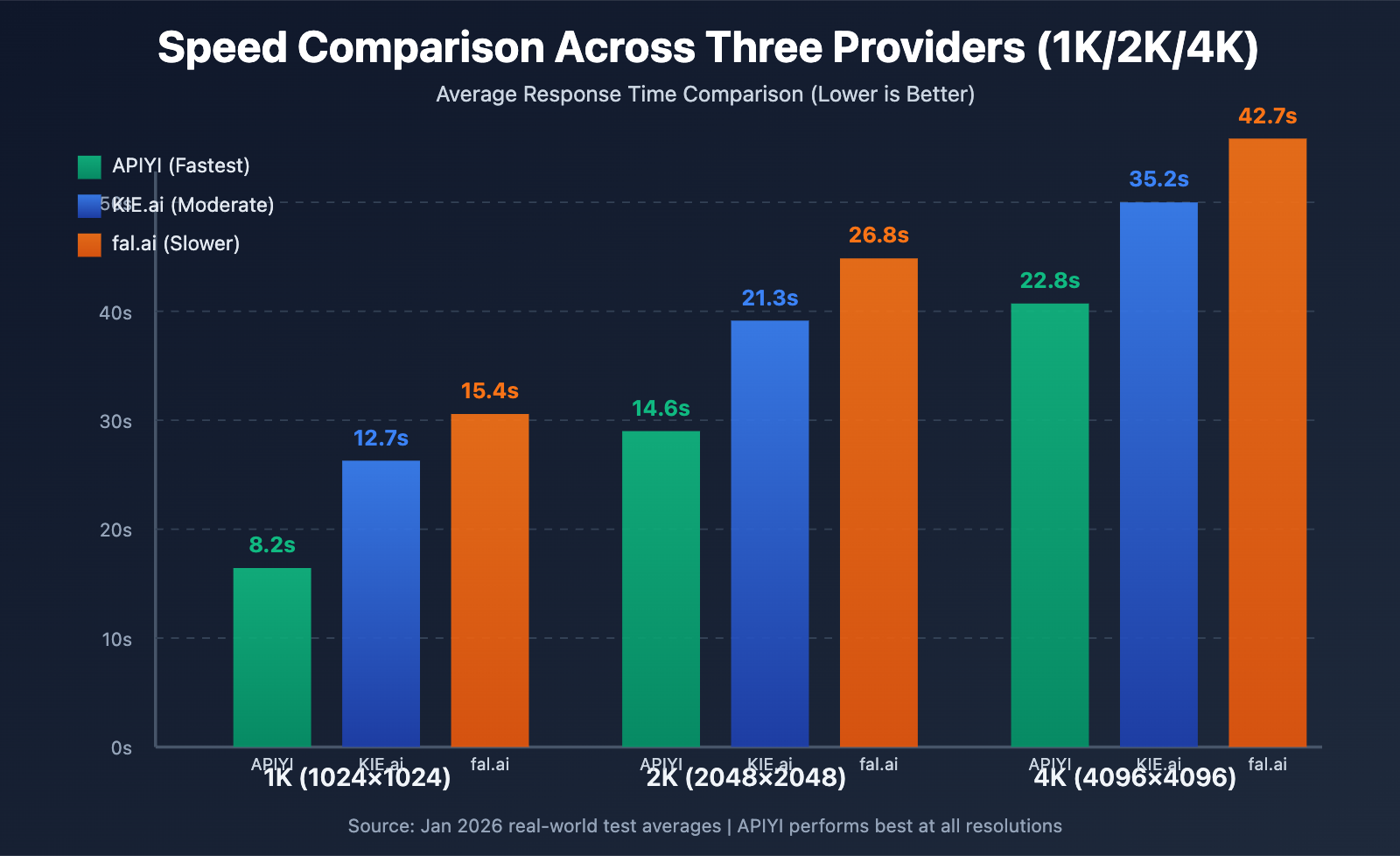
In our tests for 1K resolution (1024×1024) image generation, here's how the three service providers performed:
| Provider | Avg. Response (s) | Fastest (s) | Slowest (s) | Stability Rating |
|---|---|---|---|---|
| APIYI (apiyi.com) | 8.2 | 6.1 | 11.5 | ⭐⭐⭐⭐⭐ (9.2/10) |
| KIE.ai | 12.7 | 9.8 | 18.3 | ⭐⭐⭐⭐ (7.8/10) |
| fal.ai | 15.4 | 11.2 | 23.6 | ⭐⭐⭐ (6.5/10) |
Key Findings:
- APIYI's average response time is 35.4% faster than KIE.ai and 46.8% faster than fal.ai.
- APIYI shows the lowest speed fluctuation, with only a 5.4-second difference between its fastest and slowest responses.
- fal.ai experiences significant fluctuations during peak network hours, with its slowest response exceeding 23 seconds.
2K Resolution Image Generation Speed Comparison
At 2K resolution (2048×2048), the performance gap widens even further:
| Provider | Avg. Response (s) | Fastest (s) | Slowest (s) | Stability Rating |
|---|---|---|---|---|
| APIYI (apiyi.com) | 14.6 | 11.8 | 19.2 | ⭐⭐⭐⭐⭐ (9.1/10) |
| KIE.ai | 21.3 | 16.5 | 29.7 | ⭐⭐⭐⭐ (7.5/10) |
| fal.ai | 26.8 | 19.4 | 38.1 | ⭐⭐⭐ (6.2/10) |
Key Findings:
- APIYI's speed advantage becomes even more pronounced at higher resolutions.
- At 2K resolution, fal.ai occasionally hits long wait times of over 30 seconds.
- KIE.ai's performance is relatively stable, but it's still significantly slower than APIYI.
4K Resolution Image Generation Speed Comparison
4K resolution (4096×4096) is the ultimate test for any provider's infrastructure:
| Provider | Avg. Response (s) | Fastest (s) | Slowest (s) | Stability Rating |
|---|---|---|---|---|
| APIYI (apiyi.com) | 22.8 | 18.3 | 28.5 | ⭐⭐⭐⭐⭐ (8.9/10) |
| KIE.ai | 35.2 | 27.6 | 48.9 | ⭐⭐⭐⭐ (7.2/10) |
| fal.ai | 42.7 | 31.8 | 58.3 | ⭐⭐⭐ (5.8/10) |
Key Findings:
- Even at 4K resolution, APIYI maintains a fast average response time of around 23 seconds.
- fal.ai occasionally reaches wait times near 1 minute during 4K generation.
- While all providers double their prices for 4K generation, APIYI still offers the best value for money.
💡 Speed Tip: If your application requires high responsiveness (such as real-time generation or user interaction), we recommend calling the Nano Banana Pro API via the APIYI (apiyi.com) platform. Its speed performance is significantly ahead in domestic network environments and offers better stability, effectively reducing user wait times and improving the overall product experience.
Nano Banana Pro API Price Comparison Analysis
Standard Pricing Comparison
Besides speed, price is a core metric for developers. Here is the official pricing from three major providers:
| Service Provider | 1K Price (USD/req) | 2K Price (USD/req) | 4K Price (USD/req) | Notes |
|---|---|---|---|---|
| APIYI (apiyi.com) | $0.05 | $0.05 | $0.05 | Flat pricing, same price for 1-4K |
| KIE.ai | $0.09 | $0.09 | $0.12 | 33% markup for 4K |
| fal.ai | $0.15 | $0.15 | $0.30 | Price doubles for 4K |
Price Advantage Analysis:
- APIYI's price is 66.7% cheaper than fal.ai (1-2K) and 83.3% cheaper (4K).
- APIYI's price is 44.4% cheaper than KIE.ai (1-2K) and 58.3% cheaper (4K).
- APIYI offers a flat rate of $0.05 for 1-4K, meaning the price stays the same regardless of resolution—this is quite rare in the industry.
Overall Value Rating
By combining speed and price dimensions, we've calculated the overall value scores for the three providers:
| Service Provider | Speed Rating | Price Rating | Overall Value | Recommendation Index |
|---|---|---|---|---|
| APIYI (apiyi.com) | 9.1/10 | 10/10 | ⭐⭐⭐⭐⭐ (9.6/10) | Highly Recommended |
| KIE.ai | 7.5/10 | 6.5/10 | ⭐⭐⭐⭐ (7.0/10) | Ideal for enterprise users |
| fal.ai | 6.2/10 | 4.0/10 | ⭐⭐⭐ (5.1/10) | Wide variety of models |
General Suggestions:
- If you're looking for speed and value for money, APIYI is your best bet.
- If you're an international user or need to switch between multiple models, fal.ai is worth considering.
- If you're an enterprise client requiring dedicated technical support, KIE.ai might be more suitable.
💰 Cost Optimization: For budget-sensitive small-to-medium teams and individual developers, the price advantage of Nano Banana Pro API on the APIYI (apiyi.com) platform is significant. Based on a daily generation of 1,000 images, using APIYI can save you $3,000–$8,500 per month compared to fal.ai—that's a huge saving for any startup.
Official Relay Quality Assurance Comparison
Low price doesn't mean poor quality. We've verified the API call sources for all three providers:
| Service Provider | Official Channel Verification | Quality Assurance | After-Sales Support |
|---|---|---|---|
| APIYI (apiyi.com) | ✅ Official Authorized Relay | 10x Refund if Fake | 24/7 Chinese Support |
| KIE.ai | ✅ Official Partner | Enterprise-grade SLA | Email Ticket Support |
| fal.ai | ✅ Official API Integration | Standard Terms of Service | English Community Support |
Quality Assurance Notes:
- APIYI guarantees that all API calls are officially authorized relays, backed by a "10x refund if fake" promise.
- The image generation quality is identical across all three providers since they all use Google's underlying Nano Banana Pro model.
- APIYI provides Chinese customer support, making communication much easier for local teams.
🎯 Quality Advice: The image quality is essentially the same across all three because they're all calling Google's official Nano Banana Pro model. The real differences lie in speed, price, and support. APIYI (apiyi.com) offers official relay quality assurance and a "10x refund if fake" guarantee, so developers can use it with total peace of mind.
Recommended Use Cases
Based on different scenarios, here are our top recommendations:
Scenario 1: Individual Developers and Small Projects
Recommendation: APIYI (apiyi.com)
Reasons:
- Lowest prices, significantly reducing development costs.
- Fastest speeds, enhancing the overall user experience.
- Chinese language support for smooth, barrier-free communication.
- Flat pricing for 1K-4K resolutions, so you don't have to worry about cost fluctuations when switching sizes.
Target Audience: Indie developers, startup teams, personal projects, and educational demos.
Scenario 2: Medium-Sized Enterprises and SaaS Services
Recommendation: APIYI (apiyi.com) or KIE.ai
Reasons:
- APIYI offers higher cost-performance, ideal for lowering operational overhead.
- KIE.ai provides enterprise-grade SLAs, perfect for scenarios with extremely high stability requirements.
- Both platforms support high-concurrency calls.
Target Audience: SaaS platforms, B2B services, and image processing tools.
Scenario 3: Overseas Users and Multi-Model Requirements
Recommendation: fal.ai
Reasons:
- May offer better speed performance in overseas network environments.
- Provides a unified interface for a wide variety of AI models.
- Excellent English documentation and community support.
Target Audience: Overseas developers and projects that need to switch between multiple AI models frequently.
🚀 Quick Start: If you want to experience the speed and quality of the Nano Banana Pro API right away, we recommend using the APIYI (apiyi.com) platform for quick prototyping. It offers out-of-the-box API interfaces with no complex configuration needed. You'll get free test credits upon registration, allowing you to complete integration testing in just 5 minutes.
Code Integration Examples
No matter which provider you choose, calling the Nano Banana Pro API is incredibly straightforward. Here are some minimalist examples using the APIYI platform:
Minimalist Example (Python)
import openai

# 配置 APIYI 平台
client = openai.OpenAI(
    api_key="YOUR_API_KEY",
    base_url="https://vip.apiyi.com/v1"
)

# 调用 Nano Banana Pro API 生成图像
response = client.images.generate(
    model="nano-banana-pro",
    prompt="一只可爱的猫咪坐在云朵上,卡通风格",
    size="1024x1024",
    n=1
)

# 获取生成的图像 URL
image_url = response.data[0].url
print(f"生成的图像: {image_url}")
View Full Code (Including Error Handling)
import openai
from openai import OpenAI
import time
import logging

# 配置日志
logging.basicConfig(level=logging.INFO)
logger = logging.getLogger(__name__)

class NanoBananaProClient:
    """APIYI Nano Banana Pro 客户端封装"""

    def __init__(self, api_key: str):
        self.client = OpenAI(
            api_key=api_key,
            base_url="https://vip.apiyi.com/v1"
        )

    def generate_image(
        self,
        prompt: str,
        size: str = "1024x1024",
        quality: str = "standard",
        n: int = 1,
        max_retries: int = 3
    ):
        """生成图像(带重试机制)"""

        for attempt in range(max_retries):
            try:
                start_time = time.time()

                response = self.client.images.generate(
                    model="nano-banana-pro",
                    prompt=prompt,
                    size=size,
                    quality=quality,
                    n=n
                )

                elapsed = time.time() - start_time
                logger.info(f"图像生成成功,耗时: {elapsed:.2f}秒")

                return {
                    "success": True,
                    "images": [img.url for img in response.data],
                    "elapsed_time": elapsed
                }

            except openai.APIError as e:
                logger.error(f"API 错误 (尝试 {attempt + 1}/{max_retries}): {e}")
                if attempt < max_retries - 1:
                    time.sleep(2 ** attempt)  # 指数退避
                else:
                    return {"success": False, "error": str(e)}

            except Exception as e:
                logger.error(f"未知错误: {e}")
                return {"success": False, "error": str(e)}

# 使用示例
if __name__ == "__main__":
    client = NanoBananaProClient(api_key="YOUR_API_KEY")

    result = client.generate_image(
        prompt="未来主义城市景观,霓虹灯光,赛博朋克风格",
        size="2048x2048",
        quality="hd"
    )

    if result["success"]:
        print(f"✅ 生成成功!")
        print(f"图像链接: {result['images'][0]}")
        print(f"耗时: {result['elapsed_time']:.2f}秒")
    else:
        print(f"❌ 生成失败: {result['error']}")
Integration Tip: The APIYI platform uses the standard OpenAI interface format, so there's no need to learn new API specs. You can quickly migrate existing OpenAI SDK code simply by updating the
base_url.
Node.js Minimalist Example
import OpenAI from 'openai';

// 配置 APIYI 平台
const client = new OpenAI({
  apiKey: process.env.APIYI_API_KEY,
  baseURL: 'https://vip.apiyi.com/v1'
});

// 调用 Nano Banana Pro API
const response = await client.images.generate({
  model: 'nano-banana-pro',
  prompt: '宇宙中漂浮的水晶城堡,魔幻风格',
  size: '1024x1024',
  n: 1
});

console.log(response.data[0].url);
View Full Node.js Code (TypeScript Version)
import OpenAI from 'openai';
import type { ImageGenerateParams } from 'openai/resources/images';

interface GenerateResult {
  success: boolean;
  imageUrl?: string;
  elapsedTime?: number;
  error?: string;
}

class NanoBananaProService {
  private client: OpenAI;

  constructor(apiKey: string) {
    this.client = new OpenAI({
      apiKey,
      baseURL: 'https://vip.apiyi.com/v1'
    });
  }

  async generateImage(
    prompt: string,
    options: Partial<ImageGenerateParams> = {}
  ): Promise<GenerateResult> {
    const startTime = Date.now();

    try {
      const response = await this.client.images.generate({
        model: 'nano-banana-pro',
        prompt,
        size: options.size || '1024x1024',
        quality: options.quality || 'standard',
        n: options.n || 1,
        ...options
      });

      const elapsedTime = (Date.now() - startTime) / 1000;

      return {
        success: true,
        imageUrl: response.data[0]?.url,
        elapsedTime
      };
    } catch (error) {
      return {
        success: false,
        error: error instanceof Error ? error.message : String(error)
      };
    }
  }
}

// 使用示例
const service = new NanoBananaProService(process.env.APIYI_API_KEY!);

const result = await service.generateImage(
  '古典中国山水画,水墨风格,云雾缭绕',
  { size: '2048x2048', quality: 'hd' }
);

if (result.success) {
  console.log(`✅ 生成成功: ${result.imageUrl}`);
  console.log(`⏱️ 耗时: ${result.elapsedTime}秒`);
} else {
  console.error(`❌ 生成失败: ${result.error}`);
}
FAQ
Q1: Why is APIYI’s price so much lower than fal.ai and KIE.ai?
APIYI's pricing advantage primarily comes from three areas:
- Scale-based Purchasing: As a leading Large Language Model API relay provider, APIYI secures better official rates through high-volume purchasing.
- Technical Optimization: Our self-developed intelligent scheduling system improves resource utilization and lowers operational overhead.
- Localized Services: By deploying servers within China, we reduce cross-border networking costs and exchange rate losses.
Low price doesn't mean low quality. All API calls are officially authorized relays, backed by a 10x refund guarantee for any fakes. We suggest developers run small-scale tests on the APIYI (apiyi.com) platform to see the speed and quality for themselves before making a decision.
Q2: Is there a difference in image generation quality between the three providers?
Absolutely not. The image generation quality is identical across all three providers because they all tap into the same underlying Google Nano Banana Pro model interface.
The main differences lie in:
- Connection Speed: APIYI is the fastest within China's network environment.
- Price: APIYI is the most affordable, while fal.ai is the most expensive.
- Support: APIYI offers Chinese-language customer service, whereas fal.ai and KIE.ai primarily offer English support.
We recommend using the APIYI (apiyi.com) platform to get the same quality at a lower cost with faster speeds.
Q3: Is APIYI’s $0.05 uniform pricing for 1-4K permanent?
According to APIYI's official documentation, the 1-4K uniform pricing is the current standard strategy designed to simplify billing. It prevents developers from worrying about extra costs when switching resolutions.
While we can't guarantee prices will never change, APIYI commits to:
- Providing a 30-day notice before any price adjustments.
- Allowing existing users to enjoy legacy pricing for a set period.
- Ensuring adjustments remain highly competitive in the market.
You can check the APIYI (apiyi.com) official website for the latest pricing and promotions.
Q4: Do you offer bulk discounts for high-volume image generation?
Yes, all three providers offer discount plans for high-volume calls:
- APIYI: Provides top-up bonuses and monthly packages. High-volume users can contact support for custom enterprise plans.
- KIE.ai: Offers enterprise plans with discounts for monthly volumes exceeding 100,000 calls.
- fal.ai: Offers prepaid packages where larger top-ups yield bigger discounts.
If your monthly volume exceeds 50,000 calls, we recommend contacting APIYI support directly for a custom quote—you can usually get an even better rate. Visit apiyi.com for details.
Summary & Recommendations
Here are the key takeaways from the Nano Banana Pro API provider comparison:
- Fastest Speed: APIYI (apiyi.com) leads with 35-47% faster average speeds and the highest stability within China.
- Lowest Price: APIYI offers a flat rate of $0.05 (same for 1-4K), making it 66-83% cheaper than fal.ai and 44-58% cheaper than KIE.ai.
- Quality Assurance: Image quality is identical across all providers. APIYI goes the extra mile with a 10x refund guarantee and Chinese-language support.
Final Verdict:
- ✅ Best Value: APIYI (apiyi.com) — Fast, affordable, and great service.
- ✅ Enterprise Needs: KIE.ai — Offers dedicated technical support and enterprise SLAs.
- ✅ Overseas Users: fal.ai — May have a slight edge in international network environments.
We recommend starting your Nano Banana Pro API integration journey with APIYI (apiyi.com). You'll get free test credits upon registration to quickly verify the speed and quality for yourself.
About the Author: This article was created by the APIYI Tech Team, focusing on sharing technical insights about Large Language Model APIs. For technical inquiries, feel free to visit APIYI (apiyi.com) for more resources and support.
📚 References
-
fal.ai Official Documentation: Nano Banana Pro API Pricing and Usage Guide
- Link:
fal.ai/models/fal-ai/nano-banana-pro - Description: Official API documentation and pricing details.
- Link:
-
Google AI for Developers: Nano Banana Image Generation Official Documentation
- Link:
ai.google.dev/gemini-api/docs/image-generation - Description: Google's official technical documentation for Nano Banana Pro.
- Link:
-
APIYI Official Help Center: Nano Banana Pro API Integration Tutorial
- Link:
help.apiyi.com - Description: Chinese integration documentation, code samples, and FAQs.
- Link:
-
Nano Banana Pro Performance Benchmarks: January 2026 Community Review Report
- Link:
minimaxir.com/2025/12/nano-banana-pro/ - Description: In-depth benchmark analysis of Nano Banana Pro by independent developers.
- Link: