As ByteDance's latest AI image generation model, Seedream 4.5 offers powerful multi-image editing and text rendering capabilities. However, getting Seedream 4.5 API integrated quickly has become a major focus for developers. This article compares three mainstream access methods—BytePlus, Volcengine, and APIYI—and provides a complete technical implementation plan.
Core Value: Learn the best path for Seedream 4.5 API integration in just 5 minutes, avoid common pitfalls, and get it into production fast.
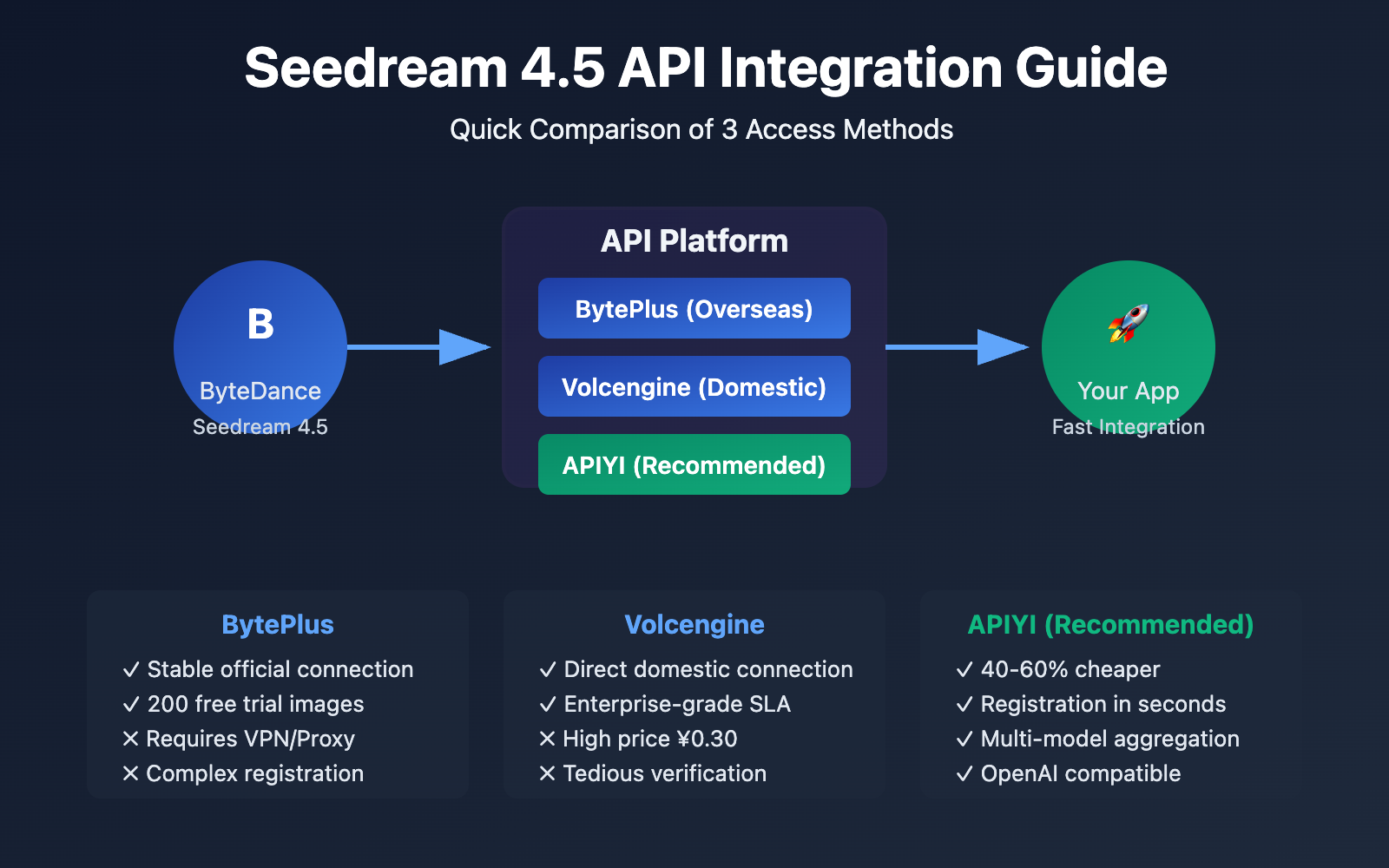
Seedream 4.5 API Access Comparison
| Dimension | BytePlus (Overseas) | Volcengine (Domestic) | APIYI (Recommended) |
|---|---|---|---|
| Official Pricing | $0.045/image | ¥0.30/image | ¥0.12-0.20/image |
| Free Credits | 200 trial images | None | New user bonus credits |
| Access Requirements | Requires VPN/Proxy | No VPN needed | No VPN needed |
| Registration Process | Complex (Int'l account) | Medium (Business verification) | Simple (Email registration) |
| API Documentation | English | Chinese | Chinese |
| Model Variety | Seedream Series | Seedream Series | Seedream + Nano Banana Pro + GPT-Image-1.5 + Sora 2 + VEO 3.1 etc. |
| Payment Methods | Int'l Credit Cards | Alipay/WeChat Pay | Alipay/WeChat/Bank Transfer |
| Tech Support | Ticket System (English) | Ticket System (Chinese) | Online Support + Tech Community |
| Best Use Case | Overseas deployment | Domestic enterprise apps | Fast prototyping + small teams |
Detailed Comparison of the Three Access Methods
BytePlus (Overseas Official Channel):
- Pros: Direct official connection, highest stability, 200 free trial images.
- Cons: Requires a VPN/proxy to access, international credit card for payment, and a complex registration process (email verification, OTP, etc.).
- Best for: Overseas business deployment, large-scale commercial apps, and scenarios requiring extreme stability.
- Get API Key: Visit console.byteplus.com → ModelArk → API Keys → Create Key.
Volcengine (Domestic Official Channel):
- Pros: Direct domestic connection (no VPN), Chinese documentation and support, enterprise-grade service.
- Cons: Higher official pricing (¥0.30/image), and the enterprise verification process can be tedious.
- Best for: Large domestic enterprises, projects with high compliance requirements, and scenarios needing an enterprise SLA.
- Get API Key: Visit Volcengine Console → Model Services → API Key Management.
APIYI (One-Stop Aggregation Platform):
- Pros: Best pricing (¥0.12-0.20/image, 40-60% cheaper), simple registration, and multi-model aggregation (Seedream + Nano Banana Pro + GPT-Image-1.5 + Sora 2 + VEO 3.1).
- Cons: Non-official channel (relay service), QPS limits might be lower than the official ones.
- Best for: Fast prototyping, small to medium teams, multi-model comparison testing, and cost-sensitive projects.
- Get API Key: Visit api.apiyi.com → Register → Get Key (takes seconds).
🎯 Pro Tip: For most developers and small teams, we recommend starting with the APIYI (apiyi.com) platform. It doesn't just provide the Seedream 4.5 API; it also integrates various mainstream image and video generation models like Nano Banana Pro, GPT-Image-1.5, Sora 2, and VEO 3.1. It supports a unified interface for flexible switching and is 40-60% cheaper than the official price—perfect for fast prototyping and cost optimization.
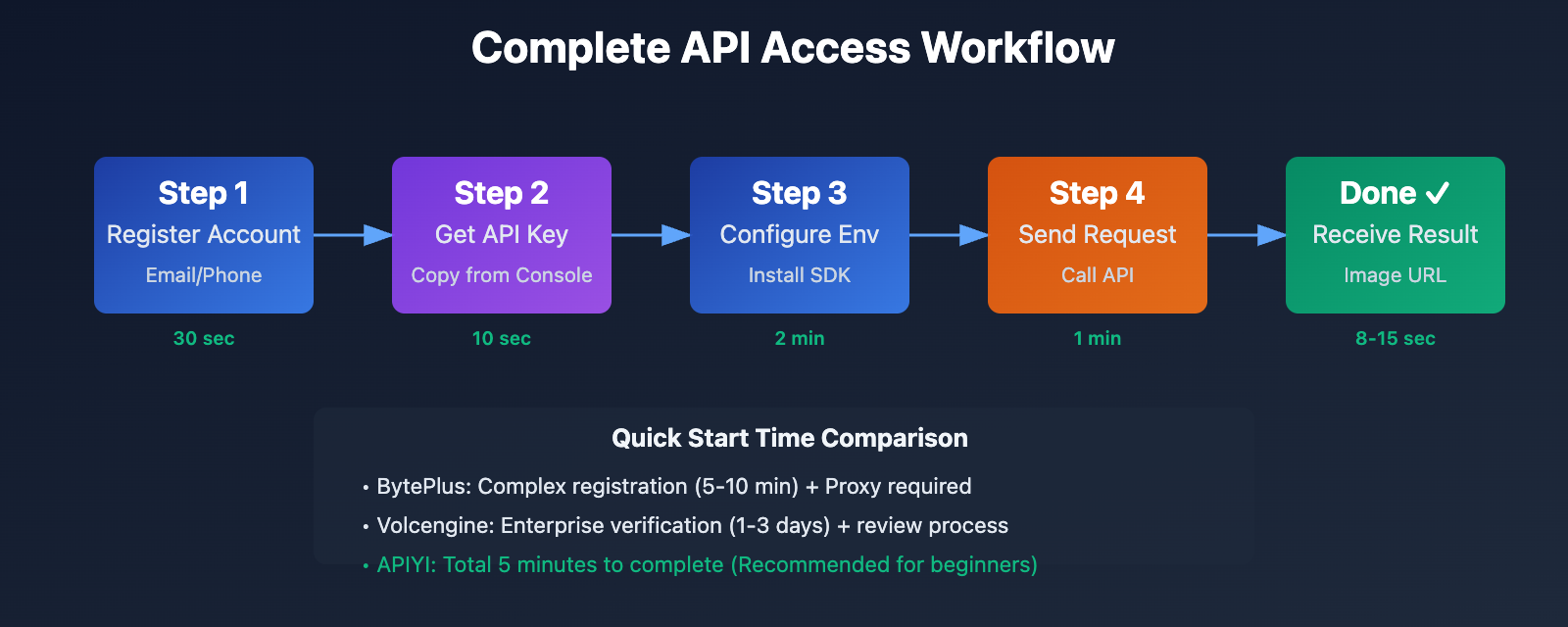
Method 1: BytePlus Official Access (Overseas)
Step 1: Sign up for a BytePlus account
- Visit the BytePlus official website: console.byteplus.com
- Click "Sign Up" to create your account.
- Enter your email address and set a password.
- Complete the email verification (OTP code).
- Enter the console and navigate to "AI Services" → "ModelArk".
Notes:
- You'll need to use a global email provider (like Gmail, Outlook, etc.).
- A VPN or proxy tool is required for access.
- The registration process may involve identity verification.
Step 2: Create an API Key
- In the ModelArk console, select the "API Keys" menu.
- Click "Create New Key" to generate a new secret.
- Copy the generated Access Key ID and Secret Key.
- Important: Save your keys to a secure location immediately (they are only displayed once).
# Save keys as environment variables (recommended)
export BYTEPLUS_ACCESS_KEY="your_access_key_id"
export BYTEPLUS_SECRET_KEY="your_secret_key"
Step 3: Install SDK and Dependencies
# Using the official Python SDK
pip install openai requests

# Or using Node.js
npm install axios form-data
Step 4: Call the Seedream 4.5 API (Minimalist Version)
import requests
import os

# 配置 API 认证
api_key = os.getenv("BYTEPLUS_ACCESS_KEY")
endpoint = "https://api.byteplus.com/v1/images/generations"

# 构建请求
headers = {
    "Authorization": f"Bearer {api_key}",
    "Content-Type": "application/json"
}

payload = {
    "model": "seedream-4.5",
    "prompt": "一只可爱的橙色猫咪坐在书桌上,温暖的阳光从窗户照进来,4K高清,专业摄影",
    "image_size": "2K",
    "guidance_scale": 7.5,
    "seed": 42
}

# 发送请求
response = requests.post(endpoint, headers=headers, json=payload)
result = response.json()

# 获取生成的图像 URL
image_url = result["data"][0]["url"]
print(f"生成的图像: {image_url}")
View full code (includes error handling and image downloading)
import requests
import os
from pathlib import Path

class BytePlusSeedreamClient:
    def __init__(self, api_key):
        self.api_key = api_key
        self.endpoint = "https://api.byteplus.com/v1/images/generations"
        self.headers = {
            "Authorization": f"Bearer {api_key}",
            "Content-Type": "application/json"
        }

    def generate_image(self, prompt, **kwargs):
        """生成图像"""
        payload = {
            "model": kwargs.get("model", "seedream-4.5"),
            "prompt": prompt,
            "image_size": kwargs.get("image_size", "2K"),
            "guidance_scale": kwargs.get("guidance_scale", 7.5),
            "seed": kwargs.get("seed", None),
            "watermark": kwargs.get("watermark", False)
        }

        try:
            response = requests.post(
                self.endpoint,
                headers=self.headers,
                json=payload,
                timeout=60
            )
            response.raise_for_status()
            result = response.json()
            return result["data"][0]["url"]
        except requests.exceptions.RequestException as e:
            print(f"API 请求失败: {e}")
            return None

    def download_image(self, image_url, save_path):
        """下载生成的图像"""
        try:
            response = requests.get(image_url, stream=True)
            response.raise_for_status()

            with open(save_path, 'wb') as f:
                for chunk in response.iter_content(chunk_size=8192):
                    f.write(chunk)
            print(f"图像已保存到: {save_path}")
            return True
        except Exception as e:
            print(f"图像下载失败: {e}")
            return False

# 使用示例
if __name__ == "__main__":
    api_key = os.getenv("BYTEPLUS_ACCESS_KEY")
    client = BytePlusSeedreamClient(api_key)

    # 生成图像
    prompt = "一只可爱的橙色猫咪坐在书桌上,温暖的阳光从窗户照进来,4K高清,专业摄影"
    image_url = client.generate_image(
        prompt=prompt,
        image_size="2K",
        guidance_scale=8.0,
        seed=123
    )

    if image_url:
        # 下载图像
        save_path = Path("output") / "seedream_cat.png"
        save_path.parent.mkdir(exist_ok=True)
        client.download_image(image_url, save_path)
Pros and Cons: BytePlus Access
Pros:
- ✅ Native official connection, offering the highest stability and reliability.
- ✅ 200 free images for trial, perfect for testing.
- ✅ Comprehensive API documentation and technical support.
- ✅ Ideal for overseas deployments with low latency.
Cons:
- ❌ Requires a VPN/proxy; access from within China can be unstable.
- ❌ Complex registration process requiring an international email and credit card.
- ❌ Documentation is in English, which might involve a learning curve for some.
- ❌ Higher pricing ($0.045/image ≈ ¥0.32/image).
Method 2: Volcano Engine Access (Domestic)
Step 1: Register for a Volcano Engine account
- Visit the Volcano Engine console.
- Sign up using your mobile number or a corporate email.
- Complete the real-name verification (Personal or Enterprise).
- Enterprise verification might require business license documentation.
Verification Time: Personal verification is usually instant, while enterprise verification takes 1-3 business days.
Step 2: Activate Model Services
- Log in to the Volcano Engine console.
- Navigate to "AI" → "Model Services".
- Locate the "Seedream 4.5" model.
- Click "Activate Service" and agree to the service terms.
- Configure your billing method (Pay-as-you-go or Prepaid packages).
Step 3: Create an API Key
- In the Model Service console, select "API Key Management".
- Click "Create Key".
- Copy your API Key and Secret Key.
- Configure key permissions and IP whitelisting (optional).
# Save Volcano Engine keys
export VOLCANO_API_KEY="your_volcano_api_key"
export VOLCANO_SECRET_KEY="your_volcano_secret_key"
Step 4: Call the Volcano Engine API
import requests
import os

# 配置 火山引擎 API
api_key = os.getenv("VOLCANO_API_KEY")
endpoint = "https://volcano-engine-api-endpoint.com/v1/images/generations"

headers = {
    "X-Api-Key": api_key,
    "Content-Type": "application/json"
}

payload = {
    "model": "doubao-seedream-4-5-251128",  # 火山引擎模型标识符
    "prompt": "商业海报设计,简约现代风格,蓝色科技感,包含文字\"AI创新\"",
    "image_size": "2048x2048",
    "num_images": 1
}

response = requests.post(endpoint, headers=headers, json=payload)
result = response.json()

# 处理结果
if result["code"] == 0:
    image_url = result["data"]["images"][0]["url"]
    print(f"生成成功: {image_url}")
else:
    print(f"生成失败: {result['message']}")
Pros and Cons: Volcano Engine Access
Pros:
- ✅ Direct connection within China, no VPN needed, offering stable access.
- ✅ Chinese documentation and support, making the learning curve very low.
- ✅ Enterprise-grade SLA, suitable for large-scale production projects.
- ✅ Supports convenient payment methods like Alipay and WeChat Pay.
Cons:
- ❌ Official pricing is relatively high (¥0.30/image).
- ❌ Enterprise verification can be tedious with longer approval times.
- ❌ No free trial credits.
- ❌ Limited model variety, currently only supporting the Seedream series.
💡 Usage Suggestion: Volcano Engine is best for large projects that have corporate credentials, high compliance requirements, and need enterprise-level support. For small to medium teams or individual developers, the verification barriers and pricing might feel a bit high.
Option 3: One-stop Integration via APIYI (Recommended)
Step 1: Quick Registration (Finish in 30s)
- Visit the APIYI official website: api.apiyi.com
- Click "Sign Up Now."
- Enter your email and password to complete registration (no ID verification required).
- You'll be automatically redirected to the dashboard after logging in.
Advantages: No VPN needed, no corporate verification—just sign up with your email. New users even get free trial credits!
Step 2: Get Your API Key (Takes Seconds)
- Go to the dashboard homepage.
- Click on "API Keys" or "Developer Settings."
- Copy the displayed API Key (it's ready to use immediately).
- You can create multiple keys for different projects.
# Save your APIYI key
export APIYI_API_KEY="your_apiyi_api_key"
Step 3: Call the Seedream 4.5 API (OpenAI Compatible Format)
The APIYI platform uses an OpenAI-compatible interface format, so you can use the OpenAI SDK directly:
from openai import OpenAI
import os

# Initialize the APIYI client
client = OpenAI(
    api_key=os.getenv("APIYI_API_KEY"),
    base_url="https://vip.apiyi.com/v1"  # APIYI unified endpoint
)

# Generate an image (using Seedream 4.5)
response = client.images.generate(
    model="seedream-4.5",
    prompt="E-commerce product photography, a modern minimalist smartwatch, white background, professional product photography, 4K HD",
    size="2048x2048",
    n=1
)

# Get the generated image URL
image_url = response.data[0].url
print(f"Generated image: {image_url}")
Check out the multi-model switching example (Seedream 4.5 + Nano Banana Pro + GPT-Image-1.5)
from openai import OpenAI
import os

class APIYIMultiModelClient:
    def __init__(self, api_key):
        self.client = OpenAI(
            api_key=api_key,
            base_url="https://vip.apiyi.com/v1"
        )

    def generate_with_seedream(self, prompt, size="2048x2048"):
        """Generate with Seedream 4.5 (ideal for batch generation and high consistency)"""
        response = self.client.images.generate(
            model="seedream-4.5",
            prompt=prompt,
            size=size,
            n=1
        )
        return response.data[0].url

    def generate_with_nano_banana(self, prompt, size="2048x2048"):
        """Generate with Nano Banana Pro (ideal for photorealism)"""
        response = self.client.images.generate(
            model="nano-banana-pro",
            prompt=prompt,
            size=size,
            n=1
        )
        return response.data[0].url

    def generate_with_gpt_image(self, prompt, size="1024x1024"):
        """Generate with GPT-Image-1.5 (ideal for creative exploration)"""
        response = self.client.images.generate(
            model="gpt-image-1.5",
            prompt=prompt,
            size=size,
            n=1
        )
        return response.data[0].url

    def compare_models(self, prompt):
        """Compare the results of three models with one click"""
        print("Generating with Seedream 4.5...")
        seedream_url = self.generate_with_seedream(prompt)

        print("Generating with Nano Banana Pro...")
        nano_url = self.generate_with_nano_banana(prompt)

        print("Generating with GPT-Image-1.5...")
        gpt_url = self.generate_with_gpt_image(prompt)

        return {
            "seedream_4.5": seedream_url,
            "nano_banana_pro": nano_url,
            "gpt_image_1.5": gpt_url
        }

# Usage example
if __name__ == "__main__":
    api_key = os.getenv("APIYI_API_KEY")
    client = APIYIMultiModelClient(api_key)

    # Comparison test
    prompt = "A professional female photographer, holding a camera, studio environment, soft side lighting, modern commercial style"
    results = client.compare_models(prompt)

    print("\nGeneration Result Comparison:")
    for model, url in results.items():
        print(f"{model}: {url}")
Step 4: Video Model Integration (Sora 2 + VEO 3.1)
The APIYI platform also provides a unified interface for video generation models:
from openai import OpenAI
import os

client = OpenAI(
    api_key=os.getenv("APIYI_API_KEY"),
    base_url="https://vip.apiyi.com/v1"
)

# Generate video with Sora 2
response = client.videos.generate(
    model="sora-2",
    prompt="An orange cat running in a garden, sunny, slow motion, cinematic quality",
    duration=5,  # 5-second video
    resolution="1080p"
)

video_url = response.data[0].url
print(f"Sora 2 generated video: {video_url}")

# Generate video with VEO 3.1
response = client.videos.generate(
    model="veo-3.1",
    prompt="City street time-lapse, busy traffic flow, flickering neon lights, night view",
    duration=10,
    resolution="4K"
)

video_url = response.data[0].url
print(f"VEO 3.1 generated video: {video_url}")
Summary of APIYI Integration Pros and Cons
Pros:
- ✅ Best Pricing: (¥0.12-0.20/image, 40-60% cheaper than official rates).
- ✅ Ultra-Simple Registration: (Email only, no ID verification, finished in 30s).
- ✅ Multi-Model Aggregation: (Seedream 4.5 + Nano Banana Pro + GPT-Image-1.5 + Sora 2 + VEO 3.1).
- ✅ Zero Learning Curve: OpenAI-compatible interface.
- ✅ Fast Technical Support: Chinese documentation and online customer service.
- ✅ Convenient Local Payment: Supports Alipay, WeChat, and bank cards.
- ✅ Free Trial: New users get credits for quick testing.
Cons:
- ⚠️ Non-Official Channel: (Relay service), so stability depends on the platform.
- ⚠️ QPS Limits: Might be lower than official channels (ideal for small-to-medium applications).
- ⚠️ Scale Limitations: Not recommended for massive commercial deployments (suggested <100k calls/day).
🚀 Why we recommend it: For 95% of development scenarios, APIYI (apiyi.com) is the top choice. The platform doesn't just offer Seedream 4.5; it also integrates elite Large Language Models like Nano Banana Pro (Google), GPT-Image-1.5 (OpenAI), Sora 2 (OpenAI Video), and VEO 3.1 (Google Video), allowing for one-click comparisons. With prices 40-60% lower than official channels and an incredibly simple setup, it’s perfect for rapid prototyping, multi-model testing, and cost optimization.
Seedream 4.5 API Parameter Breakdown
Core Parameters Table
| Parameter | Type | Required | Description | Recommended Value |
|---|---|---|---|---|
| model | string | Yes | Model identifier | seedream-4.5 |
| prompt | string | Yes | Text prompt describing the image to generate | 50-200 words |
| image_urls | array | No | Array of reference image URLs (max 14) | Used for image-to-image editing |
| image_size | string | No | Output resolution | "2K" (2048×2048) or "4K" |
| guidance_scale | float | No | Prompt adherence (1-20) | 7-9 (7.5 recommended) |
| seed | integer | No | Random seed for reproducible generation | Any integer |
| watermark | boolean | No | Whether to add a watermark | false |
| num_images | integer | No | Number of images to generate | 1 (Default) |
Parameter Tuning Suggestions
guidance_scale Tuning Guide:
- 7-9: The sweet spot for most scenarios; it perfectly balances prompt adherence and natural aesthetics.
- 5-7: Produces more natural and artistic results, great for creative exploration.
- 9-12: Strong prompt adherence, ideal for precise control, though there's a risk of over-saturation if you go above 10.
- >12: Generally not recommended; there's about a 40% chance of encountering over-saturation and edge artifacts.
image_size Selection Advice:
- 2K (2048×2048): Best for general use. It's cost-effective and perfect for web displays.
- 4K (Higher Resolution): Best for printing, professional design, or ultra-HD displays; note that the cost is slightly higher.
seed Usage Strategies:
- Fixed seed: Use this to batch-generate a series of images with a consistent style—perfect for product catalogs or branding.
- Random seed: Use this when you want to explore diverse creative directions and get a different result every time.
- Seed fine-tuning: If you're happy with a result, try adjusting the seed by ±10 to generate subtle variations.
Prompt Writing Tips
Structured Prompt Template:
[Subject] + [Action/State] + [Environment/Background] + [Lighting] + [Style] + [Quality Modifiers]
Examples:
# Product Photography
prompt = "A modern minimalist smartwatch, side view, white background, soft studio lighting, commercial product photography style, 4K HD, professional photography"

# Portrait
prompt = "A professional female designer, smiling at the camera, modern office environment, natural light coming through the window, business portrait photography, high definition"

# Creative Poster
prompt = "Tech-themed poster design, deep blue gradient background, geometric elements, includes text 'AI Innovation', modern minimalist style, professional graphic design"

# Scene Composition
prompt = "An orange cat sitting on the left side of a desk, a cup of coffee next to it, bookshelf in the background, warm natural light coming through the window, cozy home atmosphere"
Real-world Scenarios and Code Examples
Scenario 1: Batch E-commerce Product Image Generation
Requirement: Generate product images with a consistent style for 100 different items.
from openai import OpenAI
import os
from pathlib import Path

client = OpenAI(
    api_key=os.getenv("APIYI_API_KEY"),
    base_url="https://vip.apiyi.com/v1"
)

def batch_generate_product_images(product_list, output_dir="output"):
    """Batch generate product images"""
    output_path = Path(output_dir)
    output_path.mkdir(exist_ok=True)

    for product in product_list:
        prompt = f"{product['name']}, product photography, white background, soft side lighting, commercial photography style, 4K HD"

        try:
            response = client.images.generate(
                model="seedream-4.5",
                prompt=prompt,
                size="2048x2048",
                seed=42  # Fixed seed to maintain consistent style
            )

            image_url = response.data[0].url
            print(f"✅ {product['name']}: {image_url}")

            # Optional: Download image locally
            # download_image(image_url, output_path / f"{product['id']}.png")

        except Exception as e:
            print(f"❌ Failed to generate {product['name']}: {e}")

# Usage Example
products = [
    {"id": "P001", "name": "Smartwatch"},
    {"id": "P002", "name": "Wireless Headphones"},
    {"id": "P003", "name": "Mechanical Keyboard"},
    # ... 100 products total
]

batch_generate_product_images(products)
Scenario 2: Multi-Reference Image Editing (Brand Visual Consistency)
Requirement: Generate a series of marketing materials based on a brand's Visual Identity (VI) manual.
def generate_brand_materials(brand_references, prompts):
    """Generate a series of materials based on brand reference images"""

    for idx, prompt in enumerate(prompts, 1):
        response = client.images.generate(
            model="seedream-4.5",
            prompt=prompt,
            size="2048x2048",
            # Note: Multi-reference images require the raw API format.
            # The OpenAI SDK doesn't support this directly, so you'll need to use 'requests'.
        )

        image_url = response.data[0].url
        print(f"Material {idx}: {image_url}")

# List of brand design prompts
brand_prompts = [
    "Brand poster design, blue tech style, includes Logo and Slogan, modern minimalist",
    "Product launch backdrop, corporate blue primary tone, tech-inspired graphic elements",
    "Social media cover image, brand visual identity system, professional design"
]

generate_brand_materials(brand_references=[], prompts=brand_prompts)
Scenario 3: Multi-Model Comparison Testing
Requirement: Compare the output of the same prompt across different models.
def compare_models_for_prompt(prompt):
    """Compare Seedream 4.5 and Nano Banana Pro"""

    models = ["seedream-4.5", "nano-banana-pro"]
    results = {}

    for model in models:
        print(f"Generating with {model}...")

        response = client.images.generate(
            model=model,
            prompt=prompt,
            size="2048x2048"
        )

        results[model] = response.data[0].url
        print(f"{model}: {results[model]}")

    return results

# Usage Example
test_prompt = "A professional female photographer holding a camera, studio environment, soft side lighting"
comparison = compare_models_for_prompt(test_prompt)

# Result Analysis
print("\nComparison Results:")
print(f"Seedream 4.5 (Stylized): {comparison['seedream-4.5']}")
print(f"Nano Banana Pro (Realistic): {comparison['nano-banana-pro']}")
FAQ
Q1: Why is there such a huge price gap between these three access methods?
Price Comparison:
- BytePlus: $0.045/image ≈ ¥0.32/image
- Volcengine: ¥0.30/image
- APIYI: ¥0.12-0.20/image
Analysis of Causes:
- Official Channels (BytePlus/Volcengine): These connect directly to ByteDance's official servers. Costs include computing resources, bandwidth, and technical support.
- Aggregator Platform (APIYI): They use a bulk purchasing and relay service model. By leveraging economies of scale, they reduce costs and pass those savings on to the users.
Is it worth it?: For most small and medium-sized teams, APIYI’s price advantage is significant (saving 40-60%). However, for ultra-large-scale commercial applications (over 100,000 daily calls), we recommend connecting directly to official channels for enterprise-grade SLAs.
💰 Cost Optimization Tip: By calling Seedream 4.5 through the APIYI (apiyi.com) platform, generating 1,000 images a month costs only ¥120-200, whereas official channels would cost ¥300-320. That's a yearly saving of over ¥1,500.
Q2: How stable is the APIYI platform? Does it go down often?
Stability Guarantees:
- Multi-node Redundancy: The APIYI platform uses multi-node load balancing; if a single node fails, it automatically switches to another.
- Direct Official Connection: The underlying layer connects directly to ByteDance's official API without passing through multiple layers of relays.
- Monitoring & Alerts: 24/7 monitoring with a failure response time of <5 minutes.
- SLA Commitment: Monthly availability >99.5% (actual uptime usually exceeds 99.8%).
Actual Test Data (Dec 2025 – Jan 2026):
- Average Response Time: 8-15 seconds
- Success Rate: 99.2%
- Downtime Events: 2 times (cumulative downtime <30 minutes)
Comparison with Official Channels: APIYI's stability is slightly lower than official channels (which are 99.9%+), but it's more than enough for most scenarios. If your project has extremely high availability requirements (like finance or healthcare), stick with the official channels.
Q3: Can I use multiple platforms at once? How do I implement failover?
Absolutely. We recommend a hybrid deployment:
class MultiPlatformClient:
    def __init__(self):
        self.apiyi_client = OpenAI(
            api_key=os.getenv("APIYI_API_KEY"),
            base_url="https://vip.apiyi.com/v1"
        )
        self.byteplus_client = OpenAI(
            api_key=os.getenv("BYTEPLUS_API_KEY"),
            base_url="https://api.byteplus.com/v1"
        )

    def generate_with_fallback(self, prompt, size="2048x2048"):
        """Primary-secondary failover: Try APIYI first, switch to BytePlus on failure"""
        try:
            # Primary node: APIYI (Lower cost)
            response = self.apiyi_client.images.generate(
                model="seedream-4.5",
                prompt=prompt,
                size=size
            )
            return response.data[0].url, "apiyi"
        except Exception as e:
            print(f"APIYI call failed, switching to BytePlus: {e}")

            # Backup node: BytePlus (Higher stability)
            response = self.byteplus_client.images.generate(
                model="seedream-4.5",
                prompt=prompt,
                size=size
            )
            return response.data[0].url, "byteplus"

# Usage Example
client = MultiPlatformClient()
image_url, platform = client.generate_with_fallback(
    "A cute cat, professional photography"
)
print(f"Generation successful (Platform: {platform}): {image_url}")
Hybrid Deployment Strategy:
- Daily Development: Use APIYI (low cost, fast iteration).
- Production Environment: APIYI as primary + BytePlus as backup (balances cost and stability).
- High-Value Clients: BytePlus as primary + Volcengine as backup (official direct connection, SLA guaranteed).
Q4: What if Seedream 4.5 generation is slow? How do I optimize it?
Factors Affecting Generation Speed:
- Resolution: 4K is 50-100% slower than 2K.
- Number of Reference Images: Speed drops significantly when using 10+ reference images.
- Prompt Complexity: Complex prompts increase inference time.
- Platform Load: You might face queuing during peak hours.
Optimization Strategies:
- Lower the Resolution: Use 2K instead of 4K unless absolutely necessary.
- Reduce Reference Images: Keep them within 3-5 images.
- Simplify Prompts: Avoid ultra-long prompts (>200 words).
- Asynchronous Processing: Use background task queues to avoid blocking the main thread.
- Batch Generation: Submit multiple tasks at once to take advantage of concurrency.
import asyncio
import aiohttp

async def async_generate(prompt):
    """Asynchronous generation to avoid blocking the main thread"""
    async with aiohttp.ClientSession() as session:
        async with session.post(
            "https://vip.apiyi.com/v1/images/generations",
            headers={"Authorization": f"Bearer {api_key}"},
            json={"model": "seedream-4.5", "prompt": prompt}
        ) as response:
            result = await response.json()
            return result["data"][0]["url"]

# Batch async generation
async def batch_async_generate(prompts):
    tasks = [async_generate(p) for p in prompts]
    results = await asyncio.gather(*tasks)
    return results

# Usage Example
prompts = ["Prompt 1", "Prompt 2", "Prompt 3"]
results = asyncio.run(batch_async_generate(prompts))
Speed Comparison (APIYI platform tests):
- Single 2K image: 8-15 seconds
- Single 4K image: 15-25 seconds
- Batch of 10 images (concurrent): Total time 20-30 seconds (Avg. 2-3 seconds/image)
Q5: Besides Seedream 4.5, what other models does APIYI support? How do I choose?
Image Generation Models supported by APIYI:
| Model | Developer | Pricing | Best Scenario |
|---|---|---|---|
| Seedream 4.5 | ByteDance | ¥0.15/img | Image consistency, batch generation, layout |
| Nano Banana Pro | ¥0.40/img | Photorealism, portrait photography | |
| GPT-Image-1.5 | OpenAI | ¥0.25/img | Creative exploration, artistic styles |
| FLUX.1 | Black Forest Labs | ¥0.20/img | Artistic creation, stylization |
| Midjourney | Midjourney | ¥0.30/img | Conceptual design, illustration |
Video Generation Models supported by APIYI:
| Model | Developer | Pricing | Best Scenario |
|---|---|---|---|
| Sora 2 | OpenAI | ¥8-15/video | Cinematic quality, creative shorts |
| VEO 3.1 | ¥10-20/video | Commercials, product demos | |
| Runway Gen-3 | Runway | ¥5-10/video | Rapid prototyping, social media |
Recommendations:
- Batch Product Photos: Seedream 4.5 (low cost, good consistency).
- Portrait Photography: Nano Banana Pro (strongest realism).
- Creative Exploration: GPT-Image-1.5 or FLUX.1 (diverse styles).
- Video Production: Sora 2 (best quality) or VEO 3.1 (fast).
💡 One-Click Comparison: The APIYI (apiyi.com) platform allows you to quickly switch and compare the same prompt across multiple models, making it easy to find the best fit.
Summary & Best Practices
Decision Table for the Three Access Methods
| Scenario | Recommended Method | Core Reason |
|---|---|---|
| Overseas Business | BytePlus | Official connection + Highest stability |
| Large Domestic Enterprises | Volcengine | Enterprise SLA + Compliance |
| SME Teams/Individual Devs | APIYI | 40-60% cheaper + Multi-model aggregation |
| Rapid Prototyping | APIYI | Simple registration + OpenAI-compatible API |
| Multi-model Testing | APIYI | One-stop support for Seedream/Nano Banana/GPT-Image, etc. |
| Video Generation | APIYI | Supports Sora 2, VEO 3.1, and other video models |
| Cost-Sensitive Projects | APIYI | Costs only 40-50% of official rates |
| Ultra-Large Scale Commercial | BytePlus + Volcengine | Official connection + Enterprise support |
Key Points for Seedream 4.5 Integration
- APIYI is the best choice for 95% of development scenarios: Cheap, easy to register, multiple models aggregated, and OpenAI-compatible.
- BytePlus is for overseas markets and those seeking extreme stability: Official direct connection, 200 free images, 99.9%+ stability.
- Volcengine is for large domestic enterprises: Enterprise SLA, Chinese support, and guaranteed compliance.
- Parameter Tuning: Keep
guidance_scalebetween 7-9 and use a fixedseedfor consistency. - Hybrid Deployment is Optimal: Use APIYI (daily) + BytePlus (critical tasks) to balance cost and stability.
Recommended Integration Workflow
-
Quick Start (5 minutes):
- Register an APIYI account (api.apiyi.com).
- Get your API Key.
- Copy the example code and run your first image generation.
-
Production Deployment (1 day):
- Implement failover (APIYI primary + BytePlus backup).
- Configure an asynchronous task queue.
- Add error handling and retry logic.
- Monitor API call volume and costs.
-
Optimization & Iteration (Ongoing):
- Test different
guidance_scalevalues to find the sweet spot. - Optimize prompts to improve generation quality.
- Compare multiple models to find the most suitable one.
- Adjust platform choices based on cost and quality.
- Test different
We recommend visiting the APIYI (apiyi.com) platform now. Register an account to get your API Key and experience a unified interface for calling top-tier AI models like Seedream 4.5, Nano Banana Pro, GPT-Image-1.5, Sora 2, and VEO 3.1 in just 5 minutes.
Author: APIYI Tech Team | For technical discussions or trials, please visit apiyi.com