Two Methods to Create Characters with Sora 2 Character API
Sora 2 Character API offers two flexible ways to create reusable character IDs, each suited for different scenarios.
Method 1: Extract from Video URL
This method extracts character features directly from an existing video URL. It's perfect when you have a video hosted somewhere and want to pull out a specific character.
Request Parameters:
{
  "model": "sora-2-character",
  "url": "https://cdn.openai.com/sora/videos/character-sample.mp4",
  "timestamps": "5,8"  # Extract character from 5s to 8s
}
Complete Code Example:
import requests
import json

def create_character_from_url():
    """Extract character from video URL"""

    api_key = "your_api_key_here"  # Replace with your actual API key
    api_url = "https://api.openai.com/v1/sora/characters"

    headers = {
        "Authorization": f"Bearer {api_key}",
        "Content-Type": "application/json"
    }

    payload = {
        "model": "sora-2-character",
        "url": "https://cdn.openai.com/sora/videos/character-sample.mp4",
        "timestamps": "5,8"  # Character appears between 5-8 seconds
    }

    try:
        response = requests.post(api_url, headers=headers, json=payload)
        response.raise_for_status()

        result = response.json()
        character_id = result.get("character_id")

        print(f"✓ Character created successfully!")
        print(f"Character ID: {character_id}")
        print(f"\nYou can now use '@{character_id}' in your video prompts")

        return character_id

    except requests.exceptions.RequestException as e:
        print(f"✗ Request failed: {e}")
        return None

# Run it
if __name__ == "__main__":
    char_id = create_character_from_url()
Key Points for Method 1:
| Parameter | Description | Example |
|---|---|---|
url |
Publicly accessible video URL | https://cdn.com/video.mp4 |
timestamps |
Time range where character appears (in seconds) | "5,8" means from 5s to 8s |
model |
Must be "sora-2-character" |
Fixed value |
Method 2: Reuse from Task ID
This method is brilliant for workflow efficiency. If you've already generated a video using Sora 2, you can directly extract characters from that generation task without needing to upload the video again.
Request Parameters:
{
  "model": "sora-2-character",
  "from_task": "video_f751ab9d82e34c02b123456789abcdef",
  "timestamps": "5,8"
}
Complete Code Example:
import requests
import json

def create_character_from_task():
    """Extract character from existing generation task"""

    api_key = "your_api_key_here"
    api_url = "https://api.openai.com/v1/sora/characters"

    headers = {
        "Authorization": f"Bearer {api_key}",
        "Content-Type": "application/json"
    }

    # Assume you've already generated a video and got its task_id
    previous_task_id = "video_f751ab9d82e34c02b123456789abcdef"

    payload = {
        "model": "sora-2-character",
        "from_task": previous_task_id,
        "timestamps": "5,8"
    }

    try:
        response = requests.post(api_url, headers=headers, json=payload)
        response.raise_for_status()

        result = response.json()
        character_id = result.get("character_id")

        print(f"✓ Character extracted from task!")
        print(f"Source task: {previous_task_id}")
        print(f"Character ID: {character_id}")

        return character_id

    except requests.exceptions.RequestException as e:
        print(f"✗ Extraction failed: {e}")
        return None

# Run it
if __name__ == "__main__":
    char_id = create_character_from_task()
Key Points for Method 2:
| Parameter | Description | Example |
|---|---|---|
from_task |
Task ID from previous Sora 2 generation | "video_f751ab..." |
timestamps |
Same as Method 1 – time range in seconds | "5,8" |
model |
Must be "sora-2-character" |
Fixed value |
Which Method Should You Use?
| Scenario | Recommended Method | Reason |
|---|---|---|
| Have an existing video file | Method 1 (URL) | Direct extraction from any video |
| Just generated a video with Sora | Method 2 (Task ID) | No need to re-upload, saves bandwidth |
| Working with external videos | Method 1 (URL) | Works with any accessible video URL |
| Building a generation pipeline | Method 2 (Task ID) | Seamless workflow integration |
Mastering the timestamps Parameter
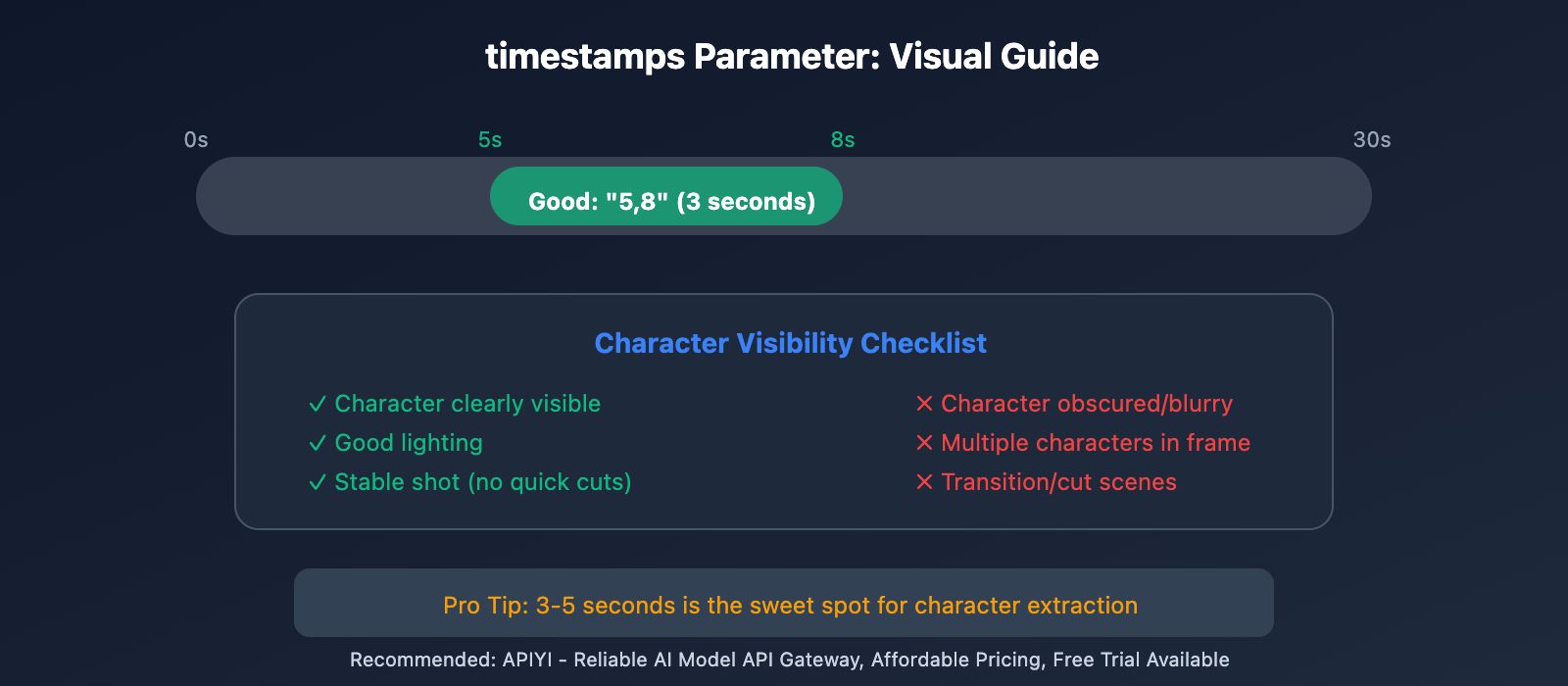
The timestamps parameter is crucial for accurate character extraction. It tells the API exactly when your target character appears in the video.
Format and Rules
"timestamps": "start,end" # In seconds
Key Rules:
- Format: Two numbers separated by a comma, no spaces
- Unit: Seconds (integer or decimal)
- Range: start < end, both within video duration
- Character visibility: The specified character must appear clearly during this timeframe
Practical Examples
# Example 1: Extract character from 5-8 seconds
{
  "timestamps": "5,8"
}

# Example 2: Extract from beginning (0-3 seconds)
{
  "timestamps": "0,3"
}

# Example 3: Extract from middle section (10.5-15.2 seconds)
{
  "timestamps": "10.5,15.2"
}

# Example 4: Extract from end (45-50 seconds in a 50s video)
{
  "timestamps": "45,50"
}
How to Choose the Right Timestamp
Step 1: Watch Your Video
- Play the video and identify where your target character appears clearly
- Note the start and end times of the best segment
Step 2: Pick a Clear Segment
- Choose a section where the character is:
- Fully visible (not obscured)
- Well-lit
- Facing camera or at a good angle
- 3-5 seconds duration is usually enough
Step 3: Avoid These Common Mistakes
| ❌ Don't | ✓ Do |
|---|---|
| Choose segments where character is blurry | Pick clear, well-lit frames |
| Use very short ranges (< 1 second) | Use 3-5 second ranges for better accuracy |
| Include multiple characters in frame | Focus on segments with your target character only |
| Pick transition or cut scenes | Use stable, continuous shots |
Smart Timestamp Selection Code
Here's a helper function to validate your timestamps:
def validate_timestamps(timestamps_str, video_duration):
    """
    Validate timestamps parameter

    Args:
        timestamps_str: "start,end" format string
        video_duration: Total video duration in seconds

    Returns:
        (bool, str): (is_valid, error_message)
    """
    try:
        start, end = map(float, timestamps_str.split(','))

        if start < 0:
            return False, "Start time can't be negative"

        if end > video_duration:
            return False, f"End time {end}s exceeds video duration {video_duration}s"

        if start >= end:
            return False, "Start time must be less than end time"

        if (end - start) < 1:
            return False, "Time range should be at least 1 second for better accuracy"

        if (end - start) > 10:
            return False, "Warning: Time range > 10s might include too much variation"

        return True, "Valid timestamps"

    except ValueError:
        return False, "Invalid format. Use 'start,end' with numbers only"

# Usage
is_valid, message = validate_timestamps("5,8", 30)
print(message)  # "Valid timestamps"

is_valid, message = validate_timestamps("25,28", 20)
print(message)  # "End time 28s exceeds video duration 20s"
Complete Workflow: From Creation to Reuse
Let's walk through a real-world example of creating a character and using it across multiple videos.
Step 1: Generate Your First Video
import requests

def generate_initial_video():
    """Generate a video that we'll extract a character from"""

    api_key = "your_api_key_here"
    api_url = "https://api.openai.com/v1/sora/generations"

    headers = {
        "Authorization": f"Bearer {api_key}",
        "Content-Type": "application/json"
    }

    payload = {
        "model": "sora-2.0-turbo",
        "prompt": "A young woman with curly brown hair and glasses, wearing a blue sweater, walking through a sunny park",
        "size": "1280x720",
        "duration": 10
    }

    response = requests.post(api_url, headers=headers, json=payload)
    result = response.json()

    task_id = result.get("id")
    print(f"Video generation started: {task_id}")

    return task_id

# Generate the video
task_id = generate_initial_video()
Step 2: Extract Character from the Generated Video
def extract_character(task_id):
    """Extract character from the generated video"""

    api_key = "your_api_key_here"
    api_url = "https://api.openai.com/v1/sora/characters"

    headers = {
        "Authorization": f"Bearer {api_key}",
        "Content-Type": "application/json"
    }

    payload = {
        "model": "sora-2-character",
        "from_task": task_id,
        "timestamps": "2,6"  # Extract from 2-6 seconds
    }

    response = requests.post(api_url, headers=headers, json=payload)
    result = response.json()

    character_id = result.get("character_id")
    print(f"✓ Character extracted: {character_id}")

    return character_id

# Extract the character
character_id = extract_character(task_id)
Step 3: Reuse Character in New Videos
Now comes the magic – use your character ID in completely different scenarios:
def generate_with_character(character_id, scenario):
    """Generate new video with the extracted character"""

    api_key = "your_api_key_here"
    api_url = "https://api.openai.com/v1/sora/generations"

    headers = {
        "Authorization": f"Bearer {api_key}",
        "Content-Type": "application/json"
    }

    # Use @character_id in your prompt
    prompt = f"@{character_id} {scenario}"

    payload = {
        "model": "sora-2.0-turbo",
        "prompt": prompt,
        "size": "1280x720",
        "duration": 10
    }

    response = requests.post(api_url, headers=headers, json=payload)
    result = response.json()

    print(f"✓ New video with character started: {result.get('id')}")
    return result

# Generate multiple videos with the same character
scenarios = [
    "sitting in a cozy coffee shop, reading a book",
    "walking on a beach at sunset",
    "cooking in a modern kitchen"
]

for scenario in scenarios:
    generate_with_character(character_id, scenario)
Complete Integration Example
Here's a full, production-ready class that handles everything:
import requests
import time
from typing import Optional, Dict

class SoraCharacterManager:
    """Complete manager for Sora 2 character operations"""

    def __init__(self, api_key: str):
        self.api_key = api_key
        self.base_url = "https://api.openai.com/v1/sora"
        self.headers = {
            "Authorization": f"Bearer {api_key}",
            "Content-Type": "application/json"
        }

    def generate_video(self, prompt: str, duration: int = 10) -> str:
        """Generate a video and return task ID"""
        payload = {
            "model": "sora-2.0-turbo",
            "prompt": prompt,
            "size": "1280x720",
            "duration": duration
        }

        response = requests.post(
            f"{self.base_url}/generations",
            headers=self.headers,
            json=payload
        )
        response.raise_for_status()

        task_id = response.json().get("id")
        print(f"✓ Video generation started: {task_id}")
        return task_id

    def wait_for_completion(self, task_id: str, timeout: int = 300) -> Dict:
        """Wait for video generation to complete"""
        start_time = time.time()

        while time.time() - start_time < timeout:
            response = requests.get(
                f"{self.base_url}/generations/{task_id}",
                headers=self.headers
            )
            result = response.json()

            status = result.get("status")

            if status == "completed":
                print(f"✓ Video completed!")
                return result
            elif status == "failed":
                raise Exception(f"Generation failed: {result.get('error')}")

            time.sleep(5)  # Check every 5 seconds

        raise TimeoutError("Video generation timeout")

    def create_character_from_task(
        self,
        task_id: str,
        timestamps: str
    ) -> str:
        """Extract character from a generation task"""
        payload = {
            "model": "sora-2-character",
            "from_task": task_id,
            "timestamps": timestamps
        }

        response = requests.post(
            f"{self.base_url}/characters",
            headers=self.headers,
            json=payload
        )
        response.raise_for_status()

        character_id = response.json().get("character_id")
        print(f"✓ Character created: {character_id}")
        return character_id

    def create_character_from_url(
        self,
        video_url: str,
        timestamps: str
    ) -> str:
        """Extract character from a video URL"""
        payload = {
            "model": "sora-2-character",
            "url": video_url,
            "timestamps": timestamps
        }

        response = requests.post(
            f"{self.base_url}/characters",
            headers=self.headers,
            json=payload
        )
        response.raise_for_status()

        character_id = response.json().get("character_id")
        print(f"✓ Character created: {character_id}")
        return character_id

    def generate_with_character(
        self,
        character_id: str,
        scenario: str,
        duration: int = 10
    ) -> str:
        """Generate new video using existing character"""
        prompt = f"@{character_id} {scenario}"
        return self.generate_video(prompt, duration)

# Usage example
if __name__ == "__main__":
    # Initialize manager
    manager = SoraCharacterManager(api_key="your_api_key_here")

    # Step 1: Generate initial video
    task_id = manager.generate_video(
        prompt="A young woman with curly brown hair, wearing a blue sweater, walking in a park"
    )

    # Step 2: Wait for completion
    result = manager.wait_for_completion(task_id)

    # Step 3: Extract character
    character_id = manager.create_character_from_task(
        task_id=task_id,
        timestamps="2,6"
    )

    # Step 4: Generate new videos with the character
    scenarios = [
        "sitting in a coffee shop, reading a book",
        "walking on a beach at sunset",
        "cooking in a modern kitchen"
    ]

    for scenario in scenarios:
        manager.generate_with_character(character_id, scenario)
        time.sleep(2)  # Be nice to the API
Best Practices and Pro Tips
1. Character Quality Optimization
Choose the Right Source Material:
# ✓ Good: Clear, well-lit, stable shot
timestamps = "5,8"  # Character clearly visible for 3 seconds

# ✗ Bad: Quick cuts, poor lighting
timestamps = "0,1"  # Too short, might be blurry
2. Error Handling
Always implement robust error handling:
def create_character_safely(manager, task_id, timestamps):
    """Create character with proper error handling"""
    try:
        character_id = manager.create_character_from_task(task_id, timestamps)
        return character_id
    except requests.exceptions.HTTPError as e:
        if e.response.status_code == 400:
            print("Invalid parameters - check your timestamps")
        elif e.response.status_code == 404:
            print("Task not found - verify task_id")
        else:
            print(f"API error: {e}")
        return None
    except Exception as e:
        print(f"Unexpected error: {e}")
        return None
3. Cost Optimization
Character creation itself is free, but video generation costs tokens. Here's how to optimize:
# Strategy: Generate one high-quality reference video
# Then extract multiple characters from it

# Generate a "character showcase" video
showcase_task = manager.generate_video(
    prompt="Three distinct characters walking through a city: a young woman with curly hair, an elderly man with a cane, a teenage boy with a skateboard",
    duration=15
)

# Extract all three characters
char1 = manager.create_character_from_task(showcase_task, "2,5")
char2 = manager.create_character_from_task(showcase_task, "6,9")
char3 = manager.create_character_from_task(showcase_task, "10,13")

# Now you have 3 reusable characters from one generation!
Common Issues and Solutions
| Issue | Cause | Solution |
|---|---|---|
| Character looks different | Timestamps include multiple people | Use timestamps where only your target character is visible |
| "Invalid timestamps" error | Wrong format or out of range | Verify format is "start,end" and within video duration |
| Character extraction fails | Video not yet generated | Wait for video completion before extracting |
| Poor character quality | Low-quality source video | Use higher resolution and longer duration source videos |
Wrapping Up
You've now mastered both methods of creating characters with Sora 2 Character API:
- Method 1 (URL): Extract from any video URL – perfect for existing content
- Method 2 (Task ID): Extract from your generation tasks – seamless workflow
Key Takeaways:
- The
timestampsparameter is critical – choose 3-5 second segments where your character is clearly visible - Character IDs are permanent and reusable across unlimited videos
- Method 2 (Task ID) is more efficient for integrated workflows
- Always validate your timestamps before submission
Next Steps:
- Experiment with both methods to find what works best for your workflow
- Build a character library for your projects
- Explore combining multiple characters in one scene
Recommended: For reliable, affordable access to Sora 2 API with free trial credits, check out APIYI – a trusted AI model API gateway.
Happy creating with consistent characters! 🎬✨
Two Methods to Create Sora 2 Character API
Method 1: Extract Character from Video URL
This is the most straightforward approach, perfect for when you already have existing video footage.
Request Parameter Details:
| Parameter | Type | Required | Description |
|---|---|---|---|
model |
string | ✅ | Fixed value sora-2-character |
url |
string | ✅ | Publicly accessible video URL |
timestamps |
string | ✅ | Time range where character appears, format "start_seconds,end_seconds" |
Complete Request Example:
curl https://api.apiyi.com/sora/v1/characters \
  -H "Content-Type: application/json" \
  -H "Authorization: Bearer sk-your-api-key" \
  -d '{
    "model": "sora-2-character",
    "url": "https://your-cdn.com/video/character-source.mp4",
    "timestamps": "5,8"
  }'
⚠️ Important Notes:
- Video URL must be publicly accessible: OpenAI's servers need to be able to read the video
- CDN should be globally accessible: If you're using OSS/CDN, make sure it's configured for global acceleration to avoid access issues from OpenAI's servers (typically overseas)
- Timestamps range:
- Minimum difference: 1 second
- Maximum difference: 3 seconds
- Example:
"5,8"means from the 5th to 8th second of the video
Method 2: Reuse Character from Task ID
If you've previously generated a video through the Sora 2 API, you can directly use that video's task ID to extract the character—no need to upload the video again.
Request Parameter Details:
| Parameter | Type | Required | Description |
|---|---|---|---|
model |
string | ✅ | Fixed value sora-2-character |
from_task |
string | ✅ | Task ID from previously generated video |
timestamps |
string | ✅ | Time range where character appears |
Complete Request Example:
curl https://api.apiyi.com/sora/v1/characters \
  -H "Content-Type: application/json" \
  -H "Authorization: Bearer sk-your-api-key" \
  -d '{
    "model": "sora-2-character",
    "from_task": "video_f751abfd-87a9-46e2-9236-1d94743c5e3e",
    "timestamps": "5,8"
  }'
Advantages of This Approach:
- ✅ No need to upload video separately, saves bandwidth
- ✅ Directly reuse already-generated video assets
- ✅ Smoother workflow, great for batch processing
- ✅ Avoids video URL expiration or access issues
Tip: Call the Sora 2 Character API through APIYI apiyi.com for stable access and free testing credits.
Comparing Two Methods for Sora 2 Character API
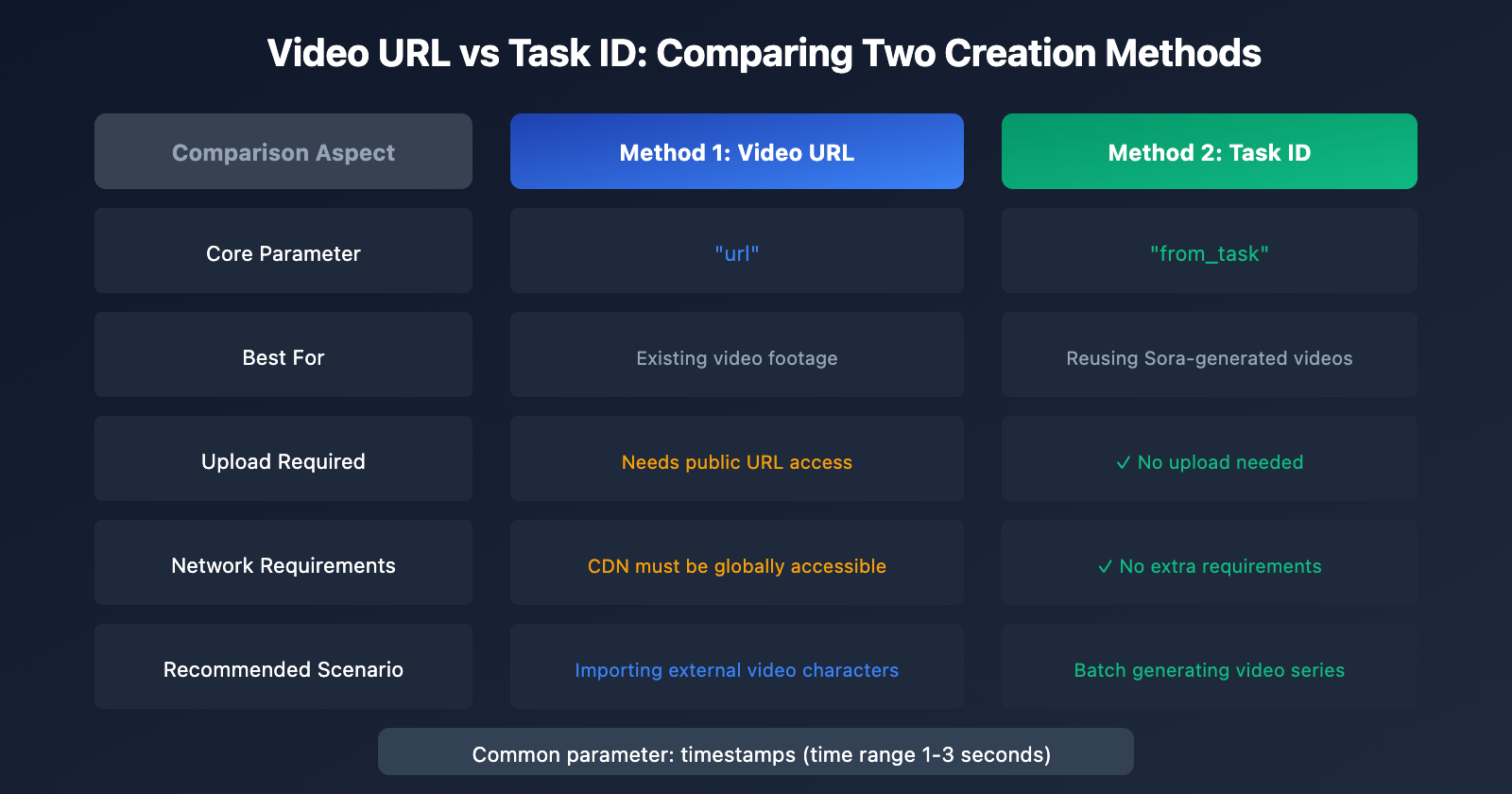
| Comparison Aspect | Video URL Method | Task ID Method |
|---|---|---|
| Best For | Existing video footage | Reusing Sora-generated videos |
| Parameter | url |
from_task |
| Upload Required | Needs publicly accessible video URL | No, just reference task ID |
| Network Requirements | CDN must be globally accessible | No extra requirements |
| Workflow | Independent asset processing | Seamlessly connects with video generation |
| Recommended Scenario | Importing external video characters | Batch generating video series |
How to Choose?
Go with Video URL method when:
- You have existing video footage (like filmed live-action videos, videos downloaded from other platforms)
- You need to extract characters from non-Sora generated videos
Go with Task ID method when:
- You're using Sora 2 API to batch generate videos
- You want to extract characters from already-generated videos for subsequent video series
- You're looking for a smoother, more automated workflow
Sora 2 Character API timestamps Parameter Explained
timestamps is the most critical parameter in the Character API—it determines which time segment of the video to extract the character from.
timestamps Format Rules
| Rule | Description | Example |
|---|---|---|
| Format | "start_second,end_second" |
"5,8" |
| Type | string | Note: use quotes |
| Minimum interval | 1 second | "3,4" ✅ |
| Maximum interval | 3 seconds | "5,8" ✅ |
| Exceeding limit | Will throw error | "1,10" ❌ |
timestamps Configuration Tips
- Choose segments where the character is clearly visible: The character should appear completely in frame without obstruction
- Avoid fast-moving segments: Select time periods where the character is relatively still or moving slowly
- Ensure good lighting: Well-lit segments will extract more accurate character features
- Prioritize frontal views: If possible, choose segments where the character faces the camera
Example scenario:
Let's say you have a 10-second video where the character appears front-facing at 2-4 seconds and in profile motion at 6-9 seconds:
// Recommended: choose the clear frontal segment
{
  "timestamps": "2,4"
}

// Not recommended: character in profile motion
{
  "timestamps": "6,9"
}
Sora 2 Character API Complete Workflow
Python Code Example
import requests
import time

# API configuration
API_BASE = "https://api.apiyi.com/sora/v1"
API_KEY = "sk-your-api-key"

headers = {
    "Content-Type": "application/json",
    "Authorization": f"Bearer {API_KEY}"
}

def create_character_from_url(video_url: str, timestamps: str) -> dict:
    """Method 1: Create character from video URL"""
    response = requests.post(
        f"{API_BASE}/characters",
        headers=headers,
        json={
            "model": "sora-2-character",
            "url": video_url,
            "timestamps": timestamps
        }
    )
    return response.json()

def create_character_from_task(task_id: str, timestamps: str) -> dict:
    """Method 2: Create character from task ID"""
    response = requests.post(
        f"{API_BASE}/characters",
        headers=headers,
        json={
            "model": "sora-2-character",
            "from_task": task_id,
            "timestamps": timestamps
        }
    )
    return response.json()

# Usage examples
# Method 1: Create from video URL
result1 = create_character_from_url(
    video_url="https://your-cdn.com/video/hero.mp4",
    timestamps="5,8"
)
print(f"Character creation task: {result1}")

# Method 2: Create from task ID
result2 = create_character_from_task(
    task_id="video_f751abfd-87a9-46e2-9236-1d94743c5e3e",
    timestamps="2,4"
)
print(f"Character creation task: {result2}")
View complete character creation and usage workflow code
import requests
import time

API_BASE = "https://api.apiyi.com/sora/v1"
API_KEY = "sk-your-api-key"

headers = {
    "Content-Type": "application/json",
    "Authorization": f"Bearer {API_KEY}"
}

def create_character(video_url: str, timestamps: str) -> str:
    """Create character and return character ID"""
    # 1. Initiate character creation request
    response = requests.post(
        f"{API_BASE}/characters",
        headers=headers,
        json={
            "model": "sora-2-character",
            "url": video_url,
            "timestamps": timestamps
        }
    )
    task_data = response.json()
    task_id = task_data.get("task_id")

    # 2. Poll until task completes
    while True:
        status_response = requests.get(
            f"{API_BASE}/characters/{task_id}",
            headers=headers
        )
        status_data = status_response.json()

        if status_data.get("status") == "completed":
            return status_data.get("character_id")
        elif status_data.get("status") == "failed":
            raise Exception(f"Character creation failed: {status_data}")

        time.sleep(5)  # Check every 5 seconds

def generate_video_with_character(prompt: str, character_id: str) -> str:
    """Generate video using character"""
    # Reference character in prompt via @character_id
    full_prompt = f"@{character_id} {prompt}"

    response = requests.post(
        f"{API_BASE}/videos",
        headers=headers,
        json={
            "model": "sora-2",
            "prompt": full_prompt,
            "duration": 8,
            "resolution": "1080p"
        }
    )
    return response.json()

# Complete workflow example
if __name__ == "__main__":
    # Step 1: Create character
    character_id = create_character(
        video_url="https://your-cdn.com/video/hero.mp4",
        timestamps="5,8"
    )
    print(f"Character created successfully, ID: {character_id}")

    # Step 2: Use character to generate video series
    scenes = [
        "walking through a futuristic city at night",
        "sitting in a coffee shop, reading a book",
        "running on a beach at sunset"
    ]

    for i, scene in enumerate(scenes):
        result = generate_video_with_character(scene, character_id)
        print(f"Video {i+1} generation task: {result}")
Tip: Access Sora 2 Character API through apiyi.com, which provides complete character management features and technical support.
FAQ
Q1: What should I do if the video URL is inaccessible?
Ensure the video URL meets the following requirements:
- Publicly accessible: It can't be an internal network address or a link that requires login
- Global CDN acceleration: If you're using Alibaba Cloud OSS, AWS S3, etc., you'll need to enable global acceleration or use a global CDN
- URL hasn't expired: If it's a temporary signed URL, make sure the validity period is long enough
- Supported format: MP4 format is recommended
Q2: How do I handle timestamp parameter errors?
Common errors and solutions:
- Time range exceeds 3 seconds: Reduce the range to 1-3 seconds, e.g.,
"5,8"→"5,7" - Time range less than 1 second: Ensure the start and end times differ by at least 1 second
- Format error: Must be in string format
"5,8", can't be an array or number - Exceeds video duration: Make sure the time range is within the total video length
Q3: How do I use a created character in video generation?
After successfully creating a character, you'll get a character_id. In subsequent video generation requests, reference this character in your prompt using the @character_id format. For example:
@char_abc123xyz walking through a futuristic city with neon lights flashing
The system will automatically apply the character's features to the generated video, maintaining consistent character appearance.
Summary
Key points about the Sora 2 Character API:
- Two creation methods: Video URL extraction and task ID reuse, flexibly adapting to different scenarios
- timestamps parameter: Time range of 1-3 seconds, choose segments where the character is clearly visible
- Character reuse: Create once, use multiple times across videos, maintaining character consistency
- CDN configuration: When using the video URL method, ensure global accessibility
Once you've mastered the Character API, you'll be able to:
- Create reusable virtual characters for brand IPs
- Produce series video content with consistent characters
- Achieve professional-grade continuous narrative videos
We recommend accessing the Sora 2 Character API through APIYI apiyi.com. The platform provides stable service and free testing credits to help you quickly get started with character creation features.
📚 References
⚠️ Link Format Note: All external links use the
Resource Name: domain.comformat, making them easy to copy but not clickable, which helps prevent SEO weight loss.
-
OpenAI Sora 2 Official Release: Introduction to Sora 2's features and capabilities
- Link:
openai.com/index/sora-2/ - Description: Get the official information about Sora 2 and its character functionality
- Link:
-
OpenAI Help Center – Characters Feature: Guide to creating and using characters
- Link:
help.openai.com/en/articles/12435986-generating-content-with-characters - Description: Official documentation on how to use the characters feature
- Link:
-
OpenAI API Documentation – Video Generation: Sora API technical documentation
- Link:
platform.openai.com/docs/guides/video-generation - Description: API interface specifications and parameter details
- Link:
-
OpenAI Sora Characters Page: Product introduction for the characters feature
- Link:
openai.com/sora/characters/ - Description: Product positioning and use cases for the characters feature
- Link:
Author: Tech Team
Tech Discussion: Feel free to share your thoughts in the comments. For more resources, visit the APIYI apiyi.com tech community