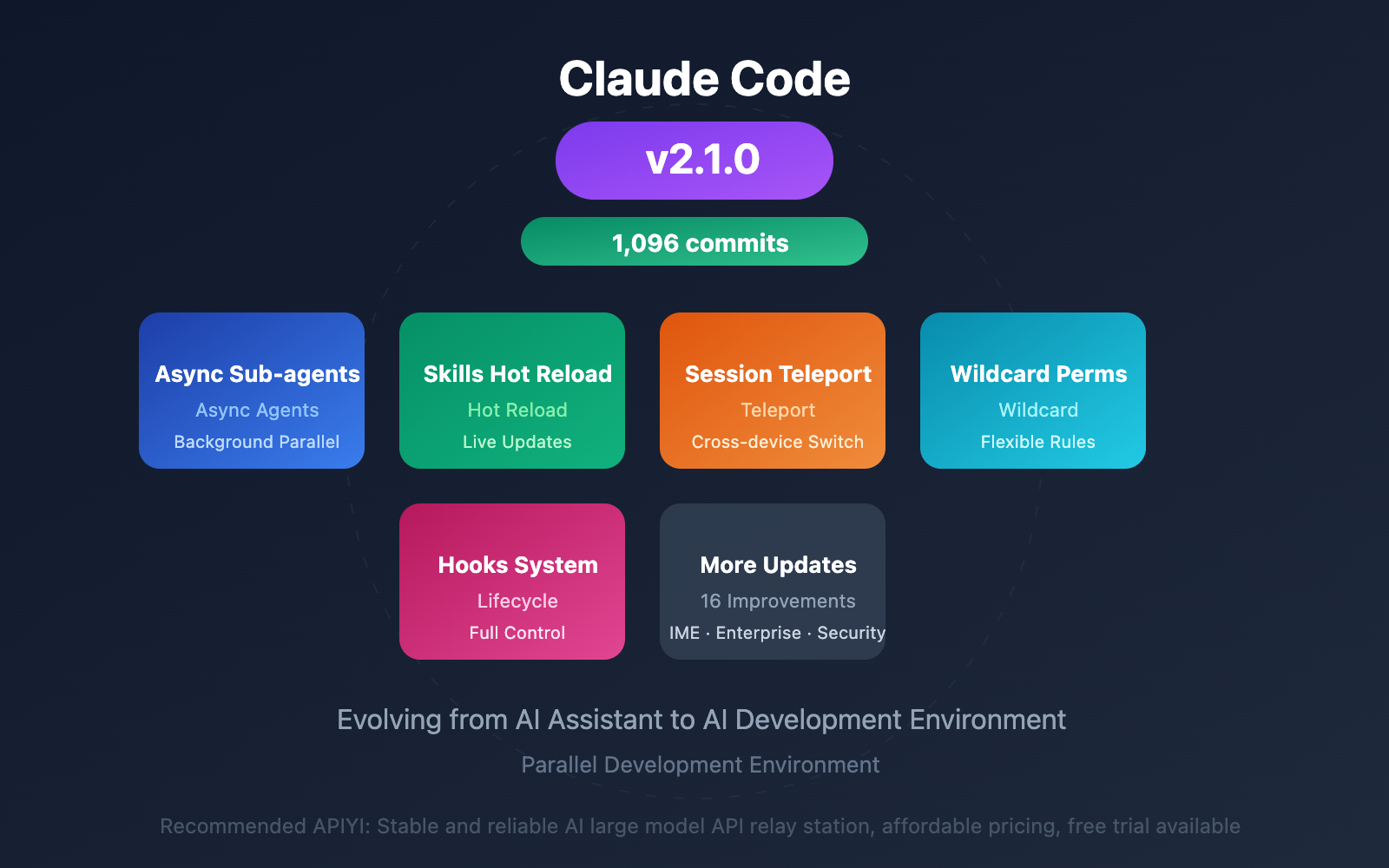
Anthropic has just released Claude Code 2.1.0, a major update containing 1,096 commits. From async sub-agents to session teleportation, from Skills hot reload to enterprise-grade features, this update transforms Claude Code from a "turn-based assistant" into a "parallel development environment."
Core Value: Claude Code 2.1 brings true multi-tasking parallel capabilities, allowing developers to handle multiple background tasks simultaneously, significantly boosting work efficiency.
Claude Code 2.1 Core Updates at a Glance
This update encompasses 16 major improvements. Here are the most noteworthy core features:
| Feature | Description | Value |
|---|---|---|
| Async Sub-agents | Run long-running tasks in background | Multi-task parallelism without blocking main flow |
| Skills Hot Reload | Update skills without restart | Real-time iteration, doubling development efficiency |
| Session Teleportation | Seamless switching between terminal and web | Cross-device collaboration, continue anytime |
| Wildcard Permissions | Bash(npm *) pattern matching |
Simplified configuration, more flexible permission management |
| Hooks System | Complete lifecycle hooks | Fine-grained control, custom workflows |
Why Claude Code 2.1 Matters
Before 2.1, Claude Code operated in "turn-based" mode—you ask, it responds, you wait, it executes. When encountering long-running operations like npm install or docker build, you could only wait.
Now it's different. Background Agents transform Claude Code into a true parallel development environment:
- Have one agent run tests in the background
- Have another agent refactor code simultaneously
- Continue discussing architecture design with the main agent
This workflow was previously only achievable with full-featured IDEs.
Claude Code 2.1 Asynchronous Sub-Agents Explained
Asynchronous sub-agents are the most core feature upgrade in 2.1, fundamentally changing how developers interact with AI assistants.
How Asynchronous Sub-Agents Work
When the main agent spawns sub-agents, you can choose to run them in the background:
# In conversation, Claude automatically moves long-running tasks to background
> Help me run the complete test suite

# Claude will prompt: This task is expected to take longer, started in background
# Task ID: task_abc123

# You can continue with other work
> Meanwhile help me check type errors in src/api.ts

# View background task status
/tasks
Claude Code 2.1 Background Task Management
| Operation | Command | Description |
|---|---|---|
| View all tasks | /tasks |
List running and completed background tasks |
| Background current task | Ctrl+B |
Push current agent or shell command to background |
| Foreground resume | /tasks select task |
Bring background task back to foreground |
| Cancel task | Operate in /tasks |
Terminate unwanted background tasks |
Practical Use Cases:
npm install/yarn installinstalling dependenciesdocker buildbuilding images- Running complete test suites
- Log monitoring and analysis
- Search and refactoring in large codebases
Efficiency Boost: The unified
Ctrl+Bshortcut lets you push any long-running task to the background with one keystroke, immediately freeing up the terminal to continue other work. This is a key step in Claude Code's evolution from a tool to a development environment.
Claude Code 2.1 Skills Hot Reload Feature
The Skills system received a major upgrade in 2.1, with hot reload making the development experience more seamless.
Skills Hot Reload Mechanism
After creating or modifying skill files in the ~/.claude/skills or .claude/skills directory, no session restart is needed – new skills are immediately available.
# Create a new skill
cat > ~/.claude/skills/code-review.md << 'EOF'
---
name: code-review
description: Review code and provide improvement suggestions
context: fork
---

Please review the following code, focusing on:
1. Code quality and maintainability
2. Potential performance issues
3. Security vulnerabilities
4. Best practice recommendations
EOF

# skill is immediately available, no restart needed
> /code-review src/api.ts
Claude Code 2.1 Forked Context Isolation
The newly added context: fork option allows skills to run in an isolated environment:
| Context Mode | Description | Use Cases |
|---|---|---|
| Default mode | skill shares main agent context | Tasks requiring access to conversation history |
| fork mode | skill runs in independent context | Experimental operations, avoiding pollution of main session |
Advantages of fork mode:
- Testing new logic without affecting main agent state
- Isolating impact scope when performing risky operations
- Multiple skills executing in parallel without interference
Claude Code 2.1 Session Teleportation Feature
Session Teleportation allows you to seamlessly switch your work environment between terminal and web.
How to Use Session Teleportation
# Get session from web and continue in terminal
/teleport

# Claude will automatically:
# 1. Verify you're in the correct repository
# 2. Pull and switch to the remote session's branch
# 3. Load the complete conversation history

# Configure remote environment
/remote-env
Claude Code 2.1 Cross-Device Workflow
Session Teleportation supports the following work modes:
- Terminal → Web: Use
&prefix to send tasks to web for asynchronous execution - Web → Terminal: Use
/teleportto pull web sessions to local and continue
Typical Scenarios:
- Start work in terminal at office, continue on web at home
- Send time-consuming tasks to cloud for execution, continue other work locally
- Share sessions with team members for collaborative debugging
Note: Session teleportation is unidirectional—you can pull web sessions to terminal, but cannot push terminal sessions to web.
Claude Code 2.1 Permissions & Hooks System
Version 2.1 significantly strengthens permission management and lifecycle control capabilities.
Wildcard Permission Configuration
New wildcard syntax makes permission configuration more concise:
{
  "permissions": {
    "allow": [
      "Bash(npm *)",
      "Bash(yarn *)",
      "Bash(git * main)",
      "Bash(*-h*)"
    ]
  }
}
| Pattern | Example Match | Description |
|---|---|---|
Bash(npm *) |
npm install, npm run build |
All npm commands |
Bash(* install) |
npm install, yarn install |
Commands ending with install |
Bash(git * main) |
git push origin main |
git operations on main branch |
Bash(*-h*) |
node -h, npm -help |
Help commands |
Claude Code 2.1 Hooks Lifecycle
The new Hooks system provides complete lifecycle control:
// .claude/hooks/pre-tool-use.js
module.exports = {
  // Before tool invocation
  PreToolUse: async (tool, params) => {
    console.log(`About to execute: ${tool}`);
    // Returning false can prevent execution
    return true;
  },

  // After tool invocation
  PostToolUse: async (tool, result) => {
    console.log(`Execution completed: ${tool}`);
    // Can log, send notifications, etc.
  },

  // When agent stops
  Stop: async (reason) => {
    console.log(`Agent stopped: ${reason}`);
  }
};
Hooks Application Scenarios:
- Audit logging
- Sensitive operation interception
- Custom notification systems
- Execution time statistics
Claude Code 2.1 Other Important Updates
Multi-language Output Support
# Set response language in configuration
language: "japanese"  # or chinese, spanish, korean, etc.
IME Input Method Optimization
Fixed cursor positioning issues with Chinese, Japanese, and Korean input methods. Now you can use Pinyin, Kana, and other input methods normally.
Terminal UX Improvements
| Improvement | Description |
|---|---|
| Shift+Enter | Works out of the box in iTerm2, Kitty, Ghostty, WezTerm |
| Unified Ctrl+B | One-key backgrounding for both agents and shell commands |
| Auto-continuation | Automatically continues when output reaches token limit, no manual operation needed |
Enterprise Features
- Enterprise-managed settings support (contact Anthropic account team to enable)
- MCP server whitelist/blacklist management
- More granular permission controls
Security Fixes
Fixed issues where sensitive data (OAuth tokens, API keys, passwords) could leak in debug logs.
Claude Code 2.1 Quick Start
Installation or Update
# Fresh installation
npm install -g @anthropic-ai/claude-code

# Update to latest version
npm update -g @anthropic-ai/claude-code

# Verify version
claude --version
# Should display 2.1.0 or higher
Try Asynchronous Sub-agents
# Start Claude Code
cd your-project
claude

# Try background tasks
> Help me run tests while checking code style

# Claude will automatically process in parallel, or prompt you to background with Ctrl+B
Platform Recommendation: If you need to integrate Claude capabilities into your application, you can use the unified API interface at APIYI apiyi.com to call Claude API, supporting the latest models like Claude Opus 4.5 and Sonnet 4, with more flexible pay-as-you-go pricing.
FAQ
Q1: Does Claude Code 2.1 require payment?
Claude Code itself requires a Claude Pro ($20/month) or MAX ($100-200/month) subscription. If you only want to use Claude API capabilities, you can pay-as-you-go through APIYI apiyi.com, which is more suitable for development and testing scenarios.
Q2: Do background tasks consume more tokens?
Yes, each background sub-agent has its own independent context and will consume additional tokens. It's recommended to plan tasks wisely to avoid unnecessary parallel operations. The good news is that version 2.1 fixed the context overflow issue caused by excessive background task output.
Q3: How do I migrate from an older version to 2.1?
Simply run npm update -g @anthropic-ai/claude-code. Configuration files are compatible, so no additional migration is needed. If you're using custom hooks, it's recommended to check whether they need to be adapted to the new lifecycle events.
Summary
Claude Code 2.1 is a major update with the following core highlights:
- Async Sub-agents: Run multiple tasks in parallel in the background, say goodbye to waiting, and double your efficiency
- Skills Hot Reload: Real-time skill updates without restart, smoother development experience
- Session Transfer: Seamless switching between terminal and web, enabling cross-device collaboration
- Enterprise-grade Enhancements: Wildcard permissions, Hooks system, managed settings to meet team needs
This update evolves Claude Code from an "AI assistant" to an "AI development environment"—a sincere offering with 1,096 commits that every developer should upgrade to experience.
For integrating Claude capabilities into your applications, it's recommended to use the Claude API through APIYI apiyi.com, which offers a unified interface supporting multiple models with free credits available for testing.
Author: Technical Team
Technical Discussion: Feel free to share your Claude Code 2.1 experience in the comments. For more AI development resources, visit APIYI apiyi.com
References:
- GitHub – Claude Code Changelog: github.com/anthropics/claude-code/blob/main/CHANGELOG.md
- VentureBeat – Claude Code 2.1.0 arrives with smoother workflows: venturebeat.com
- Geeky Gadgets – Claude Code 2.1 Update Overview: geeky-gadgets.com
- ClaudeLog – Claude Code Changelog: claudelog.com