

Author’s note: Starting with a single sentence to your Agent, this hands-on guide walks you through installing Agent-Reach so Claude Code, Codex, and other Agents can read Xiaohongshu notes, X posts, and Bilibili subtitles—complete with a channel table, command reference, troubleshooting, and cost estimates.
Ask an Agent to run a competitive analysis and it’ll hit a wall pretty fast. Tell it to “see what people on Xiaohongshu are saying about these headphones,” and its built-in web search only returns a handful of reposted articles—the actual Xiaohongshu notes are nowhere to be found. Tell it to “summarize what a certain X account posted this week,” and it can’t get past the login wall to the timeline.
Video content is even worse. In a 40-minute Bilibili tech talk, the real value is all in the spoken narration. Generic search can’t reach Bilibili subtitles, so the Agent is left guessing from the title and description. Chinese platforms like Xueqiu and V2EX also have poor coverage in generic search, and the pages it does return are cluttered with navigation menus and ads.
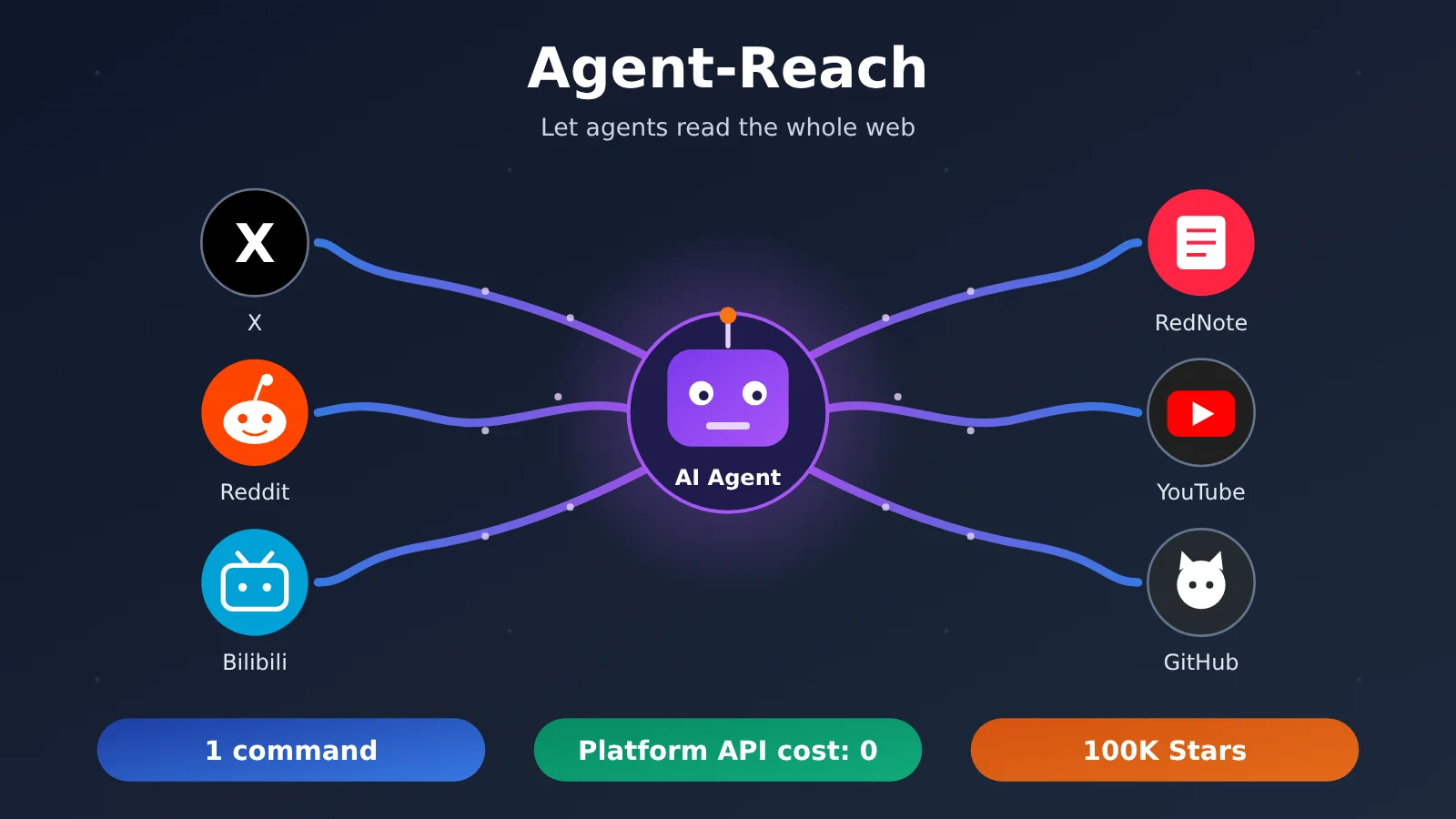
That’s exactly the problem the open-source project Agent-Reach sets out to solve. It’s already racked up over 100,000 stars on GitHub, and its mission is “to let AI Agents reach the parts of the internet they can’t get to on their own.” This isn’t yet another tool where you’re stuck grinding through CLI commands: the whole thread of this tutorial is installing it by saying one sentence to your Agent—and adding channels, switching accounts, and upgrading all happen in plain language too.
Core value: By the end of this article, your Agent will be able to read content from X, Reddit, Bilibili, Xiaohongshu, and other platforms—and you’ll know exactly how to verify each step, how to troubleshoot when things break, and roughly how much a single research run costs.
Agent-Reach Tutorial: Key Facts at a Glance
Before you start building anything, it helps to get the essentials straight in one table. Everything below was verified against the project repository on 2026-10-26.
| Key point | Details | Why it matters to you |
|---|---|---|
| Project popularity | Over 100K stars; once hit #1 on Trendshift’s GitHub Trending for the day | Active community, so issues actually get followed up |
| License and environment | Open source under MIT, written in Python 3.10+ | Free to use, and you can audit the code yourself |
| Platform fees | Free in itself — no platform API fees required | Your only real cost is the Agent’s model tokens |
| How it works | Read-only: it searches and reads, but never posts, comments, likes, or sends DMs | It won’t “speak” on your behalf on any platform |
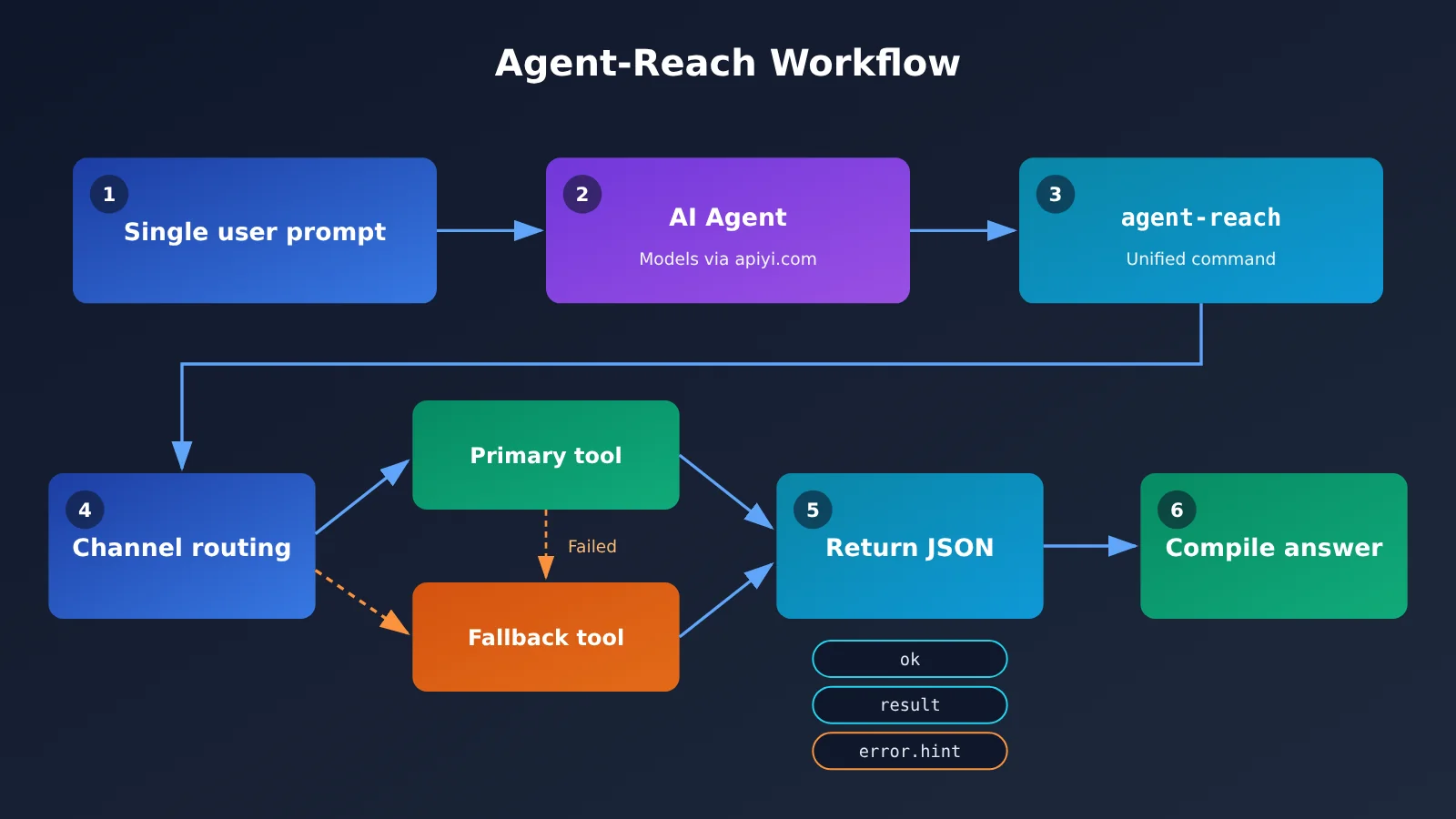
| Output format | Since v1.6, each command returns a single JSON object | The Agent just checks ok / result / error.hint to tell success from failure |
The four kinds of “out of reach” that Agent-Reach fixes
CLI Agents like Claude Code, Codex, Hermes Agent, and OpenClaw all come with built-in search and web reading. But there are four kinds of content they simply can’t reach. The first is anything behind a login — searching notes on Xiaohongshu, checking an account’s activity on X, or reading the details of a job listing. The second is content locked inside videos: subtitles from Bilibili and YouTube, plus speech-to-text for YouTube videos and Xiaoyuzhou podcasts.
The third is Chinese platforms. Bilibili, Xiaohongshu, V2EX, and Xueqiu are all poorly covered by general-purpose search. The fourth is clean, structured data — Xueqiu quotes, V2EX posts and replies, GitHub repositories and issues. Agent-Reach hands back organized content instead of a full page of HTML, which directly cuts down the number of tokens your Agent burns through.
Agent-Reach’s design philosophy: primary plus fallback
Agent-Reach models every action on every platform as an “ordered list of tools to try.” Reading a Bilibili video, for example, tries bili-cli first and automatically falls back to Bilibili’s public API if that fails. Reading a web page tries Jina Reader first, then Exa. Platforms redesign, tools break — that’s just normal. The maintainers only need to adjust that list, while your usage and your Agent’s behavior stay exactly the same.
What Channels Does Agent-Reach Support?
The current version groups channels into three tiers. Default channels work the moment they’re installed. Optional channels can be enabled by telling the Agent “add XX for me”—the software it needs gets installed automatically. Experimental channels do work, but they face stricter anti-scraping measures from the platforms and may break at any time. The table below is worth bookmarking—it answers the two most common questions: “what can it do?” and “what does it need?”
| Channel | Tier | What It Can Do | What It Needs |
|---|---|---|---|
| bilibili | Default | Search, video info, trending, subtitles | Subtitles require QR code login |
| v2ex | Default | Trending, nodes, posts and replies, users | No login required |
| github | Default | Search repos, read repos and READMEs, read issues and PRs (including comments) | No login required |
| youtube | Default | Video info, search, subtitles, speech-to-text | Transcription requires a Groq or OpenAI Key |
| web | Default | Web search, web reading (fallback channel) | No login required |
| xiaohongshu | Optional | Search notes, read post bodies, view comments | Login required |
| xueqiu | Optional | Real-time quotes, stock search, hot posts, hot stocks | Quotes don’t need login; hot posts and hot stocks do |
| boss | Optional | Search jobs and JDs | Login required |
| xiaoyuzhou | Optional | Podcast-to-text | Requires a Groq Key |
| Optional | Search jobs, read job details | Public jobs don’t need login; on-site search does | |
| Optional | Search posts, read post bodies, view comments, browse subreddits | Login required | |
| twitter (X) | Experimental | Search tweets, user profiles, user tweets, read tweet threads | Login required |
| Experimental | Search, profile info | Login required | |
| Experimental | Search users, profile info, user posts | Login required |
One thing worth noting: if you don’t want a default channel, you can remove it—and once removed, future updates won’t automatically add it back. The X mentioned in the title is currently an experimental channel, suitable for occasional lookups but not as a stable data source you rely on every day.
Agent-Reach Quick Start: One Sentence to Your Agent
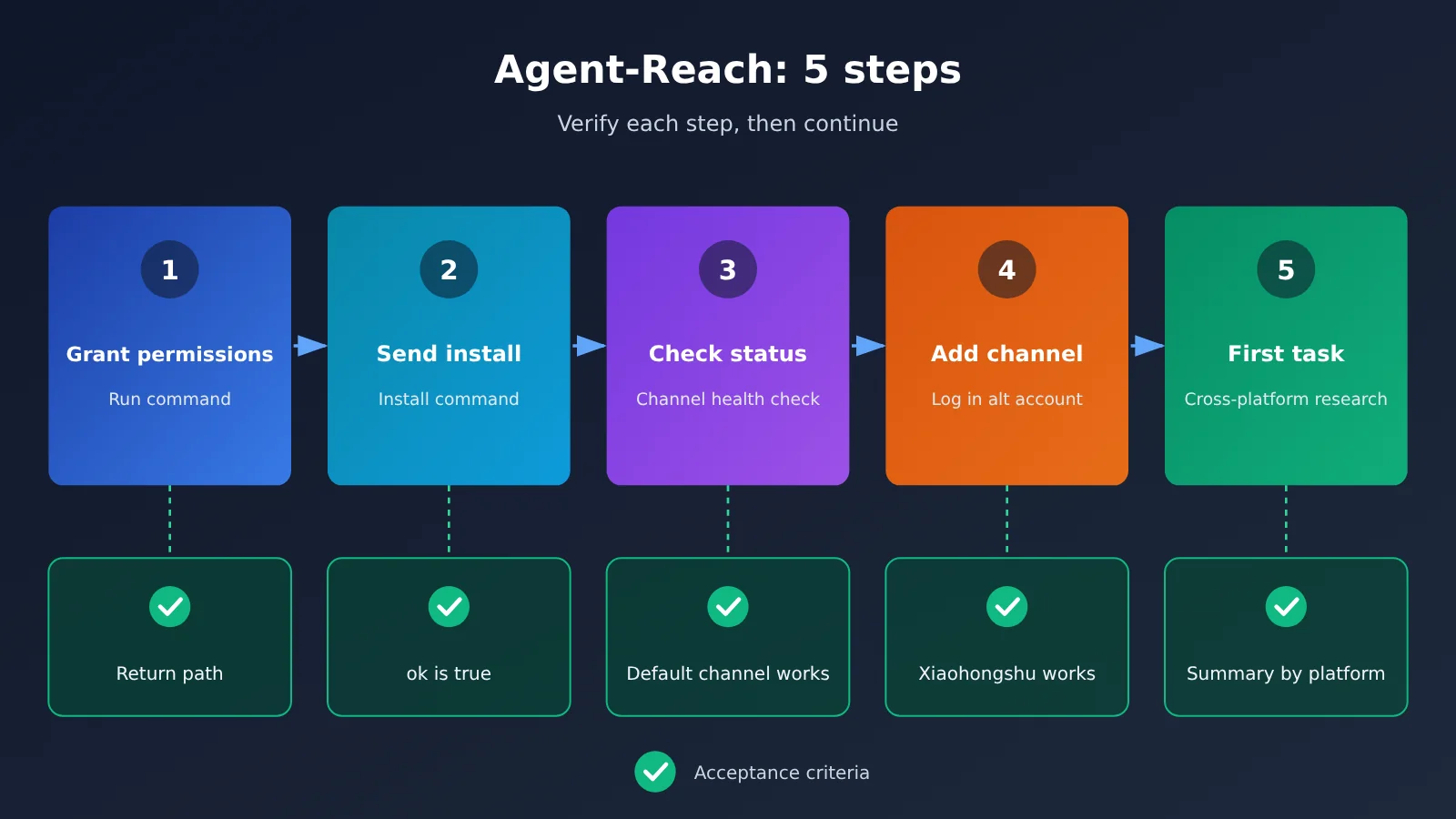
You don’t need to open a terminal at any point during the install. Every step below comes with an acceptance check — confirm it passes before moving on. If something goes sideways, you can jump straight to the troubleshooting table later in this guide.
Step 1: Turn on “Allow Command Execution” in Your Agent’s Settings
Agent-Reach needs your agent to be able to run terminal commands. Open your agent’s graphical settings and look for a toggle along the lines of “allow command execution” — the exact wording differs from one agent to another. Don’t worry if uv isn’t installed on your computer; the agent will install it for you first. It only takes one command, and no admin password is required.
- Acceptance check: Tell your agent “show me the current directory.” It should actually run a command and return a path — not answer with “I can’t execute commands.”
Step 2: Send the install command to the Agent
This is the easiest officially recommended method. Just copy the sentence below and send it to the Agent:
Install Agent Reach for me: https://raw.githubusercontent.com/Panniantong/Agent-Reach/main/docs/install.md
After reading the installation instructions, the Agent will handle two things on its own: first run uv tool install https://github.com/Panniantong/Agent-Reach/releases/latest/download/agent-reach.zip, then run agent-reach setup. All files are kept in one folder, ~/.agent-reach/, which makes future upgrades, management, and removal easy.
- Acceptance criteria: The Agent reports that installation is complete, and after running
agent-reach channels, the returned JSON hasokset to true and lists the channels inresult.
Step 3: Have the Agent check channel status
Tell the Agent “check Agent Reach status.” It will tell you whether each channel is currently usable, and which channels were working last time but are now broken. This step is like a checkup, and it’s worth doing first if you run into strange issues later.
- Acceptance criteria: The five default channels—bilibili, v2ex, github, youtube, and web—show as available. Features that require extra conditions, such as Bilibili subtitles and YouTube transcription, showing “login required” or “key required” is normal.
Step 4: Add optional channels and finish logging in
Take Xiaohongshu as an example. Tell the Agent “help me add Xiaohongshu” and it’ll automatically install whatever software is needed. Platforms that require a login are handled by Agent-Reach’s built-in dedicated browser, which runs in the background without popping up windows, and is only accessible from this computer. It never logs in for you, and it won’t ask for your password.
Some platforms reuse login states that already exist on your computer. Only the login for that single site gets copied — your original browser stays untouched, and the password vault isn’t read. Be sure to read the risk warnings in the next section, and if what it reuses turns out to be your main account, tell the Agent “switch to a different account” and use a secondary one instead.
- Acceptance criteria: Say “check Agent Reach status” again and xiaohongshu should show as available. Then have the Agent search for a keyword, and the returned results should include note titles and body snippets.
Step 5: Run your first cross-platform research task
Just describe the goal in natural language, for example: “Use Agent Reach to look up what people are saying about a certain mechanical keyboard — check Xiaohongshu notes, Bilibili review video subtitles, and Reddit discussions separately, then summarize by platform.” The Agent will break this down into multiple agent-reach <channel> <action> [parameters] commands and execute them on its own.
- Acceptance criteria: The Agent’s summary lists each platform separately, and every point maps back to a specific note, video, or post. If a channel fails, it conveys the hint from
error.hintinstead of quietly skipping it.
🚀 Quick-start tip: Agent-Reach is only responsible for fetching content back — the understanding and summarizing is done by the Large Language Model behind your Agent. If your Agent supports custom model endpoints, you can connect Claude, GPT, Gemini, and other models with a single API key through APIYI apiyi.com. New users get free trial credits, which is great for getting your first research task up and running at low cost.
How to Configure the APIYI Model Endpoint for Your Agent
If your agent supports OpenAI-compatible endpoints, here’s the setup. The exact field names depend on your agent’s settings screen:
- Base URL:
https://api.apiyi.com/v1 - API key: one you create in the APIYI console
-
Model name:
claude-sonnet-5-5is a good default for everyday research;claude-haiku-5-5works well for high-volume, lightweight tasks -
Acceptance check: send the agent a quick “Hi, which model are you?” — if it responds normally and a matching call shows up in the APIYI console, you’re good to go.
Agent-Reach Command Cheat Sheet
In day-to-day use, just say what’s in the left column to your agent — no commands to memorize. The right-hand column shows what the agent runs behind the scenes, handy when you want to understand what’s happening or debug from your own terminal.
| What you say to the agent | What the agent runs | What it’s for |
|---|---|---|
| “What channels are there, and what can each one do?” | agent-reach channels |
List channels and their capabilities |
| “Search Bilibili for large language models” | agent-reach bilibili search "large language models" |
Consistent format: channel + action + parameters |
| “Read this link” | agent-reach read <link> |
Picks the right channel automatically based on the URL |
| “Upgrade Agent Reach” | agent-reach update |
Updates the program, channel tools, and skills in one shot |
| “It says command not found after install” | uv tool update-shell, then open a new shell |
Fixes the command path |
| (Doing it yourself in the terminal) | agent-reach configure groq-key |
Enter the key needed for speech-to-text |
| “Uninstall Agent Reach” | List what will be deleted, then confirm before removing | Safe uninstall |
Beyond that, you can also just tell the agent things like “drop Xiaohongshu,” “my Xiaohongshu login expired,” “log me out,” or “let another AI use this too” — no commands required.
Agent-Reach Risk Notice (Read Before Use)
⚠️ Please read this section carefully before using Agent-Reach
- This is a community open-source tool, not an officially authorized API from any platform. We’re simply recommending the project and make no guarantees about its stability, security, or compliance.
- Your account may get rate-limited or banned. Platforms like X, Xiaohongshu, and Reddit may flag automated access as abnormal behavior. The official README also explicitly recommends using a secondary account—please don’t run the Agent on an important account.
- Reusing local login sessions may pull in your main account. Some channels reuse the login state already present on your computer, and that’s usually your primary account. After enabling a channel, check which account is currently in use, and if needed, tell the Agent “switch accounts” to move to your secondary one.
- You assume all consequences. Any fallout—account bans, rate limiting, or compliance issues around data scraping and usage—is your own judgment and responsibility, and is unrelated to the APIYI platform or the author of this article.
- Install only from the verified source. The package named agent-reach on PyPI is not this project—you can only install it from the GitHub address. The project has no official token, coin, investment product, or wallet connection. Any crypto project borrowing this name is unrelated to this repository.
Agent-Reach Troubleshooting
Here are the five most common issues you’ll hit when getting started — each one comes with a fix you can follow directly. Before you start troubleshooting, it’s a good idea to have the Agent run a “check Agent Reach status” pass and report back the exact text of error.hint.
| Symptom | Cause | Fix |
|---|---|---|
After installation, the agent-reach command isn’t found |
The uv tool directory hasn’t been added to your command path yet | Have the Agent run uv tool update-shell, then open a new shell (or restart the Agent) and try again |
| The Agent replies “I can’t execute commands” | Command execution permission isn’t enabled | Go back to Step 1 and turn on “Allow command execution” in the Agent settings |
| All sorts of errors after upgrading from 1.5 | Versions 1.5 and earlier were installed via pipx/pip | Have the Agent run uv tool install --force with the GitHub install URL, then run agent-reach setup — your keys and settings will be preserved |
| Xiaohongshu suddenly returns nothing and asks you to log in | Your login session has expired | Tell the Agent “Xiaohongshu login expired” and follow the prompts to log in again (using a secondary account is recommended) |
| The X channel works on and off | Twitter is an experimental channel, and the platform has stricter anti-scraping measures | First check the status to confirm whether it’s down. If it is, wait for a project update and then run agent-reach update, or report it on GitHub Issues |
Agent-Reach Costs and Model Selection
Agent-Reach itself is free, and there’s no platform API fee. What actually costs money is the tokens consumed when the agent running it calls a Large Language Model. Below are the prices for three models, pulled from the APIYI apiyi.com documentation center on 2026-10-26, in USD per million tokens. Model names and prices are subject to the platform’s model list.
| Model | Input | Output | Cache read | Suitable Agent-Reach tasks | Available platform |
|---|---|---|---|---|---|
| claude-opus-5-5 | $4 | $20 | $0.2 | Long-form research reports, cross-validating multiple sources | APIYI apiyi.com |
| claude-sonnet-5-5 | $2 | $10 | $0.1 | The workhorse for everyday cross-platform research | APIYI |
| claude-haiku-5-5 | $0.1 | $0.5 | $0.01 | Batch summarization, simple lookups, status checks | APIYI |
Here’s a rough estimate (not measured): a single research run across 4 platforms, where the agent reads 5 long threads plus 20 search results, comes to roughly 30k–60k input tokens and 3k–6k output tokens. On claude-sonnet-5-5 that’s around $0.1 per run; on claude-haiku-5-5 it’s under a cent; on claude-opus-5-5 it lands somewhere between $0.2 and $0.35.
The selection advice is straightforward: get the workflow running on sonnet first, then decide based on output quality whether to upgrade to opus, and hand repetitive batch work to haiku. Agent-Reach returns organized, structured content, which already saves tokens compared to having the agent read raw web pages — and if you’re in it for the long haul, it’s worth watching the savings that cache-read pricing brings.
FAQ
Q1: Is Agent-Reach really completely free?
Agent-Reach itself is free and MIT-licensed, and the platforms don’t charge API fees either. The only cost you pay is the token fee when the Agent invokes a Large Language Model. Based on the estimate above, a single research run across 4 platforms using a sonnet-class model comes out to around $0.10. If you want to test the waters first, you can claim free trial credits for new users at APIYI apiyi.com and use them to run your first task.
Q2: Will the Agent post, like, or DM from my account?
No. Agent-Reach is a read-only tool — it only searches and reads. It doesn’t post, comment, like, or send DMs. That said, read-only doesn’t mean zero risk: platforms may still flag high-frequency reads as abnormal access, so we still recommend using a secondary account. See the risk notes section for details.
Q3: How do I turn on speech-to-text for YouTube and Xiaoyuzhou? Do I need to send the key to the Agent?
YouTube transcription requires a Groq or OpenAI key, and Xiaoyuzhou requires a Groq key. **Don’t paste the key directly into the chat.** The official instructions require you to run `agent-reach configure groq-key` in your own terminal to enter it. How to verify: ask the Agent to transcribe a YouTube video — the returned JSON should have `ok` set to true along with the transcript text.
Q4: Which model works best with Agent-Reach?
For everyday research, start with claude-sonnet-5-5 — it strikes a good balance between understanding multi-source content and keeping costs under control. Switch to claude-opus-5-5 when you need deeper analysis. A single API key from APIYI apiyi.com lets you switch between these models by changing only the model name, with no need to change the endpoint URL — which makes it easy to compare results on the same research task.
Q5: It’s already installed in Claude Code — how do I let another Agent use it too?
Just tell the Agent that’s already set up to “let another AI use it too,” and it’ll handle the shared configuration. Since all files are kept in the `~/.agent-reach/` folder, any other Agent can call it as long as it also has command execution permissions enabled. How to verify: in the new Agent, say “check Agent Reach status” — it should return the same channel list as the original Agent.
Agent-Reach Tutorial: Key Takeaways
- One-line pitch: Agent-Reach lets Agents read content behind login walls, inside videos, and on Chinese-language platforms.
- Installation: Send the official
install.mdlink to your Agent, and it’ll installuvandagent-reachby itself. - Three channel tiers: 5 default channels work out of the box, 6 optional channels can be enabled with one sentence, and 3 experimental ones may break at any time.
- Read-only by design: No posting, liking, or DMs; output is standardized JSON with an
okfield. - Account safety: Community tools aren’t official APIs and may trigger rate limits or account bans—always use a burner account.
- Controllable costs: Platform API fees are $0; the main cost is model tokens, which can be accessed with pay-as-you-go billing through APIYI at apiyi.com.
Summary
The core takeaways from this Agent-Reach tutorial:
- Solves real pain points: Xiaohongshu notes, X account updates, and Bilibili subtitles that general search can’t find are now directly readable by Agents.
- Zero barrier to entry: Complete installation by saying one sentence to your Agent; adding channels, switching accounts, and upgrading all work in plain language.
- Know the risks: This is a community open-source tool—use a burner account, check which account is being reused, and judge and bear the consequences yourself.
We recommend first using the default channels to run through a Bilibili or GitHub research task, confirm each validation step passes, then add login-required channels like Xiaohongshu and Reddit as needed.
Need a model? You can use APIYI at apiyi.com.
📚 References
- Agent-Reach GitHub Repository: Project source code, README, and channel documentation
- Link:
github.com/Panniantong/Agent-Reach -
Note: The only trustworthy installation source — the channel list and security notes here are authoritative
-
Agent-Reach Official Installation Guide: Installation docs for the Agent to read
- Link:
raw.githubusercontent.com/Panniantong/Agent-Reach/main/docs/install.md -
Note: This is exactly the address you send to the Agent in Step 2 of this article
-
Agent-Reach GitHub Issues: Issue reporting channel
- Link:
github.com/Panniantong/Agent-Reach/issues - Note: If an experimental channel stops working or you hit installation errors, search or report here
Author: APIYI Technical Team
Technical Contact: Feel free to reach us through the APIYI website homepage. For more resources, visit the docs.apiyi.com documentation center


