Author's Note: Claude Opus 4.6 Agent Teams lets multiple AI agents collaborate in parallel to complete complex tasks. This article explains the working principles, architectural design, use cases, and setup steps from scratch.
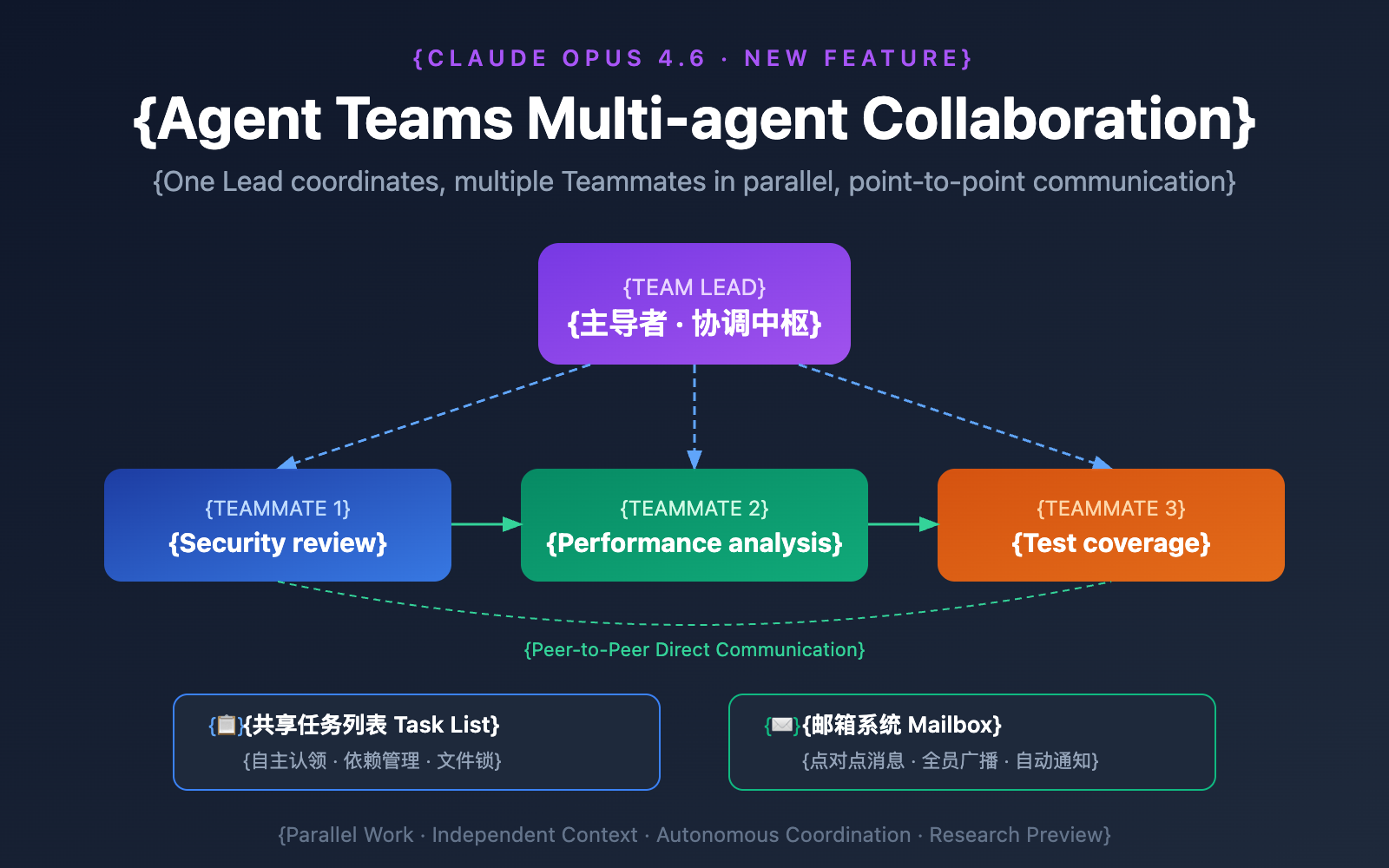
Claude Opus 4.6 introduces a game-changing capability—Agent Teams. Simply put, you can now have multiple Claude instances collaborating like a real development team, rather than having one AI handle everything serially from start to finish.
Core Value: By the end of this article, you'll understand how Agent Teams work, their ideal use cases, and how to configure and use this feature from the ground up.
Claude Opus 4.6 Agent Teams: Key Takeaways
| Key Point | Description | Value |
|---|---|---|
| Parallel, Not Serial | Multiple Claude instances work simultaneously, each with its own context. | Multiplies efficiency for complex tasks. |
| Lead + Teammate Architecture | One leader assigns tasks while multiple teammates execute them. | Clear division of labor; avoids conflicts. |
| Direct Inter-Agent Communication | Teammates can message each other and challenge each other's conclusions. | Surpasses traditional master-slave models. |
| Shared Task List | All agents share a single task list and claim tasks autonomously. | No need for manual, one-by-one assignment. |
| File Locking Mechanism | Prevents multiple agents from modifying the same file at once. | Avoids code conflicts and overwrites. |
Agent Teams vs. Traditional Single Agents
In the traditional mode, no matter how complex the task is, you're only talking to one Claude. It can only do one thing at a time—analyze code, then write tests, then fix bugs, all in sequence. When a task involves multiple files or modules, this approach is slow and prone to oversight.
Agent Teams completely flips this script. The core idea is: break a large task into multiple independent subtasks and have multiple Claude instances process them in parallel. It's just like a real software team—the architect designs, the frontend dev builds the UI, the backend dev writes the API, and the QA engineer writes test cases—everyone plays their part and moves forward simultaneously.
Anthropic Product Lead Scott White compares it to "having a team of talented humans working for you," highlighting the leap in efficiency brought by task decomposition and parallel coordination.
Claude Opus 4.6 Agent Teams Architectural Principles
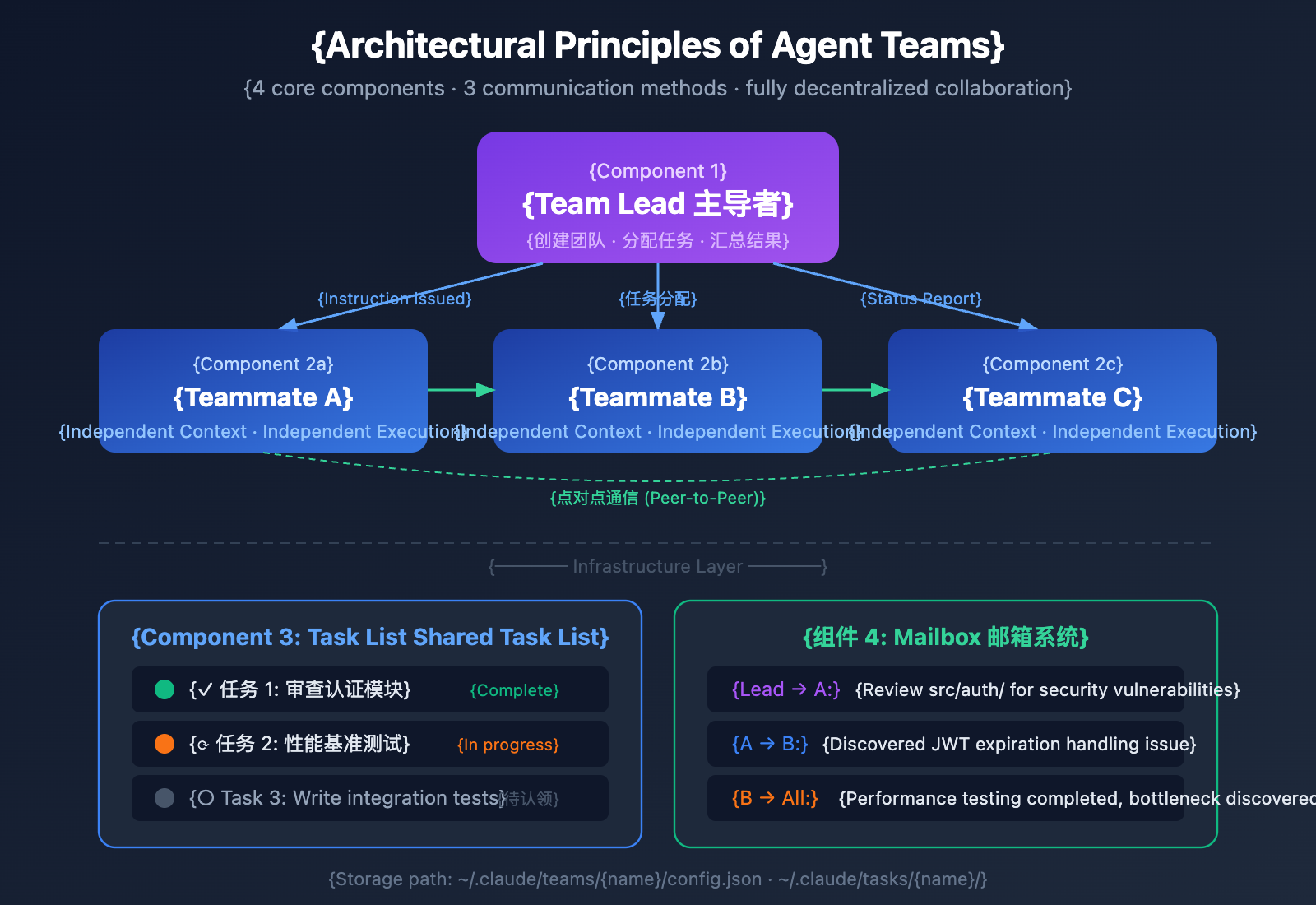
Understanding the architecture of Agent Teams is key to mastering this feature. The entire system is built around four core components:
The 4 Core Components of Agent Teams
| Component | Role | How it Works |
|---|---|---|
| Team Lead | Creates the team, assigns tasks, and summarizes results | Your main Claude Code session |
| Teammates | Execute specific tasks independently | Each has its own independent context window |
| Task List | A shared to-do list | Teammates claim tasks autonomously; supports dependencies |
| Mailbox System | Inter-agent communication | Peer-to-peer messaging or team-wide broadcasts |
3 Ways Agent Teams Communicate
First: Lead to Teammate instructions. This is the most basic mode. The Lead creates a task and assigns it to a specific Teammate, or lets a Teammate claim it. Once the Teammate finishes, the results are automatically sent back to the Lead.
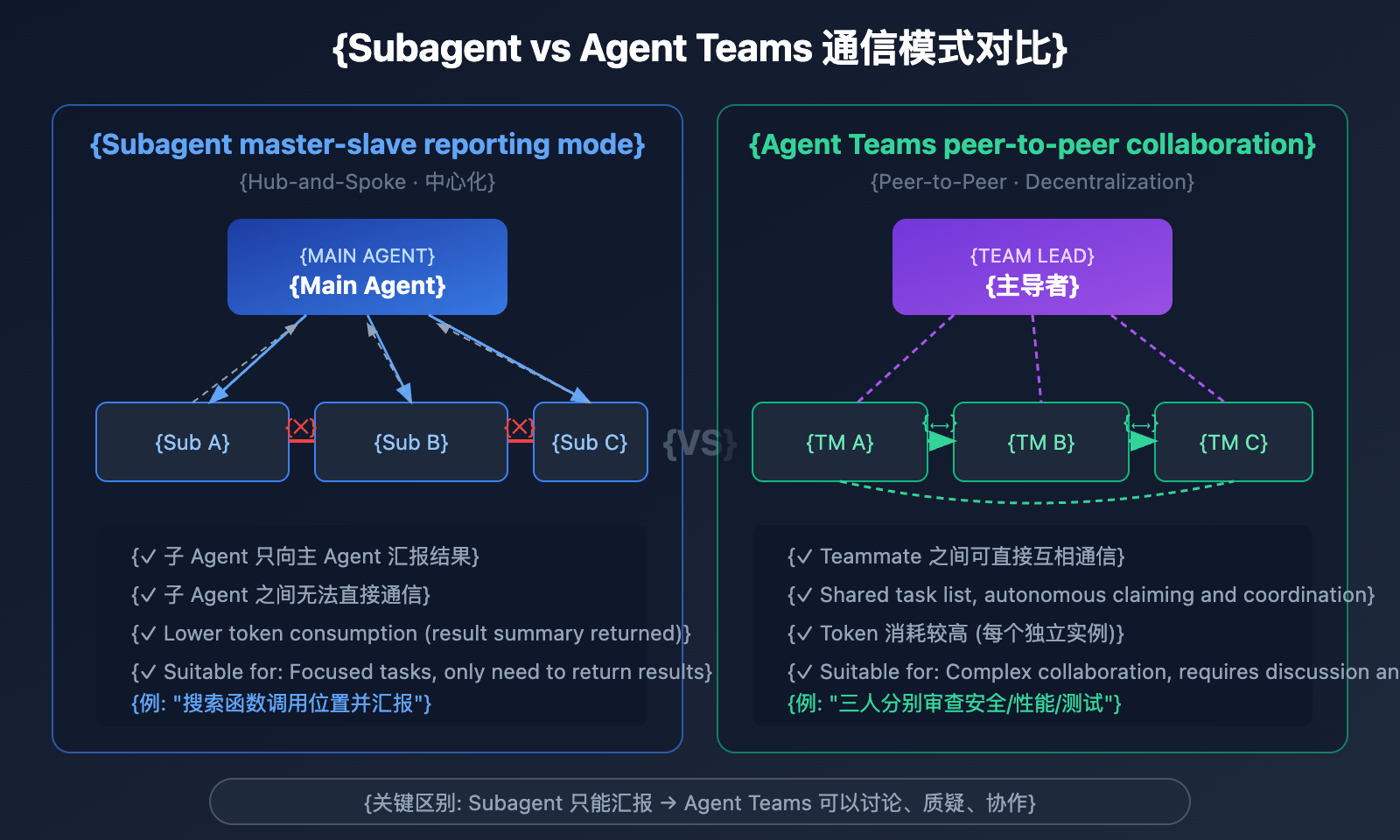
Second: Direct communication between Teammates. This is the key differentiator between Agent Teams and traditional sub-agents. Teammates can message each other directly—for example, a frontend engineer can ask a backend engineer, "What's the API return format?" without needing the Lead to relay the message. This peer-to-peer communication significantly boosts collaboration efficiency.
Third: Team-wide broadcasts. The Lead can send a message to all Teammates simultaneously, which is useful for project-wide decision adjustments. However, official guidance suggests using this sparingly, as token consumption for broadcasts scales linearly with the size of the team.
🎯 Developer Tip: The communication mechanism of Agent Teams is very similar to real-world team collaboration. If you're building your own multi-agent application, you can access the Claude Opus 4.6 API via APIYI to implement similar collaborative logic in your own apps.
Claude Opus 4.6 Agent Teams vs. Subagents
Many people get confused between Agent Teams and Subagents. While both allow for parallel work, their architectures and use cases are completely different:
| Aspect | Subagent | Agent Teams |
|---|---|---|
| Context | Independent window, results returned to caller | Independent window, fully autonomous |
| Communication | Can only report to the main Agent | Teammates can communicate directly with each other |
| Coordination | Unified management by the main Agent | Shared task list, autonomous coordination |
| Best For | Focused tasks that just need a result | Complex work requiring discussion and collaboration |
| Token Usage | Lower; only result summaries are sent back | Higher; each teammate is a separate instance |
How to decide in one sentence
Use Subagents: When you need an "assistant" to run an errand and report back—for example, "help me search for where this function is called across all files."
Use Agent Teams: When you need a "team" to discuss, challenge each other, and push forward together—for example, "help me review this PR from the perspectives of security, performance, and test coverage."
Claude Opus 4.6 Agent Teams Use Cases
Agent Teams aren't a silver bullet; they provide the most value in specific scenarios. Here are the 4 recommended "strong" use cases and 3 "weak" scenarios you should avoid:
4 Strong Use Cases for Agent Teams
Scenario 1: Multi-Perspective Code Review
Traditional solo reviews tend to focus on one type of issue while overlooking others. Using Agent Teams, you can parallelize reviews across different dimensions like security, performance, and test coverage:
Create an Agent Team to review PR #142, assigning three reviewers:
- One focused on security vulnerabilities
- One checking performance impact
- One verifying test coverage
Have them each report their findings after the review.
Scenario 2: Competitive Hypothesis Debugging
When the root cause of a bug is unclear, a single Agent often stops once it finds a plausible explanation. Agent Teams allow multiple Teammates to investigate different hypotheses simultaneously and challenge each other's conclusions:
User feedback indicates the app disconnects after sending a single message.
Create 5 Teammates to investigate different hypotheses,
let them debate to debunk each other's theories,
just like a scientific debate. Document the final consensus reached.
This adversarial investigation mechanism avoids the "anchoring effect"—where the first hypothesis explored biases the rest of the investigation.
Scenario 3: New Feature Module Development
When a new feature involves several independent modules, each Teammate can take responsibility for one module without stepping on each other's toes:
Create an Agent Team to develop a user authentication system:
- Teammate 1: Responsible for backend APIs and database models
- Teammate 2: Responsible for frontend login and registration pages
- Teammate 3: Responsible for unit and integration testing
Scenario 4: Cross-Layer Coordinated Changes
When a change spans the frontend, backend, and testing layers, each layer is handled by a different Teammate, keeping everything in sync via the messaging system.
3 Scenarios to Avoid
| Weak Scenario | Reason | Recommendation |
|---|---|---|
| Serial dependent tasks | Each step depends on the previous result; cannot be parallelized | Use a single Session or Subagent |
| Frequent edits to the same file | Multiple Agents modifying the same file leads to overwrites | A single Session is safer |
| Simple, small tasks | Coordination overhead outweighs parallel benefits | Complete it directly in one Session |
💡 Pro Tip: If you're new to Agent Teams, we recommend starting with tasks that don't require writing code—like code reviews, technical research, or bug investigations. These tasks let you feel the value of parallel exploration without the coordination headaches of parallel implementation.
Claude Opus 4.6 Agent Teams Quick Start
Step 1: Enable Agent Teams
Agent Teams is currently in an experimental phase and is disabled by default. You'll need to manually enable it in your Claude Code configuration file:
// Add to settings.json
{
  "env": {
    "CLAUDE_CODE_EXPERIMENTAL_AGENT_TEAMS": "1"
  }
}
Or set it via an environment variable:
export CLAUDE_CODE_EXPERIMENTAL_AGENT_TEAMS=1
Step 2: Create a Team Using Natural Language
Once enabled, just tell Claude what kind of team you want using natural language:
I'm designing a CLI tool to track TODO comments in a codebase.
Create an Agent Team to explore this from different angles:
One Teammate for UX design,
one for technical architecture,
and one to play "devil's advocate" and raise concerns.
Claude will automatically create the team, assign roles, spin up Teammates, and coordinate the entire workflow.
Step 3: Choose Your Display Mode
Agent Teams supports two display modes:
| Mode | Description | Best For |
|---|---|---|
| In-process | All Teammates run within the main terminal; switch with Shift+Up/Down | Any terminal, no extra config needed |
| Split panes | Each Teammate gets an independent panel; view all output at once | Requires tmux or iTerm2 |
Configure this in your settings.json:
{
  "teammateMode": "in-process"  // or "tmux"
}
Step 4: Interact Directly with Teammates
You don't just manage the team through the Lead; you can talk directly to any Teammate:
- In-process mode: Use
Shift+Up/Downto select a Teammate and type your message directly. - Split panes mode: Click the corresponding panel to operate directly within that Teammate's session.
Step 5: Task Management and Cleanup
View task progress: Press Ctrl+T to toggle the task list display.
Close a Teammate:
Please have the researcher Teammate shut down.
Clean up team resources:
Clean up the entire team.
⚠️ Important: Always perform cleanups through the Lead. Teammates shouldn't clean themselves up, as it might lead to inconsistent resource states.
🎯 Technical Tip: Once you've mastered Agent Teams, if you want to implement multi-agent logic in your own applications via API calls to Claude Opus 4.6, you can get a unified API interface through APIYI (apiyi.com). The platform supports various models, including Opus 4.6.
Claude Opus 4.6 Agent Teams: A Real-World Case Study
Case Study: 16 Agents Writing a C Compiler in Rust
Anthropic researcher Nicholas Carlini recently shared a landmark case study on Agent Teams: using 16 parallel Claude instances to write a C compiler from scratch in Rust—one capable of compiling the Linux kernel.
| Metric | Data |
|---|---|
| Number of Agents | 16 parallel instances |
| Total Sessions | Nearly 2,000 Claude Code sessions |
| Lines of Code | 100,000 lines of Rust |
| Token Consumption | 2 billion input + 140 million output tokens |
| API Cost | Approx. $20,000 |
| Compilation Capability | Compiles Linux 6.9 (x86, ARM, RISC-V) |
| Test Pass Rate | 99% on the GCC torture test suite |
Key Lessons from This Case Study
Task locking mechanisms are vital. The 16 agents "locked" tasks by creating text files in a current_tasks/ directory. If two agents tried to claim the same task, Git's synchronization mechanism would force the second agent to pick something else.
Strict test suites are the foundation of success. Without human supervision, agents need clear feedback signals to know if their work is correct. The GCC torture test suite provided exactly that.
Parallelism doesn't mean linear speedup. When all 16 agents hit the same bug, they all get stuck at once. The project solved this with an innovative "oracle" approach, using GCC for differential testing.
New features can break existing ones. This is a classic challenge in multi-agent parallel development—code from one agent might break a feature another agent just finished. Rigorous regression testing is a necessary safeguard.
Claude Opus 4.6 Agent Teams Best Practices
Based on official documentation and community experience, here are 6 best practices for using Agent Teams:
Practice 1: Give Teammates plenty of context. Teammates automatically load the project's CLAUDE.md, MCP servers, and Skills, but they don't inherit the Lead's conversation history. When creating a Teammate, make sure to include enough task details in the prompt:
Create a security review Teammate with the prompt:
"Review the authentication module in the src/auth/ directory for security vulnerabilities.
Focus on token handling, session management, and input validation.
The app uses JWT tokens stored in httpOnly cookies.
Report all issues and label them by severity level."
Practice 2: Define task granularity wisely. Official advice suggests assigning 5-6 tasks per Teammate. If tasks are too small, the coordination overhead outweighs the benefits; if they're too large, the Teammate might go too long without reporting back, increasing the risk of wasted effort.
Practice 3: Avoid file conflicts. Ensure each Teammate is responsible for a different set of files. Having two Teammates edit the same file will lead to overwriting issues.
Practice 4: Make use of Delegate Mode. If the Lead starts writing code instead of waiting for the Teammate to finish, hit Shift+Tab to switch to Delegate Mode. This forces the Lead to focus solely on coordination.
Practice 5: Require plan approval. For complex or risky tasks, you can ask the Teammate to draft a plan and wait for the Lead's approval before executing:
Create an Architect Teammate to refactor the authentication module.
Require them to submit a plan for approval before modifying any code.
Practice 6: Check progress regularly. Don't leave the team unattended for too long. Periodically check in on the Teammates' progress and adjust any approaches that aren't working.
💰 Cost Tip: Agent Teams' token consumption is roughly N times that of a single session (where N is the number of Teammates). We recommend keeping team sizes between 2-5 Teammates. If you need to optimize costs at the API level, you can use the APIYI (apiyi.com) platform to flexibly call different models—using the more cost-effective Sonnet 4.5 for Teammates and the high-capability Opus 4.6 for the Lead.
Claude Opus 4.6 Agent Teams Known Limitations
Agent Teams is currently in Research Preview, so there are a few known limitations you should keep in mind:
| Limitation | Description | Workaround |
|---|---|---|
| No Session Recovery | /resume and /rewind can't restore In-process Teammates |
Have the Lead recreate the Teammate |
| Task Status Lag | Teammates sometimes forget to mark tasks as complete, blocking dependent tasks | Manually update the task status or have the Lead nudge them |
| Slow Shutdown | Teammates must finish their current request before they can be closed | Just be patient |
| One Team per Session | You can only manage one team at a time | Clean up the current team before creating a new one |
| No Nested Teams | Teammates can't create their own teams | Only the Lead can manage the team |
| Non-transferable Lead | The session that creates the team is fixed as the Lead | Plan your Lead role ahead of time |
| Split-screen Requirements | Requires tmux or iTerm2 | VS Code terminal and Windows Terminal don't support split-screen |
FAQ
Q1: Does Agent Teams cost extra?
The Agent Teams feature itself doesn't cost extra; it's included with your Claude Code access. However, since each Teammate is an independent Claude instance, token consumption will multiply. A 5-person team consumes roughly 5x the tokens of a single session. If you're on a Pro or Max plan, any extra usage is deducted from your "Extra Usage" at standard API rates. For API development scenarios, you can also call the Opus 4.6 interface through the APIYI (apiyi.com) platform and pay based on your actual usage.
Q2: What’s the ideal number of Teammates for a team?
The official recommendation is 2-5 Teammates, with each Teammate assigned 5-6 tasks. If the team is too small, you lose the benefits of parallel work; if it's too large, the coordination overhead skyrockets. For code review tasks, a 3-Teammate setup (focusing on Security, Performance, and Testing respectively) is a proven, high-efficiency configuration.
Q3: Can regular users use Agent Teams?
Yes, but you'll need to use Claude Code (the command-line tool). Agent Teams is a feature of Claude Code, not the claude.ai web version. You'll need to install Claude Code and then enable experimental features in the configuration. If you primarily integrate Claude's capabilities via API, you can get your interface access through the APIYI (apiyi.com) platform and implement similar multi-agent collaboration logic within your own application.
Q4: What’s the difference between Agent Teams and third-party multi-agent frameworks?
Agent Teams is a native feature from Anthropic, deeply integrated into Claude Code without requiring extra frameworks. The advantage is that it's easy to set up, has native communication support, and connects seamlessly with the Claude ecosystem. Third-party frameworks (like LangGraph, CrewAI, etc.) are more flexible and allow you to mix different models and services, but you'll have to handle the communication and coordination logic yourself.
Summary
Key takeaways for Claude Opus 4.6 Agent Teams:
- Architectural Design: Lead + Teammate + Shared Task List + Mailbox system. It supports peer-to-peer communication rather than just a traditional master-slave reporting structure.
- Use Cases: Multi-perspective code reviews, competitive hypothesis debugging, parallel multi-module development, and cross-layer coordinated changes.
- Entry Requirements: Requires Claude Code + manually enabling experimental features. It's currently in the Research Preview stage.
- Cost Considerations: Token consumption grows linearly with the number of Teammates. A team of 2-5 Teammates is generally recommended.
- Core Difference: Unlike standard Subagents, Agent Teams' Teammates can communicate with and challenge each other, making the setup ideal for complex tasks that require discussion and collaboration.
Agent Teams represents a paradigm shift in AI-assisted development, moving from "solo operations" to "team collaboration." If you're interested in exploring the capabilities of Claude Opus 4.6, we recommend getting API access through APIYI (apiyi.com). The platform provides a unified interface and flexible billing, supporting various mainstream models including Opus 4.6.
📚 References
⚠️ Link Format Note: All external links use the
Resource Name: domain.comformat. This makes them easy to copy while remaining non-clickable to prevent SEO weight loss.
-
Claude Code Agent Teams Official Documentation: Anthropic's official complete user guide
- Link:
code.claude.com/docs/en/agent-teams - Description: Includes architectural deep dives, configuration methods, best practices, and known limitations.
- Link:
-
Claude Opus 4.6 Release Announcement: Anthropic Official Blog
- Link:
anthropic.com/news/claude-opus-4-6 - Description: Introduction to all new features in Opus 4.6, including an overview of Agent Teams.
- Link:
-
Building a C Compiler with Agent Teams: A practical case study from Anthropic's engineering blog
- Link:
anthropic.com/engineering/building-c-compiler - Description: A full technical retrospective on 16 agents working in parallel to write 100,000 lines of Rust code.
- Link:
-
TechCrunch Agent Teams Coverage: In-depth analysis from third-party media
- Link:
techcrunch.com/2026/02/05/anthropic-releases-opus-4-6-with-new-agent-teams/ - Description: Features insights from Anthropic's product leads and broader industry analysis.
- Link:
Author: APIYI Team
Technical Exchange: For more AI model tutorials and API guides, feel free to visit the APIYI (apiyi.com) technical community.