Black Forest Labs' FLUX.2 series has become one of the most talked-about image generation models of 2025. Many developers and creators are wondering how to quickly integrate the FLUX.2 Pro and FLUX.2 Max APIs. This guide provides a complete walkthrough to help you finish the integration in under 5 minutes.
Core Value: By the end of this article, you'll master FLUX.2 Pro/Max API calling methods, parameter configuration tips, and how to choose the right model version for your specific needs.
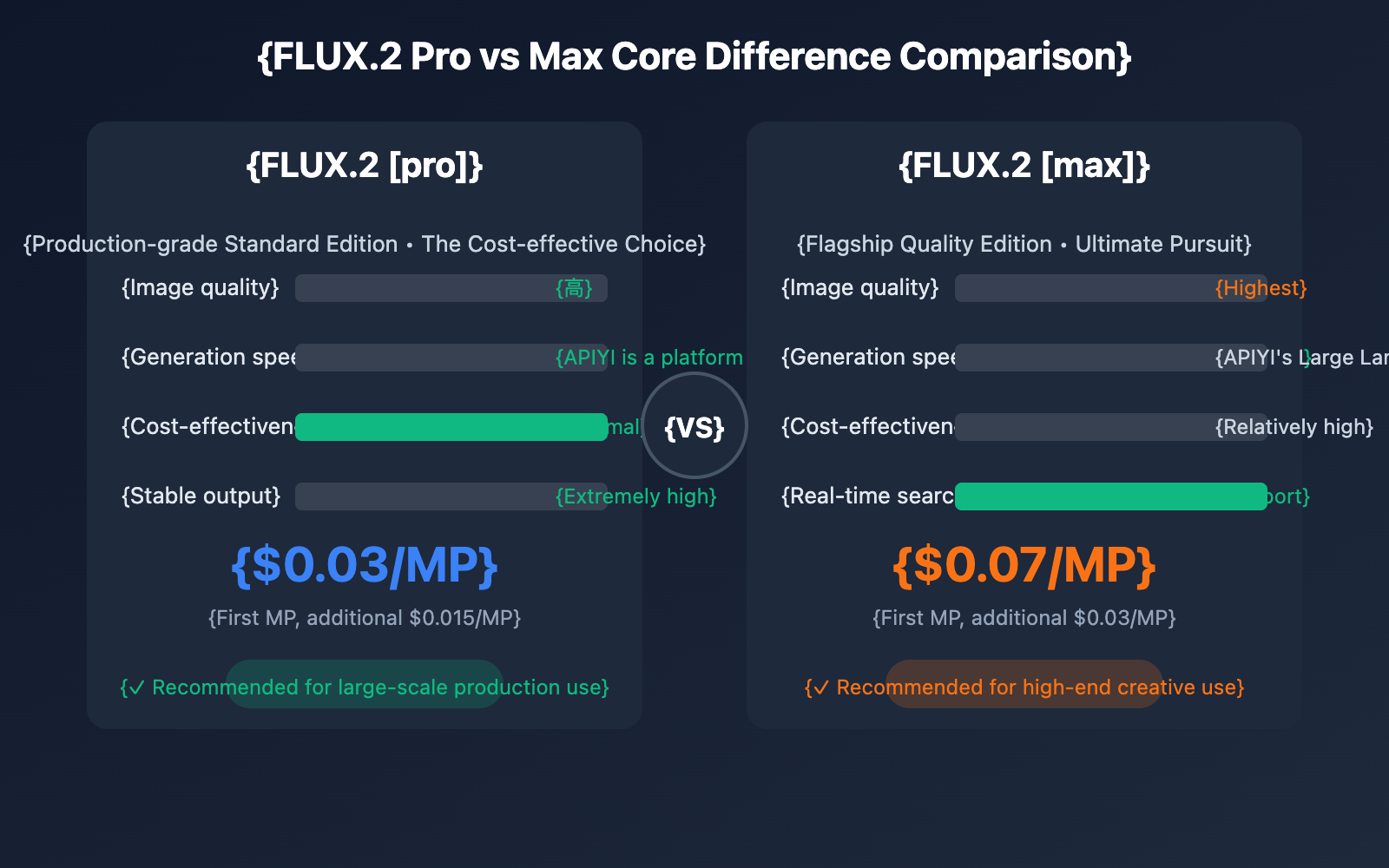
| Comparison Dimension | FLUX.2 [pro] | FLUX.2 [max] | Winner |
|---|---|---|---|
| Image Quality | High quality, production-ready | Highest quality, professional-grade | Max |
| Prompt Adherence | Strong | Strongest (24B VLM) | Max |
| Real-time Search | ❌ Not supported | ✅ Supported | Max |
| Generation Speed | <10 seconds | <15 seconds | Pro |
| Price | From $0.03/MP | From $0.07/MP | Pro |
| Stability | Extremely High | High | Pro |
| Adjustable Parameters | ❌ Fixed Optimal | ❌ Fixed Optimal | Tie |
| Use Cases | Mass production, commercial content | High-end creative, precise needs | Choose based on needs |
Selection Advice
When to choose FLUX.2 [pro]:
- Batch generation of e-commerce product photos
- Social media content creation
- Mass production of advertising assets
- Cost-sensitive projects
- When you need stable and consistent output
When to choose FLUX.2 [max]:
- High-end brand advertising creative
- Images that need to include the latest current events/information
- Artistic creation and conceptual design
- Precise restoration of complex scenes
- Professional use with extremely high quality requirements
Quickly Integrating FLUX.2 API
Method 1: Via APIYI Unified Interface (Recommended)
The APIYI platform now supports FLUX.2 Pro and FLUX.2 Max, with OpenAI-compatible API calls:
import requests

# APIYI Unified Interface
base_url = "https://api.apiyi.com/v1"

def generate_image_flux2(prompt, model="flux.2-pro", width=1024, height=1024):
    """
    Call FLUX.2 via APIYI to generate images

    Args:
        prompt: Image description
        model: flux.2-pro or flux.2-max
        width: Image width (multiple of 16, max 2048)
        height: Image height (multiple of 16, max 2048)
    """
    headers = {
        "Authorization": "Bearer YOUR_APIYI_KEY",
        "Content-Type": "application/json"
    }

    data = {
        "model": model,
        "prompt": prompt,
        "size": f"{width}x{height}",
        "response_format": "url"
    }

    response = requests.post(
        f"{base_url}/images/generations",
        json=data,
        headers=headers
    )

    result = response.json()
    return result["data"][0]["url"]


# Usage Example
image_url = generate_image_flux2(
    prompt="A professional product photo of a modern smartphone on marble surface, soft studio lighting, ultra detailed",
    model="flux.2-pro",
    width=1024,
    height=1024
)
print(f"Generated Image: {image_url}")
🚀 Quick Start: We recommend using the APIYI (apiyi.com) platform for quick FLUX.2 integration. It offers out-of-the-box API interfaces without complex configurations and supports direct calls via the OpenAI SDK.
Method 2: BFL Official API
If you need to use the Black Forest Labs official API directly:
import requests
import time

class FLUX2Client:
    """FLUX.2 Official API Client"""

    def __init__(self, api_key):
        self.api_key = api_key
        self.base_url = "https://api.bfl.ai/v1"
        self.headers = {
            "Authorization": f"Bearer {api_key}",
            "Content-Type": "application/json"
        }

    def generate(self, prompt, model="flux-2-pro", **kwargs):
        """
        Generate Image

        Args:
            prompt: Image description
            model: flux-2-pro, flux-2-max, flux-2-flex
            **kwargs: width, height, seed, output_format, safety_tolerance
        """
        endpoint = f"{self.base_url}/{model}"

        data = {
            "prompt": prompt,
            "width": kwargs.get("width", 1024),
            "height": kwargs.get("height", 1024),
            "output_format": kwargs.get("output_format", "png")
        }

        # Add optional parameters
        if "seed" in kwargs:
            data["seed"] = kwargs["seed"]
        if "safety_tolerance" in kwargs:
            data["safety_tolerance"] = kwargs["safety_tolerance"]

        response = requests.post(endpoint, json=data, headers=self.headers)
        return response.json()

    def generate_with_flex(self, prompt, steps=50, guidance=4.5, **kwargs):
        """
        Generate using FLUX.2 [flex] (supports parameter adjustment)

        Args:
            prompt: Image description
            steps: Sampling steps 1-50
            guidance: Guidance scale 1.5-10
        """
        data = {
            "prompt": prompt,
            "steps": steps,
            "guidance": guidance,
            "width": kwargs.get("width", 1024),
            "height": kwargs.get("height", 1024)
        }

        response = requests.post(
            f"{self.base_url}/flux-2-flex",
            json=data,
            headers=self.headers
        )
        return response.json()


# Usage Example
client = FLUX2Client("YOUR_BFL_API_KEY")

# Using Pro version
result = client.generate(
    prompt="A serene Japanese garden with cherry blossoms",
    model="flux-2-pro",
    width=1536,
    height=1024
)
print(f"Pro Generation Result: {result}")

# Using Max version (Highest Quality)
result_max = client.generate(
    prompt="A futuristic cityscape at night, neon lights, cyberpunk style, ultra detailed",
    model="flux-2-max",
    width=2048,
    height=2048
)
print(f"Max Generation Result: {result_max}")
View full code for asynchronous batch generation
import asyncio
import aiohttp
from typing import List, Dict

class AsyncFLUX2Client:
    """FLUX.2 Async Client, supports batch generation"""

    def __init__(self, api_key: str, base_url: str = "https://api.apiyi.com/v1"):
        self.api_key = api_key
        self.base_url = base_url
        self.headers = {
            "Authorization": f"Bearer {api_key}",
            "Content-Type": "application/json"
        }

    async def generate_single(self, session: aiohttp.ClientSession,
                              prompt: str, model: str = "flux.2-pro",
                              width: int = 1024, height: int = 1024) -> Dict:
        """Asynchronously generate a single image"""
        data = {
            "model": model,
            "prompt": prompt,
            "size": f"{width}x{height}",
            "response_format": "url"
        }

        async with session.post(
            f"{self.base_url}/images/generations",
            json=data,
            headers=self.headers
        ) as response:
            return await response.json()

    async def generate_batch(self, prompts: List[str],
                             model: str = "flux.2-pro",
                             max_concurrent: int = 5) -> List[Dict]:
        """
        Batch generate images

        Args:
            prompts: List of prompts
            model: Model version
            max_concurrent: Maximum concurrency
        """
        semaphore = asyncio.Semaphore(max_concurrent)

        async def limited_generate(session, prompt):
            async with semaphore:
                return await self.generate_single(session, prompt, model)

        async with aiohttp.ClientSession() as session:
            tasks = [limited_generate(session, p) for p in prompts]
            results = await asyncio.gather(*tasks, return_exceptions=True)

        return results


async def main():
    client = AsyncFLUX2Client("YOUR_APIYI_KEY")

    prompts = [
        "A modern minimalist living room with natural lighting",
        "A vintage coffee shop interior with warm tones",
        "A futuristic office space with holographic displays",
        "A cozy bookstore with wooden shelves",
        "A high-tech laboratory with blue lighting"
    ]

    print("Starting batch generation...")
    results = await client.generate_batch(prompts, model="flux.2-pro")

    for i, result in enumerate(results):
        if isinstance(result, Exception):
            print(f"Image {i+1} generation failed: {result}")
        else:
            print(f"Image {i+1}: {result['data'][0]['url']}")


if __name__ == "__main__":
    asyncio.run(main())
FLUX.2 API Core Parameters Explained
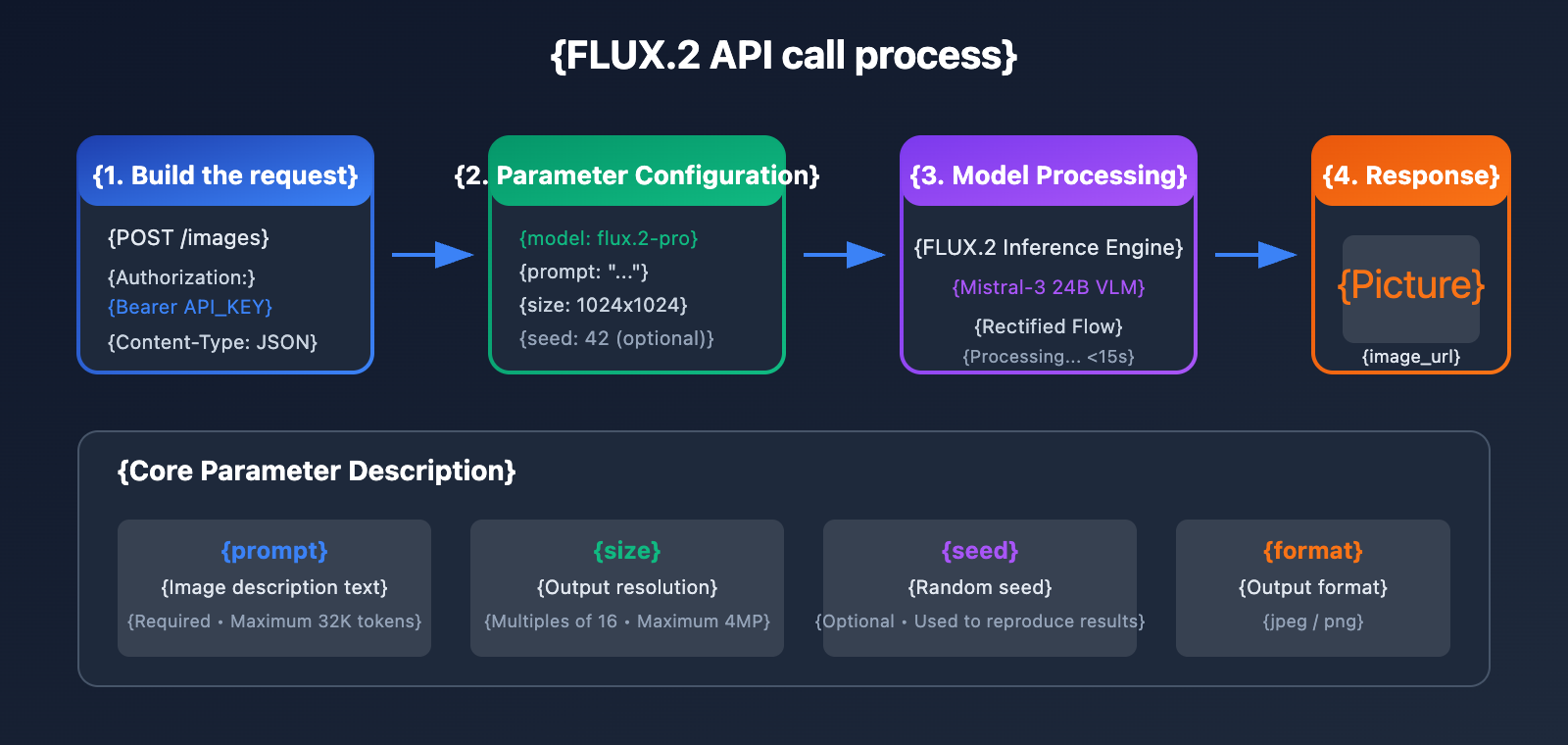
General Parameters
| Parameter | Type | Required | Description | Example Value |
|---|---|---|---|---|
prompt |
string | ✅ Yes | Image description, up to 32K tokens | "A beautiful sunset…" |
width |
int | No | Image width, must be a multiple of 16 | 1024 |
height |
int | No | Image height, must be a multiple of 16 | 1024 |
seed |
int | No | Random seed for reproducibility | 42 |
output_format |
string | No | Output format: jpeg or png | "png" |
safety_tolerance |
int | No | Safety level from 0-5 | 2 |
Resolution Configuration Suggestions
| Use Case | Recommended Resolution | Pixels | Pro Price | Max Price |
|---|---|---|---|---|
| Social Media Square | 1024×1024 | 1MP | $0.03 | $0.07 |
| Landscape Poster | 1536×1024 | 1.5MP | $0.045 | $0.10 |
| Portrait Poster | 1024×1536 | 1.5MP | $0.045 | $0.10 |
| HD Large Image | 2048×2048 | 4MP | $0.075 | $0.16 |
| Ultra-wide Banner | 2048×768 | 1.5MP | $0.045 | $0.10 |
💡 Cost Optimization: For budget-sensitive projects, you can call FLUX.2 Pro via the APIYI (apiyi.com) platform to get better pricing, which is perfect for batch generation scenarios.
FLUX.2 [flex] Exclusive Parameters
The FLUX.2 [flex] version supports fine-grained parameter control:
| Parameter | Type | Range | Default | Description |
|---|---|---|---|---|
steps |
int | 1-50 | 50 | Sampling steps; higher means better quality |
guidance |
float | 1.5-10 | 4.5 | Guidance scale; higher follows the prompt more closely |
Steps Parameter Effects:
| Steps | Quality | Speed | Use Case |
|---|---|---|---|
| 6 | Basic | Extremely Fast | Quick sketch preview |
| 20 | Good | Fast | Iterative debugging |
| 50 | Best | Standard | Final output |
Advanced Features: Multi-Image Reference & Image Editing
FLUX.2 supports up to 10 reference images, enabling advanced features like style transfer and character consistency:
import base64
import requests

def generate_with_references(prompt, reference_images, model="flux.2-pro"):
    """
    Generate with reference images

    Args:
        prompt: Image description
        reference_images: List of reference image URLs or base64 strings (max 10)
        model: Model version
    """
    headers = {
        "Authorization": "Bearer YOUR_APIYI_KEY",
        "Content-Type": "application/json"
    }

    # Process reference images
    images = []
    for img in reference_images[:10]:  # Max 10 images
        if img.startswith("http"):
            images.append({"type": "url", "url": img})
        else:
            images.append({"type": "base64", "data": img})

    data = {
        "model": model,
        "prompt": prompt,
        "reference_images": images,
        "size": "1024x1024"
    }

    response = requests.post(
        "https://api.apiyi.com/v1/images/generations",
        json=data,
        headers=headers
    )

    return response.json()


# Example usage: Maintaining character consistency
result = generate_with_references(
    prompt="Same character in a coffee shop, reading a book, warm lighting",
    reference_images=[
        "https://example.com/character_ref1.jpg",
        "https://example.com/character_ref2.jpg"
    ],
    model="flux.2-max"
)
Image Editing Features
FLUX.2 supports natural language-based image editing:
def edit_image(source_image, edit_prompt, model="flux.2-pro"):
    """
    Edit an existing image

    Args:
        source_image: Source image URL or base64
        edit_prompt: Edit instructions
        model: Model version
    """
    headers = {
        "Authorization": "Bearer YOUR_APIYI_KEY",
        "Content-Type": "application/json"
    }

    data = {
        "model": model,
        "prompt": edit_prompt,
        "image": source_image,
        "mode": "edit"
    }

    response = requests.post(
        "https://api.apiyi.com/v1/images/edits",
        json=data,
        headers=headers
    )

    return response.json()


# Example usage
result = edit_image(
    source_image="https://example.com/room.jpg",
    edit_prompt="Change the wall color to light blue, add plants near the window",
    model="flux.2-pro"
)
FLUX.2 Prompt Best Practices
FLUX.2's Mistral-3 24B vision-language model has an incredible grasp of prompts. Here are some tips to help you optimize yours:
Prompt Structure Template
[Subject Description] + [Style Definition] + [Lighting/Atmosphere] + [Detail Requirements] + [Quality Modifiers]
Great Prompt Examples
| Scenario | Prompt Example | Key Techniques |
|---|---|---|
| Product Photography | "A sleek wireless headphone on white marble surface, professional studio lighting, product photography, sharp focus, 8K" | Specify materials, lighting, and use case |
| Portrait Art | "Portrait of a woman with braided hair, golden hour lighting, soft bokeh background, film grain, Hasselblad style" | Specify camera style and time of day |
| Architectural Visualization | "Modern minimalist house exterior, sunset light, architectural visualization, photorealistic, wide angle lens" | Specify building type and perspective |
| Concept Art | "Floating islands with waterfalls, fantasy world, epic scale, volumetric lighting, matte painting style" | Describe unique elements and style |
Color Control Tips
FLUX.2 supports precise hex color control:
# Use hex color codes to ensure brand color accuracy
prompt = """
A modern tech company logo mockup on business card,
primary color: #FF6B35 (orange),
secondary color: #1A1A2E (dark navy),
clean minimalist design, professional presentation
"""
Cost Optimization and Best Practices
Pricing Calculation Examples
| Scenario | Resolution | Quantity | Pro Cost | Max Cost | Recommendation |
|---|---|---|---|---|---|
| Social Media Graphics | 1024×1024 | 100 images | $3.00 | $7.00 | Pro |
| Product Detail Pages | 1536×1024 | 50 images | $2.25 | $5.00 | Pro |
| High-end Advertising | 2048×2048 | 20 images | $1.50 | $3.20 | Max |
| Rapid Prototyping | 512×512 | 200 images | $1.50 | $3.50 | Pro/Flex |
Cost Optimization Strategies
- Resolution Optimization: Choose the right resolution based on your actual needs to avoid overspending.
- Model Selection: Use Pro for bulk content and Max for high-end masterpieces.
- Preview Iteration: Use Flex with low steps for quick previews, then switch to high-quality output once you're satisfied with the result.
- Batch Processing: Use asynchronous batch interfaces to boost efficiency.
💰 Cost Comparison: Accessing FLUX.2 via the APIYI (apiyi.com) platform gives you more flexible billing options. For users with high monthly call volumes, the platform offers tiered discounts.
FAQ
Q1: How do I choose between FLUX.2 Pro and Max?
Your choice mainly depends on your quality requirements and budget:
- FLUX.2 Pro: Perfect for 90% of production scenarios; it's cost-effective and offers stable output.
- FLUX.2 Max: Best for high-end creative work and brand advertising where you're chasing the absolute best quality.
Through the APIYI (apiyi.com) platform, you can access both versions simultaneously, making it easy to switch based on your project needs.
Q2: How can I ensure consistency in the generated results?
Using the seed parameter ensures you get consistent results with the same prompt:
result = generate_image(
    prompt="A red apple on wooden table",
    seed=12345  # 固定种子
)
The same seed + prompt + parameters = the same output image.
Q3: Does FLUX.2 support Chinese prompts?
Yes, it does. FLUX.2's Mistral-3 VLM has multilingual understanding capabilities, so Chinese prompts work just fine. However, we recommend:
- Using English prompts for complex scenarios for more stable results.
- When mixing Chinese and English, use English for the core descriptions.
- Keep technical terms in English.
Q4: What should I do if generation fails or times out?
Here's a recommended error-handling strategy:
import time
from requests.exceptions import Timeout, RequestException

def generate_with_retry(prompt, max_retries=3):
    for attempt in range(max_retries):
        try:
            result = generate_image(prompt, timeout=60)
            return result
        except Timeout:
            if attempt < max_retries - 1:
                time.sleep(2 ** attempt)  # 指数退避
            continue
        except RequestException as e:
            print(f"请求错误: {e}")
            break
    return None
The APIYI platform provides stable interface services, so timeouts are rare. If you run into any issues, you can always contact technical support.
Q5: How do I get FLUX.2 API access?
There are two ways:
- BFL Official API: Visit bfl.ai to register an account.
- APIYI Platform (Recommended): Visit apiyi.com to register and get a unified API Key without needing to apply for a separate BFL account.
The APIYI platform offers free test credits, so you can quickly verify your integration.
FLUX.2 API Integration Summary
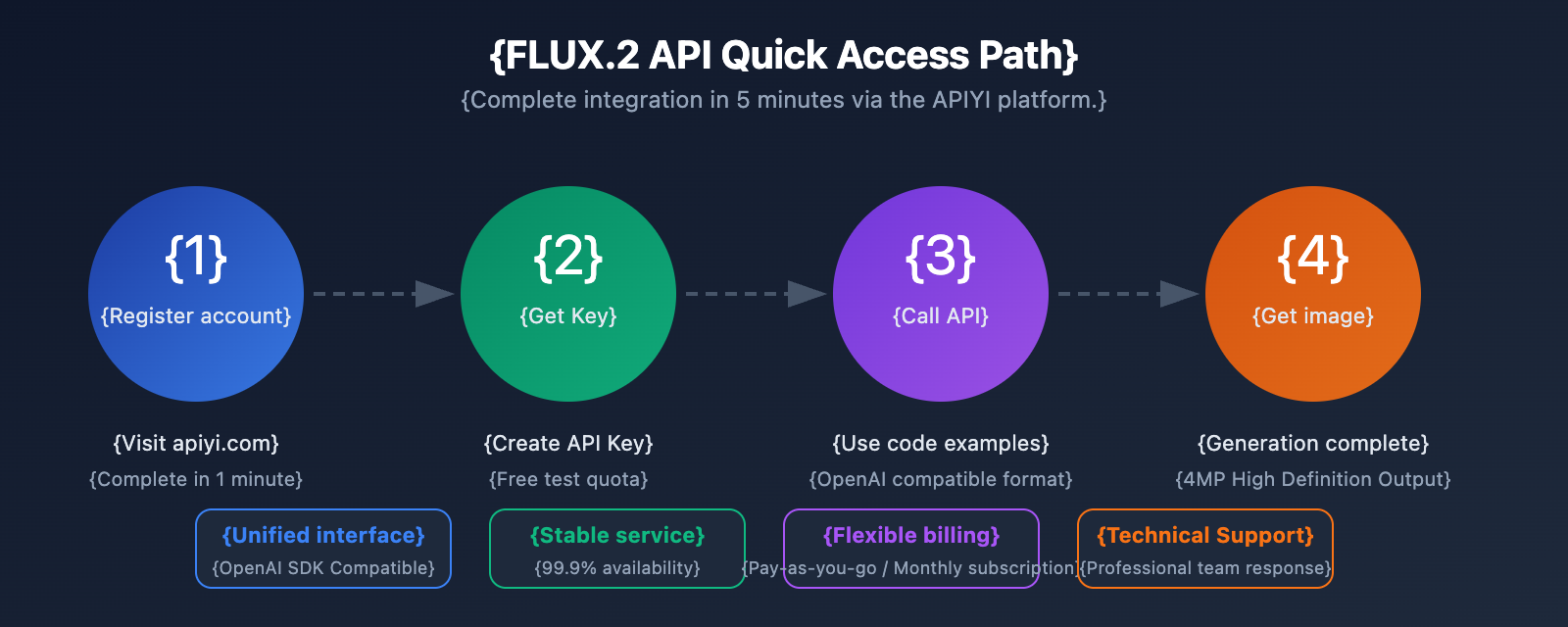
The FLUX.2 series represents the absolute forefront of current image generation technology. Here are the key takeaways from this guide:
| Key Point | Description |
|---|---|
| Model Selection | Pro is ideal for production; Max is best for high-end creative work. |
| Integration Method | We recommend using the unified APIYI interface, which is fully compatible with the OpenAI SDK. |
| Core Parameters | Prompt, size, and seed are the three most critical parameters to master. |
| Cost Optimization | Choose the right resolution for your specific needs; use Pro for high-volume batch processing. |
| Advanced Features | Supports multi-image referencing, image editing, and precise color control. |
Recommended Integration Path:
- Visit apiyi.com and sign up for an account.
- Grab your API Key from the dashboard.
- Use the code examples in this guide to get integrated quickly.
- Tweak your prompts and parameters based on the results to get the perfect output.
By using the APIYI platform, you can quickly access FLUX.2 Pro and Max while enjoying the benefits of a unified interface, stable service, and flexible billing.
Further Reading:
- FLUX.2 Official Documentation: docs.bfl.ai
- FLUX.2 Model Introduction: bfl.ai/models/flux-2
- FLUX.2 Official Blog: bfl.ai/blog/flux-2
This article was written by the APIYI technical team. For more AI model API integration solutions, feel free to visit apiyi.com