Encountering the error message "It looks like you don't have access to Flow. Click here to see our rollout areas" when visiting Google Flow (labs.google/fx/zh/tools/flow) is a common issue for users in mainland China and some overseas regions. In this article, we'll introduce 3 effective solutions, including calling the Veo 3.1 API directly to generate high-quality videos. This will help you bypass regional restrictions and jumpstart your AI video creation.
Core Value: After reading this, you'll understand why Google Flow has access restrictions and master how to call the Veo 3.1 API. You can experience top-tier AI video generation immediately without waiting for Flow to open up in your region.
Analyzing Google Flow Access Restrictions
Before diving into the solutions, we need to understand why you're hitting these Google Flow access walls.
Current Status of Google Flow Regional Restrictions
As Google's latest AI video generation tool, Flow isn't globally available yet. Here's the breakdown:
| Rollout Phase | Timing | Coverage |
|---|---|---|
| Initial Launch | May 2025 | US Only |
| First Expansion | July 2025 | 70+ Countries |
| Current Status | January 2026 | 140+ Countries (Mainland China still excluded) |
Common Reasons for Access Denial
| Reason Type | Details | Difficulty to Fix |
|---|---|---|
| Geographic Restrictions | Regions like mainland China are not supported | ⭐⭐⭐ |
| Insufficient Subscription | Requires Google AI Pro/Ultra subscription | ⭐⭐ |
| Account Eligibility | New accounts or non-Google Workspace accounts | ⭐⭐ |
| Enterprise Policy | Some corporate/government networks disable AI tools | ⭐⭐⭐⭐ |
Why a VPN Isn't Always the Best Solution
Even if you use a proxy to access Google Flow, you'll still run into these hurdles:
- Paid subscription required: Google AI Pro starts at $19.99/month, and AI Ultra is even pricier.
- Limited quota: Only 100 credits/month for Workspace users, and even Pro users have caps.
- Slow generation speeds: Expect long queues during peak times.
- Unstable experience: Network latency can mess with uploads and downloads.
🎯 Technical Suggestion: For developers and creators who need a stable way to use AI video generation, we recommend calling the Veo 3.1 API directly through the APIYI (apiyi.com) platform. It offers a stable interface for users in China, no Google AI Pro subscription required, and flexible pay-as-you-go pricing.
Deep Dive into Veo 3.1 Core Capabilities
Before choosing an alternative, let's take a look at the core capabilities of Google Veo 3.1, which is currently one of the most advanced AI video generation models available.
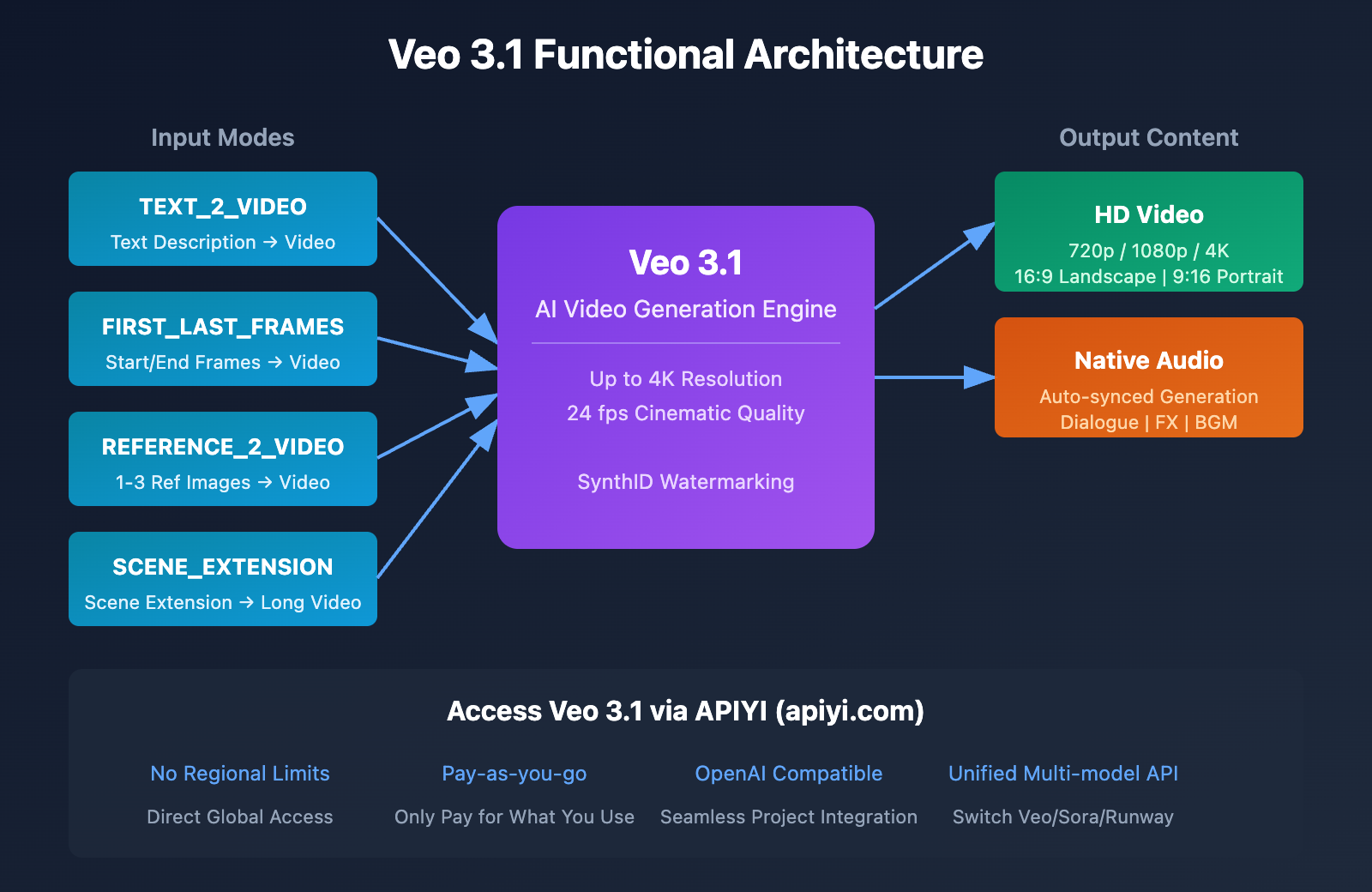
Veo 3.1 Technical Specifications
| Technical Indicator | Specification | Notes |
|---|---|---|
| Max Resolution | 4K | Supports 720p / 1080p / 4K |
| Frame Rate | 24 fps | Cinematic smoothness |
| Video Duration | 8s per generation | Can be extended to 1 min+ via scene extension |
| Aspect Ratio | 16:9 / 9:16 | Supports landscape and portrait |
| Audio Generation | Native support | Auto-synced dialogue, sound effects, and ambient sound |
| Reference Image Support | Up to 3 images | Maintains character and style consistency |
Veo 3.1 Generation Modes
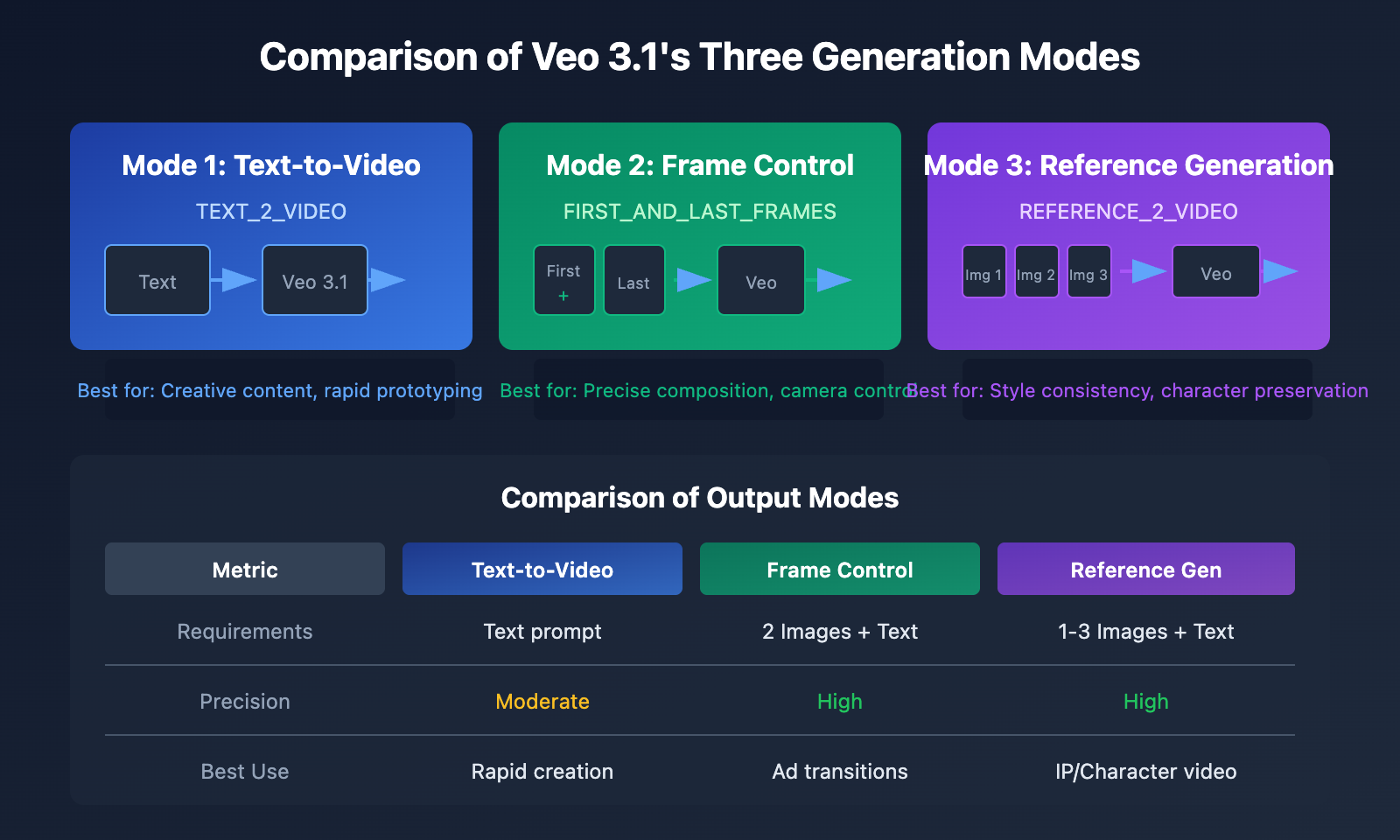
Veo 3.1 supports three core generation modes:
| Generation Mode | English Name | Use Case |
|---|---|---|
| Text-to-Video | TEXT_2_VIDEO | Generate video from pure text descriptions |
| Start/End Frame Control | FIRST_AND_LAST_FRAMES_2_VIDEO | Precisely control the starting and ending composition |
| Reference Image Generation | REFERENCE_2_VIDEO | Guide generation based on 1-3 reference images |
Native Audio Generation Capabilities
The most breakthrough feature of Veo 3.1 is Native Audio Generation:
- Dialogue Generation: Use quotation marks to specify character lines, and the model automatically generates synchronized speech.
- Sound Effect Generation: Automatically matches footsteps, ambient sounds, etc., based on the visual content.
- Background Music: Intelligently generates background music that matches the mood of the scene.
This means you'll no longer need post-production dubbing or sound editing—you get complete audiovisual content in a single generation.
3 Solutions for Limited Access to Google Flow
We offer three solutions tailored to different user needs.
Solution 1: Access Veo 3.1 API via APIYI (Recommended)
This is the most flexible and stable solution, perfect for developers and content creators.
Core Advantages
| Advantage | Explanation |
|---|---|
| No Subscription Required | No need for a Google AI Pro/Ultra subscription |
| Pay-as-you-go | Only pay for what you use, no monthly fees |
| Stable Global Access | Direct access without needing a proxy |
| Standard API Interface | OpenAI compatible format, easy to integrate |
| Multi-model Switching | Switch between Veo 3.1, Veo 3, Sora, etc., through the same interface |
Quick Start Code
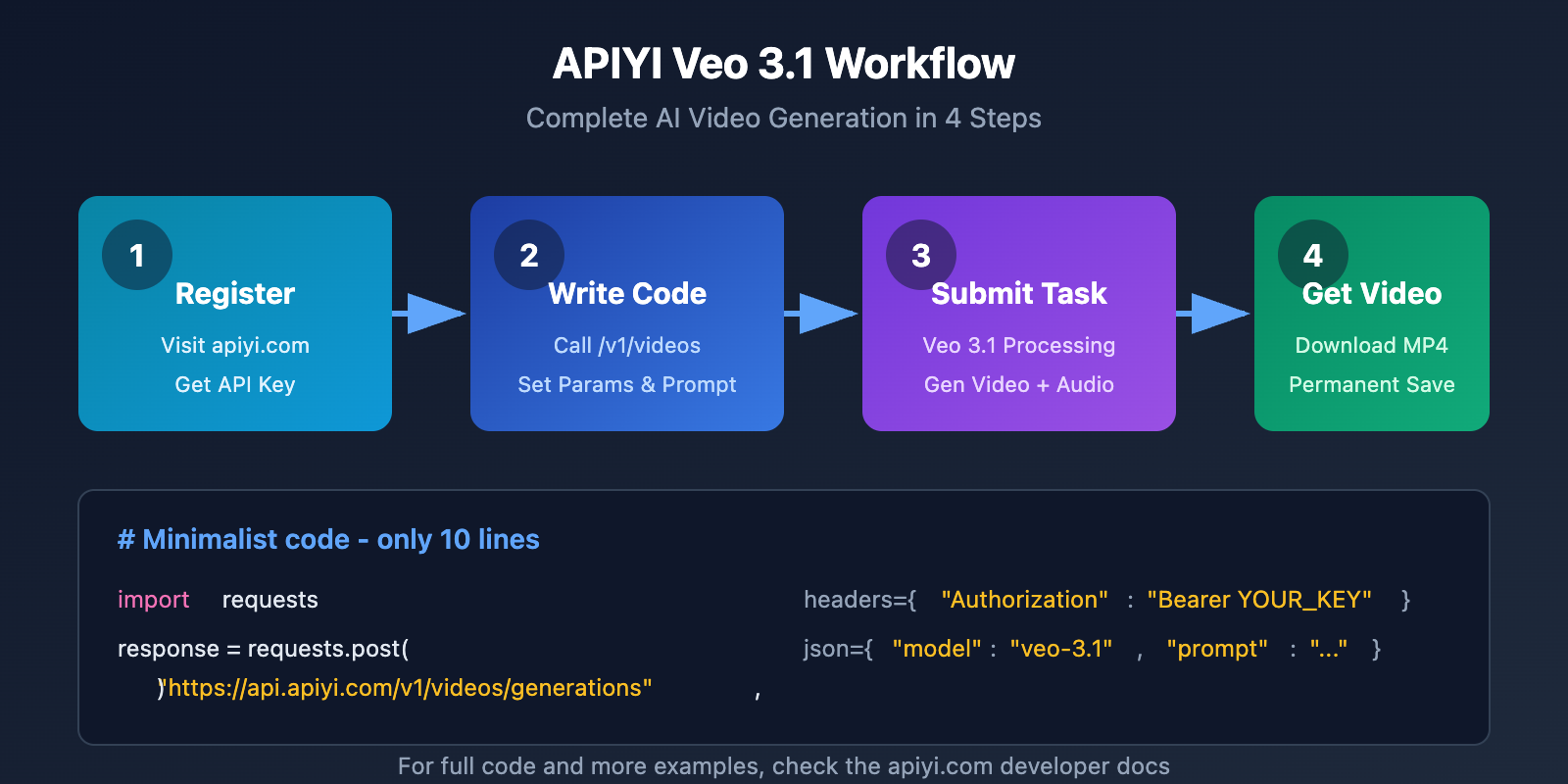
import requests
import time

# APIYI Veo 3.1 视频生成
def generate_video_veo31(prompt, aspect_ratio="16:9"):
    """
    使用 Veo 3.1 生成视频

    Args:
        prompt: 视频描述文本
        aspect_ratio: 画面比例,支持 "16:9" 或 "9:16"

    Returns:
        视频下载 URL
    """
    headers = {
        "Authorization": "Bearer YOUR_API_KEY",  # 替换为你的 APIYI 密钥
        "Content-Type": "application/json"
    }

    # 提交生成任务
    response = requests.post(
        "https://api.apiyi.com/v1/videos/generations",  # APIYI 统一接口
        headers=headers,
        json={
            "model": "veo-3.1",
            "prompt": prompt,
            "aspect_ratio": aspect_ratio,
            "duration": 8  # 8 秒视频
        }
    )

    task_id = response.json()["id"]
    print(f"任务已提交,ID: {task_id}")

    # 轮询获取结果
    while True:
        result = requests.get(
            f"https://api.apiyi.com/v1/videos/generations/{task_id}",
            headers=headers
        ).json()

        if result["status"] == "completed":
            return result["video_url"]
        elif result["status"] == "failed":
            raise Exception(f"生成失败: {result.get('error')}")

        time.sleep(5)  # 每 5 秒查询一次

# 使用示例
video_url = generate_video_veo31(
    prompt="一只金毛犬在阳光下的草地上奔跑,慢动作镜头,背景是蓝天白云,电影级画质",
    aspect_ratio="16:9"
)
print(f"视频已生成: {video_url}")
View full code with audio generation
import requests
import time
import os

class Veo31VideoGenerator:
    """Veo 3.1 视频生成器 - 支持原生音频"""

    def __init__(self, api_key):
        self.api_key = api_key
        self.base_url = "https://api.apiyi.com/v1"  # APIYI 统一接口
        self.headers = {
            "Authorization": f"Bearer {api_key}",
            "Content-Type": "application/json"
        }

    def text_to_video(self, prompt, aspect_ratio="16:9", with_audio=True):
        """
        文生视频 (TEXT_2_VIDEO)

        Args:
            prompt: 视频描述,可包含对话 (使用引号)
            aspect_ratio: "16:9" 横屏 或 "9:16" 竖屏
            with_audio: 是否生成原生音频

        Returns:
            dict: 包含 video_url 和 status 的结果
        """
        payload = {
            "model": "veo-3.1",
            "mode": "TEXT_2_VIDEO",
            "prompt": prompt,
            "aspect_ratio": aspect_ratio,
            "generate_audio": with_audio,
            "duration": 8
        }

        return self._submit_and_wait(payload)

    def first_last_frame_to_video(self, prompt, first_frame_url, last_frame_url):
        """
        首尾帧控制生成 (FIRST_AND_LAST_FRAMES_2_VIDEO)

        Args:
            prompt: 视频过渡描述
            first_frame_url: 第一帧图片 URL
            last_frame_url: 最后一帧图片 URL

        Returns:
            dict: 生成结果
        """
        payload = {
            "model": "veo-3.1",
            "mode": "FIRST_AND_LAST_FRAMES_2_VIDEO",
            "prompt": prompt,
            "first_frame": first_frame_url,
            "last_frame": last_frame_url,
            "duration": 8
        }

        return self._submit_and_wait(payload)

    def reference_to_video(self, prompt, reference_images):
        """
        参考图生成 (REFERENCE_2_VIDEO)

        Args:
            prompt: 视频描述
            reference_images: 参考图 URL 列表 (1-3 张)

        Returns:
            dict: 生成结果
        """
        if len(reference_images) > 3:
            raise ValueError("最多支持 3 张参考图")

        payload = {
            "model": "veo-3.1",
            "mode": "REFERENCE_2_VIDEO",
            "prompt": prompt,
            "reference_images": reference_images,
            "duration": 8
        }

        return self._submit_and_wait(payload)

    def extend_video(self, previous_video_url, extension_prompt):
        """
        场景扩展 - 基于上一个视频的最后一帧继续生成

        Args:
            previous_video_url: 上一个视频的 URL
            extension_prompt: 扩展场景描述

        Returns:
            dict: 新视频结果
        """
        payload = {
            "model": "veo-3.1",
            "mode": "SCENE_EXTENSION",
            "previous_video": previous_video_url,
            "prompt": extension_prompt,
            "duration": 8
        }

        return self._submit_and_wait(payload)

    def _submit_and_wait(self, payload, max_wait=300):
        """提交任务并等待完成"""

        # 提交任务
        response = requests.post(
            f"{self.base_url}/videos/generations",
            headers=self.headers,
            json=payload
        )

        if response.status_code != 200:
            raise Exception(f"提交失败: {response.text}")

        task_id = response.json()["id"]
        print(f"✅ 任务提交成功,ID: {task_id}")

        # 轮询等待
        start_time = time.time()
        while time.time() - start_time < max_wait:
            result = requests.get(
                f"{self.base_url}/videos/generations/{task_id}",
                headers=self.headers
            ).json()

            status = result.get("status")

            if status == "completed":
                print(f"🎬 视频生成完成!")
                return {
                    "status": "success",
                    "video_url": result["video_url"],
                    "duration": result.get("duration", 8),
                    "resolution": result.get("resolution", "1080p")
                }
            elif status == "failed":
                raise Exception(f"生成失败: {result.get('error')}")
            else:
                progress = result.get("progress", 0)
                print(f"⏳ 生成中... {progress}%")

            time.sleep(5)

        raise TimeoutError("生成超时,请稍后查询结果")


# ========== 使用示例 ==========

if __name__ == "__main__":
    # 初始化生成器
    generator = Veo31VideoGenerator(api_key="YOUR_API_KEY")

    # 示例 1: 文生视频 (带对话音频)
    result = generator.text_to_video(
        prompt='''
        一位年轻女性站在咖啡店柜台前,微笑着说:"我要一杯拿铁"。
        咖啡师点头回应:"好的,稍等"。
        背景是温馨的咖啡店氛围,轻柔的爵士乐。
        ''',
        aspect_ratio="16:9",
        with_audio=True
    )
    print(f"视频地址: {result['video_url']}")

    # 示例 2: 首尾帧控制 (精确构图)
    result = generator.first_last_frame_to_video(
        prompt="镜头从特写逐渐拉远,展示整个城市天际线",
        first_frame_url="https://example.com/closeup.jpg",
        last_frame_url="https://example.com/skyline.jpg"
    )

    # 示例 3: 生成长视频 (多次扩展)
    clips = []

    # 生成第一个片段
    clip1 = generator.text_to_video("日出时分,海面波光粼粼,一艘帆船缓缓驶来")
    clips.append(clip1["video_url"])

    # 扩展后续片段
    clip2 = generator.extend_video(clip1["video_url"], "帆船靠近港口,渔民开始忙碌")
    clips.append(clip2["video_url"])

    clip3 = generator.extend_video(clip2["video_url"], "渔民们满载而归,脸上洋溢着笑容")
    clips.append(clip3["video_url"])

    print(f"已生成 3 个连续片段: {clips}")
🚀 Quick Start: We recommend using the APIYI (apiyi.com) platform to quickly experience Veo 3.1. It provides out-of-the-box API interfaces with no complex configuration required—just register to get test credits.
Solution 2: Use APIYI's Video Generation Tool
If you're not comfortable with coding, APIYI also provides an online visual tool that allows you to generate videos without writing a single line of code.
Steps to Use
- Visit apiyi.com and register an account.
- Go to "AI Tools" -> "Video Generation."
- Select the Veo 3.1 model.
- Enter your video description (supports both Chinese and English).
- Choose the aspect ratio and resolution.
- Click generate and wait for the results.
Feature Comparison
| Feature | Google Flow | APIYI Online Tool |
|---|---|---|
| Access Restrictions | Regional limits + Subscription | No regional limits |
| Language Support | Best in English only | Supports both English and Chinese |
| Generation Speed | Affected by queuing | Relatively fast |
| Result Storage | Expires after 2 days | Permanent storage |
| Payment Method | Monthly subscription | Pay-per-use / Pay-as-you-go |
| API Access | Available | Available |
Solution 3: Wait for Google Flow Regional Expansion
If you're in no rush, you can choose to wait for Google to continue expanding the availability of Flow to more regions.
According to Google's expansion history:
- May 2025: Initial launch in the US.
- July 2025: Expanded to 70+ countries.
- Late July 2025: Expanded to 140+ countries.
Projected Trend: Google will likely continue to expand its coverage over the coming months, though it's still uncertain when access will be fully opened to mainland China.
Veo 3.1 API Implementation Guide
This section provides a detailed walkthrough of API call methods for various real-world scenarios.
Scenario 1: Short Video Content Creation
Perfect for vertical content on platforms like TikTok or Instagram Reels.
# Generate vertical short video
result = generator.text_to_video(
    prompt="""
    A food blogger frosting a cake in a kitchen,
    extreme close-up shot showing the smooth application of cream,
    final shot of the beautiful finished cake, upbeat background music
    """,
    aspect_ratio="9:16",  # Vertical aspect ratio
    with_audio=True
)
Scenario 2: E-commerce Product Display
Creates 360-degree product showcase videos, ideal for product detail pages.
# Product showcase video
result = generator.text_to_video(
    prompt="""
    A high-end mechanical watch rotating slowly against a sleek black background,
    dramatic side lighting highlighting the metallic texture and intricate dial details,
    cinematic 360-degree orbital shot, professional product commercial style
    """,
    aspect_ratio="16:9",
    with_audio=False  # Audio usually isn't needed for product displays
)
Scenario 3: Ad Creative Testing
Quickly generate multiple versions of ad creatives for A/B testing.
# Batch generate ad creatives
prompts = [
    "Young couple on a romantic date at a cafe, trying out a new drink, warm and cozy atmosphere",
    "Business professional in a modern office, grabbing a coffee to stay focused, professional and efficient vibe",
    "College student in a library studying late, coffee by their side, youthful and energetic scene"
]

for i, prompt in enumerate(prompts):
    result = generator.text_to_video(prompt, aspect_ratio="16:9")
    print(f"Creative Version {i+1}: {result['video_url']}")
Scenario 4: Long-form Video Production
Use the scene extension feature to generate coherent videos that run for over a minute.
# Generate a brand story long-form video
scenes = [
    "Early morning, a small cafe just opening its doors, the owner preparing the first cup of coffee",
    "Customers start arriving, the shop gradually fills with life and the aroma of coffee",
    "Afternoon sunlight streaming through the window, an old customer reading peacefully in the corner",
    "Evening, the owner smiling while saying goodbye to the last guest and closing the shop",
]

video_clips = []
previous_clip = None

for scene in scenes:
    if previous_clip is None:
        result = generator.text_to_video(scene)
    else:
        result = generator.extend_video(previous_clip, scene)

    video_clips.append(result["video_url"])
    previous_clip = result["video_url"]

print(f"Generated {len(video_clips)} sequential clips, totaling approx {len(video_clips) * 8} seconds")
Veo 3.1 vs. Other AI Video Models
When choosing an AI video generation model, it's important to understand the unique characteristics of each.
| Comparison Metric | Veo 3.1 | Sora | Runway Gen-3 | Pika 2.0 |
|---|---|---|---|---|
| Max Resolution | 4K | 1080p | 4K | 1080p |
| Max Clip Duration | 8s | 60s | 10s | 5s |
| Native Audio | ✅ Supported | ✅ Supported | ❌ Not Supported | ❌ Not Supported |
| Start/End Frame Control | ✅ Supported | ✅ Supported | ✅ Supported | ✅ Supported |
| Reference Images | Up to 3 | Up to 1 | Up to 1 | Up to 1 |
| Scene Expansion | ✅ Supported | ✅ Supported | ❌ Not Supported | ❌ Not Supported |
| Chinese Prompting | ⭐⭐⭐ | ⭐⭐⭐⭐ | ⭐⭐ | ⭐⭐ |
| APIYI Support | ✅ | ✅ | ✅ | ✅ |
💡 Recommendation: Which model you should choose depends mostly on your specific use case. If you need native audio and 4K quality, Veo 3.1 is currently your best bet. If you need ultra-long videos, Sora can generate up to 60 seconds in one go. We recommend trying them out on the APIYI (apiyi.com) platform, which provides a unified interface for all these models.
Recommended Use Cases for Each Model
| Use Case | Recommended Model | Why? |
|---|---|---|
| Short video content creation | Veo 3.1 | Native audio + high resolution |
| Long videos/Short films | Sora | Best-in-class 60s single clip |
| Product showcase ads | Veo 3.1 / Runway | 4K high resolution |
| Rapid creative testing | Pika 2.0 | Fast generation speed |
| Character consistency videos | Veo 3.1 | Supports up to 3 reference images |
FAQ
Q1: What’s the difference between APIYI’s Veo 3.1 API and the official Google API?
The APIYI platform accesses Veo 3.1 capabilities through official channels, so technically it's identical to the Google official API. The main differences are:
- Accessibility: No need for a VPN; you can access it directly.
- Payment Method: Pay-as-you-go, so you don't need a Google AI Pro subscription.
- Interface Format: Provides an OpenAI-compatible format for easier integration.
- Flexible Quotas: You aren't tied to Google's monthly credit limits.
You can get free test credits at apiyi.com to quickly verify the results.
Q2: Will videos generated by Veo 3.1 have watermarks?
All videos generated via Veo 3.1 include a SynthID invisible watermark, which is Google's technology for identifying AI-generated content. This watermark:
- Is invisible to the naked eye
- Doesn't affect video quality
- Can be identified by specialized detection tools
- Complies with AI content labeling standards
This is a security measure from Google, and any channel you use to call Veo 3.1 will include this watermark.
Q3: How can I improve the quality of videos generated by Veo 3.1?
Optimizing your prompt is key. We suggest including the following elements:
| Element | Example | Purpose |
|---|---|---|
| Subject Description | A Golden Retriever | Clearly identifies the main subject |
| Action/State | Running on a grassy field | Defines the movement |
| Camera Language | Slow motion, close-up, orbit shot | Controls the filming style |
| Lighting/Atmosphere | Sunlight, dusk, studio lighting | Sets the mood |
| Visual Style | Cinematic, documentary style, animated | Defines the overall look |
| Audio Prompt | Upbeat music, "dialogue content" | Controls the sound |
Q4: How long are the generated videos saved?
- Official Google: You need to download within 2 days, or they'll be deleted.
- APIYI Platform: Videos are saved permanently in your account, so you can download them whenever you like.
Q5: Can I use them for commercial purposes?
According to Google's Terms of Service, content generated with Veo 3.1 can be used for commercial purposes, but you need to:
- Ensure prompts and reference images don't infringe on others' intellectual property.
- Avoid generating prohibited content (violence, adult content, etc.).
- Comply with local laws and regulations.
The APIYI platform follows these same guidelines.
Prompt Writing Techniques
Mastering Veo 3.1's prompt writing techniques can significantly boost the quality of your generations.
Structured Prompt Template
[Subject] + [Action] + [Environment] + [Camera] + [Style] + [Audio]
Example:
A young woman in a red dress (Subject)
walking down the streets of Paris (Action)
with the Eiffel Tower and cafes in the background (Environment)
tracking shot, medium shot (Camera)
French New Wave cinema style, film grain texture (Style)
soft accordion music, with occasional street hustle and bustle (Audio)
Audio Generation Tips
| Audio Type | How to Write Prompts | Example |
|---|---|---|
| Dialogue | Use quotation marks | She says: "The weather is lovely today." |
| Sound Effects | Clearly describe the sound source | Footsteps echoing down a hallway |
| Ambience | Describe environmental features | A busy cafe, clinking of cups and plates |
| Background Music | Describe music genre and mood | Upbeat jazz, joyful atmosphere |
Common Issues & Solutions
| Issue | Possible Cause | Solution |
|---|---|---|
| Shaky footage | No camera stability specified | Add "stable camera" or "tripod shot" |
| Character distortion | Description isn't specific enough | Detail physical traits or use reference images |
| Style mismatch | Vague style keywords | Use specific movie or director style references |
| Audio out of sync | Conflict between action and dialogue | Simplify the scene and reduce simultaneous events |
Summary
While restricted access to Google Flow is a real hurdle for many users, it doesn't mean you have to miss out on the power of Veo 3.1.
Comparison of Three Solutions
| Solution | Best For | Pros | Cons |
|---|---|---|---|
| APIYI API Call | Developers, tech teams | Flexible, integrable, no regional restrictions | Requires coding skills |
| APIYI Online Tools | Content creators | No-code, easy to start | Relatively fixed features |
| Wait for Flow | Patient users | Official experience | Uncertain timeline |
Key Recommendations
- If you need it now: Choose the APIYI platform; you can start generating in just 5 minutes.
- Value for money: APIYI's pay-as-you-go model is more flexible than a subscription.
- For long-term integration: The APIYI API provides stable interfaces for production environments.
- Multi-model needs: APIYI supports a unified interface for Veo 3.1, Sora, Runway, and more.
We recommend quickly verifying Veo 3.1's performance via APIYI at apiyi.com. The platform offers free testing credits, so you can start experimenting as soon as you sign up.
References
-
Google Labs Flow Help Center: Official User Guide
- Link:
support.google.com/labs/answer/16353333
- Link:
-
Veo 3.1 Developer Documentation: Gemini API Video Generation Guide
- Link:
ai.google.dev/gemini-api/docs/video
- Link:
-
Google DeepMind Veo Introduction: Model Technical Background
- Link:
deepmind.google/models/veo
- Link:
-
Vertex AI Veo 3.1 Documentation: Enterprise-grade API Documentation
- Link:
docs.cloud.google.com/vertex-ai/generative-ai/docs/models/veo/3-1-generate
- Link:
This article was written by the APIYI technical team. If you have any questions, feel free to visit apiyi.com for technical support.