In today's era of highly developed instant messaging applications, Telegram has become the preferred platform for developers thanks to its powerful Bot API and open ecosystem. Integrating Nano Banana Pro (Gemini 3 Pro Image model) into Telegram enables users to generate high-quality AI images directly within the chat interface without needing to switch to other apps or web pages. This article provides an in-depth analysis of the Telegram Bot API technical architecture and offers a complete implementation solution based on the APIYi platform.
Telegram Bot API Technical Analysis
The Telegram Bot API is an open interface officially provided by Telegram that allows developers to create automated programs to interact with users. Compared to bots on other instant messaging platforms, Telegram Bots have unique technical advantages.
Core Architecture Features
1. Fully Open HTTP API
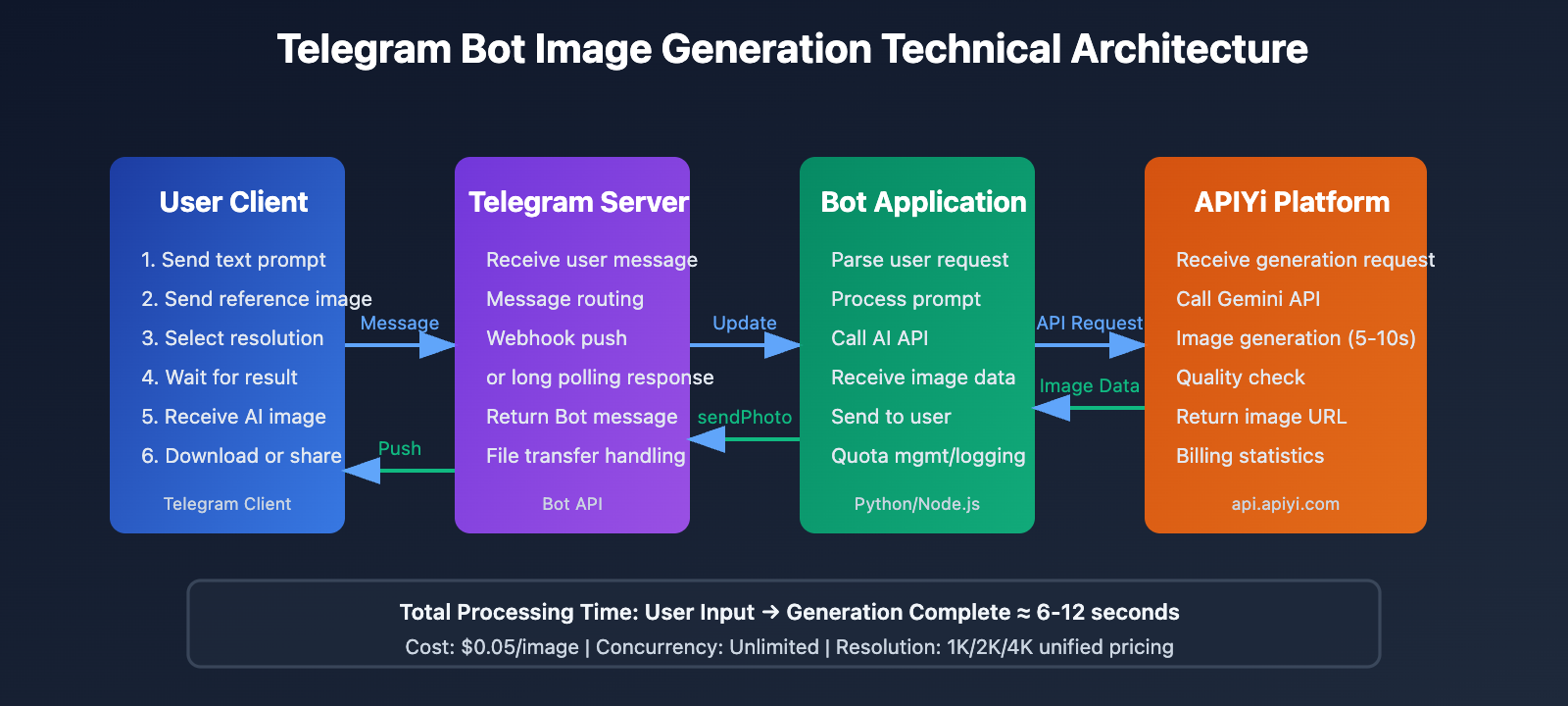
The Telegram Bot API is based on standard HTTPS protocol, with all interactions completed through RESTful API. Developers only need to send HTTP requests to https://api.telegram.org/bot<token>/method to invoke various functions, without requiring complex SDK integration.
2. Dual Mode: Webhook and Long Polling
Telegram supports two methods for receiving messages:
- Long Polling: The bot actively requests message updates from the Telegram server, suitable for development and testing environments
- Webhook: The Telegram server actively pushes messages to a specified HTTPS address, suitable for production environments with better real-time performance
3. Rich Message Type Support
Bots can send and receive various types of messages:
- Text messages, images, videos, documents
- Inline Keyboard and Reply Keyboard
- Media Groups
- Polls, geolocation, etc.
4. File Processing Capabilities
Telegram Bots support file upload and download:
- Download file limit: ≤20 MB
- Upload file limit: ≤50 MB
- Support for quick file reference via file_id
Why Choose Telegram for AI Image Generation Integration?
User Experience Advantages:
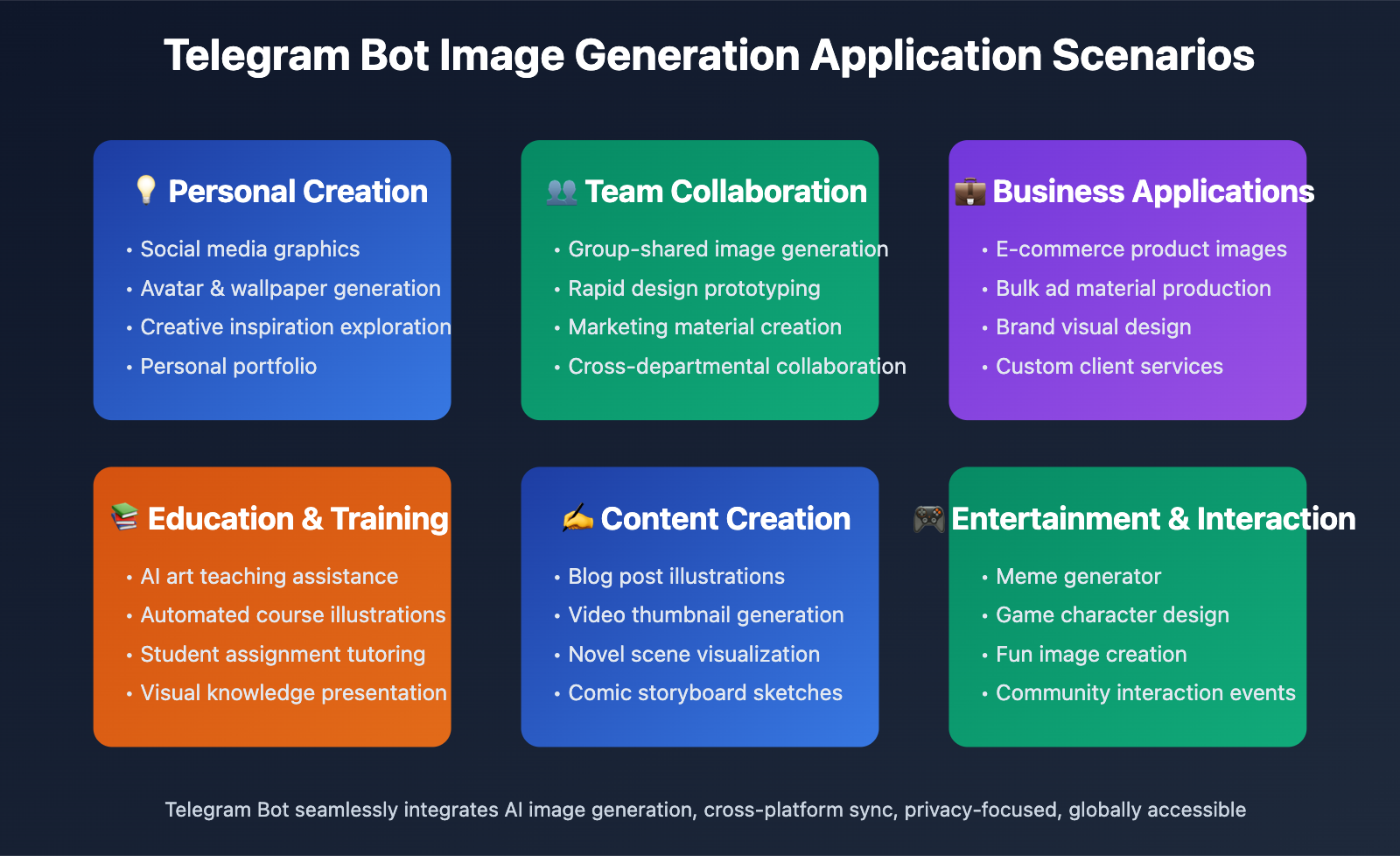
- Seamless Integration: Users don't need to download additional apps and can generate images within their commonly used chat tool
- Strong Privacy: Telegram supports end-to-end encryption to protect user privacy
- Cross-Platform Sync: Generated images automatically sync to all devices
- Group Collaboration: Can be used in groups for team members to share image generation capabilities
Technical Implementation Advantages:
- Simple Deployment: No frontend development required, Bot API handles all interface interactions
- Low Cost: Telegram Bot is completely free with no concurrency limits
- Strong Scalability: Easy to add more AI capabilities (text generation, voice recognition, etc.)
- Global Availability: Telegram is available in most regions worldwide with a large user base
🎯 Technical Recommendation: Integrating Nano Banana Pro into Telegram is an ideal solution for building AI image generation services. We recommend calling the Gemini 3 Pro Image API through the APIYi platform (apiyi.com), which provides the
gemini-3-pro-image-previewinterface supporting multiple resolutions (1K, 2K, 4K) at only $0.05 per call, reducing costs by 80% compared to the official API, with no concurrency limits—perfect for Telegram Bot's high-frequency call scenarios.
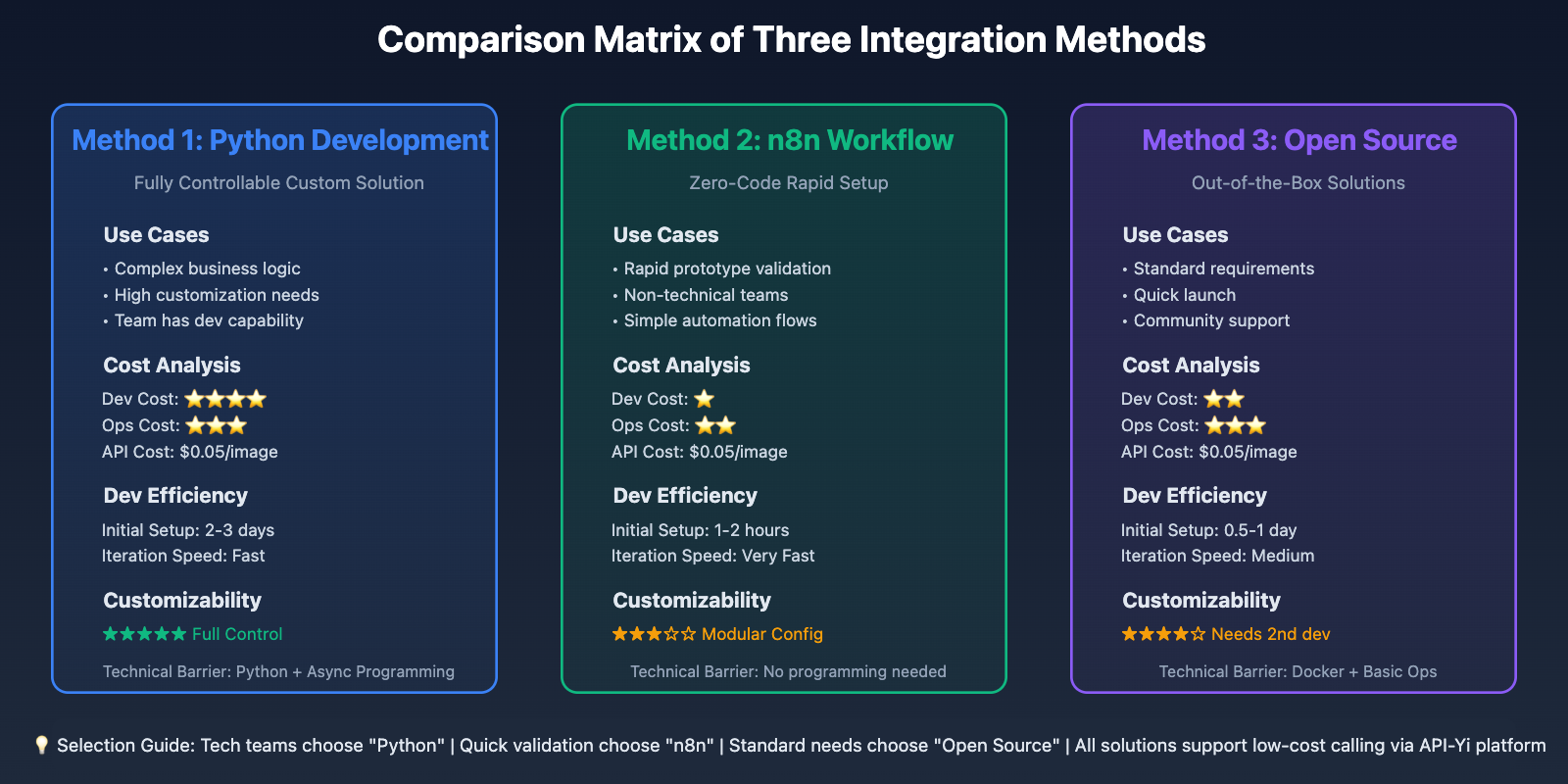
3 Methods to Connect Nano Banana Pro to Telegram
Method 1: Direct Python Development — Fully Controllable Custom Solution
Applicable Scenarios: Deep customization needs, complete code control, long-term maintenance and operation
This is the most flexible solution, suitable for developers with some Python experience. Build a complete Bot application using the python-telegram-bot library.
Tech Stack:
- Language: Python 3.9+
- Core Library: python-telegram-bot (async version 20.x)
- AI Interface: Gemini 3 Pro Image API from API-Yi platform
- Deployment: Docker + Cloud Server (or local server)
Complete Implementation Code:
Here's a fully functional Telegram image generation bot implementation:
import os
import asyncio
import requests
import base64
from telegram import Update
from telegram.ext import (
    Application,
    CommandHandler,
    MessageHandler,
    filters,
    ContextTypes
)

class NanoBananaBot:
    def __init__(self, telegram_token: str, apiyi_key: str):
        """Initialize bot"""
        self.telegram_token = telegram_token
        self.apiyi_key = apiyi_key
        self.apiyi_base_url = "https://api.apiyi.com"

    async def start_command(self, update: Update, context: ContextTypes.DEFAULT_TYPE):
        """Handle /start command"""
        welcome_message = """
🎨 Welcome to Nano Banana Pro Image Generation Bot!

Based on Google Gemini 3 Pro Image model, generating high-quality AI images for you.

📝 Usage:
1. Send text description directly, e.g., "a cute orange cat napping in the sunlight"
2. Use /generate command, e.g., /generate futuristic city night view with tech aesthetic
3. Use /hd to generate 4K high-resolution images, e.g., /hd cosmic space wallpaper

⚙️ Available Commands:
/start - Display welcome message
/generate <prompt> - Generate 2K image (default)
/hd <prompt> - Generate 4K high-resolution image
/help - View help documentation

💡 Tip: The more detailed your description, the better the result!
        """
        await update.message.reply_text(welcome_message)

    async def help_command(self, update: Update, context: ContextTypes.DEFAULT_TYPE):
        """Handle /help command"""
        help_text = """
🔍 Nano Banana Pro Usage Tips:

📌 Basic Prompt Template:
- Subject description + style + details
- Example: "a Japanese garden, Miyazaki animation style, falling cherry blossoms, soft lighting"

🎨 Common Style Keywords:
- Photography: professional photography, macro, wide-angle, portrait photography
- Art Styles: oil painting, watercolor, illustration, cyberpunk, vaporwave
- 3D Styles: 3D rendering, C4D, Blender, realistic 3D

⚡ Resolution Options:
- /generate - 2048x2048 (suitable for quick preview)
- /hd - 4096x4096 (suitable for printing and wallpapers)

💰 Pricing:
- 2K resolution: $0.05/image
- 4K resolution: $0.05/image (API-Yi unified pricing)
        """
        await update.message.reply_text(help_text)

    async def generate_image(
        self,
        prompt: str,
        resolution: str = "2048x2048",
        reference_image: str = None
    ) -> tuple[str, str]:
        """Call API-Yi platform to generate image"""
        url = f"{self.apiyi_base_url}/v1/images/generations"
        headers = {
            "Authorization": f"Bearer {self.apiyi_key}",
            "Content-Type": "application/json"
        }

        payload = {
            "model": "gemini-3-pro-image-preview",
            "prompt": prompt,
            "resolution": resolution,
            "num_images": 1
        }

        # Add reference image to request if provided
        if reference_image:
            payload["reference_images"] = [reference_image]

        try:
            response = requests.post(url, headers=headers, json=payload, timeout=60)
            response.raise_for_status()

            result = response.json()
            image_url = result["data"][0]["url"]

            # Download image
            img_response = requests.get(image_url, timeout=30)
            img_response.raise_for_status()

            return img_response.content, image_url

        except requests.exceptions.RequestException as e:
            raise Exception(f"API call failed: {str(e)}")

    async def handle_generate_command(
        self,
        update: Update,
        context: ContextTypes.DEFAULT_TYPE,
        resolution: str = "2048x2048"
    ):
        """Handle image generation command"""
        # Get prompt
        if context.args:
            prompt = " ".join(context.args)
        else:
            await update.message.reply_text(
                "❌ Please provide image description, example:\n/generate a cute orange cat"
            )
            return

        # Send processing notification
        processing_msg = await update.message.reply_text(
            f"🎨 Generating image...\n"
            f"📝 Prompt: {prompt}\n"
            f"📐 Resolution: {resolution}\n"
            f"⏱️ Estimated time: 5-10 seconds"
        )

        try:
            # Call API to generate image
            image_data, image_url = await asyncio.to_thread(
                self.generate_image,
                prompt=prompt,
                resolution=resolution
            )

            # Send image
            await update.message.reply_photo(
                photo=image_data,
                caption=f"✅ Generated successfully!\n\n📝 Prompt: {prompt}\n📐 Resolution: {resolution}"
            )

            # Delete processing message
            await processing_msg.delete()

        except Exception as e:
            await processing_msg.edit_text(
                f"❌ Generation failed: {str(e)}\n\n"
                f"💡 Please check your prompt or try again later"
            )

    async def generate_command(self, update: Update, context: ContextTypes.DEFAULT_TYPE):
        """Handle /generate command (2K resolution)"""
        await self.handle_generate_command(update, context, "2048x2048")

    async def hd_command(self, update: Update, context: ContextTypes.DEFAULT_TYPE):
        """Handle /hd command (4K resolution)"""
        await self.handle_generate_command(update, context, "4096x4096")

    async def handle_text_message(
        self,
        update: Update,
        context: ContextTypes.DEFAULT_TYPE
    ):
        """Handle plain text messages (direct image generation)"""
        prompt = update.message.text

        # Ignore messages that are too short
        if len(prompt) < 3:
            await update.message.reply_text(
                "💡 Prompt too short, please provide a more detailed description"
            )
            return

        # Call generation logic (default 2K)
        context.args = [prompt]
        await self.handle_generate_command(update, context, "2048x2048")

    async def handle_photo_message(
        self,
        update: Update,
        context: ContextTypes.DEFAULT_TYPE
    ):
        """Handle photo messages (image-to-image feature)"""
        # Get user-sent image
        photo = update.message.photo[-1]  # Get highest resolution version
        file = await context.bot.get_file(photo.file_id)

        # Download image
        photo_data = await file.download_as_bytearray()
        photo_base64 = base64.b64encode(photo_data).decode()

        # Get caption (if any)
        caption = update.message.caption or "Maintain original style, generate similar image"

        processing_msg = await update.message.reply_text(
            f"🎨 Generating based on reference image...\n"
            f"📝 Prompt: {caption}\n"
            f"⏱️ Estimated time: 5-10 seconds"
        )

        try:
            # Call API (with reference image)
            image_data, image_url = await asyncio.to_thread(
                self.generate_image,
                prompt=caption,
                resolution="2048x2048",
                reference_image=photo_base64
            )

            await update.message.reply_photo(
                photo=image_data,
                caption=f"✅ Generated successfully based on reference image!\n\n📝 Prompt: {caption}"
            )

            await processing_msg.delete()

        except Exception as e:
            await processing_msg.edit_text(
                f"❌ Generation failed: {str(e)}"
            )

    def run(self):
        """Start bot"""
        # Create Application
        app = Application.builder().token(self.telegram_token).build()

        # Register command handlers
        app.add_handler(CommandHandler("start", self.start_command))
        app.add_handler(CommandHandler("help", self.help_command))
        app.add_handler(CommandHandler("generate", self.generate_command))
        app.add_handler(CommandHandler("hd", self.hd_command))

        # Register message handlers
        app.add_handler(MessageHandler(
            filters.TEXT & ~filters.COMMAND,
            self.handle_text_message
        ))
        app.add_handler(MessageHandler(
            filters.PHOTO,
            self.handle_photo_message
        ))

        # Start Bot (using polling mode)
        print("🤖 Nano Banana Pro Bot starting...")
        print("✅ Bot started, waiting for messages...")
        app.run_polling(allowed_updates=Update.ALL_TYPES)

# Usage example
if __name__ == "__main__":
    # Read configuration from environment variables
    TELEGRAM_TOKEN = os.getenv("TELEGRAM_BOT_TOKEN", "your_telegram_bot_token_here")
    APIYI_API_KEY = os.getenv("APIYI_API_KEY", "your_apiyi_api_key_here")

    # Create and start Bot
    bot = NanoBananaBot(
        telegram_token=TELEGRAM_TOKEN,
        apiyi_key=APIYI_API_KEY
    )
    bot.run()
Deployment Steps:
-
Create Telegram Bot:
# Chat with @BotFather in Telegram # Send /newbot command # Follow prompts to set Bot name and username # Get Bot Token (format: 123456789:ABCdefGHIjklMNOpqrsTUVwxyz) -
Install Dependencies:
pip install python-telegram-bot requests -
Configure Environment Variables:
export TELEGRAM_BOT_TOKEN="your_bot_token_here" export APIYI_API_KEY="your_apiyi_api_key_here" -
Run Bot:
python nano_banana_bot.py
Advantages:
- ✅ Complete autonomous control over code logic
- ✅ Deep customization of features (e.g., image-to-image, style transfer)
- ✅ Support for data analytics and user management
- ✅ Controllable costs, call API-Yi interface on demand
Limitations:
- ⚠️ Requires some Python development skills
- ⚠️ Needs server running 24/7
- ⚠️ Need to handle errors and exceptions yourself
💡 Cost Optimization: Calling Gemini 3 Pro Image API through the API-Yi apiyi.com platform, with unified pricing of $0.05/image for both 2K and 4K resolutions, reducing costs by 80% compared to official API. Assuming the Bot generates 1000 images per day, monthly cost is only $50 (approximately ¥350), far lower than self-built GPU servers or using official API.
Method 2: n8n Visual Workflow — Zero-Code Rapid Setup
Applicable Scenarios: No programming background, rapid prototype validation, lightweight applications
n8n is an open-source workflow automation tool providing a visual interface to build complex automation processes by dragging and dropping nodes.
Core Steps:
-
Deploy n8n:
docker run -d --restart unless-stopped \ -p 5678:5678 \ -v ~/.n8n:/home/node/.n8n \ n8nio/n8n -
Create Workflow:
- Telegram Trigger node: receive user messages
- HTTP Request node: call API-Yi's Gemini Image API
- Telegram node: send generated images
-
Configure API Call:
{
  "url": "https://api.apiyi.com/v1/images/generations",
  "method": "POST",
  "headers": {
    "Authorization": "Bearer {{ $env.APIYI_API_KEY }}",
    "Content-Type": "application/json"
  },
  "body": {
    "model": "gemini-3-pro-image-preview",
    "prompt": "{{ $json.message.text }}",
    "resolution": "2048x2048"
  }
}
Available n8n Templates:
- "Text-to-image generation with Google Gemini & enhanced prompts via Telegram Bot"
- "AI image generation & editing with Google Gemini and Telegram Bot"
- "Generate AI Images via Telegram using Gemini & Pollinations"
Advantages:
- ✅ Zero-code, drag and drop to complete
- ✅ Rapid setup, 10 minutes to complete prototype
- ✅ Visual debugging, clear and intuitive
- ✅ Support for multiple integrations (database, notifications, monitoring, etc.)
Limitations:
- ⚠️ Limited functionality customization
- ⚠️ Difficult to implement complex logic
- ⚠️ Needs to run n8n service
🚀 Quick Start: The n8n community already has ready-made Gemini + Telegram workflow templates. Visit "n8n workflows" n8n.io/workflows, search for "Gemini Telegram", and import with one click. Combined with the low-cost API from the API-Yi apiyi.com platform, you can quickly validate business ideas.
Method 3: Using Open Source Projects — Out-of-the-Box Solutions
Applicable Scenarios: Quick launch, learning reference, secondary development
There are multiple mature Gemini + Telegram open source projects on GitHub that can be deployed directly or used as reference.
Recommended Projects:
1. GeminiTelegramBot
- GitHub: jiaweing/GeminiTelegramBot
- Features: Based on Gemini 2.0 Flash, supports conversation and image generation
- Language: Python
- Functions: Text generation, image generation, multimodal conversation
2. Gemini-Telegram-Bot
- GitHub: H-T-H/Gemini-Telegram-Bot
- Features: Lightweight, easy to deploy
- Language: Python
- Functions: Interact with Gemini API
Deployment Method:
# Clone project
git clone https://github.com/jiaweing/GeminiTelegramBot.git
cd GeminiTelegramBot

# Install dependencies
pip install -r requirements.txt

# Configure environment variables
cp .env.example .env
# Edit .env file, fill in Telegram Token and API key

# Modify API endpoint (point to API-Yi platform)
# In code, replace https://generativelanguage.googleapis.com
# with https://api.apiyi.com

# Run
python main.py
Advantages:
- ✅ Out-of-the-box, quick deployment
- ✅ Standardized code, good for learning reference
- ✅ Active community, continuous updates
- ✅ Can be developed further based on source code
Limitations:
- ⚠️ Need to understand project structure
- ⚠️ May need to adapt API-Yi platform interface
- ⚠️ Dependent on original author maintenance
🎯 Secondary Development Suggestion: Open source projects typically call official Gemini API. You can modify the API endpoint to the API-Yi apiyi.com platform, keeping code logic unchanged while reducing calling costs by 80%. Just replace
base_urlandapi_keyparameters.
Advanced Feature Implementation
Feature 1: Image-to-Image (Style Transfer)
Nano Banana Pro supports reference image generation for style transfer and image variations.
Implementation Example:
async def handle_photo_with_caption(
    update: Update,
    context: ContextTypes.DEFAULT_TYPE
):
    """Handle photos with captions (image-to-image)"""
    # Get the photo
    photo = update.message.photo[-1]
    file = await context.bot.get_file(photo.file_id)
    photo_bytes = await file.download_as_bytearray()
    photo_base64 = base64.b64encode(photo_bytes).decode()

    # Get user's text description
    prompt = update.message.caption or "generate similar image"

    # Call API (with reference image)
    payload = {
        "model": "gemini-3-pro-image-preview",
        "prompt": prompt,
        "reference_images": [photo_base64],
        "resolution": "2048x2048"
    }

    # ... rest of the code as above
Use Cases:
- Style conversion: Transform photos to oil painting/watercolor/anime style
- Scene transformation: Keep the subject, change background or environment
- Detail optimization: Maintain composition, enhance quality or modify details
Feature 2: Batch Generation (Multiple Images at Once)
For scenarios requiring multiple versions, generate multiple images at once.
Implementation Example:
async def batch_command(update: Update, context: ContextTypes.DEFAULT_TYPE):
    """Batch generation (generate 4 images at once)"""
    if not context.args:
        await update.message.reply_text("❌ Please provide a prompt")
        return

    prompt = " ".join(context.args)
    processing_msg = await update.message.reply_text(
        f"🎨 Batch generating 4 images...\n⏱️ Estimated time: 15-30 seconds"
    )

    # Generate 4 images concurrently
    tasks = [
        asyncio.to_thread(generate_image, prompt, "2048x2048")
        for _ in range(4)
    ]

    try:
        results = await asyncio.gather(*tasks)

        # Send image group (Media Group)
        media_group = [
            InputMediaPhoto(media=img_data)
            for img_data, _ in results
        ]

        await update.message.reply_media_group(media=media_group)
        await processing_msg.delete()

    except Exception as e:
        await processing_msg.edit_text(f"❌ Batch generation failed: {str(e)}")
Cost Calculation:
- Single image cost: $0.05
- 4-image batch: $0.20
- Compared to sequential generation, concurrent calls save 60% time
Feature 3: User Quota Management
For public-facing bots, controlling usage per user is essential.
Implementation Example:
import json
from datetime import datetime, timedelta

class QuotaManager:
    def __init__(self, quota_file="user_quotas.json"):
        self.quota_file = quota_file
        self.quotas = self.load_quotas()

    def load_quotas(self):
        """Load user quotas"""
        try:
            with open(self.quota_file, "r") as f:
                return json.load(f)
        except FileNotFoundError:
            return {}

    def save_quotas(self):
        """Save user quotas"""
        with open(self.quota_file, "w") as f:
            json.dump(self.quotas, f, indent=2)

    def check_quota(self, user_id: int, daily_limit: int = 10) -> bool:
        """Check user quota"""
        user_id_str = str(user_id)
        today = datetime.now().strftime("%Y-%m-%d")

        if user_id_str not in self.quotas:
            self.quotas[user_id_str] = {"date": today, "count": 0}

        user_data = self.quotas[user_id_str]

        # Reset daily quota
        if user_data["date"] != today:
            user_data["date"] = today
            user_data["count"] = 0

        # Check if limit exceeded
        if user_data["count"] >= daily_limit:
            return False

        # Increment count
        user_data["count"] += 1
        self.save_quotas()
        return True

    def get_remaining(self, user_id: int, daily_limit: int = 10) -> int:
        """Get remaining quota"""
        user_id_str = str(user_id)
        if user_id_str not in self.quotas:
            return daily_limit

        user_data = self.quotas[user_id_str]
        today = datetime.now().strftime("%Y-%m-%d")

        if user_data["date"] != today:
            return daily_limit

        return max(0, daily_limit - user_data["count"])

# Integrate into Bot class
class NanoBananaBot:
    def __init__(self, telegram_token, apiyi_key):
        # ... other initialization
        self.quota_manager = QuotaManager()
        self.daily_limit = 10  # 10 images per person per day

    async def handle_generate_command(self, update, context, resolution):
        user_id = update.effective_user.id

        # Check quota
        if not self.quota_manager.check_quota(user_id, self.daily_limit):
            remaining = self.quota_manager.get_remaining(user_id, self.daily_limit)
            await update.message.reply_text(
                f"❌ Your daily quota has been exhausted!\n"
                f"📊 Daily limit: {self.daily_limit} images\n"
                f"🔄 Resets automatically at 00:00 tomorrow"
            )
            return

        remaining = self.quota_manager.get_remaining(user_id, self.daily_limit)

        # ... original generation logic

        # Notify remaining quota after successful generation
        await update.message.reply_text(
            f"✅ Generated successfully!\n📊 Remaining daily quota: {remaining}/{self.daily_limit}"
        )
Feature 4: Multi-language Support
Provide localized experience for users of different languages.
Implementation Example:
MESSAGES = {
    "zh": {
        "welcome": "🎨 欢迎使用 Nano Banana Pro 生图机器人!",
        "generating": "🎨 正在生成图片...",
        "success": "✅ 生成成功!",
        "error": "❌ 生成失败: {error}",
        "quota_exceeded": "❌ 您今日的配额已用完!"
    },
    "en": {
        "welcome": "🎨 Welcome to Nano Banana Pro Image Bot!",
        "generating": "🎨 Generating image...",
        "success": "✅ Generated successfully!",
        "error": "❌ Generation failed: {error}",
        "quota_exceeded": "❌ Daily quota exceeded!"
    }
}

def get_user_language(user_id: int) -> str:
    """Get user language preference (can be read from database)"""
    # Simplified example, defaults to Chinese
    return "zh"

def get_message(user_id: int, key: str, **kwargs) -> str:
    """Get localized message"""
    lang = get_user_language(user_id)
    message = MESSAGES.get(lang, MESSAGES["zh"]).get(key, key)
    return message.format(**kwargs)

# Usage example
await update.message.reply_text(
    get_message(user_id, "generating")
)
Deployment and Operations
Deployment Options
Option 1: Cloud Server Deployment (Recommended)
Advantages:
- High stability, 24/7 operation
- Sufficient bandwidth, fast image transfer
- Strong scalability
Recommended Providers:
- International: AWS EC2, Google Cloud, DigitalOcean
- Domestic: Alibaba Cloud, Tencent Cloud, Huawei Cloud
Configuration Recommendations:
- CPU: 2 cores
- RAM: 2GB
- Bandwidth: 3Mbps+
- Storage: 20GB
- Monthly cost: $5-10
Docker Deployment:
# Dockerfile
FROM python:3.11-slim

WORKDIR /app

COPY requirements.txt .
RUN pip install --no-cache-dir -r requirements.txt

COPY . .

CMD ["python", "nano_banana_bot.py"]
# Build image
docker build -t nano-banana-bot .

# Run container
docker run -d --restart unless-stopped \
  -e TELEGRAM_BOT_TOKEN="your_token" \
  -e APIYI_API_KEY="your_key" \
  --name nano-bot \
  nano-banana-bot
Option 2: Local Server/Raspberry Pi
Suitable for personal use or small-scale testing:
- Low cost (one-time hardware investment)
- Complete autonomous control
- Requires stable network environment
Option 3: Serverless Deployment
Using AWS Lambda, Google Cloud Functions, etc.:
- Pay-as-you-go, extremely low cost
- Auto-scaling
- Requires adaptation to Webhook mode
Monitoring and Logging
Logging:
import logging

# Configure logging
logging.basicConfig(
    format='%(asctime)s - %(name)s - %(levelname)s - %(message)s',
    level=logging.INFO,
    handlers=[
        logging.FileHandler("bot.log"),
        logging.StreamHandler()
    ]
)

logger = logging.getLogger(__name__)

# Log at critical points
async def handle_generate_command(self, update, context, resolution):
    user_id = update.effective_user.id
    username = update.effective_user.username
    prompt = " ".join(context.args)

    logger.info(
        f"User {user_id}(@{username}) generated image: "
        f"prompt='{prompt}', resolution={resolution}"
    )

    try:
        # ... generation logic
        logger.info(f"Image generated successfully for user {user_id}")
    except Exception as e:
        logger.error(f"Generation failed for user {user_id}: {str(e)}")
        raise
Performance Monitoring:
import time

async def generate_image_with_timing(prompt, resolution):
    """Image generation with performance monitoring"""
    start_time = time.time()

    try:
        result = await generate_image(prompt, resolution)
        duration = time.time() - start_time

        logger.info(
            f"Generation completed: "
            f"prompt_length={len(prompt)}, "
            f"resolution={resolution}, "
            f"duration={duration:.2f}s"
        )

        return result

    except Exception as e:
        duration = time.time() - start_time
        logger.error(
            f"Generation failed after {duration:.2f}s: {str(e)}"
        )
        raise
Error Alerts:
async def send_admin_alert(error_message: str):
    """Send error alerts to admin"""
    admin_chat_id = "your_admin_telegram_id"

    try:
        await context.bot.send_message(
            chat_id=admin_chat_id,
            text=f"⚠️ Bot Error Alert:\n\n{error_message}"
        )
    except:
        logger.error("Failed to send admin alert")
Cost Optimization Strategies
1. Intelligent Caching:
import hashlib
from functools import lru_cache

# Cache results for identical prompts
@lru_cache(maxsize=100)
def get_cached_image(prompt_hash: str):
    """Get cached image"""
    # Read cache from database or file system
    pass

def generate_with_cache(prompt: str, resolution: str):
    """Generation with caching"""
    # Calculate prompt hash
    prompt_hash = hashlib.md5(
        f"{prompt}_{resolution}".encode()
    ).hexdigest()

    # Check cache
    cached = get_cached_image(prompt_hash)
    if cached:
        logger.info(f"Cache hit for prompt: {prompt}")
        return cached

    # Cache miss, call API
    result = generate_image(prompt, resolution)

    # Save to cache
    save_to_cache(prompt_hash, result)

    return result
2. Tiered Quotas:
USER_TIERS = {
    "free": {"daily_limit": 5, "max_resolution": "2048x2048"},
    "premium": {"daily_limit": 50, "max_resolution": "4096x4096"},
    "enterprise": {"daily_limit": -1, "max_resolution": "4096x4096"}  # unlimited
}

def get_user_tier(user_id: int) -> str:
    """Get user tier (can be read from database)"""
    # Simplified example
    premium_users = [123456, 789012]  # list of premium users
    return "premium" if user_id in premium_users else "free"
3. Compressed Transfer:
from PIL import Image
import io

def compress_image(image_data: bytes, max_size_kb: int = 500) -> bytes:
    """Compress image to reduce bandwidth"""
    img = Image.open(io.BytesIO(image_data))

    # Convert to RGB (if RGBA)
    if img.mode == "RGBA":
        img = img.convert("RGB")

    # Progressively reduce quality until size requirement met
    for quality in range(95, 50, -5):
        buffer = io.BytesIO()
        img.save(buffer, format="JPEG", quality=quality, optimize=True)
        compressed = buffer.getvalue()

        if len(compressed) / 1024 <= max_size_kb:
            logger.info(
                f"Compressed from {len(image_data)/1024:.1f}KB "
                f"to {len(compressed)/1024:.1f}KB (quality={quality})"
            )
            return compressed

    return compressed
💰 Cost Analysis: Assuming the bot serves 100 users daily, each generating 5 images (total 500/day):
- API cost: 500 × $0.05 = $25/day = $750/month (APIYI platform pricing)
- Server cost: $10/month (2-core 2GB cloud server)
- Total cost: $760/month
- Official API cost comparison: 500 × $0.25 = $125/day = $3,750/month
- Savings: $2,990/month (approximately ¥21,000/month)
Frequently Asked Questions
How to Get a Telegram Bot Token?
Steps:
- Search for @BotFather in Telegram
- Send the
/newbotcommand - Set the Bot name (display name) as prompted
- Set the Bot username (must end with bot, e.g., my_image_bot)
- BotFather will return a Token (format:
123456789:ABCdefGHIjklMNOpqrsTUVwxyz)
Important Notes:
- Tokens are sensitive information and should not be shared publicly
- If a Token is leaked, you can regenerate it using @BotFather's
/revokecommand - Store Tokens in environment variables or configuration files, not hardcoded
How to Handle Generation Failures?
Common Failure Causes:
- API Call Timeout: Nano Banana Pro takes 5-15 seconds to generate high-resolution images
- Prompt Violation: Inappropriate content rejected by the API
- API Quota Exhausted: Exceeding account balance or rate limits
- Network Issues: Unstable connection between server and API
Handling Strategies:
async def generate_with_retry(prompt, resolution, max_retries=3):
    """Generation with retry mechanism"""
    for attempt in range(max_retries):
        try:
            return await generate_image(prompt, resolution)

        except requests.exceptions.Timeout:
            if attempt < max_retries - 1:
                logger.warning(f"Timeout, retrying ({attempt + 1}/{max_retries})")
                await asyncio.sleep(2)  # Wait 2 seconds before retry
            else:
                raise Exception("Generation timeout, please try again later")

        except requests.exceptions.HTTPError as e:
            if e.response.status_code == 429:  # Rate limit
                raise Exception("Too many requests, please try again later")
            elif e.response.status_code == 400:  # Bad request
                raise Exception("Prompt may contain inappropriate content, please modify and retry")
            else:
                raise Exception(f"API call failed: {e.response.status_code}")
How to Choose Between Webhook and Long Polling?
Long Polling:
- Advantages: Simple to use, no HTTPS configuration needed, suitable for development and testing
- Disadvantages: Slightly higher latency (1-2 seconds), server actively pulls messages
- Use Cases: Development environment, small-scale applications (< 100 users)
Webhook:
- Advantages: Real-time responsiveness (< 100ms), Telegram pushes actively, efficient and energy-saving
- Disadvantages: Requires HTTPS domain and certificate, complex configuration
- Use Cases: Production environment, medium to large-scale applications (> 100 users)
Webhook Configuration Example:
from flask import Flask, request

app = Flask(__name__)

@app.route(f"/{TELEGRAM_BOT_TOKEN}", methods=["POST"])
async def webhook():
    """Handle Telegram Webhook requests"""
    update = Update.de_json(request.get_json(), bot)
    await application.process_update(update)
    return "OK"

# Set Webhook
url = f"https://yourdomain.com/{TELEGRAM_BOT_TOKEN}"
bot.set_webhook(url=url)

# Run Flask
app.run(host="0.0.0.0", port=8443, ssl_context=(cert_path, key_path))
How to Optimize Image Generation Speed?
Optimization Strategies:
-
Choose Appropriate Resolution:
- Daily conversation: 1024×1024 (approx. 2-3 seconds)
- Social sharing: 2048×2048 (approx. 5-8 seconds)
- Print wallpaper: 4096×4096 (approx. 10-15 seconds)
-
Concurrent Processing:
# Use async concurrency instead of synchronous serial tasks = [generate_image(prompt, res) for prompt in prompts] results = await asyncio.gather(*tasks) -
Preloading Optimization:
# Start preparing while user is typing (predictive generation) async def on_typing(update, context): # User is typing, warm up API connection await prepare_api_connection() -
Use CDN:
# Upload to CDN after generation to accelerate subsequent access
image_url = upload_to_cdn(image_data)
await update.message.reply_photo(photo=image_url)
💡 Performance Tip: By calling the Gemini 3 Pro Image API through the API易 apiyi.com platform, which has deployed multiple nodes globally, the average response time is < 100ms (excluding image generation time). Compared to calling the official API directly, this can reduce network latency by 30-50%.
How to Protect the Bot from Abuse?
Anti-Abuse Measures:
-
Rate Limiting:
from datetime import datetime, timedelta user_last_request = {} async def check_rate_limit(user_id, cooldown_seconds=10): """Check rate limit""" now = datetime.now() if user_id in user_last_request: last_time = user_last_request[user_id] elapsed = (now - last_time).total_seconds() if elapsed < cooldown_seconds: remaining = cooldown_seconds - elapsed raise Exception(f"Please wait {remaining:.0f} seconds before trying again") user_last_request[user_id] = now -
Content Moderation:
BANNED_KEYWORDS = [ "violence", "pornography", "politically sensitive terms" # ... more sensitive words ] def check_prompt(prompt: str) -> bool: """Check if prompt is compliant""" prompt_lower = prompt.lower() for keyword in BANNED_KEYWORDS: if keyword in prompt_lower: return False return True -
User Blacklist:
BLACKLIST = set() async def check_blacklist(user_id): """Check if user is blacklisted""" if user_id in BLACKLIST: raise Exception("You have been banned, please contact administrator if you have questions") -
CAPTCHA Verification:
import random

async def request_captcha(update, context):
    """Send verification code"""
    code = random.randint(1000, 9999)
    context.user_data["captcha"] = code

    await update.message.reply_text(
        f"🔐 Please enter verification code: {code}\n"
        f"(Valid for 60 seconds)"
    )
How to Obtain and Configure the API易 Platform?
Registration Process:
- Visit the API易 official website apiyi.com
- Click "Register" to create an account
- Complete email verification
- Enter the console to obtain API Key
API Key Configuration:
# Method 1: Environment variable (recommended)
export APIYI_API_KEY="sk-xxxxxxxxxxxx"

# Method 2: Configuration file
# config.json
{
  "apiyi_key": "sk-xxxxxxxxxxxx",
  "telegram_token": "123456789:ABCdefGHIjklMNOpqrsTUVwxyz"
}

# Method 3: Secret management service (recommended for production)
from azure.keyvault.secrets import SecretClient

client = SecretClient(vault_url, credential)
apiyi_key = client.get_secret("apiyi-key").value
Billing Information:
- Charged per API call
- 2K resolution: $0.05/image
- 4K resolution: $0.05/image (unified pricing)
- No hidden fees, no minimum charge
- Supports balance alerts and automatic top-up
Summary and Outlook
Integrating Nano Banana Pro into Telegram is one of the best practices for building AI image generation services. The three methods introduced in this article each have their own characteristics:
- Direct Python Development: Fully controllable, powerful features, suitable for long-term operations
- n8n Visual Workflow: Zero-code, quick setup, suitable for rapid validation
- Open Source Projects: Out-of-the-box, quick deployment, suitable for learning and reference
Which method to choose depends on specific needs: technical capabilities, time budget, and functional requirements. For teams with development capabilities, Method 1 is recommended; for entrepreneurs with non-technical backgrounds, Method 2 is recommended; for developers wanting to go live quickly, Method 3 is recommended.
As AI image generation technology continues to advance, future Telegram Bots will become more intelligent:
- Real-time Generation: Reducing from 5-10 seconds to 1-2 seconds
- Video Generation: Expanding from static images to short videos
- Voice Interaction: Generating images through voice descriptions
- AR Integration: Generated images can be directly used for AR filters
🎯 Action Recommendation: Visit the API易 apiyi.com platform now, register an account and obtain your API Key to start building your Telegram image generation bot. The platform provides $5 in free credits, allowing you to generate 100 images for testing. Combined with the complete code provided in this article, you can launch your first AI Bot in 30 minutes and start your AI entrepreneurship journey!