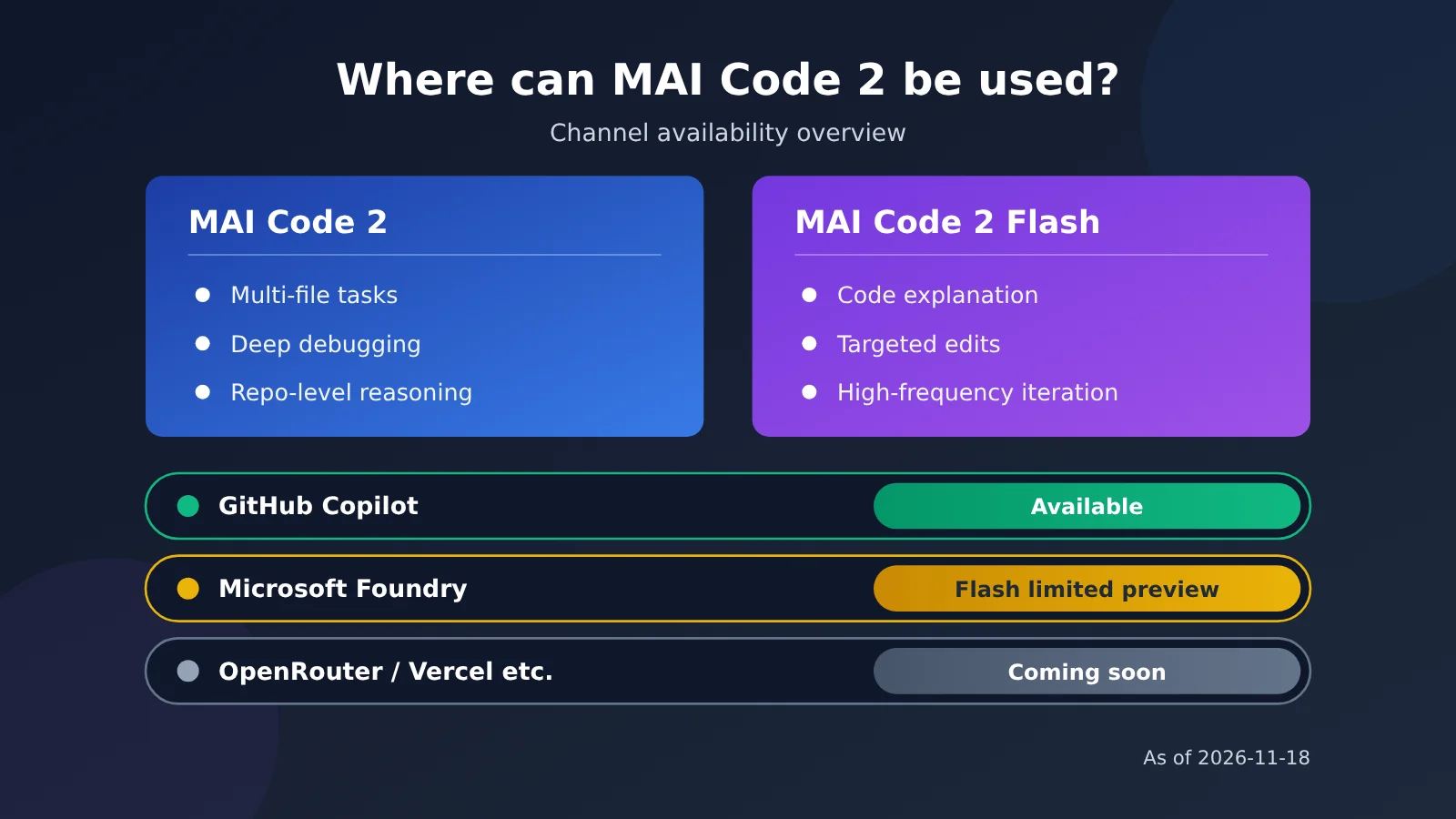
Quick answer: As of November 18, 2026, if you want to use MAI Code 2, start by checking your GitHub Copilot plan and the model entry point; Free and Student users shouldn’t assume they can select it manually. Microsoft said in its announcement that both MAI Code 2 and MAI Code 2 Flash are already available in GitHub Copilot. If you want to integrate them into your own app, the only thing confirmed right now is that MAI Code 2 Flash is available in Microsoft Foundry as a limited-access preview — that doesn’t mean every channel is fully open.
OpenRouter, Vercel, Hermes, OpenCode, Kilo, and other channels are marked “coming soon” in the announcement and shouldn’t be treated as available yet. And even when a model has launched on a given channel, whether your account actually sees it still depends on the specific product entry point, quotas, and admin policies.
What you’ll learn in this article:
- How MAI Code 2 and MAI Code 2 Flash are officially positioned differently, and which kinds of coding tasks each is suited for;
- A side-by-side status check across channels — “available now / limited-access preview / coming soon” — so you don’t misread “coming soon” as “already usable”;
- The input/output specs disclosed on the model card, and why they don’t equal the actual limits you get in the product;
- What to do along each of the three paths: individual trial, enterprise admin, and developer applying for the Foundry preview;
- A pre-flight checklist, plus common reasons for “can’t find the model.”
In this article: Part 1 lays out the facts — the announcement (1.1), channel availability status (1.2), model card specs (1.3), and Foundry access requirements (1.4) — all based on Microsoft’s public materials. Part 2 is editorial analysis: it first explains the difference between model card capabilities and product limits (2.1), then walks through the three access paths (2.2–2.4), followed by a checklist and troubleshooting table (2.5–2.6), and finally covers how to verify third-party platforms and what to watch next (2.7–2.8). If all you care about is “can I use it right now,” jump straight to 1.2 and 2.5.
Know First: MAI Code 2 Concept Cheat Sheet
These concepts come up again and again later on, so here’s one table to get them all straight up front.
| Concept | Quick explanation |
|---|---|
| MAI Code 2 | A coding model released by Microsoft’s MAI team, officially positioned for multi-file tasks, deep debugging, and repository-level reasoning |
| MAI Code 2 Flash | The lightweight member of the same family, positioned for code explanation, pinpoint edits, routine fixes, and high-frequency iteration |
| GitHub Copilot model selector | The place in Copilot where you switch the underlying model. Whether a given model shows up there depends on both product rollout progress and your account policy |
| Microsoft Foundry | Microsoft’s platform for developers to build AI models and applications, formerly Azure AI Foundry |
| Limited-access preview | A preview that requires meeting access criteria or getting an application approved — it isn’t open to every user |
| Model Card | A vendor-published document describing the model, disclosing input/output modalities, context length, and other model-level capabilities |
| Context window | The total token ceiling a model can handle in a single pass, made up of both input and output |
| Responses API | An interface format defined by OpenAI; Flash in Foundry uses a compatible way of calling it |
| Admin policy | Enablement or restriction settings at the enterprise or organization level for available models and features |
Impact at a Glance: What MAI Code 2 Means for Different Groups
| Audience | Actual impact | Recommended action |
|---|---|---|
| Individual Copilot users | Paid plans differ from Free/Student in model access and how models are selected | Check the model list and start comparing with small tasks |
| Enterprise / organization admins | Whether members can use it depends on org policy; an admin may need to evaluate it before enabling access | Assess compliance and cost first, then decide whether to open it up |
| Developers building their own apps | Only Flash is in limited preview on Foundry and requires Azure authentication and approval | Confirm subscription, quota, and region before applying for the preview |
| Teams relying on third-party toolchains | Channels like OpenRouter and Vercel are still “coming soon” | Don’t rewrite production config ahead of time; wait for official confirmation |
| Teams using aggregator platforms | The reference material doesn’t mention any aggregator having integrated it | Go by the platform’s actual model list — for example, check the backend at APIYI apiyi.com — and don’t assume it’s already listed |
1. Facts: MAI Code 2 Release Info and Availability Channels
This section only states what’s in Microsoft’s public materials. Performance benchmark data is vendor self-reported; our team hasn’t run either model, so we won’t repeat specific scores or offer hands-on conclusions.
1.1 MAI Code 2 Release Date and the Positioning of the Two Models
On November 17, 2026, Microsoft AI announced MAI Code 2 and MAI Code 2 Flash on its official site. The two models target programming tasks of different intensity: MAI Code 2 handles complex cross-file work, while Flash handles frequent, lightweight day-to-day edits.
According to the official description, MAI Code 2 focuses on multi-file edits, deep debugging, and repository-level reasoning — a good fit for tasks that require understanding the structure of an entire codebase. MAI Code 2 Flash focuses on code explanation, targeted edits, routine fixes, and high-frequency iteration, making it better suited to interactive scenarios where response speed matters. The benchmark results included in the announcement come from the vendor, so readers should treat them as reference points rather than independent third-party validation.
1.2 Channel Availability at a Glance
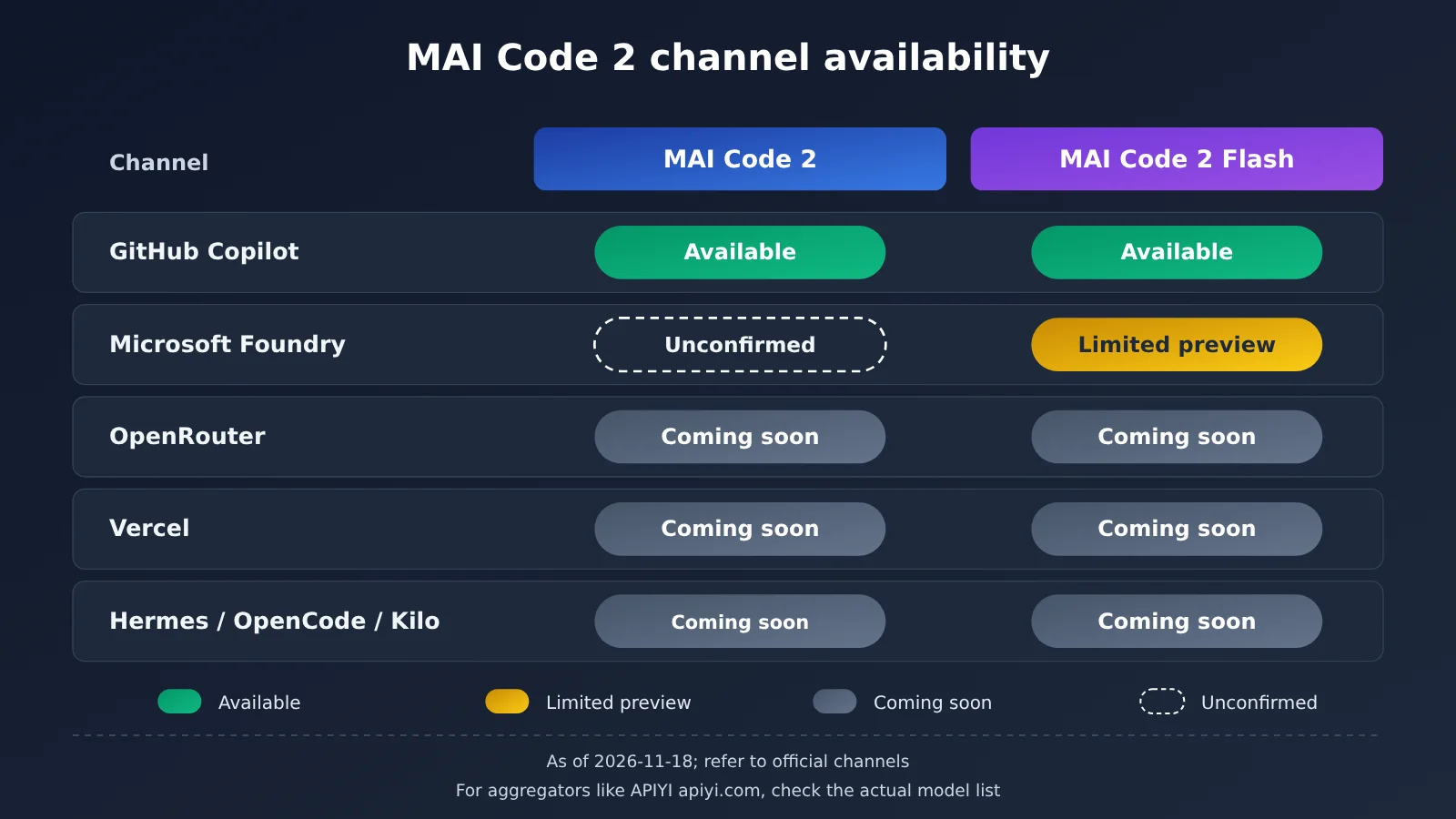
The table below is based on the Microsoft AI announcement and GitHub’s official launch post. A “soon” status for third-party channels reflects a release plan — it doesn’t guarantee both models will launch at the same time, nor does it mean invocation access has already been granted.
| Channel | MAI Code 2 | MAI Code 2 Flash | Status notes |
|---|---|---|---|
| GitHub Copilot | Available | Available | The announcement states both models are available in Copilot |
| Microsoft Foundry | Not confirmed in reference material | Limited preview | Flash is a limited-access preview and requires meeting eligibility conditions |
| OpenRouter | Coming soon | Coming soon | Marked as soon in the announcement; shouldn’t be treated as fully rolled out |
| Vercel | Coming soon | Coming soon | Same as above |
| Hermes / OpenCode / Kilo | Coming soon | Coming soon | Same as above |
| Other API aggregation platforms | Not mentioned | Not mentioned | Check each platform’s actual model list |
1.2.1 GitHub Copilot Plans and Entry Points
The official GitHub announcement states that MAI Code 2 covers Pro, Pro+, Max, Business, and Enterprise, while Flash also covers Free and Student; eligible annual subscriptions apply as well. Entry points include VS Code, Visual Studio, Copilot CLI, the Copilot app, github.com, and more.
However, GitHub’s supported models documentation makes it clear: Free and Student access models only through Auto’s automatic selection, which doesn’t mean Flash can be manually specified in the model picker. Business/Enterprise admins can control access through model policies, and automatic enablement by default can also be turned off by the organization.
1.2.2 Release Status Isn’t the Same as Account Permission
Two things are worth calling out. First, “available in GitHub Copilot” is a product-level statement — it doesn’t mean every user on every plan will see it immediately. Second, only Flash has been confirmed in Foundry so far; the reference material doesn’t confirm the availability status of MAI Code 2 itself in Foundry.
1.3 Input and Output Specs Disclosed in the MAI Code 2 Model Card
Microsoft published a shared model card (PDF) for both models. The specs most relevant to integration are listed below.
| Item | Model card disclosure | Notes |
|---|---|---|
| Input modalities | Text, images | You can feed screenshots, diagrams, and the like in as context input |
| Output modalities | Text | Doesn’t generate images |
| Model context window | ~1.05M tokens | The overall cap at the model level |
| Max input | ~922k tokens | The input cap a single request can carry |
| Max output | ~128k tokens | The output cap for a single generation |
This article doesn’t cite model parameter counts. More importantly, the table above describes the model’s own capabilities — the context and output limits actually offered by a specific product (say, a particular client in Copilot, or a particular preview deployment in Foundry) may well be smaller.
1.4 Access Requirements for MAI Code 2 Flash in Foundry
According to Section 2.4 of the official model card, MAI Code 2 Flash is invoked in Foundry through the OpenAI-compatible Responses API. “Compatible” here means the request format is similar, but authentication and admission still belong to Azure.
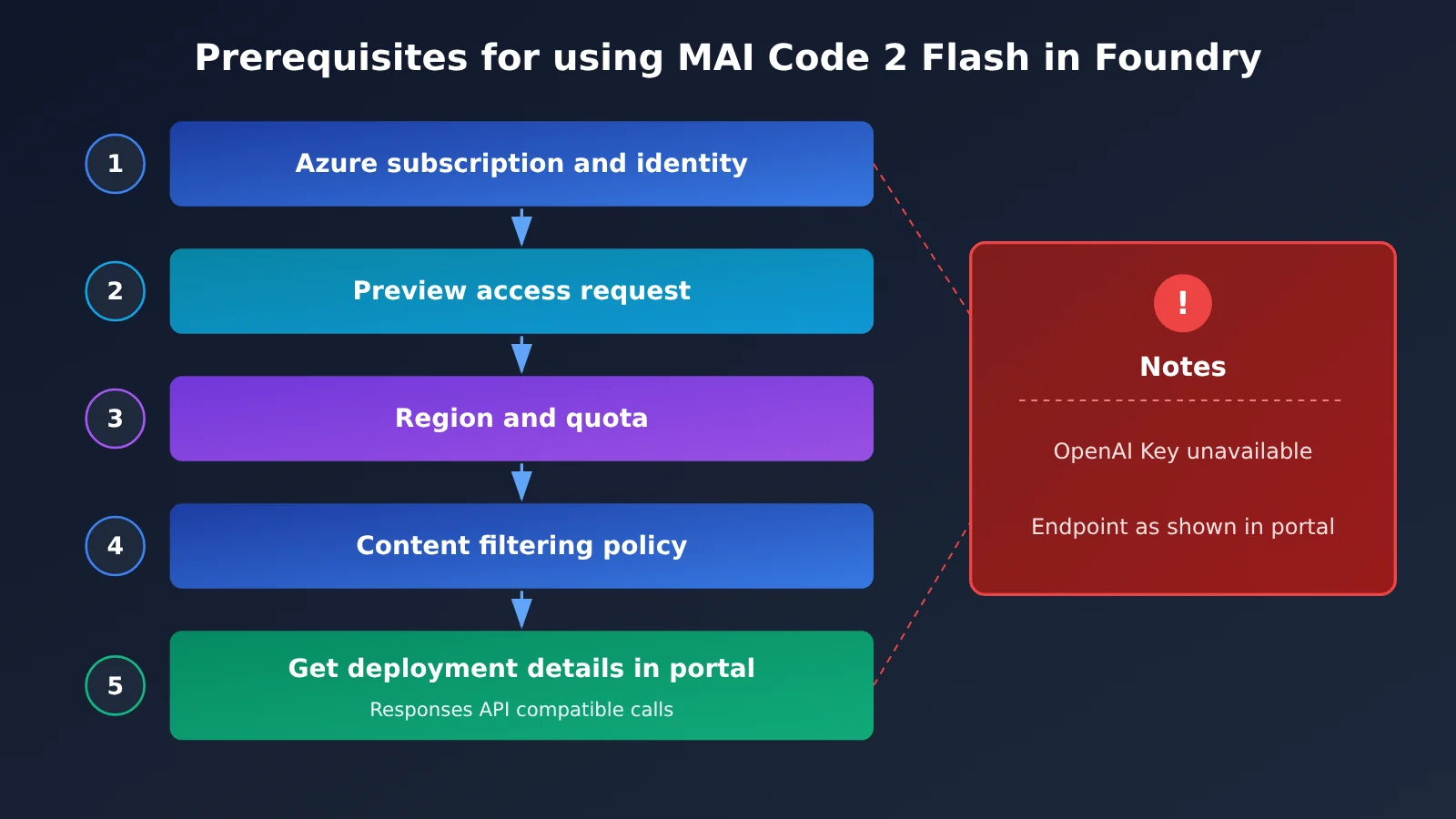
Specifically, before calling it you need to complete Azure authentication, and you’re bound by subscription quotas, content filtering policies, and preview admission requirements. You can’t just grab an OpenAI API Key and use it as-is. The endpoint, deployment name, and credentials should come from your own Foundry deployment — you can’t treat the model’s display name, someone else’s example address, or an OpenAI key as your Azure deployment configuration.
2. Analysis and Assessment: MAI Code 2 Integration Boundaries and Three Paths
The following is the editorial team’s analysis and recommendations based on the facts above, not a hands-on tutorial. The steps only describe the areas you should verify and do not include specific UI screenshots or button names, since these change as the product evolves.
2.1 MAI Code 2 Model Card Capabilities ≠ Actual Product Limits
Many people see “1.05M context” and assume they can drop an entire large repository into Copilot in one go. That’s the most common misreading. The model card describes how much content the model can handle; the product separately sets its own limits based on cost, latency, and user experience.
The difference between the two directly affects your usage strategy. If you plan to rely on ultra-long context for repository-level analysis, first confirm the actual usable length in the specific product. Don’t use the model card numbers directly for capacity planning. For the Foundry preview, quotas may also be lower than the model’s upper limit, so production throughput estimates should be based on the quota you’re actually allocated.
| Dimension | Model card (model capability) | Specific product (actual limit) |
|---|---|---|
| Context length | About 1.05M tokens | May be shorter, set by the product |
| Single output | About 128k tokens | May be limited by the client or quota |
| Availability | Not applicable | Affected by plan, region, and admin policies |
| Invocation frequency | Not applicable | Affected by quota and rate limiting |
| Information source | Model card PDF | Product documentation and account console |
2.2 Path One: How Individual Developers Can Try MAI Code 2 in GitHub Copilot
For individual users who already have a suitable Copilot plan, this is a way to try it out without deploying an API. The idea is simple: first confirm whether you can see it, then compare it on tasks you’re already familiar with.
- Update the client: Make sure your IDE extension or Copilot client is a relatively recent version. Older versions may not have the new model entry yet.
- Check your plan and entry point: If your plan allows manual model selection, check the model selector. Free/Student users rely on Auto, so don’t mistake the lack of a manual entry for a malfunction.
- Assign tasks based on positioning: Give cross-file refactoring and tricky bug localization to MAI Code 2; give code explanation and small-scale fixes to Flash.
- Keep a control group: Run the same task again with the model you usually use, and judge the differences yourself. Don’t just copy vendor benchmark conclusions.
If you can’t see it yet, first check whether your plan allows manual selection, then check the client version and organizational policies. You can go through the troubleshooting table in 2.6 item by item.
2.3 Path Two: How Enterprise Administrators Should Assess MAI Code 2’s Availability
For members using an organizational account, there’s a layer of admin policy between “Copilot offers it” and “I can use it.” The question admins need to answer isn’t “Can we turn it on?” but “Should we turn it on, and who should get it?”
We recommend admins check three things: whether organizational policy requires enabling the new model separately; whether the new model’s data processing and compliance terms match those of existing models; and whether it affects billing and usage. A safer approach is to start with a pilot for a small group, gather feedback, and then decide whether to expand. At the policy level, you should also clearly tell members which code repositories are allowed to use the new model.
2.4 Path 3: Developers Apply for the MAI Code 2 Flash Preview in Foundry
If you want to connect the model to your own application or internal tools, the hosted API path we verified for this article is the Flash limited preview in Foundry. Confirm the access conditions first, then schedule your integration testing.
A few key points to confirm in advance:
- Identity system: It uses Azure authentication, not the OpenAI account system;
- Access eligibility: A limited preview means you may need to apply and wait for approval;
- Quota and region: Verify the deployability and actual allocated quota in your chosen region; this article does not verify coverage across all regions;
- Invocation method: It uses a Responses API-compatible format, so code originally built on Chat Completions may need adjustment;
- Production risk: Terms, capabilities, and limits during the preview phase may all change, so it’s not recommended to carry core production traffic directly.
2.5 Pre-Flight Checklist for MAI Code 2
Whichever path you take, I recommend going through the checklist below item by item first. It’ll save you a lot of troubleshooting time wondering, “Why can’t I see it?”
- Am I trying to use MAI Code 2 or Flash? Does this provider actually offer that version? (See 1.2)
- Is this provider currently “available,” “limited preview,” or “coming soon”?
- Is my account or plan covered? Do organization policies allow it?
- Is the context length I need actually available in this specific product?
- For the Foundry path, are the Azure subscription, access, region, and quota all in place?
- If you plan to call it through a third-party or aggregator platform, have you verified it in that platform’s model list (for example, the APIYI apiyi.com model list) rather than guessing from news?
2.6 Common Reasons MAI Code 2 Isn’t Available and What to Do
| Symptom | Likely cause | What to do |
|---|---|---|
| Not in Copilot’s model selector | Free/Student plans only support Auto; it could also be a client or organization policy restriction | Check your plan first, then check the client and admin policies |
| Can’t see it on an organization account but can on a personal account | Admin policy hasn’t been enabled yet | Contact your organization admin to evaluate enabling it |
| Can’t find Flash in Foundry | Preview access hasn’t been granted, or the region isn’t supported | Submit an access request and confirm supported regions |
| Authentication fails when calling Foundry | Using an OpenAI key, or the identity configuration is incorrect | Switch to Azure authentication |
| Requests are rejected or truncated | Insufficient quota, content filter triggered, or product limit exceeded | Check quota and filter logs, and shorten the input |
| Can’t find it on platforms like OpenRouter | The announcement marked it as “coming soon” | Go by the platform’s official launch announcement |
| Looking for an MAI Code 2 deployment in Foundry | Reference materials only confirm Flash is in Foundry preview | Watch for official follow-up announcements |
2.7 Third-Party and Aggregator Platforms: How to Verify Whether MAI Code 2 Is Actually Usable
After a new model launches, claims like “such-and-such platform can already call it” often start circulating on social media. For MAI Code 2, all the third-party channels explicitly listed in the launch announcement are still in the “coming soon” stage, so every claim from other platforms needs to be verified individually.
A platform’s model list is only a starting point for checking—it can’t, on the strength of a name alone, prove a model’s identity, your account permissions, or whether it can actually be called. You should also check that platform’s official announcement, the exact model ID, compatible interfaces, pricing, and data-processing terms, then validate with a small request that contains no sensitive data.
This article has not verified whether APIYI apiyi.com has integrated MAI Code 2 or Flash, nor has it validated its model query interface, so it does not provide invocation code that would imply support. If you choose a third-party service, use only the dedicated key issued by that service, and never send OpenAI or Azure credentials to a third-party address.
2.8 Signals Worth Watching for MAI Code 2 Going Forward
The following are predictive observation points, not established facts. First, when MAI Code 2 itself enters Foundry, and when Flash moves from limited preview to broader availability, will directly affect the feasibility of building your own application. Second, for channels marked “coming soon” like OpenRouter and Vercel, it’s worth confirming one by one whether the context and limits they offer at actual launch come close to the figures on the model card.
Third, beyond vendor evaluations, community and independent evaluations will offer more reference on how the two models perform in real repositories; before that, it’s unwise to make replacement decisions based on the launch announcement alone. For teams that need to validate multiple models in parallel, keep an eye on model list changes at platforms like APIYI apiyi.com, and include new models in your evaluation only after they’re actually available.
Overall, the most certain entry point for MAI Code 2 right now is GitHub Copilot; the hosted API path confirmed in this article is the Flash limited preview in Foundry, and all other channels should wait for official confirmation. The capability metrics on the model card look impressive, but whether you can actually realize them depends on the channel and account conditions you’re working with.
What you get from books always feels shallow; to truly know a thing, you must practice it yourself. — Lu You, “Reading with My Son on a Winter Night”
📚 References
-
Microsoft AI: Introducing MAI Code 2 and MAI Code 2 Flash: Official announcement post
- Link: Official materials
- Notes: Positioning of the two models, their availability status in GitHub Copilot, and the list of “coming soon” channels
-
GitHub official announcement: MAI Code 2 and MAI Code 2 Flash in GitHub Copilot
- Link: Launch announcement
- Notes: Plan coverage, client entry points, and administrator policies
-
MAI Code 2 and MAI Code 2 Flash model cards: Official model card PDF
- Link: Official materials
- Notes: Input/output specifications, plus Section 2.4 covering the Foundry Responses API, Azure authentication, and quota requirements
-
GitHub supported models documentation
- Link: Supported models and plan limitations
- Notes: Free/Student plans only support Auto; for specific client and model limits, refer to the product documentation
Author: APIYI Technical Team
Technical discussion: Feel free to reach us through the homepage of the APIYI apiyi.com website. For more integration resources, visit the docs.apiyi.com documentation center.