Author’s note: MAI-Image-2.7 just took No. 1 on the AA single-edit leaderboard, while Ideogram 4.6 ranks No. 1 on the multi-step face-drift leaderboard. This article looks at how product-image and portrait-retouching teams actually work, unpacks the methodology behind the two leaderboards, works out the cost for the same job, and offers recommendations on how to split the work.
If your team handles 2K product images and portrait retouching every day and budgets per image, you’re probably facing the same question this month: Microsoft MAI-Image-2.7 tops Artificial Analysis’s editing leaderboard—so is Ideogram 4.6 still worth considering?
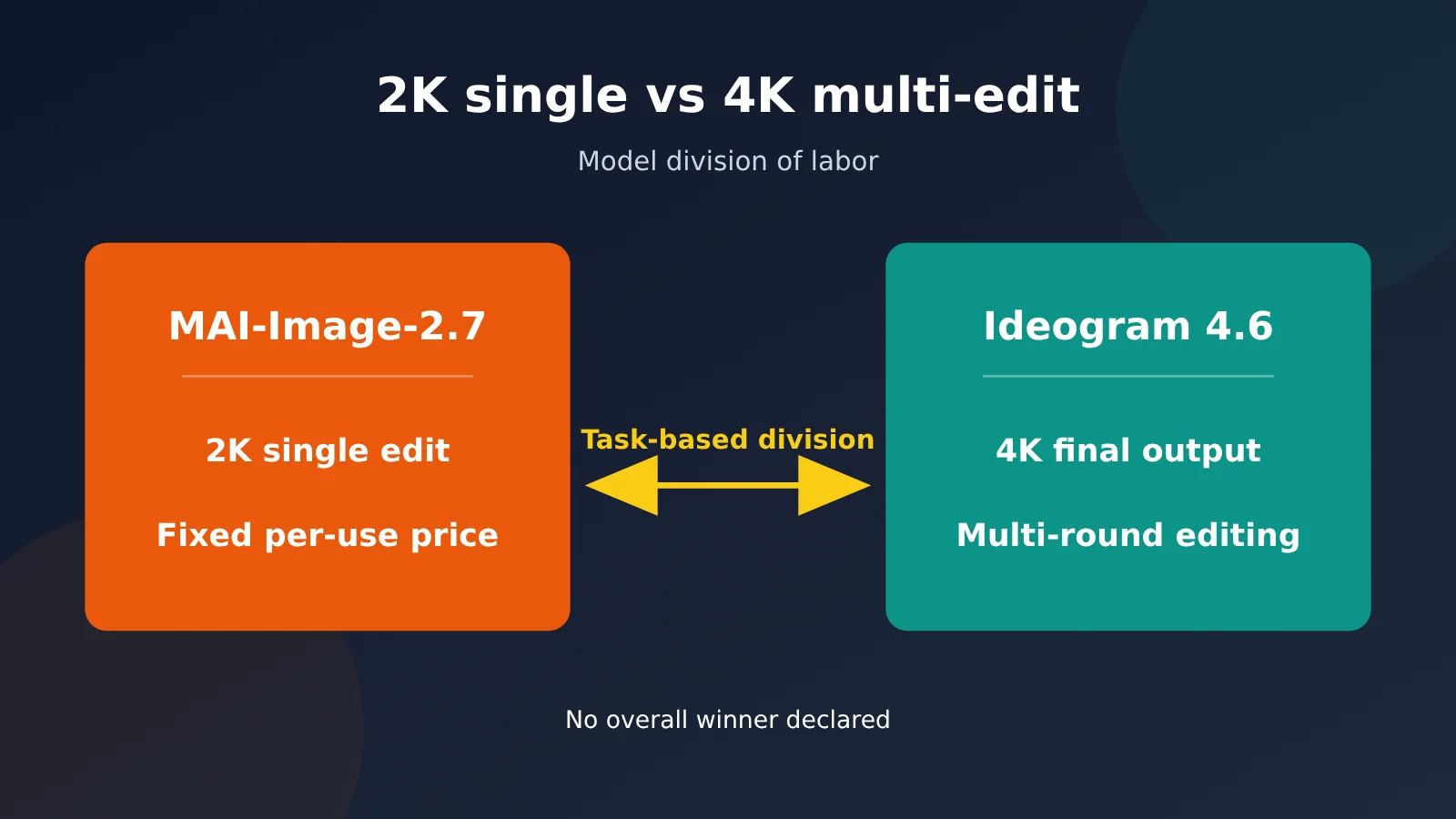
This article doesn’t pick an overall winner. Their division of labor is pretty clear: MAI-Image-2.7 is a good fit for single-pass edits up to 2K, with flat per-call pricing; Ideogram 4.6 is a good fit for 4K final images and multi-turn iterative editing, billed by size and quality tier. The two leaderboards measure different things, so their rankings aren’t directly comparable.
Core value: After reading this, you’ll be able to decide which model should get the work on your plate and get a clear cost comparison for the same job.
Ideogram 4.6 vs MAI-Image-2.7: Key Differences
Let’s start with the basics of both models. MAI-Image-2.7 was announced by Microsoft at its Ignite conference on 2026-11-17, alongside MAI-Image-2.7 Flash and the Canvas workbench, and it’s currently in public preview on Foundry. Microsoft positions it as “frontier image generation and editing at a fraction of the cost”—in other words, frontier-level generation and editing at lower cost. Ideogram 4.6 launched on 2026-11-19, with the official line “the new frontier of precise editing, now in native 4K”; its focus is precise editing and native 4K.
Their positioning doesn’t really overlap. MAI-Image-2.7 goes after single-generation output quality and flat pricing, while Ideogram 4.6 chases large-format finished images and keeps the picture from drifting after multiple rounds of edits.
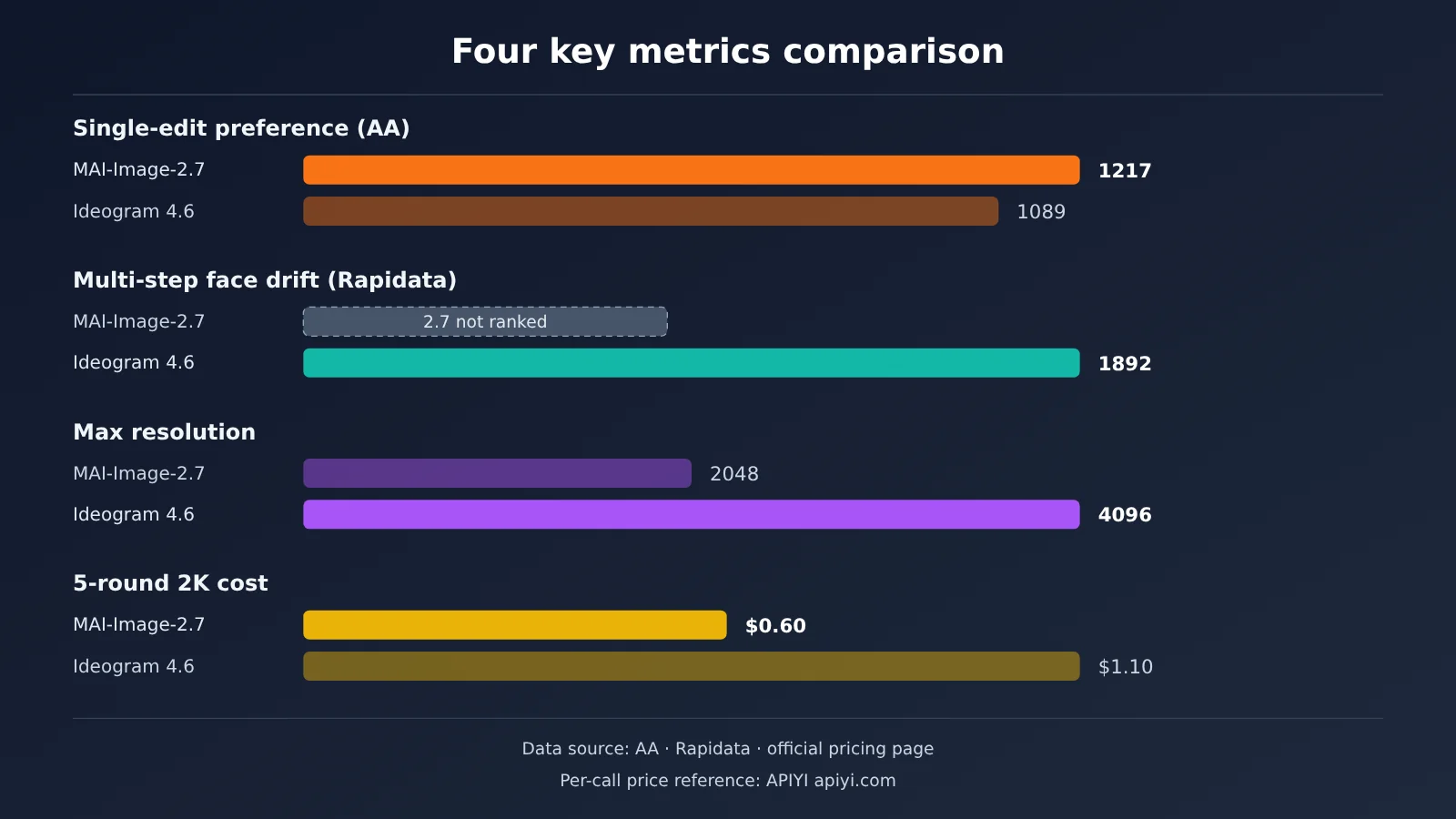
| Comparison dimension | MAI-Image-2.7 | Ideogram 4.6 | Best for |
|---|---|---|---|
| Official positioning | Low-cost frontier generation and editing | Precise editing + native 4K | Depends on the task |
| Single-edit preference (AA v2.1) | 1217, No. 1 | 1089, No. 31 | Single-pass image edits favor 2.7 |
| Multi-step face drift (Rapidata) | 2.7 not on leaderboard | 1892, No. 1 | Multi-round portraits favor 4.6 |
| Max resolution | 2048×2048 | 4096×4096; supports localized editing of 8K source images | 4K finished output only works with 4.6 |
| Billing model | Flat per-generation fee, no size distinction | Tiered by quality tier and size | 2K batches favor 2.7 |
| Transparent background | Supported | Supported (background=transparent) |
Both work |
Benchmark Methodology for MAI-Image-2.7 and Ideogram 4.6
This is the part most likely to trip you up, so it gets its own section.
AA-Image-Editing v2.1 measures general preference for single edits. The setup gives people the same edit instruction and asks them to blind-pick one of two results. Based on data read on 2026-11-26, MAI-Image-2.7 scores 1217 ±14, ranks 1st, with a sample size of 5,644; Ideogram 4.6 (High) scores 1089 ±14, ranks 31st, with a sample size of 4,207. Microsoft also published a second set of figures: as of 2026-11-16, 2.7 scored 1,215 Elo with 5,478 votes, 4 points ahead of GPT Image 2.6 Sunburst. This set is company-reported, and a slight discrepancy with later leaderboard readings is normal.
The Rapidata multi-step edit leaderboard (benchmark.ai, updated 2026-11-10), despite being called Multi-step Image Edit, actually measures face identity drift. The test uses 199 photos of real people; each photo runs through a five-step edit chain, changing only clothing, objects, and text—never the face—and each step takes the model’s own previous output as input. Finally, people blind-pick which face after step 5 looks more like the original. On this leaderboard, Ideogram 4.6 (Precise Edit, High Quality) scores 1892 ±32, ranks 1st, with an 86.3% win rate.
The catch is that this snapshot does not include MAI-Image-2.7, only the previous-generation MAI-Image-2.6, which scores 1299 ±22 and ranks 6th. So there are two things you shouldn’t do:
- Don’t treat 2.6’s 6th-place finish as 2.7’s result.
- Don’t subtract AA’s 1217 from Rapidata’s 1892, or compare their rankings. The two leaderboards have different methodologies, samples, and Elo baselines.
| Leaderboard | What it measures | Input method | MAI result | Ideogram 4.6 |
|---|---|---|---|---|
| AA-Image-Editing v2.1 | General preference for single edits | One instruction, one edit | 2.7: 1217, 1st | 1089, 31st |
| AA-Image-T2I v2.1 | Text-to-image preference | Text only | 2.7: 1216, 4th | 985, 69th |
| Rapidata multi-step edit | Whether the face still looks like the original after 5 steps | Chained; previous output as input | 2.6 only: 1299, 6th | 1892, 1st |
One more detail worth noting: on the Rapidata leaderboard, the confidence intervals for Ideogram 4.6 and 4.5 (1866 ±30) overlap between 1860 and 1896, so this leaderboard can’t tell which of the two generations is stronger. Still, 4.6 leads third-place Seedream 5.5 by 87 points, and their intervals don’t overlap. In other words, 4.6 is an image-editing specialist, not a broad upgrade across general capabilities. On AA’s text-to-image and single-edit leaderboards, its scores are close to 4.5—or even lower.
Ideogram also published a set of usability-rate improvements (High tier, same batch of edit requests, 4.5 vs. 4.6): recoloring to a brand color code went from 46% to 83%, fixing minor product flaws went from 61% to 86%, product images went from 66% to 88%, still recognizing a person after a scene change went from 69% to 85%, and editing only the painted region went from 82% to 90%. These figures are company-reported, the comparison is against its own previous generation, and the company hasn’t published the criteria for judging “usable,” so they’re for reference only.
Resolution and interface differences between MAI-Image-2.7 and Ideogram 4.6
Resolution is a hard dividing line. MAI-Image-2.7 and 2.7 Flash cap out at 4,194,304 pixels, which works out to 2048×2048; the previous-generation 2.6 topped out at just 1536×1536. Ideogram 4.6 can output 2K or 4K, up to 4096×4096, but the Very low tier maxes out at 2K. If your deliverable is a 4K final asset, MAI-Image-2.7 doesn’t meet the requirement here.
Ideogram 4.6’s Precise Edit has one more capability: source images can go up to 50MB and 67,108,864 pixels (exactly 8192×8192). Anything larger than 4096×4096 gets downscaled by default. If you want to keep the original size, you can use context_window=auto together with a mask, or specify y_min,x_min,y_max,x_max yourself. That way the model only modifies the selected region and returns the rest untouched. It’s genuinely useful when you need to touch up part of an 8K poster.
| Interface aspect | MAI-Image-2.7 | Ideogram 4.6 |
|---|---|---|
| Endpoint | /v1/images/generations, /v1/images/edits |
/v2/image/generate/ideogram-4-6, /v2/image/precise-edit/ideogram-4-6 |
| Size parameters | width + height, no size |
2K / 4K tiers; edit output matches the source image size |
| Reference images | 1–5 images | Up to 5 source images (the first is the one being edited), plus 3 more when a mask is included |
| Parameters you can’t send | response_format, seed, negative_prompt (returns a 400) |
Uses multipart/form-data; authentication goes in the Api-Key header |
| Invocation method | Synchronous, no task ID, still billed if the client disconnects | Synchronous by default, also supports async / webhook; dry_run=true lets you get a quote first |
MAI-Image-2.7 only works through the image endpoints and doesn’t support /v1/chat/completions or /v1/responses. For reference timing, Flash takes about 21 seconds at 1024, and the flagship version about 62 seconds at 2048. Since it’s a synchronous call, set your client timeout long enough—otherwise you’ll still get charged even after the request drops.
Cost per Job: MAI-Image-2.7 vs Ideogram 4.6
Prices only make sense when you calculate them per job. The table below uses USD, and Ideogram 4.6 is always priced at the High tier.
| Same job | MAI-Image-2.7 | MAI-Image-2.7-Flash | Ideogram 4.6 (High) | Available platforms |
|---|---|---|---|---|
| Generate one 2K image | 0.12 | 0.06 | 0.10 | 2.7 series: APIYI apiyi.com |
| Edit one 2K image | 0.12 | 0.06 | 0.22 | 4.6: Ideogram official and partner platforms |
| 5 consecutive 2K edits | About 0.60 | About 0.30 | About 1.10 | Same as above |
| Generate a 4K image | Not supported | Not supported | 0.20 | Only 4.6 |
| Edit one 4K image | Not supported | Not supported | 0.60 | Only 4.6 |
MAI-Image-2.7 is billed per generation and doesn’t differentiate by size. A 2048×2048 output costs the same as a smaller image, so it’s a low-hassle option for 2K batch work. Ideogram 4.6, on the other hand, bills at the 4K tier when output exceeds 2048×2048, and image edits (Precise Edit and Generate with a reference image) cost one tier more than pure generation. Also note that the per-thousand-image prices shown on the AA leaderboard (about $34.82/1k for 2.7 and $220/1k for 4.6) are normalized to each provider’s default settings, so they can’t be mixed with the per-image prices in the table above.
At APIYI, MAI-Image-2.7 is $0.12 per generation and MAI-Image-2.7-Flash is $0.06 per generation, both regardless of size. When you integrate, set base_url to https://api.apiyi.com/v1; use /v1/images/generations for generation and /v1/images/edits for image edits, passing dimensions as width=2048 and height=2048. Ideogram 4.6 isn’t available on APIYI yet. We’ll get this model listed as soon as we can; model names and pricing follow the platform’s model list.
🎯 Technical tip: Before running batch 2K image edits, you can use APIYI apiyi.com’s free credits for new users to test a batch of
MAI-Image-2.7andMAI-Image-2.7-Flashseparately, then decide which tier to use based on the pass rate for your own product images.
Ideogram 4.6 vs MAI-Image-2.7: Use Case Recommendations
Mapping those differences onto real work, product image and portrait editing teams most often run into the following four kinds of jobs.
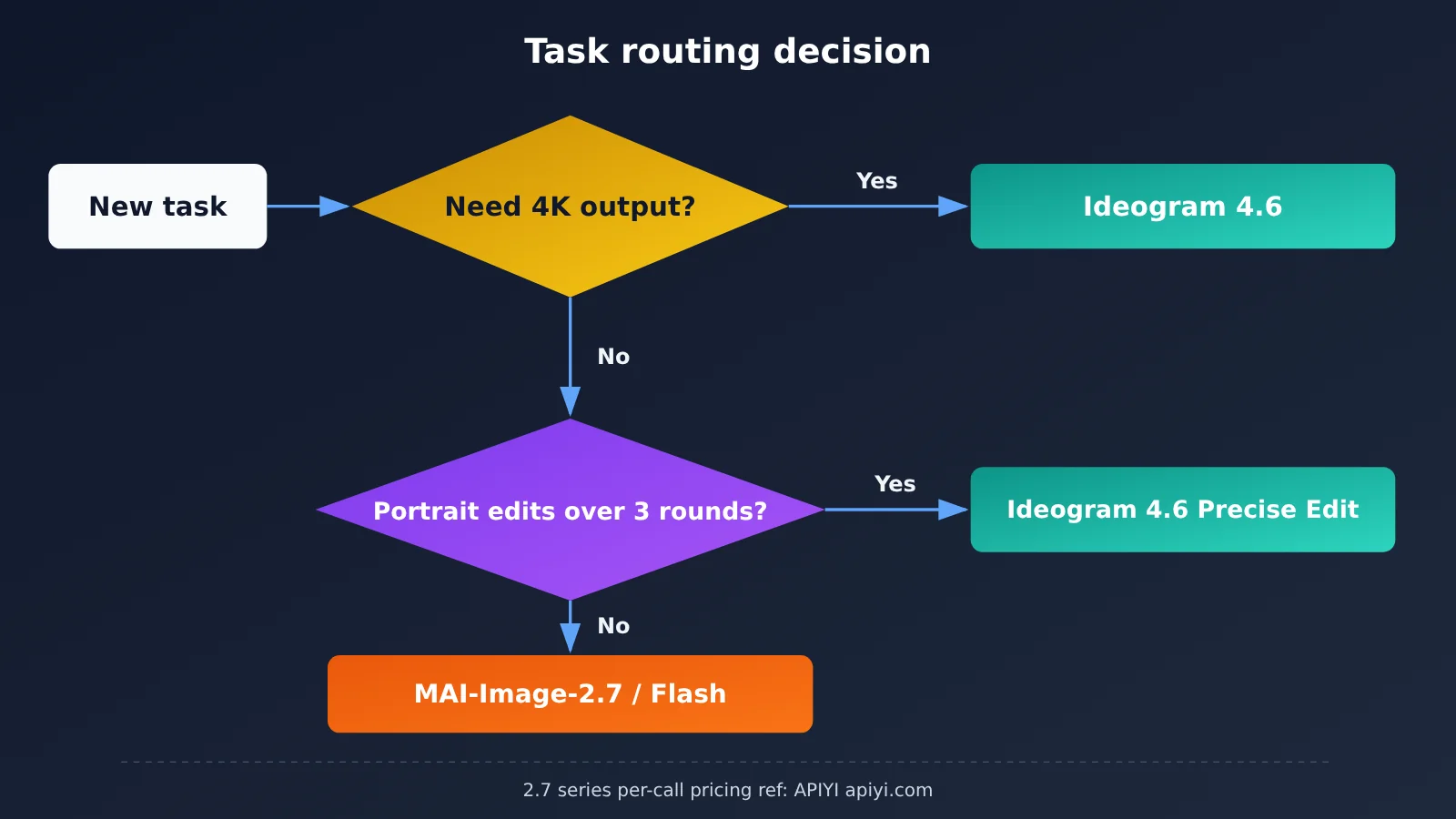
| Scenario | Recommendation | Why |
|---|---|---|
| 2K product image batches | MAI-Image-2.7, run Flash samples first | Fixed per-call pricing, direct 2048×2048 output, ranks #1 on AA single-edit |
| Single-pass edits (swap background, change color, remove blemishes) | MAI-Image-2.7 | One-round results line up exactly with AA’s testing criteria |
| Transparent-background assets | 2.7 up to 2K, 4.6 when you need 4K | Both support transparent backgrounds; only size and price differ |
| 4K final assets and long-chain portrait edits | Ideogram 4.6 | It’s the only one that outputs 4K, and it ranks #1 on the Rapidata face-drift leaderboard |
Jobs best handed to MAI-Image-2.7
- E-commerce hero images and detail pages at 2K, in bulk: Size doesn’t affect price—2048 output costs the same as a small image, and the Flash version is half that again. Perfect for running large sample batches first, then picking the winners to redo.
- Edits that only need one pass to finalize: swapping backgrounds, removing watermarks, changing copy. MAI-Image-2.7 supports Chinese text rendering and delivers high edit fidelity—exactly the kind of single-pass editing the AA leaderboard measures.
- Multi-reference compositing: You can supply up to 5 reference images, which makes it a good fit for compositing a product and a scene into one image.
Jobs best handed to Ideogram 4.6
- Print-grade 4K final assets: The official docs state that native 4K isn’t a small image upscaled afterward—skin and fabric textures are generated at full resolution.
- Five or six rounds of edits on the same portrait: Change clothing, swap props, add text, each round building on the previous output. This is exactly what the Rapidata leaderboard tests, and 4.6 ranks first there.
- Partial edits on large images: An 8K source image plus
context_windowlets you modify only the selected region while the remaining pixels stay untouched—and it won’t get downscaled to 4096.
Ideogram 4.6 vs. MAI-Image-2.7: Decision Guide
In one sentence: For quick 2K edits, use MAI-Image-2.7. For 4K final deliverables and long-chain image edits, use Ideogram 4.6.
This isn’t about which model is stronger; it’s about dividing work by task structure. If an image needs at most one or two edits and its size won’t exceed 2048, MAI-Image-2.7 offers a better single-edit preference score and a lower per-edit price. If you need 4K delivery, or the same portrait needs many rounds of consecutive edits, Ideogram 4.6’s resolution and face stability make the extra cost worthwhile. Many teams can connect both: early-stage proofs and batch revisions go through 2.7, while final 4K key visuals go to 4.6.
💡 Selection tip: The safest approach is to pick 20–30 real assets of your own for a sample test, measure the “first-pass rate” and “number of rework rounds,” and then calculate total cost using the unit prices in this article. On the MAI-Image-2.7 side, you can get started directly at APIYI (apiyi.com) with an OpenAI-compatible endpoint; to switch models, you only need to change the
modelparameter.
Common Questions FAQ
Q1: MAI-Image-2.7 ranks #1 on the AA editing leaderboard — does that mean I can skip Ideogram 4.6 for image edits?
No. AA-Image-Editing v2.1 measures general preference for single-pass edits, and the result shows 2.7 is favored by reviewers within one round of changes. If you need multiple consecutive edits, or you want 4K output, this leaderboard won’t answer that — you’ll need to look at the Rapidata face-drift leaderboard and the resolution ceiling together.
Q2: Can I use MAI-Image-2.6’s #6 spot on Rapidata to infer how 2.7 performs across multiple rounds?
No. 2.6 and 2.7 are different models, and generational changes can’t be extrapolated from a leaderboard. The current Rapidata snapshot doesn’t include 2.7, so its multi-step face drift behavior is still unknown. If your business centers on multi-round portrait edits, I’d recommend running your own 5-step chain to test it.
Q3: When were the two models released?
MAI-Image-2.7 and 2.7 Flash were released on 2026-11-17 at Microsoft Ignite and are currently in public preview on Foundry. Ideogram 4.6 launched on 2026-11-19 and is already available in the Ideogram app and API, as well as on partner platforms like Leonardo, Runway, fal, and Comfy.
Q4: Why is Ideogram 4.6 more expensive for 5 consecutive rounds of 2K edits?
Ideogram 4.6’s High tier charges 0.22 per edit, so 5 rounds comes to about 1.10; MAI-Image-2.7 charges 0.12 per edit, so 5 rounds is about 0.60. What you get for the extra cost is better face stability — whether it’s worth it depends on your rework rate. If 2.7 already starts looking “nothing like the person” by the third round and you have to start over, the real cost may not actually be lower.
Q5: How do I call MAI-Image-2.7 quickly via API?
1. Sign up for an account at APIYI apiyi.com, and claim your API key and free trial quota.
2. Set `base_url` to `https://api.apiyi.com/v1` and the model name to `MAI-Image-2.7` or `MAI-Image-2.7-Flash`.
3. For generation, call `/v1/images/generations`; for edits, call `/v1/images/edits`. Pass dimensions via `width` and `height`, and don’t send `seed`, `negative_prompt`, or `response_format`.
I’d recommend setting the client timeout to 90 seconds or more, since the 2048-size flagship version takes about 62 seconds to produce an image.
Q6: How do I call Ideogram 4.6 now?
You can use the official Ideogram API directly: for generation use `/v2/image/generate/ideogram-4-6`, and for precise edits use `/v2/image/precise-edit/ideogram-4-6`. The request format is multipart/form-data, with authentication in the `Api-Key` header. For batch jobs, you can first add `dry_run=true` to get a quote, then generate for real once you’ve confirmed.
Q7: What known limitations does each model have?
MAI-Image-2.7’s max resolution is 2048×2048, it’s only available through the image endpoint, calls are synchronous, you’re still billed if the connection drops, and some parameters will return a 400 if you pass them. Ideogram 4.6 scores poorly on AA’s text-to-image and single-edit leaderboards, and its per-edit price is noticeably higher than generation; its five availability-rate improvements are self-reported by the vendor and measured against its own 4.5.
Ideogram 4.6 vs MAI-Image-2.7: Key Takeaways
- Different positioning: MAI-Image-2.7 centers on 2K single-pass edits and flat per-call pricing, while Ideogram 4.6 centers on 4K finished output and multi-round revisions.
- Read the leaderboards separately: AA measures single-edit preference, Rapidata measures face drift after 5 steps — the two rankings can’t be converted into each other.
- Don’t mix them up: The Rapidata leaderboard only lists MAI-Image-2.6 (#6), which doesn’t represent 2.7.
- Resolution is a hard gate: When you need 4K finished output, only Ideogram 4.6 qualifies; you can also edit just a local region on an 8K source image.
- Cost by the job: For five rounds of 2K edits, 2.7 costs about 0.60 and 4.6 about 1.10; 4K edits on Ideogram 4.6 run 0.60 each.
- How to get started: The MAI-Image-2.7 series can be tested directly through APIYI apiyi.com’s OpenAI-compatible interface.
Summary
Putting Ideogram 4.6 and MAI-Image-2.7 side by side, the conclusion isn’t about who’s stronger — it’s about how to divide the work:
- Fast 2K edits go to MAI-Image-2.7: #1 in single-edit preference, priced per call regardless of size, and the Flash version is great for batch drafts.
- 4K finished output goes to Ideogram 4.6: native 4K, up to 4096×4096, with local-only edits on 8K source images.
- Long-chain portrait edits favor Ideogram 4.6: #1 on Rapidata’s multi-step face drift leaderboard, but you pay the higher per-edit rate.
My suggestion: run a small sample test with your own assets first, then decide the split after measuring pass rate and rework rounds. For MAI-Image-2.7, use APIYI apiyi.com to validate results quickly — the platform offers free credits and a unified interface across multiple models.
📚 References
-
Ideogram 4.6 Official Model Page: specs, quality tiers, and pricing table
- Link:
ideogram.ai/models/4.6 - Notes: max resolution, Precise Edit parameters, and the officially reported availability rate
- Link:
-
Ideogram Official Release Announcement: 4.6 release notes
- Link:
x.com/ideogram_ai/status/2123461101224624402 - Notes: the original source of the official “precise editing, now in native 4K” positioning
- Link:
-
Rapidata Multi-Step Image Editing Leaderboard: face identity drift test
- Link:
benchmark.ai/multi-step-image-edit - Notes: test methodology and full rankings based on 199 real-person photos and 5-step editing chains
- Link:
-
Artificial Analysis Image Leaderboard: AA-Image-Editing v2.1 and AA-Image-T2I v2.1
- Link:
artificialanalysis.ai - Notes: blind-vote rankings for single-pass editing and text-to-image, including sample size and normalized price per thousand images
- Link:
Author: APIYI Technical Team
Technical Support: Feel free to reach us through the APIYI official website homepage. For more model versions and integration guides, visit the docs.apiyi.com documentation center.