
Author’s note: The APIYI Request ID lookup documentation has been upgraded. This article explains which string to copy when an error occurs, which IDs won’t work, how to store async video task_id, and what materials to provide when the logs can’t find the record.
When a call fails and you file a ticket, developers often get stuck on the same problem: they have an ID string in hand, but support can’t find it in the logs. The usual reason is that they copied the upstream provider’s X-Request-Id instead of APIYI’s own X-Shellapi-Request-Id. The new documentation was rewritten specifically to solve this problem, and it’s at docs.apiyi.com/faq/request-id-troubleshooting.
This isn’t a superficial documentation update. The old version started with “response headers” and was full of “usually” and “might”, and after reading it, you still wouldn’t know where to copy from. The new version flips the order: answer first, then where to get it, and finally a ticket template.
The main takeaway: After reading this, you’ll be able to get the correct Request ID in 10 seconds and spot which IDs are wrong. And if the logs can’t find a record, you’ll know what additional materials to provide.
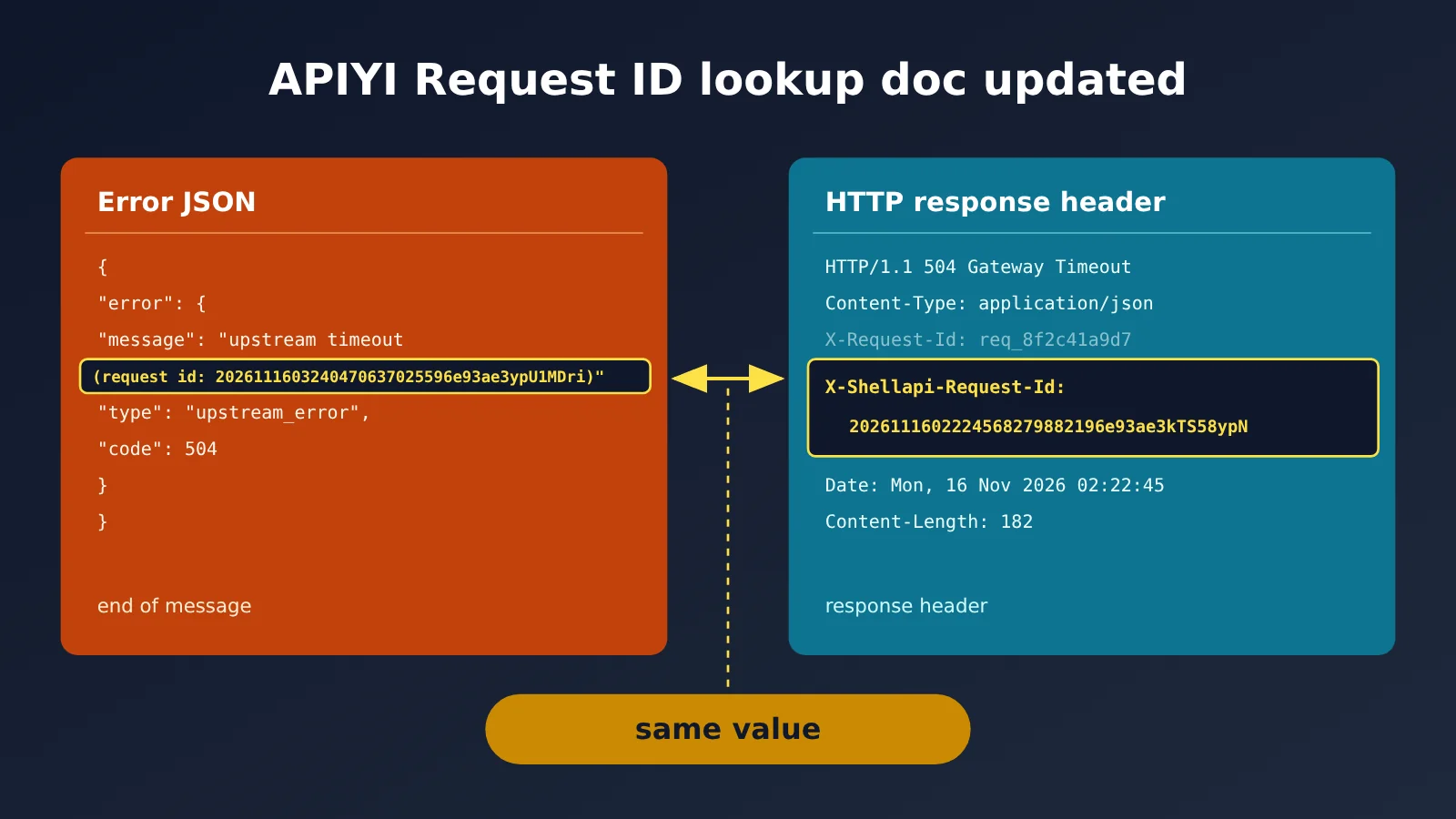
What Changed in the APIYI Request ID Documentation Upgrade
The first sentence of the new documentation gives you the answer: APIYI’s Request ID is the X-Shellapi-Request-Id in the response header, and the same value shows up at the end of the error message whenever something goes wrong. A few spots in the old page that treated x-request-id as “just jot it down for troubleshooting” got cleaned up this time too.
| Item | Details |
|---|---|
| Updated | 2026-11-16 |
| Doc location | New page under the FAQ section “Request ID Troubleshooting” |
| Core answer | Request ID = response header X-Shellapi-Request-Id; the (request id: ...) at the end of an error message is the same value |
| New content | Two ways to retrieve it, an ID reference table, console logs not showing the ID, async video notes, what to do when you can’t find it, ticket template |
| Security note | The Request ID isn’t a secret key—you can paste it into tickets, chats, and screenshots; what you must never share externally is the full API key starting with sk- |
| Who’s affected | All developers calling text, image, Embedding, Claude Messages, Responses, and async video APIs on APIYI |
According to the original documentation, the header name is case-insensitive. It’s returned on successful requests, business errors, and streaming requests alike—for streaming, the response header arrives before the first data block. The async video API returns it on both submission and polling.
APIYI Request ID: Which String Should You Copy Now? Two Paths
First, know the format: APIYI’s Request ID starts with a 14-digit UTC timestamp. For example, in 2026111602224568279882196e93ae3kTS58ypN, the first 14 digits 20261116022245 are 2026-11-16 02:22:45 UTC—that is, 10:22:45 Beijing time. Compare this prefix against your own call time, and you can usually tell whether you’ve grabbed the right one.
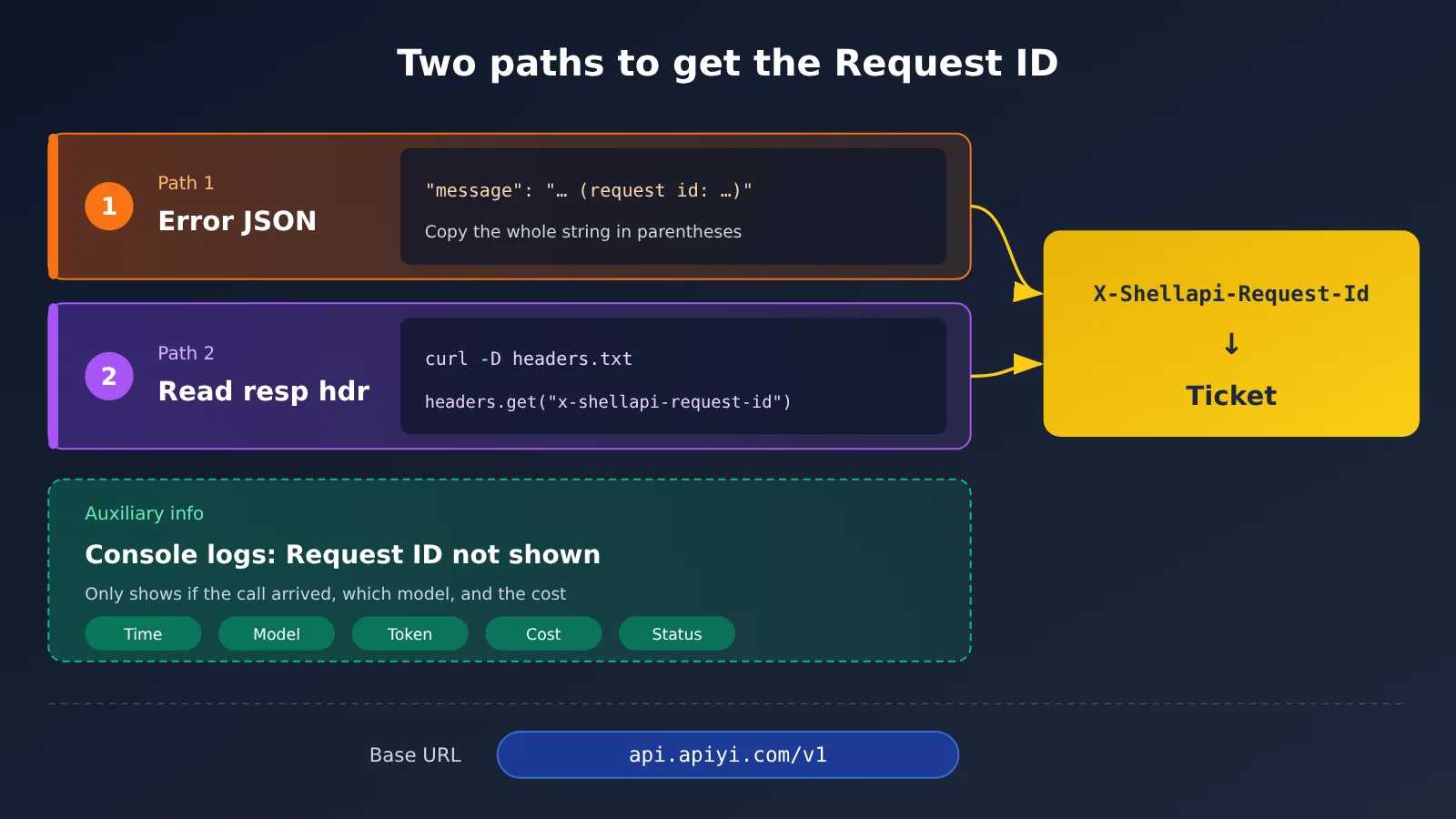
Path 1: Copy Directly from the Error JSON
This path works for most client users. When a request fails, the message field in the error JSON includes a (request id: ...) segment at the end. Just copy the full string inside the parentheses.
- Find the full error JSON in the client or log output.
- Locate the end of the
messagefield. - Copy the entire string after
request id:—don’t truncate it.
Console Logs: They Confirm the Call, but Don’t Show the Request ID
Many people’s first instinct is to look for the ID on the Console’s “Logs” page. The updated docs have a dedicated section: the Logs page doesn’t display X-Shellapi-Request-Id, and there’s no way to search by it.
What you can see in the logs includes time, model, token name, streaming/non-streaming, duration, status, input/output tokens, cost, group, multiplier, and IP. That’s enough to confirm whether the call reached APIYI, which model was used, and how much was charged—but it can’t serve as the locator for a support ticket.
So when you file a support ticket, the ID can only come from two places: the original error text (Path 1) and the response headers (Path 2). The logs are used to fill in the time, model, token, and cost details.
Path 2: Read the Response Header in Code
If you’re collecting errors automatically, it’s best to record this header directly in your code. For every method, the Base URL should be https://api.apiyi.com/v1.
- cURL: Add
curl -D headers.txtto write response headers to a file, then look forx-shellapi-request-idin that file. For ad-hoc troubleshooting, you can also usecurl -ito print them directly. - Python requests: After you get the response object, read
r.headers.get("x-shellapi-request-id"). You can read it on both success and error. - OpenAI SDK (Python): The regular return value’s
_request_idreadsx-request-id, which is usually empty on APIYI. The right approach is to useclient.chat.completions.with_raw_response.create(...), readraw.headers.get("x-shellapi-request-id"), then callraw.parse()to get the result. On errors, reade.response.headersinsideexcept openai.APIStatusError as e. - Node.js: When using fetch, read
res.headers.get("x-shellapi-request-id"). - Postman: After sending the request, open the Headers tab in the response area and find
X-Shellapi-Request-Id. - Browser frontend: Cross-origin calls are subject to CORS restrictions, so JS can’t read this header. You can record it in a backend proxy, or check it in DevTools under Network → that request → Response Headers.
🚀 Quick start: To confirm your code can read this header, send a minimal request using an APIYI apiyi.com token and see whether it prints an ID that starts with a 14-digit timestamp. This step consumes a small number of tokens, so choose a prompt with a very short output.
Which IDs Are Not APIYI Request IDs
A single response can contain several different kinds of “ID”, and plenty of support tickets get stuck right at this step. The updated docs include a comparison table, so here are the key points.
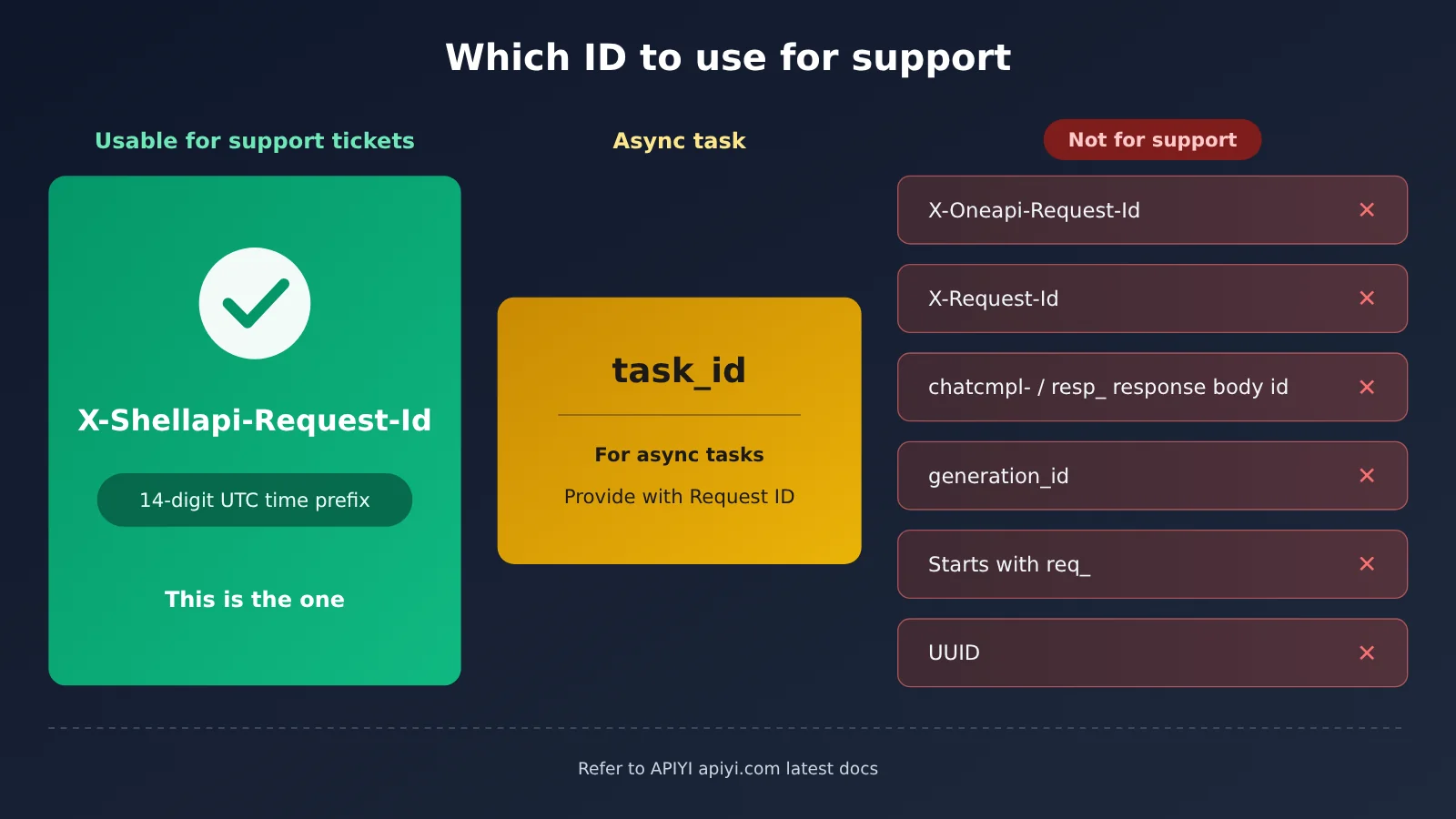
| Field | Source | Usable for support log lookup | Identifying feature |
|---|---|---|---|
| X-Shellapi-Request-Id | APIYI | ✅ That’s the one | Begins with a 14-digit UTC timestamp |
| X-Oneapi-Request-Id | Middle layer | ❌ | Different header name |
| X-Request-Id | Upstream provider | ❌ Can’t be found in APIYI logs | Usually starts with req_ or is a UUID |
| Custom headers from other channels | Channel | ❌ | Header names vary |
Response body id |
Completion ID / Response ID | ❌ | Starts with chatcmpl- or resp_ |
Image generation_id |
Image generation result | ❌ | Lives in the response body |
task_id |
Async task | ❌ Not a Request ID, but you still need to provide it | Task lookup, charge lookup |
The rule is simple: if it doesn’t start with a 14-digit timestamp, it’s not an APIYI Request ID. If the ID you got starts with req_, the request may have gone straight to OpenAI’s official endpoint. In that case, first check whether your Base URL is set to https://api.apiyi.com/v1.
How to Store Async Video task_id and Request ID Separately
Async video has two steps — “submit” and “query” — and each one returns a new X-Shellapi-Request-Id. Add a task ID on top, and it’s easy to mix them all up. The new docs recommend: store the submit request’s Request ID and the polling task ID separately.
| Model | Where the task ID lives | Query endpoint | Easily confused field |
|---|---|---|---|
| Seedance | Top-level id in the response body (the field isn’t called task_id) |
GET /seedance/api/v3/contents/generations/tasks/{id} |
— |
| Wan / HappyHorse | output.task_id |
GET /v1/tasks/{task_id} |
The request_id in the response body belongs to the upstream, not the one in APIYI logs |
For actual storage, save 3 fields per task: the X-Shellapi-Request-Id from submit time, the task ID, and the submit time. Request IDs returned when you query a task can be recorded as needed. Use the Request ID for error reports when submission fails; when a task gets stuck or there’s a billing question, both task lookup and billing lookup need the task ID.
What to Add When a Request ID Isn’t in the Logs
Even with the ID in hand, the logs won’t necessarily have it. The new docs have a dedicated section for “no Request ID in console logs,” and there are a few other not-found cases you can handle side by side.
| Situation | Cause | What to supplement |
|---|---|---|
| Request fails before a response arrives | DNS, TCP/TLS, proxy rejection, client timeout — no response header at all | The raw error text, call time, network environment |
| Client only shows “request failed” | The client doesn’t surface the raw error | Get the ID via path 1 or path 2; logs can only confirm whether the call arrived |
ID starts with req_ |
You might have hit OpenAI directly | Check the Base URL and retry |
| Can’t find it in the logs either | Past the retention period, or you grabbed the wrong ID | Verify the ID format; logs only keep the current month and the two calendar months before |
One more thing: the console page doesn’t display the ID, but the log query API can look it up by request_id. The table below is a real verification from 2026-11-16, with the models deepseek-flash and gpt-image-2, requests sent to https://api.apiyi.com/v1.
| Call | HTTP status | Response header | Log query by request_id result |
|---|---|---|---|
| deepseek-flash non-streaming | 200 | Has x-shellapi-request-id, no x-request-id | Exactly 1 consumption record returned |
| deepseek-flash streaming | 200 | Present, readable before the first data: chunk |
— |
| gpt-image-2, size=999×999 | 400 | Same value as the request id at the end of message | 3 error/retry lines, no consumption line |
| Nonexistent model name | 503 | Same value as the request id at the end of message | Not a single line |
The takeaway: the console log page doesn’t display the Request ID, but the log query API can find both “consumption lines” and “error lines” by request_id — and it can’t guarantee they’ll always be there. Requests that reach the channel and then fail on the channel side (bad parameters, for example) will leave error lines. Ones rejected right at the gateway (no available channel, for example) might leave nothing at all. When you can’t find it, use the ID from the response header or the raw error text, plus the call time, to fill in the details.
If support needs to reproduce, you can call again on APIYI apiyi.com with the same token and the same set of parameters, or switch to a different model to see whether the error is identical. Reproduction also burns tokens, so remember to record the Request ID of each reproduction.
🎯 Troubleshooting tip: When reproducing an error, pin the Base URL to
https://api.apiyi.com/v1and record the X-Shellapi-Request-Id and call time every time. Then hand the ID and call time to support together — they can look it up by ID in the backend and confirm faster whether the error happened at the gateway layer or the channel layer.
APIYI Request ID Error Ticket Template
Just copy these fields straight into your ticket:
- Request ID: the string that starts with a 14-digit timestamp
- Model: e.g. gpt-image-2
- Endpoint: e.g. POST /v1/chat/completions
- Time: include the timezone, e.g. 2026-11-16 11:24:04 UTC+8
- HTTP status: e.g. 400 / 503
- Error message: paste the full error, including
(request id: ...) - What you’ve already tried: e.g. swapped models, checked the Base URL, retried twice
- task_id (async video only): the task ID returned when you submitted the job
Two things to keep in mind: never send your full API key, and if the request body or images contain private information, redact it before submitting.
How the Request ID Doc Upgrade Affects Developers
What it means for developers
- One less round trip when reporting an issue: give the right ID the first time and support won’t have to come back and ask again.
- SDK users stop getting empty values: we now spell out the
_request_idgotcha and how to pull the value withwith_raw_response. - Video tasks become traceable: keep the Request ID and the task ID stored separately, and you’ve got a basis for both task lookups and billing checks.
What to watch for in the old docs
Some endpoint capability pages, news pages, and error-logging pages still describe x-request-id as “something to note down for troubleshooting.” When you run into that wording, treat this new Request ID page as the source of truth. Also swap x-request-id for x-shellapi-request-id in your code templates.
Common Questions (FAQ)
Q1: Which one exactly is the APIYI Request ID?
It’s `X-Shellapi-Request-Id` in the response headers, starting with a 14-digit UTC timestamp. When an error occurs, the value inside `(request id: …)` at the end of the error message is the same.
Q2: Is it safe to share the Request ID with someone else?
Yes. Per the docs, the Request ID is not a secret key—you can paste it into tickets, chats, or screenshots. What you must not share externally is the full API key starting with `sk-`.
Q3: Why is the ID read by the OpenAI SDK empty?
The SDK’s default `_request_id` reads x-request-id. Switch to `with_raw_response`, or pull x-shellapi-request-id from the response headers of `APIStatusError`.
Q4: How can I quickly verify that I can get the correct Request ID?
1. Register at APIYI apiyi.com and get an API key—new users get free testing credits.
2. Set the Base URL to `https://api.apiyi.com/v1` and send a minimal request.
3. Print x-shellapi-request-id and confirm you get this ID on every call; the logs page only lets you check whether this call arrived and was billed—it doesn’t display the ID.
Q5: Can I still look up an error from three months ago?
Generally no. Logs are retained for the current month and the two previous calendar months; for older records, you’ll need to rely on the Request ID and original error text you saved yourself.
APIYI Request ID: Key Takeaways
- The only correct ID:
X-Shellapi-Request-Id, which starts with a 14-digit UTC timestamp - Two ways to get it: copy it from the error message, or read the response header in code (logs only confirm that a call happened — they don’t show the ID)
- Easy to grab the wrong one:
X-Request-Id,req_,chatcmpl-,resp_, and UUIDs all can’t be used to file a support ticket - For video, save two things: store the submitted Request ID and the task ID separately
- Logs aren’t 100% reliable: the console page doesn’t display the ID, and requests rejected by the gateway on the spot may not even have a record — so include the original error text and timestamp
- Quick sanity check: fire one minimal request at APIYI apiyi.com and you’ll confirm you can read this header
Summary
This update to the APIYI Request ID lookup doc boils down to three things:
- Answer up front: the Request ID is
X-Shellapi-Request-Id, and the same value appears at the end of the error message. - Ruling out wrong IDs: a comparison table clearly lays out the difference between the intermediary layer, the upstream, the response body, and task IDs.
- A plan when you can’t find it: for each of the four scenarios, it spells out what material to supply, plus ticket templates you can use as-is.
My suggestion: go change the error-log field in your code to x-shellapi-request-id right now. Then when something goes wrong, hand the ID and the call timestamp to support together — they’ll look it up in the backend by ID, and you can file the ticket with the full set of materials.
📚 References
- APIYI Request ID Troubleshooting Doc (New Version): the factual basis for this article
- Link:
docs.apiyi.com/faq/request-id-troubleshooting -
Contents: covers the two ways to grab the ID, console log details, the ID reference table, notes on async video, and a ticket template
-
How Long Logs Are Kept: log retention policy
- Link:
docs.apiyi.com/faq/log-retention-policy - Contents: confirms whether your error records can still be looked up
Author: APIYI Technical Team
Technical Discussion: Feel free to reach out to us through the homepage of the APIYI apiyi.com website. Including the X-Shellapi-Request-Id when you submit a ticket helps us handle it faster