Author’s note: claude-haiku-5-5 thinks by default, and trying to turn it off throws an error? Chances are effort is higher than high. This article lays out the rules, a three-step fix, and the parameter boundaries.
Getting claude-haiku-5-5 to think less and leave its output budget for the actual content is a pretty common ask when you’re running batch jobs and structured tasks. You may have already set thinking to disabled, only for the API to throw an error back at you. You’re trying to turn thinking off — so why did it get blocked instead? This article covers how effort and disabled work together, so you can quickly get the hang of the right way to turn off thinking in claude-haiku-5-5.
This isn’t some mysterious quirk, and the model isn’t misbehaving. The docs are clear about it: if you don’t pass thinking to claude-haiku-5-5, it uses adaptive thinking, which is on by default. To turn thinking off you use type: disabled on thinking, but that form is only accepted when effort is no higher than high. The parameters in this article are based on the official Anthropic documentation as of 2026-11-08 (UTC+8), verified on 2026-11-13.
The core value: by the end of this article you’ll understand the real cause of the error, the three-step fix, and how max_tokens relates to thinking tokens. After that, no matter which environment you’re calling from, this rule won’t trip you up again.
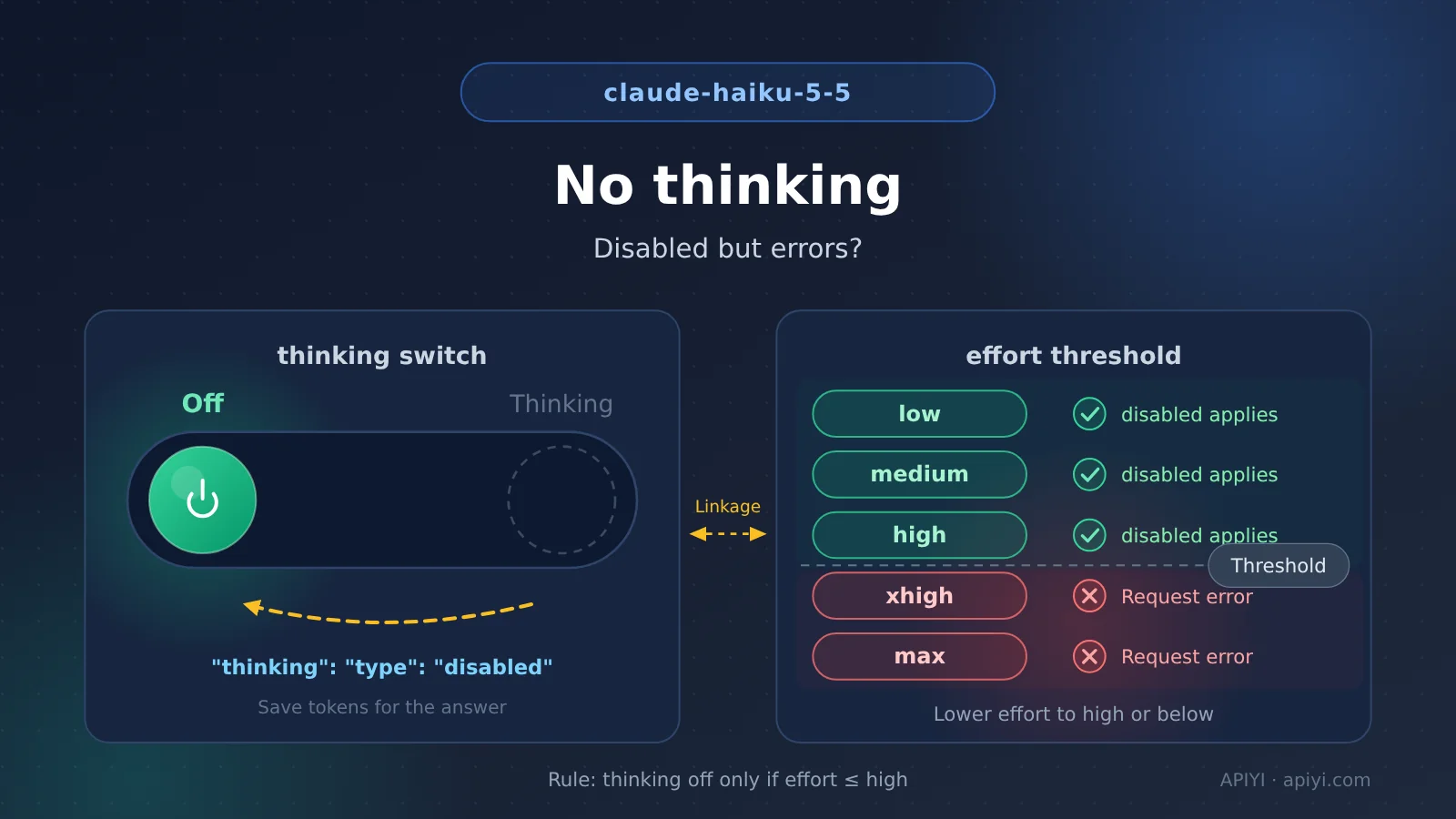
claude-haiku-5-5 Key Takeaways
Here are the conclusions up front—if you’re short on time, this section is all you need:
| Point | What the docs say | What it means for you |
|---|---|---|
| Thinking is on by default | If you don’t pass thinking, it runs adaptive thinking, which is enabled by default |
You have to turn it off explicitly if you want to save quota |
| The off switch | Set thinking to type: disabled |
It’s the only way to turn it off |
| The effort threshold | disabled is only accepted when effort is no higher than high |
Pairing it with xhigh or max throws an error |
| The effort default | Defaults to medium, same as claude-opus-5-5 |
You won’t hit the pitfall unless you raise it yourself |
| Quota boundary | Max output is 128000, and thinking tokens count toward max_tokens |
Thinking eats into the space available for the actual response |
claude-haiku-5-5, in Detail
First, it thinks by default. claude-haiku-5-5 runs with thinking enabled out of the box: when the thinking field doesn’t appear in the request, it runs adaptive thinking. The docs don’t spell out exactly how adaptive mode makes its decisions, but what’s certain is that thinking is on by default.
If your use case is short Q&A, batch labeling, format conversion, or anything else that doesn’t need deep reasoning, thinking tokens are pure overhead. The docs also note that thinking tokens count toward max_tokens, and the max output is 128000—the more it thinks, the less budget is left for the actual response. That’s exactly where the “turn off thinking and save the budget for the body text” request comes from.
Second, turning it off has conditions. The only switch for disabling thinking is setting thinking to type: disabled. But the docs also state that this only works when effort is no higher than high: with effort at medium or high, everything is fine; the moment you set it to xhigh or max, the request errors out. The official fix is equally blunt—drop effort to high or below. If you’re calling claude-haiku-5-5 through APIYI apiyi.com, start your debugging with that pair of parameters too.
Third, the default value is actually the safe one. claude-haiku-5-5 defaults effort to medium, the same as claude-opus-5-5, while most other models default to high. The common pitfall path usually looks like this: you migrate code from another model, habitually bump effort up to xhigh or max for better quality, then tack on disabled to control cost—the two intentions conflict, and the error shows up.
Conversely, as long as you don’t raise effort, the default medium naturally satisfies the “no higher than high” condition, and disabled takes effect normally. When you need to switch between models for comparison, calling multiple models with a single API key on APIYI apiyi.com saves you from repeatedly editing your integration config.
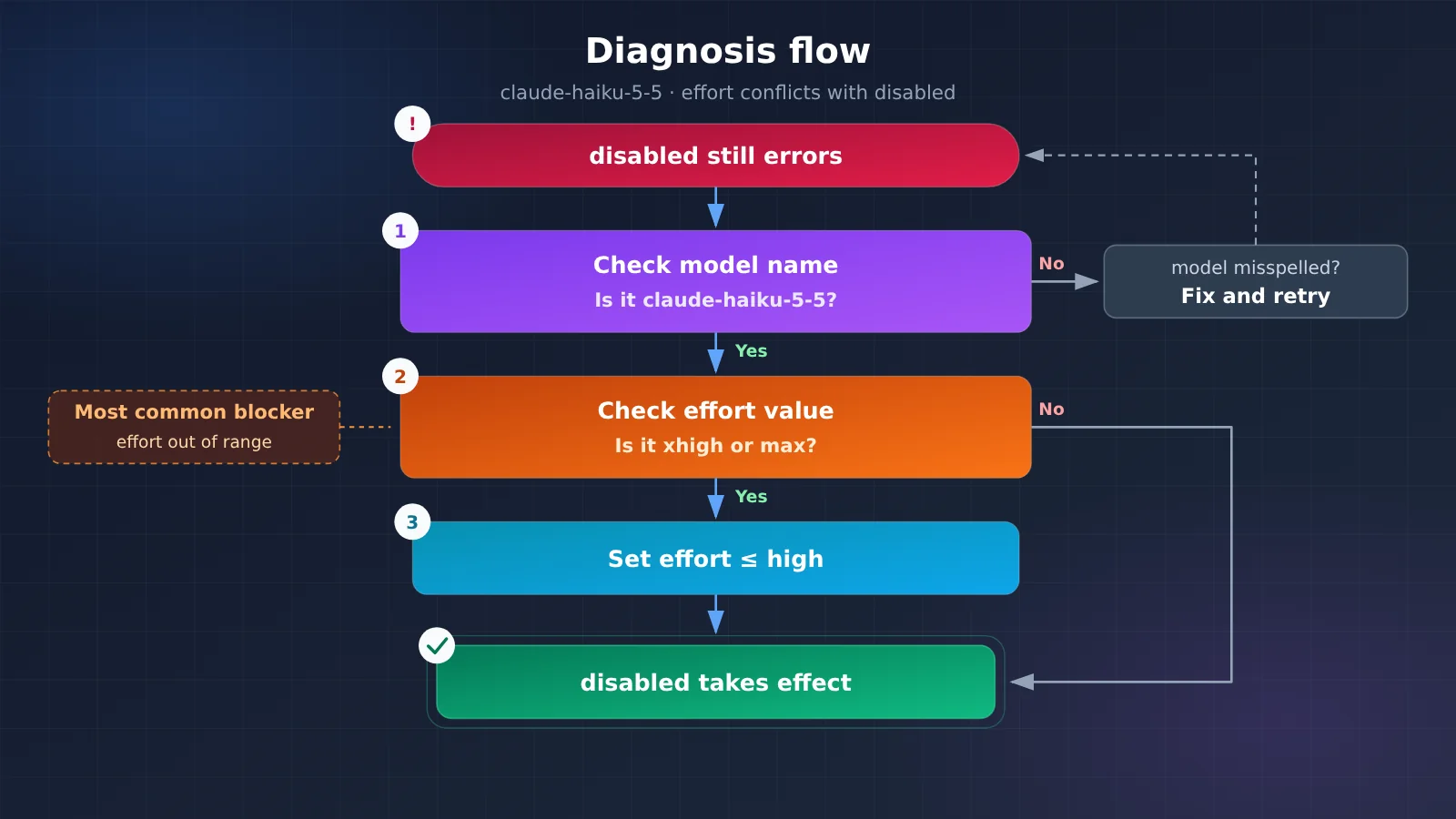
The diagram above is the standard troubleshooting path. The most common case gets stuck at that middle decision box: effort out of range. After fixing it, I’d suggest running a small-quota verification pass on APIYI apiyi.com to confirm responses come back normally before putting it into production traffic.
claude-haiku-5-5 Quick Start: Fix It in Three Steps
You don’t need to dig through long docs — just follow these three steps and this type of error is basically solved:
- Confirm the model ID: the
modelin your request should beclaude-haiku-5-5. Rule out the noise from a mistyped model name first. - Lower the effort: set it to
highor lower.mediumis the default, so you can also just omit it; the key is not to passxhighormax. - Then turn off thinking: set
thinkingto{"type": "disabled"}. At this pointeffortis no higher thanhigh, and the request will be accepted normally.
claude-haiku-5-5 Request Parameters at a Glance
| Parameter | Recommended value | Notes |
|---|---|---|
model |
claude-haiku-5-5 |
The model discussed in this article — be careful not to write it as another version |
thinking |
{"type": "disabled"} |
The only switch for turning off thinking |
effort |
medium (default) or high |
Must be no higher than high, otherwise it conflicts with disabled |
effort disallowed values |
xhigh, max |
Combining them with disabled throws an error |
max_tokens |
max 128000 | Thinking tokens count toward this value; once thinking is off, all of it can go to the body text |
The integration details aren’t complicated either — take APIYI as an example:
- Access endpoint:
https://api.apiyi.com/v1 - Authentication: just one API key
- API style: OpenAI-compatible
- Billing: pay-as-you-go with discounted pricing; new users get a free trial quota
- Coverage: mainstream models like OpenAI, Claude, and Gemini
🚀 Quick Start: We recommend running this validation on APIYI apiyi.com. After registering, run the fixed request with your free trial quota, confirm
disabledworks properly and the error is gone, then connect it to your real business — you can close the loop in a few minutes.
claude-haiku-5-5 effort compatibility
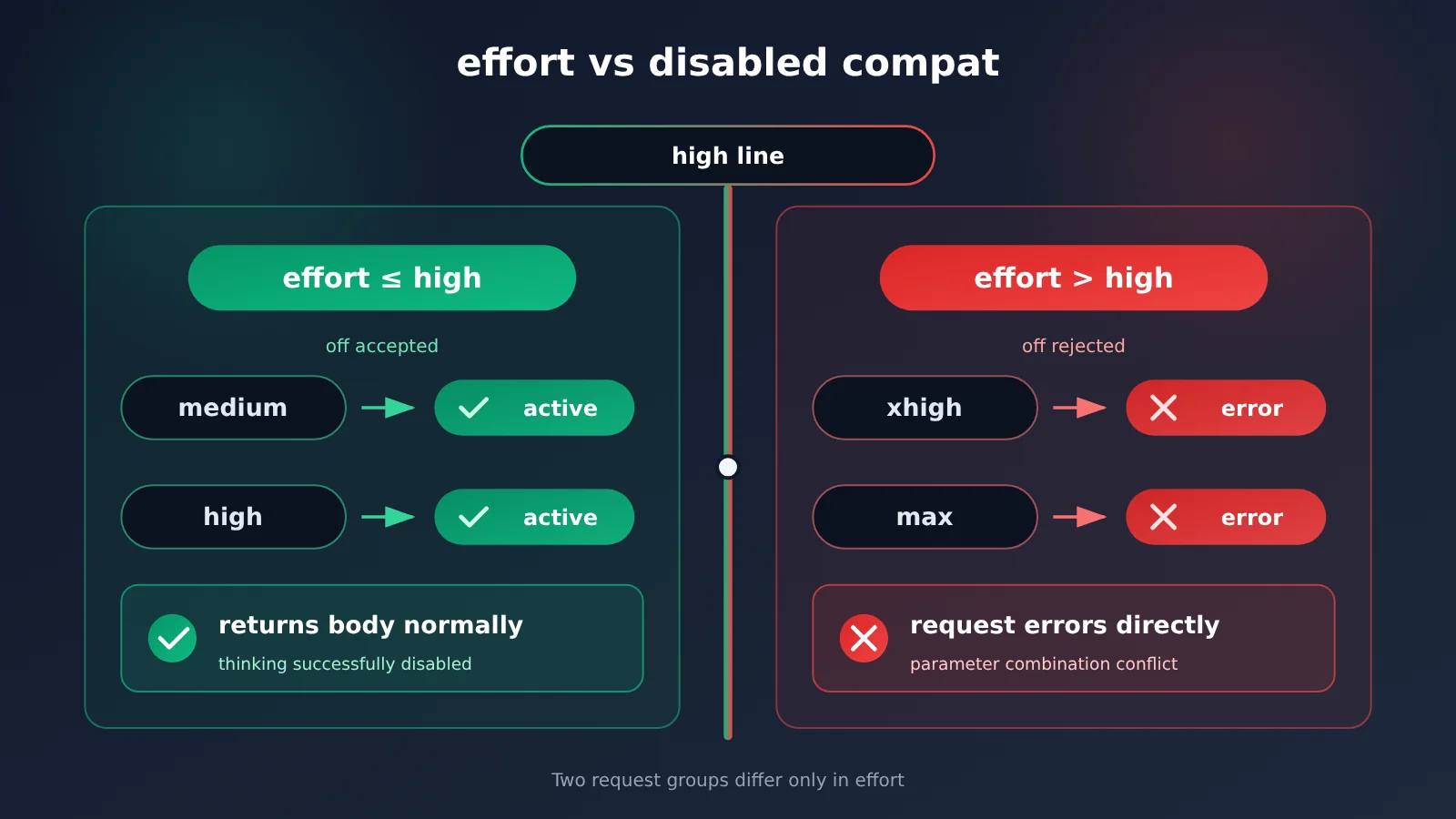
The table below is the one thing from this whole article worth remembering — go ahead and save it to your team notes:
| effort value | Combined with disabled | Result |
|---|---|---|
medium (default) |
Compatible | Thinking is disabled as expected |
high |
Compatible | Thinking is disabled as expected |
xhigh |
Conflict | The request returns an error |
max |
Conflict | The request returns an error |
With this table in hand, looking back at your own request makes the direction pretty clear: if the error shows up on a request that also sends disabled, your first move is to check whether effort has crossed the high line. The docs give exactly one fix — drop effort to high or below. There’s no other workaround.
Default effort for claude-haiku-5-5 vs. other models
| Model | Default effort | Relationship to disabling thinking |
|---|---|---|
| claude-haiku-5-5 | medium |
The default already satisfies “no higher than high”, so disabled takes effect directly |
| claude-opus-5-5 | medium |
Same default as haiku; its thinking-toggle rules aren’t covered here |
| Most other models | high |
The default is also within the threshold — only a manual bump pushes it over |
This table explains why it’s your request, of all requests, that errors: different models have different default effort values, and when you migrate code while carrying over old parameter habits, it’s easy to set effort explicitly to xhigh or max. Checking the default value before you migrate is the cheapest preventive step you can take.
claude-haiku-5-5 Troubleshooting and Self-Check Checklist
| Symptom | Most likely cause | What to do |
|---|---|---|
Still getting an error after passing disabled |
effort is xhigh or max |
Lower effort to high or below |
Not sure what effort is set to |
Defaults to medium when omitted |
The default meets the threshold, so no extra action is needed |
| Response gets shorter or truncated | Thinking tokens count toward max_tokens |
Disable thinking, or increase max_tokens within the 128000 cap |
| Want deeper reasoning quality | No thinking process after disabling thinking | Remove disabled and return to the default adaptive thinking |
Once you’ve fixed it, run through this self-check checklist before sending a request:
modelis set exactly toclaude-haiku-5-5effortis omitted, or explicitly set tomediumorhighthinkingis{"type": "disabled"}max_tokensdoes not exceed 128000
If all four conditions are met, this type of error won’t bother you again. Turning the final parameter combination into a request template can also help you avoid accidental changes later.
claude-haiku-5-5 Common Questions FAQ
Q1: Does claude-haiku-5-5 think by default?
Yes. The docs state that when you don’t pass `thinking`, claude-haiku-5-5 runs with adaptive thinking, which is on by default. If you want the entire output budget to go to the response body, you have to explicitly pass `disabled` to turn it off.
Q2: Why does it still throw an error after passing disabled?
The most common cause is `effort` being higher than `high`. The docs specify that `disabled` is only accepted when `effort` is not higher than `high`—pairing it with `xhigh` or `max` will error out. The fix is to drop `effort` to `high` or below.
Q3: What happens if you don’t pass effort?
The default is `medium`. claude-haiku-5-5 shares the same default as claude-opus-5-5—both are `medium`—while most other models default to `high`. That default already satisfies “not higher than high,” so you can pair it directly with `disabled`.
Q4: How does output length change once thinking is off?
The docs state that thinking tokens count toward `max_tokens`, with a maximum output of 128000. Once thinking is disabled, the same `max_tokens` budget can go entirely to the response body, and the risk of truncation drops along with it.
Q5: What if I temporarily want deeper reasoning?
Just remove `disabled` and let claude-haiku-5-5 fall back to its default adaptive thinking. If you also want to raise `effort`, be careful not to end up on the “`xhigh` or `max` plus `disabled`” combination.
Q6: How can I quickly verify the fix is working?
Register at APIYI apiyi.com to get free test credits, use `https://api.apiyi.com/v1` as the base URL, and run the fixed parameters once: if the request no longer errors and the body returns normally, `disabled` is in effect. The platform bills by usage, so verifying with a small amount costs very little.
Q7: Is the error always caused by effort?
Not necessarily, but this is one category explicitly documented. First check whether `model` is written exactly as `claude-haiku-5-5`, then check whether the `thinking` and `effort` combination goes out of bounds—only after ruling out both should you look at other causes. When calling through APIYI and you hit an error, start by checking this same pair of parameters.
Q8: Which version do these parameter rules follow?
This article follows the Anthropic official docs as of 2026-11-08 (UTC+8), with a verification date of 2026-11-13. If the official rules for `effort` and `disabled` change later, refer to the latest docs.
Summary
Turning off thinking in claude-haiku-5-5 comes down to four things:
- It thinks by default: if you don’t pass
thinking, you get adaptive thinking, which is on by default. To save quota you have to explicitly disable it. - Disabling has a threshold: when
thinkingis set todisabled,effortmust be no higher thanhigh. Pairing it withxhighormaxwill throw an error. - The default is safe:
effortdefaults tomedium, same as claude-opus-5-5, so as long as you don’t raise it yourself, you won’t hit the conflict. - Quota boundaries: max output is 128000, and thinking tokens count toward
max_tokens. Once you disable thinking, the whole budget goes to the response body.
Next time you run into “I tried to turn off thinking and got an error,” first check whether effort has crossed the high line. Straighten out the parameter combination and the problem is usually solved. We recommend using the free test quota on APIYI apiyi.com to verify results quickly — a single API key lets you call claude-haiku-5-5 and many other mainstream models, and the OpenAI-compatible interface makes switching models a lot less hassle.
📚 References
- APIYI docs: Claude effort and thinking parameter reference
- Link:
docs.apiyi.com/api-capabilities/claude-effort-thinking.md -
Description: effort values, the acceptance conditions for disabled, and the exact error wording
-
APIYI docs: Claude thinking guide update (2026-11)
- Link:
docs.apiyi.com/live/2026-11/claude-thinking-guide-refresh.md -
Description: changelog and background for the thinking-related guide
-
Anthropic official documentation
- Link:
docs.anthropic.com - Description: the parameters in this article follow the official version as of 2026-11-08 (UTC+8)
Author: APIYI Technical Team
Technical discussion: Feel free to contact us via the APIYI website homepage; more resources are available in the documentation center