
Author’s note: this article explains the difference between Fable’s default of Medium in Claude Code and Fable 5.2’s default of high when you leave effort out of an API call. It also shows how to line up usage on both sides.
A lot of developers start out writing code with Fable 5.2 in Claude Code and find the token usage pretty reasonable. Then they call the same model ID through the API, see noticeably higher usage on similar tasks, and start to wonder whether the two are really running the same model. Here’s the short answer: the default effort in the Claude app and Claude Code is Medium, while the default for Fable 5.2 on the Claude API, when you don’t set effort, is high.
It’s not two different models, and it’s not a billing problem. The gap comes from the same parameter having different defaults depending on where you call it from. Anthropic spells this out in its 2026-11-09 release post, as well as on the Claude platform’s model page and in the Effort docs.
What you’ll get from this article: you’ll understand why usage in Claude Code and the API doesn’t match, and you’ll know how to set effort explicitly in your API requests so that cost comparisons between the two are based on the same level.
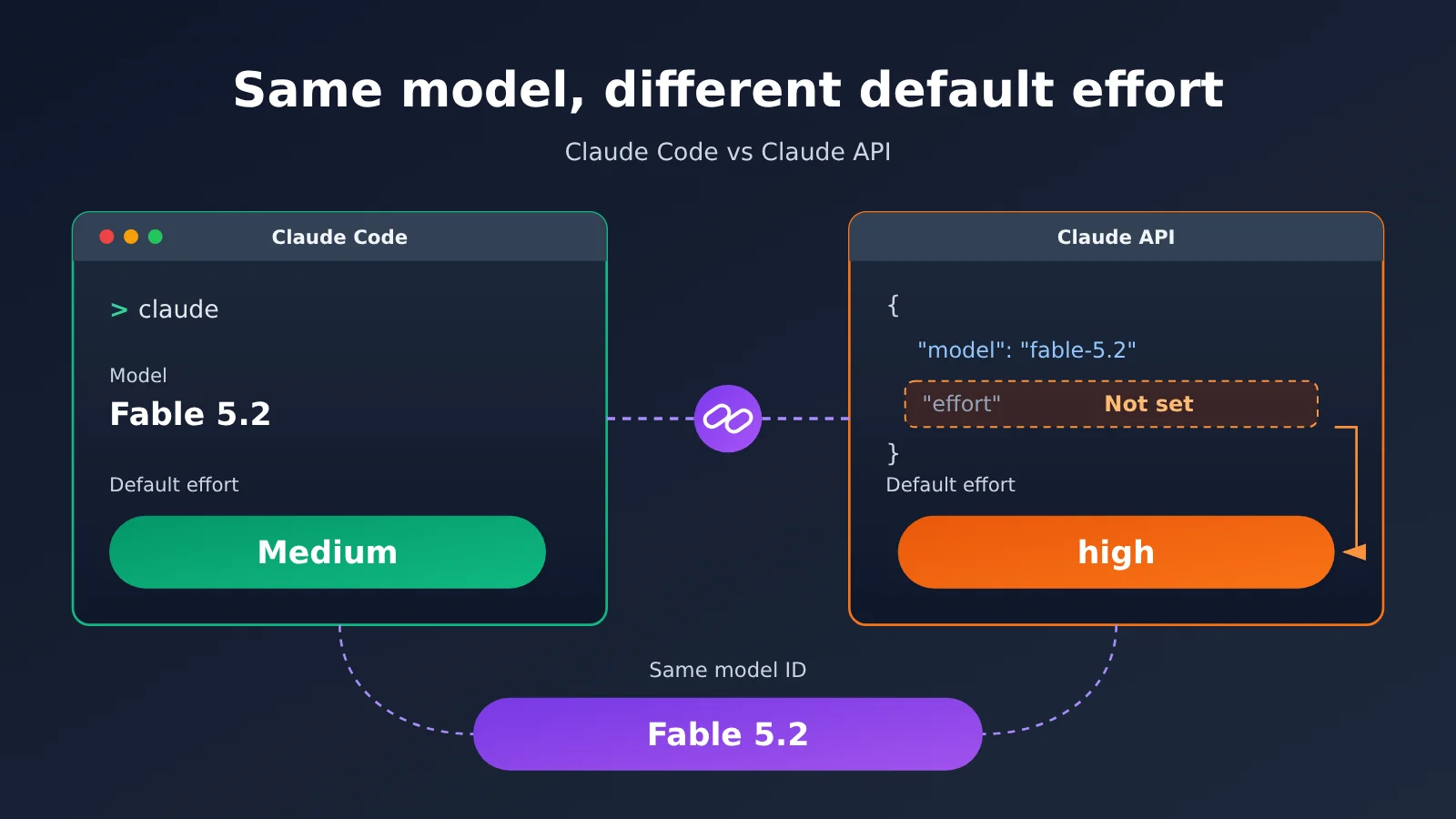
Key Takeaways: Fable’s Default Is Medium in Claude Code, but High in the API
Let’s start with a table showing how the two entry points differ. Everything in it comes from the official announcement, the model page, and the Effort docs.
| Key point | Details | What it means for you |
|---|---|---|
| Claude Code defaults to Medium | The official announcement says Medium effort is the default in the Claude app and Claude Code | The usage you see in Claude Code reflects the Medium tier |
| The API defaults to high | In the model page’s comparison table, Fable 5.2’s Default effort is high, which refers to the default value of the effort parameter on the Claude API | If your API request doesn’t specify effort, it runs at high |
| Same model | Both sides call Fable 5.2, and the only difference is the effort level | Don’t read the usage gap as a difference in model versions |
| Available levels | Fable 5.2 supports low, medium, high, xhigh, and max | You can explicitly set medium in the API to match Claude Code |
Why Fable Usage Differs Between Claude Code and the API
The effort parameter controls how much reasoning and output the model invests in a single task. The higher the level, the more thoroughly the model tends to think and elaborate, and the more tokens it tends to consume. At lower levels, the model leans toward faster, leaner answers. Claude Code is built for everyday coding interactions, so it defaults to Medium to balance quality against cost.
The Claude API is the interface developers integrate with directly. On the API, Fable 5.2’s default effort is high. In other words, if the request body doesn’t include an effort parameter, the server treats it as high. Many people migrating from Claude Code to the API only swap the base_url and model ID and forget to include effort, so the actual run level jumps from Medium to high.
What Anthropic Says About Fable 5.2 at the Medium Default
In its 2026-11-09 announcement, Anthropic noted that at the Medium default, Fable 5.2 uses fewer tokens than 5.1 to complete hard tasks. This is self-reported by Anthropic, not a conclusion from third-party retesting. The statement speaks to how efficient the Medium tier is, but it doesn’t give a universal multiplier for how much more high consumes than Medium.
So don’t treat “high costs X times more than Medium” as a fixed number. Task complexity, context length, and output length all affect the real gap. The only reliable approach is to run both medium and high on your own tasks and compare the usage fields.
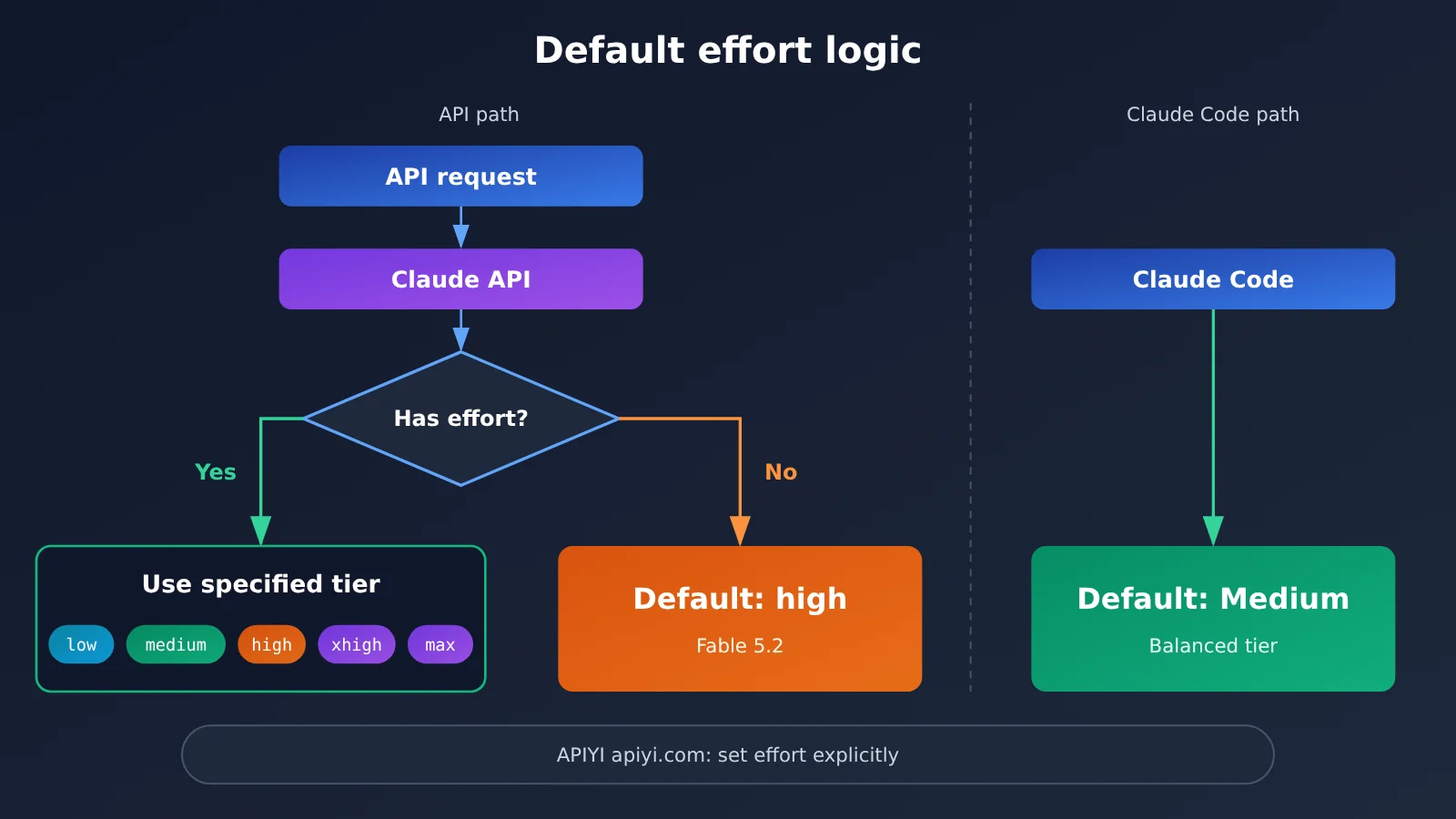
Fable 5.2 Effort Levels vs. Claude Code’s Default Medium
The table below lists the five effort levels Fable 5.2 supports and how they relate to the defaults of the two entry points. The “general tendency” column describes what the effort parameter usually means. Actual behavior depends on what your own tasks return.
| Effort level | Default for any entry point? | General tendency | Suited for |
|---|---|---|---|
low |
No | Faster and cheaper, with less reasoning effort | Simple rewrites, format conversion, classification |
medium |
Default in the Claude app and Claude Code | Balances quality and consumption | Everyday coding, routine Q&A, batch processing |
high |
Claude API default (when unset) | More thorough reasoning, tends to consume more | Complex debugging, architecture analysis |
xhigh |
No | More effort than high | Harder multi-step reasoning |
max |
No | Highest effort | A small number of critical tasks where quality matters most |
The key rows in this table are the middle two. The usage patterns you’ve seen in Claude Code come from medium, while the API runs high when you don’t set the parameter. If you want to reproduce Claude Code’s experience and cost, set medium explicitly in your API requests.
How to Align Fable 5.2 with Claude Code’s Default Medium in the API
The steps below don’t involve code blocks, so you can just check them in order. For how to write the effort field in the request body, refer to the Claude platform’s Effort documentation and the API docs of the platform you’re using.
Step 1: Confirm the Model ID and Endpoint
- Look up the model ID for Fable 5.2 on APIYI’s model pricing page at docs.apiyi.com/models:
claude-fable-5-2 - Use the OpenAI-compatible base_url for the endpoint:
https://api.apiyi.com/v1 - A single API key works for invocation, so you don’t need to apply for a separate Claude account
Step 2: Set the Effort Parameter Explicitly
- To match Claude Code: set effort to
medium - To get stronger reasoning: set it to
high, which is also the default when unset - For simple conversions: try
lowto cut consumption - Don’t rely on the default, or you won’t be able to tell from your logs which level a given request ran at
Step 3: Compare Usage Across Two Levels with the usage Field
- Pick the same batch of tasks and run it once with
mediumand once withhigh - Record the input tokens, output tokens, and cache-read tokens returned each time
- Convert to cost using the unit prices to get the actual gap for your own workload, rather than applying a fixed multiplier
🚀 Quick Start: If you want to check how effort levels affect usage first, you can use the free test credits for new users on APIYI (apiyi.com) to run a medium vs. high comparison. One key on the platform supports Claude, OpenAI, Gemini, and other models, so you won’t need to change how you connect when you compare other models later.
Fable 5.2 API Pricing and How It Relates to Effort Usage
Effort doesn’t change the unit price. What it changes is how many tokens a single request consumes. So the cost difference is simply the difference in token count multiplied by the unit price. The table below shows data from the APIYI pricing page as of 2026-11-11.
| Model ID | Input | Output | Cache Read | Group | Data Date |
|---|---|---|---|---|---|
claude-fable-5-2 |
$8 | $40 | $0.2 | Includes ClaudeCode | 2026-11-11 |
For pricing units and the latest figures, please refer to the live listings on the APIYI pricing page at docs.apiyi.com/models. As the table shows, the output price is 5x the input price. When you raise the effort level, the model tends to produce more reasoning and response content, and since output tokens carry the highest unit price, most of the extra cost at the high level comes from the output side.
The cache read price is far lower than the input price. If your requests include a lot of repeated system prompts or fixed context, enabling caching can noticeably cut input-side costs. But caching only affects the input side, so it can’t offset the extra output you get from a higher effort level.
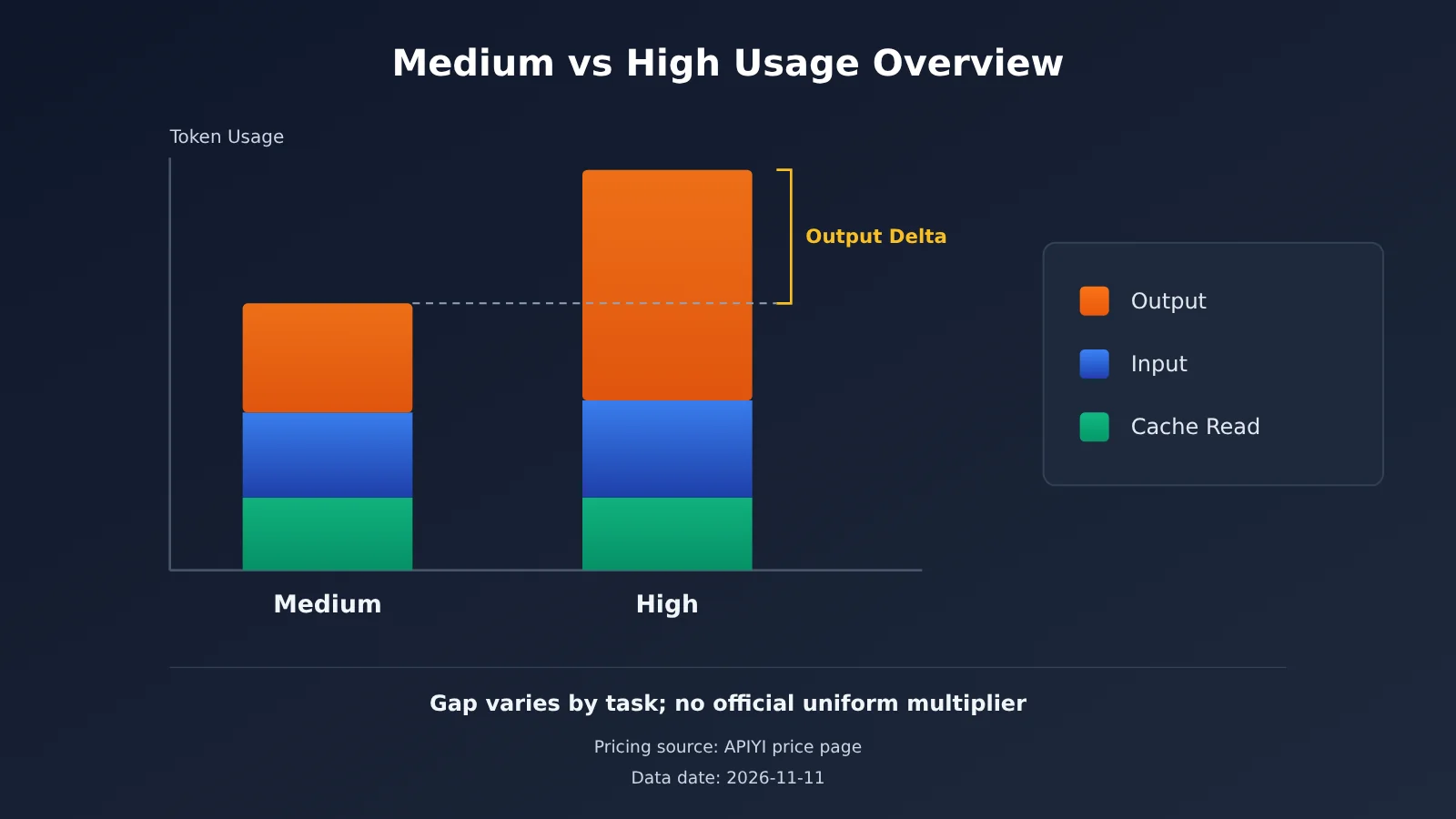
The Right Way to Estimate Fable 5.2 Costs
When estimating costs, don’t budget based on a rule of thumb like “high costs X times more than Medium.” The official docs only specify the default values for the two entry points, plus the officially self-reported finding that Fable 5.2 uses fewer tokens than 5.1 at the Medium level. They don’t give a uniform conversion ratio between high and Medium.
A more reliable approach is to take 20 to 50 representative real-world tasks and run each one at both levels. Then track the average input, output, and cache read tokens. Apply the unit prices from the table above to calculate the average cost per task, and you’ll have numbers that actually fit your own workload.
Troubleshooting Checklist for Fable 5.2 Usage Mismatches
If you notice a big gap between your API usage and what Claude Code shows, work through the table below one item at a time.
| Symptom | Possible Cause | Fix |
|---|---|---|
| API usage is noticeably higher than Claude Code | The request doesn’t set effort, so it runs at the default high |
Explicitly set it to medium, then compare again |
| You set effort but usage doesn’t change | The field’s location or name doesn’t match what the API expects, so it’s ignored | Check your field syntax against the Effort docs and the platform’s API docs |
| The request returns a parameter error | The effort value isn’t in the supported range | Use only low, medium, high, xhigh, or max |
| Model name error | The model ID is misspelled | Verify claude-fable-5-2 on the APIYI pricing page |
| Both sides are set to medium, but usage still differs | Context length, tool calls, and cache hits are different | Fix the input content before comparing, and look at cache-read tokens separately |
That last row is easy to overlook. While coding, Claude Code automatically pulls in file contents and conversation history, whereas the API requests you write yourself may not include nearly as much context. Even with the same effort setting, input tokens can differ, so it’s best to hold the input constant when you compare.
FAQ
Q1: Is Fable in Claude Code the same model as Fable 5.2 in the API?
Yes, it’s the same model. The difference is the default value of the effort parameter. The Claude app and Claude Code default to Medium, while on the Claude API, Fable 5.2 defaults to high when you don’t set effort.
Q2: What happens if I don’t set effort in the API?
The server runs Fable 5.2 at its Claude API default, which is high. That’s why many people notice higher usage after switching from Claude Code to the API.
Q3: How many times more expensive is high than Medium?
There’s no official multiplier. Effort doesn’t change the unit price, only token consumption, and how big that gap gets depends on task difficulty, context, and output length. We recommend running both levels on your own tasks and calculating the difference from the usage data.
Q4: Which effort levels does Fable 5.2 support?
According to the Effort documentation, Fable 5.2 supports five levels: `low`, `medium`, `high`, `xhigh`, and `max`. For everyday coding, `medium` is usually enough. Consider the higher levels only for complex reasoning.
Q5: How do I call Fable 5.2 through the API and set effort?
Follow these three steps:
1. Sign up at APIYI (apiyi.com) and get your API key. New users get free test credits.
2. Set base_url to `https://api.apiyi.com/v1` and the model ID to `claude-fable-5-2`.
3. Set effort explicitly in your request. For the exact field syntax, refer to the Effort documentation and the platform’s API documentation.
Q6: How much does Fable 5.2 cost on APIYI?
Based on the pricing data from 2026-11-11, `claude-fable-5-2` costs $8 for input, $40 for output, and $0.2 for cache reads, and it’s included in the ClaudeCode group. Prices can change, so check the live data on the APIYI pricing page before you order.
Q7: Is it reliable that Fable 5.2 uses fewer tokens than 5.1 at Medium?
That’s Anthropic’s own reported claim from its 2026-11-09 announcement, and it describes overall performance on hard tasks. It doesn’t give a numeric comparison between high and Medium. If cost matters to you, you should still verify it with your own task data.
Q8: Should I switch all my API requests to medium?
Not necessarily. If you want to reproduce the Claude Code experience and cost, `medium` does the job. For complex debugging or critical analysis, you can keep `high`, and for simple tasks you can drop to `low`. The key is to set the level explicitly instead of letting the default decide for you.
Key Takeaways: Fable’s Medium Default in Claude Code vs. the High Default in the API
- Same model, different defaults: Claude Code defaults to Medium, while Fable 5.2 defaults to high on the API when you don’t specify an effort
- Skip the parameter and you get high: When you migrate to the API and forget to pass effort, that’s the most common reason usage goes up
- Five levels to choose from: Fable 5.2 supports low, medium, high, xhigh, and max
- No fixed multiplier: There’s no official conversion ratio between high and Medium, so you’ll need to calculate it from your own task data
- Cost comes from output: Output is priced at 5x input, so the extra cost at higher effort levels comes mostly from output tokens
- Easy to get started: Use APIYI’s OpenAI-compatible endpoint with the model ID
claude-fable-5-2to compare the levels
Summary
Here are the three things to remember about Fable defaulting to Medium in Claude Code but to high in the API when you don’t set it:
- The defaults differ: The Claude app and Claude Code default to Medium, while Fable 5.2 on the Claude API defaults to high
- Set effort explicitly: To match Claude Code’s behavior, write
mediumin your API request - Estimate cost with real data: Don’t apply a fixed multiplier. Use the usage field and unit prices to work out your actual gap
As a next step, pick a batch of real tasks, run them at both medium and high, and feed the results into your cost model. You can use the free credits on APIYI (apiyi.com) to run this comparison first, then decide which level to make the default in production.
📚 References
- Anthropic announcement: Fable and Mythos 5.2 release notes, 2026-11-09
- Link:
anthropic.com/claude-fable-and-mythos-5-2 -
Notes: Source for Medium effort being the default tier in the Claude app and Claude Code, plus Anthropic’s self-reported figures showing Medium uses fewer tokens than 5.1
-
Fable 5.2 model page: Model specification table
- Link:
platform.claude.com/docs/en/models/fable-5-2/overview -
Notes: Default effort is high, which is the default value of the effort parameter on the Claude API
-
Effort documentation: Description of the effort parameter
- Link:
platform.claude.com/docs/en/build-with-claude/effort -
Notes: The tiers Fable 5.2 supports, and the API default
-
APIYI model pricing page: Model IDs and pricing
- Link:
docs.apiyi.com/models - Notes: Input, output, and cache-read pricing and group info for
claude-fable-5-2, with data as of 2026-11-11
Author: APIYI Technical Team
Technical support: If you run into questions about effort settings or usage comparisons, feel free to contact us on the APIYI homepage.