Author’s note: This article breaks down Claude Haiku 5.5’s specifications, pricing, and limitations. It also includes a task-based model selection table and a migration checklist for Haiku 4.5 users.
Here’s the bottom line: Claude Haiku 5.5 is a good fit for high-volume subtasks with short workflows, but it isn’t a replacement for flagship models on every task. Classification, extraction, routing, summarization, tool-executing sub-agents, and browser operations are called frequently and are relatively simple individually, making them ideal candidates for cost reduction. Complex planning, long-chain reasoning, high-value creative work, and critical decisions should still go to Sonnet 5.5 or Opus 5.5.
This isn’t another article rehashing benchmark scores. Rather than present unverified test results, we’ll use the official specifications and billing information in the APIYI documentation to calculate per-task costs across four typical scenarios. We’ll also cover the most common pitfalls when migrating from Haiku 4.5. By the end, you’ll have a model selection table and a checklist you can use to evaluate your own agent system.
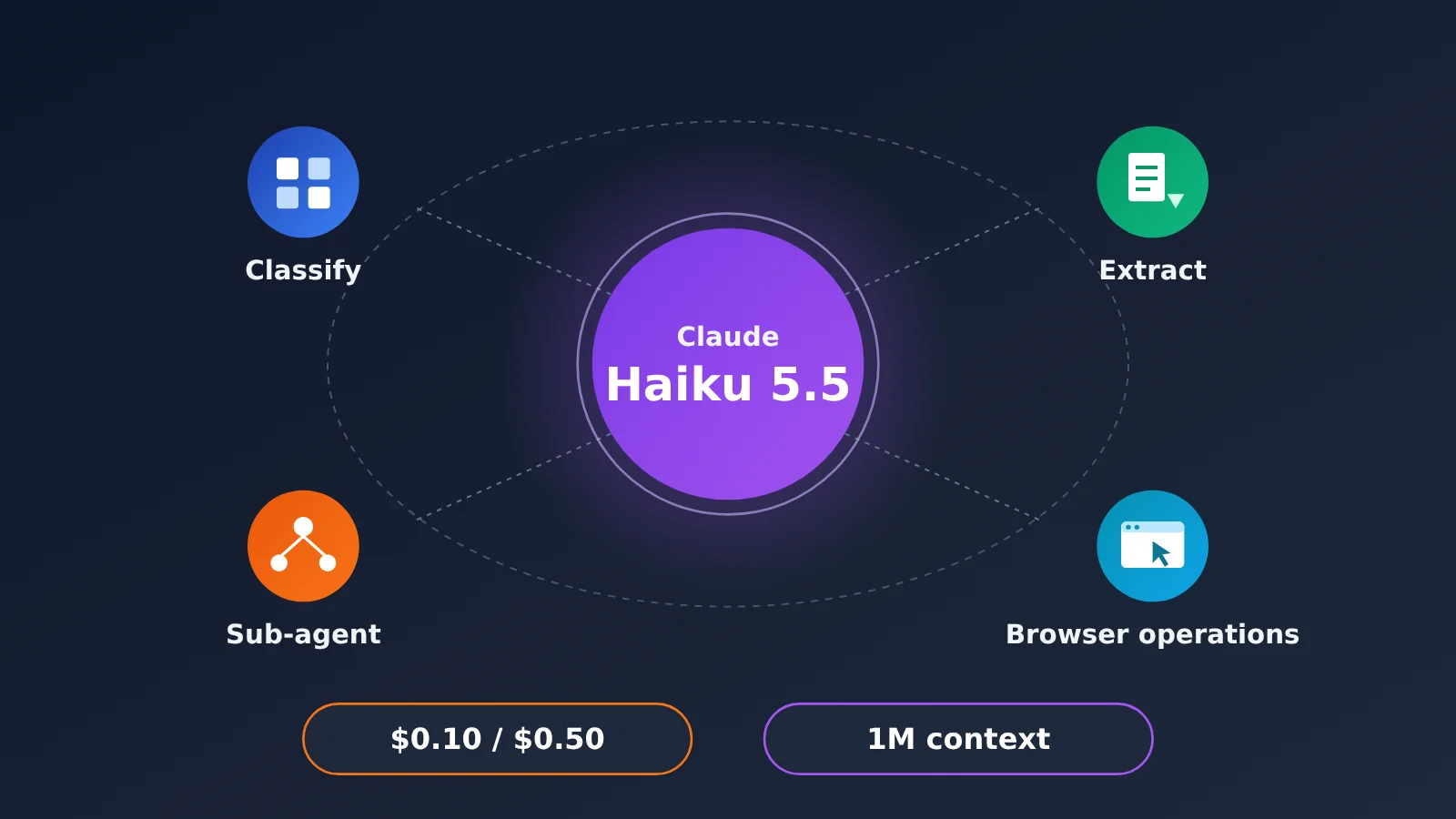
Claude Haiku 5.5 Specs and Pricing: What $0.10/$0.50 and a 1M Context Window Mean
Claude Haiku 5.5 was released on October 7, 2026, with the model ID claude-haiku-5-5. It’s designed for high-concurrency, low-latency, cost-sensitive tasks. Anthropic says its average operating cost is about 75% lower than Haiku 4.5’s. That’s the official average; your actual savings will depend on your input-to-output ratio, cache hit rate, and context length.
| Specification | Claude Haiku 5.5 | Notes |
|---|---|---|
| Model ID | claude-haiku-5-5 |
Use this ID directly when making calls |
| Release date | October 7, 2026 | Official release |
| Context window | 1M tokens | Can hold large volumes of documents or long conversation histories in a single request |
| Maximum output | 128K tokens | Enough for long summaries and large batches of structured output |
| Input price | Starting at $0.10 / MTok |
According to the official pricing page |
| Output price | Starting at $0.50 / MTok |
According to the official pricing page |
| Intended use cases | Classification, extraction, routing, summarization, sub-agents, browser operations | High-frequency, short tasks |
| Cost change | Anthropic says about 75% lower than Haiku 4.5 on average | Actual savings depend on your workload |
| Available platforms | Anthropic’s official API, APIYI apiyi.com | Check each platform’s console for pricing |
The 1M context window and 128K output limit can be misleading: it’s easy to assume that a smaller model can handle any big job. But a long context window determines what can fit, not how well the model can reason about it. Haiku 5.5 can read a long log and extract fields, but that doesn’t mean it can perform multi-step causal reasoning across that log.
Claude Haiku 5.5’s 100K Billing Threshold
It’s important to understand that $0.10 / $0.50 in the pricing table is the starting price. According to the APIYI documentation, within 100,000 tokens, input costs $0.10 and output costs $0.50 per million tokens. Check the console and documentation for how usage beyond that threshold is billed. In other words, a 1M context window is available, but filling it doesn’t necessarily mean you’ll still pay the starting rate.
Caching, batch processing, and long contexts may also have different billing rules. When estimating costs, consider tracking requests in two buckets—“within 100K” and “over 100K”—and factor in your cache hit rate. If you focus only on the base rate, it’s easy to miscalculate costs for long-context workloads.
Claude Haiku 5.5 Cost Estimates: Four Subtasks, Cost per Request
These figures aren’t based on measured results. They’re arithmetic estimates using the $0.10 / $0.50 starting rates, and they assume each request stays within 100K tokens. The token counts are typical assumptions—you should replace them with actual usage data from your own application.
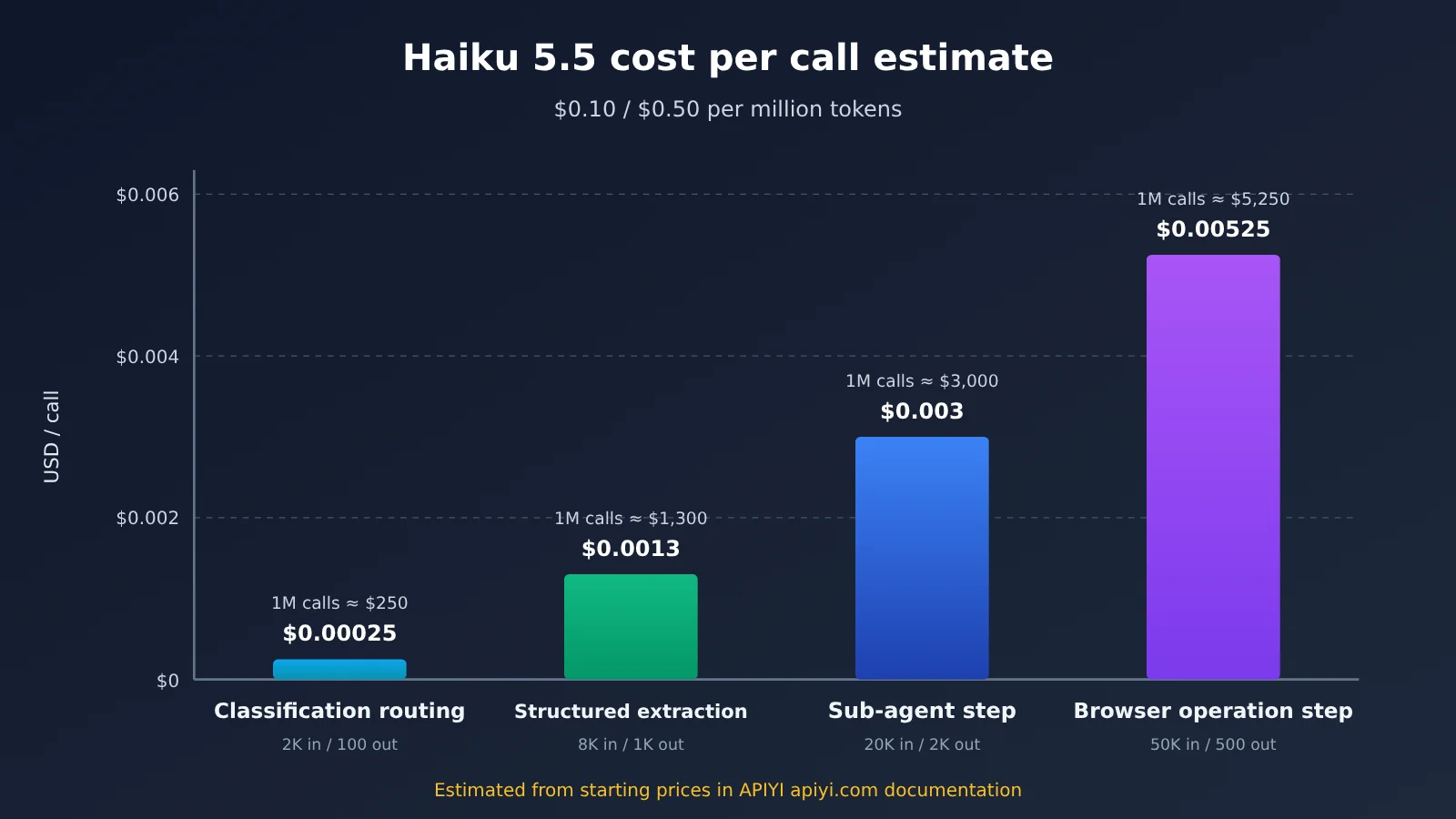
| Scenario | Assumed input tokens | Assumed output tokens | Estimated cost per request | Estimated cost per 1 million requests |
|---|---|---|---|---|
| Intent classification / routing | 2,000 | 100 | About $0.00025 | About $250 |
| Structured extraction | 8,000 | 1,000 | About $0.0013 | About $1,300 |
| Single sub-agent execution step | 20,000 | 2,000 | About $0.003 | About $3,000 |
| Single browser operation step | 50,000 | 500 | About $0.00525 | About $5,250 |
The calculation is straightforward: input tokens ÷ 1,000,000 × 0.10, plus output tokens ÷ 1,000,000 × 0.50. For classification, 2,000 input tokens cost about $0.0002 and 100 output tokens cost about $0.00005, for a total of about $0.00025.
Two patterns stand out. First, tasks like classification and routing, with short inputs and very short outputs, cost almost nothing per request. The real expense comes from the volume of calls. Second, browser operation costs are driven mainly by input, because the page DOM, screenshot descriptions, and previous steps can quickly inflate the context. If a single step’s context approaches or exceeds 100K, check the pricing in the APIYI documentation rather than relying on the estimates above.
💰 Cost tip: This table is just a starting point. Before going live, check token usage and logs for real requests in the APIYI apiyi.com console. Recalculate costs based on your actual usage distribution, then decide which workflows are worth switching.
Which Sub-Agents Are a Good Fit for Claude Haiku 5.5?
To decide whether a task should move to Haiku 5.5, ask three questions: Does it run frequently? Is each task short? Is the cost of an error manageable? If the answer to all three is “yes,” it’s a good candidate for migration.
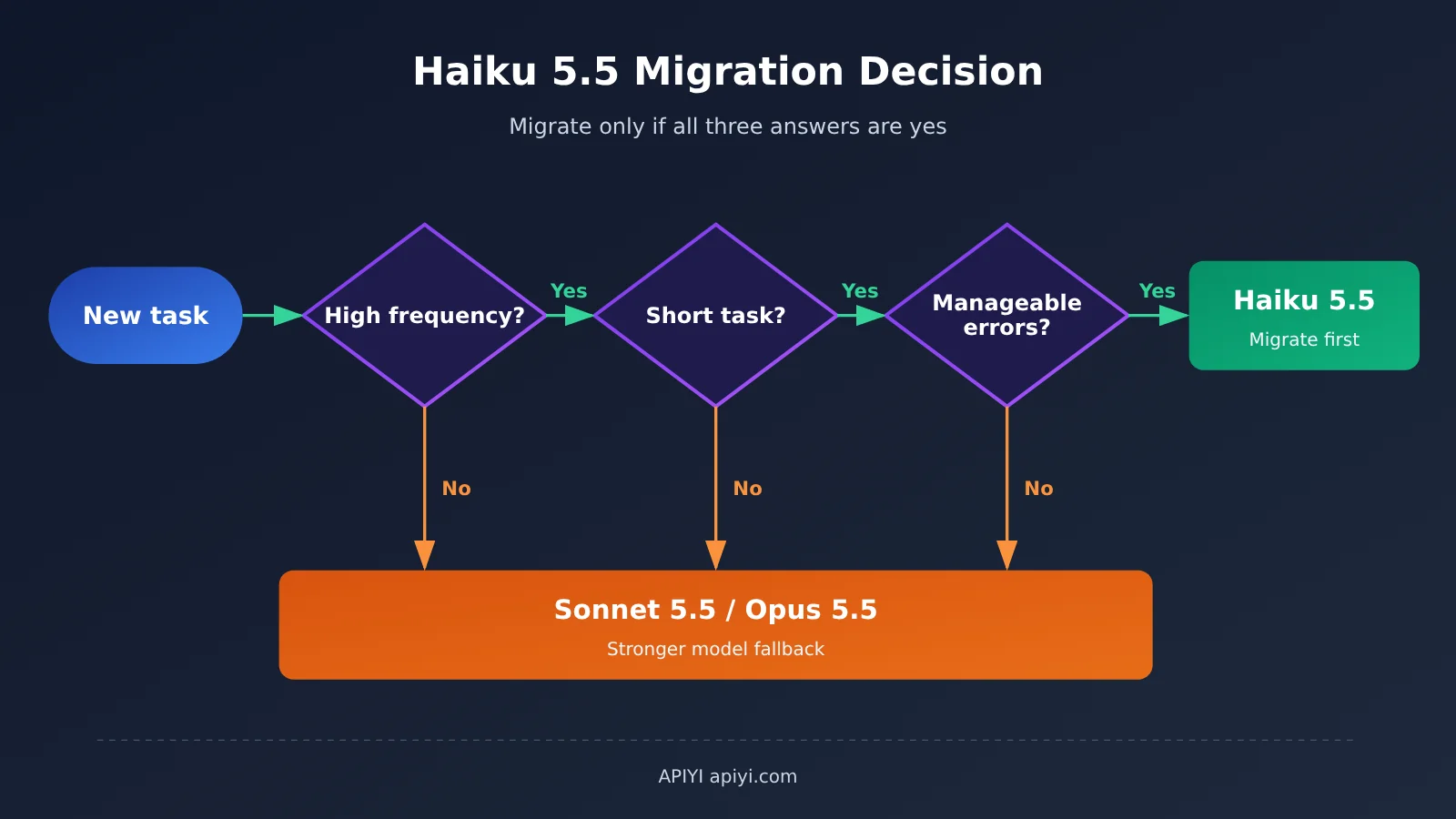
By that standard, these tasks are the strongest candidates for switching from Haiku 4.5:
- High-frequency classification and intent recognition: Customer support ticket prioritization, user intent identification, and initial content moderation routing. The output is often just a single label, making this a particularly cost-effective use of Haiku 5.5.
- Routing decisions: Deciding which downstream Agent should handle a request in a multi-Agent system is a classic example of a short, high-frequency decision.
- Structured extraction and field completion: Extracting predefined fields from contracts, resumes, or logs and returning JSON. As long as the schema is clear, a small model is usually reliable enough.
- Summarization: Condensing meeting notes, long documents, and tool results. The 1M context window lets it read longer materials in one pass, while the 128K output limit is enough for summaries broken into sections.
- Tool-execution sub-Agents: Once a more capable model has broken down the plan, Haiku handles individual steps such as running searches, querying databases, and reading or writing files.
- Browser operations and real-time interactions: Low-latency actions such as clicking, filling out forms, and navigating pages, as well as customer support conversations that need quick responses.
- Large-scale offline tasks: Cleaning historical data and applying labels in bulk, with batch processing to reduce costs further.
These scenarios have one thing in common: the task boundaries are clear, and the results can be verified. Classification has a label set, extraction has a schema, and tool calls have return values. If something goes wrong, downstream processes can detect the error and retry.
Claude Haiku 5.5: Strengths, Limitations, and When Not to Use It
Strengths
- Low starting price: At
$0.10 / $0.50, the starting price makes the per-call cost of high-frequency tasks almost negligible. - Long context window: A 1M-token context window reduces the engineering effort needed to split up long documents and piece together multiple turns.
- High output limit: 128K output tokens are enough for long summaries and batches of structured results.
- Low-latency focus: It’s designed for real-time interaction and browser operations, making it a good fit for workflows where response speed matters.
Limitations
- Unreliable at complex multistep reasoning: Smaller models are more likely to go off track during long planning chains or decisions that require repeated trade-offs. One solution is to let Sonnet 5.5 or Opus 5.5 handle the planning and use Haiku only for execution.
- Not cost-effective for high-value creative work: For brand copy, critical marketing content, or complex code refactoring, the cost of lower quality can far outweigh the token savings.
- Output variability needs safeguards: For quality-sensitive tasks where you can’t tolerate fluctuations, add validation and retries or use a flagship model instead.
- Check long-context pricing: Verify pricing beyond 100K in the documentation; don’t assume the starting rate still applies.
A practical rule of thumb: if a person has to catch the errors, don’t hand the task to Haiku lightly. If errors can be checked automatically, Haiku is often the most cost-effective choice.
How Claude Haiku 5.5, Sonnet 5.5, and Opus 5.5 Divide the Work
The right way to migrate isn’t to swap out every model at once—it’s to tier tasks. Stronger models handle the thinking, while Haiku handles execution quickly. It’s the most common and cost-effective setup in multi-agent systems.
| Task type | Recommended model | Why | Available platform |
|---|---|---|---|
| Intent classification and routing | Haiku 5.5 | High-frequency tasks with very short, verifiable outputs | APIYI apiyi.com |
| Structured extraction and field completion | Haiku 5.5 | Clear schemas work well with JSON validation | Same as above |
| Summarization and tool-result compression | Haiku 5.5 | Can read long contexts in one pass | Same as above |
| Tool-executing sub-agents | Haiku 5.5 | Execute steps already broken down by stronger models | Same as above |
| Browser operations and real-time customer support | Haiku 5.5 | Low latency takes priority | Same as above |
| Task decomposition and planning | Sonnet 5.5 / Opus 5.5 | Requires multi-step reasoning and a big-picture view | Same as above |
| Complex code refactoring | Sonnet 5.5 / Opus 5.5 | Changes affect a lot of code, and mistakes are costly | Same as above |
| Brand copy and high-value creative work | Opus 5.5 | Quality takes priority over cost | Same as above |
| Critical business decisions | Opus 5.5 | Requires the judgment of a flagship model | Same as above |
In practice, a typical workflow looks like this: Opus 5.5 or Sonnet 5.5 receives the user’s goal and produces a step-by-step plan. Each step is handed to a Haiku 5.5 sub-agent to make tool calls. Haiku then compresses the results into a summary and sends it back to the stronger model for the next round of decision-making. That way, expensive reasoning happens only at a few key points, while the bulk of execution runs on a cheaper model.
In this kind of tiered architecture, the ability to switch models through the same interface is essential. With APIYI apiyi.com, you can access Opus 5.5, Sonnet 5.5, Haiku 5.5, and other models with a single API key. The planning and execution layers only need to change the model parameter—there’s no need to maintain separate accounts and keys for each model.
Calling Claude Haiku 5.5 and Checking Your Migration from Haiku 4.5
Calling Claude Haiku 5.5 Through APIYI
APIYI supports both the OpenAI format and Claude’s native format. If your project already uses the OpenAI SDK, set base_url to https://api.apiyi.com/v1 and change the model parameter to claude-haiku-5-5. If you’re using Claude’s native format, you’ll also just need to replace the endpoint and API key. Check the APIYI documentation for the exact parameters.
After migrating, check three things in the APIYI apiyi.com console: confirm that claude-haiku-5-5 is available in the model list, verify that the token distribution on the usage page matches your estimates, and use the logs to investigate formatting issues and tool-call failures. Check the console and documentation for current pricing and availability, especially for long-context requests exceeding 100K.
🚀 Quick start: Use the free test credits at APIYI apiyi.com to run a batch of real task samples. Compare the outputs from Haiku 4.5 and Haiku 5.5 side by side before deciding how much to migrate.
Five Things That Are Easy to Overlook During Migration
Switching from Haiku 4.5 to 5.5 may look like a simple model ID change, but several areas need to be revalidated.
- Prompt dependencies: Check whether your existing prompts assume that “the model will figure it out.” If a task needed repeated retries to produce stable results on 4.5, break it into smaller steps before switching.
- Output format: The new model may respond to the same prompt in a different style. Add JSON validation and retry handling for any output that downstream systems need to parse.
- Tool calls: Make sure tool definitions, parameter structures, and response handling remain compatible with the new model. Pay particular attention to parallel tool calls and omitted parameters.
- Cache hits: Existing prompt caches may not be reusable after switching models. Costs may be higher than expected for the first few days, so monitor the hit rate as it recovers.
- Rate limits and concurrency: Haiku’s value lies in high-concurrency workloads. Make sure your account’s rate limits can handle peak traffic after the switch.
The most important thing is to compare a small sample of real tasks, not just benchmark scores. Benchmarks measure general capabilities; your business cares about accuracy and stability on its own tasks.
Frequently Asked Questions
Q1: Does Claude Haiku 5.5 really cost $0.10/$0.50?
Those are starting prices. The official pricing page lists input from `$0.10 / MTok` and output from `$0.50 / MTok`. APIYI documentation says those rates apply within 100,000 tokens; check the console and documentation for rates beyond that. Caching, batch processing, and long contexts may also have different rates.
Q2: How much cheaper is Claude Haiku 5.5 than Haiku 4.5?
According to the official announcement, its average operating cost is about 75% lower than Haiku 4.5. That’s an average; your actual savings will depend on your input-to-output ratio and context length. Try running real requests through APIYI at apiyi.com for a week, then compare your bill and usage logs to calculate your actual savings.
Q3: Does the 1M context window mean Haiku 5.5 can reason over long documents?
Not necessarily. The 1M context window lets it read long documents, making it suitable for extraction, summarization, and retrieval tasks. But tasks that require multistep causal reasoning or long-chain planning should still go to Sonnet 5.5 or Opus 5.5.
Q4: How can I use Haiku 5.5 and Opus 5.5 together in a layered agent?
With APIYI at apiyi.com, you can access Opus 5.5, Sonnet 5.5, Haiku 5.5, and other models with a single API key. The interface supports both OpenAI and Claude’s native formats. Just switch the model parameter between the planning and execution layers. New users also get free testing credits to validate their setup.
Conclusion: Choosing Claude Haiku 5.5 and a Migration Checklist
Claude Haiku 5.5’s main advantage is its low per-call cost for high-frequency subtasks. Its 1M context window and 128K output limit also reduce the need to split tasks into chunks. It’s best suited for classification, routing, extraction, summarization, tool-executing sub-agents, and browser operations. It’s less suitable for complex reasoning, long-chain planning, and high-value creative work. The right approach is to tier tasks: let a stronger model plan and Haiku execute.
Key Takeaways
- Pricing starts at
$0.10 / $0.50for requests within 100,000 tokens. Check the documentation for pricing above that threshold. - Cost savings are an average: Anthropic says costs are about 75% lower than Haiku 4.5 on average. Measure the savings for your own workload.
- Tasks to migrate: Start with high-frequency, short, verifiable sub-agent tasks.
- Tasks to keep on stronger models: Use Sonnet 5.5 / Opus 5.5 for complex planning, high-value creative work, and critical decisions.
- What to validate: Check prompts, output formats, tool calls, caching, and rate limits individually.
| Check | What to check | Pass criteria |
|---|---|---|
| Task selection | Is the task high-frequency, short, and are errors verifiable? | Migrate only if all three criteria are met |
| Prompts | Do they depend on a flagship model’s reasoning capabilities? | Complex steps have been broken down |
| Output format | Is structured output stable? | JSON validation and retries are in place |
| Tool calls | Are tool definitions and parameters compatible? | All tests in a small sample pass |
| Caching | How does the cache hit rate change after switching? | Hit rate returns to the expected level |
| Billing | Do any requests exceed 100K? | Requests above the threshold are priced separately |
| Rate limits | Can the concurrency quota handle peak traffic? | Load tests produce no rate-limit errors |
| Performance comparison | Compare a small sample of real tasks | Accuracy is at least as good as 4.5 |
We recommend using the free credits on APIYI at apiyi.com to compare the models on real tasks first. Check the pricing and usage logs in the console to confirm the savings, then migrate suitable sub-agents to Claude Haiku 5.5 in batches.
Author: APIYI Technical Team
Technical discussions: Contact us through the APIYI homepage. For more information on models and billing, visit the documentation center at docs.apiyi.com.