
Author’s note: Using openJiuwen WorkSwarm’s context-switching mechanism as a case study, this article explores the “handoff summary + archive retrieval” pattern and the design choices and trade-offs long-running agents face as they approach context window limits.
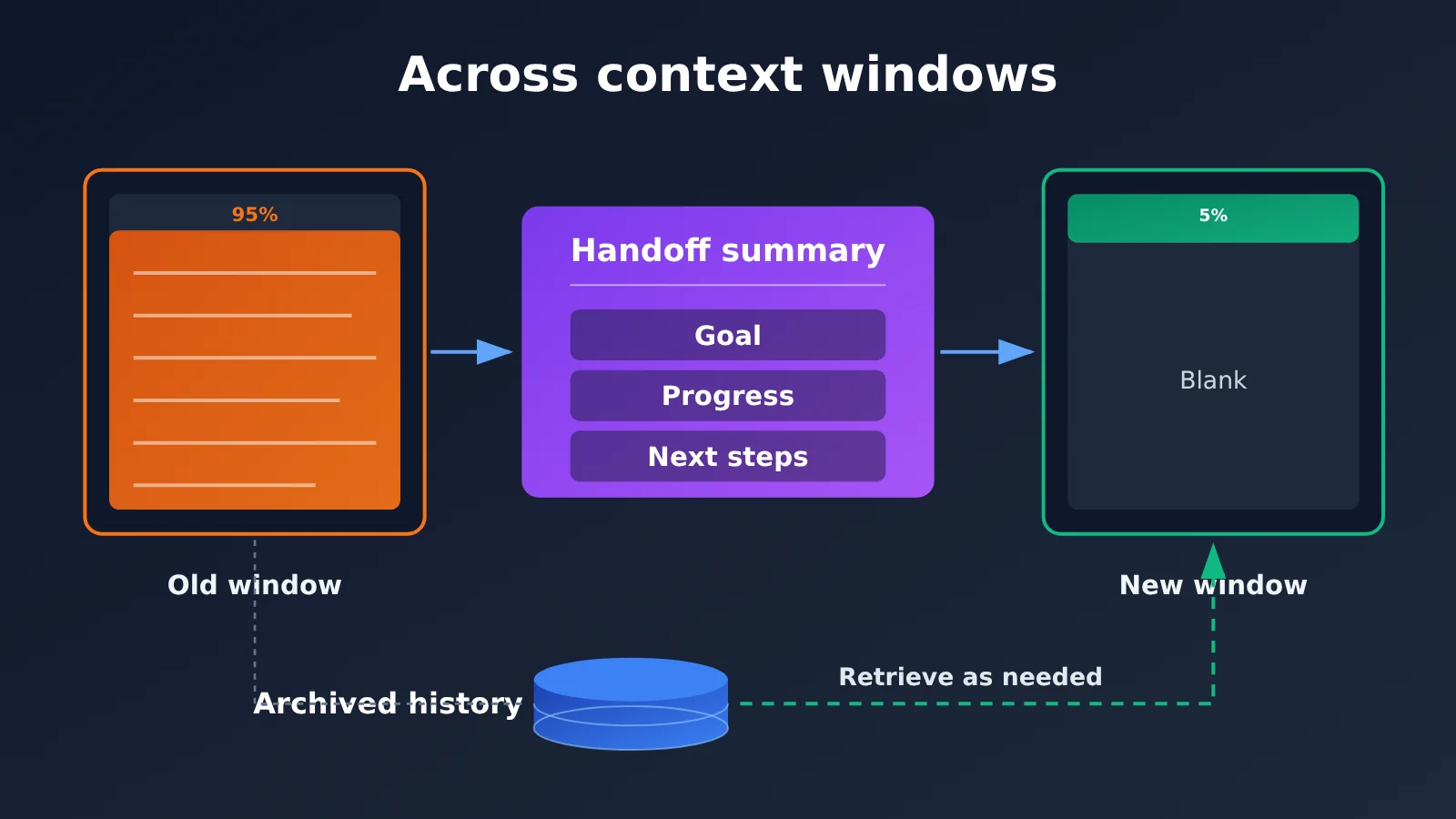
The Huawei-backed open-source agent community openJiuwen recently released its Hyper-Agent cluster architecture. One detail is worth developers’ attention: When an agent’s context window nears its limit, it switches to a new window, carrying a handoff summary of its goals, progress, and next steps. When it needs more detail, it retrieves archived history. The mechanism is easy to describe in a sentence, but it addresses an engineering problem every long-running agent faces.
This isn’t just a rumor. The capability has been released as part of openJiuwen WorkSwarm, and the code is open source on GitHub under the name JiuwenSwarm. Using this mechanism as a case study, we’ll explore three design questions: what a handoff summary should contain, when to trigger a switch, and when to retrieve archived history. We’ll also compare the trade-offs between relying on longer context windows and using summaries with retrieval.
The takeaway: By the end of this article, you’ll be able to assess the options for handling context window limits in your own agent applications and the risks of each approach.
Handoff Summaries + Archive Retrieval: Key Facts at a Glance
Let’s start with the facts confirmed by the source material, then look at what they mean for developers. The table below draws on public reporting; implementation details that haven’t been confirmed are noted separately later.
| Item | Details |
|---|---|
| Publisher | openJiuwen, a Huawei-backed open-source agent community |
| Release | The Hyper-Agent cluster architecture, implemented in openJiuwen WorkSwarm |
| Open-source status | Code released on GitHub under the name JiuwenSwarm |
| Core change | A Persistent Agent retains its own identity and state, while sessions become underlying resources scheduled by the system |
| Context mechanism | When a window approaches its limit, the system switches to a new one, carrying a handoff summary of the “goal, progress, and next steps”; archived history is retrieved when details are needed |
| Reporting date | Early November 2026 |
Why Persistent Agents Must Address Context Window Limits
WorkSwarm is designed to let agents operate independently of individual chat sessions, remaining in work groups on platforms like Feishu and DingTalk as long-running “digital employees.” A single agent can track multiple tasks across different third-party group chats, receiving a request in one channel and delivering the result in another. A gateway connects instant messaging apps and the web interface, while AgentServer schedules agents and work sessions.
In this setup, reaching the context window limit isn’t an occasional problem—it’s inevitable. A chatbot that answers one-off questions rarely fills its window, but an agent tracking a project over several days continually accumulates conversation history, tool results, and file contents. Reporting also notes that WorkSwarm’s activity dashboard shows each agent’s token usage, indicating that context consumption is an operational metric these systems need to monitor continuously.
Sessions as Resources: The Foundation for Handoff Summaries
The key to understanding the handoff summary mechanism is that WorkSwarm separates “agents” from “sessions.” An agent’s identity and state persist, while sessions are resources that the system can allocate, schedule concurrently, and resume with context. Since a session can be replaced, switching to a new window when the current one fills up becomes a natural design choice.
The handoff summary carries the minimum sufficient working state from the old session to the new one. Archived history ensures that details from the old session aren’t truly lost—they simply move from being “always present” to being “retrieved on demand.”
Handoff Summary Design Question 1: What Should It Include?
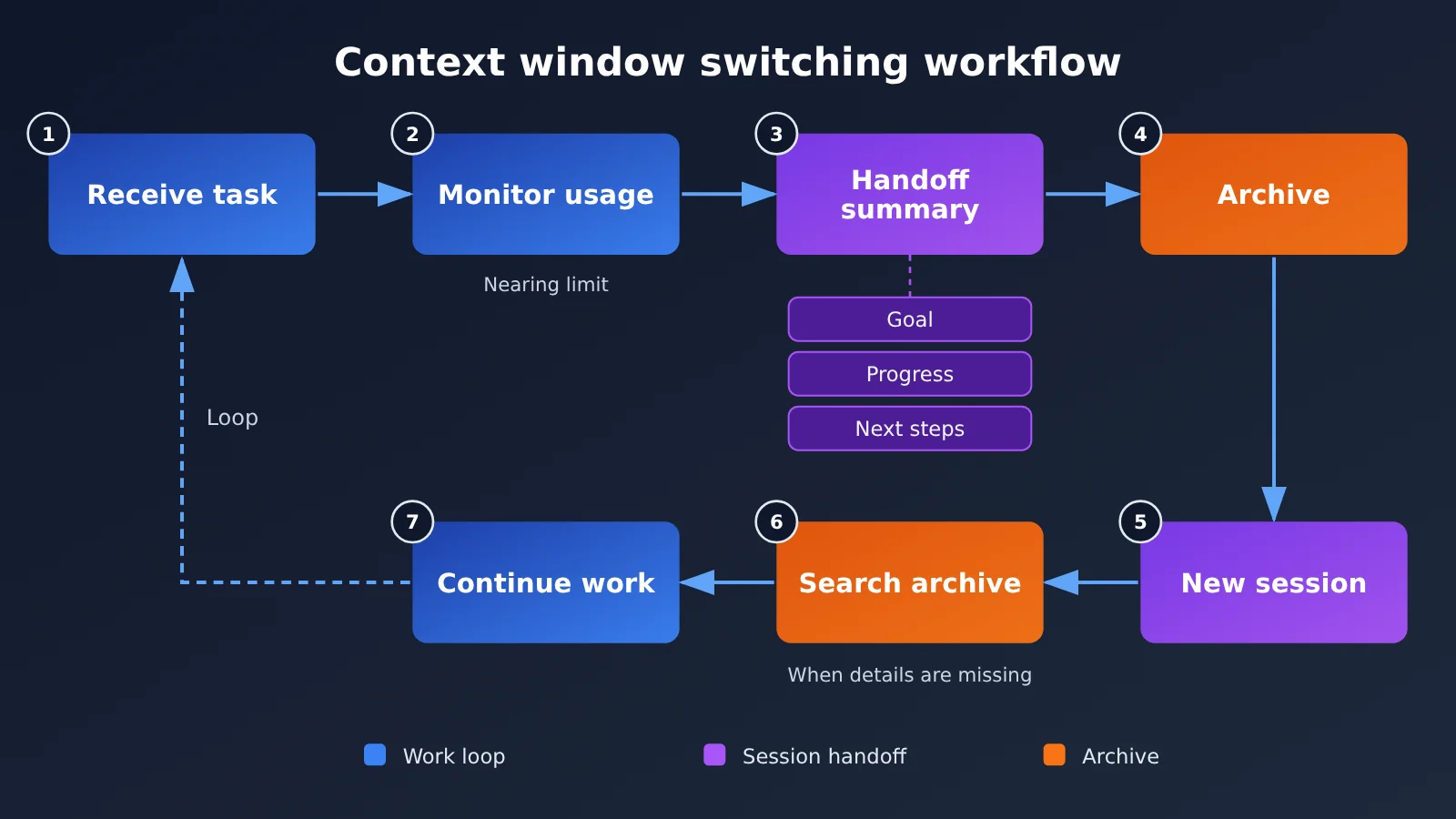
The report identifies three elements: goals, progress, and next steps. This structure is concise, but each element needs more detail in practice. The table below expands on those three elements as an engineering design reference; it isn’t a confirmed description of JiuwenSwarm’s implementation.
| Field | Suggested Content | Risk If Omitted |
|---|---|---|
| Goals | Original task description, deliverable requirements, requester, and delivery channel | The new window drifts away from the original requirements or delivers to the wrong group or in the wrong format |
| Progress | Completed subtasks, key decisions made, and the reasoning behind them | Duplicate work or reversal of a previously agreed-upon approach |
| Next steps | To-do items, blockers, and pending external responses | The task stalls because the agent doesn’t know where to pick up |
| Constraints (extension) | User-specified restrictions, permission scope, and formatting preferences | The agent violates preferences the user has already expressed, creating a disjointed experience |
| Index (extension) | Locations or keywords for key information in the archive | Details can’t be retrieved when needed, making the archive effectively useless |
We’ve added “constraints” and “index” as two additional fields. Constraints matter because preferences users express throughout a long conversation—such as “keep the report to one page”—are especially easy to lose when compressing a summary. The index bridges the handoff summary and archive retrieval: the shorter the summary, the more important it is to tell the new window where to find the details.
In WorkSwarm’s case, there’s also the complexity of multiple groups and channels. The report notes that sharing across groups requires user approval. Users can grant one-time or permanent permission and can also revoke it. If authorization status isn’t included in the handoff summary, the agent in the new window may misjudge what it’s allowed to do. This kind of information is better stored as structured fields than as free text.
Handoff Summary Design Question 2: When to Switch Contexts
The report only says the switch happens “near the limit.” Public sources don’t disclose the exact threshold or whether the summary is generated by the model or by rules; confirming those details would require checking the JiuwenSwarm source code or documentation. From an engineering perspective, there are several common options for deciding when to trigger a switch.
| Trigger strategy | How it works | Advantages | Risks |
|---|---|---|---|
| Fixed-percentage threshold | Switch when token usage reaches a certain percentage of the window | Simple to implement and predictable | May switch in the middle of a critical task step |
| Reserved-space threshold | Switch when the remaining space can’t accommodate the next input plus summary generation | Ensures there’s enough space to generate the summary itself | Requires estimating the size of the next input |
| Task-boundary trigger | Switch at natural breakpoints, such as when a subtask finishes or the system is waiting for a user response | Produces a more complete summary and reduces switching costs | A breakpoint may not occur before the window fills up |
| Hybrid strategy | Prefer switching at task boundaries, but force a switch when a hard threshold is exceeded | Balances completeness and safety | More complex logic that requires additional testing |
One important detail is that generating the handoff summary also consumes context. If the switch isn’t triggered until the window is completely full, the model may no longer have enough space to read the history and write a high-quality summary. Whatever strategy you choose, you should reserve some room for summary generation.
As for how the summary is generated, a model-generated summary is more flexible and can understand the semantics of the task. A rule-generated summary—for example, one that directly extracts status fields from a task list—is more consistent, but it may miss implicit decisions made during the conversation. A common approach is to combine the two: the program maintains structured state, while the model adds a natural-language explanation of progress.
How to Implement Handoff Summaries and Archive Search: A Minimal Prototype
This minimal prototype demonstrates the idea behind the pattern; it isn’t an implementation of JiuwenSwarm. When estimated token usage approaches a threshold, it asks the model to generate a handoff summary and archives the old messages.
import openai

client = openai.OpenAI(
    api_key="YOUR_API_KEY",
    base_url="https://api.apiyi.com/v1"  # APIYI OpenAI-compatible API
)

HANDOFF_PROMPT = "请将以上工作记录整理为交接摘要,包含:目标、进展、下一步、约束、关键信息索引。"

def make_handoff(messages, model="gpt-4o-mini"):
    resp = client.chat.completions.create(
        model=model,
        messages=messages + [{"role": "user", "content": HANDOFF_PROMPT}]
    )
    return resp.choices[0].message.content
View the full prototype code (including switch logic and archive search)
import openai
from typing import List, Dict

client = openai.OpenAI(
    api_key="YOUR_API_KEY",
    base_url="https://api.apiyi.com/v1"
)

MODEL = "gpt-4o-mini"
CONTEXT_LIMIT = 100_000      # Example value; adjust for the model's actual context window
SWITCH_RATIO = 0.7           # Leave room for summary generation
HANDOFF_PROMPT = (
    "请将以上工作记录整理为交接摘要,分为五部分:"
    "1.目标 2.进展(含关键决策及理由)3.下一步 4.用户约束 5.关键信息索引(关键词列表)"
)

class LongRunningAgent:
    def __init__(self, system_prompt: str):
        self.system_prompt = system_prompt
        self.messages: List[Dict] = [{"role": "system", "content": system_prompt}]
        self.archive: List[Dict] = []   # Archived history; use a database or vector store in production

    def estimate_tokens(self) -> int:
        # Rough estimate; use the model's tokenizer in production
        return sum(len(m["content"]) for m in self.messages)

    def maybe_switch(self):
        if self.estimate_tokens() < CONTEXT_LIMIT * SWITCH_RATIO:
            return
        resp = client.chat.completions.create(
            model=MODEL,
            messages=self.messages + [{"role": "user", "content": HANDOFF_PROMPT}]
        )
        summary = resp.choices[0].message.content
        self.archive.extend(self.messages[1:])      # Archive the old conversation
        self.messages = [
            {"role": "system", "content": self.system_prompt},
            {"role": "system", "content": f"【交接摘要】\n{summary}"}
        ]

    def search_archive(self, keyword: str, top_k: int = 5) -> str:
        hits = [m["content"] for m in self.archive if keyword in m["content"]]
        return "\n---\n".join(hits[-top_k:]) or "归档中未找到相关记录"

    def chat(self, user_input: str) -> str:
        self.maybe_switch()
        self.messages.append({"role": "user", "content": user_input})
        resp = client.chat.completions.create(model=MODEL, messages=self.messages)
        answer = resp.choices[0].message.content
        self.messages.append({"role": "assistant", "content": answer})
        return answer

agent = LongRunningAgent("你是负责跟进项目周报的数字员工。")
print(agent.chat("请记录:本周报告不要超过一页。"))
This prototype uses simple keyword matching to search the archive. The report doesn’t say whether JiuwenSwarm uses vector search or another method. In a real project, you can choose full-text search, vector search, or a combination of both based on the size of your archive. You can also register search_archive as a tool and let the model decide when to call it.
🚀 Quick start: When building a prototype like this, you can use different models for summary generation and the main task—for example, a lightweight model for summaries and a more capable one for the main task. With a single API key from APIYI at apiyi.com, you can call OpenAI, Claude, Gemini, and other models, making it easy to switch between and compare them in the same codebase. New users get free testing credits.
Handoff Summary Design Question 3: When to Search Archived History
Archive retrieval addresses a fundamental problem: summaries are inevitably lossy. Any compression leaves information out. The key question is whether you can recover it when needed. There are roughly three approaches to deciding when to search the archive:
- Model-initiated retrieval: Give the model a retrieval tool and let it search when it identifies an information gap. This is flexible, but it depends on the model recognizing what it doesn’t know.
- Rule-based triggers: Automatically search and inject results when the user mentions an entity, filename, or point in time that’s missing from the summary. This offers more control, but rules can only cover so much.
- Index-guided retrieval: Keep an index of key information in the handoff summary, so the new window can retrieve specific details when a related topic comes up. This depends on the quality of the index created during summarization.
We think the biggest risk is “not knowing what you’ve missed.” If a summary leaves out a user preference and there’s nothing in the new window to suggest it exists, the model won’t know to search for it. That’s why we recommended adding “constraints” and “index” fields to the summary: they provide starting points for searching the archive.
Longer Context vs. Handoff Summaries: Impact Analysis
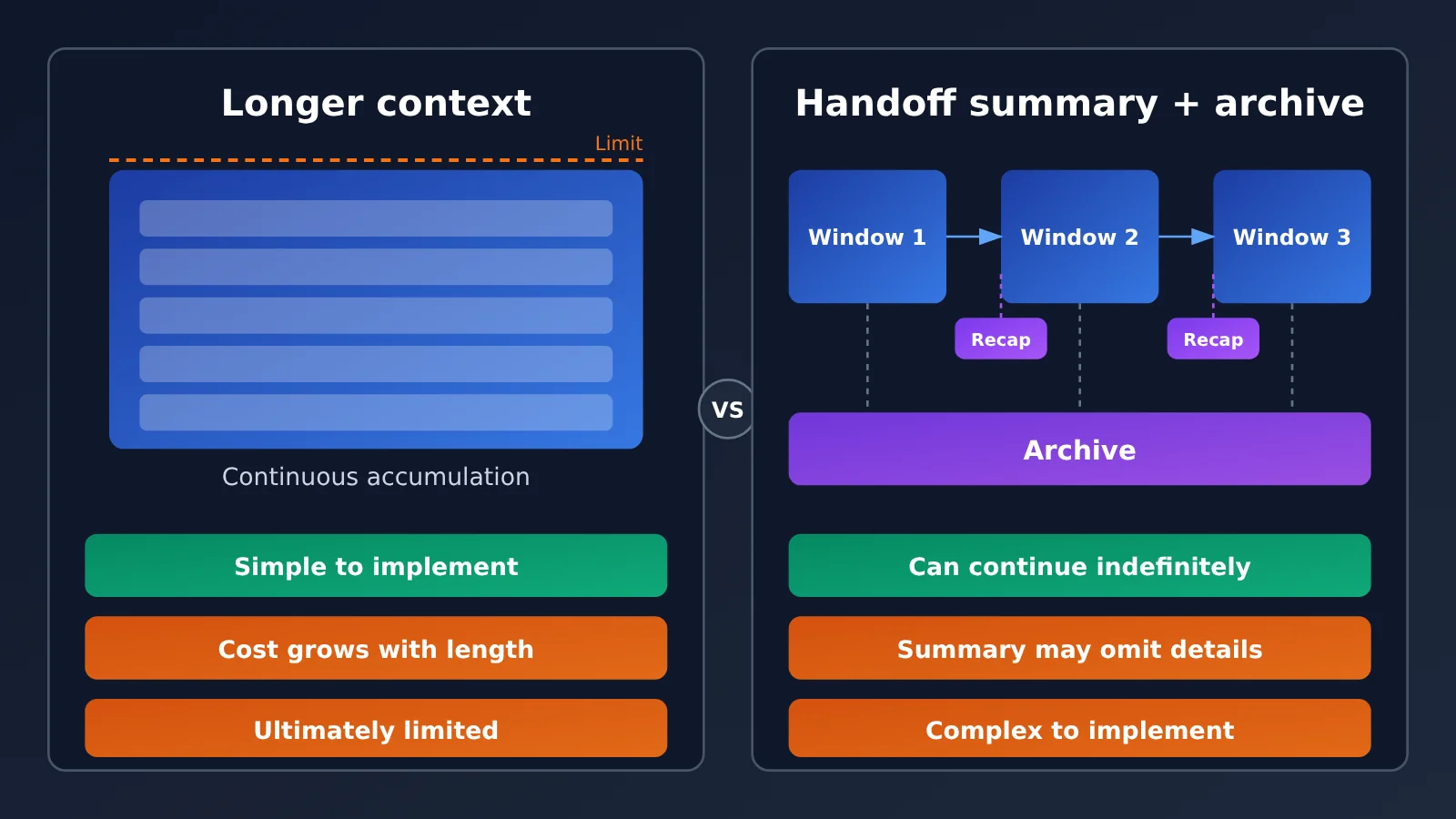
When you hit the context window limit, another option is to switch to a model with a longer context window. The two approaches aren’t mutually exclusive, but they suit different situations. The table below is a qualitative analysis; it doesn’t include performance data.
| Dimension | Rely on longer context | Handoff summaries + archive retrieval |
|---|---|---|
| Implementation complexity | Low; little to no modification needed | High; requires summary, archive, and retrieval logic |
| Information completeness | All original information remains in context | Summaries are lossy and rely on retrieval to fill gaps |
| Task duration | Limited by the model’s context window | Can theoretically continue indefinitely |
| Cost per invocation | Continues to rise as history grows | Drops after each context switch |
| Main risk | Key information gets buried in very long inputs | Details are omitted from the summary and not recovered through retrieval |
| Best suited for | Medium-length tasks that require comparing the full text | Ongoing work lasting days to weeks |
| Available platforms | APIYI apiyi.com and others offer models with a range of context window sizes | Works with any model, regardless of platform |
💡 How to choose: If a task can usually be completed within one long context window, switching to a long-context model is the simpler option. If an agent needs to remain active over the long term, like WorkSwarm’s digital employees, handoff summaries are almost essential. You can start by running the same task on APIYI apiyi.com with models that have different context window sizes, then look at actual usage before deciding whether to invest in a summarization mechanism.
Impact on Developers
- Context management becomes an architectural concern: WorkSwarm treats sessions as schedulable resources, making context switching part of the system design rather than a fix after something goes wrong.
- State needs to be modeled explicitly: The quality of a handoff summary depends on whether the agent has clearly recorded its goals, decisions, and pending tasks. In turn, developers need to plan the state structure during the design phase.
- Observability matters more: WorkSwarm displays token usage and response times in its activity dashboard. Long-running agents also need monitoring for context-switch frequency and retrieval hit rates.
Impact on the Industry
- From conversational to persistent: As agents move from one-off exchanges to working in groups over the long term, the ability to carry context across windows will become foundational infrastructure for these products.
- Open-source implementations provide a reference: With JiuwenSwarm open source, developers can study its switching thresholds, summary generation, and retrieval implementation directly instead of figuring everything out from scratch.
Frequently Asked Questions
Q1: What is the “handoff summary + archive retrieval” pattern?
It’s a way for long-running agents to work across context windows. When a window approaches its limit, the agent moves to a new one, carrying only a handoff summary of its goals, progress, and next steps. The full history is archived so the agent can retrieve details as needed. openJiuwen WorkSwarm uses this approach.
Q2: Wouldn’t switching to a model with a longer context window solve this?
For medium-duration tasks, switching to a long-context model is often the easiest solution. But for long-running agents, history keeps growing, and any window will eventually fill up. Key information can also get lost in very long inputs. Try testing your actual tasks with models that have different context window sizes through APIYI apiyi.com before deciding whether you need a summary mechanism.
Q3: What threshold does WorkSwarm use to switch windows, and how does it generate summaries?
Current public reports don’t disclose the specific threshold, whether summaries are generated by a model or by rules, or whether archive retrieval uses vector search or another method. You’ll need to check the JiuwenSwarm open-source code on GitHub or the official documentation to confirm these implementation details. The discussion in this article is general engineering analysis.
Q4: How can I quickly test a handoff summary approach through an API?
You can build a prototype in a few steps:
1. Sign up at APIYI apiyi.com and get an API key and free testing credits
2. Use the prototype code in this article, setting base_url to `https://api.apiyi.com/v1`
3. Test it with a real long conversation, then check whether the agent still remembers key constraints after switching windows
Q5: What are the known risks of this pattern?
The biggest risk is that the summary omits a detail and the new window has no clue to retrieve it. Another is switching windows in the middle of a critical step, leaving the task in an inconsistent state. There’s also no public test data on how this mechanism affects task quality, so test it thoroughly in your own use case before deploying it.
Handoff Summaries and Context Windows: Key Takeaways
- Core mechanism: When the context window is nearly full, switch to a new one and carry over a handoff summary covering the goal, progress, and next steps.
- Prerequisite: Separate the agent’s identity from its session, making the session a resource that can be scheduled and resumed.
- Summary design: Add user constraints and archive indexes to the three core elements to reduce the risk of omissions.
- Timing: Leave room to generate the summary, and switch at task boundaries whenever possible.
- Archive retrieval: Summaries inevitably lose detail, so retrieval access determines whether that information can be recovered.
- Choosing an approach: For medium-sized tasks, a longer-context model may be enough. Long-running tasks benefit more from summary handoffs.
- Quick validation: Build and compare prototypes using the unified multi-model interface from APIYI at apiyi.com.
Summary
The context-switching mechanism in openJiuwen WorkSwarm offers a useful reference pattern for long-running agents:
- Handoff summaries carry work state: The goal, progress, and next steps are the minimum; constraints and indexes are practical additions.
- Switching requires headroom: Generating a summary consumes context, so don’t wait until the window is completely full.
- Archive retrieval recovers lost details: The summary retains the key points, while details can be retrieved on demand.
If your agent is moving from single-session tasks to long-running work, start by mapping out its state structure. Then decide whether to switch to a longer-context model or introduce handoff summaries. You can quickly build a prototype through APIYI at apiyi.com and compare summary quality and context consumption across models.
📚 References
- Pandaily article: openJiuwen Hyper-Agent swarm architecture and WorkSwarm digital employees
- Link:
pandaily.com/openjiuwen-hyper-agent-swarm-architecture-persistent-agents-workswarm-digital-employees -
Description: An English-language report on persistent agents, context switching, and handoff summaries
-
JiuwenSwarm open-source code: The open-source implementation of openJiuwen WorkSwarm
- Link:
github.com(search for JiuwenSwarm) - Description: Explore the implementation of switching thresholds, summary generation, and archive retrieval
Author: APIYI Technical Team
Technical discussion: Contact us through the APIYI homepage at apiyi.com. For more resources, visit the documentation center at docs.apiyi.com.