Author’s note: After a model upgrade, you can’t just delete prompts and patch code on gut feeling. This article gives you a 4-category taxonomy and a 5-step regression process to help you decide what to delete, what to change, and what to keep.
In November 2026, a 36Kr report about a key Claude Code figure leaving Anthropic got developers talking about AI coding tools again. Beyond the people story, there’s a more practical question many teams are facing: with every model upgrade, prompts and patch code keep piling up — do they still need to exist? This article walks through a cleanup method that goes categorize first, compare next, roll out gradually, so you can subtract without sacrificing stability.
This isn’t an article telling you to “delete everything boldly.” Prompts may be hiding business rules, and patch code may be hiding safety guardrails — one wrong deletion usually costs more than paying for a few extra tokens. This article also doesn’t offer generic benchmarks, because cleanup results depend on your own business samples; you’ll need to draw conclusions from your own data.
Core value: by the end of this article, you’ll know how to judge which prompts and patch code can be deleted after a model upgrade, and you’ll be able to complete the cleanup with a process you can roll back.
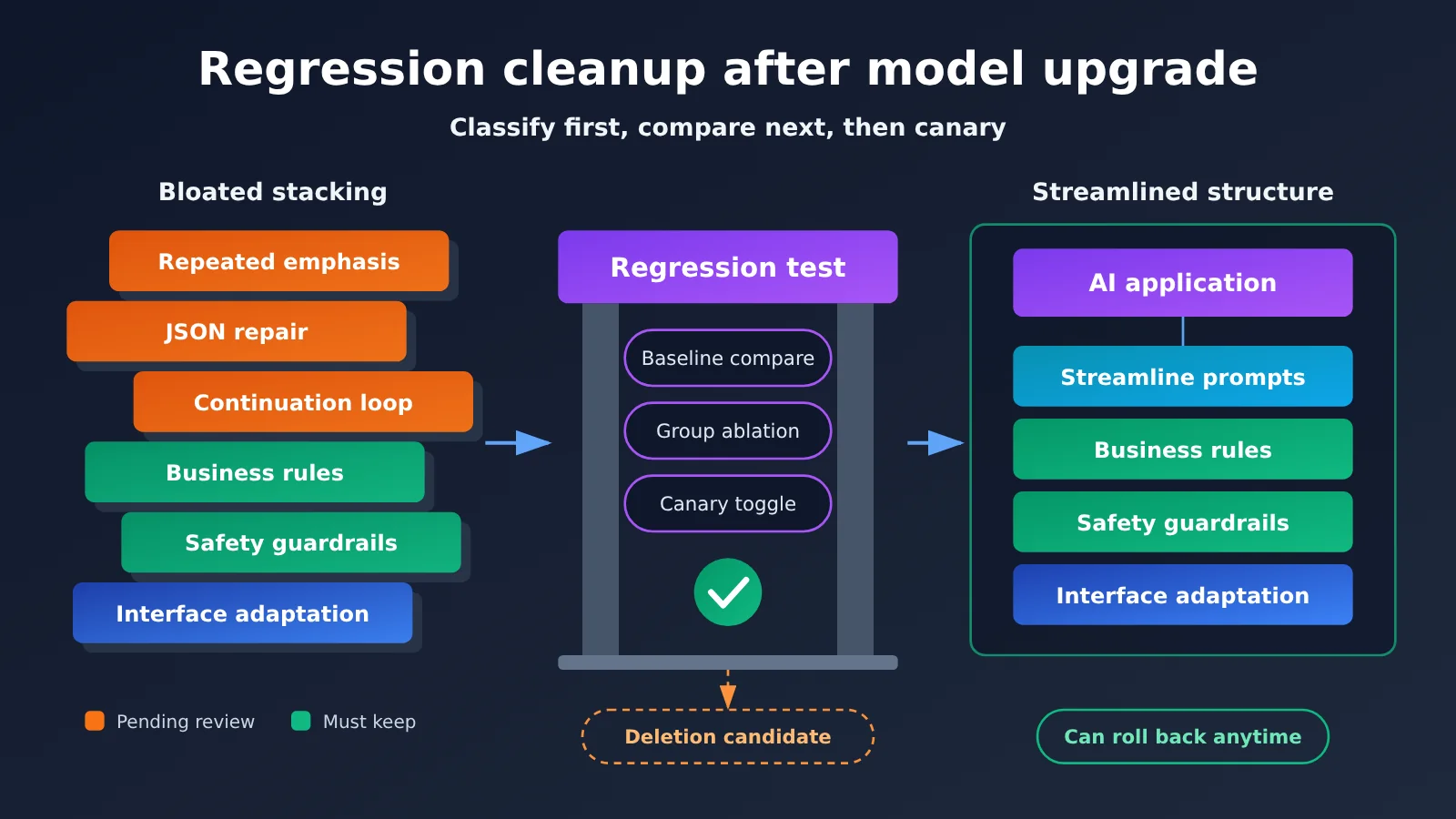
Core Points for Prompt and Patch Code Cleanup After a Model Upgrade
Start with one guiding principle: if a prompt or patch exists to compensate for the old model’s shortcomings, it deserves a second look; if it exists to express business rules or control risk, it shouldn’t be deleted just because the model got upgraded. The table below is a condensed version of the process described later.
| Key Point | Description | Value |
|---|---|---|
| Classify before you touch anything | Sort content into 4 buckets: model compensation, business rules, safety guardrails, interface adaptation | Avoids deleting critical logic by mistake |
| Change only the model for the baseline | Keep prompts and code unchanged in the first round | Separates what the model changed from what the cleanup changed |
| Grouped ablation testing | Remove one group at a time and compare results | Pinpoints what each piece of content actually does |
| Canary rollout with feature flags | Gate cleanup results behind configuration so you can roll back anytime | Reduces the risk of production incidents |
| Review the bill separately | Shorter prompts don’t necessarily mean lower total cost | Prevents misjudging based on token count alone |
Why Prompts and Patch Code Go Stale After a Model Upgrade
Most prompts in AI applications have been “fattened up” by production issues. The model misses a format, so you add an emphasis line. The model truncates its output, so you add a continuation loop. The model occasionally writes malformed JSON, so you bolt on a repair function. All of these were reasonable at the time, but they’re tied to the old model’s behavior—and that tie is rarely documented.
After a model upgrade, these pieces can land in one of three situations: the problem is gone and the patch is now dead code; the problem persists and the patch is still useful; or the model’s behavior has changed and the old approach now causes side effects. For example, an emphatic phrase you repeated to get the old model’s attention might, on a new model that responds to instructions differently, cause it to over-apply a single rule. So the goal of a post-upgrade review isn’t “shorter is better”—it’s making sure every piece of content has a clear reason to exist.
How to Sort Prompts and Patch Code into 4 Categories
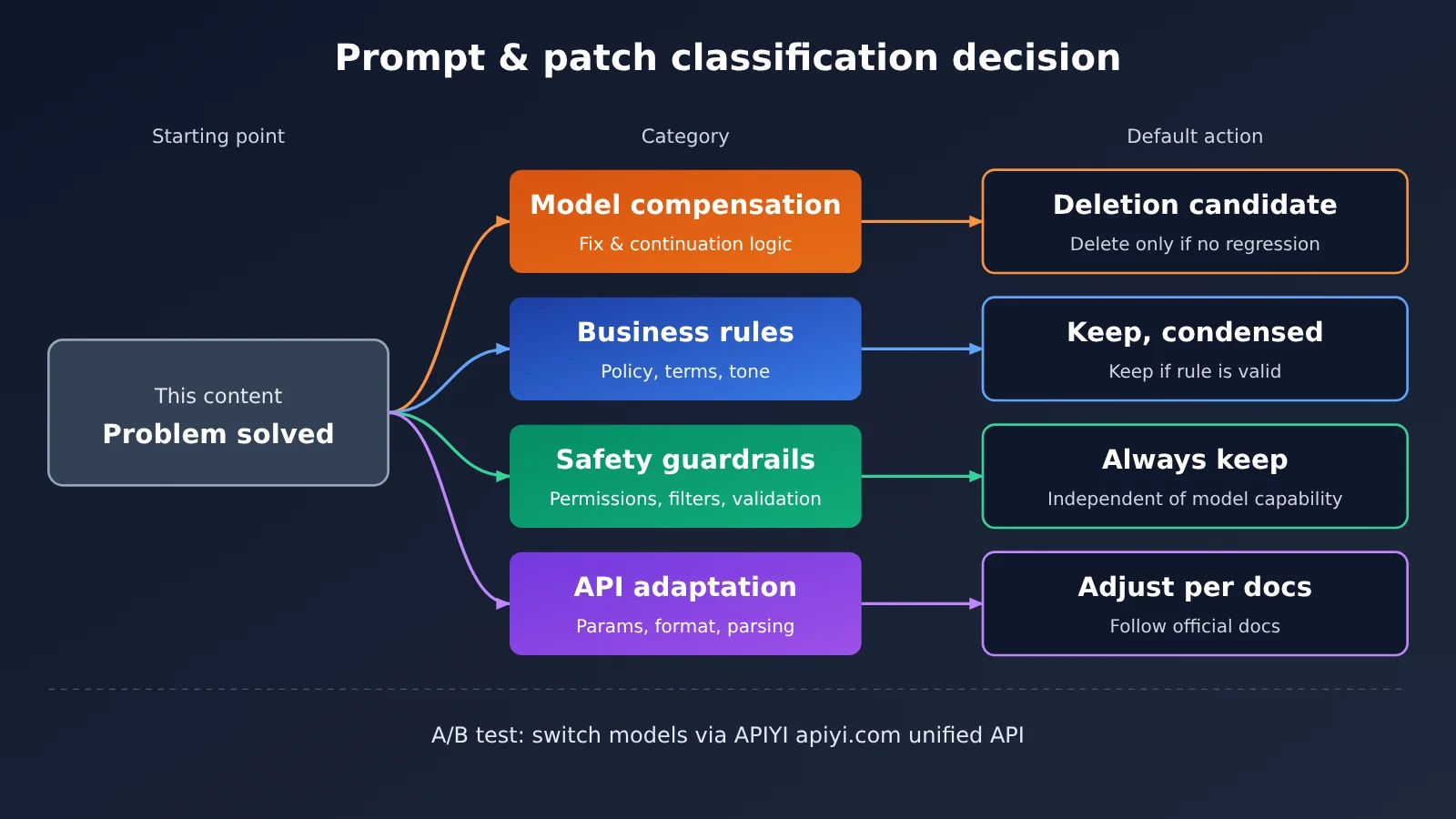
Before you start cleaning, break the system prompt into paragraphs, and list out each piece of processing logic that runs before and after the model call. Then sort everything using the table below — that gives you a basis for every deletion decision you’ll make later.
| Category | Common Examples | Default Action | How to Decide |
|---|---|---|---|
| Model compensation | Repeatedly stressing “don’t omit anything,” JSON repair functions, truncation-and-continue loops | Mark as a deletion candidate | Delete only if regression tests show no degradation |
| Business rules | Refund policy, glossary, brand tone, domain constraints | Keep, but tighten the wording | Keep as long as the rule still applies |
| Safety guardrails | Permission checks, sensitive-information filtering, output validation, injection protection | Always keep | Not conditional on model capability |
| Interface adaptation | Parameter mapping, tool-call format conversion, response parsing | Adjust for the new model | Defer to the official API docs |
One detail deserves its own callout: repair logic can be a deletion candidate; validation logic cannot be deleted. If the new model’s structured output is more reliable, the regex-based JSON repair code can probably be retired — but schema validation should stay. Same idea for truncation: the continuation loop for truncated output is worth revisiting, but retries for network errors and rate limits have nothing to do with model capability, so they shouldn’t be in the cleanup scope at all.
Quick Start: Cleaning Up Prompts and Patch Code After a Model Upgrade
The five-step process below doesn’t require a complex platform—your existing test framework and a spreadsheet will do. The key is to change only one variable at a time and write down every decision you make.
Step 1: Inventory where your prompts and patch code come from
Use git log and git blame to trace when each piece of content was introduced and which issue it was tied to. Then record four pieces of information for each entry: where it lives, which category it belongs to, the problem it was meant to solve, and how it’s verified. If no one can explain where a prompt came from anymore, mark it as “needs verification”—don’t just assume it’s useless.
Step 2: Build a regression sample set for the model upgrade
A regression set should cover three parts: real everyday requests from production, failure samples that have caused incidents in the past, and business edge cases. You can size the sample set based on risk — for small teams, starting with a few dozen high-value samples is still worthwhile. Because model outputs are non-deterministic, key samples should be run multiple times so you don’t mistake a lucky pass for a stable pass.
Step 3: Change only the model and establish a control baseline
In the first round, change only the model name. Leave prompts and code untouched, and pin down controllable parameters like temperature. This gives you the difference between “old model + old config” and “new model + old config,” and lets you catch changes in API parameters or response structure early. If the platform supports pinned model versions, prefer them — that way the model doesn’t shift underneath you mid-test and skew the results.
The table below lists the config items you need to confirm when setting up a control experiment.
| Config item | How to fill it in | Notes |
|---|---|---|
base_url |
Use the matching endpoint URL from the APIYI docs | Addresses and paths for the OpenAI and Anthropic formats follow the docs |
api_key |
Use a key created in the console | Manage it via environment variables; never commit it to the repo |
model |
Enter the model name from the pricing page or docs | Keep everything except the model name identical across the old and new groups |
temperature |
Use the same value for all experiment groups | Parameter ranges can differ between models, so check the docs |
max_tokens |
Set enough headroom for both old and new models | Prevents truncation from being misread as a model quality problem |
🚀 Quick start tip: The most time-consuming part of a control experiment is often adapting to multiple API formats. APIYI offers API access to the Claude, GPT, and other models covered in this article, and is compatible with both the OpenAI and Anthropic API formats — usually you only need to adjust
base_url,api_key, andmodelto start testing. For integration details, see the APIYI docs: https://docs.apiyi.com
Step 4: Group ablation of prompts and patch code
Once the baseline is stable, remove groups one at a time, starting with the model-compensation group. Each group should contain only content that solves the same problem. For example, first remove the “format emphasis” prompts and their fix functions, run the full regression, and only then move on to the next group. If you delete too much at once, it’ll be hard to pinpoint the cause when results degrade — and you’ll usually end up rolling everything back.
| Metric | What to watch | Decision guidance |
|---|---|---|
| Critical sample pass rate | Whether historical incidents and high-risk scenarios still pass | Restore that group if it regresses |
| Overall task pass rate | Quality changes on ordinary requests | Judge against thresholds the team set in advance |
| Patch trigger rate | How often the fix or continuation logic actually fires | Persistently near zero is grounds for removal |
| Tokens and latency | Input/output usage and response time | Used to estimate the real payoff of the cleanup |
| Human intervention rate | Share of handoffs to humans or user rework | Keep watching after launch to cover blind spots in offline samples |
Write down your judgment criteria before running the tests; otherwise teams tend to adjust the standard on the fly based on the results. For patch code, you can also start by only observing rather than intervening: let it keep running while reporting “what would happen without it,” and a few days later decide whether to remove it based on the trigger data. This is especially useful for high-risk business scenarios.
Step 5: Roll Out Gradually and Keep the Ability to Roll Back
It’s best to ship the cleaned-up version behind a configuration flag: cover a small slice of traffic first, and only widen the scope once the metrics look stable. Document the reasoning behind each deletion — for example, “this model version passed regression, and the patch trigger rate stayed close to zero” — so you can reuse that judgment the next time you upgrade.
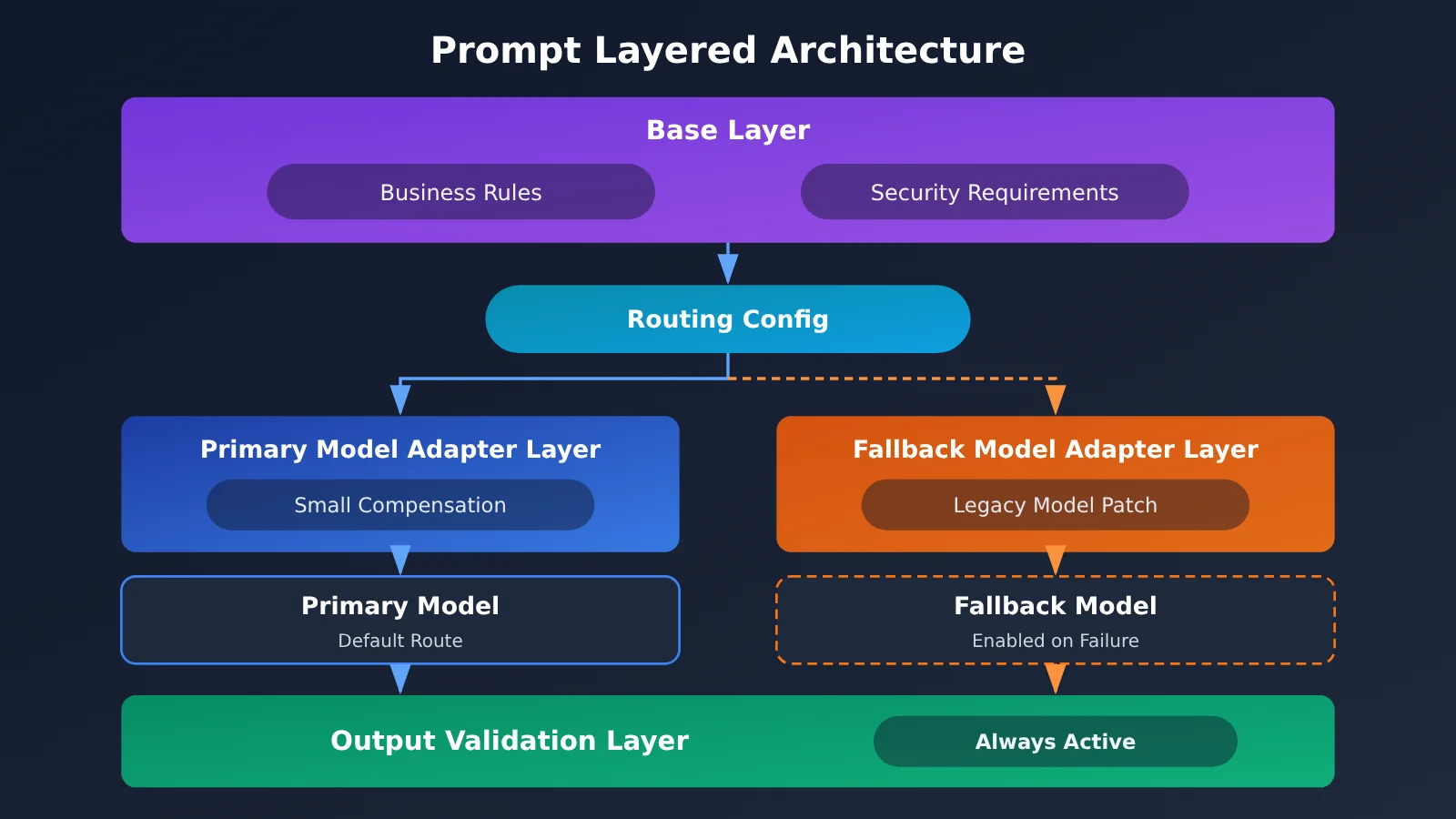
Also pay special attention to the model fallback chain. If the system falls back to an older model when the primary one is unavailable, the patches written for that older model may still be necessary. A more robust approach is to split prompts into two layers: business rules and safety requirements live in a base layer, while model-specific content lives in an adapter layer that the routing configuration loads per model.
Comparing 3 Ways to Handle Prompts and Patch Code After a Model Upgrade
Cleanup isn’t a binary choice between “delete everything” and “leave it alone.” The table below compares three common strategies, so you can pick one based on business risk and how much your team can invest.
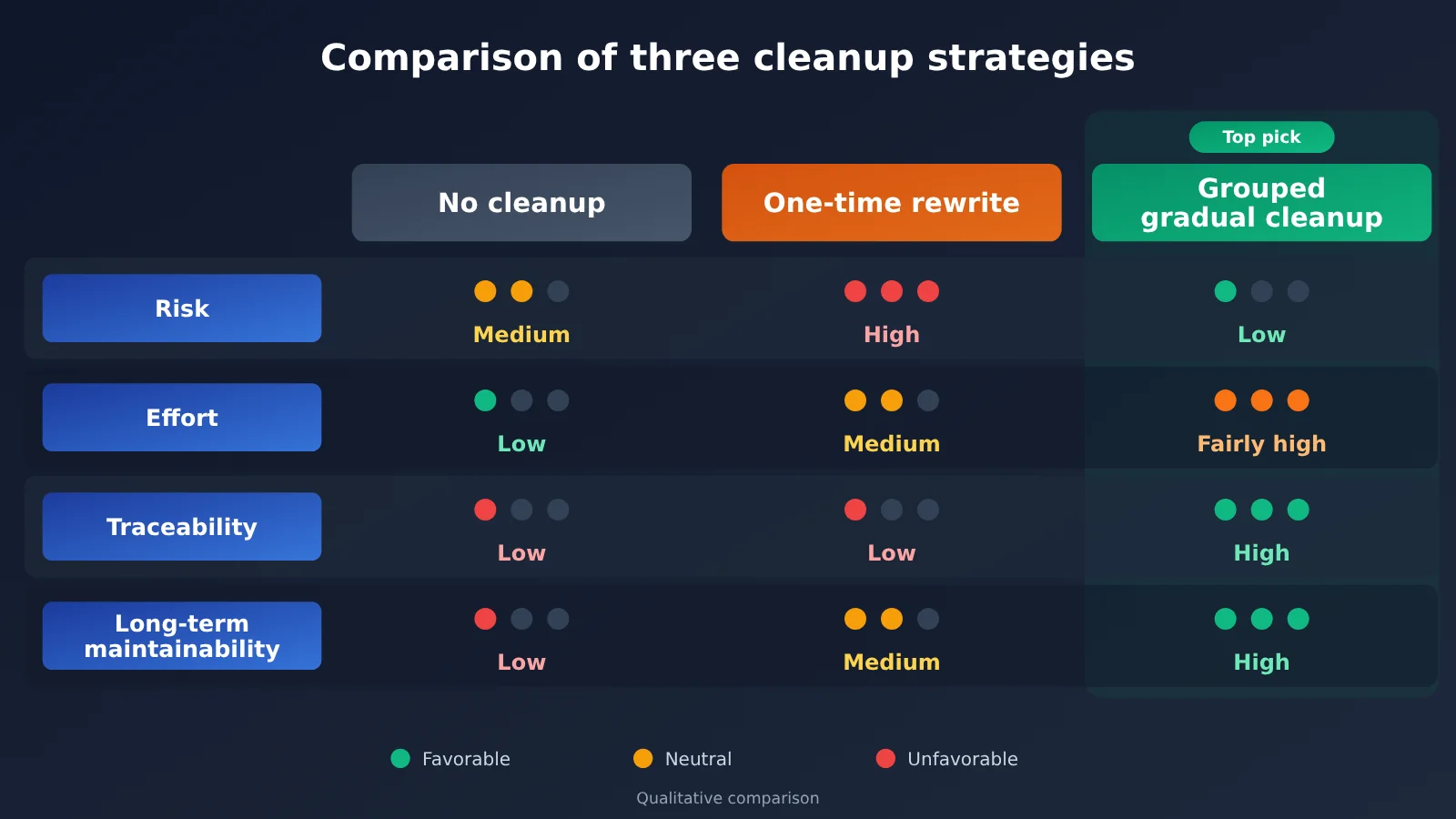
| Option | Approach | Main risk | Best suited for |
|---|---|---|---|
| Keep as-is | Switch only the model name; change nothing else | Dead weight keeps piling up, and you never get the most out of the new model | Temporary upgrades, or when there’s no testing capacity in the short term |
| One-shot rewrite | Write it from scratch following the new model’s prompting guide | Implicit business rules can get lost | Small prompt sets, or when the business is being refactored anyway |
| Grouped incremental cleanup | Classify, then ablate group by group and roll out gradually | Takes time to build a regression suite | Production systems and most long-lived apps |
Benchmark analysis for keeping as-is: this option leads on speed to ship, but the side effects and maintenance burden of the old prompts don’t go away on their own. By comparison, grouped incremental cleanup fits production systems that need long-term iteration.
Benchmark analysis for a one-shot rewrite: this option shines on clean prompt structure, but business know-how buried in historical patches is easy to miss. If you do go the rewrite route, still validate with the same regression suite and check the old version’s business rules one by one.
Cost Accounting for Prompt and Patch Cleanup After a Model Upgrade
Shorter prompts don’t automatically mean lower total cost. You can estimate the cost of a single call as “input tokens × input unit price + output tokens × output unit price.” If you use caching, you also need to account for cache read and write pricing separately, and factor in the extra calls from retries and fallbacks. A new model may produce longer output, and changing the prompt prefix can affect cache hit rates, so double-check against the real usage you see in your experiments.
💰 A note on pricing: This article doesn’t list specific unit prices. For model pricing, billing rules, input/output unit prices, and cache pricing, refer to the actual data on the APIYI pricing page at https://docs.apiyi.com/models, and record the date you looked it up when you do your cost accounting.
Frequently Asked Questions (FAQ)
Q1: What is “model compensation” in prompts and patch code?
Model compensation refers to content added to work around the shortcomings of a specific model — for example, repeatedly emphasizing the output format, repairing broken JSON, or stitching together truncated results. What separates it from business rules is this: once you switch to a more capable model, it may no longer be necessary.
Q2: After a model upgrade, should I delete all the prompts and patch code and rewrite them from scratch?
Generally, no. A full rewrite looks clean, but it’s easy to lose implicit business rules and hard-won lessons from past incidents. Production systems are better off with grouped, gradual cleanup. If your prompt footprint is very small or the business is being refactored anyway, a rewrite is worth considering — but it still needs to be validated against a regression set.
Q3: When is a good time to clean up prompts and patch code?
The best window is the evaluation period for a model switch, since you’re running regressions anyway. You should also schedule a dedicated cleanup when patch trigger rates stay near zero for a long time, or when the prompts have grown to the point where nobody dares to touch them. Don’t do concentrated cleanup right before a major promotion or peak business period.
Q4: Which prompts and patch code must never be deleted just because of a model upgrade?
Keep permission checks, sensitive-information filtering, output schema validation, prompt injection protection, and audit logs at all times. These control system risk, and you shouldn’t rely on the model “probably behaving well.” Retry logic for network errors and rate limiting is infrastructure too, and shouldn’t be part of the cleanup scope.
Q5: How can I quickly compare old and new models through the API?
Once your regression set is ready, have the old and new experimental groups use identical prompts and parameters, changing only the model name. With APIYI, you can call a wide range of models through interfaces compatible with OpenAI or Anthropic formats, which makes it easy to switch between them within the same test script. For detailed configuration, see the docs: https://docs.apiyi.com
Q6: How do I tell whether cleanup actually saves money?
Count input tokens, output tokens, cache hits, and retry counts before and after cleanup, then multiply by the current unit price. For unit pricing and cache billing, check the APIYI pricing page: https://docs.apiyi.com/models. Alongside cost per call, also look at cost per successful task — that’s closer to your real business spend.
Q7: What are the limitations of this cleanup process?
A regression set can only cover known issues; passing the tests doesn’t mean nothing new will happen in production, so canary releases and monitoring are non-negotiable. The process also takes manpower, and low-frequency or low-risk internal tools don’t need to follow it to the letter. With small samples, metrics can fluctuate a lot, so don’t make overly fine-grained judgments based on them.
Key Takeaways: Cleaning Up Prompts and Patch Code After a Model Upgrade
- Decision criterion: Ask whether the content is compensating for the old model or expressing business rules and controlling risk.
- Four-category classification: Take different actions for model compensation, business rules, safety guardrails, and interface adaptation.
- Baseline first: In the first round, only swap the model. Don’t change prompts and patch code at the same time.
- Gradual ablation: Remove only one group of related content at a time, so if quality degrades you can pinpoint the cause.
- Keep validations: JSON repair logic can be reviewed, but schema validation and permission checks should stay.
- Fallback checks: Before deleting a patch, confirm whether the old model in the rollback path still depends on it.
- Comparison tooling: You can use APIYI’s compatible API to switch models with the same script for regression testing.
Conclusion
After a model upgrade, whether to delete prompts and patch code doesn’t depend on marketing claims about the new model. It depends on your regression data. You can boil the cleanup work down to three points:
- First, understand where it came from: Document what problem each piece of content solves, then classify it into one of the four categories.
- Let experiments decide: Establish a baseline, run grouped ablations, and use pre-defined metrics to decide what stays and what goes.
- Make changes reversible: Roll out gradually behind feature flags, and manage model-related content and business rules in separate layers.
Start with a scenario that has moderate invocation volume and controllable risk. Get the full process working end to end first, then expand to core business. If you need to compare multiple models, you can call the models covered in this article through APIYI. For integration details, see https://docs.apiyi.com. For pricing, refer to the actual data on the pricing page at https://docs.apiyi.com/models.
📚 References
- 36Kr – Princeton CS Star Student Suddenly Leaves Anthropic, Single-Handedly Putting Claude Code on the Map: source of the timely background at the start of this article
- Link:
36kr.com/p/4055331476526214 -
Note: Published November 4, 2026. The cleanup methods described in this article are a summary of general engineering practice, not a restatement of that report’s content.
-
APIYI Documentation: API format and integration configuration notes
- Link:
docs.apiyi.com -
Note: Used to confirm
base_url, endpoint paths, and how to make calls. -
APIYI Models and Pricing page: model list and billing information
- Link:
docs.apiyi.com/models -
Note: All model prices, billing rules, and cache pricing mentioned in this article follow the actual data on this page.
-
Anthropic Official Documentation: Claude models and prompt guide
- Link:
docs.anthropic.com -
Note: When upgrading Claude models, check here for API changes and prompt suggestions.
-
OpenAI Official Documentation: GPT models and API guide
- Link:
platform.openai.com/docs - Note: When upgrading GPT models, check here for parameter changes and migration notes.
Author: APIYI Technical Team
Technical discussion: Feel free to contact us through the APIYI website homepage; for more resources, visit the docs.apiyi.com documentation center.