
Author’s note: Based on the Claude Code v2.1.318 release notes, this article covers the causes and troubleshooting steps for seven types of issues in shared network home directories, including lost configuration, “Not logged in” errors, and expired logins.
In university computer labs, HPC clusters, and company jump hosts, home directories are often mounted on NFS or another network file system, with multiple hosts sharing the same ~. When you use Claude Code in these environments, you might find that MCP server configurations disappear overnight, you’re automatically logged back in after logging out, background tasks suddenly report “Not logged in,” or ~/.claude.json is emptied. This article explains how to troubleshoot Claude Code configuration and login issues in shared network home directories, so you can figure out whether the problem lies with the version, the file system, or the credentials themselves.
This isn’t a grab bag of troubleshooting tips based on guesswork. The Claude Code v2.1.318 release notes, published on November 4, 2026, document a series of fixes for issues involving shared network home directories. The troubleshooting steps in this article are based on those notes.
What you’ll gain: You’ll be able to use the symptoms to pinpoint Claude Code configuration or login issues in a shared home directory and decide whether to upgrade, restore a backup, or switch authentication methods.
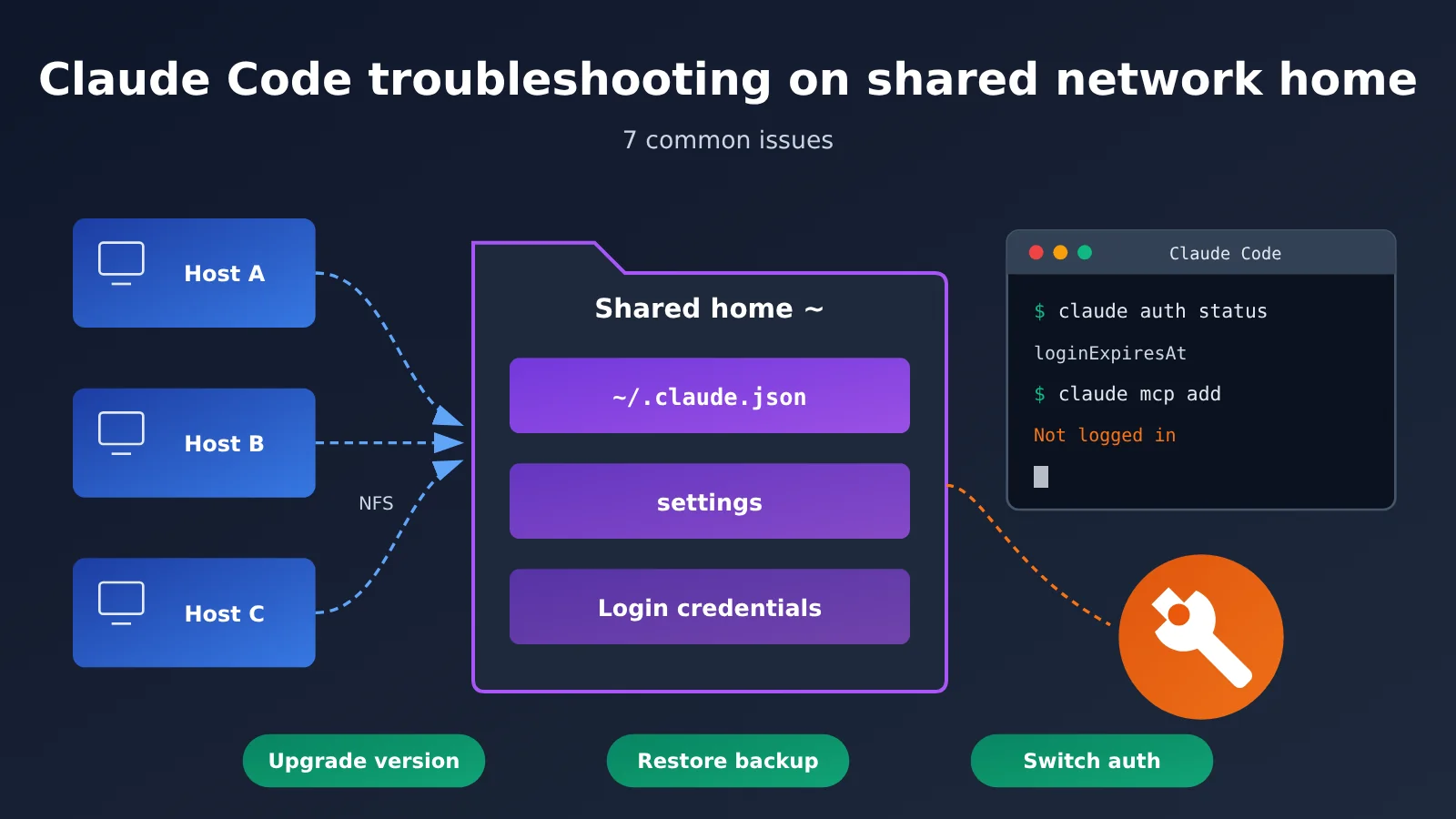
Claude Code Configuration and Login on Shared Network Home Directories
Let’s start with the big picture. Claude Code maintains three main types of state in your home directory: the global configuration file ~/.claude.json (for MCP servers, trusted directories, and more), settings files, and saved login credentials. With a shared network home directory, multiple processes across multiple hosts can read and write these files at the same time. Network filesystems also handle locking, caching, and quotas differently from local disks. Here’s what’s changed in v2.1.318:
| Key point | What changed | Why it matters |
|---|---|---|
| Write failures no longer report false success | If the configuration can’t be updated on a shared home directory, /logout, claude auth logout, and claude mcp remove no longer report success |
Avoids situations where you think you’ve logged out but haven’t |
| Logging in again from another host no longer stops tasks | When another terminal or host sharing the same home directory logs in again to the same account and organization, running tasks no longer exit with Not logged in | More reliable parallel workloads across hosts |
| MCP configuration writes use locking | claude mcp add/remove waits for the configuration lock and exits with code 1 if it can’t acquire it |
Reduces configuration corruption from concurrent writes |
| Login expiration is visible | claude auth status now includes loginExpiresAt, and the JSON output of claude -p includes credential_expires_at |
Helps you spot logins that are about to expire |
| Configuration files are more resilient | When ~/.claude.json, settings files, and login credentials are saved on a shared home directory, they’re less likely to be deleted, briefly emptied, or overwritten by an outdated copy |
Reduces the chance of configuration seemingly disappearing |
Why Claude Code configuration can run into trouble on a shared home directory
On a local disk, Claude Code’s configuration saves can generally be treated as atomic operations. On a network file system, client-side caching can mislead operations such as “write a temporary file, then replace the original” or “check whether a file exists.” For example, a file may exist but be reported as missing. Older versions could conclude that the configuration didn’t exist, leaving MCP servers and trusted directories missing on the next launch. In v2.1.318, Claude Code checks again when a configuration file is incorrectly reported as missing, reducing the chances of starting with an empty configuration.
Disk quotas are another potential problem. The release notes describe a scenario where a network home directory has no space left for data but still allows new files to be created. Saving login credentials could then replace the credentials file with an empty file, immediately logging the user out. The new version fixes this issue. If your cluster enforces tight home-directory quotas, it’s still a good idea to regularly check available space with df or the cluster’s quota command.
Claude Code login concurrency issues on a shared home directory
Login state is another common trouble spot. When multiple hosts share the same home directory, running claude auth login on machine A previously could cause a claude -p batch job running on machine B to exit with “Not logged in.” v2.1.318 fixes this when both sessions use the same account and organization. Also, claude plugin commands could previously exit before a slow token refresh finished saving, leaving you logged out the next time you ran them. That’s been fixed too.
Another issue is more subtle: a separate login on the same machine could save an allowedProviders list that rejected your session when it started. This was more likely when several people shared a jump host or when the same user switched between organizations. The new version no longer incorrectly rejects those sessions.
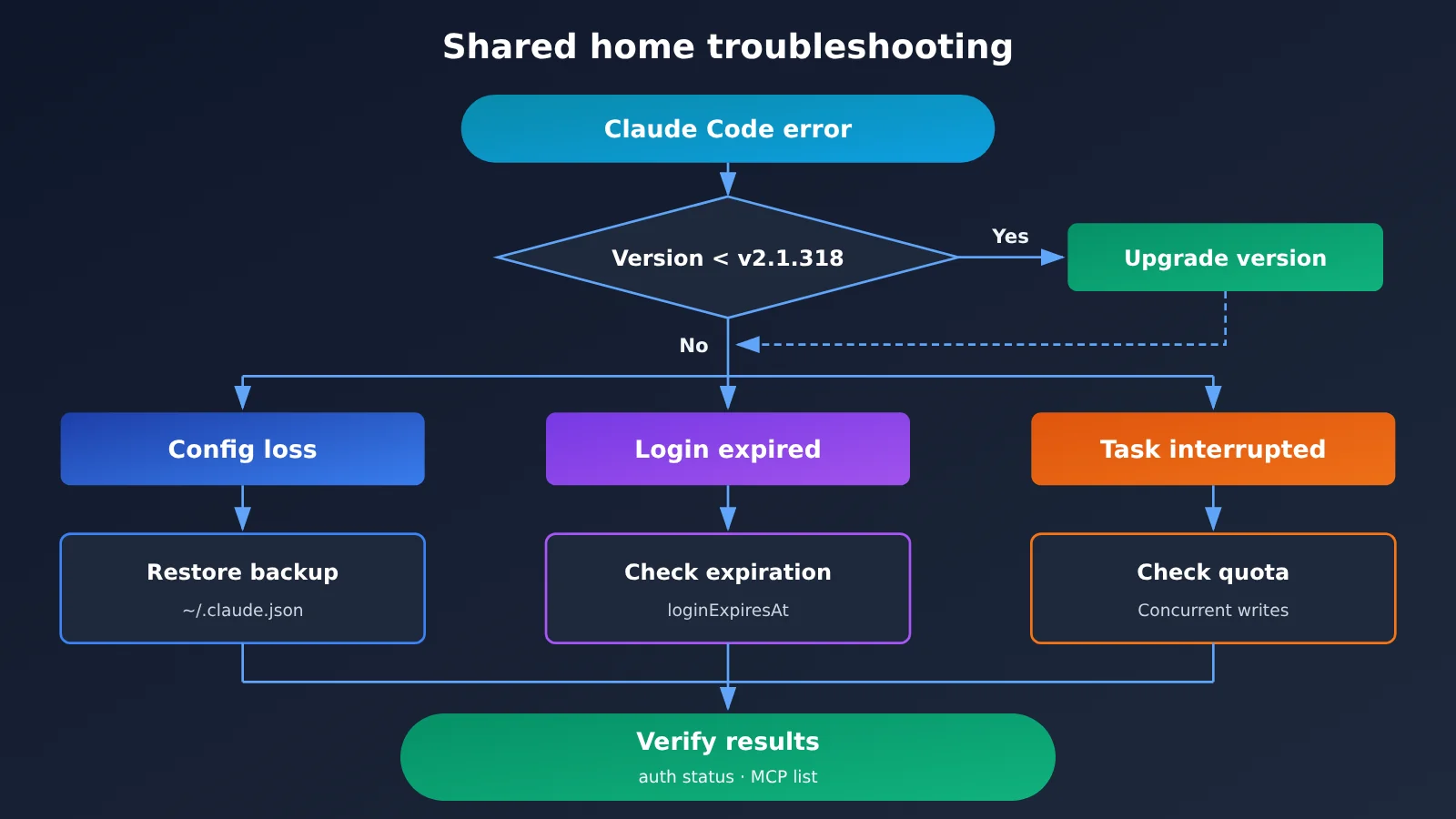
Quick Start: Troubleshooting Claude Code with a Shared Home Directory
Following this article’s conventions, there are no code blocks below; commands and fields appear inline. The troubleshooting process has four steps, which are best followed in order.
Step 1: Check Your Claude Code Version and Login Status
First, run claude --version to check your version. If it’s older than v2.1.318, upgrade with claude update or use your original installation method. Many of the issues listed in this article can only be worked around—not fully resolved—in older versions. After upgrading, run claude auth status to check your current account, organization, and the new loginExpiresAt field.
If you mainly invoke claude -p in scripts, you can have it return JSON and read the credential_expires_at field in your pipeline to trigger an alert before expiration. In text output mode, newer versions print a one-line warning to stderr starting 10 days before a saved claude.ai login expires, so keep an eye on your logs.
| Command/field | Purpose | What to check |
|---|---|---|
claude --version |
Check the current version | Whether it’s ≥ v2.1.318 |
claude auth status |
Check login status | Whether loginExpiresAt is approaching |
claude -p (JSON output) |
Unattended invocation | The credential_expires_at field |
claude auth login |
Log back in to your claude.ai account | Run as prompted after login expires |
claude setup-token |
Generate a token for unattended use | Suitable for CI and batch processing |
claude mcp add / claude mcp remove |
Manage MCP servers | Exit code 1 means the configuration lock wasn’t acquired |
Step 2: Check that ~/.claude.json is intact
A corrupted ~/.claude.json is the most common reason configuration appears to be lost in a shared home directory. v2.1.318 changed several related behaviors: if the file isn’t valid JSON during non-interactive startup, Claude no longer overwrites it with defaults. Instead, startup fails with recovery instructions, and the original file is left untouched (issue #87551). If the file is empty and no backup exists, the new version starts normally as if the file didn’t exist, rather than reporting it as corrupted.
The recovery command printed by the new version is also more reliable. Previously, it could point to an empty or truncated backup, or fail on a read-only file. Both issues have been fixed. Also, in a home directory used only for claude -p, retention cleanup could previously delete the last remaining ~/.claude.json backup. Claude now creates a new backup before deleting the old one.
Step 3: Resolve login failures and expired credentials
If login fails, first check whether the message says that your saved claude.ai login has expired. The new version states this explicitly and, when using claude -p, provides two options: claude auth login and claude setup-token. Use the former for interactive sessions; the latter is generally better suited to long-running background tasks.
On machines with forceLoginOrgUUID enabled, which requires login to a specific organization, older versions could reject a token generated with setup-token at startup even when it belonged to the allowed organization. This was fixed in v2.1.318. If you encounter this in an enterprise environment, upgrading will usually resolve it.
Step 4: Reduce the Risk of Concurrent Writes
Multiple hosts modifying MCP configuration at the same time is an inherent risk of a shared home directory. Newer versions of claude mcp add and claude mcp remove wait for the configuration lock and exit with code 1 if they can’t acquire it, rather than writing without a lock. Note, however, that the release notes also say another task saving the configuration can still overwrite a server entry you just saved. For bulk MCP configuration changes, run them sequentially on a single host whenever possible.
Also, unattended runs (claude -p and SDK applications) no longer rewrite ~/.claude.json every time when the configuration hasn’t changed. This significantly reduces write pressure on the configuration file during large batches of parallel tasks. If your cluster is still running large workloads on an older version, that’s another reason to upgrade.
🚀 Quick start: If your team runs batch jobs with Claude Code on a cluster and doesn’t want to be affected by expiring claude.ai logins, you can use an API instead. APIYI apiyi.com provides API access to Claude models and supports both OpenAI and Anthropic API formats. See docs.apiyi.com for integration details.
Common Claude Code Issues with a Shared Home Directory
The table below brings together common symptoms, possible causes, and recommended fixes. You can look up the symptom directly when troubleshooting.
| Symptom | Possible cause | Recommended fix |
|---|---|---|
/logout reports success, but you’re still logged in the next time you start |
Older versions reported success even when writing the configuration failed on a shared home directory | Upgrade to v2.1.318, then run claude auth logout and verify the result |
| A background task suddenly reports Not logged in | Another terminal or host logged in again using the same home directory | Upgrade; the issue is fixed when using the same account and organization |
| MCP servers and trusted directories all disappear after startup | The network file system incorrectly reports that the configuration file is missing | Upgrade to enable the recheck logic, and restore from a backup if needed |
| The login credentials file becomes empty | The home directory is out of space but can still create new files | Free up quota space, log in again, and upgrade |
| Non-interactive startup fails immediately with recovery instructions | ~/.claude.json isn’t valid JSON |
Follow the suggested recovery command; don’t overwrite the file manually |
| Startup is rejected by allowedProviders | A list saved by another login on the same machine is interfering | Upgrade and try again |
| All network connections fail | NODE_EXTRA_CA_CERTS points to an empty or non-PEM file | The newer version uses readable certificates and warns on stderr; also fix the certificate file |
There’s one cross-user scenario worth calling out separately. If someone uses sudo claude and leaves a running process owned by another user, older versions could mistakenly treat it as exited during version cleanup and delete the executable it was using. Relatedly, if an update or version cleanup deletes the binary of a still-running process, remote-control hosts, background daemons, and self-hosted runners may report spawn ENOENT when starting a new session. Both issues are fixed in v2.1.318. Even so, it’s best to avoid running Claude Code with sudo in shared environments.
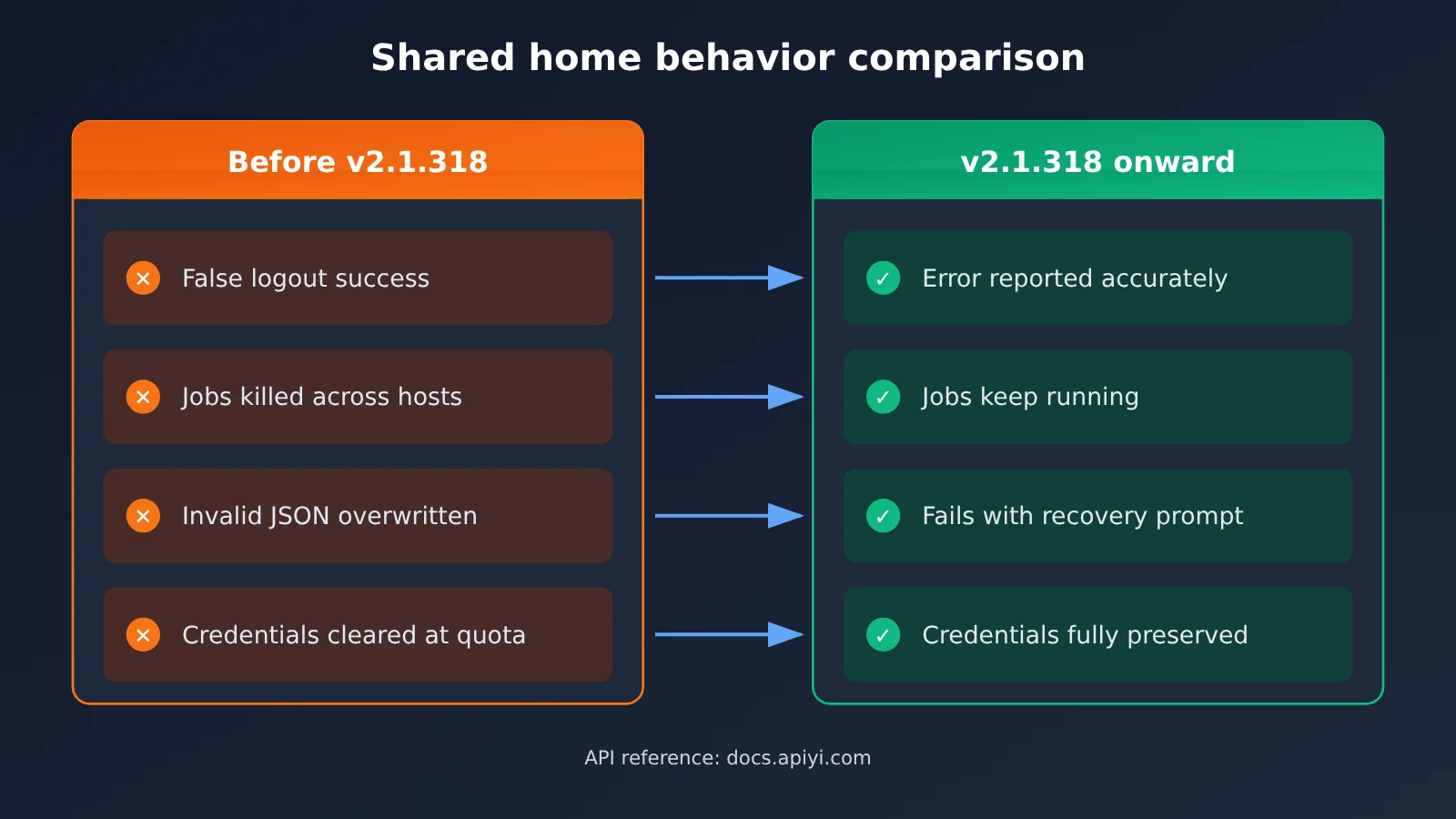
Claude Code v2.1.318: Before and After in Shared Home Environments
| Scenario | Before v2.1.318 | Starting with v2.1.318 |
|---|---|---|
| Config write failure in a shared home directory | Logout and MCP removal still reported success; changes to trust and MCP settings were silently discarded | No longer falsely reports success |
Invalid JSON in ~/.claude.json |
Non-interactive startup overwrote it with defaults | Startup fails with recovery instructions, preserving the original file |
Empty ~/.claude.json with no backup |
Reported as corrupted | Starts normally, as if the file were missing |
| Login expires | Only a generic login failure message | Clearly reports expiration and suggests claude auth login and claude setup-token |
| Expiration warning | None | Warns on stderr 10 days in advance; expiration time is available through the status command |
| Unattended runs | Rewrites ~/.claude.json on every run |
No longer rewrites it when the content hasn’t changed |
As the table shows, the guiding principle behind the v2.1.318 fixes is simple: report failures accurately and preserve user data when configuration files are corrupted. For operations teams, that means fewer situations where everything looks fine but something has already gone wrong. Problems surface earlier, making them easier to troubleshoot.
If you’re running large-scale batch jobs on a shared cluster, a safer approach is to keep using account login for interactive development and use a token generated by setup-token for batch jobs, or authenticate directly through the API. That way, the credentials won’t interfere with each other.
Connect Claude Code via API to avoid account login issues with a shared home directory
Many login issues in a shared home directory come down to multiple hosts using the same claude.ai login credentials. If batch jobs use API key authentication instead, credentials are injected through environment variables rather than loaded from login files in the home directory. That largely avoids the cross-host session conflicts and login expiration issues discussed earlier. Claude Code supports environment variables such as ANTHROPIC_BASE_URL and ANTHROPIC_AUTH_TOKEN to specify the API endpoint and key. Check the official documentation for the exact variable names and supported versions.
🎯 Technical tip: APIYI at apiyi.com provides API access to Claude models and supports both Anthropic’s native API format and the OpenAI API format. This makes it a convenient option for configuring a single endpoint for Claude Code and other tools. For the Base URL, instructions on obtaining a key, and configuration examples for each tool, see the APIYI documentation at docs.apiyi.com.
| Comparison | claude.ai account login | API key access (e.g., APIYI) |
|---|---|---|
| Credential storage | Saved login credentials in the home directory | Environment variables or a secrets management system |
| Effect of a shared home directory | Shared across machines, with potential concurrency and expiration issues | Injected independently into each job, so jobs don’t interfere with one another |
| Expiration management | Requires monitoring loginExpiresAt | Depends on the key’s validity period and quota |
| API format | Built into Claude Code | Compatible with Anthropic and OpenAI formats |
| Billing | Based on account subscription and usage rules | Based on current data on the APIYI pricing page at docs.apiyi.com/models |
💰 Cost note: For billing details such as model pricing, input and output rates, and cache pricing, check the current data on the APIYI pricing page at docs.apiyi.com/models. This article doesn’t list specific figures, so it won’t become misleading if prices change.
Frequently Asked Questions (FAQ)
Q1: What is a “shared network home directory,” and why is Claude Code more likely to run into problems there?
A shared network home directory is a user’s home directory mounted through a network file system such as NFS and shared by multiple hosts. Claude Code stores its global configuration, settings, and login credentials under the home directory. Concurrent writes by multiple processes, misleading file system cache reports, and unexpected write behavior when a quota is full can all lead to lost configuration or expired login sessions.
Q2: How does Claude Code behave differently on a shared home directory before and after v2.1.318?
Older versions could silently report a failed write as successful or overwrite a corrupted configuration with defaults. Starting with v2.1.318, Claude Code reports errors accurately, preserves the original file, and provides recovery instructions. It also saves configuration files more reliably on shared home directories and adds a login expiration field.
Q3: When were these fixes released?
The fixes are included in Claude Code v2.1.318, which the GitHub Release lists as published on November 4. You can check your installed version with `claude –version`. If you’re running an older version, it’s best to upgrade before troubleshooting.
Q4: What should I do if background tasks keep reporting “Not logged in”?
First, check whether another terminal or host has logged in again to the same account using the same home directory. This issue is fixed in v2.1.318 when the account and organization are the same. For cross-organization logins or expired credentials, consider using a token generated with `claude setup-token` or API key authentication for long-running tasks.
Q5: How can I have Claude Code invoke models through an API instead of logging in to an account?
You can use environment variables to specify an API endpoint and key for Claude Code. APIYI at apiyi.com provides API access to Claude models and supports both Anthropic and OpenAI API formats, so it can serve as a unified endpoint. For configuration steps, see docs.apiyi.com; for pricing, see docs.apiyi.com/models.
Q6: Can I just delete and recreate ~/.claude.json if it’s corrupted?
Deleting it outright isn’t recommended. When a newer version encounters invalid JSON, it stops starting and provides a recovery command. Follow the instructions to restore from a backup first. If the file is empty and there’s no backup, the newer version will start normally as if the file were missing, but you’ll need to add your previously configured MCP servers and trusted directories again.
Q7: What known limitations remain on shared home directories after upgrading to v2.1.318?
The release notes state that although `claude mcp add/remove` now uses locking, another task saving the configuration may still overwrite a server entry you just saved. Issues such as tight quotas and aggressive file system caching can also only be partially mitigated. In high-concurrency environments, consider managing configuration changes sequentially or using separate credentials for batch and interactive work.
Key Takeaways for Troubleshooting Claude Code with a Shared Home Directory
- Check the version first: Make sure Claude Code is at least v2.1.318 before troubleshooting. Upgrading resolves most shared-home issues.
- Monitor login expiry: Use the
loginExpiresAtfield inclaude auth statusto spot an expiring login early. - Don’t delete your configuration outright: If
~/.claude.jsonhas problems, follow the recovery command provided by the newer version to preserve your existing configuration. - Serialize concurrent changes: Make MCP configuration changes from one machine to prevent hosts from overwriting each other’s changes.
- Watch your quota: A full home directory can cause credentials to be cleared, so check available space regularly.
- Separate batch credentials: Use a token generated by setup-token or an API key for long-running tasks, separate from your interactive login.
- Consider API access: APIYI supports Anthropic and OpenAI formats. See docs.apiyi.com/models for pricing.
Summary
Here are the main points for troubleshooting Claude Code configuration and login issues with a shared network home directory:
- Start with the version: v2.1.318 fixes several issues, including logouts that falsely report success, logins on one host disrupting tasks on another, and configurations being overwritten or cleared. Upgrade first.
- Diagnose by symptom: For missing configuration, check
~/.claude.jsonand its backups first. For login failures, check the expiry time and credential file. For interrupted tasks, check concurrent writes and disk quota. - Separate credentials by use: Use account login for interactive development and a token or API key for batch processing. This reduces conflicts caused by sharing a home directory.
When your team uses Claude Code at scale on a shared cluster, it’s worth planning authentication methods carefully. If you need a unified API endpoint, you can evaluate APIYI at apiyi.com using the integration docs at docs.apiyi.com. For billing details, refer to the current pricing at docs.apiyi.com/models.
📚 References
- Claude Code v2.1.318 Release Notes: The source for all fixes covered in this article
- Link:
github.com/anthropics/claude-code/releases/tag/v2.1.318 -
Details: Complete release notes covering shared network home directories, login expiration,
~/.claude.jsonrecovery, and more -
APIYI Documentation Center: Instructions for API access and tool configuration
- Link:
docs.apiyi.com -
Details: Base URL, API key access, and integration methods for both Anthropic and OpenAI formats
-
APIYI Model Pricing Page: The authoritative source for model pricing
- Link:
docs.apiyi.com/models - Details: Refer to this page for current input and output rates, cache pricing, and other billing details
Author: APIYI Technical Team
Technical discussion: If you run into issues deploying Claude Code in a shared environment, contact us through the APIYI homepage at apiyi.com. For more integration resources, visit the documentation center at docs.apiyi.com.