Author’s note: The cost of an AI comic drama isn’t just the per-generation unit price — you also have to look at the pull rate (how often you get a usable result) and the reject rate. This article breaks down 5 key stages and hands you a costing method you can apply as-is.
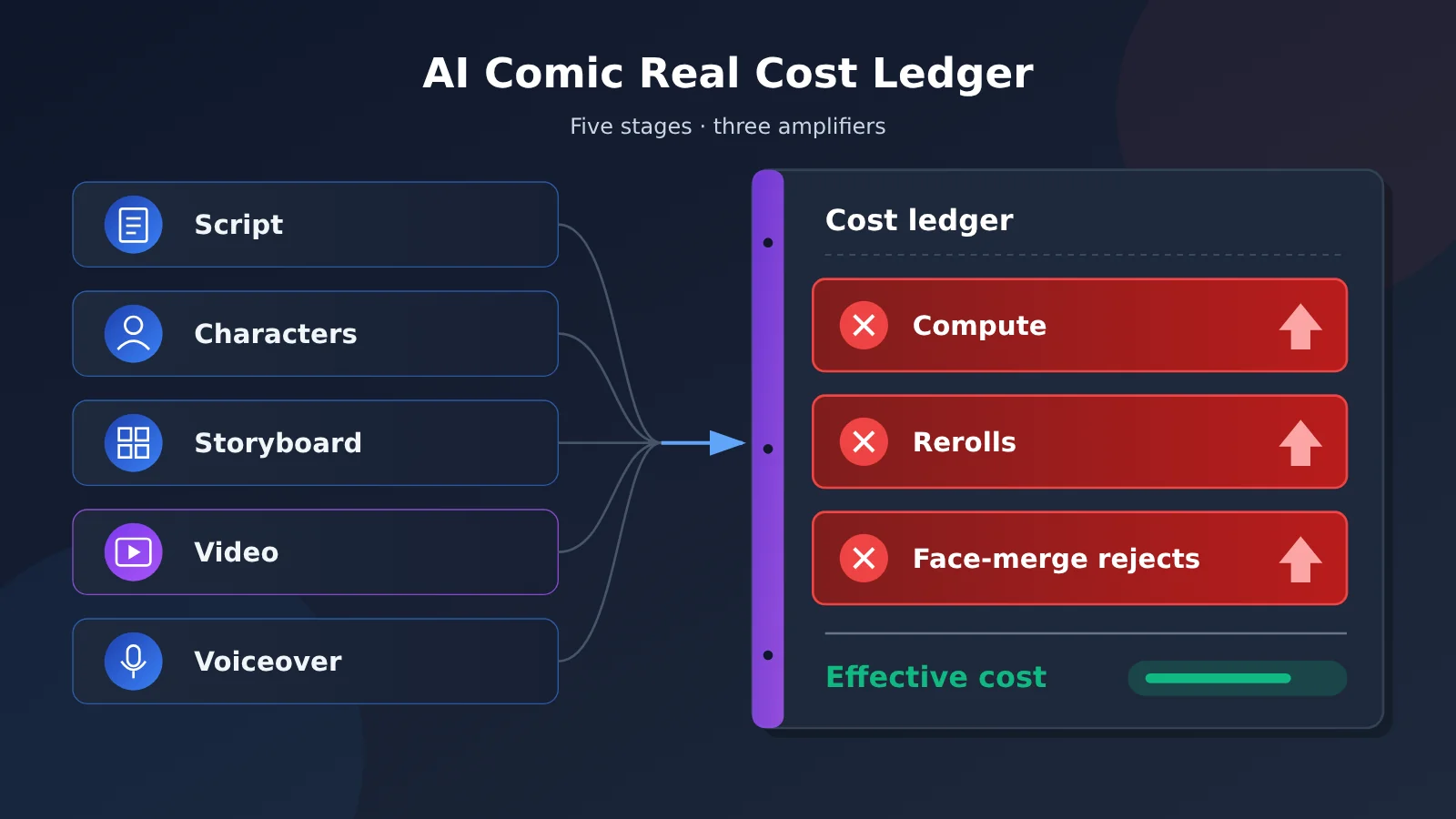
As short-drama platforms enter the “Big Red Fruit era,” AI comic dramas have become a low-cost content lane in the eyes of many small teams. 36Kr recently reported that some practitioners are pulling in solid returns from AI comic dramas, and the “making money quietly” narrative has caught on. But anyone who’s actually done the work knows that the real cost of an AI comic drama often looks quite different from the marketing pitch. The gap comes mainly from three places: compute consumption, the number of pulls, and the reject footage caused by “face blending”.
This isn’t a “don’t do it” piece, and it’s not here to hype up fat profits either. Starting from the actual production workflow, this article explains where the cost comes from at each stage, then shows how to calculate “effective cost” and how to push the reject rate down.
Core value: After reading this, you’ll know where the money goes for one episode of an AI comic drama, why quotes always come in higher than expected, and you’ll walk away with a costing method you can use directly for project evaluation.
Core Points of the Real Cost Accounting for AI Comic Dramas
Many newcomers, when estimating costs, only calculate “how much it costs to generate an image, how much to generate a video segment,” then multiply by the number of shots to arrive at an optimistic number. This approach misses the biggest variable in AI generation: results are uncontrollable. Run the same prompt ten times, and maybe only one or two are directly usable. The rest either have the wrong action, broken characters, or the faces of two characters “melt” into one person.
| Point | Description | Impact on Cost |
|---|---|---|
| Compute is the explicit cost | Text, image, video, and voice models are billed per invocation | Predictable, but the video stage accounts for the largest share |
| Retries are the hidden multiplier | A single shot needs multiple generations before a usable result can be picked out | Actual cost = single-run cost × average number of retries |
| Face blending is the main cause of unusable footage | When multiple characters appear in the same frame, facial features blend and identities get mixed up | Causes entire segments to be redone, along with voiceover and editing |
| Human labor is the underestimated item | Screening, retouching, lip-sync, and editing all require manpower | The more retries, the longer the screening hours |
| Workflow determines yield | Character design, storyboard standards, QC checkpoints | A good workflow can significantly reduce the average number of retries |
The “Effective Cost” Concept in AI Comic Drama Cost Accounting
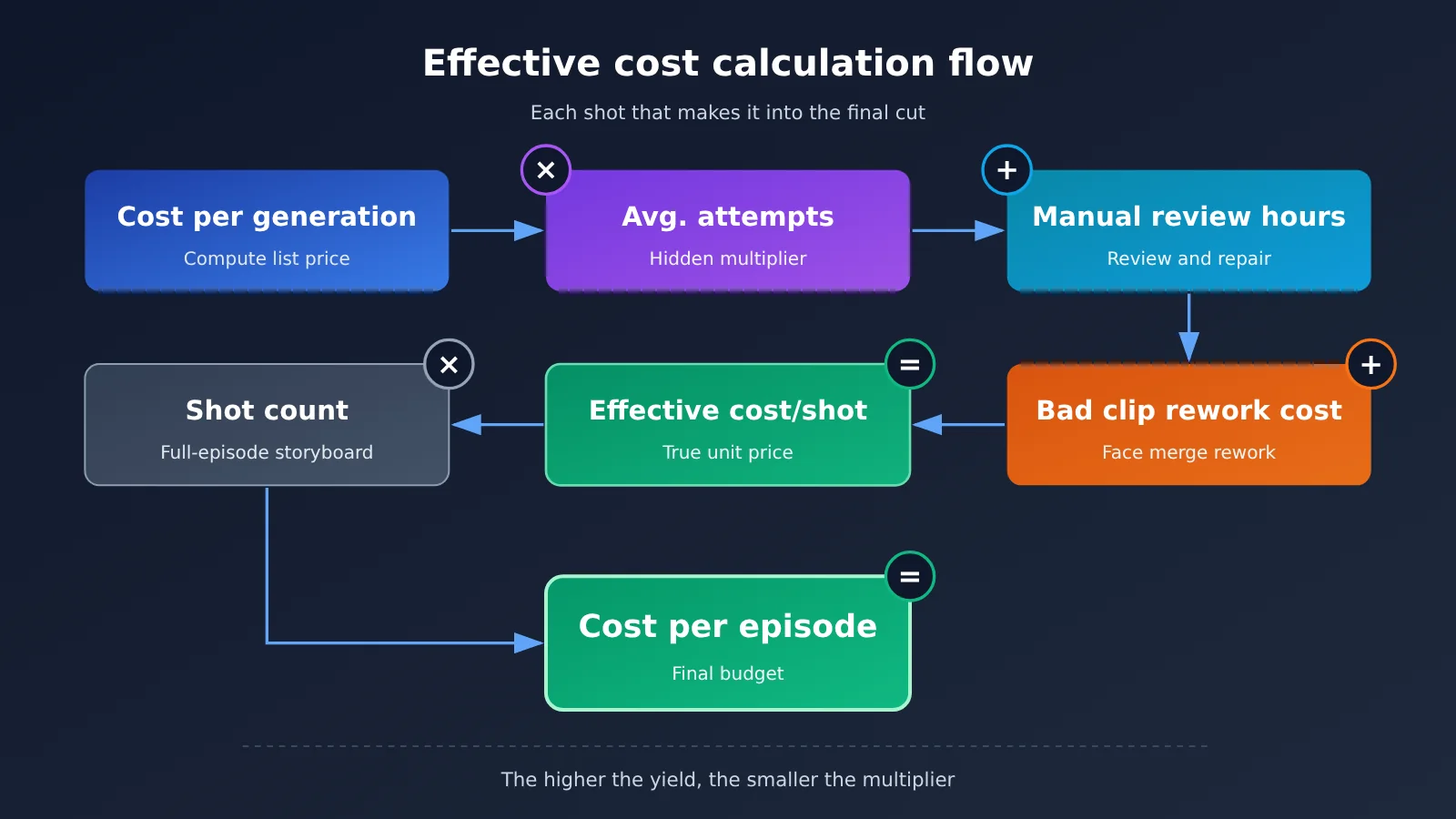
To calculate the true cost of an AI comic drama, you first need to establish the concept of “effective cost.” Effective cost refers to the money actually spent behind every shot that ultimately makes it into the final cut, not the sticker price of a single generation. It consists of three parts: the compute fee of a single generation multiplied by the average number of retries, plus the labor hours for manual screening and patching, plus the downstream rework cost caused by unusable footage.
Take a hypothetical example: a certain two-person dialogue shot needs an average of 5 generations to pick 1 usable result, so its compute cost is 5 times the single-run sticker price. If one of them looks usable but a face-blending flaw is only discovered after voiceover, forcing a redo, then the voiceover and editing hours already spent must also be counted. This is the fundamental reason many teams see their “budget double.”
Breaking Down Compute Costs Across Each Stage of AI Comic Drama Production
The production pipeline for one episode of an AI comic drama roughly breaks down into five stages. Each stage uses different model types and different billing methods. The table below lists cost sources and generation-attempt intensity by stage. For actual unit prices, refer to the pricing page of the platform you use. This article doesn’t provide unverified numbers.
| Production stage | Main model type | Billing basis (refer to platform pricing page) | Generation-attempt intensity | Cost-share characteristics |
|---|---|---|---|---|
| Script and storyboard | Text Large Language Model | Billed by input/output tokens | Low | Small share, but affects every downstream stage |
| Character design sheets | Image generation model | Usually billed per run or per image | Medium | One-time investment, reusable |
| Storyboard keyframes | Image generation / image editing model | Usually billed per run or per image | Medium to high | More shots means higher cost |
| Image-to-video | Video generation model | Usually billed per second or per run | High | Often the biggest cost |
| Voiceover and sound effects | Speech synthesis model | Usually billed by character or duration | Low | Wasted along with rework |
Script Stage: The “Cheapest” Yet Most Critical Part of AI Comic Drama Costs
Text models bill by tokens, so generating one episode’s script and storyboard script usually doesn’t cost much. But this stage determines how many shots you’ll need later, and how many two-person or multi-person same-frame scenes. The more detailed the storyboard, the more accurate the prompts for the later image and video stages, and the fewer generation attempts you’ll need.
I recommend having the model output a structured storyboard at the script stage, including shot size, number of characters, action, emotion, and dialogue. Shots with multiple characters in the same frame should be marked separately, because these shots are the most prone to face blending, so you need to plan the shooting approach in advance.
Video Stage: The Main Source of Compute Cost in AI Comic Drama
Image-to-video is the stage with the highest per-run cost and the most frequent generation attempts in the whole pipeline. Video models need to keep characters consistent and actions continuous across multiple frames, which is far harder than generating a single image. Common problems include: face drift when a character walks, facial features changing after a character turns around, hand and prop clipping, and identity swapping during multi-person interaction.
So the video-stage budget should be set aside as “unit price × expected number of generation attempts,” not by multiplying the unit price directly by the number of shots. A safer approach is to test-run a small number of shots first, measure the actual success rate for your genre, and then use that data to back-calculate the budget for the whole episode.
💰 Cost budgeting tip: If you need to call multiple models at the same time across stages like scripting and image generation, you can use APIYI (apiyi.com) for unified access. APIYI is compatible with the OpenAI and Anthropic API formats, so existing code usually only needs the
base_urland API key changed. For billing data such as each model’s input/output unit prices and cache pricing, refer to the actual listings on the APIYI pricing page at docs.apiyi.com/models.
AI Manga Drama Gacha Costs: Why Yield Rate Matters More Than Unit Price
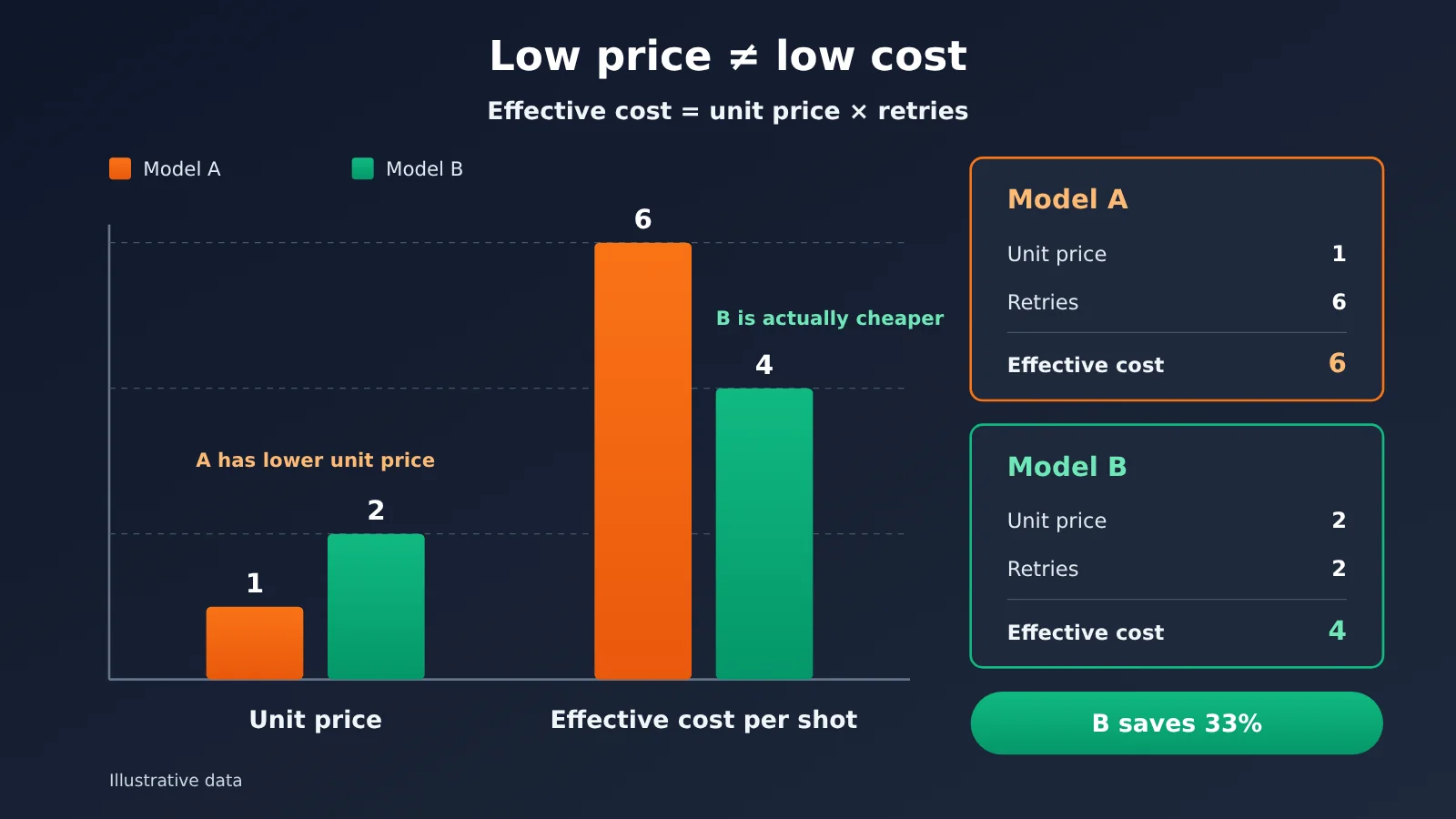
“Gacha” started as a game term, but in AI creative circles it means generating over and over until you get a result you’re happy with. For AI manga dramas, the average number of rerolls is the multiplier on your cost. A cheap model with a low yield rate can end up costing more than a pricier model that nails a usable result on the first try.
The things that drive reroll counts fall into a few categories, and each one maps to an optimization you can actually make:
| Factor | Typical pattern | Reroll trend | Optimization direction |
|---|---|---|---|
| Number of people in frame | Solo close-up vs. three people in one shot | More people, more rerolls | Split multi-person scenes into solo shots + reverse angles |
| Action complexity | Static dialogue vs. fight or chase | Bigger action, more rerolls | Use shot cuts instead of continuous motion for big action |
| Character recognizability | Similar hair and face shapes vs. distinct features | More similar, more rerolls | Differentiate with hair color, accessories, and wardrobe |
| Prompt discipline | Free-form description vs. fixed template | More casual, more rerolls | Build character description templates and reuse them shot by shot |
| Reference image quality | Single reference vs. multi-angle design sheets | Fewer references, more rerolls | Prepare three-view sheets and expression charts ahead of time |
Choose models by yield rate, not unit price
A good approach is to run a small AB test on each candidate model: pick 10 to 20 representative shots — solo, two-person, and action scenes — generate them with different models, and record how many attempts each shot needs before you get something usable. Then calculate each model’s effective cost per shot as “unit price × average reroll count,” and factor in whether the art style fits the subject matter before picking your main model.
The test itself costs money, but it’s tiny compared to the budget for a whole series — and it keeps you from having to redo everything in bulk after picking the wrong model.
💡 Selection tip: When running model AB tests, you can call multiple models through the same interface on the APIYI platform, which makes it easy to compare yield rates on the same batch of shots without writing separate integration code for each vendor. For the model list and billing details, refer to docs.apiyi.com/models.
AI Comic Drama “Face Melting”: Risks of Wasted Footage and How to Handle Them
“Face melting” is what the AI comic drama community calls a typical defect: when two or more characters appear in the same frame, the model blends their facial features, hairstyles, skin tones and so on, so the characters start to look more and more alike — sometimes outright “swapping faces.” With a still image, you can sometimes fix it in post. With video, the problem tends to worsen frame by frame until the whole shot is unusable.
Face melting is such a cost sinkhole because it’s often discovered downstream. The keyframe looked fine, and only after generating the video do you notice the character starting to drift at some second mark. Or you only spot during editing that the same character looks different from one shot to the next. The later you catch it, the more voiceover and editing hours get wasted along with it.
| Face-melting trigger | What it looks like | How to handle it | Where it applies |
|---|---|---|---|
| Character designs too similar | Two leads with similar hair, face shape, and outfits | Force visual separation at the design stage | Character design |
| Insufficient reference material | Only one front-facing reference image | Produce multi-angle design sheets and expression sheets | Character design |
| Mixed character descriptions in the prompt | Multiple characters’ traits crammed into one paragraph | Describe characters in separate segments and state their positions explicitly | Keyframes |
| Close-range physical interaction | Hugging, eye contact, cheek-to-cheek shots | Break into over-the-shoulder shots, or generate separately and composite | Storyboard / keyframes |
| Frame-to-frame drift in video | The longer the shot, the less the face matches | Limit clip length and constrain with first and last frames | Image-to-video |
Designing a workflow that cuts the wasted-footage rate from face melting
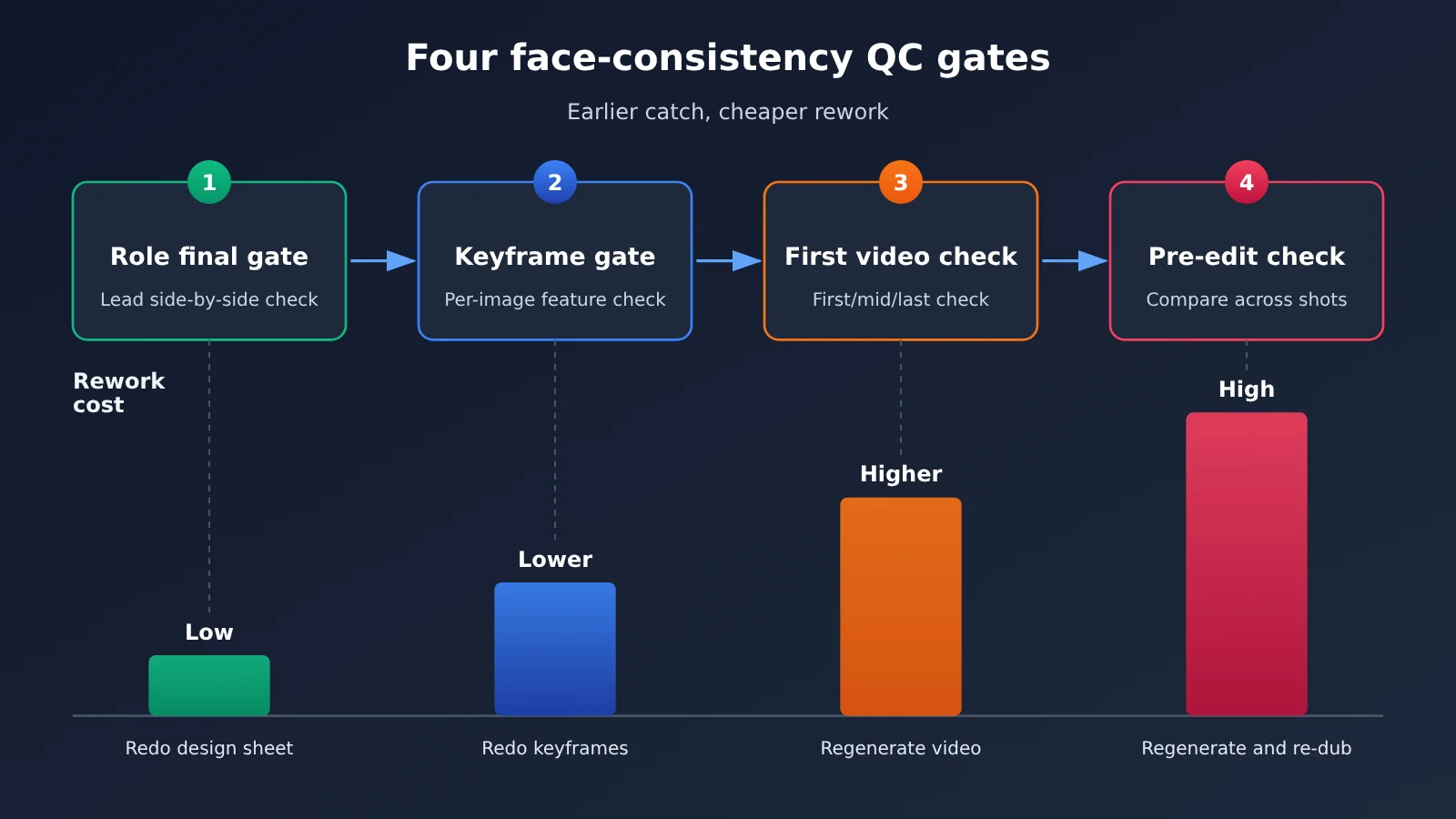
Prompting tricks alone rarely eliminate face melting. A more effective approach is to build “quality gates” into the workflow so problems surface as early as possible:
- Character sign-off gate: Once each character’s design sheet is done, line up all the leads side by side and check how distinguishable they are. If you can’t tell them apart at thumbnail size, keep adjusting.
- Keyframe gate: For multi-character shots, check every keyframe one by one and confirm each character’s signature traits (hair color, accessories, scars, etc.) are present.
- First video check gate: After generating the video, look at the faces in the first, middle, and last frames. Confirm there’s no drift before moving on to voiceover.
- Pre-edit comparison gate: Stitch together screenshots of the same character from different shots and compare. If something doesn’t match, re-roll right away instead of reworking at the final-cut stage.
These four gates add a bit of manual time, but they stop bad footage at the cheapest possible stage. Overall, that’s usually far more economical than large-scale rework later on.
AI Comic Drama Cost Accounting Quick Start
Here’s a spreadsheet-friendly cost accounting process that doesn’t require any coding. It’s great for evaluating whether an AI comic drama is worth producing before you greenlight it.
The Five-Step Method for AI Comic Drama Cost Accounting
- Break down the shots: Use a text model to turn the script into a shot list. Count the total shots per episode, and group them into single-character, two-character, multi-character, and action scenes.
- Run sample tests: Pick a handful of shots from each category and run them as tests. Record the average number of generation attempts and why rejects happen (face morphing, broken motion, style mismatch, etc.).
- Check unit prices: On the pricing page of the platform you’re using, check how each model is billed—per token, per image, or per second—and write it down.
- Calculate effective cost: Effective cost per shot category = unit price per attempt × average number of attempts + prorated manual review labor, then multiply by the number of shots in that category and sum across categories.
- Set aside a rework buffer: Based on the reject rate from your sample runs, set aside extra budget for downstream rework. Genres with more multi-character scenes need a bigger buffer.
Models You Need to Access AI Comic Drama via API
If your team plans to produce at scale, manual web-based work quickly becomes a bottleneck. A more common approach is to wire script generation, image generation, and video generation into a pipeline through APIs. When integrating, pay attention to the following configuration items:
| Configuration | Description | Suggested Value |
|---|---|---|
base_url |
API endpoint | When using APIYI, follow the docs at docs.apiyi.com |
api_key |
Authentication key | Create it in the APIYI console and manage keys per project |
model |
Model name | Use the names listed at docs.apiyi.com/models |
| API format | Request protocol | APIYI supports both OpenAI and Anthropic formats |
| Billing basis | Input/output/cache unit prices | Use the actual prices shown on the APIYI pricing page |
For text tasks like scripts and storyboards, you can call models such as the GPT series and DeepSeek directly using the OpenAI-compatible format, or call Claude using the Anthropic format. If long system prompts (such as fixed character settings and storyboard templates) need to be reused, check whether the platform supports prompt caching. Cache pricing is also based on what’s shown on the pricing page.
🚀 Quick start: We recommend signing up at APIYI apiyi.com and creating an API key first. Run a small set of shots through the “script → storyboard → keyframe” pipeline, confirm the success-rate data, and then scale up. For integration details, see the documentation center at docs.apiyi.com; for models and pricing, see docs.apiyi.com/models.
Frequently Asked Questions
Q1: What’s the real cost of an AI comic drama?
Real cost means the money actually spent behind every shot in the final cut: the per-call compute price multiplied by the number of generation attempts, plus the labor hours spent manually selecting and patching shots, plus the downstream rework caused by unusable takes. If you estimate from the single-generation price alone, your number will usually come out noticeably too low.
Q2: What’s the difference between generation-attempt cost and compute cost?
Compute cost is the list price of a single call — you can look it up directly on the platform’s pricing page. Generation-attempt cost is the multiplier on that list price, and it depends on your genre, shot complexity, and how disciplined your workflow is. You control the first by choosing the right platform, and the second by optimizing your process.
Q3: Can the “face blending” problem be avoided entirely?
With today’s generation tech, it’s very hard to avoid completely — especially in close-range interactions between multiple characters and in long shots. A workable approach is to lower the odds through design and process: make characters more visually distinct, split multi-character shots apart, keep each video segment short, and set up several quality-check gates so problems surface early.
Q4: Which genres are the best fit for AI comic dramas?
From a cost perspective, genres that are dialogue-driven, heavy on single-character shots, and light on action are friendlier — emotional stories, suspenseful monologues, urban comeback tales, and the like. Big battle scenes and crowd scenes put heavy demands on generation attempts and face-blending control, which makes costs harder to keep in check. They’re better suited to teams with a mature pipeline.
Q5: How can I quickly call the models an AI comic drama needs through an API?
You can use a multi-model aggregation platform like APIYI apiyi.com. It provides API access to the text and image models covered in this article, and is compatible with both OpenAI and Anthropic API formats. Register, create an API key, then configure base_url according to the docs at docs.apiyi.com and you’re ready to go. Available models and pricing are listed at docs.apiyi.com/models.
Q6: How do I tell whether a model is cost-effective for my project?
Don’t just compare unit prices — compare “effective cost per shot.” Pick a batch of representative shots and run an A/B test, recording the average number of generation attempts for each model, then compare price multiplied by attempts. Using APIYI to switch models through the same set of interfaces cuts down on integration work.
Q7: What are the limitations of AI comic drama cost accounting?
Trial-run samples are affected by sample size, and yield shifts when the genre or art style changes, so the results are better treated as a range estimate than a precise quote. On top of that, model version updates can change both yield and unit price, so it’s worth re-running the trials whenever you switch models or genres.
Key Takeaways: The Real Cost Breakdown of AI Comic Dramas
- Effective cost is the only real cost: unit price per generation × number of re-rolls + labor + rework. Miss any one of these and you’ll underestimate your budget.
- Video is where the money goes: image-to-video has a high unit price and needs lots of re-rolls, so budget generously for it first.
- Yield rate matters more than unit price: a model with a low unit price but a low yield rate can end up costing you more.
- Face merging is the number one cause of wasted clips: multi-person shots and long takes are the most dangerous, so avoid it from the design stage.
- The earlier your quality gate, the more you save: catching a problem at the keyframe stage is far cheaper than catching it at the final-cut stage.
- Unified access makes model selection easier: call multiple models through APIYI’s unified interface, with prices as listed at docs.apiyi.com/models.
Summary
The real cost breakdown of AI comic dramas comes down to three things:
- Compute: predictable, but you need to separate the billing basis for each stage—video is the key one.
- Re-rolls: the hidden multiplier. You need to run test samples to get the real yield rate for your own genre.
- Face merging: the main cause of wasted clips, controlled through character design, shot breakdown, and multiple quality gates.
To make steady money in the AI comic drama space, the key isn’t finding the cheapest model—it’s building a production workflow that continuously drives down re-rolls and the wasted-clip rate. Start by running a small sample to get real data, then decide whether to scale up.
We recommend using APIYI at apiyi.com to unify access to the models you need for scripting, image generation, and other stages. It’s compatible with both the OpenAI and Anthropic API formats, making it easy to compare and switch within the same workflow. For integration docs, see docs.apiyi.com, and for model pricing, refer to the actual listings at docs.apiyi.com/models.
📚 References
- 36Kr – Making Money Quietly in the AI Comic Drama Space: How I Hit Million-Level Results in the “Big Red Fruit Era”: A case study report on AI comic drama practitioners
- Link:
36kr.com/p/4054823534007175 -
Description: Learn about the industry background and practitioner experience in the AI comic drama space
-
APIYI Documentation Center: API access and configuration instructions
- Link:
docs.apiyi.com -
Description: Check the base_url configuration and compatibility notes for OpenAI and Anthropic formats
-
APIYI Models and Pricing Page: Model list and billing data
- Link:
docs.apiyi.com/models - Description: All prices and billing standards mentioned in this article are based on the actual data on this page
Author: APIYI Technical Team
Technical Discussion: Feel free to reach out to us on the APIYI apiyi.com homepage. For more access documentation, visit the docs.apiyi.com documentation center