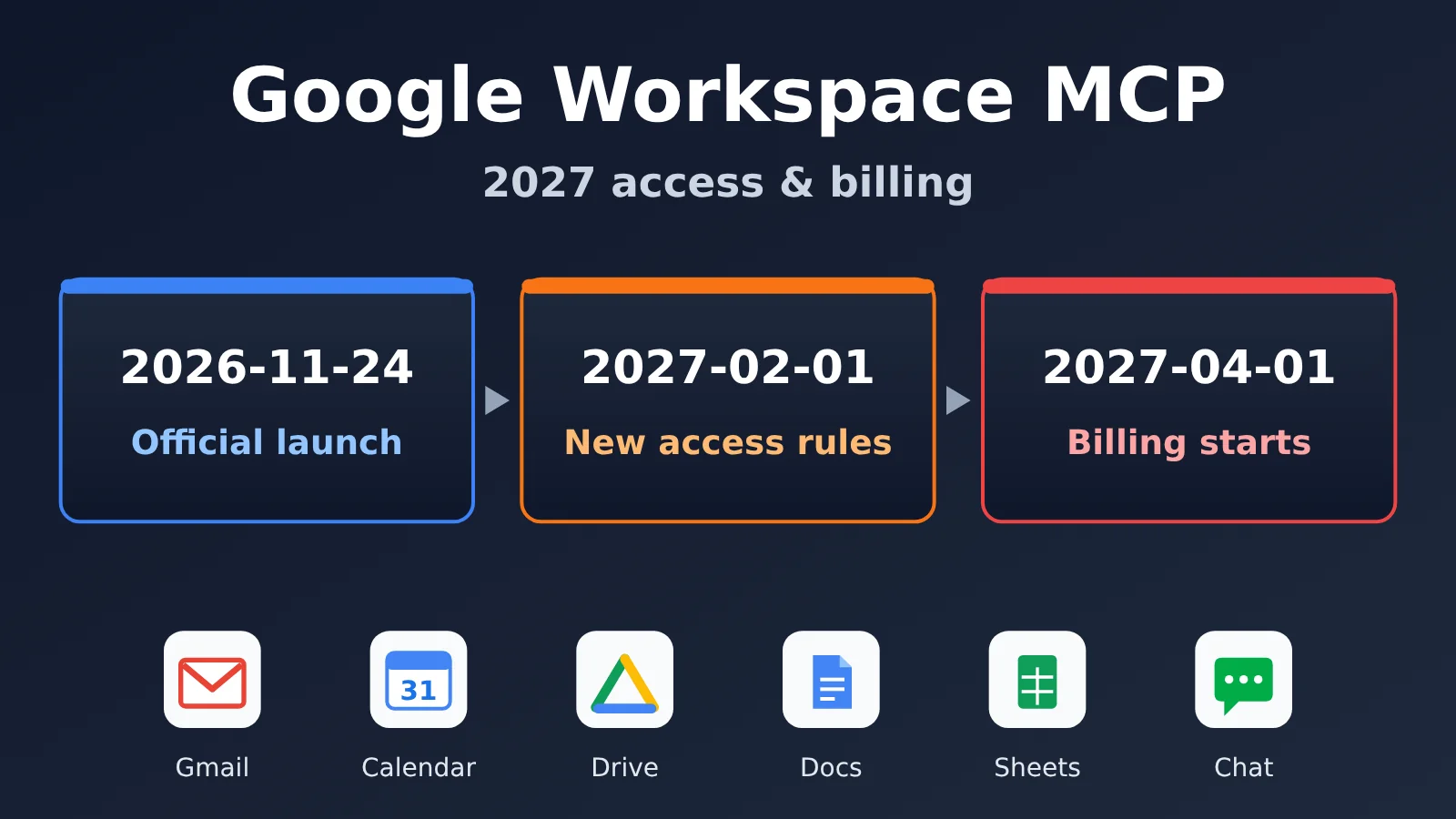
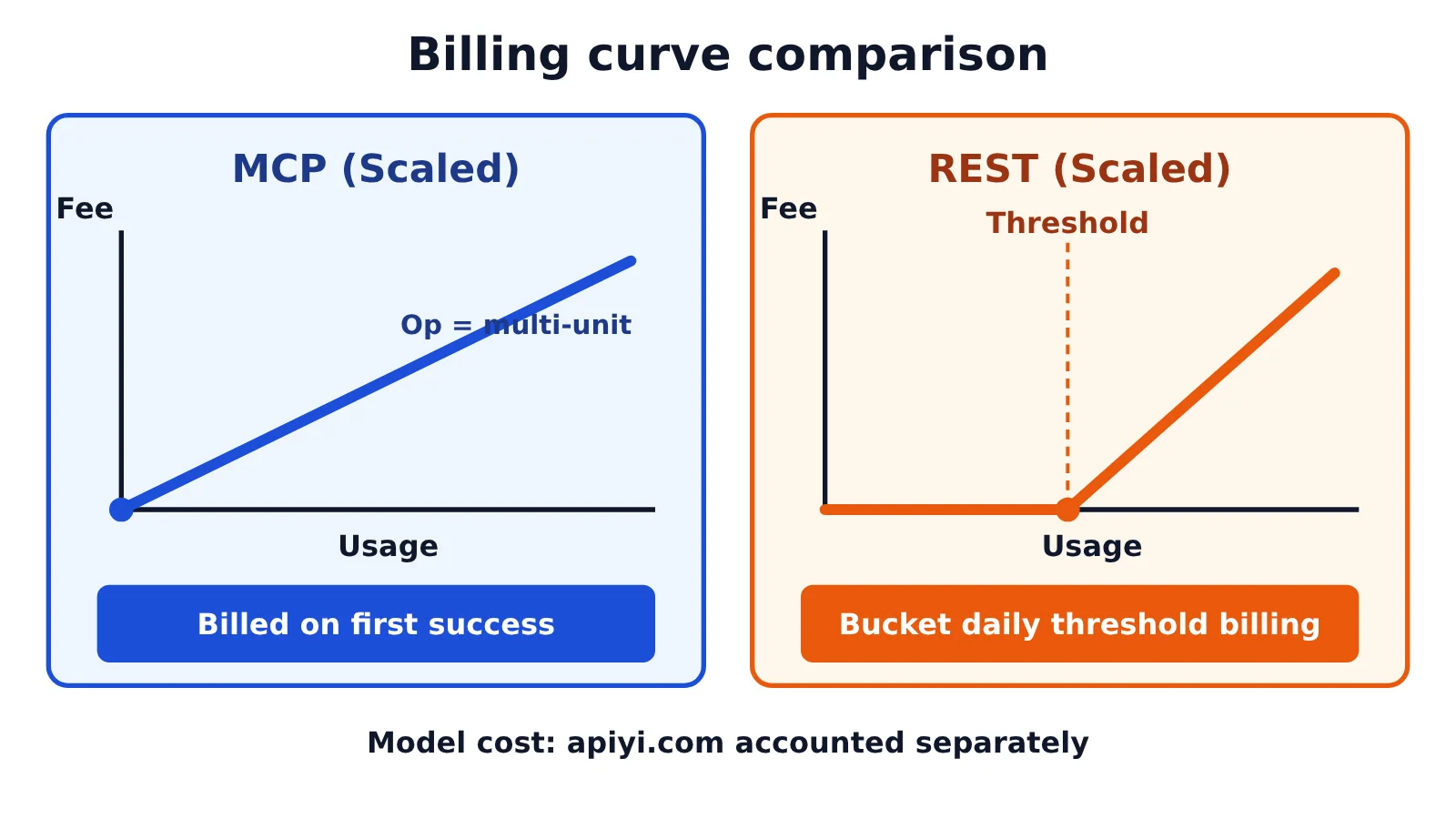
Bottom line: Google Workspace MCP officially launched on 2026-11-24. Starting 2027-02-01, AI agents must connect to Workspace through MCP or the Workspace CLI; agents that continue to call REST directly can only use Standard quota. Starting 2027-04-01, the Scaled tier begins charging for Gmail, Calendar, and Drive. For technical leads, the key is to manage MCP and REST as two separate ledgers: Scaled-tier MCP is billed from the first successful operation, while REST is charged only after each billing bucket’s daily threshold is exceeded.
What you’ll learn from this article
- What happens on each of the three key dates, and which actions need to be completed by when.
- How quota and billing rules differ between the Standard and Scaled tiers.
- How to split MCP and REST bills, with a few budget examples you can reuse.
- What limitations apply when requesting quota exceptions.
Index: First, the “To Know” section explains concepts such as MCP, billing buckets, and is_agentic, then gives a quick impact overview by audience. The “Objective Facts” section of the main body organizes official rules and pricing tables around the three milestones: launch, access, and billing. The “Analysis and Judgment” section provides bill-splitting methods, budget examples, and migration recommendations, and ends with an FAQ covering common questions.
Google Workspace MCP: Concepts to Know First
| Concept | Quick Explanation |
|---|---|
| MCP | Model Context Protocol, a protocol that lets AI Agents call external services in the form of “tools.” Google offers a hosted version of the Workspace MCP server |
| Workspace CLI | Google’s official Workspace command-line tool, which went GA alongside the hosted MCP and is another official channel for Agent access |
| REST calls | The traditional way of directly requesting product APIs like Gmail and Drive |
| Standard tier | The free usage tier, with an MCP quota of 5,000 requests per project, per product, per day |
| Scaled tier | The paid, scaled tier, billed by successful billing units |
| Billing bucket | Price tiers divided by operation type, in four levels: Light, Medium, Plus, and Premium |
| Billing unit | The smallest billing unit; some single tool operations map to multiple billing units |
is_agentic |
A flag that distinguishes the purpose of an OAuth client; Agent use cases require a separate OAuth client marked with this flag |
Google Workspace MCP Rules: Impact at a Glance
- Technical leads: You’ll need to migrate your Agent’s Workspace access to MCP or Workspace CLI before 2027-02-01. If you stick with REST, your Agent will be capped at the Standard quota.
- Workspace admins: You’ll need to set up a separate OAuth client for your Agent and mark it
is_agentic, while keeping an eye on the backend governance capabilities Google is rolling out. - Finance and budget owners: Starting 2027-04-01, Gmail, Calendar, and Drive on the Scaled tier will incur charges. MCP and REST are metered differently, so you’ll want to budget for them separately.
- Traditional integration (non-Agent) developers: Under the current details, non-Agent features aren’t directly bound by the “Agents are limited to the Standard quota” rule, but you should still watch the REST billing bucket thresholds.
Google Workspace MCP: The Facts Behind Three Key Dates
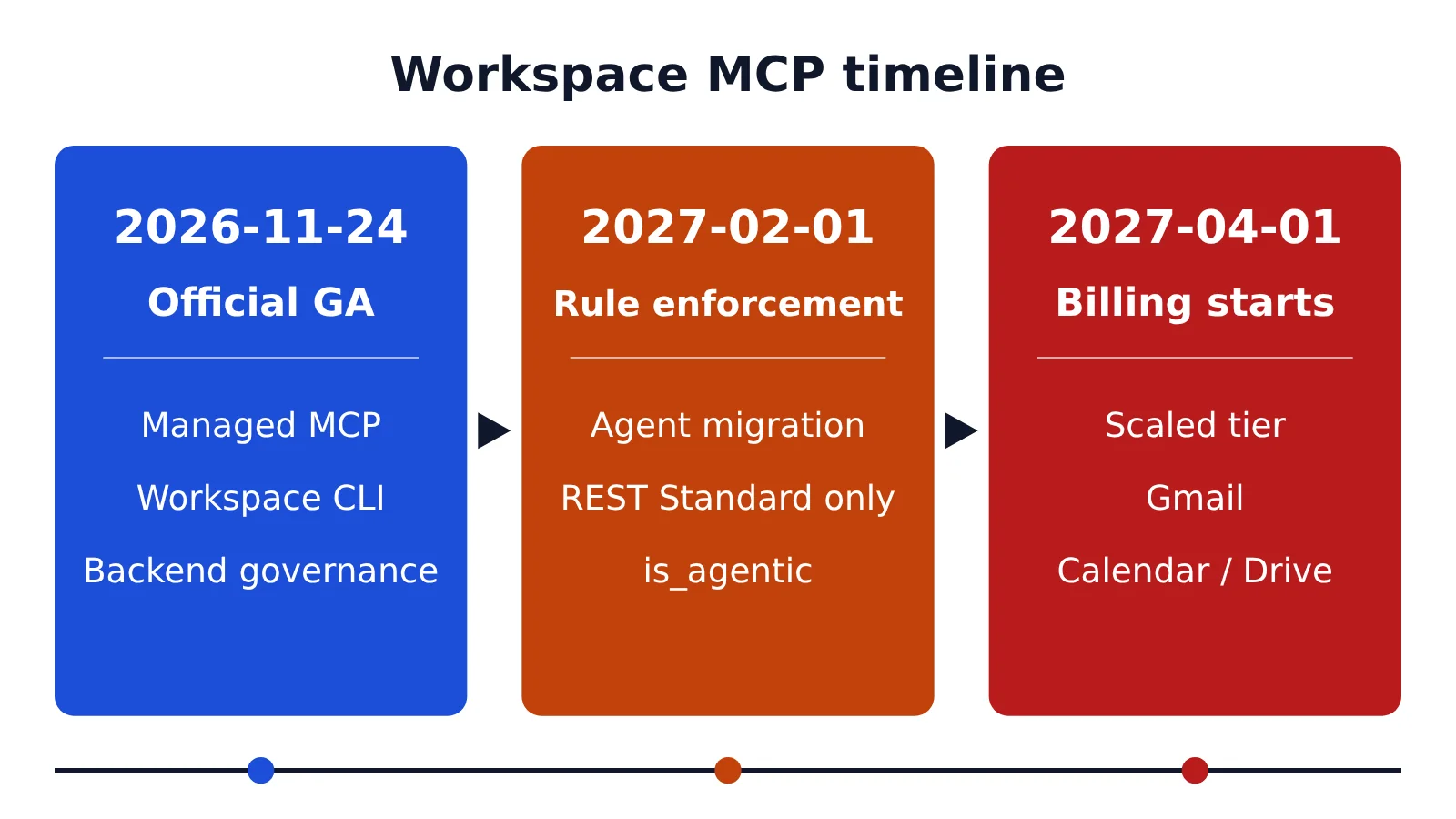
Milestone One: Google Workspace MCP and CLI Go Live on 2026-11-24
On 2026-11-24, Google published an announcement confirming that Workspace hosted MCP servers and the official Workspace CLI are now generally available, with governance capabilities in the admin console rolling out alongside them. According to the official configuration guide reviewed on 2026-11-27, the products currently listed cover eight in total: Gmail, Calendar, Drive, Docs, Sheets, Slides, Chat, and Tasks.
- Official announcement: workspaceupdates.googleblog.com/2026/11/mcp-servers-cli-standardized-usage-tiers-now-available.html
Milestone 2: 2027-02-01 — Technical Enforcement of Google Workspace MCP Access Rules
2027-02-01 is the technical enforcement date, with three main requirements:
- AI agents must migrate to MCP or the Workspace CLI.
- Under the latest rules, AI agents that call REST directly are limited to the Standard quota; non-agent features aren’t directly restricted by this rule.
- Use a separate OAuth client and tag it with
is_agenticbased on its purpose.
The third requirement means the practice of using the same OAuth client for both background sync and agents needs to be split apart; otherwise, you can’t clearly distinguish the purposes.
- Quota and usage tier documentation: developers.google.com/workspace/guides/quota-usage-tiers
Milestone 3: 2027-04-01 — Google Workspace MCP Scaled Tier Starts Billing
Starting 2027-04-01, the Scaled tier begins charging under the rules for the three products Gmail, Calendar, and Drive. The core differences between the two tiers are as follows:
| Dimension | Standard tier | Scaled tier |
|---|---|---|
| Cost | Free | Charged per successful billing unit |
| MCP quota/threshold | 5,000 requests/project/product/day | No free MCP threshold |
| MCP billing starts | No charge | Billing starts with the first successful operation in Gmail, Calendar, or Drive |
| REST billing starts | No charge | Successful requests are charged only after each billing bucket exceeds its starting threshold |
| Billing unit note | — | Some single tool operations count as multiple billing units |
Important: applying for the Scaled tier does not automatically raise the quota cap. Internal exceptions can request an increase to the REST quota but cannot request an increase to the MCP quota.
- Quota and pricing guide: developers.google.com/workspace/guides/quota-pricing
Google Workspace MCP Billing Bucket Pricing and REST Thresholds
The unit prices for the four billing buckets (per 1,000 billing units, undiscounted) are as follows:
| Billing bucket | Unit price (per 1,000 units) | Gmail REST daily threshold | Calendar REST daily threshold | Drive REST daily threshold |
|---|---|---|---|---|
| Light | $0.10 | 70 million | — | 20 million |
| Medium | $0.20 | 10 million | — | 7 million |
| Plus | $0.25 | — | 1 million | 4 million |
| Premium | $0.50 | 1 million | — | 1 million |
The reference material lists Drive’s four thresholds in order of the four tiers; Gmail doesn’t list the Plus tier, and Calendar lists only the Plus tier. The official example is: Calendar in the Scaled tier has 20,000 successful billing units. Charged to the Plus bucket, the undiscounted cost is $5 (20 × $0.25).
- Cost estimator: developers.google.com/workspace/guides/quota-cost-estimator
🎯 Technical recommendation: Workspace MCP addresses what an agent can operate; the Large Language Model invocations behind the agent are a separate cost. If you need to compare how well GPT, Claude, and Gemini support tool calls in the same agent, you can use APIYI apiyi.com to test them all with a single API key and account for model costs and Workspace costs separately.
Google Workspace MCP Billing Analysis: How to Split REST and MCP Bills
Why Google Workspace MCP Needs Two Separate Ledgers
Going by the rules, MCP and REST bill in almost opposite ways. MCP on the Scaled tier has no free threshold — every successful operation is billed. REST, on the other hand, has daily thresholds in the tens of millions for products like Gmail and Drive, and anything under that threshold generates no successful-request charges. So the same volume of business routed through different channels can produce very different bills.
That said, after 2027-02-01, Agents no longer have the freedom to pick a channel: Agents are expected to go through MCP or CLI, and an Agent connecting directly to REST only gets the Standard quota. The more realistic approach is to split the books by purpose: Agent traffic goes into the MCP ledger, while non-Agent batch jobs and sync tasks stay in the REST ledger. That’s exactly what independent OAuth clients and the is_agentic flag are there for.
Google Workspace MCP Budget Examples
The examples below use only the unit prices and thresholds from the reference materials to show the math. They’re illustrative estimates and don’t factor in discounts. Actual billing bucket assignment and billing unit conversion should follow the official cost estimator.
| Scenario | Tier/Channel | Assumption | Estimate |
|---|---|---|---|
| A: Small-team Agent pilot | Standard / MCP | No more than 5,000 requests per product per day | $0; anything beyond that is capped by quota |
| B: Official example | Scaled / MCP | Calendar 20,000 successful billing units, Plus bucket | About $5 |
| C: Agent reading email | Scaled / MCP | Gmail 100,000 billing units per day, assumed to land in the Light bucket | About $10/day |
| D: Same as C, but in the Premium bucket | Scaled / MCP | 100,000 billing units | About $50/day |
| E: Non-Agent background sync | Scaled / REST | Gmail Premium bucket, 1.2 million successful requests per day | 200K over the threshold × $0.50 per thousand ≈ $100/day |
The C vs. D comparison makes the point: which billing bucket you land in has a big impact on your MCP budget — the same unit count can cost five times as much. On top of that, some tool operations count as multiple billing units, so estimating straight from “number of Agent invocations” tends to come in low. Our suggestion: run on the Standard tier for a while first, record the actual billing unit counts, then use the cost estimator to project Scaled-tier costs.
💰 Cost optimization: An Agent’s total cost = Workspace billing units + Large Language Model tokens. On the model side, you can pay as you go through APIYI at apiyi.com — use the free credits for new users to get the flow working first, then put both sets of numbers into the same budget table.
Google Workspace MCP Migration and Quota Strategy Takeaways
Based on the facts above, we can draw a few conclusions.
First, don’t treat “applying for Scaled” as a way to scale up capacity. The official guidance clearly states that applying for Scaled won’t automatically raise the limit, and MCP quotas can’t be increased through internal exceptions. Teams relying on high-concurrency agents should build caching and operation batching into their architecture to reduce duplicate reads.
Second, complete the OAuth client split before 2027-02-01. This is the lowest-cost preparation work admins can start right away. After the split, metering for agent traffic and traditional traffic will be clearer, and it’ll be easier to reconcile bills later.
Third, this is a prediction: as backend governance capabilities roll out, admins will likely use the is_agentic flag as the basis for auditing and quota limits. Future agent projects should establish clients according to this standard from the start.
🚀 Quick start: During migration, you’ll often need to validate how multiple models perform when invoking Workspace MCP tools. With APIYI apiyi.com’s OpenAI-compatible endpoint (base_url:
https://api.apiyi.com/v1), you can switch comparisons by changing only the model name.
Google Workspace MCP FAQ
Q1: What is Google Workspace MCP?
It’s a Google-hosted MCP server that lets AI Agents work with Gmail, Calendar, Drive, Docs, Sheets, Slides, Chat, Tasks, and other products as standard tools. It officially reached GA on 2026-11-24.
Q2: How is Workspace MCP different from calling REST directly?
The main differences are in onboarding rules and billing. Starting 2027-02-01, Agents that connect directly to REST can only use Standard quota. At the Scaled tier, MCP bills starting from the first successful operation, while REST only bills after exceeding each bucket’s daily threshold.
Q3: What needs to be done by 2027-02-01 and 2027-04-01, respectively?
Before 2027-02-01, complete the migration of your Agents to MCP or the Workspace CLI, and create a separate OAuth client tagged `is_agentic`. Before 2027-04-01, complete budget assessments for Gmail, Calendar, and Drive at the Scaled tier.
Q4: Will traditional non-Agent integrations be affected?
According to the latest rules, non-Agent features are not directly restricted by the “direct REST connections limited to Standard quota” rule. If you’re at the Scaled tier, any usage exceeding the REST billing bucket threshold still requires payment.
Q5: Is the Standard tier enough?
Standard is free, with an MCP quota of 5,000 requests per project, per product, per day — suitable for pilots and small teams. Once your business volume exceeds that, you’ll need to evaluate the Scaled tier, but note that Scaled doesn’t automatically raise the limit.
Q6: Can MCP quota be increased?
No. Internal exceptions can only raise REST quota; MCP quota cannot be increased through that route. High-concurrency scenarios need architectural optimization to reduce call volume.
Q7: How can I validate the model-side approach for my Agent at low cost?
On the Workspace side, you can start with free trials at the Standard tier. For the model side, we recommend getting free test credits through APIYI apiyi.com, comparing tool-calling quality across different models using a unified interface, and then deciding which model to run in production.
Q8: What kinds of deviation might budget estimates have?
Deviations mainly come from two areas: first, some single tool operations correspond to multiple billing units; second, operations belong to different billing buckets. We recommend relying on measured data and double-checking with the official cost estimator; model token costs can be tracked separately in the APIYI apiyi.com console.
There’s just over two months left until 2027-02-01. A safer order of operations is: first split the OAuth clients, then record real billing units at the Standard tier, and finally decide whether to move to the Scaled tier based on measured data. Workspace-side bills are managed separately for MCP and REST, and model-side costs can be accounted for separately through APIYI apiyi.com — put the two parts together and you have the Agent’s complete budget.
📚 References
- Google Workspace Updates official announcement: MCP servers, CLI, and usage tiers released
- Link:
workspaceupdates.googleblog.com/2026/11/mcp-servers-cli-standardized-usage-tiers-now-available.html - Notes: original GA announcement dated 2026-11-24
- Link:
- Workspace quotas and pricing guide: per-billing-bucket rates and REST thresholds
- Link:
developers.google.com/workspace/guides/quota-pricing - Notes: detailed billing rules for the Scaled tier
- Link:
- Workspace usage tiers explained: Standard and Scaled rules
- Link:
developers.google.com/workspace/guides/quota-usage-tiers - Notes: quotas, exception requests, and agent limits
- Link:
- Workspace cost estimator: budget calculation tool
- Link:
developers.google.com/workspace/guides/quota-cost-estimator - Notes: cross-check your budget against measured billing units
- Link:
Author: APIYI Technical Team
Technical discussion: Feel free to reach out to us through APIYI at apiyi.com. For more integration guides, check out the documentation center at docs.apiyi.com.