Author’s note: breaking down the selection logic behind GLM-5.4 and Kimi K3.1 Pro along two technical paths — 2.8T MoE versus a 28-layer loop — plus the state of their weights, and two billing shapes: per-token pricing and subscription.
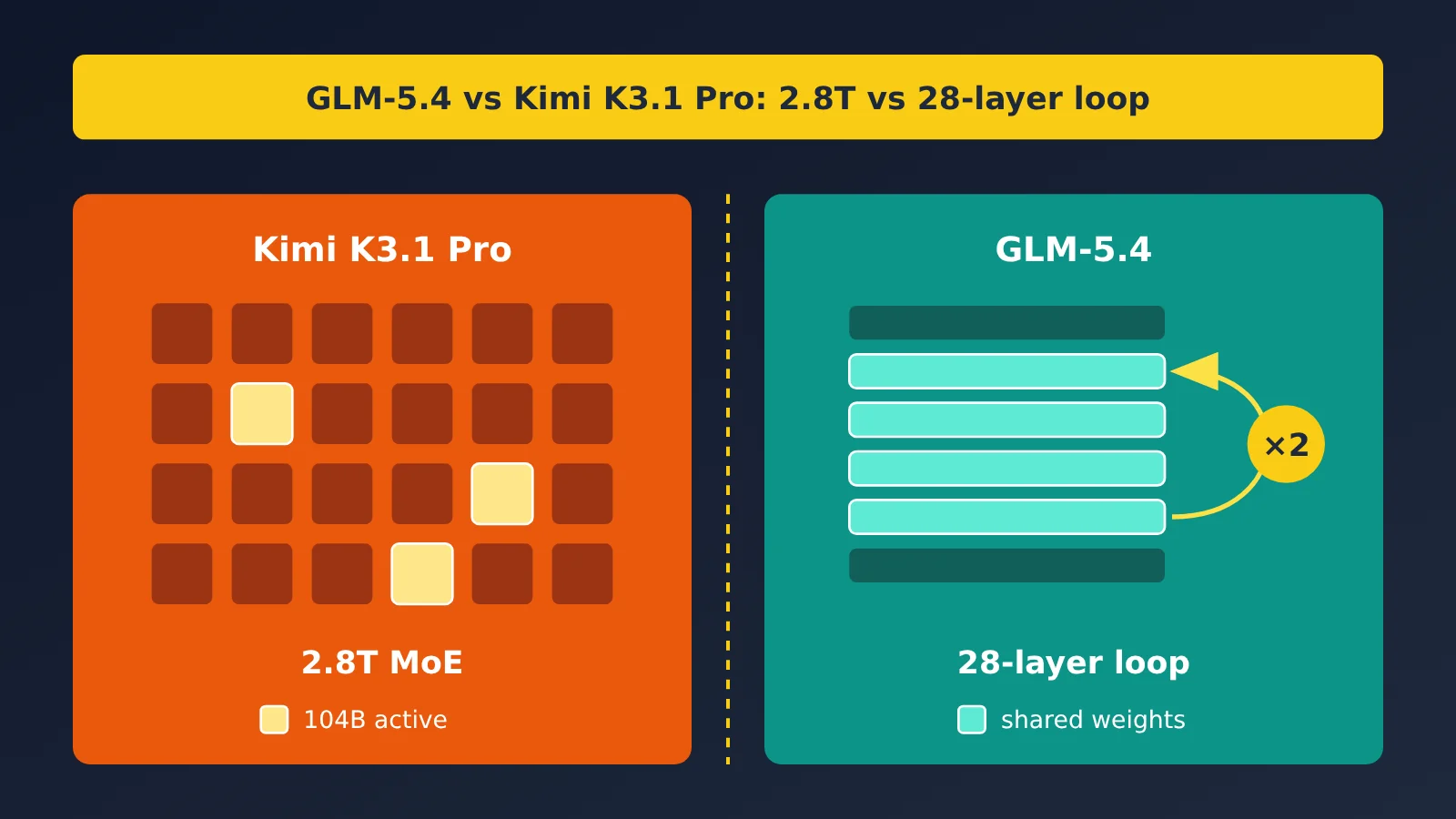
Developers who care about open weights, long context, and multimodality have hit two new options back-to-back this past month. On 2026-10-24, Moonshot AI released Kimi K3.1 Pro; on 2026-11-23, Z.ai (Zhipu) released GLM-5.4. Both claim 1M-class context, both lead with coding, but their technical paths are completely different. Kimi goes the big-MoE route: 2.8T total parameters with 104B activated. GLM-5.4, meanwhile, runs the 28 layers of its 750B base twice — that’s the Loop Transformer.
This is not a “each has its merits” compromise piece. On the same independent benchmark, KingBench 4, the two models sit just 1 point apart — and that score doesn’t give you an answer. What actually separates them comes down to three things: architectural cost, the state of the weights, and the shape of the bill. This article keeps vendor self-reported results, independent third-party single-instance runs, and things that can’t be verified clearly separated, so we don’t mistake a vendor’s own testing for an independent conclusion.
The core value: after reading this, you’ll be able to decide which one to try first based on whether you’re “billed per token and need a stable API,” or “want a low-barrier way to try visual coding and can accept a subscription.”
GLM-5.4 and Kimi K3.1 Pro: Key Takeaways
The table below puts the hard facts readers need most front and center. Unless otherwise noted, all specifications are as officially published by the vendors.
| Item | Kimi K3.1 Pro | GLM-5.4 |
|---|---|---|
| Architecture approach | MoE, 2.8T total parameters / 104B active, 93 layers | Loop Transformer, 750B scale, 28 of 78 layers share weights and run for two rounds |
| Context / max output | 1,048,576 / 262,144 (Azure model card) | 1M / 128K |
| Input modalities | Text + image | Video + image + text + files |
| Thinking mode | Thinking always on; reasoning_effort can be low / high / max, default max |
Supports thinking mode |
| Availability | Token-based API billing, standard version $2 / $10 | GLM Coding Plan subscription, ZCode, Z.ai Chat; API pending safety evaluation before release |
| Weight status | Official plan to release full weights before 2026-11-04 | Plans to open-source after security hardening, no timeline provided |
| Standalone single-instance score | KingBench 4: 32.2 | KingBench 4: 33.2 |
GLM-5.4 vs. Kimi K3.1 Pro: The Details
Kimi K3.1 Pro’s approach is to scale up the parameters, but only use a small portion at a time. The 2.8T total parameters provide a huge knowledge capacity, while only 104B are activated per token, keeping inference cost within a range that can be sold per token. Its standout spec is a 262,144-token max output, which is more helpful for tasks that require writing a long code file or a long report in one pass.
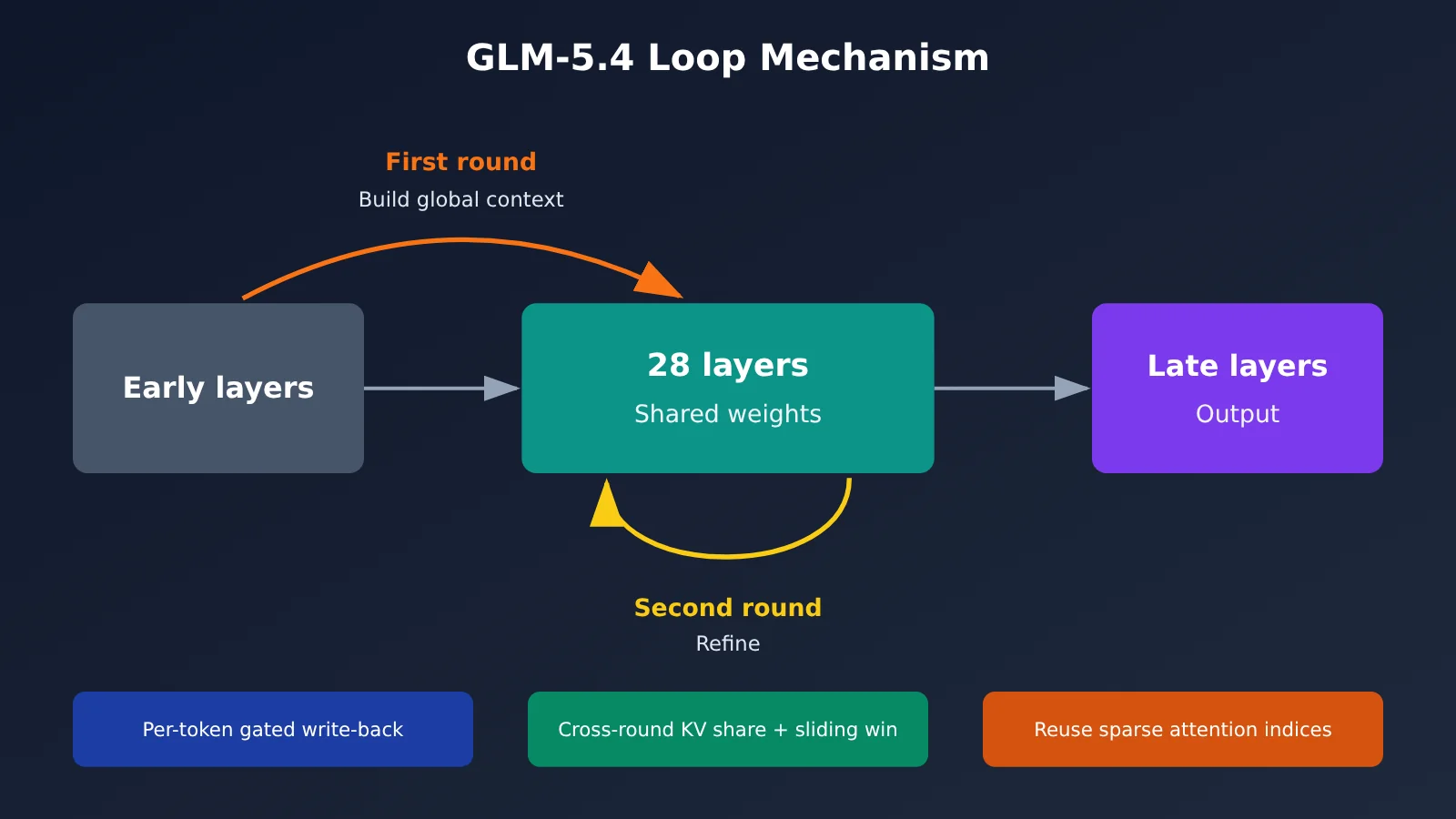
GLM-5.4’s approach is not to add parameters, but to make the network deeper. The company takes 28 layers in the GLM-5 base model, makes them share weights, and runs them for two rounds: the first round builds global context, and the second refines it. The parameter count stays the same, but the effective depth increases. The company claims its intelligence level is on par with 2T–3T-parameter models, but that’s a vendor claim. The blog post doesn’t provide overall benchmark scores such as SWE-bench or Terminal-Bench.
Core differences between GLM-5.4 and Kimi K3.1 Pro
Neither approach is strictly better; each places its costs in different places. The table below lists the differences by dimension, and the last column only shows which type of need leans toward which side.
| Comparison dimension | Kimi K3.1 Pro | GLM-5.4 | Which need it favors |
|---|---|---|---|
| Source of capacity | Total parameter scale (2.8T) | Effective depth from looping | For knowledge breadth, lean Kimi; for inference depth at the same parameter count, lean GLM |
| Per-inference cost | 104B active; compute is relatively fixed | 28 layers run an extra round; official says training compute rises only by about 10% | Depends on the specific deployment |
| Long output | 262,144 | 128K | One-shot long output leans Kimi |
| Multimodal input | Text + image | Video + image + text + file | Video and visual replication lean GLM |
| Billing model | Per token | Subscription first; API not yet open | Backend integration leans Kimi; personal coding trials lean GLM |
| Weights | Official date commitment | No timetable | Private deployment needs lean Kimi |
The cost of Kimi K3.1 Pro: large parameters, sold by token
A total parameter count of 2.8T means self-hosting has very high VRAM and storage requirements. Even if only 104B is active, the full weights still need to be loaded. For the vast majority of teams, the more realistic approach is to call the API and pay per token. The advantage is transparent, predictable billing; the downside is that input tokens for long-context tasks accumulate quickly, and the cache hit rate directly determines how high the bill goes.
In addition, Kimi K3.1 Pro always has thinking enabled, with a default reasoning_effort of max. That helps with complex tasks, but simple requests also consume thinking tokens. For batch lightweight tasks, it’s better to explicitly set it to low.
The cost of GLM-5.4: looping for depth, subscriptions first
Two loops essentially trade time for depth. To make this work, the official team made three engineering changes: token-by-token gated progressive write-back; cross-round KV cache sharing plus an independent sliding window, so an extra round adds only the KV for one sliding window; and reuse of the first round’s sparse attention index in the second round, adding no indexing overhead. The official team also says that on benchmarks such as GPQA-Diamond and MMLU-Pro, average output length dropped 10%–14%, with some reasoning shifting from explicit tokens into the loop’s implicit depth.
But the official team also acknowledges the limitations: the model can easily fall into excessively long “marathon thinking,” and repeated reflection often pushes accuracy higher at the cost of latency. On throughput, the official figures are up to 200 token/s off-peak and 70-80 token/s at peak. On the commercial side, GLM-5.4 first arrived in the GLM Coding Plan subscription, ZCode, and Z.ai Chat; the API will open only after a safety evaluation, with no timetable.
Weight status: the two companies differ, so don’t frame it as “both are open source”
- Kimi K3.1 Pro: The official plan is to release the full weights by 2026-11-04. Actual download addresses and license terms are subject to Moonshot AI’s official repository; this article does not confirm those details on its behalf.
- GLM-5.4: The official statement only says it plans to open-source in a responsible manner after security hardening, with no date given. Until the weights are actually released, it cannot count as an open-weight model that can be privately deployed.
One thing to note: the KingBench 4 evaluators called GLM-5.4 “the highest-scoring open-weight model in this test.” That is the evaluators’ framing and should be viewed separately from the fact that GLM-5.4 has not yet released its weights.
How to read the GLM-5.4 vs. Kimi K3.1 Pro benchmark scores: facts come in three layers
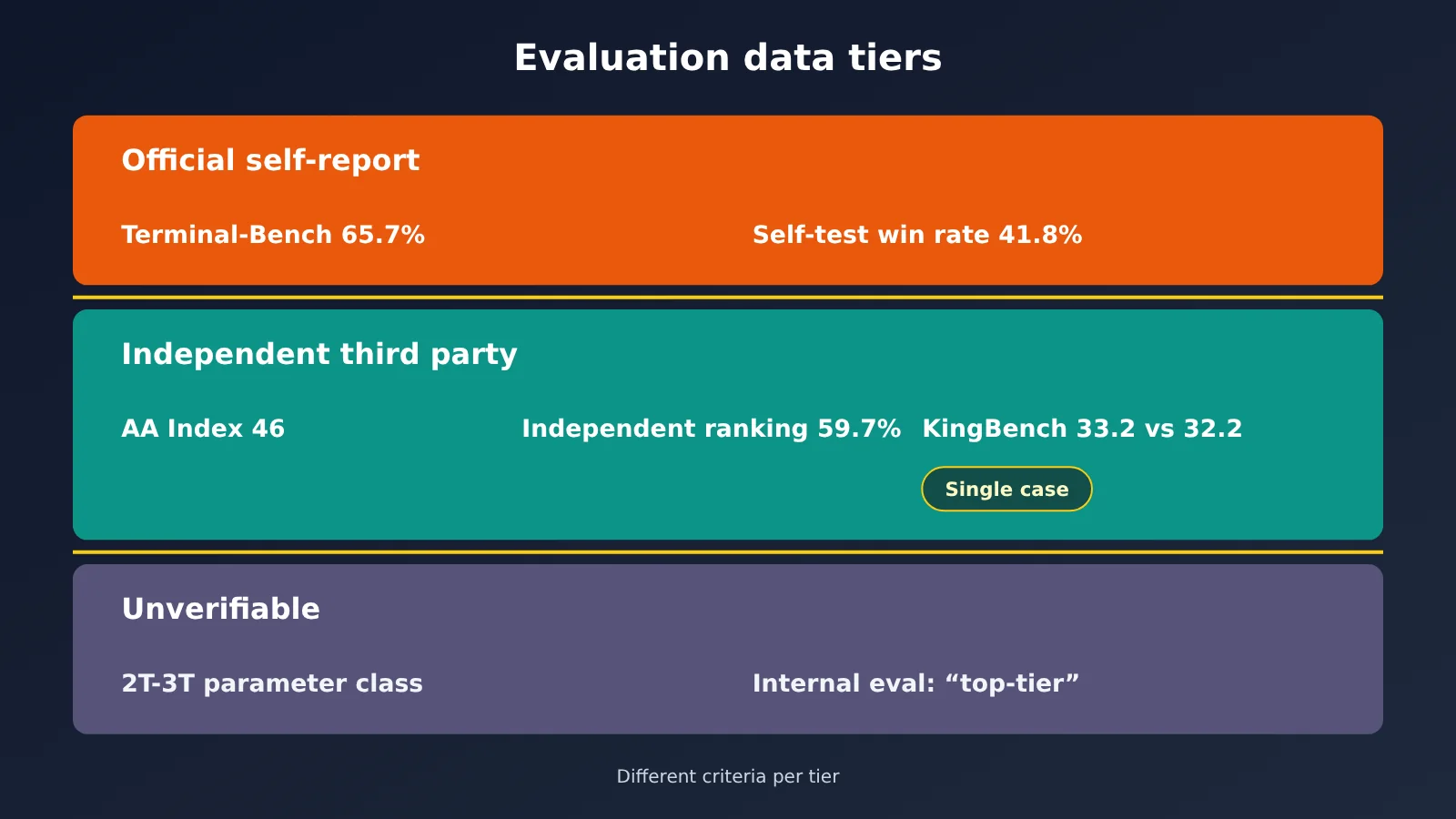
Benchmark scores are the easiest part of a model-selection discussion to misread. The table below sorts the available numbers into three layers by source. When reading it, compare only within the same layer.
| Layer | Content | Kimi K3.1 Pro | GLM-5.4 |
|---|---|---|---|
| Vendor self-reported | Vendor benchmarks | Terminal-Bench 4.0 65.7%; Kimi Code Bench 3.0 Long-horizon 61.2% | 30B controlled experiment: AIME25 19.17→30.42, GPQA-Diamond 47.58→56.26, etc.; self-reported win rate vs. Kimi 41.8 / 26.9 / 31.3 |
| Independent third-party | Terminal-Bench independent leaderboard | 59.7% ±4.2 | None |
| Independent third-party | Artificial Analysis Index v5.0.1 | 46 | No public score yet |
| Independent third-party single run | KingBench 4 (out of 60) | 32.2 | 33.2, ranked 7th |
| Unverifiable | Overall capability positioning | — | Vendor claims 2T-3T parameter class; Chinese documentation says an internal evaluation across 200 scenarios “ranks among the top,” with no scores published |
What the 1-point gap on KingBench 4 tells us
KingBench 4 was published by AICodeKing on 2026-11-23. It tested 19 models with six one-sentence apps (a room designer, a QMK keyboard, a Fitbit watch face, etc.), with a uniform max thinking effort. GLM-5.4 scored 33.2 and Kimi K3.1 Pro scored 32.2 — a 1-point difference. This is an independent single run on a private test set, not a vendor final leaderboard, and not an APIYI test result. A 1-point gap isn’t enough to support a conclusion about “who’s stronger.”
There’s a more noteworthy data point in the same test: GLM-5.4 used 1,128 reasoning steps and 431 minutes, while the Gemini 4 Neon reference used only 244 steps and 109 minutes. Per-step time is actually close (22.9 seconds vs. 26.7 seconds); the difference is in the step count. That aligns with the official description of “marathon thinking.” The evaluator also recorded a 98.4% cache hit rate and 31/31 parallel tool schema checks passing. In a 180-second short-task probe, Low / Medium finished on time while High / Max timed out; on long tasks, Max at 33.2 and High at 28.8 were clearly above Low at 25.2 and Medium at 24.1. In other words, GLM-5.4’s high score depends on long thinking time.
The 41.8% win rate isn’t an independent verdict
In a chart on the Z.ai blog, GLM-5.4 against Kimi K3.1 Pro shows 41.8% wins / 26.9% ties / 31.3% losses. This is a vendor self-test; the vendor chose the prompts and the judging method, so it can only be read as “the vendor thinks it has a slight edge,” not as a third-party conclusion. Also, Kimi’s self-reported Terminal-Bench score of 65.7% and the independent leaderboard’s 59.7% use different methodologies, so they shouldn’t be mixed either.
How Do You Calculate Kimi K3.1 Pro and GLM-5.4 Pricing?
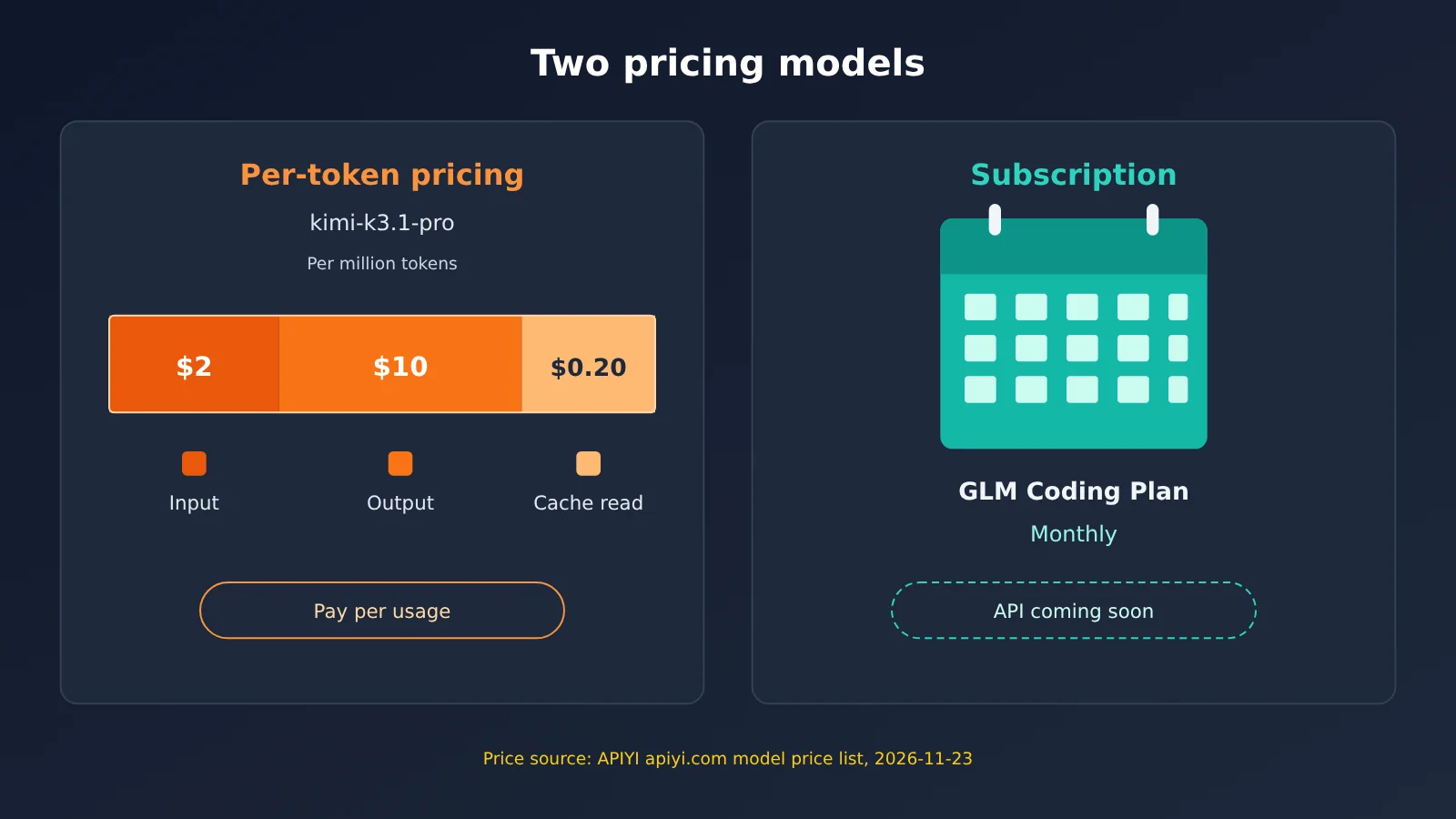
The two billing models are different, so there’s no way to compare unit prices head to head. Kimi K3.1 Pro is billed by token, while GLM-5.4 is currently subscription-only — subscription pricing follows Zhipu’s official page. If your use case has to go through the API, you can use the sibling GLM-5.3 series as a baseline for now. Below are the listed prices from the APIYI apiyi.com model price master table (USD / 1M tokens, data date 2026-11-23 10:23 UTC+8).
| Model ID | Input | Output | Cache read | Notes |
|---|---|---|---|---|
kimi-k3.1-pro |
$2 | $10 | $0.20 | 5-minute cache write $2, 1-hour $4 |
kimi-k3.1-pro-highspeed |
$4 | $20 | — | High-speed version |
glm-5.3 |
$1.4 | $4.396 | $0.259 | ClaudeCode group 0.95× |
glm-5.3-flash |
$0.15 | $0.5 | $0.03 | Lightweight batch processing |
| GLM-5.4 | — | — | — | Not listed yet — we’ll get this model up as soon as we can; model variants and pricing are subject to the platform’s model list |
Let’s run a quick estimate off these prices: processing a long task with kimi-k3.1-pro at 1M input tokens and 200K output tokens comes to roughly $2 + $2 = $4, not counting cache. If most of the input hits cache, cache reads are billed at $0.20, which can drop the input portion to about one tenth of the original. So in long-context scenarios, designing a reusable prefix saves you more money than picking a different model.
💰 Cost tip: Budget-sensitive teams can start with
glm-5.3-flashfor lightweight batch jobs, and usekimi-k3.1-profor complex tasks that need long outputs. Both are invoked through APIYI apiyi.com with the same API key, and the billing rolls up in one place, so it’s easy to compare actual spend.
Kimi K3.1 Pro and GLM-5.4 Quick Start
APIYI provides an OpenAI-compatible interface, so switching models only requires changing the model parameter. Here’s the minimal setup, using the official OpenAI SDK:
- When creating the client, set
api_key="YOUR_API_KEY"andbase_url="https://api.apiyi.com/v1". - Call
client.chat.completions.create, setmodeltokimi-k3.1-pro, and passmessagesas[{"role": "user", "content": "你的问题"}]. - Read
response.choices[0].message.contentto get the answer.
There are a few parameters worth noting for advanced usage:
- Control reasoning effort: Kimi K3.1 Pro defaults to max; for batches of simple tasks you can pass
reasoning_effort="low"to reduce reasoning tokens and latency. - Long outputs: when you need long outputs close to the limit, set
max_tokenshigh — Kimi’s limit is 262,144. - Image input: pass a
{"type": "image_url", ...}structure incontent; Kimi supports text + image input. - Switch for comparison: with the same code, change
modeltoglm-5.3orglm-5.3-flashwhile keepingbase_urlathttps://api.apiyi.com/v1, and you can compare against the same-family baseline.
GLM-5.4 is currently available through GLM Coding Plan, ZCode, and Z.ai Chat, and third-party reports also list coding tools such as Trae, WorkBuddy, Qoder, CatPaw, and OpenCode. Its API isn’t yet available on APIYI, but we’ll get this model listed as soon as possible; model IDs and pricing are subject to the platform’s model list.
🚀 Quick start: We recommend first claiming the free trial quota for new users on APIYI apiyi.com, running a few of your own real tasks with
kimi-k3.1-prowhile usingglm-5.3as a comparison. Results from testing your own tasks will tell you more than any leaderboard.
GLM-5.4 vs Kimi K3.1 Pro: Which One Should You Use?
When to choose Kimi K3.1 Pro
- Backend integration with pay-as-you-go billing: Business systems need a stable API and predictable bills, and token-based billing makes cost accounting much easier.
- Private deployment planning: The official team has committed to a release date for the full weights, so teams evaluating self-hosting can start preparing early.
- Ultra-long outputs: Generating large code files or lengthy technical documents in one go — the 262,144 output ceiling gives you more room to work with.
- Latency-sensitive workloads: When you need speed,
kimi-k3.1-pro-highspeedtrades price for throughput.
When to choose GLM-5.4
- Visual coding and visual replication: It accepts video, image, and file inputs. The official demos cover a wide range of general coding scenarios, including FreeCAD 6-axis robotic arm modeling, GLSL shader 3D scenes, and full game generation.
- Low-barrier trial for individual developers: Anyone already subscribed to the GLM Coding Plan can use it right away, and weekly-quota users get 1.5x the GLM-5.4 allowance compared with GLM-5.3.
- Long-horizon tasks where extended thinking is acceptable: KingBench 4 shows that the high-thinking setting scores noticeably better, but it also takes longer — a good fit for asynchronous tasks where you’re not in a hurry.
- Use inside IDE-style tools: Hook it up through ZCode or any coding tool that supports it, with no need to write your own API integration.
GLM-5.4 vs Kimi K3.1 Pro: Decision Guide
Let’s condense the analysis above into a single decision table — just find your hard constraint and follow the matching row.
| Your hard constraint | Go with | Why |
|---|---|---|
| Must run through the API, billed per token | Kimi K3.1 Pro | The GLM-5.4 API isn’t open yet |
| Need downloadable weights | Kimi K3.1 Pro | No timeline for open-sourcing GLM-5.4 |
| Input includes video and files | GLM-5.4 | Kimi only supports text + images |
| Already subscribed to GLM Coding Plan | GLM-5.4 | Usable within the subscription, with a quota boost |
| Interactive use, needs second-level response | Kimi’s low-thinking tier or GLM-5.3-flash | GLM-5.4’s high tier is slow |
| Going by leaderboard scores alone | Not recommended as a deciding factor | 33.2 vs 32.2 is a single data point; the gap is too small |
💡 Selection advice: The difference between the two routes shows up more in deployment and billing than in scores. We suggest testing the currently listed Kimi and GLM sibling models on APIYI apiyi.com with the same OpenAI-compatible code — once GLM-5.4 goes live, you only need to change one
modelparameter to add it to the comparison.
Frequently Asked Questions (FAQ)
Q1: What does the 28-layer loop in GLM-5.4 mean?
GLM-5.4 takes 28 of the 78 layers in the GLM-5 base model and turns them into shared weights, then runs them for two rounds during inference. The first round builds global context, and the second round refines it. The parameter count doesn’t change, but the network becomes effectively deeper — the trade-off is extra compute time.
Q2: Can you directly compare Kimi K3.1 Pro’s 2.8T with GLM-5.4’s 750B?
Not with a simple size comparison. Kimi is an MoE model, so 2.8T is the total parameter count, while only 104B is activated per token. GLM-5.4 is 750B-scale plus loop depth. One relies on capacity, the other on depth — the two kinds of “big” mean different things. The official claim that GLM-5.4 reaches the 2T–3T parameter level is a vendor statement, with no comprehensive benchmark to back it up.
Q3: Can the weights for either model be downloaded now?
Kimi K3.1 Pro officially plans to release full weights before 2026-11-04, subject to Moonshot AI’s official repository. GLM-5.4 only says it will be open-sourced after security hardening, with no date. The two models’ weight statuses are not the same.
Q4: GLM-5.4 won by 1 point on KingBench 4 — does that prove it’s stronger?
No. KingBench 4 is AICodeKing’s independent single-case private test. A 33.2 to 32.2 result is just a 1-point difference, and GLM-5.4 used 431 minutes and 1,128 steps. It shows the two are in the same tier on this task set — not that this is the final leaderboard.
Q5: How do I call Kimi K3.1 Pro through the API?
Sign up at APIYI apiyi.com and get an API key, set the OpenAI SDK’s `base_url` to `https://api.apiyi.com/v1`, and set `model` to `kimi-k3.1-pro`. New users get a free testing quota, so you can validate it with your own tasks first.
Q6: GLM-5.4 isn’t available through the API yet — what are the alternatives?
You can try GLM-5.4 through subscription channels first, while setting up your API pipeline with `glm-5.3` ($1.4 / $4.396) or `glm-5.3-flash` ($0.15 / $0.5). Both models are already listed on APIYI, so once GLM-5.4 goes live, you just change the `model` parameter to switch.
Q7: What known limitations do the two models have?
– **GLM-5.4**: Officially acknowledged to be prone to overly long reasoning, with peak throughput of 70–80 token/s; no timeline for API access or weights; no public comprehensive benchmark score.
– **Kimi K3.1 Pro**: Thinking is always on, so even simple tasks incur reasoning overhead; video input isn’t supported; its self-reported Terminal-Bench score of 65.7% differs from the independent leaderboard’s 59.7%.
GLM-5.4 and Kimi K3.1 Pro: Key Takeaways
- Different approaches: Kimi leans on 2.8T total parameters with 104B activated; GLM-5.4 leans on a 28-layer loop run twice for extra depth.
- Spec differences: Both have context windows in the 1M range, but Kimi outputs 262,144 tokens while GLM-5.4 outputs 128K.
- Weights are a separate question: Kimi has a stated release commitment for 11-04; GLM-5.4 only says it’ll open-source after security hardening.
- One point apart: KingBench 4 is a single independent data point—33.2 versus 32.2 isn’t enough to declare a winner.
- 41.8% is self-reported: Z.ai’s win rate against Kimi is a vendor-run test, not an independent conclusion.
- Different billing shapes: Kimi charges per token; GLM-5.4 starts with subscriptions and its API isn’t open yet.
- How to get started: Use APIYI’s unified interface to call Kimi and GLM’s sibling models side by side for easy comparison.
Summary
The key points on GLM-5.4 and Kimi K3.1 Pro:
- The costs land in different places: Kimi pays for its capability through parameter scale and per-token billing; GLM-5.4 pays for it through the inference time added by the loop.
- Availability differs: Kimi already has an API and a weights release plan; GLM-5.4 is currently only available through subscriptions and its own tools.
- The scores are close: The independent data point shows just a 1-point gap, so choosing between them should come down to deployment and billing, not leaderboards.
If you need per-token billing plus a stable API and weights roadmap, start with Kimi K3.1 Pro. If you want a low-barrier way to try visual coding and can live with a subscription model and longer thinking time, start with GLM-5.4. We recommend using APIYI at apiyi.com to get Kimi and GLM’s sibling models running with a single API key first, then make the final call based on your own tasks.
📚 References
-
Z.ai official technical blog: the GLM-5.4 Loop Transformer architecture and its controlled experiments
- Link:
z.ai/blog/glm-5.4 - Notes: covers the 28-layer loop mechanism, the 30B controlled-experiment data, and the limitations the team itself acknowledges
- Link:
-
Z.ai model docs: GLM-5.4 specification
- Link:
docs.z.ai/guides/llm/glm-5.4 - Notes: context window, max output, input modalities, and supported features
- Link:
-
Zhipu Chinese docs: GLM-5.4 model introduction
- Link:
docs.bigmodel.cn/cn/guide/models/glm-5.4 - Notes: describes internal coding-scenario evaluations (scores not published)
- Link:
-
Artificial Analysis: Intelligence Index v5.0.1
- Link:
artificialanalysis.ai - Notes: third-party composite index; Kimi K3.1 Pro scores 46, GLM-5.4 has no score yet
- Link:
-
APIYI model price list: models currently offered and their pricing
- Link:
docs.apiyi.com/models.md - Notes: pricing for models such as kimi-k3.1-pro and glm-5.3; the platform’s model list is authoritative
- Link:
Author: APIYI technical team
Technical discussion: Feel free to reach us through the APIYI website homepage. For more model integration resources, visit the docs.apiyi.com documentation center.