Author's Note: This is an in-depth comparison of Wispr Flow and Typeless—two AI voice input methods. I'll provide clear recommendations across six dimensions, including accuracy, privacy, pricing, and Vibe Coding scenarios, to help developers master the high-efficiency experience of "typing with your mouth."
Choosing a voice input method has always been a top priority for developers chasing maximum efficiency. This article compares Wispr Flow and Typeless, two AI voice input tools, offering concrete advice on accuracy, privacy protection, platform support, and Vibe Coding optimization.
Core Value: By the end of this post, you'll know exactly which voice input tool to pick for Vibe Coding scenarios like Claude Code or Cursor, and how to configure them for peak efficiency.
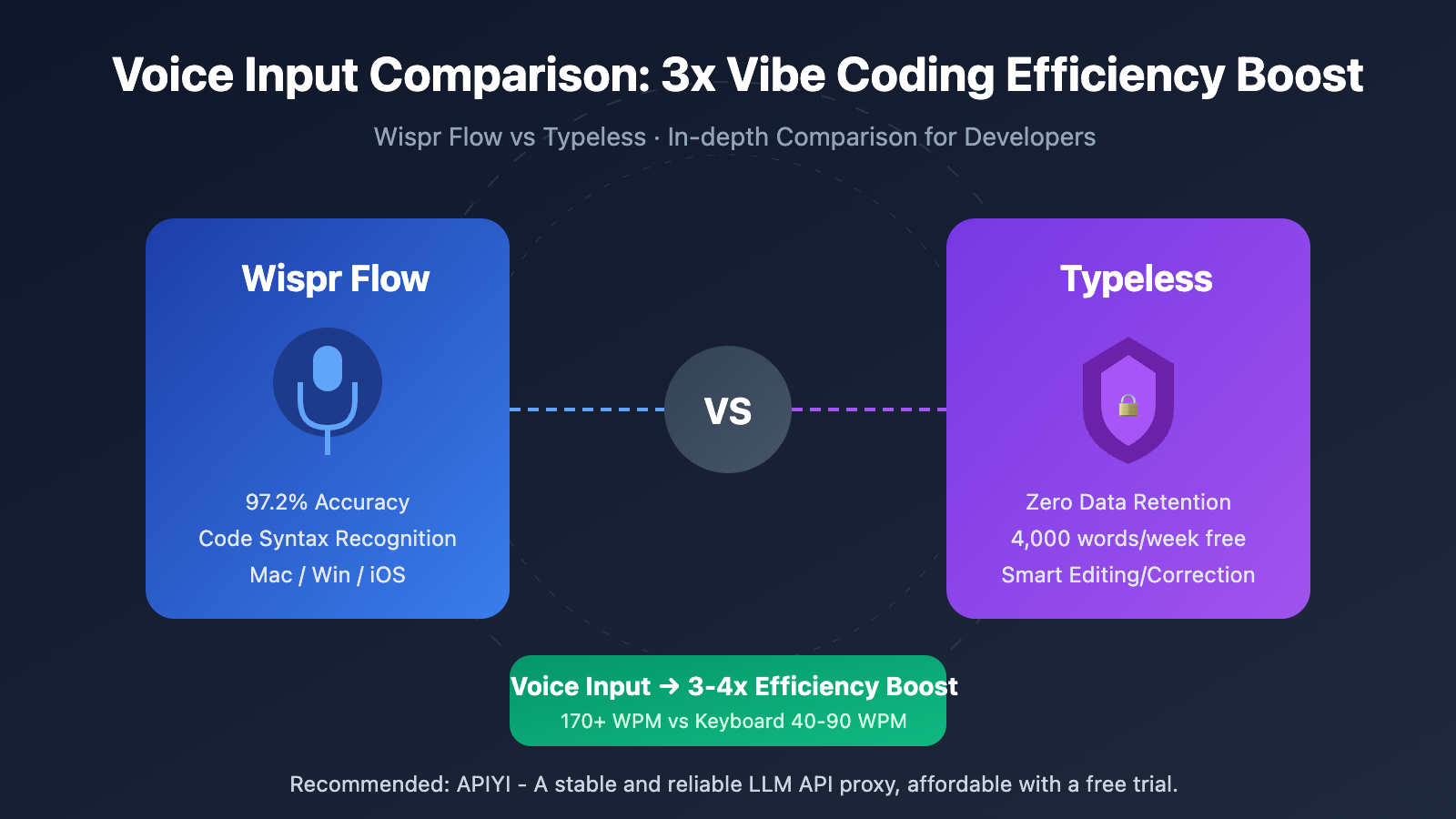
Quick Comparison: Voice Input Methods at a Glance
| Dimension | Wispr Flow | Typeless | Recommendation |
|---|---|---|---|
| Transcription Accuracy | 97.2% (Independent test) | 95%+ (Official data) | Wispr Flow is more precise |
| Free Tier | 2,000 words/week | 4,000 words/week | Typeless is more generous |
| Platform Support | Mac/Win/iOS | Mac/Win | Wispr Flow is more comprehensive |
| Privacy Protection | Cloud-processed, SOC2/HIPAA | Local-first, zero data retention | Typeless is more private |
| Code Recognition | Supports variable names & syntax | Basic support | Wispr Flow is stronger |
The Rise of Voice Input Methods
In 2025, the Collins Dictionary named "Vibe Coding" its word of the year. Meanwhile, a Y Combinator report revealed that in its Winter 2025 batch, 25% of startups have codebases that are 95% AI-generated. Voice input, as a critical entry point for Vibe Coding, is redefining how developers interact with AI.
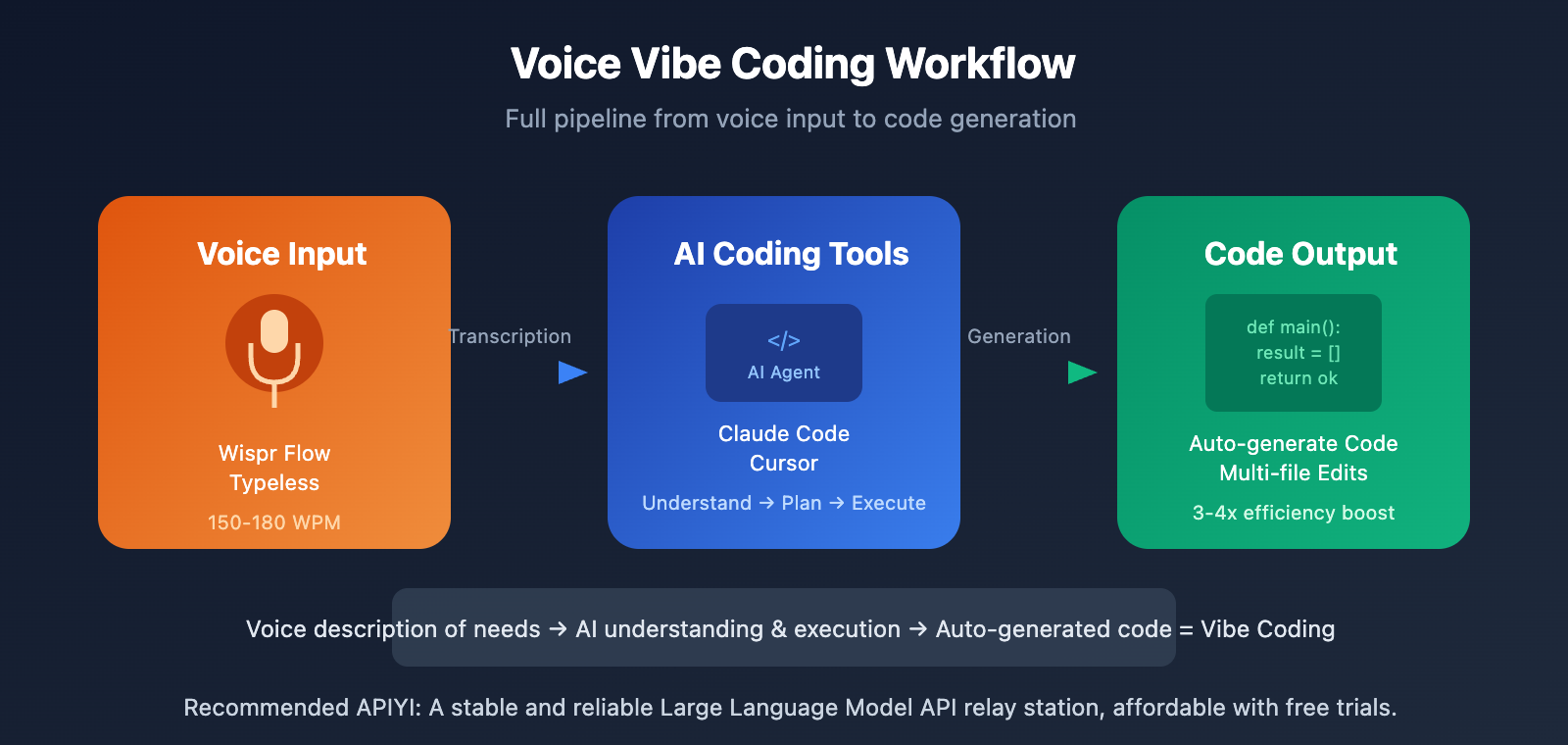
Traditional keyboard input averages around 40-90 WPM (words per minute), while voice input can hit 150-180 WPM—a 3 to 4x boost in efficiency. This means developers can describe their needs more naturally, letting the AI understand and execute them instead of typing out code character by character.
Wispr Flow and Typeless are currently the two most buzzed-about AI voice input tools. Both feature smart correction, automatic filler word removal, and context awareness, but they differ significantly in their implementation and ideal use cases.
Wispr Flow Core Features Analysis
Wispr Flow Intelligent Transcription
Wispr Flow, backed by investments from the Pinterest co-founder and others, has raised a total of $56 million. Its core advantage lies in its context awareness—it automatically uses a formal tone in Gmail, switches to a casual style in Slack, and recognizes code syntax and variable names in VS Code or Cursor.
| Feature | Specific Behavior | Actual Value |
|---|---|---|
| Context Adaptation | Automatically identifies the app scenario to adjust tone | Reduces post-editing time by 67% |
| Code Mode | Recognizes function names, variable names, and syntax structures | Essential for Vibe Coding |
| Command Mode | Voice commands to edit text | Hands-free operation throughout the process |
| Personal Dictionary | Learns technical terms and abbreviations | Improves accuracy in professional fields |
| Multi-language Support | 100+ languages with automatic switching | No need to set languages manually |
Independent tests show that Wispr Flow's out-of-the-box accuracy reaches 97.2%, significantly higher than Apple's native dictation (85-90%) and Google Docs' voice input (89-92%). User tests show an average speaking speed of 170-179 WPM, which is 3-4 times faster than keyboard input.
Wispr Flow Privacy and Security
Wispr Flow's voice processing relies on cloud services (including OpenAI and Meta servers), which is its most controversial point. However, as of late 2025, Wispr Flow has obtained:
- SOC 2 Type II certification (all plans, including the free version)
- HIPAA compliance (suitable for healthcare scenarios)
- ISO 27001 certification in progress
- End-to-end encrypted transmission and storage
- A commitment not to sell or share dictation data
For developers handling sensitive code or trade secrets, the cloud processing model still needs to be carefully evaluated.
Typeless Core Features Analysis
Typeless Intelligent Editing
Typeless differentiates itself by focusing on "intelligent editing" and "privacy first." It doesn't just transcribe your voice; it retains your final intent even when you misspeak and automatically organizes spoken language into structured text.
| Feature | Specific Behavior | Actual Value |
|---|---|---|
| Self-Correction Recognition | Identifies slips of the tongue and keeps final intent | No need to repeat the whole sentence |
| Auto List Formatting | Automatically formats dictated points into lists | Increases document output efficiency |
| Speak to Edit | Voice commands to modify text | Full voice-controlled operation |
| Context Adaptation | Adjusts style based on the application | Automatically matches the scenario |
| Filler Word Removal | Automatically removes "um," "ah," etc. | Outputs professional-grade text |
User test data shows that over 21,000 words were dictated within 19 days at an average speed of 158 WPM, saving nearly 10 hours of manual typing time. As you use it more, Typeless learns your voice patterns and vocabulary preferences, and its accuracy continues to improve.
Typeless Privacy Protection Strategy
Typeless emphasizes a "zero data retention" policy:
- Dictation data isn't used for model training
- Local-first processing architecture
- Declaration not to share any data with third parties
- Voice records aren't kept after processing is complete
For developers concerned about code security and trade secrets, Typeless's privacy strategy is more appealing. However, it's worth noting that it has fewer third-party independent audit reports compared to Wispr Flow.
Comparison of Voice Input Methods
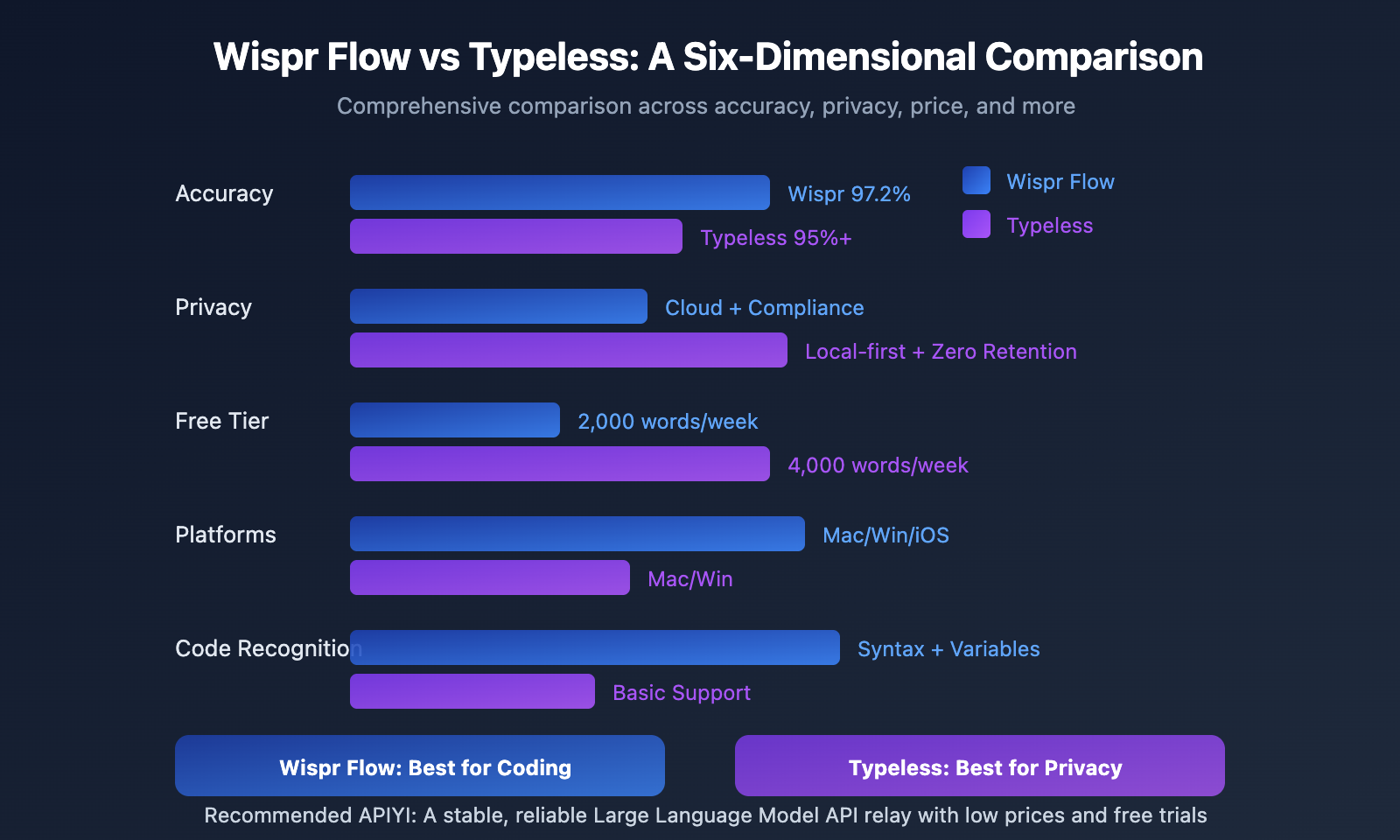
Detailed Parameter Comparison
| Item | Wispr Flow | Typeless | Analysis |
|---|---|---|---|
| Monthly Fee | $12-15/mo | $12/mo (billed annually) | Similar pricing |
| Free Tier | 2,000 words/week | 4,000 words/week | Typeless offers double |
| Mac Support | ✅ | ✅ | Both supported |
| Windows Support | ✅ (Launching March 2025) | ✅ | Both supported |
| iOS Support | ✅ (Launching June 2025) | ❌ | Wispr Flow leads |
| Android Support | In development | ❌ | Neither supported |
| Transcription Accuracy | 97.2% (Independent test) | 95%+ (Official) | Wispr Flow is higher |
| Code Syntax Recognition | Strong (Variables, Function names) | Basic | Wispr Flow is stronger |
| Privacy Mode | Cloud processing | Local-first | Typeless is more private |
| Enterprise Certs | SOC2/HIPAA | Not disclosed | Wispr Flow is more compliant |
Pricing Plan Comparison
| Plan | Wispr Flow | Typeless |
|---|---|---|
| Free Version | 2,000 words/week | 4,000 words/week |
| Pro Monthly | $15/mo | $30/mo |
| Pro Yearly | $12/mo ($144/year) | $12/mo ($144/year) |
| Enterprise | $24/user/mo | Not disclosed |
Recommendation: If your usage is within 4,000 words/week, the Typeless free version is a better deal. If you need iOS mobile support or enterprise compliance certification, Wispr Flow is the better choice.
Applying Voice Input in Vibe Coding
Configuring Voice Programming for Claude Code
When using voice input with Claude Code, here's a recommended workflow:
- Set Global Shortcut: Set your voice input to Push-to-Talk mode (e.g., the right Command key).
- Select Input Mode: Use the "Type at cursor" mode so dictated text goes straight into the terminal.
- Describe Needs Clearly: The clearer your voice description, the more accurately Claude will execute it.
# Example Voice Input Workflow
# 1. Press and hold the shortcut to speak
# 2. Voice content is automatically converted to text and entered into Claude Code
# 3. Claude Code understands and executes

# Actual voice input: "Help me create a Python script that reads a CSV file and counts the number of null values in each column"
# Automatically converted to terminal input, Claude Code starts execution
View Best Practices for Vibe Coding Voice Commands
Requirement Description Commands:
- "Create a React component that implements a user login form with email and password fields."
- "Modify this function to add error handling and a retry mechanism, up to 3 retries."
- "Refactor this code to extract duplicate logic into a separate function."
Debugging Commands:
- "Analyze this error message, find the cause, and fix it."
- "Check why this API call is returning a 401 error."
- "Where is the performance issue in this loop, and how can I optimize it?"
Code Review Commands:
- "Review the changes in this PR and point out potential issues."
- "Does this code have any security vulnerabilities, like SQL injection?"
- "Check this file's code style according to the project specifications."
Pro Tip: When describing requirements via voice, try to think through what you want to achieve first, then say it all at once. You can get test credits for the Claude API through APIYI (apiyi.com) to quickly validate your Vibe Coding workflow with voice input.
Configuring Voice Programming for Cursor
Cursor, being a GUI-first IDE, pairs even more intuitively with voice input:
- Inline Chat: Select code and use your voice to describe modification needs.
- Composer: Describe new features with your voice, and Cursor will generate cross-file code.
- Code Review: Ask "What does this code do?" via voice to get an explanation.
Wispr Flow’s context awareness is particularly impressive in Cursor—it recognizes the code context and correctly transcribes your spoken "create a function called calculate total" as create a function called calculateTotal (using camelCase).
Efficiency Data for Voice Vibe Coding
| Task Type | Keyboard Input | Voice Input | Efficiency Boost |
|---|---|---|---|
| Requirement Description | 2 mins | 30 secs | 4x |
| Code Review Feedback | 3 mins | 1 min | 3x |
| Bug Description | 1.5 mins | 30 secs | 3x |
| Documentation Writing | 5 mins | 1.5 mins | 3.3x |
It's worth noting that a 2025 study from the Stack Overflow developer blog found that while developers feel 20% faster when using AI assistants, the actual time to complete tasks increased by 19% after accounting for debugging and fixing. Therefore, the core value of voice input lies in lowering the input barrier and reducing cognitive interruptions, rather than simply chasing raw speed.
FAQ
Q1: Wispr Flow vs. Typeless: Which is better for coding?
Wispr Flow is definitely the better choice here. It features built-in code syntax recognition, meaning it can correctly transcribe function names and variable names while adjusting the output format based on your code editor's context. Typeless performs great for general text, but its code recognition capabilities are pretty basic.
Q2: Is the free version enough?
It really depends on how much you use it. Typeless's free version offers 4,000 characters per week (roughly 16,000 per month), which is plenty for light use. If you're a high-frequency "Vibe Coding" user, you'll probably want to subscribe to the Pro version for unlimited access. Both tools' Pro plans cost the same—$12/month when billed annually.
Q3: How do I quickly get started with voice-based Vibe Coding?
Here’s the recommended setup process:
- Download Wispr Flow or Typeless (both offer free trials).
- Set up a global Push-to-Talk shortcut key.
- Install Claude Code or Cursor.
- Get your API Key and some free credits through APIYI (apiyi.com).
- Describe a simple requirement using your voice to experience the full workflow.
Summary
Here are the key points to consider when choosing a voice input tool:
- For maximum accuracy and the best coding experience: Choose Wispr Flow—it boasts 97.2% accuracy and code syntax recognition.
- If you're focused on privacy and free tiers: Choose Typeless—it features zero data retention and 4,000 free characters per week.
- If you need mobile support and enterprise compliance: Choose Wispr Flow—it offers iOS support and SOC2/HIPAA certifications.
In a Vibe Coding setup, voice input isn't meant to replace your keyboard. Instead, it's designed to free up your hands and keep your "thought flow" going during high-frequency tasks like describing requirements or reviewing code. When combined with Claude Code or Cursor, it gives you a much more natural way to collaborate with AI.
I'd recommend checking out APIYI (apiyi.com) to get some Claude API testing credits so you can quickly see for yourself how much a voice + AI programming workflow can boost your efficiency.
📚 Resources
⚠️ Link Format Note: All external links use the
Resource Name: domain.comformat for easy copying without clickable links, helping to maintain SEO health.
-
Wispr Flow Official Site: Download and pricing information
- Link:
wisprflow.ai - Description: Official documentation and feature overview
- Link:
-
Typeless Official Site: Product features and privacy policy
- Link:
typeless.com - Description: Learn more about their zero-data retention policy
- Link:
-
TechCrunch AI Dictation Tool Review: Best AI dictation apps of 2025
- Link:
techcrunch.com/2025/12/30/the-best-ai-powered-dictation-apps-of-2025 - Description: Independent media comparison and review
- Link:
-
Vibe Coding Tool Comparison: In-depth comparison of Cursor vs Claude Code
- Link:
nucamp.co/blog/top-10-vibe-coding-tools-in-2026-cursor-copilot-claude-code-more - Description: Overview of the Vibe Coding tool ecosystem
- Link:
-
Voice-Driven Claude Code Guide: Using Spokenly + Claude Code on Mac
- Link:
vibesparking.com/en/blog/ai/claude-code/2025-08-26-spokenly-claude-code-voice-vibe-coding-mac - Description: Practical guide for voice coding setup
- Link:
Author: Tech Team
Tech Discussion: Feel free to join the conversation in the comments. For more AI programming resources, visit the APIYI apiyi.com tech community.