Deep Analysis of Sora 2 sentinel_block Error and 5 Effective Solutions
Using Sora 2 API to generate videos, encountering the sentinel_block error is a common challenge developers face. This article provides an in-depth analysis of the real causes behind this Sora 2 sentinel_block error and offers 5 effective solutions.
Core Value: After reading this article, you will understand the trigger mechanism of sentinel_block errors, master quick troubleshooting methods, and ensure your Sora 2 video generation project runs smoothly.
Core Analysis of Sora 2 sentinel_block Error
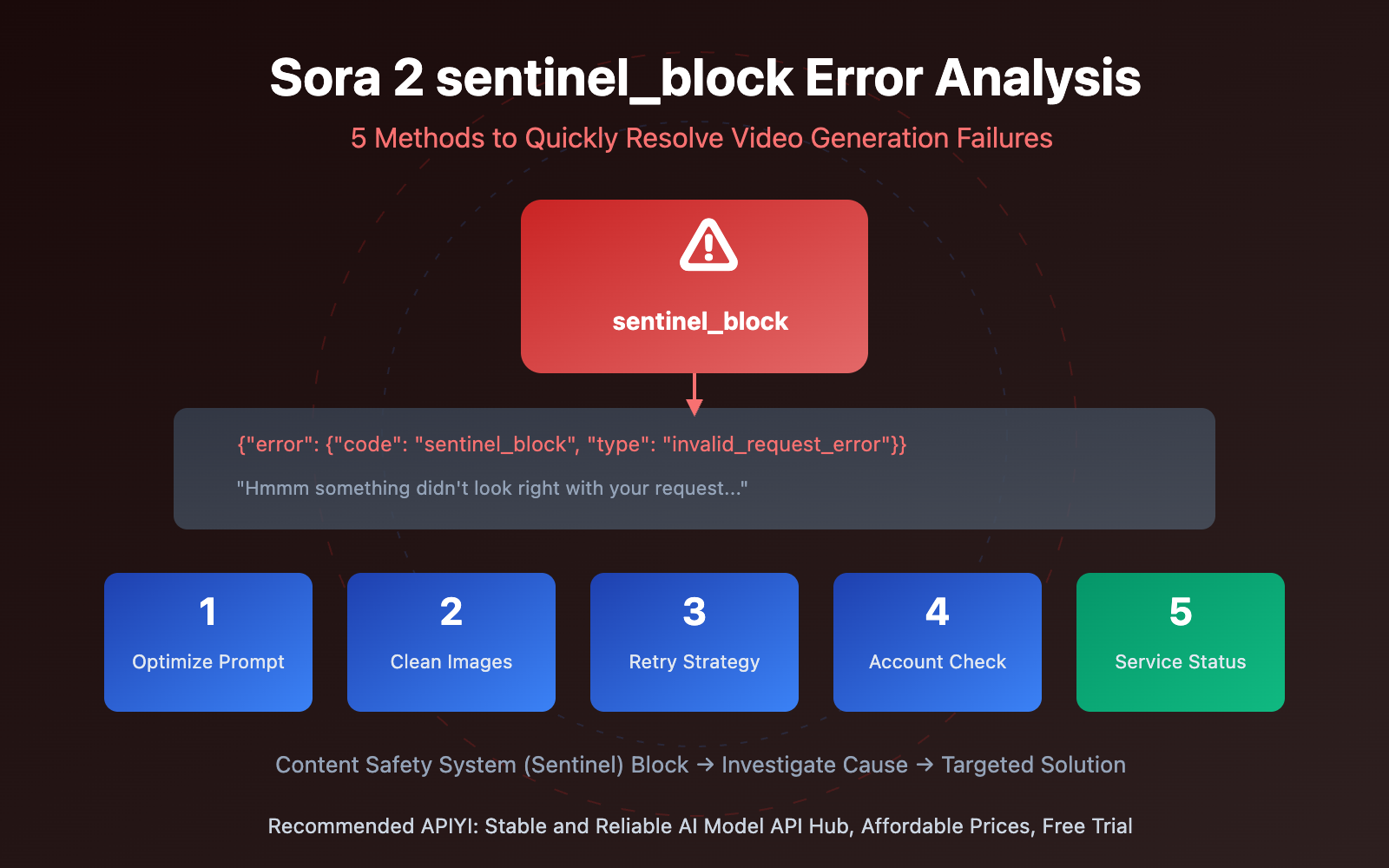
When you call the Sora 2 API and receive the following error message:
{
  "error": {
    "code": "sentinel_block",
    "message": "Hmmm something didn't look right with your request. Please try again later or visit https://help.openai.com if this issue persists.",
    "param": null,
    "type": "invalid_request_error"
  }
}
This means your request was blocked by OpenAI's Content Safety System (Sentinel).
| Error Element | Meaning | Developer Impact |
|---|---|---|
| code: sentinel_block | Request actively blocked by security system | Content or request parameters triggered review rules |
| type: invalid_request_error | Issue with the request itself | Need to modify request content rather than retry |
| param: null | No specific problem parameter indicated | Need to check potential trigger points one by one |
5 Major Triggers for Sora 2 sentinel_block Errors
Based on OpenAI community and official documentation, sentinel_block errors are mainly triggered by the following reasons:
1. Prompt Triggers Content Review
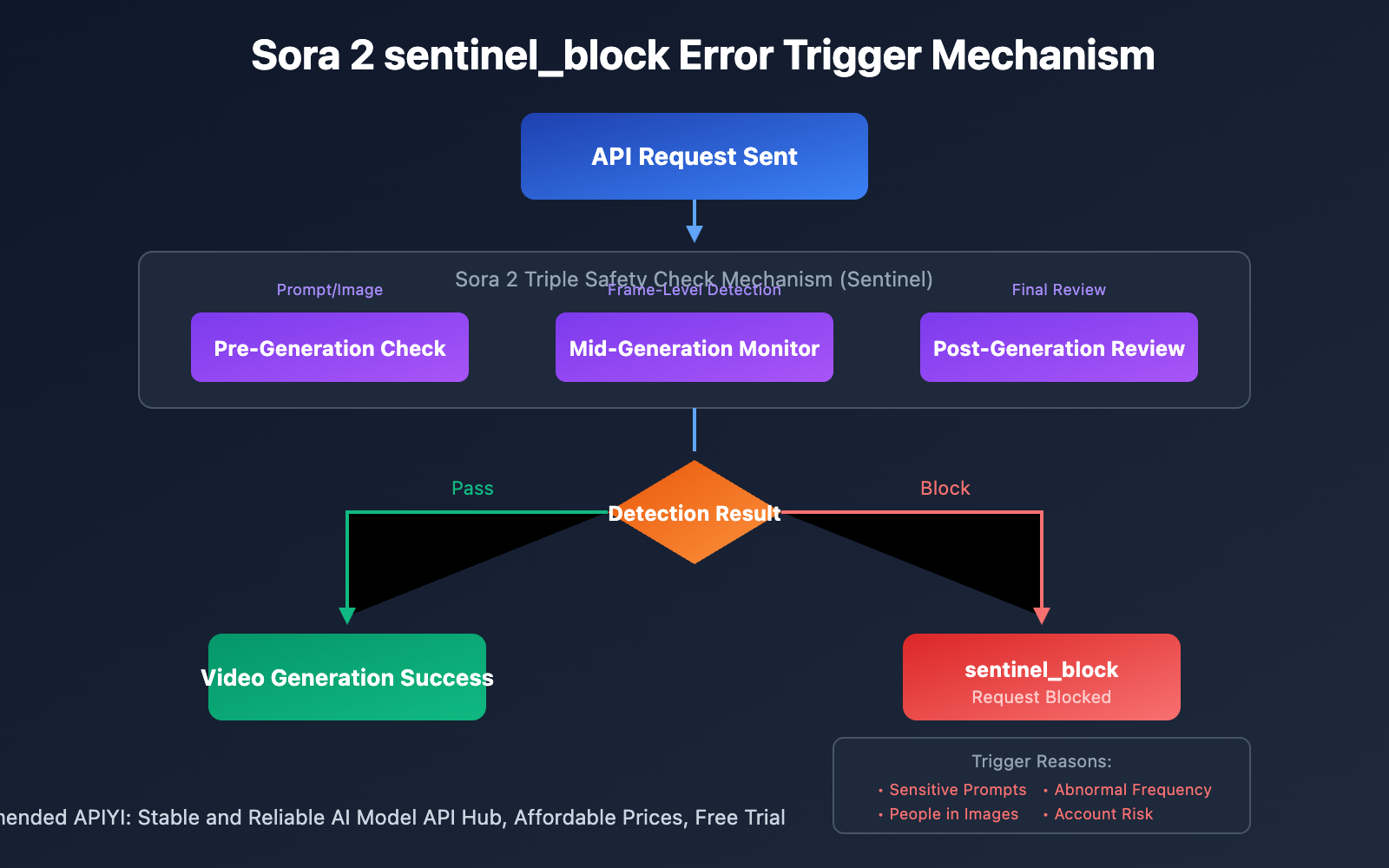
Sora 2 employs a triple safety check mechanism: pre-generation check, mid-generation monitoring, and post-generation review. Prompts involving violence, pornography, copyrighted characters, real people, etc., will directly trigger sentinel_block.
2. Uploaded Images Contain People
OpenAI explicitly prohibits uploading images containing real people for video generation. Even if it's your own photo or you have authorization, the automated system will reject processing.
3. Abnormal Request Frequency
A large number of requests in a short time may be identified as abnormal behavior by the system, triggering security blocks.
4. Account Risk Flagging
If an account has previous violation records or is marked as high-risk, new requests may be more easily blocked.
5. Temporary Server-Side Issues
OpenAI's Sora service experienced multiple service interruptions and elevated error rates in 2025; some sentinel_block errors may be temporary server-side problems.
Sora 2 sentinel_block Error Solutions
Solution 1: Optimize Prompt Content
This is the most common solution. Replace sensitive words with neutral expressions:
| Original Expression | Optimized Expression | Explanation |
|---|---|---|
| violent battle | dynamic action scene | Avoid violence-related terms |
| sexy woman | elegant person | Avoid sexual suggestive terms |
| Spider-Man | masked hero | Avoid copyrighted character names |
| realistic human | stylized character | Avoid realistic human descriptions |
Prompt Optimization Tips:
- Use film director terminology instead of direct descriptions
- Use modifiers like "stylized" and "artistic" to reduce realism requirements
- Avoid specific celebrity, brand, and copyrighted character names
- Minimize descriptions of facial and body details
Solution 2: Check and Clean Uploaded Images
If you're using the image-to-video feature:
# Check if image contains people
# Recommend using landscapes, objects, or abstract patterns as input images

# Correct examples
input_image = "landscape_scene.jpg"  # Landscape image
input_image = "product_photo.jpg"    # Product photo
input_image = "abstract_art.jpg"     # Abstract art

# Examples that may trigger blocking
# input_image = "person_photo.jpg"   # Image containing people
# input_image = "selfie.jpg"         # Selfie photo
Solution 3: Implement Request Retry Strategy
Some sentinel_block errors are temporary; a proper retry strategy can improve success rates:
import openai
import time
from typing import Optional

def generate_sora_video_with_retry(
    prompt: str,
    max_retries: int = 3,
    base_delay: float = 2.0
) -> Optional[dict]:
    """
    Sora video generation with retry mechanism
    """
    client = openai.OpenAI(
        api_key="YOUR_API_KEY",
        base_url="https://vip.apiyi.com/v1"
    )

    for attempt in range(max_retries):
        try:
            response = client.chat.completions.create(
                model="sora-2",
                messages=[{"role": "user", "content": prompt}]
            )
            return response
        except openai.BadRequestError as e:
            if "sentinel_block" in str(e):
                if attempt < max_retries - 1:
                    delay = base_delay * (2 ** attempt)
                    print(f"sentinel_block error, retrying in {delay} seconds...")
                    time.sleep(delay)
                else:
                    print("Still failing after multiple retries, please check prompt content")
                    raise
            else:
                raise
    return None
View Complete Error Handling Code
import openai
import time
import logging
from typing import Optional, Dict, Any
from dataclasses import dataclass

logging.basicConfig(level=logging.INFO)
logger = logging.getLogger(__name__)

@dataclass
class SoraGenerationResult:
    success: bool
    data: Optional[Dict[str, Any]] = None
    error_code: Optional[str] = None
    error_message: Optional[str] = None

class SoraVideoGenerator:
    """
    Sora video generator with complete error handling
    """

    SENSITIVE_PATTERNS = [
        "violent", "sexy", "nude", "weapon",
        "blood", "gore", "explicit"
    ]

    def __init__(self, api_key: str, base_url: str = "https://vip.apiyi.com/v1"):
        self.client = openai.OpenAI(api_key=api_key, base_url=base_url)

    def validate_prompt(self, prompt: str) -> tuple[bool, str]:
        """Pre-check if prompt may trigger moderation"""
        prompt_lower = prompt.lower()
        for pattern in self.SENSITIVE_PATTERNS:
            if pattern in prompt_lower:
                return False, f"Prompt contains sensitive word: {pattern}"
        return True, "Prompt check passed"

    def generate(
        self,
        prompt: str,
        max_retries: int = 3,
        validate_first: bool = True
    ) -> SoraGenerationResult:
        """Generate video with pre-check and retry mechanism"""

        if validate_first:
            is_valid, message = self.validate_prompt(prompt)
            if not is_valid:
                logger.warning(f"Prompt pre-check failed: {message}")
                return SoraGenerationResult(
                    success=False,
                    error_code="prompt_validation_failed",
                    error_message=message
                )

        for attempt in range(max_retries):
            try:
                response = self.client.chat.completions.create(
                    model="sora-2",
                    messages=[{"role": "user", "content": prompt}]
                )
                return SoraGenerationResult(success=True, data=response)

            except openai.BadRequestError as e:
                error_str = str(e)
                if "sentinel_block" in error_str:
                    logger.warning(f"sentinel_block error (attempt {attempt + 1}/{max_retries})")
                    if attempt < max_retries - 1:
                        time.sleep(2 ** attempt)
                    else:
                        return SoraGenerationResult(
                            success=False,
                            error_code="sentinel_block",
                            error_message="Content blocked by safety system, please modify prompt"
                        )
                else:
                    return SoraGenerationResult(
                        success=False,
                        error_code="bad_request",
                        error_message=error_str
                    )

            except Exception as e:
                return SoraGenerationResult(
                    success=False,
                    error_code="unknown_error",
                    error_message=str(e)
                )

        return SoraGenerationResult(success=False, error_code="max_retries_exceeded")

# Usage example
if __name__ == "__main__":
    generator = SoraVideoGenerator(api_key="YOUR_API_KEY")
    result = generator.generate(
        prompt="A serene mountain landscape at sunset with flowing clouds"
    )
    if result.success:
        print("Video generation successful!")
    else:
        print(f"Generation failed: {result.error_code} - {result.error_message}")
Recommendation: Call Sora 2 API through APIYI apiyi.com, the platform provides stable interface services and detailed error logs for quick problem identification.
Sora 2 sentinel_block Error Troubleshooting Process
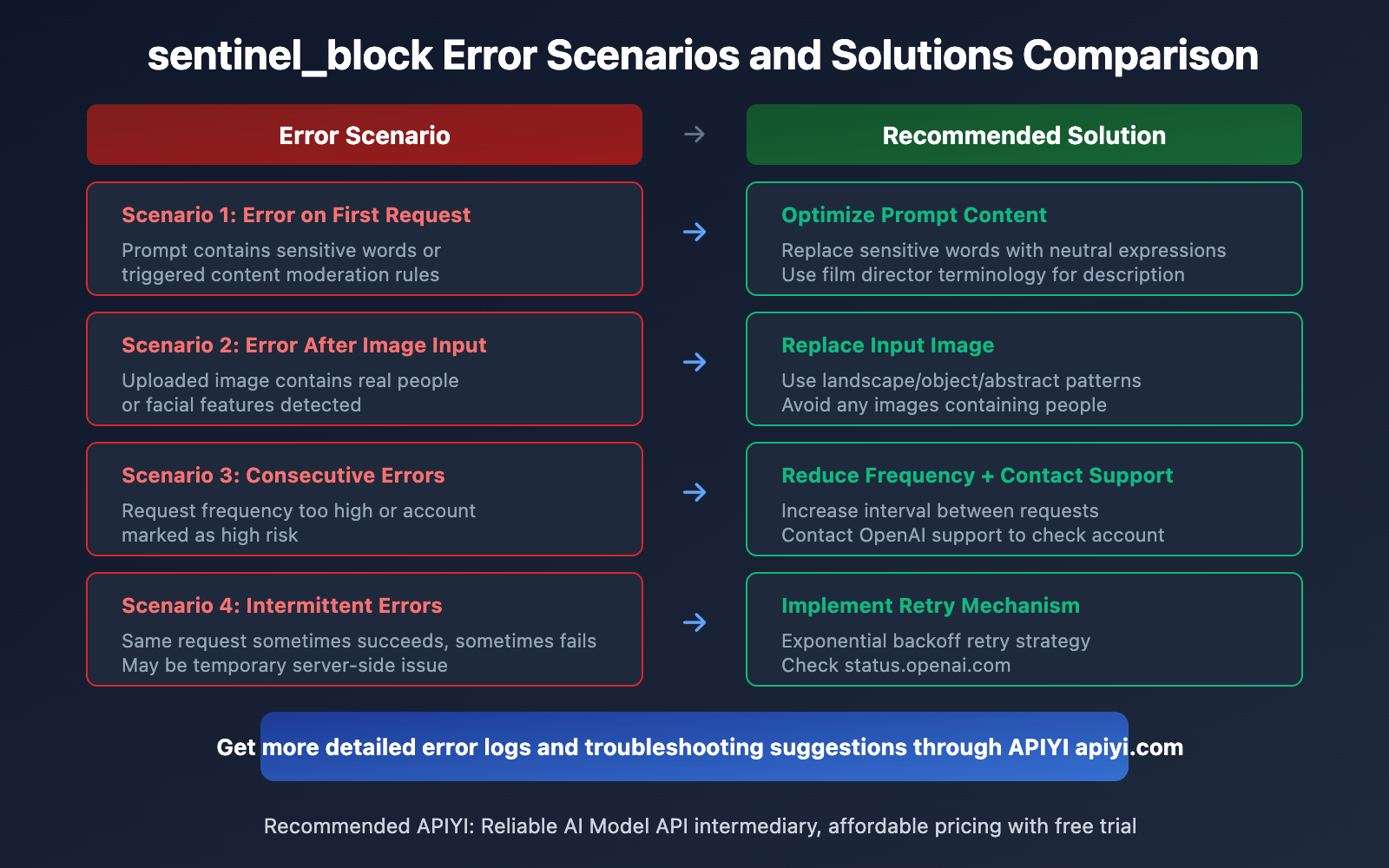
| Error Scenario | Investigation Direction | Recommended Solution |
|---|---|---|
| Error on First Request | Prompt content moderation | Simplify and optimize prompt |
| Error After Image Input | Image content detection | Replace with image without people |
| Consecutive Errors | Account or rate limits | Reduce request frequency, contact support |
| Intermittent Errors | Temporary server-side issues | Implement retry mechanism |
| Specific Prompt Errors | Triggered specific rules | A/B test to locate sensitive words |
Sora 2 API Stability Considerations
According to OpenAI status page records, Sora API has experienced multiple service anomalies in 2025:
- February 2025: ChatGPT, Sora, and API complete outage
- May 2025: Sora service unavailable
- June 2025: API, ChatGPT, and Sora elevated error rates
- December 2025: Sora API increased latency and elevated error rates
Therefore, when encountering sentinel_block errors, it's recommended to first check the OpenAI status page: status.openai.com
Comparison Note: Using stable API intermediary services like APIYI apiyi.com can provide better error handling and log tracking capabilities.
Frequently Asked Questions
Q1: What’s the difference between sentinel_block error and moderation_blocked error?
sentinel_block is a request-phase interception, typically triggered before video generation starts; moderation_blocked is a generation-phase interception, where video generation has started but is then aborted. The resolution approaches are similar for both—you need to optimize your content.
Q2: Why does my normal prompt also trigger sentinel_block?
Sora 2's content moderation system is quite strict and may have false positives. It's recommended to use more neutral descriptive words and avoid any expressions that could be misinterpreted. If you confirm your content is compliant but still gets blocked, you can contact OpenAI support for feedback.
Q3: How can I quickly test different prompts?
It's recommended to use a multi-model API aggregation platform for testing:
- Visit APIYI apiyi.com and register an account
- Obtain an API Key and free credits
- Use the code examples in this article to batch test different prompt variations
Summary
Core resolution approach for Sora 2 sentinel_block errors:
- Understand the error nature: sentinel_block is a proactive interception by OpenAI's content safety system, not a regular API error
- Optimize prompts: Avoid sensitive words, use neutral expressions—this is the most effective solution
- Check image inputs: Ensure uploaded images don't contain real people
- Implement retry mechanisms: Some errors are temporary, and reasonable retries can improve success rates
- Monitor service status: Pay attention to the OpenAI status page to distinguish between server-side issues and content issues
It's recommended to call the Sora 2 API through APIYI apiyi.com, which provides stable services and comprehensive error tracking capabilities to help developers quickly locate and resolve issues.
📚 References
⚠️ Link Format Notice: All external links use the format
Resource Name: domain.comfor easy copying but are not clickable, avoiding SEO weight loss.
-
OpenAI Developer Community sentinel_block Discussion: User feedback and official responses regarding sentinel_block errors
- Link:
community.openai.com/t/sentinel-block-in-console/1055339 - Description: Learn about similar issues encountered by other developers and their solutions
- Link:
-
OpenAI Status Page: Real-time monitoring of Sora API service status
- Link:
status.openai.com - Description: Important reference for distinguishing between server-side issues and content issues
- Link:
-
Sora 2 Content Policy Explanation: Understanding what content triggers moderation
- Link:
community.openai.com/t/sora-moderation-is-kind-of-absurd/1361515 - Description: In-depth community discussion on Sora's content moderation mechanisms
- Link:
Author: Technical Team
Technical Exchange: Feel free to discuss in the comments section. For more resources, visit the APIYI apiyi.com technical community