The AI short drama track is currently exploding. From adapting web novel IPs to distributing content on short video platforms, tools that can quickly transform text into visual short dramas have become an essential need for content creators.
Toonflow is an open-source AI short drama/manga automation tool developed by HBAI Ltd and released on GitHub under the AGPL-3.0 license. Its core strength lies in taking novel or script text and using AI to automatically handle character extraction, script generation, storyboard drawing, and video synthesis.
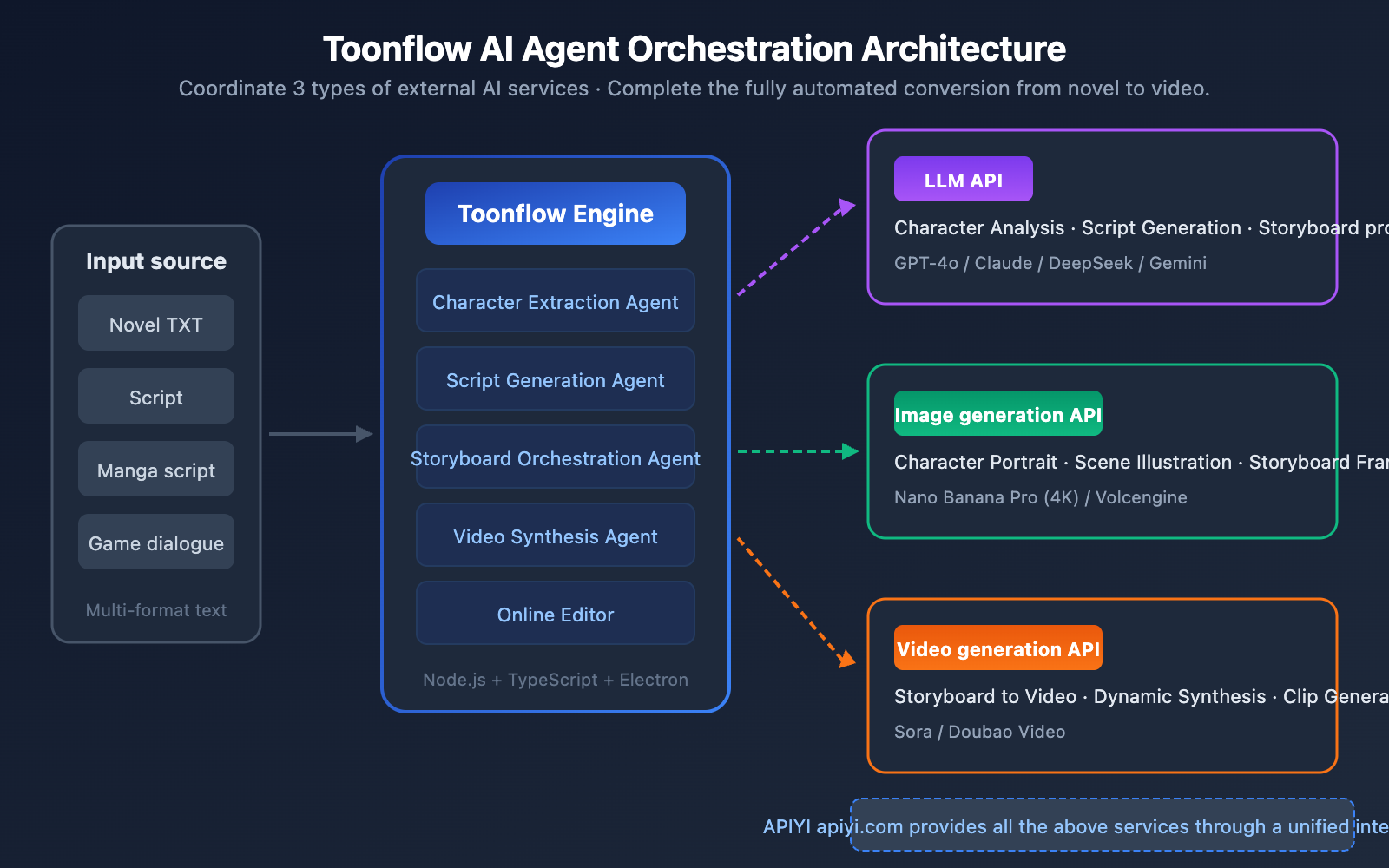
Toonflow doesn't have built-in AI models; instead, it acts as an AI Agent orchestration engine, coordinating three types of external AI services to get the job done:
| AI Service Type | Use Case | Recommended Models |
|---|---|---|
| Large Language Model (LLM) | Character analysis, script generation, storyboard prompts | GPT-4o, Claude 3.5 Sonnet, etc. |
| Image Generation Model | Character design, scene illustrations, storyboard visuals | Nano Banana Pro |
| Video Generation Model | Storyboard-to-video clips | Sora, Doubao Video |
🚀 Quick Start: The LLM, image generation, and video generation API services required by Toonflow can all be accessed in one stop through APIYI (apiyi.com). You won't need to register for multiple platforms separately—you can complete the entire configuration in just 5 minutes.
In this article, we'll walk you through Toonflow's core features, installation, and API service configuration to help you get started with this AI short drama production tool.
4 Core Features of the Toonflow AI Short Drama Tool
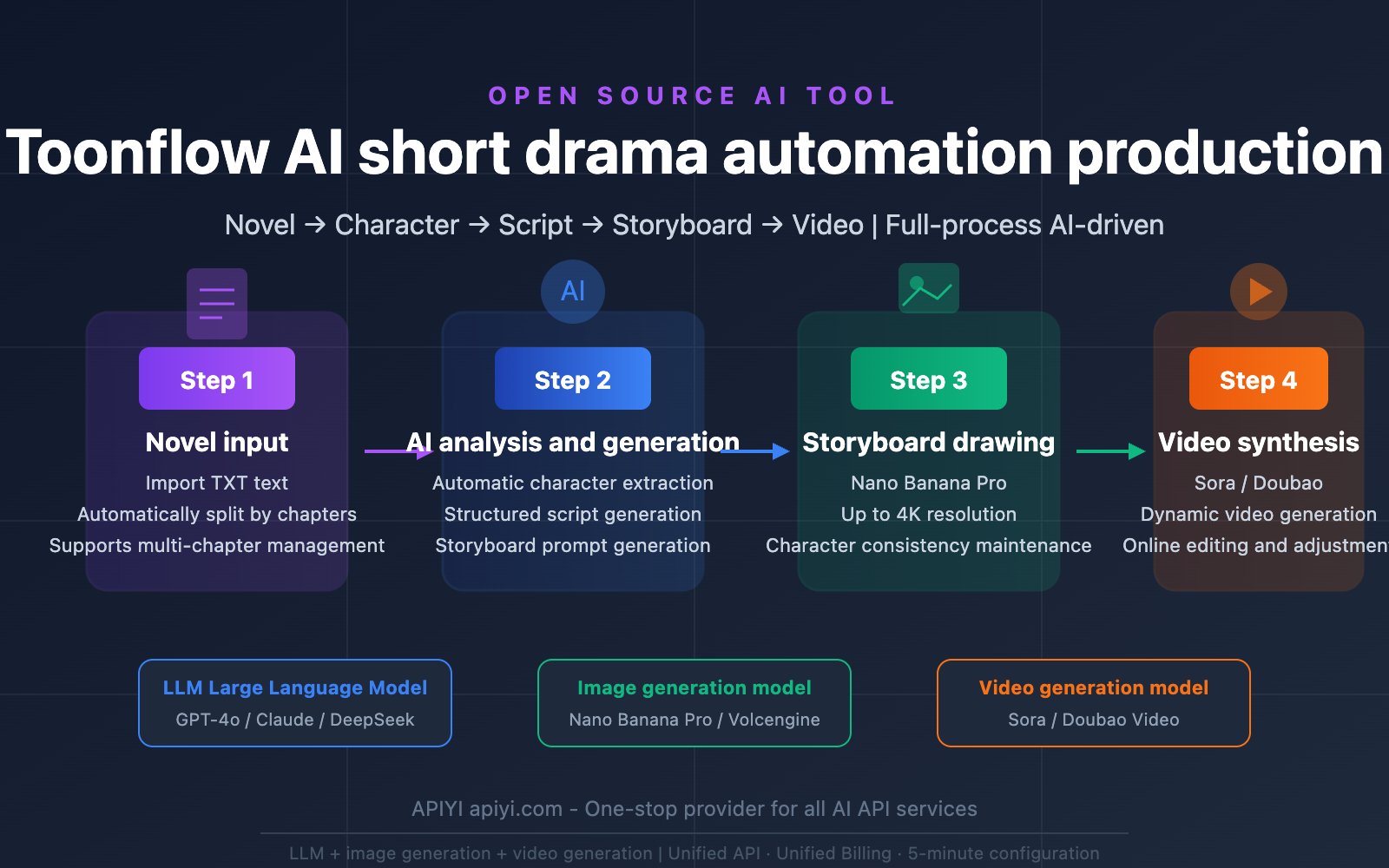
Toonflow breaks down the process of turning novels into short dramas into four automated stages, each driven by its own set of AI services:
Feature 1: Automated AI Character Extraction & Generation
Toonflow invokes a Large Language Model to perform a deep analysis of the input novel text, automatically identifying and extracting key character information:
| Extraction Dimension | Description | Example |
|---|---|---|
| Physical Appearance | Visual descriptions used to generate character art | Long black hair, blue eyes, white dress |
| Personality Traits | Behavioral patterns and psychological characteristics | Decisive and calm, introverted and sensitive |
| Background & Role | Social relationships and positioning within the story | Company CEO, female lead's best friend |
| Character Card | A visual card generated by combining the above info | Includes character art + text introduction |
The quality of character extraction directly impacts the face consistency of the storyboards later on. By using structured prompt templates, Toonflow ensures that the LLM's character descriptions can be used directly as prompts for image generation.
Feature 2: Intelligent Script & Storyboard Generation
Once you've selected the chapters you want to adapt, Toonflow automatically:
- Transforms novel passages into structured scripts (including dialogue, scene descriptions, and stage directions).
- Generates storyboard prompts for each scene (covering foreground, midground, and background composition, character dynamics, props, and camera angles).
This step is handled entirely by the LLM, and the resulting storyboard prompts are passed directly to the image generation model.
Feature 3: AI Image Generation & Storyboard Drawing
Toonflow sends those storyboard prompts to image generation APIs to automatically create every frame of the storyboard. Currently, the supported image generation backends include:
- Nano Banana Pro: Supports 4K resolution, offers excellent face consistency, and handles multi-language text rendering.
- Volcengine: The image generation service under the Doubao brand.
Feature 4: AI Video Synthesis & Online Editing
In the final step, Toonflow uses video generation APIs to transform the storyboard images into dynamic video clips. It also provides an online editing suite, allowing you to fine-tune and personalize the generated results.
Supported video generation services include Sora (OpenAI) and the Doubao video generation API.
Toonflow Installation & Deployment: 3 Ways to Choose From
Toonflow offers three installation methods: Windows desktop application, Docker deployment, and manual deployment.
Toonflow System Requirements
| Item | Minimum Requirement |
|---|---|
| Node.js | v23.11.1 or higher |
| Memory | 2GB+ |
| Operating System | Windows (Desktop) / Linux (Server) |
| Network | Requires access to external AI API services |
Method 1: Windows Desktop App (Recommended for Beginners)
Download the Electron desktop installer directly from GitHub Releases:
- GitHub Project:
github.com/HBAI-Ltd/Toonflow-app - Default Username:
admin - Default Password:
admin123
Once downloaded and installed, you're ready to go. The desktop version comes with a built-in backend service, so you don't need to configure any additional runtime environments.
Method 2: Docker Deployment (Recommended for Servers)
# Clone the project
git clone https://github.com/HBAI-Ltd/Toonflow-app.git
cd Toonflow-app

# Start with one click using Docker Compose
docker-compose -f docker/docker-compose.yml up -d --build
After starting, visit http://localhost:60000 to access the management interface.
Method 3: Manual Deployment (Best for Developers)
# Install dependencies
yarn install

# Start in development mode (backend only, port 60000)
yarn dev

# Start both desktop app and backend
yarn dev:gui

# Production build
yarn build
For manual deployment, we recommend using PM2 for process management to ensure the service runs stably.
Toonflow API Configuration: A Complete Guide to Integrating 3 Types of AI Interfaces
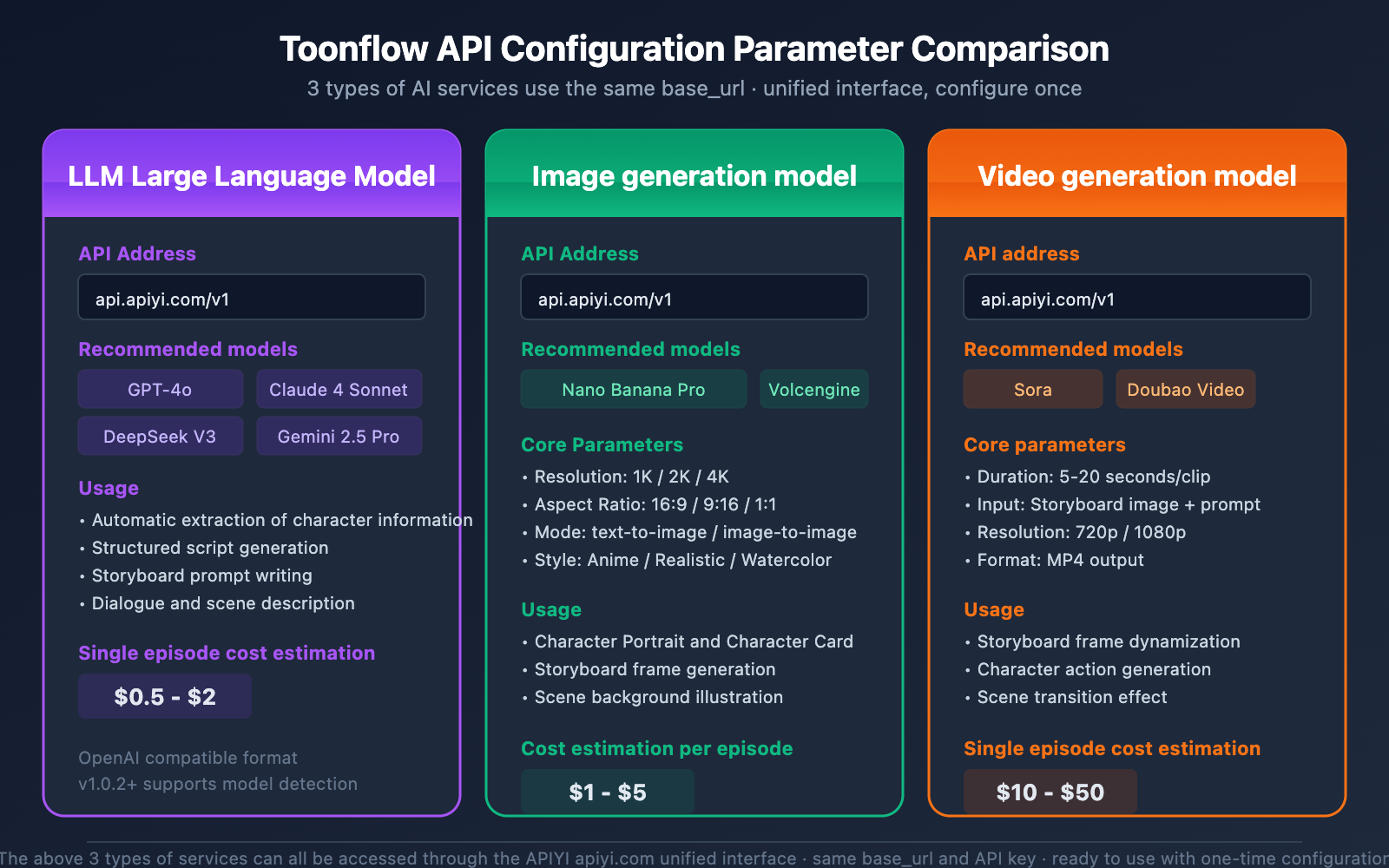
Once Toonflow is installed, you'll need to configure the API interfaces for three types of AI services to get everything running. This is the most critical step in the entire setup process.
🎯 Configuration Tip: We recommend using APIYI (apiyi.com) as your unified API provider. The platform provides a unified interface for LLM, image generation, and video generation APIs, using the same
base_urland authentication method, which significantly simplifies the Toonflow configuration.
Configuration 1: Large Language Model (LLM) API Integration
Toonflow's character analysis, script generation, and storyboard prompt generation features all rely on LLMs. When configuring, you'll need to provide an API interface in an OpenAI-compatible format.
Recommended Models:
| Model | Use Case | Features |
|---|---|---|
| GPT-4o | General scenarios, high script quality | Strong comprehension, stable output |
| Claude 4 Sonnet | Long-form novel analysis | Significant advantage in long context |
| DeepSeek V3 | Cost-sensitive scenarios | High cost-performance ratio |
| Gemini 2.5 Pro | Multimodal analysis | Supports mixed text and image input |
Configuration Example:
Enter the following information on the Toonflow settings page:
Base URL: https://api.apiyi.com/v1
API Key: Your API Key
Model Name: gpt-4o (or other supported models)
💡 Pro Tip: Once configured, you can click the "Model Check" button on the Toonflow settings page to verify if the API connectivity is working correctly. This feature was added in version 1.0.2.
Configuration 2: Nano Banana Pro Image Generation API Integration
Nano Banana Pro is the recommended image generation model for Toonflow, supporting both text-to-image and image-to-image modes with up to 4K resolution output.
Nano Banana Pro Core Parameters:
| Parameter | Description | Recommended Value |
|---|---|---|
| Model Name | The model parameter for the API call |
nano-banana-pro |
| Resolution | Output image resolution | 2K (for storyboards) or 4K (for covers) |
| Aspect Ratio | Width-to-height ratio | 16:9 (landscape) or 9:16 (portrait) |
| Style Control | Control the art style via prompts | Anime, realistic, watercolor, etc. |
Configuration Example:
Base URL: https://api.apiyi.com/v1
API Key: Your API Key
Image Model: nano-banana-pro
Nano Banana Pro delivers excellent face consistency, making it perfect for short drama production where you need to maintain the same character appearance across multiple storyboards.
Configuration 3: Sora / Doubao Video Generation API Integration
Video generation is the final step in the Toonflow workflow, transforming storyboard images into dynamic video clips.
Supported Video Generation Services:
| Service | Features | Single Generation Duration |
|---|---|---|
| Sora (OpenAI) | Excellent image quality, natural motion | Approx. 5-20 seconds |
| Doubao Video | Well-optimized for Chinese scenarios | Approx. 5-15 seconds |
Configuration Example:
Base URL: https://api.apiyi.com/v1
API Key: Your API Key
Video Model: sora (or the corresponding Doubao model name)
💰 Cost Tip: Video generation is the most expensive part of the entire process. We suggest confirming you're happy with the storyboard using image generation first before generating videos in bulk. Invoking models via the APIYI (apiyi.com) platform offers more flexible billing, which is great for controlling short drama production costs.
Toonflow Workflow in Action: 5 Steps from Novel to Short Drama
Once you've got everything set up, here's the full workflow for creating an AI short drama using Toonflow:
Step 1: Create a Project and Import Your Novel
Create a new project in the Toonflow management interface and import your novel text (TXT format). The system supports automatic chapter splitting.
Step 2: AI Character Extraction
Click "Character Generation," and the system will automatically call a Large Language Model to analyze the text, extract key character info, and generate character cards. You can manually tweak the character descriptions to optimize the final image generation results.
Step 3: Select Chapters and Generate Scripts
Pick the chapters you want to work on and click "Script Generation." The Large Language Model will transform the novel's paragraphs into a structured script complete with dialogue and scene directions.
Step 4: Storyboard Image Generation
The system generates storyboard prompts based on the script and calls Nano Banana Pro to create each frame. You can preview and adjust these frame by frame.
Step 5: Video Synthesis and Editing
Once you're happy with the storyboards, call the Sora or Doubao Video API to turn those static images into dynamic videos. Toonflow also provides an online editor for final touches.
Toonflow Technical Architecture & Development Info
| Tech Stack | Implementation Details |
|---|---|
| Backend Framework | Node.js + Express + TypeScript |
| Database | SQLite3 (better-sqlite3) |
| AI SDK | Vercel AI SDK, Aigne Middleware |
| Image Processing | Sharp |
| Desktop App | Electron |
| HTTP Client | Axios |
| Parameter Validation | Zod |
| Process Management | PM2 (Production Environment) |
| Containerization | Docker + Docker Compose |
The Toonflow project uses the AGPL-3.0 open-source license, making it free for personal and non-commercial use. For commercial use, you'll need to contact HBAI Ltd to obtain a commercial license (Contact Email: [email protected]).
Toonflow FAQ
Q1: Does Toonflow require a local GPU?
No, it doesn't. Toonflow itself is just an orchestration tool; all AI inference tasks are handled via remote APIs. Your computer only needs to be able to run Node.js and a web browser. Once you've connected your API services through APIYI (apiyi.com), you don't need to worry about local GPU resources at all.
Q2: Which image generation models does Toonflow support?
Currently, it primarily supports Nano Banana Pro and Volcengine image generation. Among these, Nano Banana Pro supports up to 4K resolution and offers excellent face consistency, making it the top choice for drawing short drama storyboards. You can call the Nano Banana Pro model directly through the APIYI (apiyi.com) platform.
Q3: What's the approximate API cost for producing one episode?
The cost depends on the chapter length and the number of storyboards. Generally speaking:
- LLM invocation (character analysis + script + storyboard prompts): Approx. $0.5 – $2
- Image generation (20-50 storyboards): Approx. $1 – $5
- Video generation (20-50 clips): Approx. $10 – $50
Video generation is the primary cost. We recommend using the flexible billing options at APIYI (apiyi.com) to optimize your spending.
Q4: Does Toonflow have a roadmap?
The project has the following features planned:
- Prompt Refinement Agent: Intelligent optimization for video prompts.
- Multi-format text support: Support for manga scripts, game dialogues, etc.
- Character clothing and prop management: Maintaining consistency over long series.
- Batch processing task queues.
- One-click style transfer templates.
Toonflow AI Short Drama Tool Summary
Toonflow provides a complete automated solution for AI short drama production, simplifying the workflow of turning novels into dramas from a manual process into an AI pipeline. Its core value lies in:
- Full Process Automation: From character extraction → script generation → storyboard drawing → video synthesis, it's all done in one place.
- Open Source and Free: Licensed under AGPL-3.0, it's free for personal use.
- Flexible AI Backend: Supports various Large Language Models, image, and video generation models without locking you into a specific provider.
- Multiple Deployment Options: Available as a desktop app, via Docker, or manual deployment to suit different scenarios.
We recommend using APIYI (apiyi.com) as your one-stop shop for all the AI API services Toonflow requires. With a unified interface and billing, you can quickly complete your configuration and start creating.
References
-
Toonflow GitHub Repository: Official open-source project
- Link:
github.com/HBAI-Ltd/Toonflow-app - Description: Contains source code, installation documentation, and releases.
- Link:
-
Toonflow Gitee Mirror: Faster access within China
- Link:
gitee.com/HBAI-Ltd/Toonflow-app - Description: Optimized for network environments in mainland China.
- Link:
-
APIYI Official Documentation: AI API Service Integration Guide
- Link:
help.apiyi.com - Description: Tutorials for Large Language Model, image generation, and video generation APIs.
- Link:
This article was written by the APIYI technical team, focusing on Large Language Model applications and development practices. For more technical tutorials, visit APIYI at apiyi.com.