作者注:手把手教你开启和使用 Claude 4.6 Agent Teams 多智能体协作功能,掌握 Lead + Teammate 架构、任务分配、消息通信和实战技巧
Claude Opus 4.6 发布时同步推出了 Agent Teams(多智能体团队) 功能,让多个 Claude 实例像真正的开发团队一样并行协作。很多开发者对此充满好奇:Agent Teams 到底怎么开启?怎么触发?和 Subagent 有什么区别?适合什么场景?
核心价值: 读完本文,你将掌握 Agent Teams 的完整使用流程——从开启配置到触发命令,从任务分配到团队协作,让你立刻上手多智能体编程。
Claude Agent Teams 是什么
Agent Teams 是 Claude Code 的实验性功能(研究预览阶段),允许你在一个项目中同时运行多个独立的 Claude Code 实例,它们通过共享任务列表和消息系统进行协作。
一句话理解: Agent Teams = 一个 Lead(团队负责人) + 多个 Teammate(队友),各自独立工作、互相通信、共同完成复杂任务。
| 对比维度 | Subagent(子智能体) | Agent Teams(团队) |
|---|---|---|
| 通信方式 | 只向主 Agent 汇报结果 | 队友之间可以直接通信 |
| 协调方式 | 主 Agent 管理一切 | 共享任务列表 + 自主认领 |
| 上下文 | 独立上下文,结果返回调用者 | 独立上下文,完全自治 |
| 最佳场景 | 只需要结果的聚焦任务 | 需要讨论和协作的复杂任务 |
| Token 消耗 | 较低(结果汇总回主上下文) | 较高(每个队友是独立 Claude 实例) |
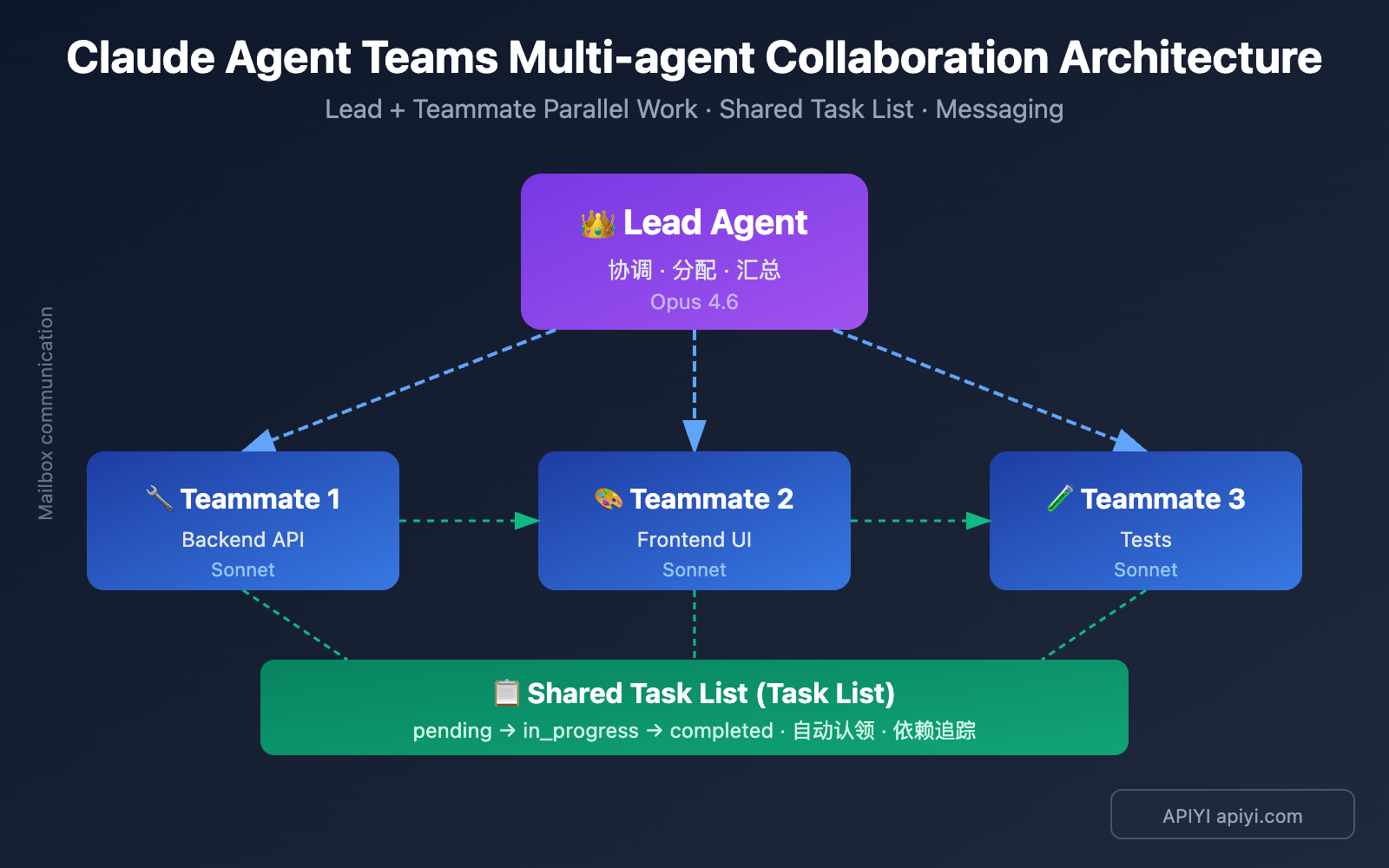
Claude Agent Teams 核心架构
Agent Teams 由 4 个核心组件构成:
| 组件 | 职责 | 说明 |
|---|---|---|
| Lead Agent | 团队负责人 | 你的主 Claude Code 会话,负责创建团队、分配任务、汇总结果 |
| Teammate | 队友 | 独立的 Claude Code 实例,各自执行分配的任务 |
| Task List | 共享任务列表 | 所有人可见的任务看板,支持认领、依赖、状态追踪 |
| Mailbox | 消息系统 | 队友之间的通信渠道,支持私信和广播 |
💡 关键区别: Subagent 是「下属汇报」模式,Agent Teams 是「团队协作」模式。如果你的任务需要多人讨论、互相挑战观点、或并行处理不同模块,Agent Teams 是更好的选择。
How to Enable Claude Agent Teams
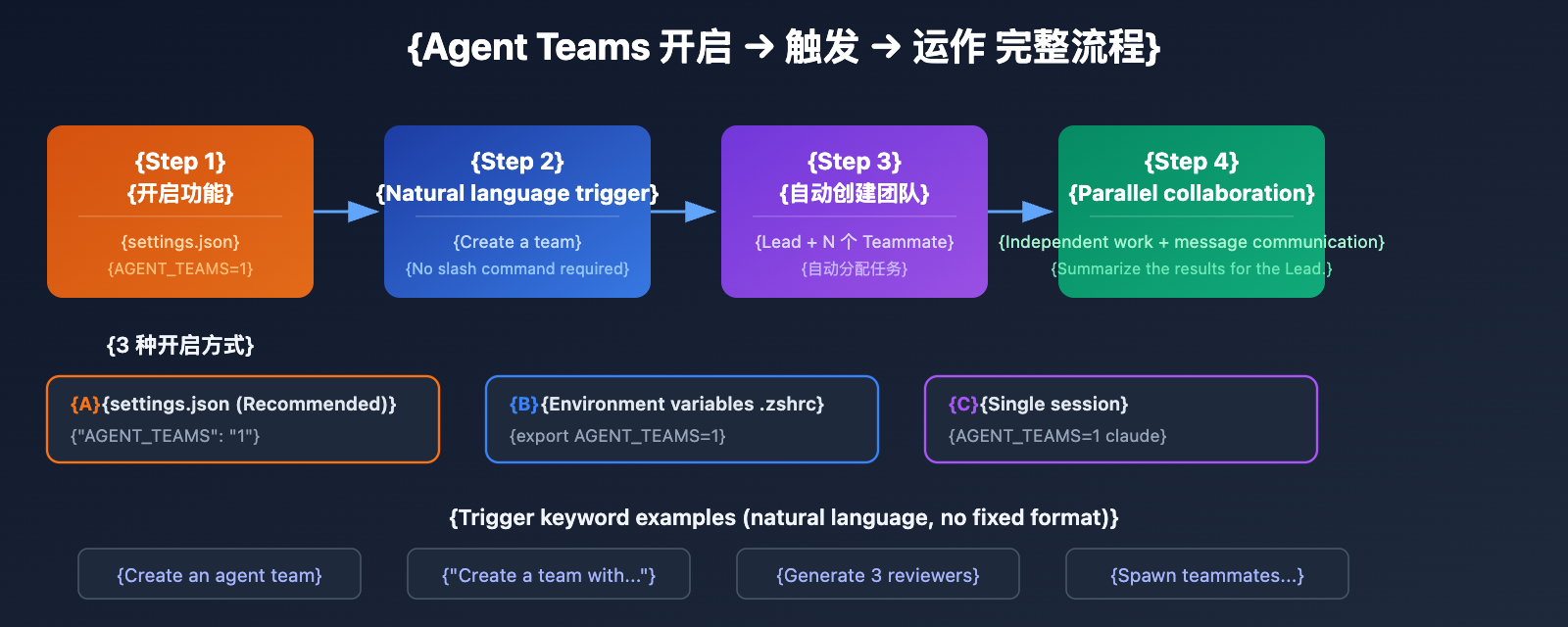
Agent Teams are off by default, so you'll need to enable them manually. Here are three ways to get them up and running:
Step 1: Enable Experimental Features
Method A — Configuration File (Recommended)
Add the following to your Claude Code settings.json:
{
  "env": {
    "CLAUDE_CODE_EXPERIMENTAL_AGENT_TEAMS": "1"
  }
}
Method B — Environment Variables
# Add this to your .bashrc or .zshrc
export CLAUDE_CODE_EXPERIMENTAL_AGENT_TEAMS=1
Method C — Single Session
CLAUDE_CODE_EXPERIMENTAL_AGENT_TEAMS=1 claude
Step 2: Trigger Agent Teams with Natural Language
There isn't a slash command like /agent-teams. Once the feature is enabled, you just need to describe the team you want using natural language:
Create an agent team to review PR #142. Generate three reviewers:
- One focused on security vulnerabilities
- One checking performance impact
- One verifying test coverage
Have them report their findings individually.
Or even simpler:
Create a team with 4 teammates to refactor these modules in parallel.
Use Sonnet for each teammate.
Claude will automatically create the team, generate teammates, and assign tasks. Claude might also proactively suggest creating a team—if it determines your task is suitable for parallel processing, it'll ask for your confirmation first.
Step 3: Choose a Display Mode
| Display Mode | Description | Best For |
|---|---|---|
| in-process (Default) | All teammates run in the main terminal | Any terminal, including VS Code |
| tmux | Each teammate gets an independent panel | Requires tmux or iTerm2 |
| auto | Automatically decides | Splits screen if in tmux, otherwise in-process |
# Specify via command line
claude --teammate-mode tmux

# Or set it in settings.json
{
  "teammateMode": "tmux"
}
Pro Tip: If you're just starting out, stick with
in-processmode. Once you're comfortable, try thetmuxsplit-screen mode. You can get Claude API credits through APIYI (apiyi.com) to fully test various Agent Teams configurations locally.
Claude Agent Teams Operation Guide
Keyboard Shortcuts Quick Reference
While Agent Teams is running, you can use the following shortcuts:
| Shortcut | Function |
|---|---|
| Shift+Up/Down | Switch/Select different teammates |
| Enter | View session details for the selected teammate |
| Escape | Interrupt the teammate's current operation |
| Ctrl+T | Toggle task list view |
| Shift+Tab | Toggle delegation mode (Lead coordinates only, no coding) |
Task Allocation and Claiming Mechanism
The Agent Teams task system supports 3 states and dependencies:
Task Status: pending (waiting to be claimed) → in_progress → completed
Dependency Mechanism: Tasks can set blockedBy dependencies. Once the prerequisite task is finished, downstream tasks are automatically unlocked without manual intervention.
Claiming Methods:
- Lead Assignment: Explicitly tell the Lead to assign a specific task to a teammate.
- Self-Claiming: After finishing their current task, a teammate automatically claims the next available unassigned task.
- File Locking to Prevent Contention: When multiple teammates try to grab the same task at once, the system uses file locks to prevent conflicts.
Task Size Recommendations: Assigning 5-6 tasks per teammate is a best practice. If tasks are too small, the coordination overhead outweighs the benefits; if they're too large, teammates won't report progress for a long time.
Communication Between Teammates
| Communication Type | Description | Use Case |
|---|---|---|
| write (Direct Message) | Send a message to a specific teammate | Coordinate on specific issues |
| broadcast (Broadcast) | Send a message to all teammates | Important announcements (use sparingly; costs scale with team size) |
Communication is peer-to-peer and doesn't need to go through the Lead. Any teammate can message another directly.
Git Collaboration and Avoiding File Conflicts
The most important rule in Agent Teams: Two teammates editing the same file will cause an overwrite.
Recommended file division strategy:
# Full-stack Feature Development Example
Backend Teammate  → Responsible for src/api/ and src/migrations/
Frontend Teammate → Responsible for src/components/
Test Teammate     → Responsible for tests/
⚠️ Important: Agent Teams teammates share the same working directory and don't automatically use git worktree. Ensuring each teammate handles a different set of files is key to avoiding conflicts.
5 Real-world Scenarios for Claude Agent Teams
Scenario 1: Multi-angle Code Review
Create an agent team to review this PR:
- Security Reviewer: Check for injection, XSS, permissions, and other security issues.
- Performance Reviewer: Analyze N+1 queries, memory leaks, and caching strategies.
- Testing Reviewer: Verify test coverage and edge cases.
Have them report their findings after their respective reviews.
Why it's a good fit for Agent Teams: The three review dimensions are completely independent, won't cause file conflicts, and can be executed in parallel.
Scenario 2: Parallel Development of New Modules
Create a team to build the user notification system:
- Teammate 1: Build the backend API (src/api/notifications/)
- Teammate 2: Build the frontend components (src/components/notifications/)
- Teammate 3: Write integration tests (tests/notifications/)
Why it's a good fit: Each teammate is responsible for a different directory, providing natural isolation. Just merge once they're done.
Scenario 3: Competitive Hypothesis Debugging
There's an intermittent bug; create a team to debug using different hypotheses:
- Teammate A: Investigate if it's a race condition.
- Teammate B: Investigate if it's a memory leak.
- Teammate C: Investigate if it's a third-party API timeout.
Independently verify the hypotheses and report back.
Why it's a good fit: Adversarial debugging: multiple leads are investigated in parallel. Whoever finds the root cause first wins.
Scenario 4: Cross-layer Modification Coordination
When a change spans the frontend, backend, and database, Agent Teams allows experts at each layer to focus on their specialty while coordinating interface definitions via the messaging system.
Scenario 5: Exploratory Research
I'm designing a CLI tool to track TODO comments in code.
Create a team to explore from different angles:
- One teammate handles UX design.
- One teammate handles technical architecture.
- One teammate plays the "devil's advocate."
Why it's a good fit: A collision of perspectives where they challenge each other's assumptions and conclusions.
Claude Agent Teams vs. Subagent Selection Guide
| Decision Dimension | Choose Subagent | Choose Agent Teams |
|---|---|---|
| Do teammates need to communicate? | ❌ No | ✅ Yes |
| Can tasks be parallelized? | Partially | ✅ Highly parallel |
| Multi-file editing involved? | ✅ Safe for same-file | ⚠️ Needs division of labor to avoid conflicts |
| Task complexity? | Focused on a single goal | Multi-perspective, multi-module |
| Token budget? | 💰 More economical | 💸 ~3-7x consumption |
| Need discussion/questioning? | ❌ No | ✅ Yes |
Cost Reference: Running a 3-person Agent Team for 30 minutes consumes about 3-4 times the tokens of a single session. In Plan mode, it's about 7 times. We recommend using APIYI to flexibly manage your token budget.
Claude Agent Teams Advanced Tips
Tip 1: Mix models to cut costs
Create a team where the Lead uses Opus and 4 teammates use Sonnet.
The Lead handles strategic decisions using Opus 4.6 to ensure quality, while teammates handle specific execution tasks using Sonnet to keep costs under control.
Tip 2: Plan approval workflow
Generate an architect teammate to refactor the authentication module.
Require them to submit a plan for approval before making any changes.
The teammate will first enter a read-only Plan mode. Once the plan is ready, they'll send an approval request to the Lead. The teammate only starts implementation after the Lead gives the green light.
Tip 3: Delegation mode to keep the Lead "above the fray"
Press Shift+Tab to enable delegation mode. This ensures the Lead only handles coordination and task assignment without getting their hands dirty with the actual code. It's a great way to prevent the Lead from "stealing the work" from the specialists.
Tip 4: Quality Gate Hooks
Use the Hook mechanism to automatically maintain quality standards:
TeammateIdle: Triggered when a teammate is about to go idle. Returning exit code 2 can send feedback to keep the teammate working.TaskCompleted: Triggered when a task is marked as finished. Returning exit code 2 can block completion and demand revisions.
Claude Agent Teams: Things to Keep in Mind
Known Limitations
- No session recovery: Commands like
/resumeand/rewindwon't restore teammates from a closed session. - One team per session: A Lead can only manage one team at a time.
- No nested teams: Teammates aren't allowed to create their own sub-teams.
- Permission inheritance: Teammates inherit the Lead's permission mode by default, though you can adjust them individually once they're spawned.
- Split-screen limitations: tmux split-screen mode doesn't work with the VS Code integrated terminal, Windows Terminal, or Ghostty.
- Teammate crashes: If a teammate crashes, it triggers a 5-minute heartbeat timeout. After that, their tasks can be picked up by other teammates.
Best Practices
- Team size: We recommend 2–5 teammates. Usually, a team of 3 performs better than a team of 6.
- Task decomposition matters more than headcount: A well-structured 3-person team will outperform a poorly organized 6-person team every time.
- Read-intensive tasks (like code reviews and research) are the "sweet spot" for Agent Teams.
- Write-intensive concurrent editing is still a challenge and requires strict division of labor at the file level.
FAQ
Q1: What subscription do I need to use Agent Teams?
Agent Teams is an experimental feature in Claude Code. You'll need a Claude Max subscription ($100–200/month) to get enough Opus 4.6 usage credits. API users are billed at standard Opus 4.6 rates ($5/$15 per million tokens). You can also access more flexible billing plans through the APIYI (apiyi.com) platform.
Q2: Can Agent Teams only use Opus 4.6?
No. While Agent Teams launched alongside Opus 4.6, you can mix and match models. A recommended pattern is using Opus 4.6 for the Lead to handle strategic decisions and Sonnet for teammates to execute specific tasks. This helps maintain coordination quality while keeping costs in check.
Q3: Does Agent Teams work in VS Code?
Yes, but with some caveats. The VS Code integrated terminal supports "in-process" mode (where all teammates run in the same terminal window). However, tmux split-screen mode isn't available inside VS Code; you'll need to use an external terminal for that.
Summary
Key takeaways for Claude 4.6 Agent Teams:
- How to enable: Set the environment variable
CLAUDE_CODE_EXPERIMENTAL_AGENT_TEAMS=1, then describe your team using natural language. - Architecture: A Lead Agent coordinates while Teammate Agents work in parallel, collaborating through a shared task list and messaging system.
- Best use cases: Code reviews, parallel development of new modules, debugging competing hypotheses, cross-layer coordination, and exploratory research.
- Core principle: Task decomposition matters more than the number of agents; 3 teammates usually perform better than 6.
- Cost control: A hybrid model (Opus for the Lead + Sonnet for teammates) offers the best value for money.
Agent Teams transition AI programming from "solo missions" to "team collaboration." While it's still in the research preview stage, it's already showing impressive parallel development capabilities.
We recommend getting your Claude API credits through APIYI (apiyi.com). The platform offers flexible billing and multi-model support, making it easy to test various Agent Teams configurations.
📚 References
⚠️ Link Format Note: All external links use the
Resource Name: domain.comformat. They're easy to copy but aren't clickable to avoid SEO weight loss.
-
Claude Code Agent Teams Official Documentation: Complete guide to using Agent Teams
- Link:
code.claude.com/docs/en/agent-teams - Description: Official docs covering setup, architecture, and best practices.
- Link:
-
Anthropic Engineering Blog — C Compiler Case Study: 16 Claudes building a C compiler in parallel
- Link:
anthropic.com/engineering/building-c-compiler - Description: A large-scale real-world case study where Agent Teams produced 100,000 lines of code across 2,000+ sessions.
- Link:
-
Addy Osmani — Claude Code Swarms: Deep dive analysis by Google's Engineering Lead
- Link:
addyosmani.com/blog/claude-code-agent-teams - Description: Architectural analysis and best practice recommendations.
- Link:
-
Claude Opus 4.6 Release Announcement: Official release notes
- Link:
anthropic.com/news/claude-opus-4-6 - Description: Official introduction to the Agent Teams feature.
- Link:
Author: APIYI Team
Tech Talk: Feel free to discuss your experience with Claude Agent Teams in the comments. For more resources, visit the APIYI (apiyi.com) tech community.