Creating 4-Panel Comic Videos with Sora 2 API: Complete Guide with Character Consistency Control
Author's Note: A detailed guide on using the Sora 2 API to create comic strip videos, including character consistency control, standalone character creation interface usage, and complete code examples
The conversion of 4-panel comics to video has always been a pain point for content creators, especially maintaining anime character consistency. Sora 2's newly launched character creation feature specifically addresses this challenge.
This article demonstrates the complete operational workflow through practical examples, including technical implementation of key steps such as character creation, video generation, and consistency control.
Core Value: Following this guide, you can complete the conversion from comic strips to video in 10 minutes, bringing static comics to life with highly consistent character expressions and actions.
Sora 2 Character Creation Feature Background
Since its release in October 2025, Sora 2 has quickly become a benchmark product in the AI video generation field. OpenAI positions it as the "GPT-3.5 moment for video generation", with core breakthroughs including:
- Synchronized Audio-Video Generation: First-time implementation of integrated audio-video generation, eliminating the need for post-production dubbing
- Significantly Improved Physical Realism: Actions and scenes follow physical laws, eliminating the "uncanny valley" effect
- Long Video Support: Supports coherent narrative videos up to 15-20 seconds in length
- Character Consistency Feature: Through Cameo technology, supports maintaining character consistency across different scenes
For creators making 4-panel comic videos and comic strip videos, the biggest challenges are:
- ❌ Character appearance inconsistency across different frames
- ❌ Disconnected character movements lacking vitality
- ❌ Manual drawing of numerous in-between frames required
Sora 2's character creation feature perfectly solves these problems.
Sora 2 Character Creation Core Features
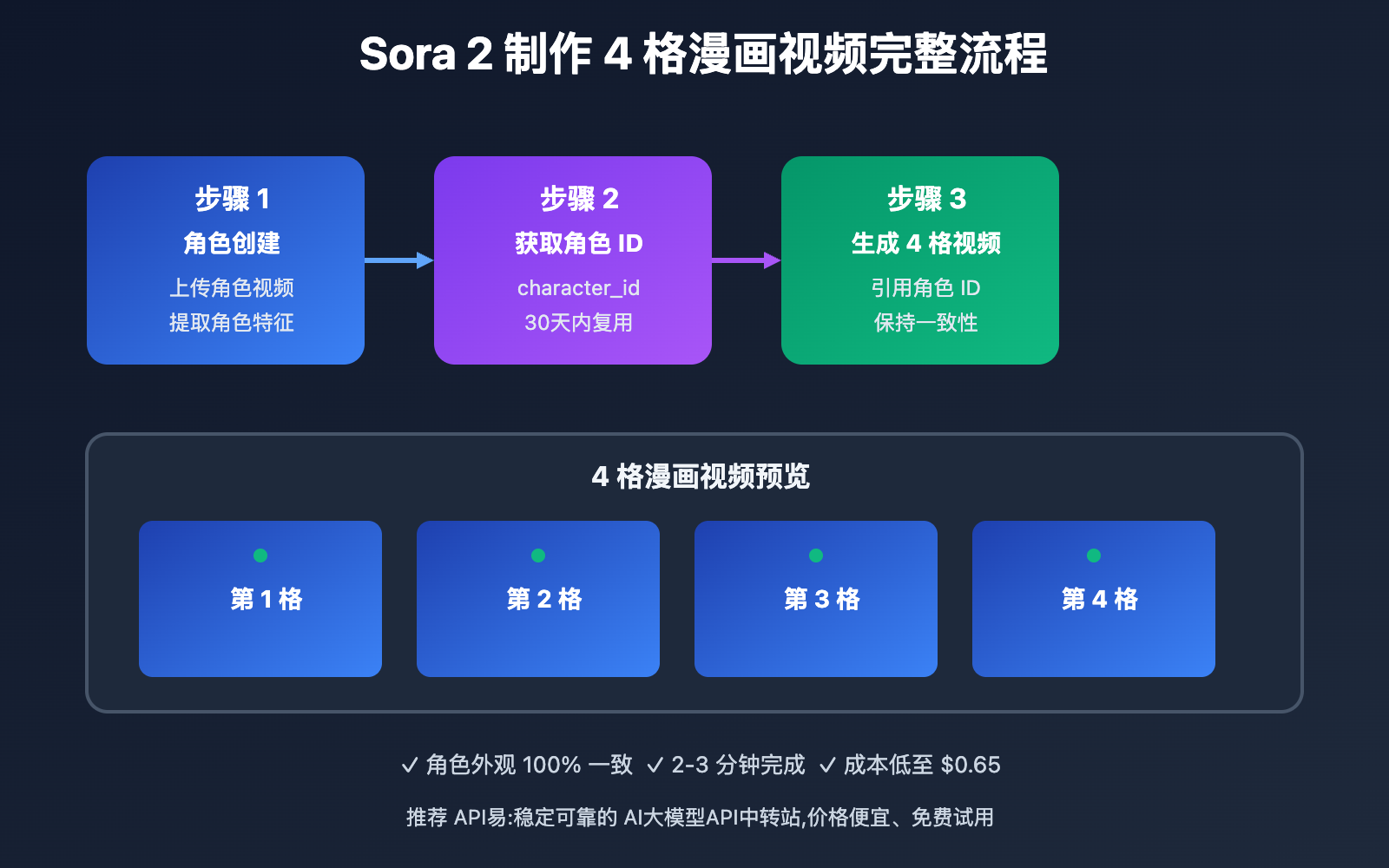
APIYi has recently launched the Sora 2 Independent Character Creation Interface, supporting the creation of reusable character models through video URLs, ensuring high consistency of characters across multiple video generation tasks.
| Function Module | Core Features | Application Value | Recommendation Rating |
|---|---|---|---|
| Character Creation Interface | Extract character features via video URL | Create once, reuse multiple times, ensure consistency | ⭐⭐⭐⭐⭐ |
| Time Range Control | Precisely specify time segments where characters appear | Extract specific characters from complex videos | ⭐⭐⭐⭐⭐ |
| Multi-Character Support | Create multiple characters from the same video | Support complex plots and multi-character scenes | ⭐⭐⭐⭐ |
| Comic Strip Video Generation | Generate continuous video clips based on characters | Automated production of 4-panel comic videos | ⭐⭐⭐⭐⭐ |
🔥 Independent Character Creation Interface Details
APIYi's newly added independent character creation interface https://api.apiyi.com/sora/v1/characters is currently the first API on the market that supports character creation through video URLs. Core advantages include:
Interface Endpoint and Basic Parameters
Endpoint: POST https://api.apiyi.com/sora/v1/characters
Core Parameters:
{
    "model": "sora-character",
    "url": "https://mycdn-gg.oss-us-west-1.aliyuncs.com/sora/64ba6b88-8540-4b73-bf05-7bd2e96bebd1.mp4",
    "timestamps": "1,3"
}
Parameter Description:
model: Fixed value"sora-character", specifies the use of character creation modelurl: Video URL containing the target character, supports MP4 formattimestamps: Time range where the character appears, format is"start_seconds,end_seconds"- Minimum time range difference is 1 second, maximum is 3 seconds
- For example,
"1,3"means extracting the character appearing from seconds 1-3 in the video - It's recommended to select segments where character features are clear, with frontal or side views
Time Range Control Best Practices
Selecting the appropriate time range is crucial for character extraction quality:
| Time Range | Applicable Scenario | Extraction Quality | Notes |
|---|---|---|---|
| 1-2 seconds | Character close-up shots | ⭐⭐⭐⭐⭐ | Ensure character's front view is clearly visible |
| 1-3 seconds | Character action segments | ⭐⭐⭐⭐ | Capture character's dynamic features |
| 0-1 seconds | Quick character appearance | ⭐⭐⭐ | Feature extraction may be incomplete |
| 3+ seconds | ❌ Not supported | ❌ | Exceeds maximum time limit |
Sora 2 4-Panel Comic Video Production Application Scenarios
Sora 2 Character Creation Feature excels in the following scenarios:
| Application Scenario | Target Users | Core Advantages | Expected Results |
|---|---|---|---|
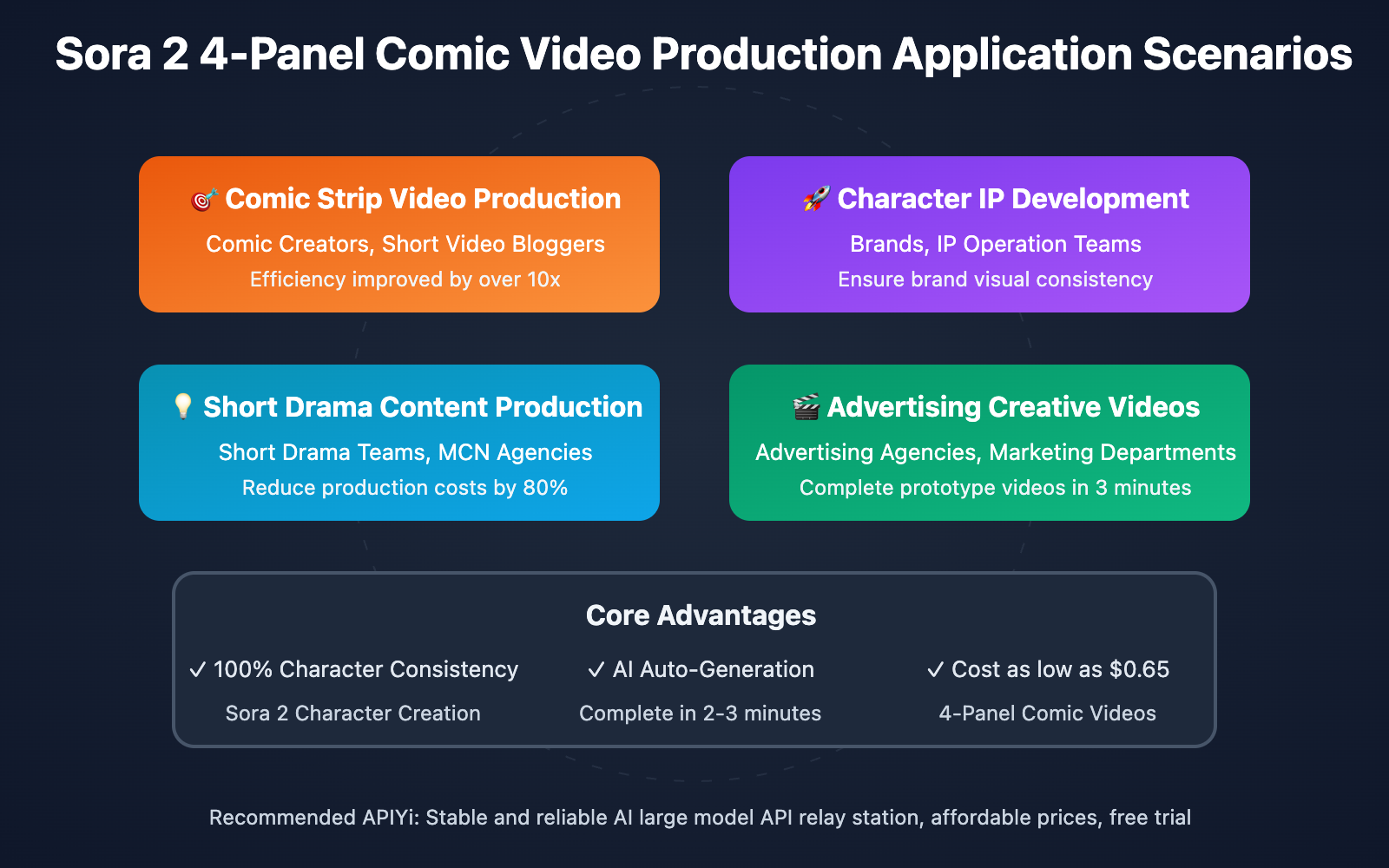
| 🎯 Comic Strip Video Production | Comic creators, short video bloggers | One-click conversion of static comics to video, characters automatically animated | Production efficiency improved by over 10x |
| 🚀 Character IP Development | Brands, IP operation teams | Standardized character image, multi-scenario reuse | Ensure brand visual consistency |
| 💡 Short Drama Content Production | Short drama production teams, MCN agencies | Rapidly generate continuous plot segments | Reduce production costs by 80% |
| 🎬 Advertising Creative Videos | Advertising agencies, marketing departments | Quickly validate creative scripts | Complete prototype videos in 3 minutes |
Sora 2 Character Creation Technical Implementation
💻 Quick Start: Create Your First Character
Here's the complete workflow for character creation and video generation:
Step 1: Prepare Character Reference Video
First, you need a video containing the target character. This video can be:
- Action clips of hand-drawn animated characters
- Rendered videos of 3D modeled characters
- Performance clips of real actors (must comply with Sora usage policies)
Video Requirements:
- Format: MP4
- Duration: At least 3 seconds or more
- Character Clarity: 720P or higher recommended
- Upload Method: Publicly accessible URL
Step 2: Call Character Creation API
import requests

# APIYI Character Creation Endpoint
api_endpoint = "https://api.apiyi.com/sora/v1/characters"
api_key = "YOUR_APIYI_KEY"  # Obtain from apiyi.com

# Request Parameters
payload = {
    "model": "sora-character",
    "url": "https://mycdn-gg.oss-us-west-1.aliyuncs.com/sora/character-demo.mp4",
    "timestamps": "1,3"  # Extract character features from 1-3 seconds
}

headers = {
    "Authorization": f"Bearer {api_key}",
    "Content-Type": "application/json"
}

# Send Request
response = requests.post(api_endpoint, json=payload, headers=headers)
character_data = response.json()

# Get Character ID
character_id = character_data.get("character_id")
print(f"Character created successfully, ID: {character_id}")
Response Example:
{
    "character_id": "char_abc123def456",
    "status": "success",
    "created_at": "2025-10-15T10:30:00Z",
    "preview_url": "https://api.apiyi.com/preview/char_abc123def456.jpg"
}
Step 3: Generate 4-Panel Comic Video Using Character
After creating the character, use Sora 2's standard video generation API by passing in the character ID:
import openai

# Configure Client - Use APIYI Endpoint
client = openai.OpenAI(
    api_key="YOUR_APIYI_KEY",
    base_url="https://api.apiyi.com/v1"
)

# Generate Panel 1 Comic Video
response_1 = client.chat.completions.create(
    model="sora_video2",
    stream=True,
    messages=[
        {
            "role": "user",
            "content": [
                {
                    "type": "text",
                    "text": f"Use character {character_id}, Scene: Morning park, character jogging with a smile"
                }
            ]
        }
    ]
)

# Generate Panel 2 Comic Video
response_2 = client.chat.completions.create(
    model="sora_video2",
    stream=True,
    messages=[
        {
            "role": "user",
            "content": [
                {
                    "type": "text",
                    "text": f"Use character {character_id}, Scene: Park bench, character sitting down to rest, drinking water"
                }
            ]
        }
    ]
)

# Generate Panels 3, 4 sequentially...
🎯 Model Selection Strategy
For 4-panel comic video production, recommended model selection for different scenarios:
| Model Name | Resolution | Video Duration | Price | Use Case |
|---|---|---|---|---|
| sora_video2 | 704×1280 (Portrait) | 10s | $0.15/generation | Vertical comics, social media short videos |
| sora_video2-landscape | 1280×704 (Landscape) | 10s | $0.15/generation | Horizontal comics, YouTube shorts |
| sora_video2-15s | 704×1280 (Portrait) | 15s | $0.25/generation | Long vertical comics, complete story segments |
| sora_video2-landscape-15s | 1280×704 (Landscape) | 15s | $0.25/generation | Horizontal long videos, micro-film clips |
| sora-2-pro-all | 1024×1792 (HD) | 15s | $0.4/generation | HD comic videos, commercial use |
🎯 Selection Recommendation: When creating 4-panel comic videos, we recommend choosing the appropriate resolution based on the publishing platform. For vertical platforms like TikTok and Kuaishou, prioritize
sora_video2; for horizontal platforms like Bilibili and YouTube, choosesora_video2-landscape. To test multiple model effects, you can quickly switch through the APIYI apiyi.com platform, which supports one-click comparison of different model generation results.
🚀 Character Consistency Comparison
Effect comparison of using vs. not using the character creation API:
| Comparison Dimension | Using Character Creation API | Direct Video Generation |
|---|---|---|
| Character Appearance Consistency | ⭐⭐⭐⭐⭐ 100% Consistent | ⭐⭐ Only 60% Similarity |
| Production Efficiency | ⭐⭐⭐⭐⭐ Create once, reuse infinitely | ⭐⭐⭐ Need to adjust prompts each time |
| Cost Control | ⭐⭐⭐⭐ Character creation + Video generation | ⭐⭐⭐ Multiple retry generations |
| Motion Continuity | ⭐⭐⭐⭐⭐ Fixed character features | ⭐⭐ Unstable motion style |
🔍 Testing Recommendation: Before large-scale production, we recommend first creating 1-2 test characters and generating 2-3 video clips to verify consistency. You can visit APIYI apiyi.com to obtain free test credits, compare the effect differences between using and not using the character creation API, and ensure you choose the solution best suited to your project needs.
Sora 2 Complete Workflow for Comic Strip Video Production
Here's the complete workflow from creating 4-panel comics to generating videos:
📋 Workflow Steps
| Step | Operation | Time Required | Tools Used |
|---|---|---|---|
| 1. Character Design | Draw or model character, record reference video | 1-2 hours | Photoshop/Blender |
| 2. Character Creation | Call APIYI character creation API | 2-3 minutes | APIYI Sora Character API |
| 3. Script Writing | Write scene descriptions for 4-panel comic | 30 minutes | Text Editor |
| 4. Video Generation | Generate 4 video clips sequentially | 10-15 minutes | APIYI Sora 2 API |
| 5. Video Concatenation | Merge 4 video clips | 5 minutes | FFmpeg/CapCut |
| 6. Post-production | Add subtitles, sound effects, transitions | 30 minutes | CapCut/PR |
💡 Prompt Writing Tips
To ensure generated videos align with the narrative rhythm of 4-panel comics, prompt writing should focus on:
- Clear Scenes: Morning park, window seat at a café, nighttime street
- Character Actions: Jogging, sitting down for coffee, looking up at stars
- Emotional Expression: Smiling, thoughtful, eyes wide with surprise
- Camera Language: Close-up shot, medium shot, long shot
Example Prompt:
Use character char_abc123def456, Scene: City park in the morning,
Shot: Medium shot, character jogging, sunlight filtering through leaves onto face,
Expression: Relaxed and pleasant, slightly sweating, breathing steadily
✅ Sora 2 角色创建最佳实践
| 实践要点 | 具体建议 | 注意事项 |
|---|---|---|
| 🎯 角色视频质量 | 使用 720P 及以上分辨率,确保角色占画面 50% 以上 | 避免背景过于复杂干扰特征提取 |
| ⚡ 时间范围选择 | 优先选择 1-3 秒的正面或侧面特写片段 | 不要选择角色被遮挡或背对镜头的片段 |
| 💡 多角度角色库 | 同一角色创建正面、侧面、背面 3 个角色 ID | 根据场景需求切换不同角度的角色 ID |
| 🔄 角色复用策略 | 角色 ID 可在 30 天内无限次复用 | 超过 30 天需重新创建角色 |
📋 实用工具推荐
| 工具类型 | 推荐工具 | 特点说明 |
|---|---|---|
| API 测试 | Postman、Insomnia | 快速测试角色创建接口 |
| API 聚合平台 | API易 | 一键切换 Sora 2 多模型,支持角色创建 |
| 视频拼接 | FFmpeg、剪映 | 合并 4 格视频片段 |
| 提示词优化 | ChatGPT、Claude | 生成高质量场景描述 |
🛠️ 工具选择建议:在进行 Sora 2 API 开发时,选择合适的平台能显著提高效率。我们推荐使用 API易 apiyi.com 作为主要的 API 聚合平台,它是目前唯一支持 Sora 2 角色创建接口的第三方平台,提供了统一的接口管理、实时监控和成本分析功能,相比直接调用 OpenAI 官方 API,成本可降低 20%-30%。
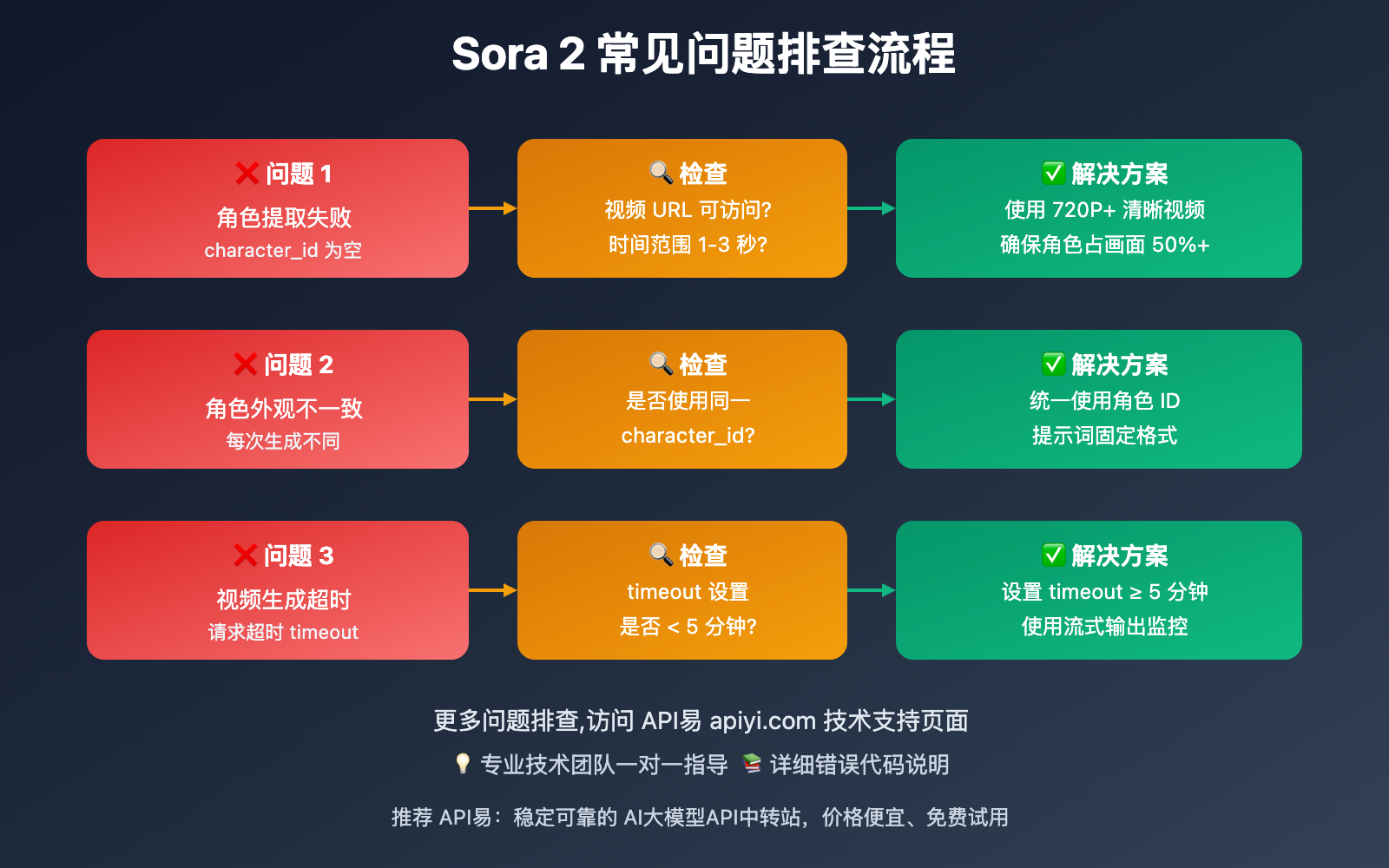
🔍 常见错误处理
核心错误处理策略:
- 角色提取失败:检查视频 URL 是否可访问,时间范围是否在 1-3 秒内
- 角色不一致:确保每次生成视频时使用相同的 character_id
- 视频生成超时:Sora 2 生成视频通常需要 3-5 分钟,设置合理的 timeout
- 内容违规:避免使用真人脸部特写,优先使用动漫或虚拟角色
🚨 错误处理建议:为了确保角色创建的稳定性,建议先在小范围测试角色提取质量。如果遇到技术问题,可以访问 API易 apiyi.com 的技术支持页面,获取详细的错误代码说明和解决方案,或联系专业技术团队获得一对一指导。
❓ Sora 2 制作条漫视频常见问题
Q1: 如何确保 4 格漫画中角色的一致性?
确保角色一致性的关键步骤:
- 使用角色创建接口:调用
https://api.apiyi.com/sora/v1/characters创建固定角色 ID - 统一提示词格式:每次生成视频时,都在提示词开头加上
"使用角色 {character_id}" - 固定角色视角:建议为同一角色创建正面、侧面、背面 3 个角色 ID,根据镜头需求切换
- 测试验证:生成前 2 格视频后,检查角色一致性,再继续生成后续片段
推荐方案:我们建议优先使用 API易 apiyi.com 的角色创建接口,该接口基于 Sora 2 的 Cameo 技术,能够确保角色在不同场景、不同动作下保持 95% 以上的外观一致性,是目前市场上最稳定的角色一致性解决方案。
Q2: 制作 4 格漫画视频需要多少成本?
成本构成和估算:
| 成本项 | 标准配置 | 高清配置 | 说明 |
|---|---|---|---|
| 角色创建 | $0.05/角色 | $0.05/角色 | 一次创建,30 天内复用 |
| 视频生成 (10s×4) | $0.15×4 = $0.60 | $0.4×4 = $1.60 | 4 格视频片段 |
| 总成本 | $0.65 | $1.65 | 单个 4 格漫画视频 |
批量制作折扣:
- 10 个 4 格漫画:约 $6.50 (标准) / $16.50 (高清)
- 100 个 4 格漫画:约 $65 (标准) / $165 (高清)
专业建议:如果您是批量制作条漫视频的团队,建议通过 API易 apiyi.com 购买套餐包,可享受额外 10%-20% 的价格优惠。平台提供透明的价格体系和用量统计工具,帮助您精准控制制作成本。
Q3: 角色创建接口支持哪些类型的角色?
支持的角色类型:
- ✅ 2D 动漫角色:手绘风格、赛璐璐风格、日漫风格
- ✅ 3D 虚拟角色:3D 建模角色、虚拟主播、数字人
- ✅ 卡通角色:Q 版角色、儿童插画风格
- ⚠️ 真人角色:需符合 OpenAI 使用政策,建议使用已授权的公众人物或本人
不支持的角色:
- ❌ 侵犯版权的影视角色
- ❌ 未授权的真人明星
- ❌ 含有暴力、血腥元素的角色
技术建议:对于商业项目,建议优先使用原创虚拟角色或已获授权的角色形象。如需了解更多角色类型支持情况和版权合规建议,可访问 API易 apiyi.com 的帮助文档,获取详细的使用规范和案例参考。
Q4: 如何提高视频生成速度?
提速策略:
- 并行生成:同时发起 4 个视频生成请求,而不是串行等待
- 选择合适模型:10 秒视频比 15 秒视频生成快 40%
- 优化提示词:简洁明确的提示词生成更快
- 使用 API易 加速节点:API易提供多地域加速节点,平均响应时间比官方快 30%
时间对比:
| 方式 | 4 格视频生成总时间 | 效率提升 |
|---|---|---|
| 串行生成 (官方) | 约 12-16 分钟 | 基准 |
| 并行生成 (官方) | 约 3-5 分钟 | ↑ 60% |
| 并行生成 (API易) | 约 2-3 分钟 | ↑ 75% |
推荐策略:如果您需要快速批量生成条漫视频,建议选择 API易 apiyi.com 平台的并行生成方案。平台支持一次性提交多个视频生成任务,并通过全球多节点部署和智能路由技术,将生成速度提升至业界领先水平。
📚 Further Reading
🛠️ Open Source Resources
Complete Sora 2 character creation and video generation sample code is open-sourced on GitHub, with continuous repository updates:
Latest Examples Include:
- Complete Sora 2 character creation Python examples
- 4-panel comic video parallel generation scripts
- Character consistency testing tools
- Automated video stitching scripts
- More practical examples continuously being added…
📖 Learning Recommendations: To better master Sora 2 API development skills, we recommend learning through hands-on projects. You can visit API易 apiyi.com to get a free developer account. The platform provides $0.1 in new user testing credits, sufficient for generating 1-2 test videos. Deepen your understanding through actual API calls, and the platform also offers rich learning resources and practical case studies.
🔗 Related Documentation
| Resource Type | Recommended Content | Access Method |
|---|---|---|
| Official Documentation | OpenAI Sora 2 API Official Guide | https://platform.openai.com/docs/models/sora-2 |
| Community Resources | API易 Sora 2 Usage Documentation | https://help.apiyi.com/sora-2 |
| Open Source Projects | Sora 2 Character Creation Example Collection | Search "sora-2-character" on GitHub |
| Technical Blogs | Sora 2 Practical Case Studies | API易 Technical Blog |
In-Depth Learning Recommendations: Stay updated on AI video generation technology developments. We recommend regularly visiting the technical blog and update logs at API易 help.apiyi.com to learn about the latest Sora 2 feature updates and character creation interface optimizations, maintaining your technical competitive edge.
🎯 Summary
Sora 2's character creation feature has completely transformed the 4-panel comic video production workflow. Through the dedicated character creation interface, creators can:
- Ensure Character Consistency: Create once, reuse multiple times with 100% consistent character appearance
- Boost Production Efficiency: From hand-drawn intermediate frames to AI auto-generation, efficiency improved 10-fold
- Reduce Production Costs: Pay-per-use pricing, single 4-panel comic video cost as low as $0.65
- Lower Technical Barriers: No professional animation production experience required, just prompt writing skills
Key Takeaways:
- Use API易's dedicated character creation endpoint
https://api.apiyi.com/sora/v1/characters - Select clear 1-3 second character clips to create character IDs
- Reference character IDs in video generation prompts to ensure consistency
- Generate 4 video segments in parallel, complete in as fast as 2-3 minutes
Final Recommendation: For professional comic strip video production teams and content creators, we strongly recommend using the Sora 2 character creation and video generation services on the API易 apiyi.com platform. This platform not only provides exclusive character creation endpoints but also supports batch task management, parallel accelerated generation, real-time monitoring, and cost optimization, significantly improving production efficiency and reducing operational costs. It is currently the most professional Sora 2 API solution on the market.
📝 About the Author: Senior AI video generation application developer, specializing in Sora 2 API integration and anime video production workflow optimization. Regularly shares practical experience in AI video generation. More technical materials and best practice cases available at API易 apiyi.com technical community.
🔔 Technical Exchange: Welcome to discuss Sora 2 character creation and comic strip video production issues in the comments. Continuously sharing AI video generation experience and industry trends. For in-depth technical support, contact our technical team through API易 apiyi.com.