Author’s note: When you call an image generation API, a response with no image doesn’t mean the request failed, and it definitely doesn’t mean you weren’t charged. This article gives you a 4-step method for checking the response first and then deciding whether to retry, plus Python code you can use as-is.
If you’ve worked with image APIs, you’ve probably hit this: the request goes out, the API responds, but you can’t find an image anywhere in the result. Many people’s first reaction is “the network must have hiccuped,” so they immediately call again, or even write a loop that fires several times in a row. This article walks through checking the response first, then deciding whether to retry, so you know the right way to troubleshoot when image generation returns no image.
This isn’t a generic retry guide. With per-call billing for image generation models, every request can incur a charge. Take gpt-image-2.6-all, which went live on APIYI on 2026-11-12, as an example. It costs $0.025 per call, so if you blindly retry an empty response, you pay again.
Core value: After reading this, you’ll know which places to check first when image generation returns no image, when it’s safe to retry and when you absolutely must not, and how to build this logic into your code so the same image never gets billed twice.
Key Takeaways When an Image Generation Request Returns No Image
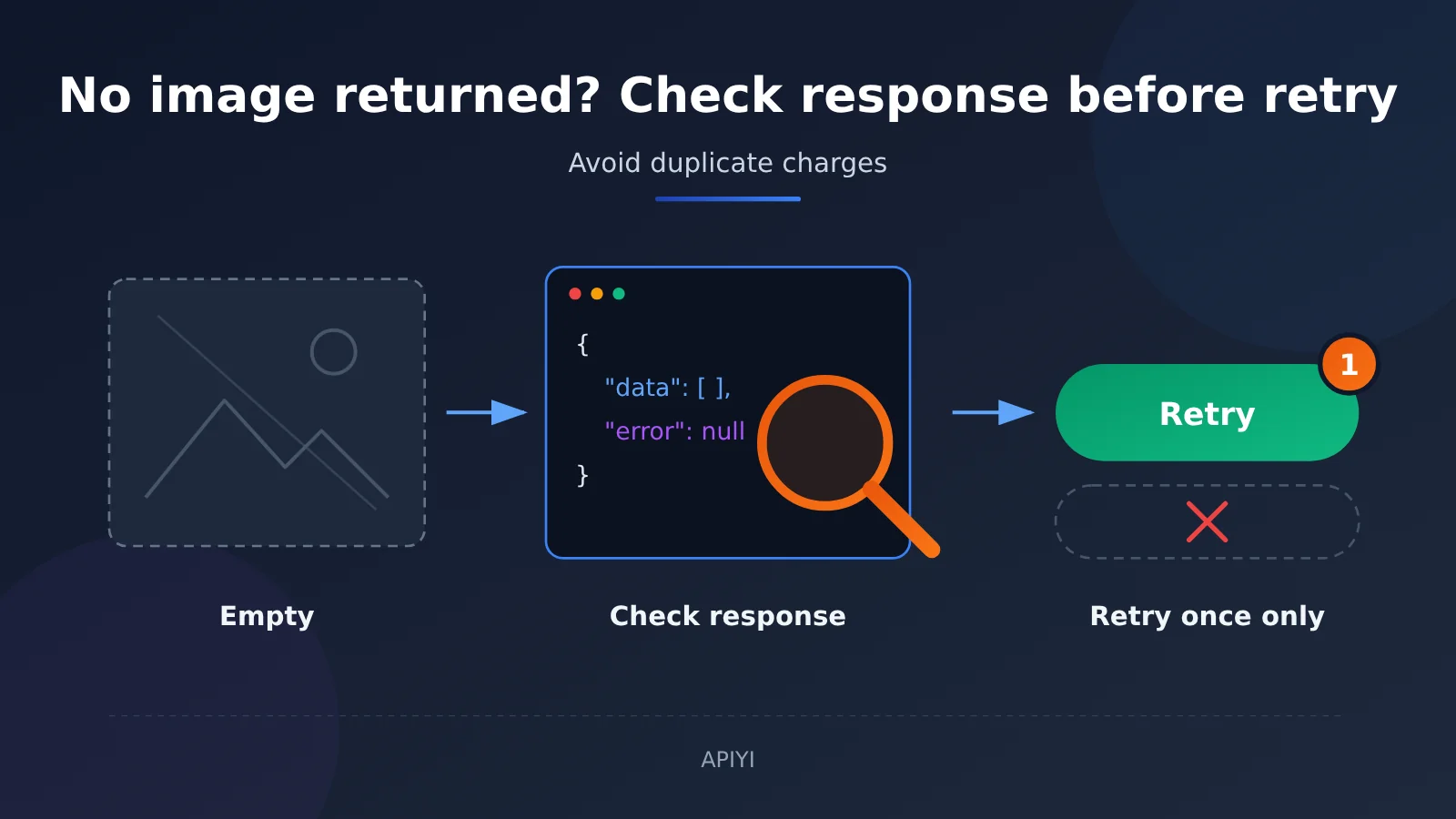
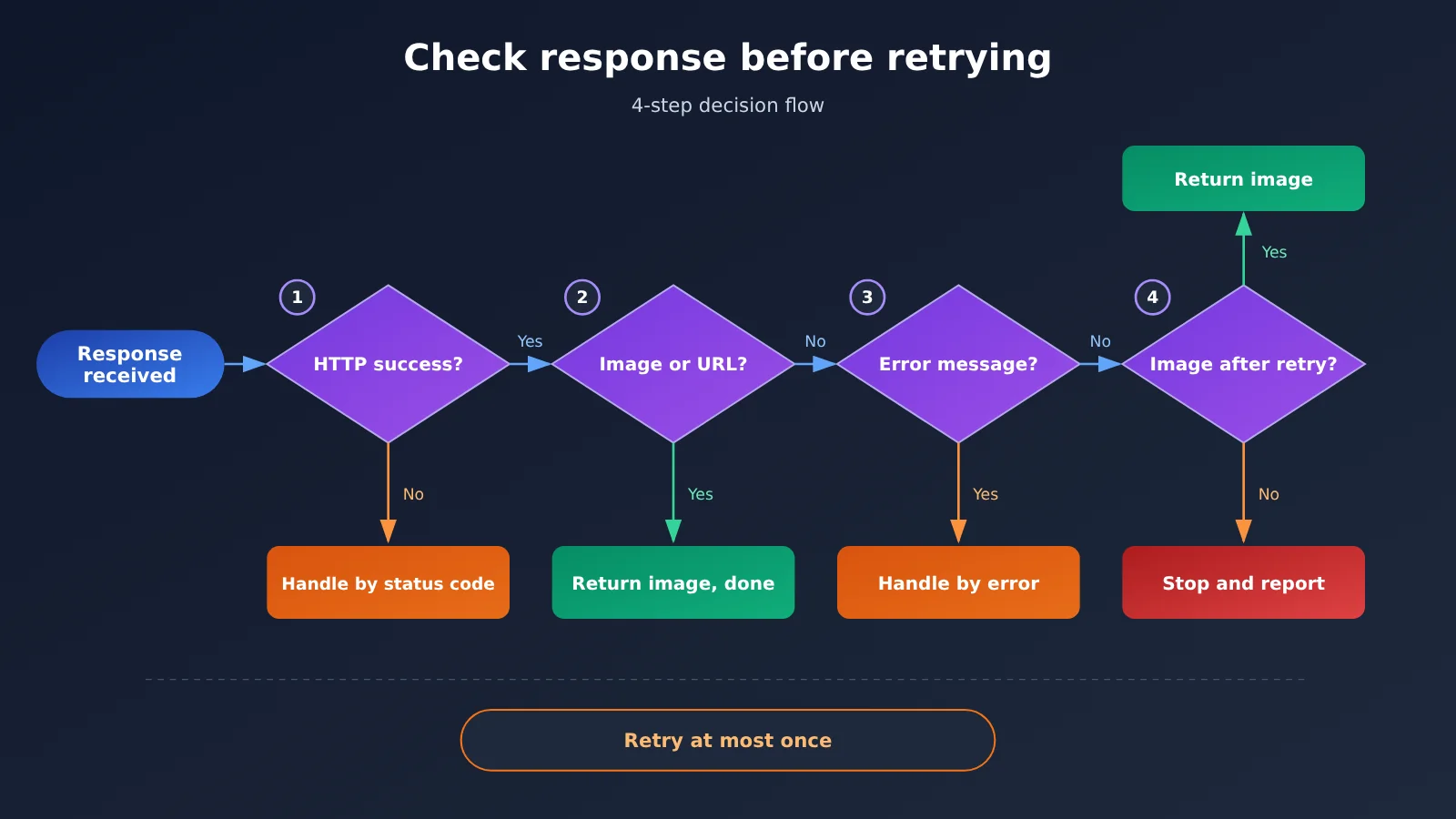
Here’s the bottom line up front. When an image generation request comes back without an image, don’t write it off as a network problem. Check the response in a fixed order instead. The table below summarizes the four steps.
| Step | What to check | What to do if the answer is “no” | Why it matters |
|---|---|---|---|
| Step 1 | Did the HTTP request succeed? | Handle it by status code and skip the remaining steps | Separates request-level failures from content-level problems |
| Step 2 | Does the response contain image data or an image URL? | Move on to Step 3 | If there’s an image, you’re done, so no accidental retries |
| Step 3 | Does the response contain an error message? | If so, handle it as an error | Stops you from paying again and again for a request that’s bound to fail |
| Step 4 | Confirm there’s no image and no error | Retry only once | Keeps the extra cost predictable |
Why You Shouldn’t Retry Immediately When No Image Comes Back
Image generation requests differ from ordinary text chat. Each call costs more, and the outcome often isn’t all-or-nothing. A request may have finished generating on the server, and your code simply didn’t pull the image from the right field. Or the request may have been rejected outright, with the reason sitting right there in the response. Retrying immediately in the first case means paying twice for the same image. In the second case, you pay repeatedly for a request that was never going to succeed.
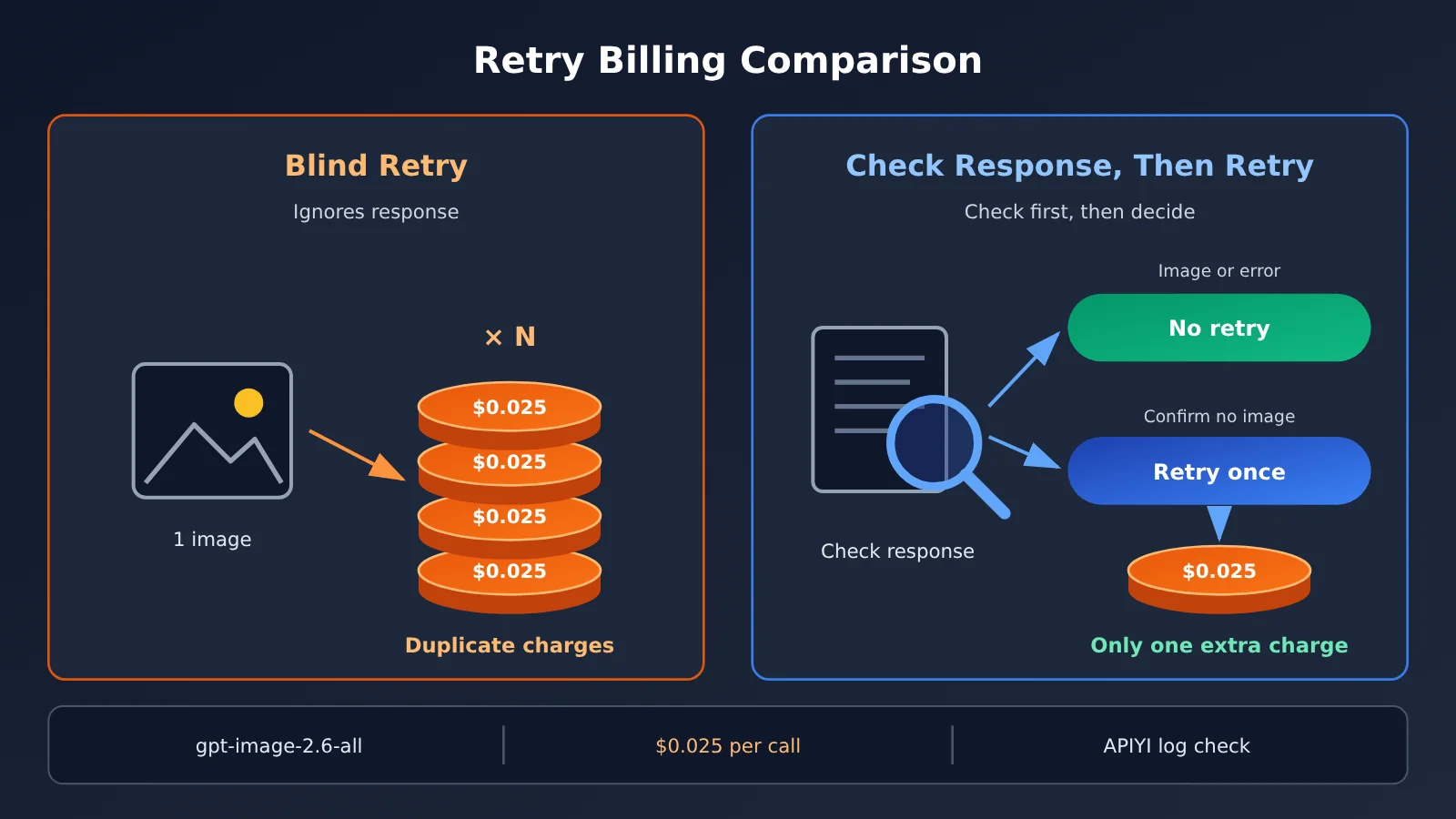
Take gpt-image-2.6-all at $0.025 per call. Every blind retry costs another $0.025. If you treat an empty response as a network hiccup and hammer it in a loop, three retries add $0.075, and you may not get a single usable image for that money. So when an image generation request returns no image, looking at the response before retrying is really just a near-zero-cost check you do before spending more.
The Logic Behind Checking the Response Before Retrying
The order follows an “outside-in” principle. The HTTP status code is the outermost signal, and it tells you whether the request was processed normally. The image data is what you actually want, so you check it next. An error message is the server’s own explanation of a failure, so it has to take priority over a retry. Only after all three layers have been checked, and you’ve confirmed there’s no image and no error explanation, does a retry make sense.
One detail people often overlook: Step 2 checks for “image data or an image URL.” Different API formats return images in different places. Some put them in the b64_json or url field inside the data array, while others write the image link into the content text of a chat message. If your parsing code only recognizes one of these, it will mistake a response that does contain an image for an empty one. That’s one of the most common causes of unnecessary retries.
Breaking Down “No Image Returned” Response Types
To get into the habit of checking the response before retrying, you first need to know what a response can actually look like. The table below lists the common types and how to handle each one.
| Response Type | Typical Signs | Image Generated? | Recommended Handling |
|---|---|---|---|
| Request-level failure | Non-2xx HTTP status code | No | Handle by status code; fix authentication or parameter issues before resending |
| Normal result (structured) | data contains b64_json or url |
Yes | Grab the image directly; don’t retry |
| Normal result (embedded in text) | Message content contains an image link |
Yes | Extract the link with a regex; don’t retry |
| Successful response with error info | HTTP succeeds, but the body contains error or a refusal explanation |
No | Read the error reason, then adjust the prompt or parameters |
| Truly empty response | HTTP succeeds, no image, no error | No | Log the raw response, then retry once |
| Request timeout | Client never received a response | Can’t tell | Don’t auto-retry; check your logs and billing first |
Why You Should Look Before Retrying on a Timeout
A timeout is the case most easily written off as a “network blip,” but it’s exactly the one that calls for the most caution. A client-side timeout only tells you that you didn’t wait long enough for a response. It doesn’t tell you the server didn’t finish generating. Image generation takes a while, so if your client’s timeout is set too short, the server may well have finished the image and already billed you, while your program gave up waiting before it arrived.
In this situation, the sensible approach is to first loosen the timeout a bit. Then, when a timeout does happen, record the request time and parameters, and check the call logs in the console to see the actual status of that request. Once you’ve confirmed there’s no successful record, resend it manually. That’s much safer than letting your program fire off request after request automatically.
Responses with Error Info Should Be Treated as Errors
Some responses come back with a successful HTTP status, but the body contains an error object, or the model explains in text why it couldn’t generate the image, for example because the prompt triggered content moderation. These responses don’t contain an image, but the reason is already spelled out, so retrying the same request as-is will almost certainly give you the same result.
The right move is to read the error message and work out whether it’s a parameter problem, a content problem, or a temporary server-side issue. Parameter and content problems require changing the request before you send it again. Only when the error clearly points to a temporary fault should you consider retrying, and even then, wait a while first.
When Image Generation Returns No Image, Check the Response Before Retrying: Quick Start
Here’s how to build this check into your code with Python. The example uses the OpenAI-compatible endpoint, with gpt-image-2.6-all as the model. For the exact endpoint and response format, check the APIYI documentation for that model.
Minimal Example: Check for an Image Before Anything Else
The simplest approach is to check the image field as soon as you get a response. If there’s an image, you’re done. If not, move on to troubleshooting:
from openai import OpenAI

client = OpenAI(
    api_key="YOUR_API_KEY",
    base_url="https://api.apiyi.com/v1",  # APIYI OpenAI-compatible endpoint
)

resp = client.images.generate(
    model="gpt-image-2.6-all",
    prompt="一只坐在窗台上的橘猫,水彩风格",
)

item = resp.data[0] if resp.data else None
if item and (item.b64_json or item.url):
    print("已拿到图片,不要重试")
else:
    print("响应里没有图片,先打印原始响应再决定")
    print(resp.model_dump())
This snippet is only a dozen or so lines, but it already avoids the most common mistake: firing off another request without looking at what came back. HTTP-level failures are raised as exceptions by the SDK, so you can catch them in an outer try block and handle them by status code instead of jumping straight into a retry loop.
Complete Example: A 4-Step Check Plus At Most One Retry
For production, I’d recommend this more complete version. It covers the HTTP status check, parsing both places an image can show up, detecting error messages, never auto-retrying on a timeout, and capping retries at one after you’ve confirmed there’s no image:
import re
import requests

API_KEY = "YOUR_API_KEY"
BASE_URL = "https://api.apiyi.com/v1"  # APIYI unified endpoint URL
MODEL = "gpt-image-2.6-all"
IMG_URL_RE = re.compile(r"https?://\S+?\.(?:png|jpe?g|webp)", re.I)


def find_images(body):
    """Check both the structured data field and the chat content for image links"""
    images = []
    for item in body.get("data") or []:
        if item.get("url"):
            images.append(item["url"])
        elif item.get("b64_json"):
            images.append("base64-image")
    for choice in body.get("choices") or []:
        content = (choice.get("message") or {}).get("content") or ""
        images += IMG_URL_RE.findall(content)
    return images


def generate_with_check(prompt, max_retry=1):
    for attempt in range(max_retry + 1):
        try:
            resp = requests.post(
                f"{BASE_URL}/images/generations",
                headers={"Authorization": f"Bearer {API_KEY}"},
                json={"model": MODEL, "prompt": prompt},
                timeout=300,
            )
        except requests.Timeout:
            # After a timeout we can't tell whether the server already generated (and billed) the image, so don't auto-retry
            return {"status": "timeout", "action": "check_logs_first"}

        # Step 1: Was the HTTP request successful?
        if resp.status_code != 200:
            return {"status": "http_error", "code": resp.status_code,
                    "detail": resp.text[:500]}

        try:
            body = resp.json()
        except ValueError:
            return {"status": "bad_json", "detail": resp.text[:500]}

        # Step 2: Does the response contain image data or an image URL?
        images = find_images(body)
        if images:
            return {"status": "ok", "images": images}

        # Step 3: If there's an error message, treat it as an error and don't retry
        if body.get("error"):
            return {"status": "api_error", "error": body["error"]}

        # Step 4: Only retry once you've confirmed there's no image and no error, and after logging the raw response
        print(f"第 {attempt + 1} 次请求无图片,原始响应:{str(body)[:300]}")

    return {"status": "empty_after_retry", "action": "stop_and_report"}


result = generate_with_check("一只坐在窗台上的橘猫,水彩风格")
print(result)
A few design choices in this code are worth calling out. max_retry defaults to 1, which means a single image can incur at most two request charges, so your cost ceiling is predictable. The timeout branch returns immediately instead of looping, because after a timeout you can’t confirm whether you’ve already been billed. And every time a response is judged empty, the raw response gets printed, so you can figure out later whether it was a parsing problem or the server genuinely didn’t produce an image.
🚀 Quick Start: If you want to validate this logic in a test environment first, you can get free test credits through APIYI at apiyi.com. With a single API key, you can call gpt-image-2.6-all and other mainstream models, so you can get the checking flow working before plugging it into production.
Cost Comparison: Blind Retries When Image Generation Returns No Image
Before you write the decision logic into your code, it’s hard to get a gut feel for what “just retry a few more times” actually costs. Using gpt-image-2.6-all at $0.025 per call, here’s how blindly hammering the endpoint compares with checking the response first, measured as extra spend on a single image.
| Strategy | Max requests per image | Worst-case extra spend | Risk |
|---|---|---|---|
| No check, retry once on failure | 2 | $0.025 | You may pay twice for a request that already produced an image |
| No check, loop 3 retries | 4 | $0.075 | You keep paying for requests that are guaranteed to fail |
| No check, loop until an image appears | Unbounded | No cap | Content moderation refusals keep billing you |
| Check the response first, retry once only if there’s confirmed no image | 2 | $0.025 | You only pay extra when the response is truly empty |
On paper, “check first, then retry” and “retry once on failure” have the same worst-case extra spend. But what triggers the retry is completely different. The first approach only spends that $0.025 when you’ve confirmed there’s no image and no error message. The second spends it even when an image was generated but parsing failed, or when the content was rejected, and in those cases the retry buys you nothing.
Once you scale up to batch image generation, that difference multiplies. An extra $0.025 per image, times your daily request volume, adds up to a cost you could have avoided entirely.
API and Model Reference for Missing Image Responses
Different models and API formats can return images in different places, and that directly affects how accurate your check in Step 2 is. The table below lists the common response formats and what to look for, so you can make sure your parsing code isn’t missing the image.
| Response Format | Where the Image Lives | Parsing Tips | Available Platform |
|---|---|---|---|
| Image generation endpoint (URL) | data[].url |
Links may expire, so download and save the image as soon as you get it | APIYI (apiyi.com); check the model docs for specifics |
| Image generation endpoint (Base64) | data[].b64_json |
Decode it and write it to a file; don’t mistake it for an empty string | Same as above |
| Image embedded in a chat endpoint | choices[].message.content |
Use a regex to extract Markdown images or links | Same as above |
| Streaming response | The full content after all chunks are joined | Wait until the stream ends and the chunks are fully assembled before deciding whether there’s an image | Same as above |
Streaming responses are another easy place to get a false negative. If you look for the image as soon as the first chunk arrives, of course you won’t find anything. When an image generation request seems to return no image, always confirm that you’re checking the complete response, not an intermediate state.
FAQ
Q1: If an image generation request returns no image, does that mean I wasn’t charged?
Not necessarily. Whether a request gets billed depends on whether the server processed it, not on whether your code managed to pull out an image. A wrong parsing field, a streaming response you didn’t fully assemble, or a client that timed out too early can all lead to “charged, but you never got the image.” So check the response before you retry, instead of assuming nothing was charged and firing the request again.
Q2: How is “check the response before retrying” different from regular exponential backoff?
Exponential backoff answers “when should I retry?” It works well for rate limiting and temporary server-side failures. Checking the response first answers “should I retry at all?” For per-request-billed image generation, use the 4-step check to confirm a retry is actually needed, then apply a backoff strategy to decide the timing. The two work in sequence rather than replacing each other.
Q3: When did gpt-image-2.6-all launch, and how much does it cost?
gpt-image-2.6-all launched on APIYI on 2026-11-12, billed per request at $0.025. Per-request billing means every request is priced independently, so blindly retrying an empty response means paying again. That’s exactly why this article stresses checking the response first.
Q4: In which cases should I never retry when no image comes back?
There are three main cases:
– **The response contains an error message**: For example, the prompt triggered content moderation or a parameter is invalid. Retrying as-is will give the same result.
– **The request timed out**: You can’t tell whether the server already generated the image and billed you, so check your logs first.
– **Authentication or quota-related HTTP errors**: Retrying won’t change anything. Fix the key or quota issue first.
Q5: How can I quickly verify that my decision logic is correct?
Run through the whole flow in a test environment first:
1. Sign up at APIYI (apiyi.com) to get an API key and free test credit
2. Set `BASE_URL` in the full example from this article to `https://api.apiyi.com/v1`, then call gpt-image-2.6-all
3. Test with both a normal prompt and one that’s likely to be rejected, and watch what each branch returns
Once every kind of response lands in the right branch, move it into your production workflow.
Q6: I retried once and still got no image. What now?
Stop retrying automatically, and record the raw responses, request parameters, and timestamps for both requests. First check whether your parsing code is missing the image field, then go to the console and review the invocation records for both requests. If it turns out the server really did return empty results twice in a row, contact APIYI support at apiyi.com with the request times and raw responses. That’s more effective than paying for more retries.
Q7: How do I keep retry costs under control for batch image generation?
Give each image generation task its own retry counter, and cap retries at 1 per task. It also helps to track an “empty response rate” at the batch level. If a batch has noticeably more empty responses than usual, look at your prompts and parsing logic first rather than raising the retry limit across the board.
Check the Response Before Retrying When Image Generation Returns No Image: Key Takeaways
- No image doesn’t mean no charge: For per-call billed image generation requests, the server may have already billed you once it processed the request.
- Follow a fixed order of checks: HTTP status → image data or URL → error message → retry only after confirming there’s no image.
- Retry just once: If there’s no image and no error, retry only once so your maximum cost stays predictable.
- Don’t auto-resend on timeouts: A timeout doesn’t tell you whether the image was generated, so check your logs before deciding to resend.
- Parse every possible location: Check both the
datafield and the chatcontentso you don’t mistake a valid response for an empty one. - Blind retries have a clear cost: With gpt-image-2.6-all, every extra blind retry costs you another $0.025.
- Validate on test credits first: You can use the free test credits at APIYI (apiyi.com) to run through this decision flow before going live.
Summary
Here are the key points to remember when image generation returns no image: check the response first, then retry.
- Investigate before you spend: Inspecting the response costs almost nothing, while every blind retry gets billed.
- Follow the 4-step order: Was the HTTP request successful? Is there an image? Is there an error? Only after confirming there’s no image, retry once.
- Put the rules in your code: Cap the number of retries, never auto-resend on a timeout, and log the raw response, so costs stay under control and problems are easy to trace.
If you’re calling per-call billed image models, this approach isn’t complicated, but it can save you from paying twice for the same image. We recommend running through every branch in a test environment first, then turning it into your standard wrapper for image generation calls.
To quickly validate this handling logic, try APIYI at apiyi.com. The platform offers an OpenAI-compatible API and free test credits, and a single API key gives you access to gpt-image-2.6-all and many other leading models.
📚 References
- APIYI Documentation Center: Model invocation methods and response format details
- Link:
docs.apiyi.com -
Notes: Check the docs for the exact endpoints and response fields for gpt-image-2.6-all. The docs are the source of truth.
-
OpenAI Images API Reference: The standard response structure for image generation endpoints
- Link:
platform.openai.com/docs/api-reference/images - Notes: Explains what the
urlandb64_jsonfields in thedataarray mean
Author: APIYI Technical Team
Get in touch: Reach out to us via the APIYI website homepage. For more integration resources, visit the docs.apiyi.com documentation center.