Author’s note: Grok Bot 1.0 is out of beta and now has team collaboration features, but you don’t get to choose the model. This article pulls together the official information and explains what to do if you need a fixed model ID and a fixed unit price.
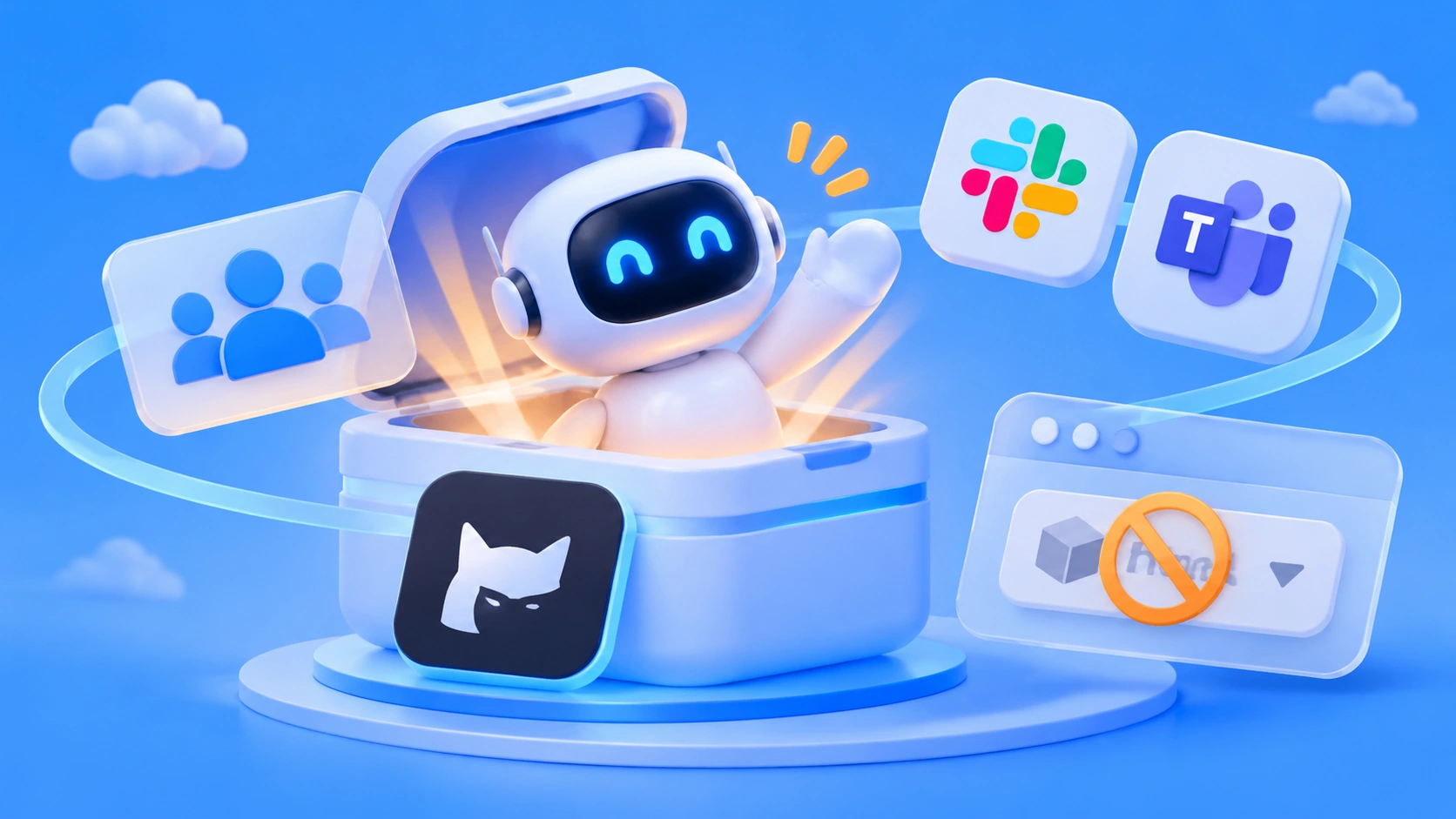
In its 2026-11-02 release notes, xAI introduced Grok Bot 1.0: bots can be shared with your team, join Slack, Microsoft Teams, and video meetings, and can even proactively suggest work to do. The official version history logs 1.0 on 2026-11-11, which is when Grok Bot moved from beta to a formal release.
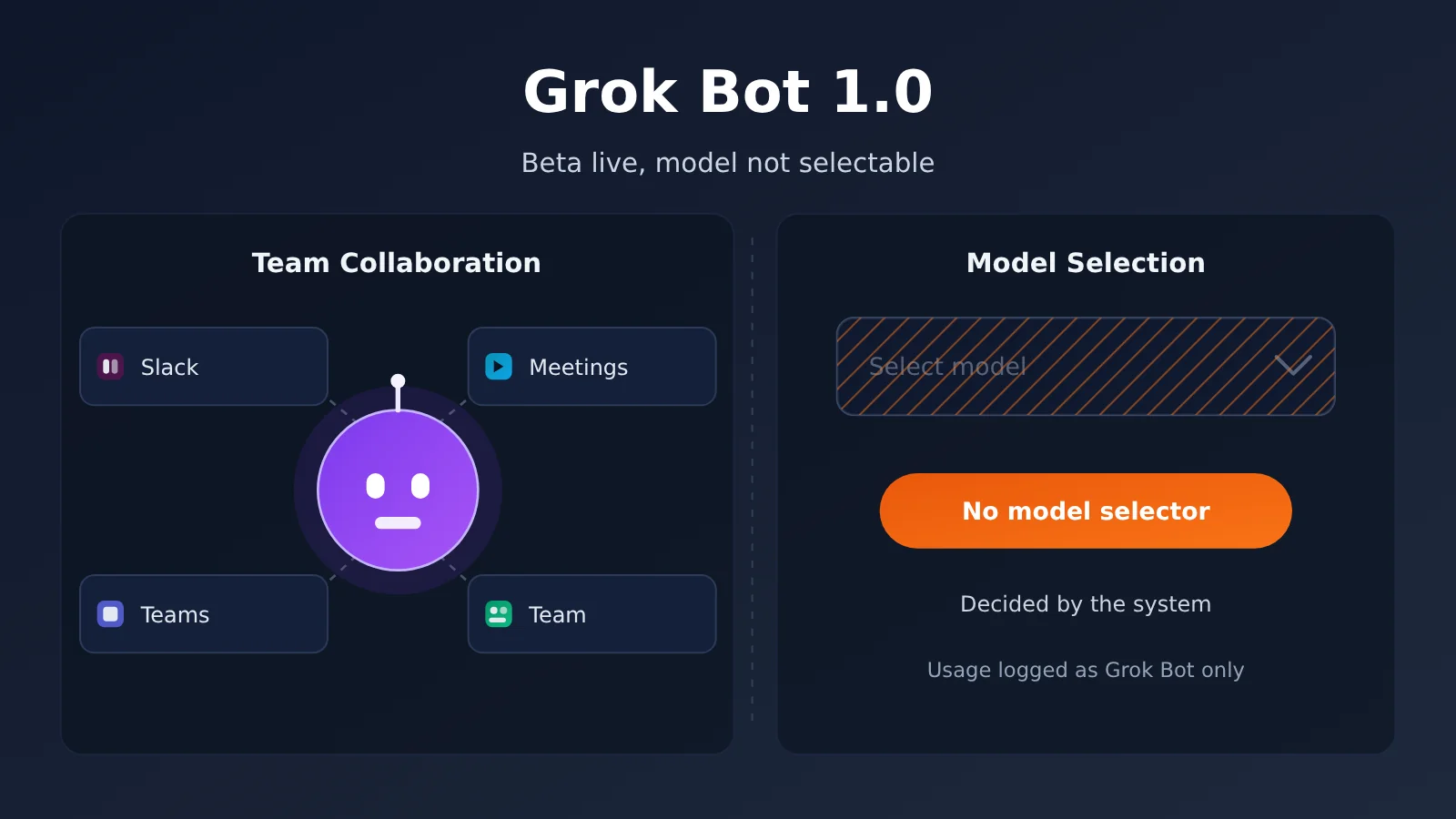
This update is backed by official release notes and version history. That said, the Grok Bot FAQ also states one thing plainly: there’s no model selector. The system decides which model handles each task, and your bill just says “Grok Bot”.
What you’ll get from this article: In about 3 minutes, you’ll understand what’s new in Grok Bot 1.0, why you can’t specify the model behind it, and which route to take if you need a fixed model ID.
Grok Bot 1.0 at a Glance
The table below summarizes the key details of this update. Anything that comes from xAI’s release notes or FAQ is marked as self-reported by xAI, so check the official pages for the latest version.
| Item | Details | Source |
|---|---|---|
| Release notes date | 2026-11-02 | xAI official notes (self-reported) |
| Version milestone | The 2026-11-11 version log lists 1.0, out of beta | Official version log |
| New capabilities | Share with a team, join Slack, Microsoft Teams, and video meetings, proactively propose work | xAI official notes (self-reported) |
| Safety boundary | Sensitive actions still require human approval | xAI official notes (self-reported) |
| Model selection | No model selector | Grok Bot FAQ (self-reported) |
| Underlying model | Could be SpaceXSI’s own model or a third-party model | Grok Bot FAQ (self-reported) |
| Usage billing | Logged uniformly as Grok Bot, not broken down by provider or model name | Grok Bot FAQ (self-reported) |
New Team Capabilities in Grok Bot 1.0
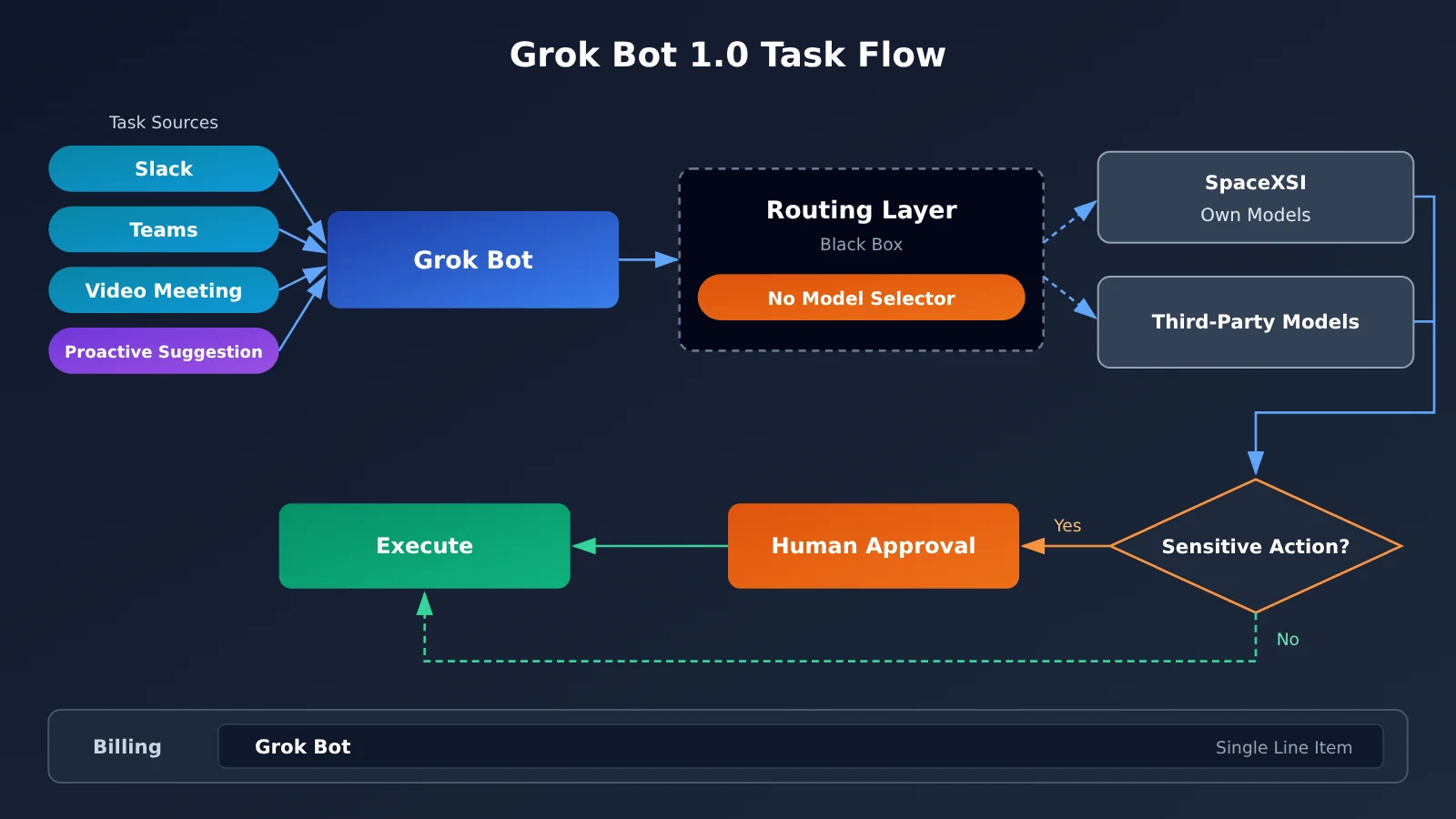
Going by the official notes, the big shift in 1.0 is that the Bot goes from a personal assistant to a team member. Before, the Bot mostly served a single user. Now you can share it with an entire team, and multiple people work with the same Bot and its shared working context.
It also reaches more places. The official notes name Slack, Microsoft Teams, and video meetings, so the Bot can show up where your team already communicates instead of living in a separate interface you have to open.
The other change is proactivity. xAI says the 1.0 Bot can propose work on its own without waiting for someone to give it instructions. For a team, that makes it feel more like a collaborator who makes suggestions than a simple Q&A tool.
Grok Bot 1.0’s Human Approval Boundary
Once a Bot gets more proactive, permission boundaries matter a lot more. The official notes state that sensitive actions still need a human to approve them. The Bot can propose and prepare, but a person makes the final call on critical operations.
This design is friendly to enterprise teams, since it lowers the risk of the Bot taking a wrong action in a group chat or a meeting. That said, the official notes don’t give a complete list of what counts as a “sensitive action,” so before rolling it out, your team should check in your own workspace which operations trigger approval.
Why You Can’t Choose the Model Behind Grok Bot 1.0
The Grok Bot FAQ is blunt about it: there’s no model selector. Once you submit a task, the system might hand it to one of SpaceXSI’s own models or to a third-party model, and nothing in the interface lets you choose.
That’s not what most people expect from an “AI tool.” With Grok Bot, you’re dealing with a product, not a set of models. The vendor controls the routing policy. You see the result of a task, but not which model produced it.
What It Means That Grok Bot 1.0 Bills Everything as “Grok Bot”
The FAQ also says usage is billed under a single Grok Bot label, with no breakdown by vendor or model name. It gives one self-reported example: even if a task gets routed to Opus 5.5, the per-token price you pay doesn’t change.
For everyday users, that’s good news. You don’t have to worry that a given task happened to run on a pricier model. But for teams that need cost accounting, model evaluation, or compliance audits, it means the bill doesn’t show the model, and you can’t specify one in the request either.
| Comparison | Grok Bot 1.0 (self-reported) | Calling a model API directly |
|---|---|---|
| Model selection | No model selector; the system routes tasks | The model field in the request names the model explicitly |
| Underlying model | SpaceXSI’s own or third-party, not visible | Exactly the model ID you specify |
| Billing granularity | Billed uniformly as Grok Bot | Metered separately by model ID |
| Unit price | Grok Bot pricing; routing doesn’t change it | Each selected model’s own unit price |
| Reproducibility | The same task may run on different models | More predictable once you pin a model ID |
| Typical use | Team collaboration, meetings, proactive task suggestions | Product integration, evaluation, batch jobs |
To be clear, Grok Bot isn’t a callable model ID. It isn’t listed in APIYI’s pricing, and you can’t call it by putting grok-bot in the model field of an OpenAI-compatible API. It’s a team-oriented product, not a model.
Grok Bot 1.0 Impact Analysis
This update affects two groups of readers: people who use Grok Bot with their team, and developers who have to hard-code a model ID in their code. They care about different things, so I’ll cover them separately.
Impact on Grok Bot Users
- Lower barrier to collaboration: Now that the bot works inside Slack, Teams, and video meetings, your team can use it without switching tools. Sharing it with the team also means nobody has to set up their own.
- A change in how work gets done: Once the bot starts proposing work on its own, your team needs to agree on who handles those proposals, so they don’t turn into noise.
- Design your approval flow early: Sensitive actions need human approval. Name the approvers ahead of time, or tasks may sit in a pending state.
- Costs are tracked per product: Your bill has a single Grok Bot line item, so you can manage the budget at the product level without tracking which model ran behind the scenes.
Impact on Developers Who Must Specify a Model ID
- No model-level evaluation: To compare how different models perform on the same task, you need to be able to pin the model. Grok Bot doesn’t offer that.
- No per-model cost accounting: If finance or a customer wants costs broken down by model, a single Grok Bot bill can’t deliver that.
- Limited reproducibility: The underlying model may change, so the same prompt could be handled by different models at different times. That makes it a poor fit for production pipelines that need stable output.
- Be careful in compliance scenarios: Some industries require you to state which vendor’s model processed the data. System-level routing combined with an unbroken-down bill makes that harder to document.
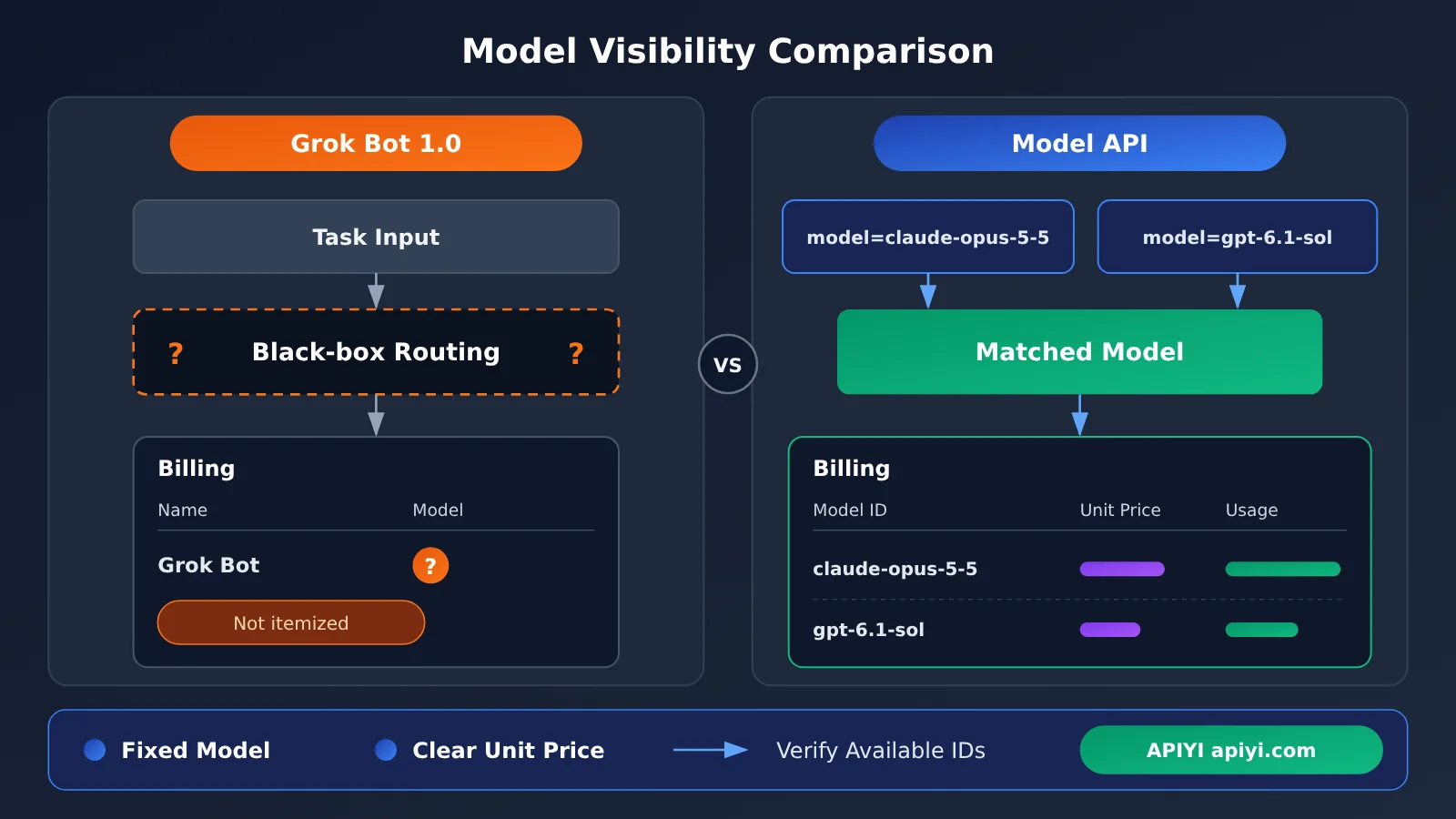
If your needs fall in the right-hand column, meaning you need to know which model handled a request and what it cost per unit, call a model API directly instead of relying on Grok Bot’s routing. The table below gives recommendations by scenario.
| Scenario | Recommended approach | Why | Where to get it |
|---|---|---|---|
| Team chat collaboration, meeting notes, and follow-ups | Grok Bot 1.0 | Native integration with Slack, Teams, and video meetings | Official xAI product |
| You want the bot to propose work proactively | Grok Bot 1.0 | New in 1.0 (self-reported by the vendor) | Official xAI product |
| Calling a fixed model inside a product feature | Model API | The model field lets you hard-code the model ID |
APIYI (apiyi.com) and other API platforms |
| Evaluating and comparing multiple models | Model API | The model for each request is explicit and reproducible | A unified interface that supports multiple models |
| Per-model cost accounting and billing | Model API | Metering is broken out by model ID | Use the unit prices in the platform’s model list |
How to Specify a Model Yourself via the API (Instead of Grok Bot Routing)
If you need to explicitly use model IDs like gpt-6.1-sol or claude-opus-5-5, you’ll have to go through the API. Those are the kinds of IDs the reference material mentions. Which ones you can actually use, and what they cost, depends on what’s currently listed in the platform’s model list.
With an OpenAI-compatible interface, you only need to change three parameters to get connected. The table below shows how to set the key fields.
| Parameter | Example | Description |
|---|---|---|
base_url |
https://api.apiyi.com/v1 |
OpenAI-compatible endpoint |
api_key |
YOUR_API_KEY |
Get it from the platform console; one key works for models from multiple providers |
model |
claude-opus-5-5 or gpt-6.1-sol |
Specifies the model ID explicitly, with no routing in between |
messages |
[{"role": "user", "content": "..."}] |
Standard chat message format |
Using the Python OpenAI SDK as an example, initialize the client with client = OpenAI(api_key="YOUR_API_KEY", base_url="https://api.apiyi.com/v1"). Then, when you make the call, pass your chosen model in client.chat.completions.create(model="claude-opus-5-5", messages=...). To switch models, just change the model field. The rest of your code stays the same.
This gives you the opposite of what Grok Bot does: the model ID is visible in the request, and your bill breaks down usage and unit price by model. If your team needs to run evaluations, do cost accounting, or handle audits, this approach is a better fit.
🎯 Tip: Before you settle on a model, check the model list on APIYI (apiyi.com) to confirm the model ID is available and see its unit price, then put it in the
modelfield. The platform offers an OpenAI-compatible interface, and a single API key lets you call OpenAI, Claude, Gemini, and other major models. New users get free test credits, so you can get everything working before moving to production.
Frequently Asked Questions (FAQ)
Q1: What is Grok Bot 1.0?
Grok Bot 1.0 is the official release of Grok Bot from xAI. The official version history marks it as 1.0 on 2026-11-11. According to the official description, you can share it with your team, bring it into Slack, Microsoft Teams, and video meetings, and it can proactively suggest work to do, though sensitive actions still need human approval.
Q2: Can I choose which model runs behind Grok Bot 1.0?
No. The official FAQ states there’s no model selector. A task might run on SpaceXSI’s own models or on third-party models, and the system decides. Usage is recorded together as Grok Bot, not broken out by provider or model name.
Q3: If a task gets routed to a more expensive model, will I be charged more?
According to the official statement, no. The FAQ gives an example: even if a task gets routed to Opus 5.5, the per-token price you pay doesn’t change as a result. For the exact pricing rules, check the official xAI page.
Q4: Can I put Grok Bot in the API as a model ID?
No. Grok Bot is a product, not a model ID, and it isn’t in the APIYI price list. If your code needs a specific model, pick a concrete ID from the model list at APIYI (apiyi.com), such as `claude-opus-5-5`, and put it in the `model` field of your request.
Q5: How can developers quickly start using a model they can specify?
It’s simple:
1. Sign up for an APIYI account and get an API key. New users can claim free test credits.
2. Confirm the target model ID and its price in the apiyi.com model list.
3. Set your SDK’s `base_url` to APIYI’s OpenAI-compatible endpoint, and enter the chosen ID in the `model` field.
That way you can always tell which model each request used and what rate it was billed at.
Q6: What limitations should I watch out for with Grok Bot 1.0?
There are three main ones. First, you can’t specify the model, so it’s a poor fit for evaluations and production pipelines that need a fixed model. Second, billing isn’t broken down by model, which makes it hard to meet finance requirements for per-model accounting. Third, the official docs don’t publish a complete list of sensitive actions, so your team will need to confirm the approval scope through actual use. If your team wants a flexible bot for collaboration while your developers need a fixed model, you can use both at the same time.
Grok Bot 1.0 Key Takeaways
- Version milestone: The changelog for 2026-11-11 lists version 1.0, and Grok Bot is officially out of beta
- Team capabilities: It can be shared with your team and connects to Slack, Teams, and video meetings
- Proactive collaboration: The official description says the Bot can proactively suggest work, while sensitive actions still need human approval
- No model choice: The FAQ states there’s no model selector, and the underlying model is chosen by system routing
- Unified billing: Usage is recorded as Grok Bot, and even if a request is routed to Opus 5.5, the unit price doesn’t change
- Not a model ID: If you need to pin a specific model, pick the model ID on APIYI (apiyi.com) and call it through the API
Summary
The Grok Bot 1.0 update centers on team collaboration:
- The features have shipped: Team sharing, Slack and Teams integration, video meetings, and proactive work suggestions are all part of 1.0.
- There are limits: Sensitive actions still require human approval, so the Bot is more proactive while humans keep the final say.
- You don’t choose the model: There’s no model selector, billing only shows Grok Bot, and you can’t see the specific model in either the requests or the bill.
So Grok Bot 1.0 is a safe bet for team collaboration scenarios. But if your work requires knowing exactly which model is being used and what it costs per unit, it can’t replace calling a model API directly.
When you need to choose your own model and see the exact pricing, we recommend checking the model IDs and prices on the APIYI (apiyi.com) model list, then connecting through the OpenAI-compatible interface. You can use the free test credits to get everything working before you go live.
📚 References
- xAI Official Announcement: Grok Bot 1.0: Overview of the new capabilities in 1.0
- Link:
x.ai/news/grok-bot-1-0 -
Notes: The official source for team sharing, Slack/Teams/video meeting integration, proactive work suggestions, and human approval
-
Grok Bot FAQ: Model routing and billing details
- Link:
docs.x.ai/grok-bot/faq - Notes: The official source for the absence of a model selector, which models run behind the scenes, how usage is metered, and unit pricing
Author: APIYI Technical Team
Technical Support: Reach out to us on the APIYI website homepage. For more integration resources, visit the docs.apiyi.com documentation center.