Author’s note: This article is for developers already using Agents in their work. It explains what context, reference materials, and checkable acceptance criteria to prepare before handing off a task—and which decisions still need human oversight.
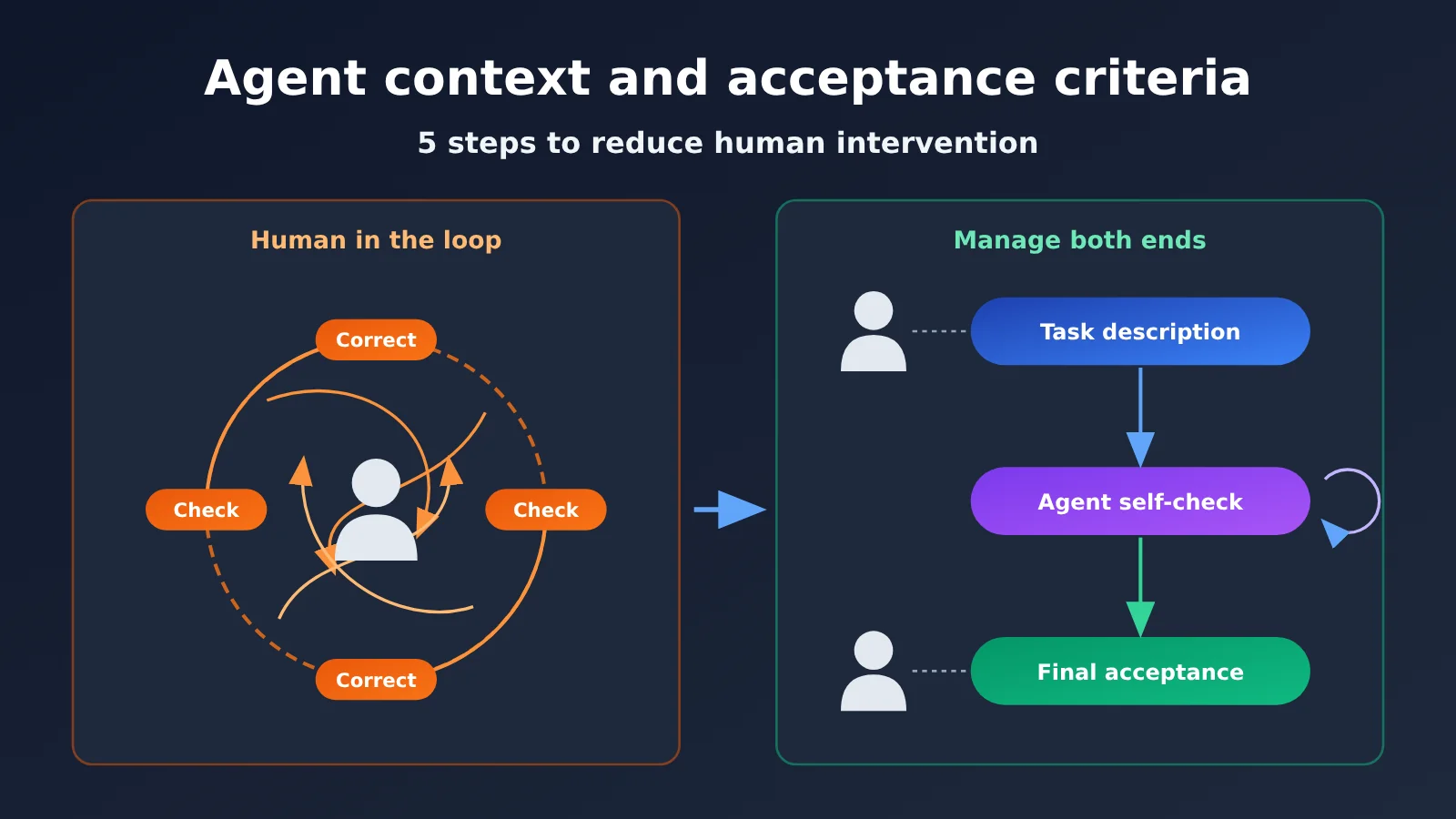
Using Agents can boost output, but it can also leave you more exhausted. On November 3, 2026, a developer on V2EX described this experience: with a person in the loop, someone still has to check the results, correct tasks that go off track, and address design issues. It’s hard to truly let go. The post mentioned a familiar lesson: providing more context and reference materials can help an Agent understand the task and improve the quality of its work. But it didn’t explain what “more context” actually means in practice.
This isn’t another generic guide to “writing better prompts.” This article focuses on the preparation you do before handing off a task. It breaks vague requirements into goals, constraints, reference materials, and checkable completion criteria so the Agent can check its own work and you only need to step in at a few key points. One caveat: there’s currently no public comparative data to quantify the effects of different preparation methods. The examples in this article draw on common scenarios, so you’ll need to test the results on your own tasks.
What you’ll take away: A reusable structure for Agent task briefs, a way to write acceptance criteria, and a framework for deciding what an Agent can check itself and where a human needs to make the call.
Key Points: Agent Context and Acceptance Criteria
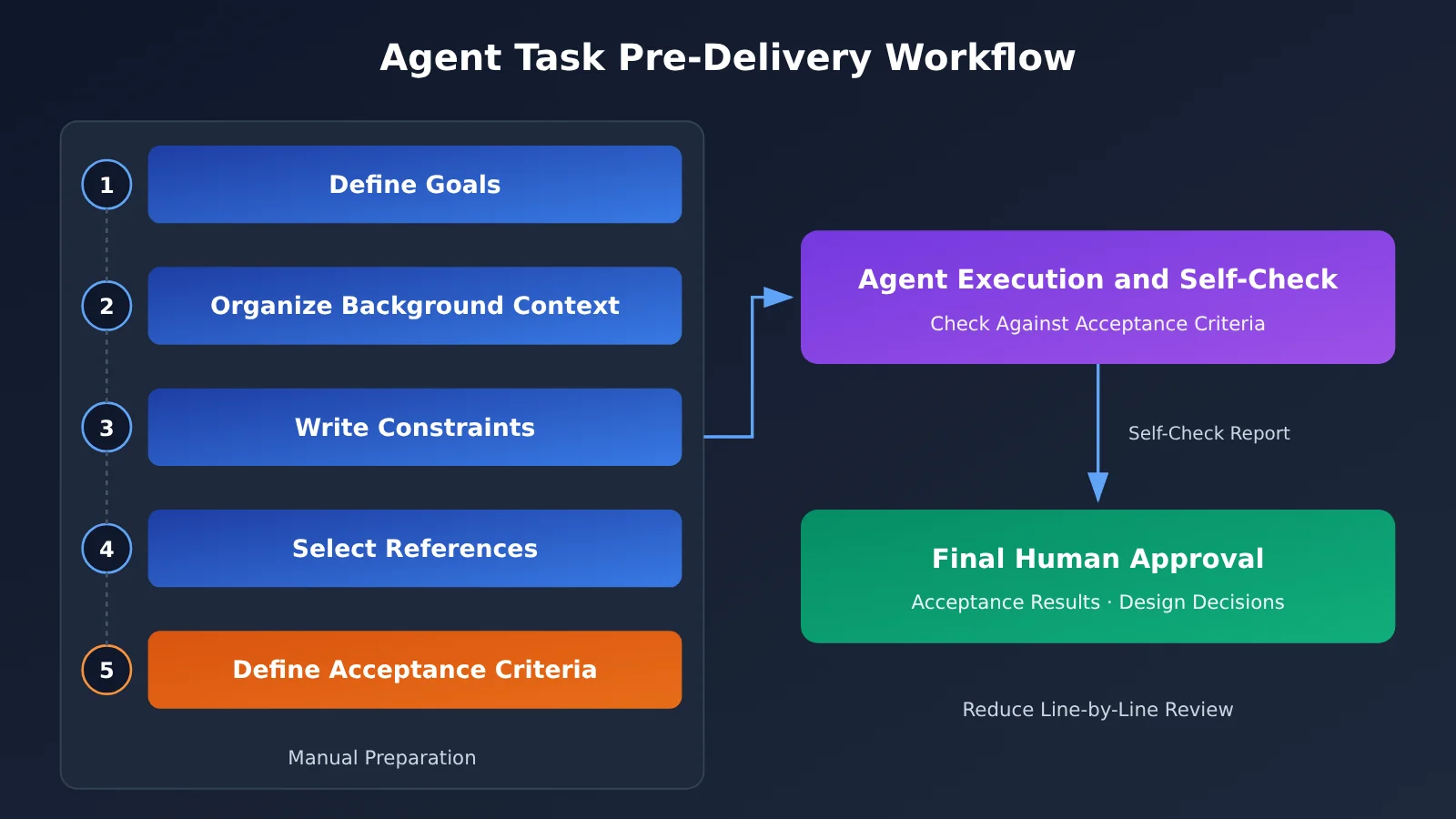
Before writing a task description, start with the big picture: Agents usually go off track because their understanding of “what to do,” “how much to do,” or “what not to touch” differs from yours. The table below covers five elements a good task description should include.
| Element | Description | Problem it solves |
|---|---|---|
| Goal | State in one sentence what to deliver and who it’s for | Keeps the Agent from expanding the requirements or heading in the wrong direction |
| Background context | The project’s current state, relevant modules, and previous attempts | Prevents reinventing the wheel or overturning existing designs |
| Constraints | Files that must not be changed, the required tech stack, and performance or compatibility requirements | Prevents solutions that “run but aren’t usable” |
| Reference materials | Existing code examples, API documentation, and style samples | Helps the output match the existing project’s style and structure |
| Acceptance criteria | Completion conditions that can be checked individually and, ideally, verified automatically | Lets the Agent check its own work, reducing the need for line-by-line review |
Common Ways Agent Tasks Go Off Track
The original post didn’t give specific examples of tasks going off track, so here are some common scenarios involving coding and task-oriented Agents. They may look different, but the root cause can often be traced back to a missing element in the task description.
| What goes wrong | Common root cause | How to prevent it |
|---|---|---|
| The Agent fixes a bug and refactors half a module along the way | The goal’s boundaries are unclear, and the scope of changes isn’t specified | State in the constraints exactly which files or functions may be modified |
| It introduces a dependency the project doesn’t already use | It doesn’t understand the existing tech stack | List existing dependencies in the context and specify whether new ones are prohibited |
| Its code style doesn’t match the rest of the project | It lacks reference examples | Include one or two similar implementations as reference materials |
| It says “done,” but key scenarios aren’t covered | The definition of done is vague | Write acceptance criteria as executable checks |
| The solution is technically feasible but doesn’t match the product intent | Design decisions weren’t explained upfront | Make the design decisions yourself before asking the Agent to implement them |
The last case is especially important. It isn’t caused by a lack of context—the design trade-offs themselves require human judgment. We’ll discuss that separately later.
How to Write an Agent Task Brief: A Five-Part Structure
Turn the five elements above into a document the Agent can understand and use to check its own work. Markdown is a good choice: keep the document in your project repository, for example as TASK.md. Alternatively, put general constraints in a project-level file such as AGENTS.md and specific objectives in a document for each task.
Part 1: Writing the Agent’s Task Objective
Use one sentence to explain what the deliverable is, who it’s for, and when it will be used. A description like “improve the login module” could mean performance optimization, code refactoring, or a UI redesign. A better objective is: “Make the login API return a consistent error code when the password is incorrect, so the frontend can display a message, without changing the successful login flow.”
For larger tasks, add a sentence explaining what’s out of scope. Clear exclusions are often more effective than positive descriptions at keeping the Agent from expanding the requirements.
Part 2: Providing Background Context for the Agent
The key to background context isn’t quantity—it’s relevance. Giving the Agent the entire repository doesn’t mean it has enough context; it still needs to know which parts matter for this task. Organize the context in this order:
- Relevant modules: List files or directories directly related to the task, such as the login logic under
src/auth/and its corresponding test files. - Existing decisions: Explain why things were designed a certain way, for example: “Error codes are defined centrally in the
errorsmodule, not hard-coded in business logic.” - Previously attempted approaches: If an approach was tried and abandoned, explain why so the Agent doesn’t repeat it.
- Terminology: Define project-specific business terms that the Agent can’t reliably infer from the code.
Part 3: Creating an Agent Constraints Checklist
Constraints are essential for avoiding work that “runs but isn’t usable.” List common constraints as a checklist for the Agent to review both before and after execution:
- The permitted scope of changes and files that must not be modified, such as database migration scripts or public interface definitions.
- Technology stack restrictions, such as “don’t add third-party dependencies” or “use only the project’s existing logging library.”
- Compatibility and performance requirements, such as “keep existing interface signatures unchanged.”
- How to handle uncertainty, such as “if a public interface needs to change, stop and explain why; don’t modify it on your own.”
That last point is important. Giving the Agent a clear condition for when to stop and ask a human is much easier than discovering afterward that it made an unauthorized decision.
Part 4: Choosing Reference Material for the Agent
Reference material helps the Agent follow existing practices instead of starting from scratch. Similar implementations in the same project are usually the most useful. For example: “When adding an API endpoint, follow the patterns in src/user/, including parameter validation and error handling.” For external documentation, provide only the sections relevant to the task and specify the version, so the Agent doesn’t write code against an outdated interface.
How to Write Verifiable Acceptance Criteria for Agents
Acceptance criteria are the easiest part of a task description to leave vague—and the part most worth spending time on. The test is simple: If an Agent can’t verify whether a criterion has been met, it’s a wish, not a criterion.
| Vague wording | Verifiable wording | How to verify |
|---|---|---|
| Code quality should be good | Pass the project’s existing lint checks with no new warnings | The Agent runs the checks and reports the results |
| The feature should work | Add unit tests for incorrect passwords, nonexistent accounts, and successful logins; all must pass | Run the tests and provide a summary of the results |
| Don’t affect other features | The existing test suite must pass, and no files prohibited by the constraints may be modified | Run the full test suite and list the changed files |
| The documentation should be complete | Add error code descriptions to the API documentation, following the format of existing entries | Compare each item against a reference example |
| Performance must not get worse | No new database queries on the critical path | Explain any change in query count in the summary |
Once you’ve written the criteria, ask the Agent at the end of the task description to report its completion status against each acceptance criterion. For each one, it should state whether it’s met, the supporting evidence, and the reason if it isn’t met. That way, you can review the results using this checklist instead of reading through every change from scratch.
Quick Start: Agent Context and Acceptance Criteria
Here’s a practical workflow you can follow right away. You don’t need any extra tools—a Markdown document is enough to get started.
Prepare an Agent Task Brief in 5 Steps
- Write acceptance criteria before the goal: Working backward forces you to define what “done” looks like and keeps the goal from becoming too broad.
- Add background context: List only the modules, previous decisions, and failed attempts relevant to the task. Keep it brief.
- List constraints and stopping conditions: Specify what the agent must not touch and when it must stop and ask for guidance.
- Choose one or two examples: Favor similar implementations within the project. For external documentation, link only to the relevant sections.
- Request a structured report: Ask the agent to report against each acceptance criterion, list the files it changed, and flag any unresolved issues.
Example Agent Task Brief: Fixing Login Error Messages
Here’s a task brief for a hypothetical scenario. You can replace the list items with details from your own task:
- Goal: Have the login endpoint return a consistent error code for incorrect passwords and nonexistent accounts, so the frontend can display the appropriate message. Don’t change the successful login flow or page styling.
- Background: Error codes are centrally defined in the
errorsmodule. A previous attempt to check error text on the frontend was abandoned because of multilingual support issues. - Constraints: Only modify
src/auth/and its corresponding tests. Don’t add dependencies. If changes to a shared interface definition are needed, stop and explain. - Reference: The error-handling approach used by the registration endpoint in
src/user/. - Acceptance criteria: Add unit tests for three scenarios and ensure they all pass; all existing tests pass; lint produces no new warnings; add descriptions of two error codes to the API documentation.
- Reporting format: Address each acceptance criterion, list the files changed, and explain any outstanding issues.
🚀 Getting started: Give the same task brief to different models and compare how well each one follows the constraints and stop conditions. With an aggregation platform like APIYI apiyi.com, you can switch between models from different providers using one interface and the same API key, without registering and configuring multiple accounts. That makes it easier to compare models on your own real-world tasks.
Cross-Reviewing Agent Plans with Models from Different Providers
The original poster also raised a concern: models from the same provider may share similar blind spots. They wanted Agents from different providers to review one another’s work, but currently had to pass information back and forth through Markdown documents or copy and paste, making coordination costly. This idea works well with the approach in this article: the task description and acceptance criteria are the best shared reference for cross-review. Reviewers don’t need to understand everything you had in mind; they just need to question each item against the same criteria.
One lightweight approach is to assign different roles to different models and give them all the same task description:
| Role | Input | Responsibility | How to connect |
|---|---|---|---|
| Implementer | Task description | Implement the solution and check its own work against the acceptance criteria | Your usual coding Agent |
| Reviewer A | Task description + change summary | Check each acceptance criterion and identify scenarios that aren’t covered | A model from another provider, accessible through APIYI’s unified interface |
| Reviewer B | Task description + change summary | Check specifically for violations of constraints and stop conditions | A model from a third provider; switch models by changing the model name in the same interface |
| Human | Summary of review feedback | Handle only disagreements between reviewers and design issues | None |
If you’re willing to write a small script that links “execution results → send to review models → compile feedback,” you can replace most of the manual copy and paste. APIYI provides a unified interface compatible with mainstream SDKs, so you can call another provider’s model by changing the model name in your script. That removes much of the integration work involved in bringing in Agents from different providers. Keep in mind, though, that it’s the information transfer you’re automating—the final decision should still be left to a human.
Which Problems Can Agent Context Solve, and Which Need Human Oversight?
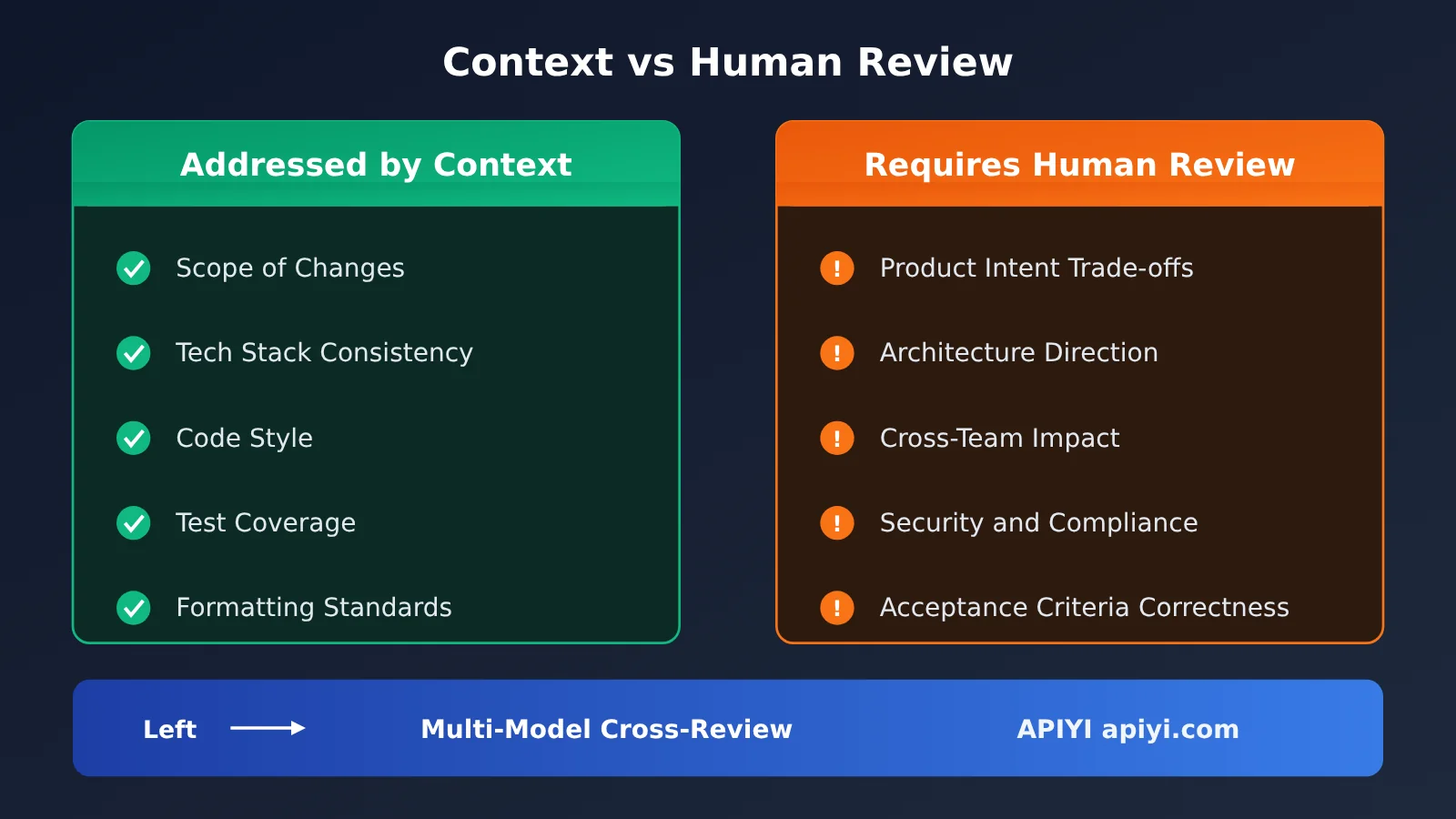
Well-prepared context can reduce the need for course correction, but it can’t eliminate human involvement altogether. The original post mentions “tasks going off track” and “design problems” side by side, but they’re fundamentally different: the former usually comes down to missing information, while the latter often involves judgment calls.
| Problem type | Can context solve it? | Why | Human role |
|---|---|---|---|
| Changes outside the intended scope | For the most part | The Agent can check its own work once constraints are clear | Spot-check the list of changes |
| Inconsistent style or formatting | For the most part | Reference examples give the Agent something to follow | Check occasionally |
| Incomplete test coverage | Mostly | The acceptance criteria can spell out the scenarios | Review whether the scenario list is complete |
| Architecture and design trade-offs | Difficult | Choosing between reasonable options involves value judgments | Decide upfront and document the decision in the task description |
| Product intent and user experience | Difficult | They depend on business goals and an understanding of users | Define upfront and validate afterward |
| Whether the acceptance criteria themselves are correct | No | The Agent can only check against the criteria; it can’t question their underlying assumptions | A human must take responsibility |
Design problems are hard to hand over entirely to an Agent because they usually don’t have one right answer. For example, should error codes go in a shared module or a business module? Both approaches can work. The choice depends on the team’s future plans for expansion and its maintenance habits—information that’s often held in people’s judgment and hard to capture fully in writing.
A more practical strategy is to bring human involvement forward: make design decisions before the task starts and include them in the constraints. The Agent can then execute without you watching over it. Once it’s finished, you only need to check the acceptance checklist and any points where reviewers disagree. This shifts the human role in the loop from “supervising every step” to “setting direction at the start and validating the result at the end.”
Frequently Asked Questions
Q1: What are acceptance criteria for an Agent?
Acceptance criteria are a checklist of conditions that must be met for a task to be considered complete, such as “all specified tests pass” or “no prohibited files were modified.” They let the Agent check its own work and help people quickly assess the result without reading every line of output.
Q2: Is more context always better?
No. Irrelevant information can dilute the important details and even cause the Agent to modify things it shouldn’t touch. Choose context based on the task: relevant modules, existing decisions, failed attempts, and essential terminology. If you’re unsure whether a piece of information is useful, you can use APIYI apiyi.com to call different models and test both a concise and a detailed task description to see which keeps them on track.
Q3: Do I need to write a full task description for every small task?
No. You can put general constraints and project background in a project-level instruction file and reuse them over time. For each task, you only need to add the goal, reference materials, and acceptance criteria. For a small change that takes a few minutes, a one-sentence goal and two or three acceptance criteria are usually enough.
Q4: What types of Agents and tasks does this approach work for?
It works best for coding Agents and task-oriented Agents with clear deliverables, such as fixing bugs, implementing interfaces, generating documentation, or organizing data. For highly exploratory tasks where the goal itself isn’t yet clear, acceptance criteria are hard to define upfront. In those cases, it’s better for the person and Agent to discuss the direction before getting started.
Q5: How can I cross-review work with models from different providers without copying and pasting back and forth?
You can write a small script that sends the results and task description to review models, then collects their feedback. With the unified interface from APIYI apiyi.com, you can call models from different providers by changing the model name in the script, without integrating a separate SDK and account for each one. This makes it easy to quickly prototype an “execution + multi-party review” workflow.
Q6: What are the limitations of this approach?
First, it can’t replace design judgment: people still need to decide on architectural trade-offs and product intent. Second, if the acceptance criteria are wrong, the Agent will faithfully satisfy the wrong criteria. Finally, there’s currently a lack of public data quantifying the differences between preparation methods. Try comparing them on a small scale with your own tasks and tracking how often you need to correct the Agent’s course.
Agent Context and Acceptance Criteria: Key Takeaways
- Going off track often starts with missing information: A missing goal, constraint, or reference can lead to rework.
- Every task brief needs five elements: A goal, background context, constraints, references, and acceptance criteria.
- Acceptance criteria must be checkable: If an Agent can’t verify a criterion itself, it’s just a wish.
- Set stopping conditions: Specify when the Agent must stop and ask questions. It’s less work than correcting mistakes afterward.
- Make design decisions upfront: People should settle architecture and product trade-offs first, then put them in the constraints.
- Use the same criteria for cross-review: You can use APIYI’s unified interface to call models from multiple providers and compare their reviews.
Summary
Keeping a human in the Agent loop can be exhausting, largely because tasks are handed off with incomplete information. That leaves you watching the whole process and correcting course along the way. Three things can help you prepare upfront:
- Write task briefs in five sections: Goal, background, constraints, references, and acceptance criteria. This tells the Agent what to do, how complete the work needs to be, and what it must leave alone.
- Turn acceptance criteria into checkable items: Ask the Agent to report against each one, so you only need to review the checklist and outstanding issues.
- Separate what context can address from what needs human oversight: Make design trade-offs upfront, and keep humans responsible for the acceptance criteria themselves.
Start with your next real task: write the acceptance criteria first, then fill in the other sections. Record how many times you need to intervene along the way, and use that as a baseline for improvement. If you’re also trying cross-review with models from multiple providers, you can use APIYI at apiyi.com to access different models through a unified interface and test which combination reduces your involvement most on real tasks.
📚 References
- V2EX discussion – How to reduce human intervention, let agents work independently, and improve delivery quality: The inspiration for this article
- Link:
v2ex.com/t/1254207 - Overview: Discusses human fatigue in the agent feedback loop, the role of context, and the idea of cross-review by agents from multiple vendors
Author: APIYI Technical Team
Technical discussions: Contact us through the APIYI homepage at apiyi.com to share practical experience with agent task instructions and multi-model collaboration.