
Author’s note: This article distinguishes Cloudflare Search for Agents, Tavily, and Firecrawl across three task types, to help you decide which AI Agent search tool to choose under what conditions—and how to chain the three together.
Here’s the bottom line first. If what you’re querying is a known domain, and the site has enabled Search for Agents on Cloudflare, query that site’s /.well-known/search directly. What you get back is Markdown snippets from an index the site operator built in advance. If you have just one question and the answer may be scattered across multiple unfamiliar domains, use Tavily Search or Firecrawl Search to discover across sites. If you already have URLs and need the full page body, screenshots, or structured fields, compare the output from Firecrawl Scrape/Crawl and Tavily Extract/Crawl.
Three conditions determine the choice: whether the caller is the domain operator or an outside developer, whether the query scope is a single site or the public web, and whether the desired return format is a snippet or the full source text. The three tools don’t replace one another. Complex tasks often require chaining all three stages together, then handing the result to a Large Language Model to organize the answer.
The facts in this article are current as of 2026-11-27 (UTC). Product positioning, interfaces, and billing rules come from each vendor’s public documentation. The scenarios, test questions, and cost figures are worked examples designed by the author; this article includes no hands-on testing and no community benchmarks.
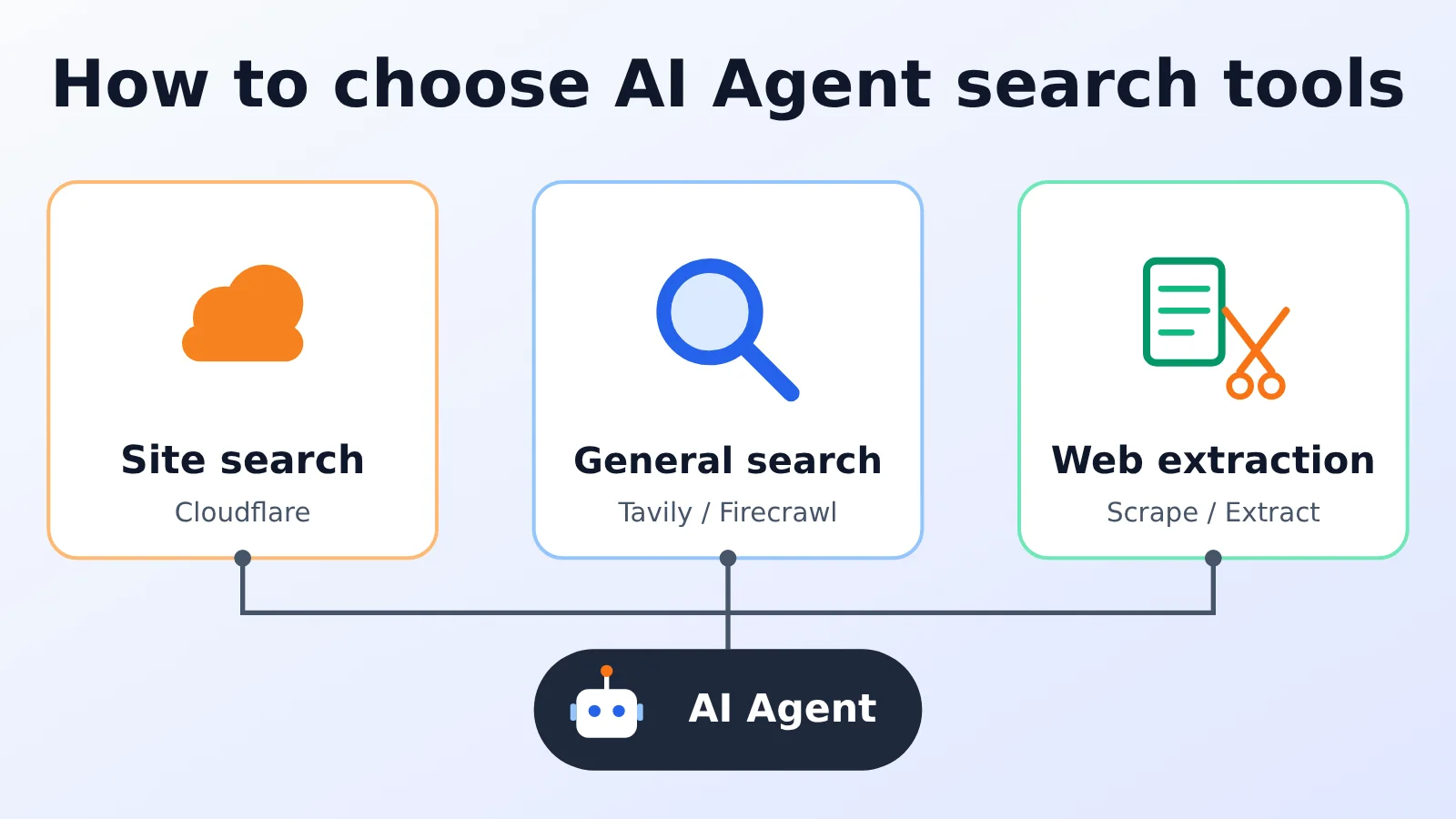
Knowledge Map: How to Choose Search Tools for AI Agents
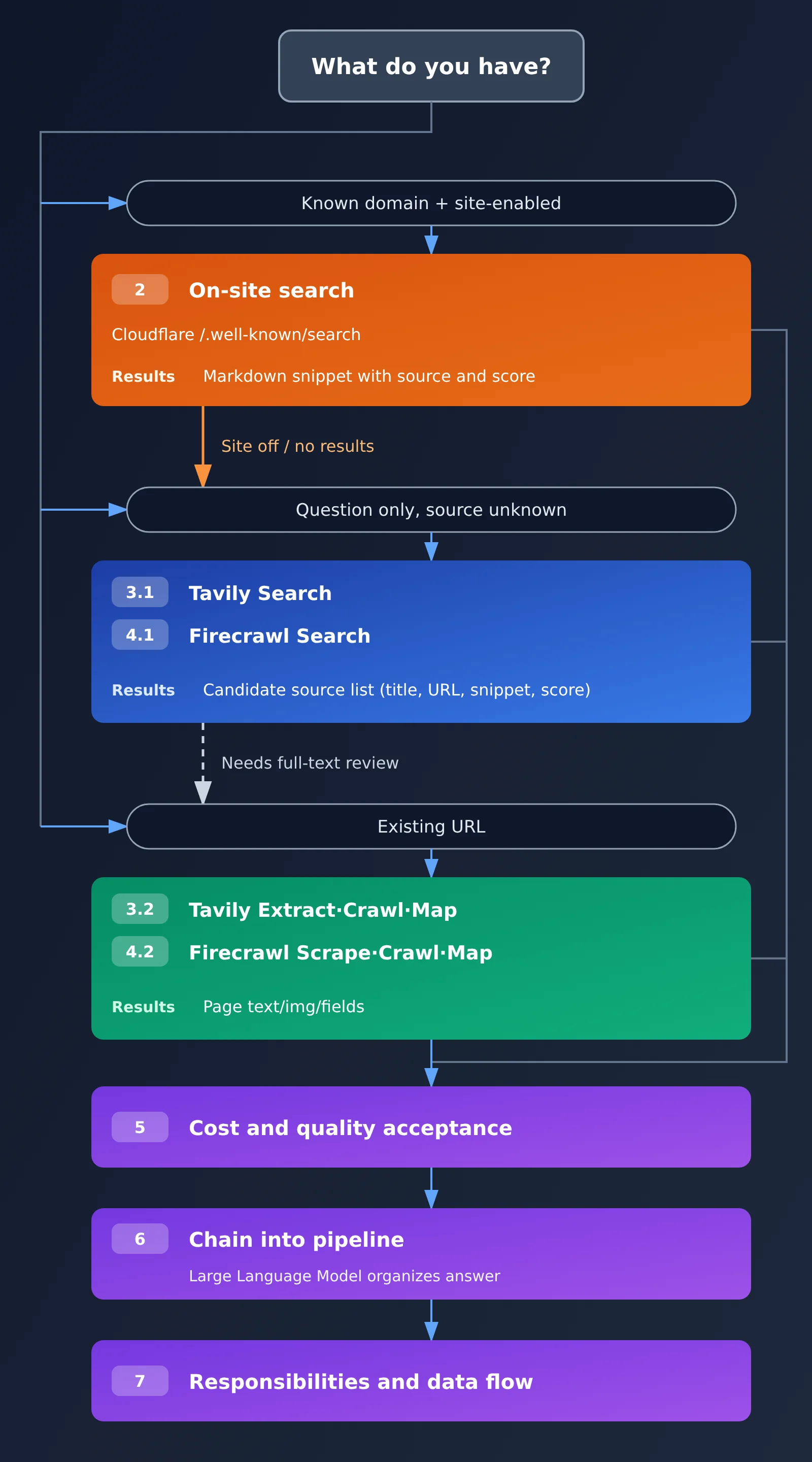
Diagram notes: Starting from “what do you have in hand,” there are three possible routes. If you know the domain and the site has enabled it, use on-site search (Section 2). If the site hasn’t enabled it or the query returns nothing, switch to general web search (Sections 3.1 and 4.1). If you only have a question, you also go to general web search. If you already have a URL, go straight to page extraction (Sections 3.2 and 4.2). All three routes pass through cost and quality acceptance (Section 5), then get chained together as needed (Section 6), and finally have their responsibility boundaries clarified (Section 7).
Index
Here’s the recommended reading order for each section:
- Section 1 first establishes the criteria for the “three types of tasks”; every later section uses that same framing to explain the tools.
- Sections 2, 3, and 4 cover Cloudflare, Tavily, and Firecrawl respectively. The three are parallel, so you can jump to whichever you need; each section ends by noting how it differs from the other two.
- Section 5 puts cost examples and test questions under a single business goal, to answer “how do you compare them?”
- Section 6 gives runnable code that chains the tools together, turning the earlier judgment into something you can actually run.
- Section 7 splits responsibilities between site operators and Agent developers, and closes with a final way to decide.
The FAQ sits at the end to cover the odds and ends.
To Know: AI Agent Search Terminology
| Term | Brief explanation |
|---|---|
| Site search | Searches for content within a single domain only; the index is usually maintained by the site owner |
| General web search | Starts from a question and discovers candidate sources across the public web |
| Web extraction | When you already have a URL, fetches the full page body, fields, or screenshots |
| Hybrid retrieval | Runs keyword search and vector search at the same time, then merges the results |
| Reciprocal Rank Fusion (RRF) | A ranking method that weights each retrieval channel by the inverse of its rank, then merges the multiple result lists |
| Credits | The billing unit for Tavily and Firecrawl; different operations consume different amounts |
1 Site Search, General Web Search, Web Extraction: Telling the Three Task Types Apart
Many tool-selection discussions drop all three tools into one table and score them side by side, and the conclusions often come out distorted — because the three are built for different tasks. The first task starts from a known, self-managed website that’s already hooked up to Cloudflare. The second starts from a question, with the sources unknown. The third already has the URL in hand and wants the entire page content.
1.1 Three Questions for Judging AI Agent Search Tools
When classifying a tool, you only need to answer three questions: who enables it, where it searches, and what it returns. The table below compares the three task types along those three dimensions.
| Dimension | Site search | General web search | Web extraction |
|---|---|---|---|
| Typical tools | Cloudflare Search for Agents | Tavily Search, Firecrawl Search | Firecrawl Scrape/Crawl, Tavily Extract/Crawl |
| Who enables it | Domain operator (the site owner) | External developers | External developers |
| Query scope | A single domain | The public web (can be narrowed with domain filters) | A given URL or site |
| Input | Known domain + query terms | A question | URL(s) |
| Typical output | Markdown snippets with source and relevance score | A list of candidate sources | Full-page body text, HTML, screenshot, or structured fields |
| Who maintains the index | A persistent index the site owner builds in advance | The vendor’s retrieval service | Fetched at call time; ingesting and storing is the caller’s job |
This table explains a lot of the misuse out there. Tavily’s include_domains can restrict a web search to a particular domain, but the caller initiates that operation — the site owner has no part in it. Cloudflare’s approach, by contrast, has the site owner proactively publish a retrieval endpoint. Both can pull off “search only one site,” but the control and the maintenance sit in completely different hands.
2 Cloudflare Search for Agents: Site‑Published On‑Site Search
The party who can enable Search for Agents is the domain owner already on Cloudflare — an outside developer can’t turn it on for anyone else’s site. According to the official onboarding guide (version 2026-11-25), the product is currently in open beta across all plans, while the underlying AI Search has been generally available since 2026-10-01.
2.1 How Cloudflare Search for Agents Works
Once the switch is flipped, Cloudflare spins up a standard AI Search instance with that domain’s website as the data source. Discover mode follows the sitemap and internal links to find pages, crawls them, converts them into indexable content, and chunks it. The guide lists these defaults: hybrid retrieval, reciprocal rank fusion, up to ten snippets returned, a match threshold of 0.4, and reranking and query rewriting off by default.
After the index is built, the site exposes search discovery metadata in its HTML pages. If the site owner has also enabled Markdown for Agents, that entry point shows up in the YAML front matter of Markdown responses too. That way an agent doesn’t need to know the search address ahead of time — it can find it through the page metadata.
2.2 How an Agent Calls the On‑Site Search Endpoint
When an agent knows a site’s domain, it can request that site’s public /.well-known/search. There are two ways to query: the q parameter on a GET request, or the HTTP QUERY method with the query in the request body. The response is Markdown snippets with sources and relevance scores attached — how those get assembled into an answer is up to the caller.
This endpoint is subject to the site’s WAF and AI Crawl Control configuration as well. Whatever restrictions the site owner puts on crawlers still apply to the search endpoint.
2.3 Where On‑Site Search Fits — and Where It Doesn’t
This approach suits two kinds of people. One is the site owner who wants visiting agents to pull exact passages when querying public docs, rather than crawling the whole site. The other is the agent developer whose target site happens to have it enabled, saving them the crawling and indexing work. Its limits are just as straightforward: it covers a single domain only, and the site owner has to enable it first. If a site hasn’t turned it on, the caller needs a fallback path ready.
3 Tavily: Start with the Question, Then Find Candidate Sources
Tavily’s main entry point is POST /search. It takes a query and returns sources ranked by relevance, with each source including the page title, URL, content, and score. It solves the question of “where might the answer be?”
3.1 Key Parameters of Tavily Search
You can use include_domains to narrow the search scope, or control the candidate set by excluding domains, topics, time ranges, and other parameters. For frequent general retrieval, start with the basic tier. When a query is more specific, compare the snippet quality and latency of the advanced tier and make a trade-off. If you need more content, explicitly request include_answer for a model-generated summary, or request include_raw_content for the cleaned original page text.
Summaries are only good for quick scanning. When citing, rely on the source list. Keep the source URLs so you can verify them later.
3.2 Tavily Extract, Crawl, and Map
When you already have URLs, use /extract; you can submit up to twenty URLs per call. Successful results go in results, while per-URL failures go in failed_results. So an overall successful HTTP response doesn’t mean every URL succeeded. Your code must handle each item individually. Crawl is for traversing a site and extracting content, and Map is for discovering URLs on a site. Both are aimed at a target site you’ve already identified.
4 Firecrawl: Turning Search Results into Consumable Web Content
Firecrawl and Tavily both offer general-purpose web search, but they focus on different things. Firecrawl’s official description of v2 Search is: a single call performs the web search and returns clean, structured content from each result.
4.1 Firecrawl Search and scrapeOptions
POST /v2/search returns titles, descriptions, and links by default. Once you configure scrapeOptions, the same call can also return the Markdown, HTML, link lists, or screenshots of the matching pages. This suits workflows where you need to read the body text right after searching — you save a round trip of requests, but that single round will cost more and take longer.
4.2 Firecrawl Scrape, Crawl, and Map
When the input is a known URL, POST /v2/scrape extracts single-page content directly. JSON mode outputs fields according to a given schema — for example, pulling publication date, product version, primary link, and price from an authorized page. You still need to verify each extracted field against the original text, especially checking that units are preserved and that values absent from the page come back as empty. Crawl discovers and extracts multiple pages starting from an entry point, with support for path rules, depth limits, and control over subdomains and external links. Map is better suited to inventorying URLs before you crawl.
One thing to keep in mind: when you use multi-page crawl results as raw material for a self-built knowledge base, deduplication, version maintenance, indexing, and the Q&A architecture are all on the caller. Firecrawl delivers content — no retrieval layer included.
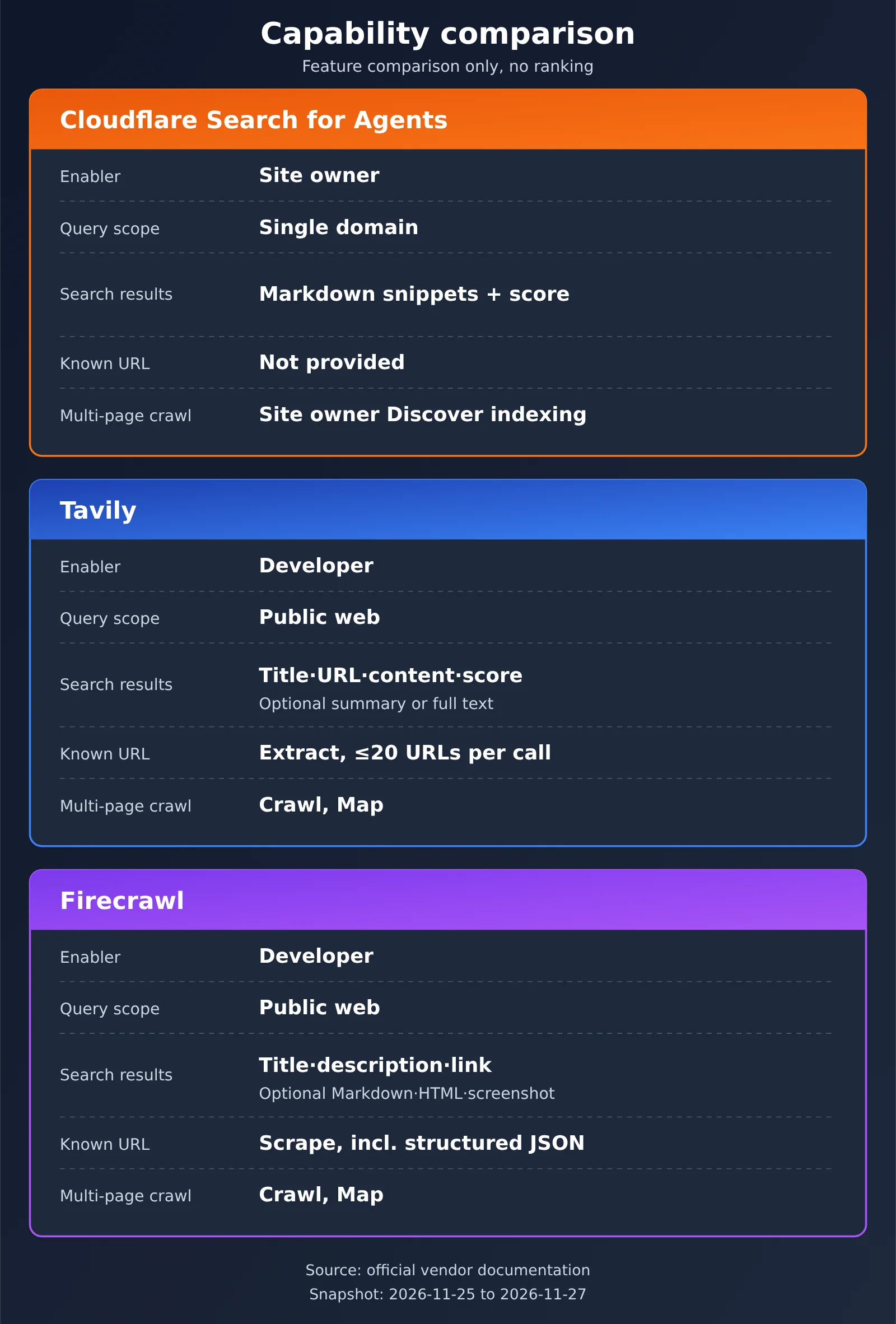
The graphic above compares feature shapes only; it doesn’t rank quality. Each vendor’s relevance score follows its own definition, so you can’t compare the numbers directly.
| Endpoint | Input | Main output | Key limits/parameters |
|---|---|---|---|
Cloudflare /.well-known/search |
Domain + q or QUERY request body |
Markdown snippets, sources, relevance scores | 10 snippets max by default, threshold 0.4; subject to WAF and AI Crawl Control |
Tavily POST /search |
Query | Title, URL, content, score | basic / advanced; include_domains, include_answer, include_raw_content |
Tavily /extract |
List of URLs | results, failed_results |
Up to 20 URLs per call |
Firecrawl POST /v2/search |
Query | Title, description, links | scrapeOptions can attach Markdown/HTML/links/screenshots |
Firecrawl POST /v2/scrape |
Single URL | Body text or JSON fields | JSON mode requires a schema definition |
5 How Do AI Agent Search Tools Compare on Cost and Quality?
The three vendors bill in different units, and their credits represent different amounts of work: web search is counted per number of results, page extraction per page, and site search per query. So you can’t just convert everything into a flat “dollars per search.”
5.1 Billing worked examples (author’s assumptions, not measured)
The table below contains independent worked examples derived from each vendor’s official billing rules, with workloads assumed by the author. Server, client model, and third-party service costs are calculated separately.
| Tool | Assumed monthly workload | Calculation | Result |
|---|---|---|---|
| Tavily | 400 basic + 200 advanced searches | 800 credits total | Within the official 1,000 free credits per month; extraction billed separately |
| Firecrawl | 200 searches (exactly 10 results each) + 300 basic single-page extractions | Searches at 2 credits per 10 results = 400, extraction 300, total 700 | Within the official 1,000 free credits per month |
| Cloudflare | Some month after 2026-12-01, ingest and storage within the included allowance, full hybrid retrieval, 3,000 queries | (3000 − 1000) ÷ 1000 × $0.75 | $1.50 in query overage |
The Cloudflare figure is based on its 2026-11-17 pricing page, and Firecrawl’s “2 credits per 10 results” comes from its official pricing page. Your actual bill depends on what else is running in your account, so always defer to each vendor’s console.
5.2 Quality acceptance framework (test design, not run in this article)
Cost is only half the picture — quality needs to be measured against your own samples. It’s worth preparing three independent sample sets, one for each type of task:
| Sample set | Task design | Evaluation metrics |
|---|---|---|
| On-site questions | Includes typos, old names, incorrect codes, and natural-language paraphrases | Share of queries where the correct document lands in the top five results; how long after a site update it becomes searchable |
| Cross-site questions | A given date and topic | Source coverage; number of unique domains after deduplication; proportion of working links |
| Extraction questions | Authorized pages containing tables, footnotes, and dynamic content | Field completeness, whether units are preserved, whether null is returned when no value exists (manual scoring) |
For all three sample sets, record median latency and 95th-percentile latency, and track “request failed” separately from “results not relevant”. When products share a name, go by the official version on the primary site and the date it applies to.
6 Quick Start: Chain Three Retrieval Stages into an Agent Pipeline
Search tools only handle finding content. You still need a Large Language Model to organize the answer. The example below uses Cloudflare site search to pull snippets, then passes them to the Large Language Model to generate a response. You call the Large Language Model through an OpenAI-compatible interface, with base_url pointing to APIYI.
6.1 Minimal Example: Site Search + Large Language Model Answering
import requests
from openai import OpenAI

client = OpenAI(
    api_key="YOUR_APIYI_KEY",
    base_url="https://api.apiyi.com/v1"  # APIYI OpenAI-compatible endpoint
)

def site_search(domain: str, q: str) -> str:
    # Only works on sites with Search for Agents enabled
    r = requests.get(f"https://{domain}/.well-known/search", params={"q": q}, timeout=15)
    r.raise_for_status()
    return r.text  # Markdown snippets with source and relevance scores

question = "邀请链接有效期多久"
snippets = site_search("docs.example.com", question)
resp = client.chat.completions.create(
    model="gpt-4o-mini",
    messages=[
        {"role": "system", "content": "只依据给定片段回答并标注来源网址;片段不足时直接说明。"},
        {"role": "user", "content": f"问题:{question}\n\n片段:\n{snippets}"},
    ],
)
print(resp.choices[0].message.content)
View the full code: a three-stage pipeline routed by task type
import os
import requests
from openai import OpenAI

client = OpenAI(
    api_key=os.getenv("APIYI_KEY"),
    base_url="https://api.apiyi.com/v1"  # Downstream Large Language Model calls all go through APIYI
)
TAVILY_KEY = os.getenv("TAVILY_API_KEY")
FIRECRAWL_KEY = os.getenv("FIRECRAWL_API_KEY")

def site_search(domain, q):
    """Section 2: site search. Returns None if the site hasn't enabled it or an error occurs, handing off to the fallback branch."""
    try:
        r = requests.get(f"https://{domain}/.well-known/search",
                         params={"q": q}, timeout=15)
        if r.status_code == 200 and r.text.strip():
            return r.text
    except requests.RequestException:
        pass
    return None

def web_search(q, domains=None):
    """Section 3.1: Tavily general web search; use include_domains to narrow the scope."""
    body = {"query": q, "search_depth": "basic"}
    if domains:
        body["include_domains"] = domains
    r = requests.post("https://api.tavily.com/search", json=body,
                      headers={"Authorization": f"Bearer {TAVILY_KEY}"}, timeout=30)
    r.raise_for_status()
    return r.json().get("results", [])  # Fields are subject to the official documentation

def extract(urls):
    """Section 3.2: Tavily Extract, handling failed_results item by item."""
    r = requests.post("https://api.tavily.com/extract", json={"urls": urls[:20]},
                      headers={"Authorization": f"Bearer {TAVILY_KEY}"}, timeout=60)
    r.raise_for_status()
    data = r.json()
    failed = [f.get("url") for f in data.get("failed_results", [])]
    return data.get("results", []), failed

def scrape_fallback(url):
    """Section 4.2: when Extract fails, switch to Firecrawl Scrape to get Markdown."""
    r = requests.post("https://api.firecrawl.dev/v2/scrape",
                      json={"url": url, "formats": ["markdown"]},
                      headers={"Authorization": f"Bearer {FIRECRAWL_KEY}"}, timeout=60)
    r.raise_for_status()
    return r.json().get("data", {}).get("markdown", "")

def answer(question, context):
    resp = client.chat.completions.create(
        model="gpt-4o-mini",
        messages=[
            {"role": "system", "content": "只依据材料回答,逐条标注来源网址;出处冲突或过期时说明。"},
            {"role": "user", "content": f"问题:{question}\n\n材料:\n{context}"},
        ],
    )
    return resp.choices[0].message.content

def run(question, domain=None, need_fulltext=False):
    if domain:
        hit = site_search(domain, question)
        if hit:
            return answer(question, hit)
    results = web_search(question, [domain] if domain else None)
    if not need_fulltext:
        ctx = "\n\n".join(f"{x.get('url')}\n{x.get('content')}" for x in results)
        return answer(question, ctx)
    urls = [x.get("url") for x in results[:5]]
    docs, failed = extract(urls)
    ctx = [f"{d.get('url')}\n{d.get('raw_content', '')[:4000]}" for d in docs]
    ctx += [f"{u}\n{scrape_fallback(u)[:4000]}" for u in failed]
    return answer(question, "\n\n".join(ctx))

print(run("邀请链接有效期多久", domain="docs.example.com"))
🚀 Getting Started Tip: When swapping retrieval tools in your pipeline, it’s best to keep the downstream model unchanged. That way, any differences you see can be attributed to retrieval quality. With APIYI apiyi.com, you can use a single API key to call different models, so after your retrieval approach is finalized, you can compare model response quality separately. New users get free trial credits to validate this.
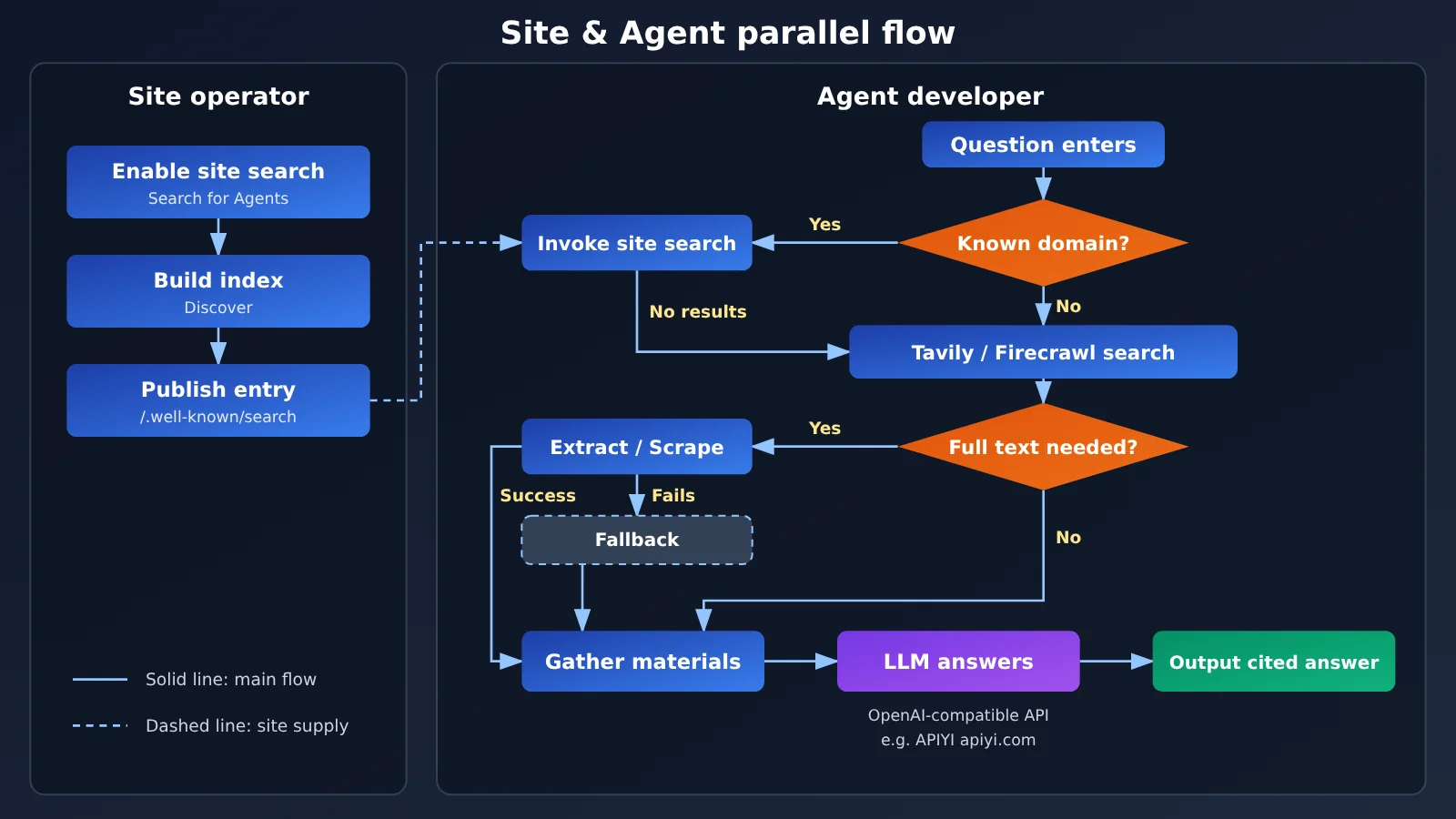
6.2 Three Acceptance Scenarios and Tool Mapping
The three scenarios below were designed by the author and can be used to check whether the pipeline branches work as expected:
| Scenario | Starting point | Recommended path | Pass criteria |
|---|---|---|---|
| Customer support asks “How long is a product invite link valid?” | Known product documentation domain | On-site search; if not enabled, use Tavily include_domains |
The result points to the current help page and includes duration context |
| Researcher asks “Which services changed pricing during the same period?” | Question only | Tavily Search or Firecrawl Search | Find original announcements from multiple providers and remove reposts and old plan pages |
| Editor needs to extract region, currency, plan, and effective date from three sources | URLs already available | Firecrawl Scrape JSON mode or Tavily Extract | Preserve body text, units, empty values, and source URLs |
| Downstream answering | Aggregated materials | Unified Large Language Model API, such as APIYI apiyi.com | Every conclusion can be traced back to a source |
7 Responsibilities and Data Flow in AI Agent Search Selection
Site owners need to decide up front: which directories can be publicly searchable, which older versions should be kept, and which dead URLs should be dropped from results. Control over the public entry point and troubleshooting both stay on the site’s own domain. If you already have internal/external network isolation, you can limit the public index to the documentation site and keep internal materials on a separate authorization path.
Agent developers need to decide up front: do they know the target domain, how many independent sources do they need, and is full-text review required. Settle these three points before choosing which search or extraction provider to hand things off to. On-site search match scores and web search relevance scores each follow their own scale, so when merging candidates, re-evaluate the sources and claims against the same question. If a user’s question contains sensitive details like unannounced order numbers or organization names, first work out which information must stay inside the organization, then call external tools according to business permissions.
The final decision method comes down to one rule: if the domain is known and the site owner has enabled it, use on-site search; if the source is unknown, use general web search; if you already have a URL and need the original text or fields, use web extraction; if all three needs show up at once, chain them together. The domain toggle gives you the site owner’s publishing capability, while Agent-side search and extraction remain two stages you can deploy independently. When validating, test separately with the three sample groups from Section 5.2, set up branches for no results, stale timestamps, and inconsistent sources, and prioritize traceable evidence in citations. The Large Language Model answer-generation stage can be connected through APIYI apiyi.com in a unified way, which makes it easy to compare models once the retrieval plan is settled.
FAQ
Q1: Can Cloudflare Search for Agents search the entire internet?
No. It only covers a single domain owned by the site operator, and the site operator must enable it on Cloudflare. To discover sources across sites, you’ll need Tavily Search or Firecrawl Search.
Q2: What’s the difference between Tavily and Firecrawl for general web search?
Both return candidate sources. Tavily can optionally include a model-generated summary or cleaned original page text, and offers filters like excluded domains, topic, and time range. Firecrawl can return Markdown, HTML, or screenshots in the same call via `scrapeOptions`. This article doesn’t benchmark the quality difference between the two—use the cross-site questions in Section 5.2 to verify for yourself.
Q3: What stage is Search for Agents currently in?
According to the official guide dated 2026-11-25, it’s a beta open to all plans. The underlying AI Search has been generally available since 2026-10-01. Default parameters and billing are subject to the latest official documentation.
Q4: If I only want a few accurate citations, do I need to scrape full pages?
Usually not. Start with on-site search or web search to narrow down the source range, then pass only the necessary pages to the extraction API. This saves credits and cuts down on waiting time.
Q5: Once I have search results, how do I hand them to a Large Language Model to generate an answer?
Assemble the snippets and source URLs into the prompt, and instruct the model to answer only based on the provided material and cite its sources—see the code in Section 6. You can call the model through the OpenAI-compatible interface at APIYI apiyi.com by setting `base_url` to `https://api.apiyi.com/v1`.
Q6: What are the known limitations of each of the three tools?
– On-site search depends on the site operator enabling it, and is constrained by WAF and AI Crawl Control.
– Tavily Extract processes at most 20 URLs per call, and failed items need to be handled separately.
– Once Firecrawl-scraped content is stored, deduplication, versioning, and indexing are all up to the caller to build.
– The three services use different scoring conventions, so their scores can’t be compared directly.
Q7: How can I validate my tool selection at low cost?
Start with the monthly free credits from Tavily and Firecrawl (1,000 each, per official docs) to run the cross-site and extraction questions. Use a single model for all downstream answering to keep results comparable—you can do this with APIYI apiyi.com’s free trial quota.