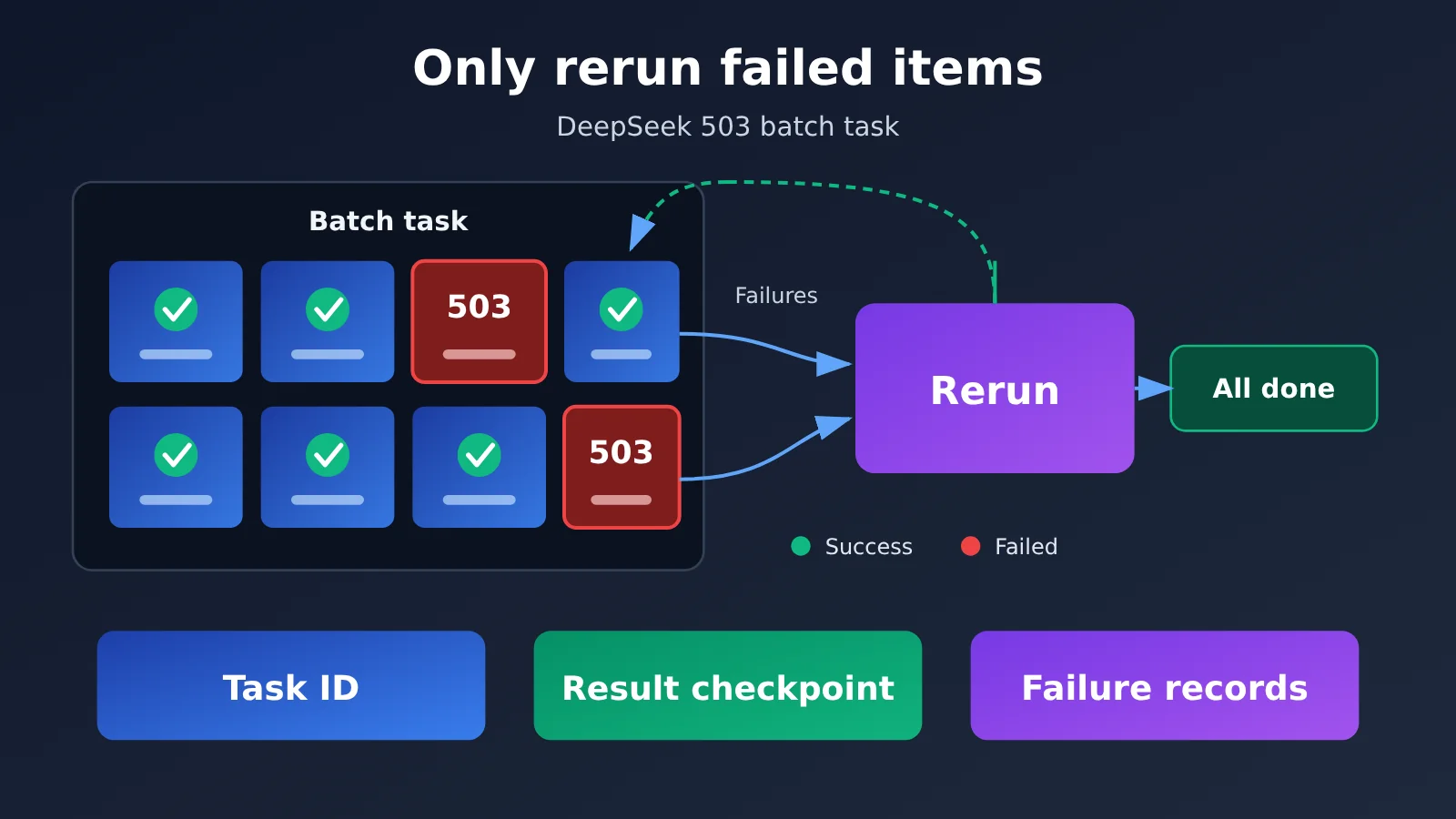
Summary: When DeepSeek API batch jobs keep throwing 503s, give each task a stable ID, write successful results into a checkpoint, and write failures into a failure log. The next round only re-runs the tasks that aren’t in the checkpoint — no need to redo the whole batch.
Bottom line first: the reason people end up re-running whole batches is that the program has no idea which tasks already succeeded. The fix comes in three steps.
- Generate a stable task ID for every input — the same input produces the same ID on every run.
- Append only results that pass validation to the checkpoint file.
- For retryable errors like 503, 429, and timeouts, retry with backoff inside a limited attempt count and a shared budget; tasks that blow past the budget go into the failure log and wait for the next round.
There are two preconditions for this approach. First, tasks must be safely replayable — repeated calls must not trigger side effects like sending duplicate emails or writing duplicate rows to the database. Second, first attempts and retries must share the same concurrency and attempt caps. If those conditions don’t hold, fix the tasks first, then talk about retries.
Knowledge Map: DeepSeek API 503 Rerun Workflow at a Glance
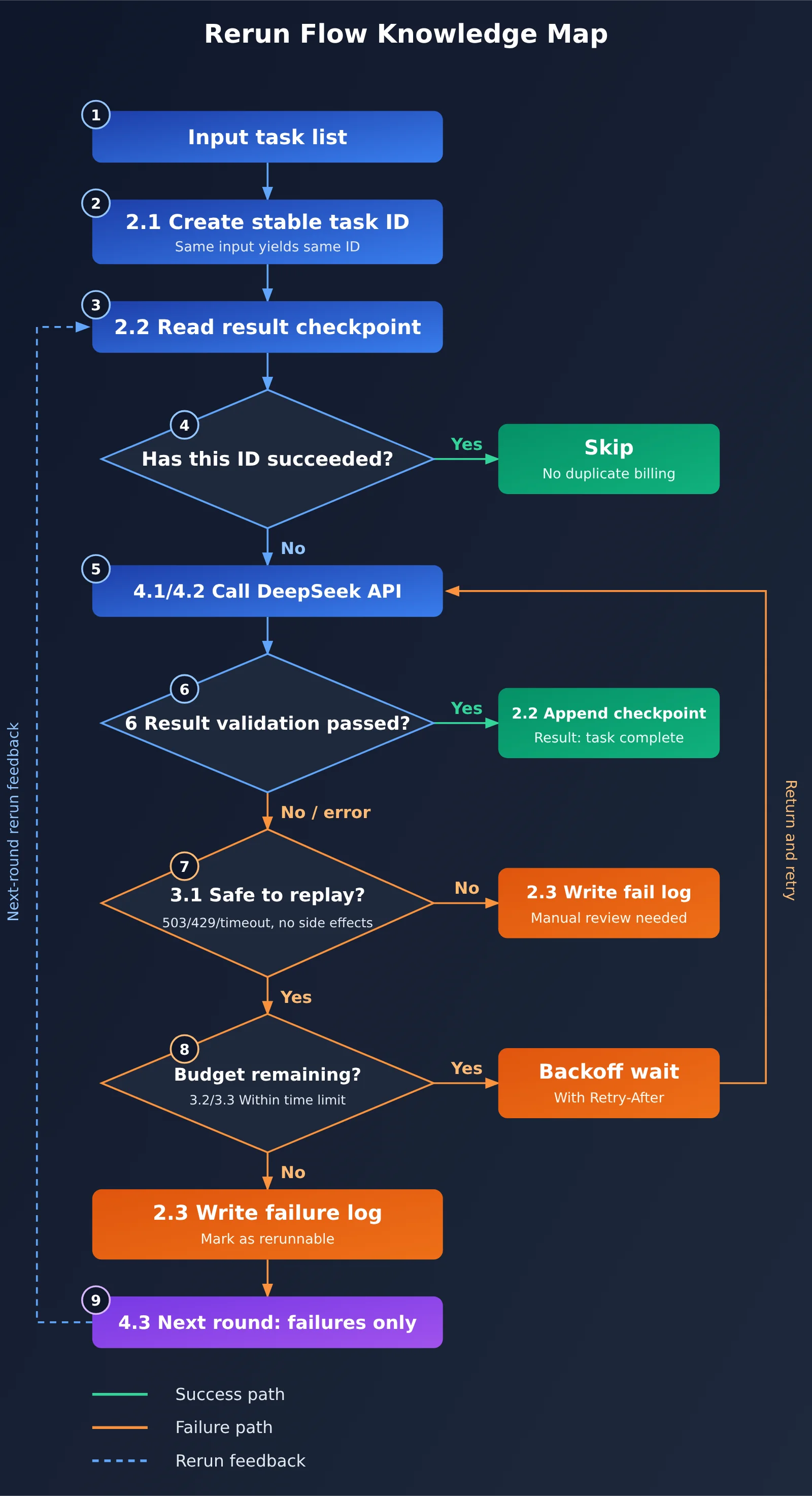
Figure caption: This flowchart starts with the “input task list”, first generates a task ID, then looks up the checkpoint. Tasks that already succeeded are skipped, and only the remaining ones call the API. When a call fails, there are two checks: first whether the task can be safely replayed, then whether the deadline and retry budget still leave room. If both hold, it waits out the backoff and retries; if either one fails, it writes a failure record. The failure record becomes the input for the next rerun round, so the whole flow closes the loop: checkpoint → rerun → checkpoint.
Index: Reading Order for Each Section of DeepSeek API 503 Reruns
| No. | Section | What it sets up for later sections | What you’ll be able to do after reading |
|---|---|---|---|
| 1 | What 503 means and prerequisites for rerunning | Decide which errors are worth retrying | Distinguish 503, 429, and non-retryable errors |
| 2 | Task IDs, checkpoints, and failure records | The three data structures you need for reruns | Design your own task file format |
| 3 | Safe retry rules | When to retry, how many times, and concurrency limits | Keep retries from making 503 worse |
| 4 | Code implementation | Turn Sections 2 and 3 into runnable code | Adapt your existing batch script directly |
| 5 | FAQs | Look up as needed | Handle edge cases like streaming and model switching |
| 6 | Rerun result validation | Final checks | Confirm the entire batch is complete and duplicate-free |
Sections 1 through 4 are best read in order, Section 5 is for on-demand lookup, and Section 6 is for the end of each rerun round.
To Know: Terms Related to DeepSeek API Reruns
| Term | Brief Explanation |
|---|---|
| Task ID | A stable identifier computed from the input content and prompt version, used to tell whether “this task has been done before” |
| Result checkpoint | An append-only results file; each line records one successful task |
| Failure record | Records the failed task ID, the status code of each attempt, and an error summary, for reruns and troubleshooting |
| Idempotent / Safe to replay | Running the same request once and multiple times produces the same business effect |
| Retry budget | The total number of additional attempts allowed within a time window, shared across all tasks |
| Retry-After | The suggested wait time in the response header; the value can be seconds or an HTTP date |
1. What DeepSeek API 503 Means in Batch Jobs
1.1 DeepSeek API 503 vs. 429
By HTTP semantics, 503 means the server temporarily can’t handle the request, usually because of temporary overload or planned maintenance. DeepSeek’s official error-code docs describe a 503 returned directly by the DeepSeek API as excessive server load and recommend retrying later. So a single 503 doesn’t mean the request itself is wrong. If you resend the same request later, it’ll often succeed.
429 means something different. DeepSeek calculates concurrency by account and model. A request counts as in-flight from the moment it’s sent until the response is complete. When the number of in-flight requests or the rate hits the limit, the request is rejected with 429. Multiple API Keys under the same account share that concurrency quota, so creating more keys won’t get around the limit.
Both count as “retryable” in a rerun design, but the focus is different: for 429, you first need to lower your own concurrency; for 503, you need to control the retry pace so you don’t keep piling on requests while the service is busy.
When troubleshooting, first record the actual request host, path, model, HTTP status, and sanitized error body. If the request goes through a gateway, the returned error may be the gateway’s generic error. In that case, use the gateway’s trace information to find the corresponding upstream response. Don’t draw conclusions from the error text alone.
1.2 The Three Costs of Rerunning the Whole Batch
If a script without checkpoints crashes midway, you can only rerun it from the beginning. The cost comes in three forms:
- Duplicate billing: tasks that already succeeded consume tokens again.
- Result drift: the same input may produce different outputs across two calls, so downstream data becomes inconsistent.
- Worse congestion: resending the entire batch pushes request volume back to its peak—and that peak is often exactly what triggered the 503.
Rerunning only the failed items avoids all three problems at once, provided the program can accurately determine which tasks have already succeeded.
2. Designing IDs, checkpoints, and failure records for DeepSeek API batch tasks
2.1 Stable task IDs
A task ID has to be derived from the input — not from a runtime auto-incrementing counter or a random UUID. The recommended approach is to concatenate “prompt version + business key + input text” and hash the result into an ID.
That gives you two nice properties. When the same piece of data is re-run, the ID stays the same, so you can look it up directly in the checkpoint. When the prompt gets a new version, every ID changes, which is effectively opening a fresh batch automatically — old results can’t be mistaken for output from the new prompt. On top of that, if your input list contains two identical records, they’ll hash to the same ID, which quietly handles deduplication for you.
2.2 Result checkpoint
I’d suggest JSONL for the checkpoint — one record per line, append-only, never modified. Only results that pass validation should be written, for example when finish_reason is stop and the content is non-empty. flush and fsync immediately after every write, so that even if the process gets killed, at worst only the last line is corrupted. When reading, skip lines that fail to parse — the corresponding tasks will naturally get picked up and re-run in the next round.
Make sure the record stores the model name and usage that were actually returned in the response. If you later switch to a fallback model, or need to reconcile costs, those two fields are the only reliable source of truth.
2.3 Failure records
Failure records also use append-only JSONL. Each task writes at most one line per round, and that line contains the details of all attempts made for the task in that round. Suggested fields:
| Field | Example | Purpose |
|---|---|---|
task_id |
a3f9… |
Correlates with the checkpoint, determines whether a re-run is needed |
round_at |
UTC timestamp | Distinguishes rounds and aligns the timeline during troubleshooting |
attempts[].status |
503 / 429 / null |
Lets you measure the 503 ratio and decide whether to reduce concurrency or wait for recovery |
attempts[].error |
truncated error summary | Keeps the sanitized error body handy for filing tickets |
final_kind |
retryable / fatal |
Decides whether the next round auto re-runs it or sends it to manual review |
model |
deepseek-flash |
Records the model actually requested in this round |
Tasks with final_kind set to fatal — for example a parameter error (400) or an auth failure (401) — will fail no matter how many times you re-run them. By default, they should be excluded from automatic re-runs; put them back manually once the underlying issue is fixed.
3. Safe Retry Rules for DeepSeek API 503 Errors
3.1 Can This Task Be Safely Replayed?
Before deciding to retry, first confirm whether the task can be safely replayed. For pure text generation, such as summarization, classification, or translation, a repeated call just adds one more charge, so you can replay it directly. If the task triggers tool calls—for example, sending a message or writing to a database—first query the business system with the task ID to confirm whether the previous operation actually executed, then decide whether to replay.
| Situation | Can retry automatically? | How to handle |
|---|---|---|
| 503, no output received yet | Yes | Retry within budget after backoff |
| 429 concurrency or rate limit exceeded | Yes | Lower worker pool concurrency first, then retry |
| Connection error or timeout | Depends on side effects | Retry if there are no side effects; if there are side effects, verify by task ID first |
| Streaming response interrupted after partial output | Rerun the entire request | Mark it as interrupted, discard the received partial output, and do not splice it with a new stream |
| 400, 401, 402, and other client errors | No | Write a failure record and mark it as fatal |
finish_reason=length |
No direct retry | Adjust max_tokens or split the input, then continue the run |
3.2 Backoff and Retry-After
Here’s a strategy you can use as a reference: after the first request fails, retry at most twice, waiting 1 second and 2 seconds respectively before each retry, with a bit of random jitter added each time so a flood of requests doesn’t fire at the same moment. If the response headers carry a valid Retry-After, parse the wait time from either the seconds value or the HTTP date, and don’t send again until at least the suggested time.
Those counts and seconds are just examples — adjust them to fit your business’s time limits. If there isn’t enough time left to complete one valid call, don’t keep waiting; just write the task into the failure record.
When using the OpenAI SDK, keep in mind it has automatic retries enabled by default. If you don’t turn that off, the SDK’s retries and your own retries stack up, and the actual request volume will far exceed what you’d expect. I’d recommend setting max_retries=0 and letting your own logic count every attempt under one roof. If the gateway also retries, that needs to count toward the same total cap.
DeepSeek’s streaming responses may first return an empty line or : keep-alive as a keep-alive signal — none of that counts as valid content, so the “first valid content arrival time” needs to be timed separately. According to the official docs, if inference still hasn’t started 10 minutes after the request is sent, the server will close the connection; your batch process can set a shorter deadline.
3.3 Retry Budget and Concurrency
A per-task retry cap isn’t enough to prevent a retry storm — the whole batch needs a total cap too.
Take 100 tasks as an example. If each task is allowed two retries, the worst case sends 300 upstream requests. If instead you allow the whole batch only 15 additional attempts per 60-second window, that window sends at most 115 requests, and the remaining failed tasks wait for the next round.
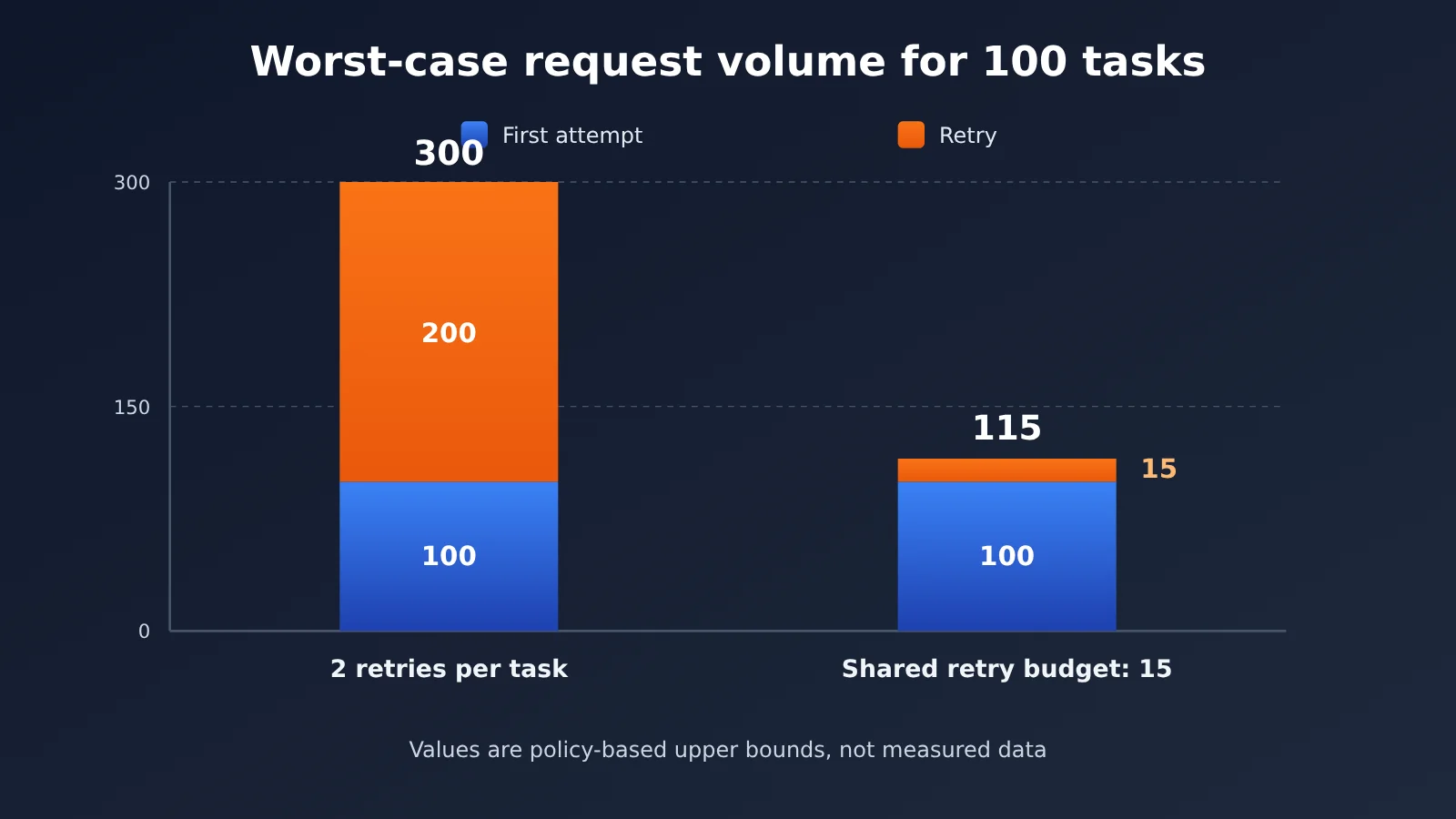
Figure caption: The chart above shows worst-case request volume calculated from the policy, not measured data. When running batch tasks on gateways like APIYI apiyi.com, it’s also a good idea to count initial sends, retries, and fallback-routing requests all against the same budget.
When you see in-flight requests, queued tasks, and retry counts all climbing at the same time, shrink the worker pool first and pause picking up low-priority tasks. That relieves pressure on upstream, but the root cause of the 503s still has to be established from the actual responses and the incident records on the official status page.
If you plan to switch to a fallback model, first make sure it has passed your business’s acceptance checks: capability, output format, and quality all need to have been verified ahead of time. According to the official model table (as of the date this article’s sources were checked), deepseek-flash supports image understanding while deepseek-v4-pro does not, so tasks containing images can’t be switched to Pro directly.
In the public model catalog on APIYI apiyi.com (data as of 2026-11-25), deepseek-flash, deepseek-v4.1-flash-1017, and deepseek-v4-pro all list both chat and messages endpoints. Before switching, go by the model IDs currently listed in the catalog.
4. DeepSeek API Code Implementation for Re-running Only Failed Items
4.1 Minimal Example
Here’s the smallest workable re-run skeleton: read the checkpoint, skip completed tasks, and only process what’s left.
import json, os, hashlib, openai

client = openai.OpenAI(
    api_key=os.environ["APIYI_API_KEY"],
    base_url="https://api.apiyi.com/v1",
    max_retries=0,  # Disable the SDK's automatic retries to avoid stacking
)

def tid(item):
    return hashlib.sha256(f"v1|{item['id']}|{item['text']}".encode()).hexdigest()[:16]

done = set()
if os.path.exists("results.jsonl"):
    for line in open("results.jsonl", encoding="utf-8"):
        try: done.add(json.loads(line)["task_id"])
        except (json.JSONDecodeError, KeyError): pass

items = [json.loads(l) for l in open("tasks.jsonl", encoding="utf-8")]
for item in items:
    if tid(item) in done:
        continue
    r = client.chat.completions.create(
        model="deepseek-flash",
        messages=[{"role": "user", "content": "总结:" + item["text"]}],
    )
    with open("results.jsonl", "a", encoding="utf-8") as f:
        f.write(json.dumps({"task_id": tid(item), "out": r.choices[0].message.content},
                           ensure_ascii=False) + "\n")
This code already delivers “no duplicate billing when you re-run after an interruption.” That said, it doesn’t yet handle retries, concurrency, or failure logging — the moment it hits its first 503, it’ll throw an exception and quit.
4.2 Complete Implementation
View the complete implementation code (including retry budget, Retry-After, and failure records)
import json, os, time, random, hashlib, threading
from datetime import datetime, timezone
from email.utils import parsedate_to_datetime
from concurrent.futures import ThreadPoolExecutor
import openai

client = openai.OpenAI(
    api_key=os.environ["APIYI_API_KEY"],
    base_url="https://api.apiyi.com/v1",  # APIYI OpenAI-compatible endpoint
    max_retries=0,   # all attempts are centrally counted by the logic below
    timeout=120,
)

MODEL = "deepseek-flash"
PROMPT_VERSION = "summary-v3"
RESULTS, FAILURES = "results.jsonl", "failures.jsonl"
RETRY_DELAYS = [1, 2]                 # example: retry at most twice
RETRYABLE = {429, 500, 502, 503, 504}
file_lock = threading.Lock()

def task_id(item):
    raw = f"{PROMPT_VERSION}|{item['source_id']}|{item['text']}"
    return hashlib.sha256(raw.encode("utf-8")).hexdigest()[:16]

def read_jsonl(path):
    if not os.path.exists(path):
        return
    with open(path, encoding="utf-8") as f:
        for line in f:
            try:
                yield json.loads(line)
            except json.JSONDecodeError:
                continue  # partial line write: skip; next round will catch up

def load_done():
    return {r["task_id"] for r in read_jsonl(RESULTS) if r.get("status") == "ok"}

def load_fatal():
    latest = {}
    for r in read_jsonl(FAILURES):
        latest[r["task_id"]] = r.get("final_kind")
    return {k for k, v in latest.items() if v == "fatal"}

def append(path, rec):
    with file_lock:
        with open(path, "a", encoding="utf-8") as f:
            f.write(json.dumps(rec, ensure_ascii=False) + "\n")
            f.flush()
            os.fsync(f.fileno())

class RetryBudget:
    """Additional attempts shared across the whole batch within a time window"""
    def __init__(self, extra, window=60):
        self.extra, self.window = extra, window
        self.used, self.start = 0, time.monotonic()
        self.lock = threading.Lock()

    def take(self):
        with self.lock:
            now = time.monotonic()
            if now - self.start >= self.window:
                self.used, self.start = 0, now
            if self.used >= self.extra:
                return False
            self.used += 1
            return True

def retry_after_seconds(err):
    resp = getattr(err, "response", None)
    value = resp.headers.get("retry-after") if resp is not None else None
    if not value:
        return None
    value = value.strip()
    if value.isdigit():
        return float(value)
    try:
        dt = parsedate_to_datetime(value)
        return max(0.0, (dt - datetime.now(timezone.utc)).total_seconds())
    except (TypeError, ValueError):
        return None

def classify(err):
    if isinstance(err, openai.APIConnectionError):   # includes timeouts
        return "retryable", None
    if isinstance(err, openai.APIStatusError):
        code = err.status_code
        return ("retryable" if code in RETRYABLE else "fatal"), code
    return "fatal", None

def run_one(item, budget, deadline):
    tid = task_id(item)
    if time.monotonic() > deadline:
        return "deferred"            # no failure record written; next round will naturally catch up
    attempts, final_kind = [], "retryable"
    for n in range(len(RETRY_DELAYS) + 1):
        if n > 0:
            wait = RETRY_DELAYS[n - 1] + random.uniform(0, 0.5)
            hint = attempts[-1].get("retry_after")
            if hint:
                wait = max(wait, hint)
            if time.monotonic() + wait > deadline or not budget.take():
                break
            time.sleep(wait)
        try:
            resp = client.chat.completions.create(
                model=MODEL,
                messages=[
                    {"role": "system", "content": "用三句话总结下面的文本。"},
                    {"role": "user", "content": item["text"]},
                ],
                max_tokens=600,
            )
        except Exception as e:
            kind, code = classify(e)
            attempts.append({"attempt": n, "status": code, "kind": kind,
                             "error": str(e)[:300],
                             "retry_after": retry_after_seconds(e)})
            if kind == "fatal":
                final_kind = "fatal"
                break
            continue

        choice = resp.choices[0]
        content = (choice.message.content or "").strip()
        if choice.finish_reason == "stop" and content:
            append(RESULTS, {
                "task_id": tid, "status": "ok", "model": resp.model,
                "output": content,
                "usage": resp.usage.model_dump() if resp.usage else None,
                "attempts": n + 1,
            })
            return "ok"
        attempts.append({"attempt": n, "status": None, "kind": "fatal",
                         "error": f"finish_reason={choice.finish_reason}"})
        final_kind = "fatal"
        break

    append(FAILURES, {
        "task_id": tid, "source_id": item["source_id"], "model": MODEL,
        "round_at": datetime.now(timezone.utc).isoformat(),
        "final_kind": final_kind, "attempts": attempts,
    })
    return "failed"

def main(items, workers=8, extra_retries=15, minutes=30, include_fatal=False):
    done = load_done()
    skip = done if include_fatal else done | load_fatal()
    todo = {}
    for it in items:
        t = task_id(it)
        if t not in skip:
            todo[t] = it              # the dict also deduplicates
    print(f"输入 {len(items)},已完成 {len(done)},本轮执行 {len(todo)}")
    budget = RetryBudget(extra_retries, window=60)
    deadline = time.monotonic() + minutes * 60
    with ThreadPoolExecutor(max_workers=workers) as pool:
        stats = list(pool.map(lambda it: run_one(it, budget, deadline), todo.values()))
    print({k: stats.count(k) for k in ("ok", "failed", "deferred")})

if __name__ == "__main__":
    tasks = list(read_jsonl("tasks.jsonl"))
    main(tasks)
This code has a few key design choices. `max_retries=0` makes sure all attempts count against the same budget. `RetryBudget` lets all threads share a pool of additional attempts, preventing retry storms. Tasks past the deadline return `deferred` immediately: they don’t write a failure record and don’t consume budget, and the next round picks them up automatically. `load_fatal` skips tasks marked non-retryable in the previous round by default, so the same error doesn’t keep coming back.
> 🚀 **Quick start tip**: Start by applying for a free test quota at APIYI (apiyi.com), pick 20–50 real tasks and run the script above once. Then interrupt it manually once and confirm that completed tasks are correctly skipped on rerun before scaling up to the full set.
### 4.3 Sequence for a catch-up run
1. Run the script and watch the `ok`, `failed`, and `deferred` counts in the output.
2. Check the status code distribution for this round in `failures.jsonl`. If 429s dominate, lower `workers` first; if 503s dominate, check the official status page first and lengthen the wait time appropriately.
3. Run the script again without changing any parameters. Successful tasks are skipped, and only failed and deferred tasks run again.
4. After fixing `fatal` issues, put those tasks back into the catch-up run with `include_fatal=True`.
5. Repeat the steps above until the failure count converges, then move on to the acceptance checks in Section 6.
—
## 5. DeepSeek API 503 Rerun FAQ
Q1: Can’t I just rely on the SDK’s built-in retries?
SDK retries only apply to a single request. They don’t know how many other tasks in the batch are retrying, and they don’t preserve progress if the process crashes. They’re fine for occasional one-off failures, but they can’t replace checkpoints and a batch-wide shared retry budget. If you keep SDK retries, you have to count them toward the total attempt count.
Q2: When 503s persist, should I switch to another model?
Check two conditions first: whether the 503 rate on first requests over the same route stays consistently high, and whether the fallback model has already passed your business acceptance. Only when both hold should you move over the tasks that meet the capability requirements, and record the actual model in the checkpoint. With the unified interface at APIYI apiyi.com, you can call multiple models using the same API key — switching only means changing the `model` parameter — but the acceptance work still has to be done against your own business standards.
Q3: If a streaming request drops mid-way, can it keep generating from where it stopped?
No. The partial output you’ve already received should be discarded, that attempt marked as interrupted, and the whole task re-run from scratch. Don’t stitch the output of another call (especially another model) onto what you’ve already received — otherwise there’s no way to guarantee the result stays consistent in semantics or format.
Q4: How do I verify this rerun logic actually works in my own environment?
Build a small batch, manually kill the process partway through, then run it again and check the checkpoint for duplicate IDs. If you need a real invocation environment, you can do a small-scale drill using APIYI apiyi.com’s test credits, and only wire it into production tasks once you’ve confirmed everything checks out.
—
## 6. Verifying Rerun Results: Confirming the DeepSeek API Batch Tasks Are Complete and Duplicate-Free
After each rerun round, use these four checks to determine whether the batch is truly done:
| Check | How to determine | Pass criteria |
|——–|——————|—————|
| Completeness | Input manifest’s set of task IDs minus the set of IDs in the checkpoint | The difference is empty, or only contains `fatal` tasks that have been confirmed as abandoned |
| No duplicates | Count how many times each `task_id` appears in the checkpoint | Each ID appears exactly once |
| Model consistency | Count the `model` field in the checkpoint | Matches expectations; if there was a switch, the proportions should be explainable |
| Cost verifiable | Sum up the `usage` in the checkpoint | Consistent with the platform bill’s order of magnitude, with no obvious double billing |
Only when all four pass is the batch considered complete, and downstream processes can safely read the checkpoint file. If the “no duplicates” check fails, it usually means two processes wrote to the checkpoint at the same time, or random values got mixed into the task IDs — fix that problem first before continuing with reruns.
When calling DeepSeek and other models on APIYI apiyi.com, you can compare the summed `usage` from the checkpoint against the usage records in the console to determine whether reruns incurred extra consumption.
—
> **Author**: APIYI Technical Team
> **Technical discussion**: Feel free to reach us through the homepage of the APIYI official website. For more integration materials, check the docs.apiyi.com documentation center.