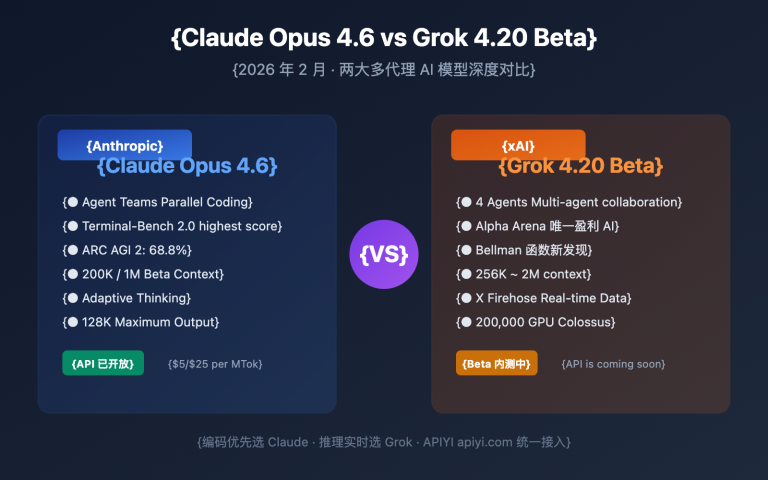
Author’s note: MAGI-2 and Seedance 2.5 can both generate 30-second AI videos with sound. This article lays out checkable numbers across four dimensions — reference material, resolution, billing, and whether you can actually call the model — to help you decide which tasks should stay on Seedance 2.5 and which are worth waiting for MAGI-2.
At 02:09 Beijing time on 2026-11-25, Sand.ai released the AI video model MAGI-2. According to the official announcement, it can turn text, images, video, and audio into videos up to 30 seconds long, 1080p, with sound — at $0.08 per second. Those specs overlap heavily with Seedance 2.5, which is already in use: also 30 seconds max, also 1080p max, also outputs audio by default.
This isn’t an article declaring a winner. The two models have similar headline ceilings; the real differences come down to how much reference material a single clip needs, what kind of 1080p you can live with, how the billing works, and whether you can actually call it in your workflow today. Every vendor number below is sourced: official claims are labeled as official, and third-party claims specify who said it and when.
The core value: after reading this, you’ll have four sets of numbers: whether the reference limit is 30 images or 20 assets, where the resolution boundary sits (neither has 4K), what token-based and per-second pricing each costs, and which one you can actually invoke right now.
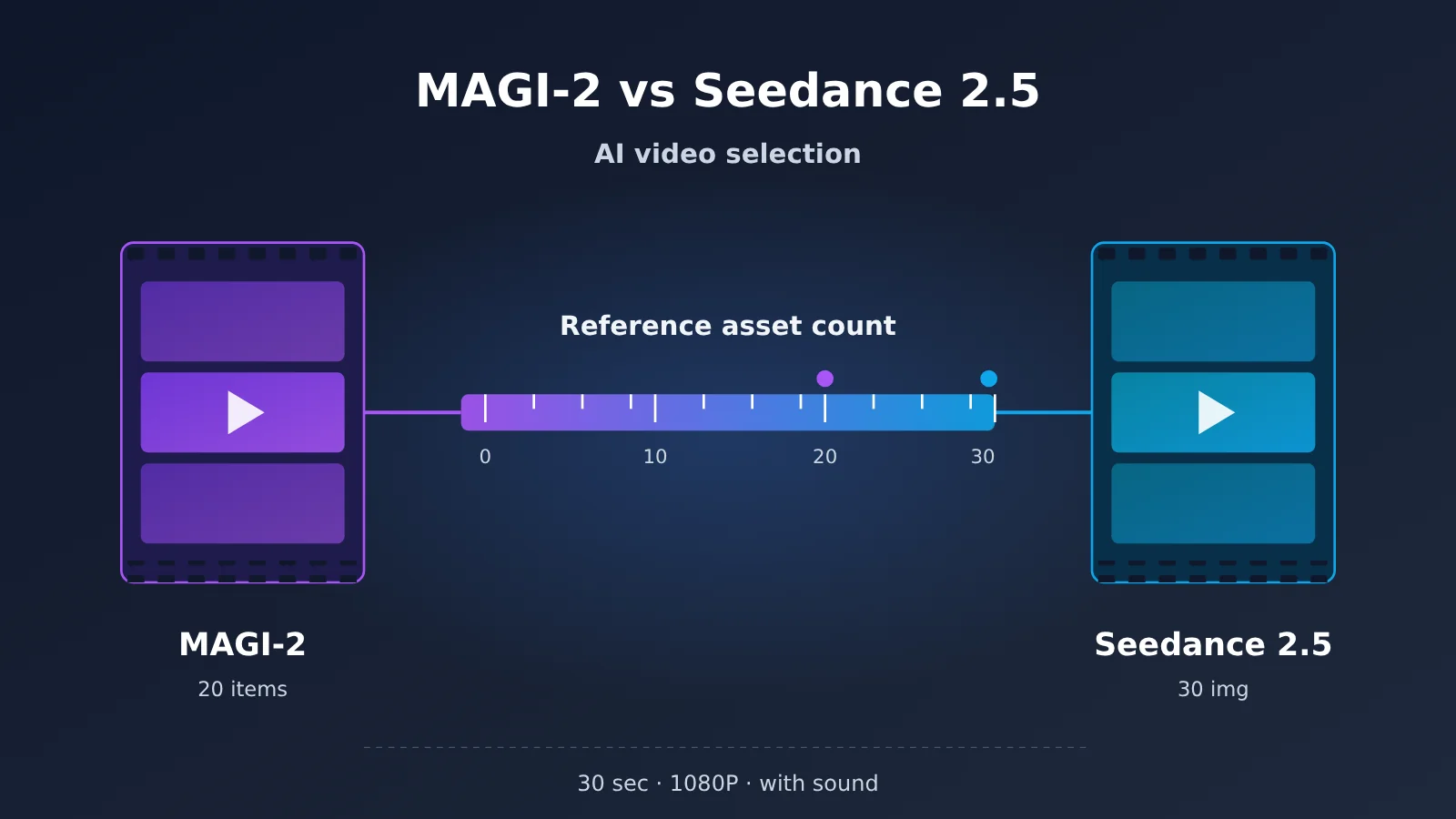
MAGI-2 vs. Seedance 2.5: Key Differences at a Glance
Let’s start by putting the advertised specs for both models into a single table. The MAGI-2 column comes from Sand.ai’s technical blog and the launch post on its official account, published on 2026-11-24. The Seedance 2.5 column comes from the description of the listed model doubao-seedance-2-5-260628 in the APIYI documentation, along with BytePlus’s official rate card.
| Comparison | MAGI-2 (vendor-reported) | Seedance 2.5 | Key difference |
|---|---|---|---|
| Duration | Up to 30 seconds (third-party onvid.ai lists 4–30 seconds) | 4–30 seconds | Same upper limit |
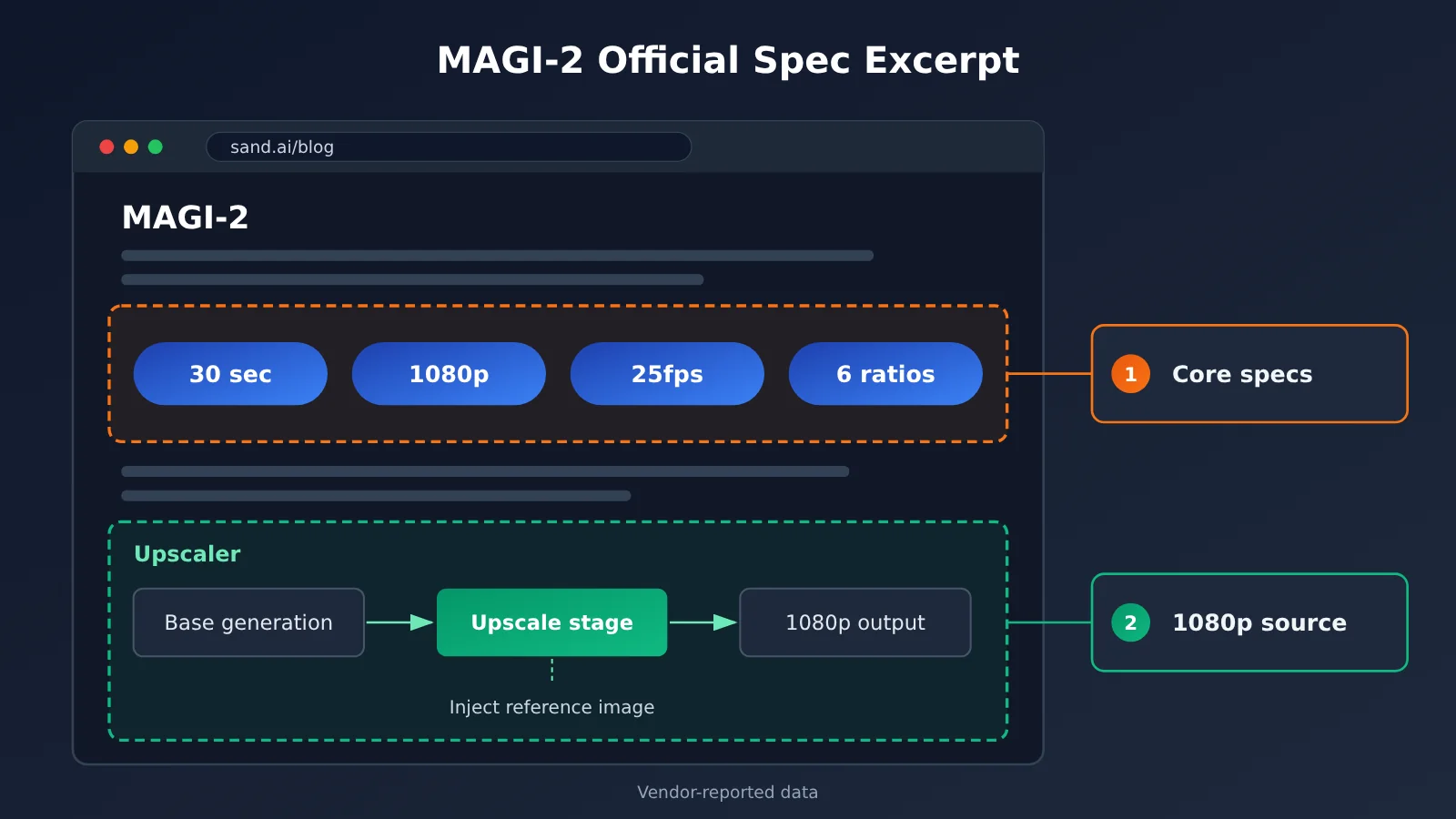
| Resolution | Up to 1080p, 25fps, 6 aspect ratios | 480p / 720p / 1080p | Neither offers 4K |
| Audio | Generates visuals and audio from the same backbone | Outputs synchronized audio by default | Both generate audio natively |
| Reference assets | Up to 20 per run: 10 images + 5 videos + 5 audio clips | Up to 30 reference images, with support for images + video + audio | Trade-off between more images and more audio |
| Billing | $0.08 per second | By token (area × duration) | Per-second vs. per-token |
| Current access | Debuts on the Higgsfield platform and its API | Already listed on APIYI | Whether it can plug into existing workflows |
The row that’s easiest to overlook in this table is “Reference assets.” Both list 30 seconds, but Seedance 2.5 puts its upper limit on the number of reference images, while MAGI-2 splits the quota across images, video, and audio. Next, let’s go through the details one by one in this order: reference assets → resolution → billing → whether you can call it today.
MAGI-2 vs. Seedance 2.5 Reference Media Limits: 30 Images vs. 20 Assets
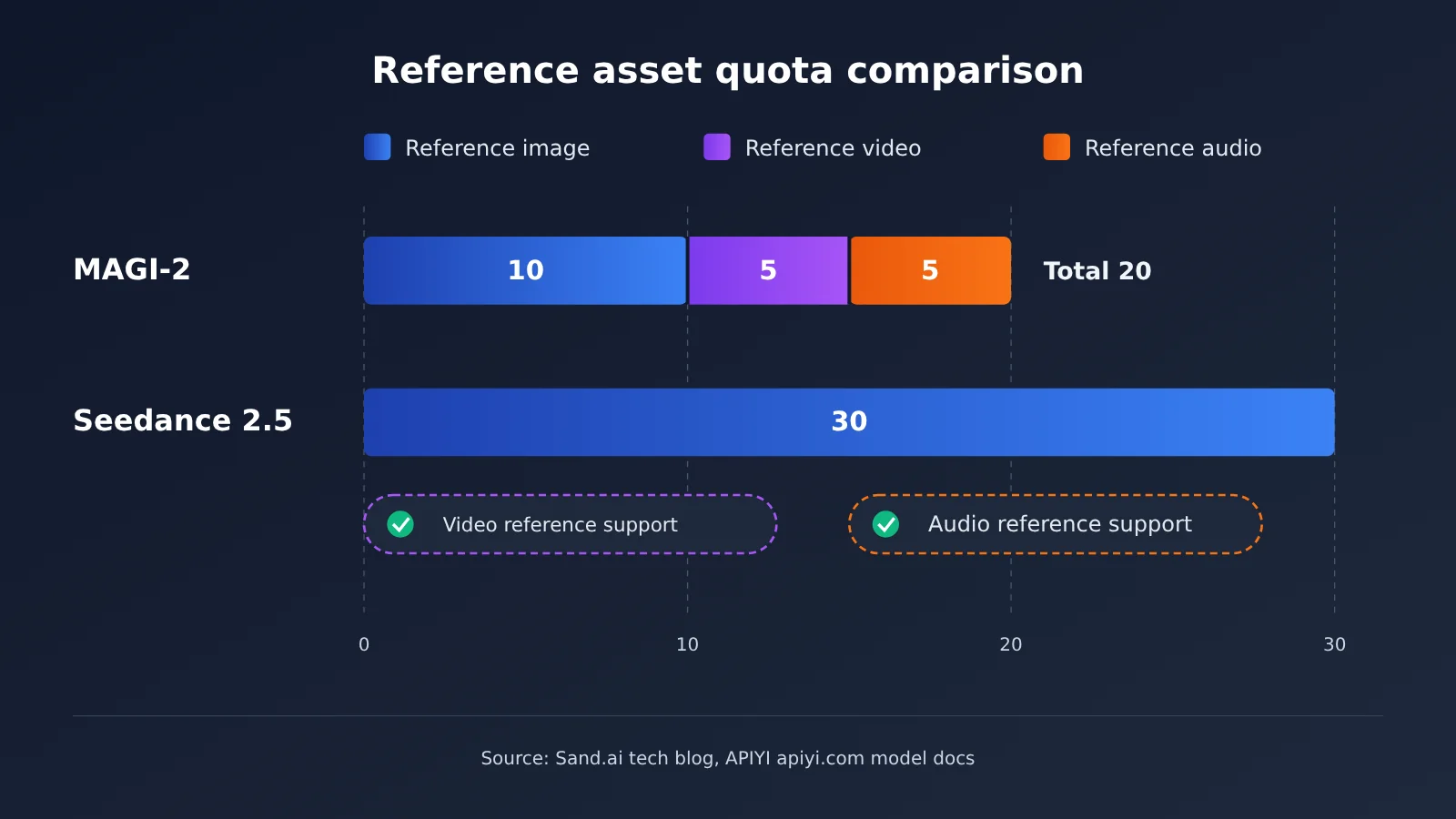
This is the question raised in the title, and it’s the one that most directly affects model selection. According to Sand.ai’s tech blog, MAGI-2’s omni-reference accepts up to 20 media assets per request, allocated as 10 images, 5 videos, and 5 audio tracks. Seedance 2.5’s reference image limit is 30, which puts it among the highest reference asset caps in its class. Its multimodal reference also supports combinations of images, video, and audio; the per-item limits for video and audio are specified in the API documentation.
Putting the numbers into real tasks makes this easier to understand. If you’re doing e-commerce multi-SKU displays, short-drama storyboards with lots of character design sheets, or need to repeatedly pull the same batch of product images from an asset library, the 30-image headroom matters a lot—10 images can easily fall short. Conversely, if a single video needs several dialogue timbre references, a music reference, and a few motion reference videos, MAGI-2’s quota of 5 audio tracks plus 5 videos is more targeted.
| Asset type | MAGI-2 per-request limit (vendor-stated) | Seedance 2.5 | Typical task |
|---|---|---|---|
| Reference images | 10 | 30 | Multi-character, multi-product, multi-scene setups |
| Reference videos | 5 | Supported; see docs for per-item limit | Motion, camera movement, pacing references |
| Reference audio | 5 | Supported; see docs for per-item limit | Dialogue timbre, music, ambient sound |
| Total | 20 | Reference images alone can reach 30 | Total asset planning |
Seedance 2.5 also has an engineering convenience: it supports an asset library, and you can use it by selecting a “usage-first” or “usage-based billing” token type. Character and product images that have already been uploaded can be reused across tasks, so you don’t have to upload them again each time. For teams producing content in batches, this often has a bigger impact on efficiency than the per-request limit.
MAGI-2 has another capability related to reference assets: according to the vendor, it supports precise timeline and cut-point control—you can specify the exact second to cut and which shot size to cut to, and it can also perform targeted edits on existing videos. Seedance 2.5 also offers video editing and extension. However, specifying cut points by the second is a selling point MAGI-2 emphasizes in its launch materials, so creators working on multi-shot narratives may want to keep an eye on it.
MAGI-2 and Seedance 2.5 Resolution Boundaries: Both Stop at 1080p
Both models top out at 1080p, and neither offers 4K. If your deliverable requires a 4K master, both models will need post-production upscaling—there’s no point waiting for MAGI-2 to solve that.
The difference lies in how they reach 1080p. Sand.ai’s technical blog states this clearly: MAGI-2’s 1080p goes through a latent spatiotemporal upscaler, which reinjects the original reference image during the upscaling stage to improve consistency for small faces in 30-second long videos and the clarity of on-screen text. In other words, MAGI-2’s 1080p is a product of the upscaling stage, not native 1080p generation. That doesn’t necessarily mean the image quality is worse, but when reviewing sample clips, it’s worth checking faces in wide shots and small text closely.
Seedance 2.5 offers three tiers: 480p, 720p, and 1080p. Among the Seedance models already available on APIYI, only 2.5 and 2.0 Standard support 1080p. The benefit of these tiers is that you can quickly test storyboards at 480p or 720p, then output the final cut at 1080p once you’ve confirmed it—we’ll also use this approach in the billing math later.
| Resolution-related item | MAGI-2 (vendor-reported) | Seedance 2.5 |
|---|---|---|
| Maximum resolution | 1080p | 1080p |
| 4K | No | No |
| Source of 1080p | Product of the upscaling stage; the reference image is reinjected during upscaling | Vendor hasn’t disclosed the upscaling method |
| Available tiers | Vendor only announces a 1080p ceiling | 480p / 720p / 1080p |
| Frame rate and aspect ratios | 25fps, 6 aspect ratios | Refer to API documentation |
The official blog also lists the limitations MAGI-2 acknowledges, which you should consider during model selection:
- Extremely high-speed motion occasionally shows trajectory and continuity issues;
- Local motion in mid-to-long-shot 2D animation looks overly smooth;
- Layering and physical realism in complex soundscapes are still lacking;
- Post-training RL makes it harder to trigger visual reasoning, implicit narrative, and cross-lingual instruction following from the pretraining stage; internally, the vendor considers this similar to an alignment tax.
As for quality comparisons, the vendor-reported average Elo across four tasks on AA Video Arena v2.1 is 1150.3, up 151.8 from 998.5 for the previous Preview generation. These are vendor-reported figures, not third-party retests, so treat them as reference only.
MAGI-2 vs Seedance 2.5 Billing: Per Second vs Per Token
This is the one people mess up most, so let’s break it into three separate calculations rather than mashing them into a single number: MAGI-2’s per-second price, each vendor’s official list rate, and APIYI’s actual in-site price.
MAGI-2 Per-Second Billing
The official launch post lists $0.08 per second. Third-party site onvid.ai was even more direct in a November 24, 2026 article: $2.40 for a 30-second clip. The nice thing about per-second pricing is how easy it makes budgeting—duration times unit price equals your cost, with no dependence on resolution or aspect ratio. For now, this price applies to the launch channel.
Seedance 2.5 Token-Based Billing
Seedance 2.5 doesn’t quote a per-second price. It bills by token, and the token count is roughly proportional to “frame area × duration.” 1080p has about 2.25 times the pixel area of 720p. The price ratio between APIYI’s 1080p/5-second and 720p/5-second tiers (3.0873 ÷ 1.3721) also comes out to roughly 2.25, which lines up with the area ratio.
BytePlus’s official list price is about $0.231 per second for 720p and $0.569 per second for 1080p, so 30 seconds at 720p comes to about $6.93. Actual APIYI prices on apiyi.com (re-verified on 2026-11-16) are as follows: 720p/5 seconds $1.3721, 1080p/5 seconds $3.0873, 720p/30 seconds $8.1761, and 480p/4 seconds $0.4893. That works out to about $0.274, $0.617, and $0.272 per second, respectively. When you create a task on the platform, it pre-authorizes $0.135 per second, then settles based on actual token usage. The 0.18x shown on the SeeDance2 group isn’t a discount—it’s the settlement multiplier for converting RMB pricing to USD.
Converting the Same 30-Second 1080P Example
Let’s apply all three billing calculations to the same task: a 30-second, 1080P clip with audio.
| Billing basis | Unit price source | 30-second 1080P conversion | Notes |
|---|---|---|---|
| MAGI-2 per-second price | Official launch post, $0.08/second | 30 × 0.08 = $2.40 | Launch-channel price; 1080p is an upscaling-stage output |
| Seedance 2.5 official list price | BytePlus, about $0.569/second | 30 × 0.569 ≈ $17.07 | Official list price, converted from tokens to per-second |
| Seedance 2.5 APIYI site price | 1080p/5 seconds, $3.0873 | About 0.617 × 30 ≈ $18.52 | Estimate based on linear extrapolation from the 5-second tier; actual billing is by token |
| Seedance 2.5 site 720p comparison | 720p/30 seconds, $8.1761 | $8.1761 | Original value from the site price list, can be cited directly |
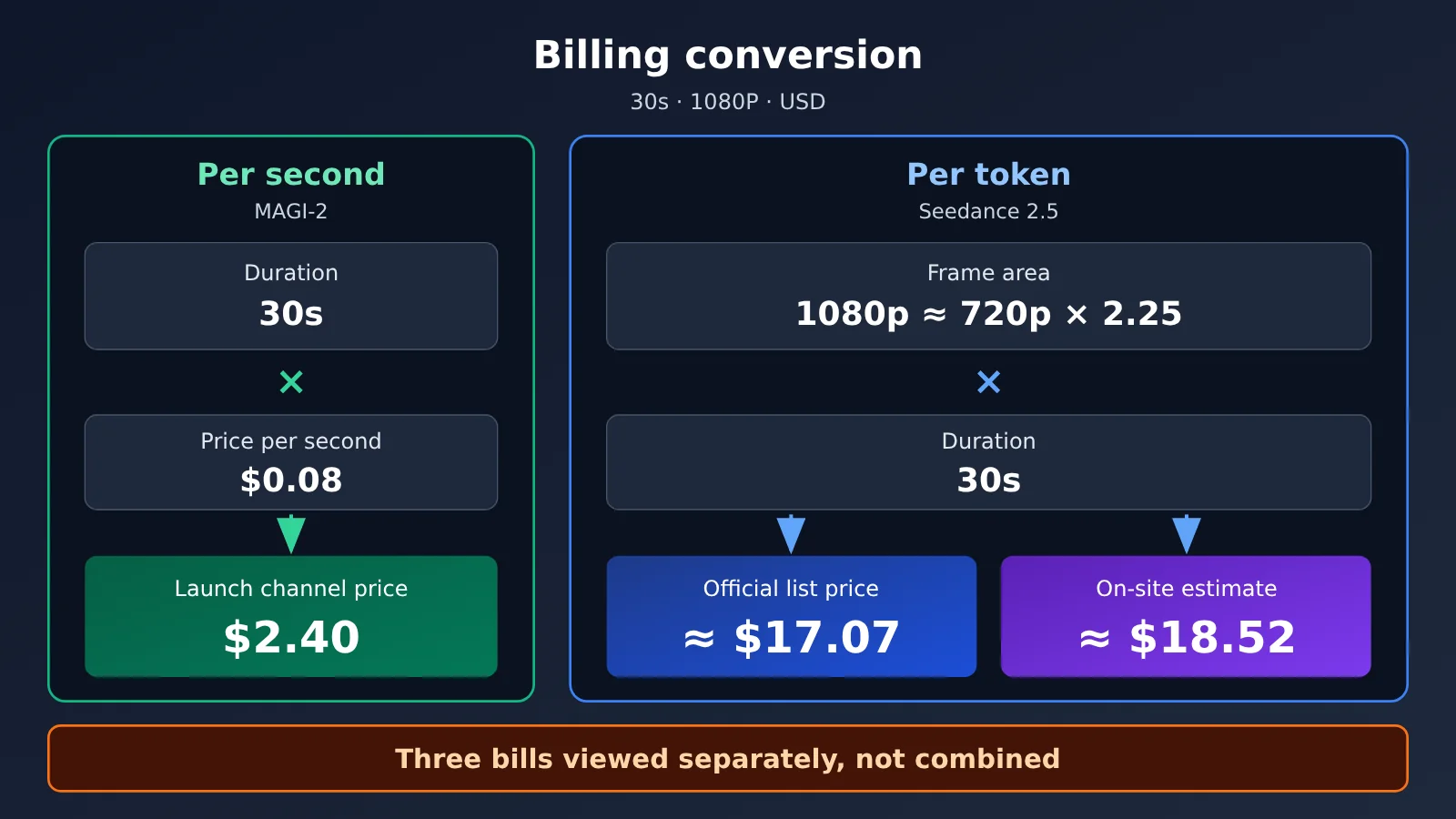
The math is simple: for MAGI-2, use seconds × 0.08; for Seedance 2.5, first pick the per-second rate by resolution (about 0.27 for 480p and 720p, about 0.62 for 1080p), then multiply by the number of seconds. The “X dollars per run” figures you see on leaderboards or social media are usually results for a specific duration and resolution—they aren’t sticker prices you can use directly.
As for the price gap, X user @chetaslua posted on 2026-11-24 that MAGI-2 covers about 90% of Seedance 2.5’s use cases and is nearly 6.5× cheaper. This is a personal opinion, and the calculation method wasn’t disclosed, so it shouldn’t be treated as a tested conclusion. Also, the two produce 1080p in different ways, so the multiple you get by dividing their unit prices isn’t the same as cost-effectiveness at equal quality.
💰 Cost tip: For the same clip, the cost can differ a lot between per-second and per-token billing. Before committing to a final render, you can first run through the storyboard at 480p or 720p for a short duration on APIYI apiyi.com, confirm the reference-material combination works, and then move to 1080p—this avoids costly trial and error on a long clip.
Can You Call MAGI-2 and Seedance 2.5 Today?
This one item decides whether you “use it right now” or “hold off for a bit.”
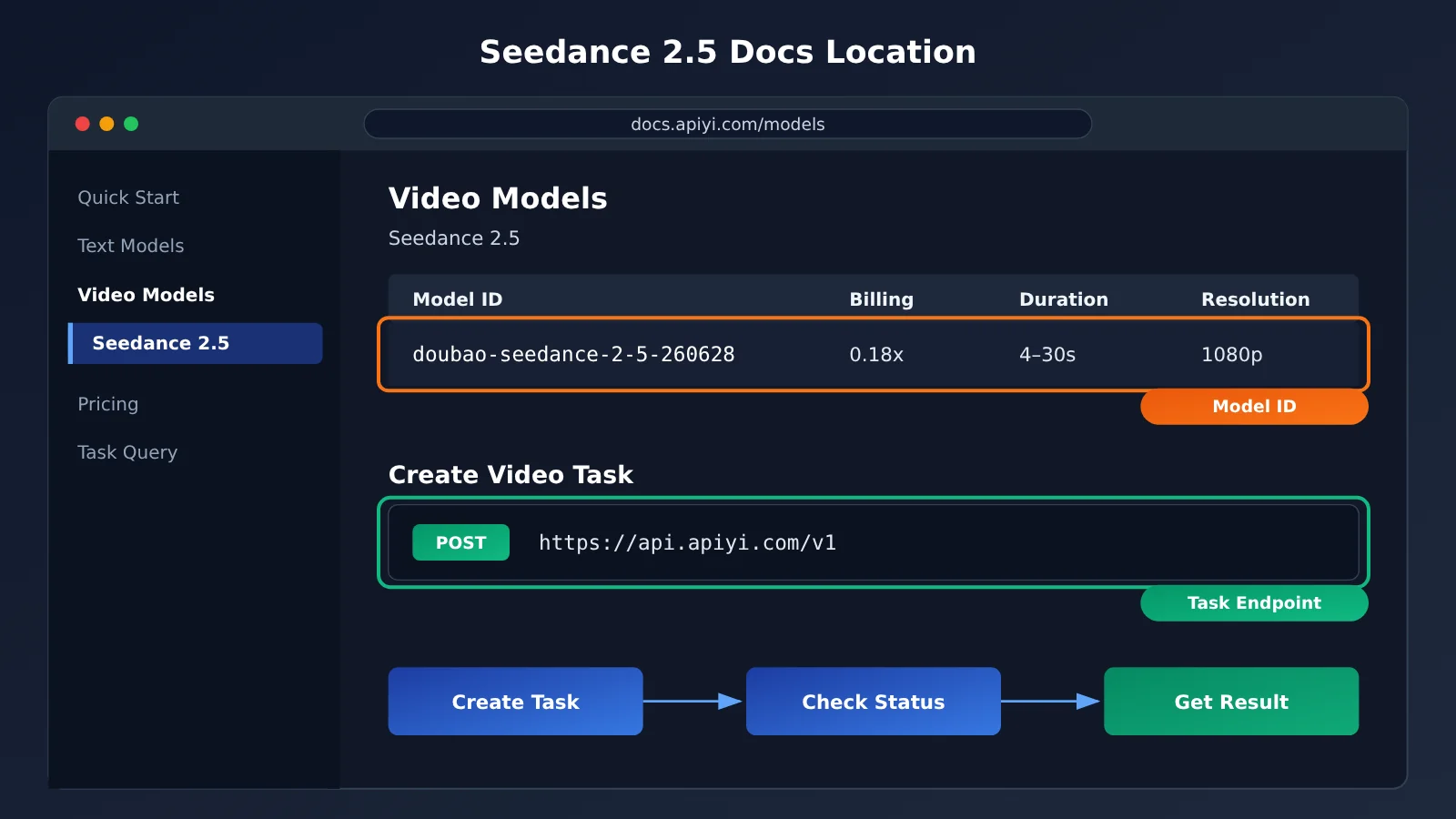
Seedance 2.5 is available on APIYI right now. The model ID is doubao-seedance-2-5-260628, and a single token gets you every model currently listed on the platform — the four models under the SeeDance2 group all share the same token. A few parameters and paths to watch out for:
- Create tasks via
POST https://api.apiyi.com/seedance/api/v3/contents/generations/tasks— don’t send them to/v1/videos; - The default
durationfor 2.5 is-1, while the 2.0 series defaults to 5 seconds — when migrating older scripts, spell out the duration explicitly; - Model IDs are case-sensitive, and version numbers use dots, so don’t alter the
doubao-seedance-2-5-260628formatting when you copy it; - If you want to reuse reference images from the asset library, the token type must be “pay-as-you-go preferred” or “pay-as-you-go billing”;
- Tasks are asynchronous — after creating one, poll the task status per the docs, then collect the finished video.
Where MAGI-2 stands today: it debuted on the Higgsfield platform and its API. As of 2026-11-25 09:45 (UTC+8), neither the model list at docs.apiyi.com/models nor the pricing endpoint on APIYI has a MAGI-2 row among the 278 live models. MAGI-2 isn’t listed yet — we’ll get this model up as soon as we can; model IDs and pricing are governed by the platform’s model list. Once it’s live, it’ll work like any other listed model: same https://api.apiyi.com/v1 base_url and the same token, with the exact endpoint per the documentation at that time.
The open-source story is inconsistent right now. The technical blog says MAGI-2 “will be open-sourced,” while the launch post says “the 400B-parameter open weights are coming soon.” But the blog gives total parameters as 480B (roughly 28B active, Multi-Head Latent MoE), so the two numbers don’t match up — and there’s no official explanation, no timeline, and no license. Third-party estimates from onvid.ai put 400B weights at around 800GB in 16-bit, while the 114B preview already needs 8 data-center GPUs. For most creators, local deployment isn’t realistic anytime soon.
🚀 Quick start: If you already have OpenAI-compatible calling code, getting onto APIYI is just a matter of swapping the base_url to
https://api.apiyi.com/v1and the model ID to the exact spelling used on the platform. Seedance 2.5 video tasks go through the dedicated task endpoint above, and new users can use their free trial credits to run a 480p short film first to validate the workflow.
Similar Models You Can Call on APIYI While Waiting for MAGI-2
If you’re after a specific MAGI-2 capability—say, a finished 30-second video in one go, audio references, or per-second billing—there are already similar models on APIYI that can hold you over. The table below comes from the video model documentation on APIYI:
| Model ID | Pricing (on APIYI) | Duration & resolution | Relevant capabilities | Available platform |
|---|---|---|---|---|
doubao-seedance-2-5-260628 |
Per token, SeeDance2 group 0.18x | 4–30 seconds, up to 1080p | Up to 30 reference images, audio track included by default | APIYI apiyi.com |
wan3.0-video |
480P $0.0294 / 720P $0.0588 / 1080P $0.1176 per second | Up to 30 seconds | One ID covers all modes, audio track included by default | Same as above |
MiniMax-H3 |
$0.03 per second | 4–15 seconds, 768P only | 9 images + 3 videos + 3 audio references; audio track can’t be turned off | Same as above |
wan2.7-i2v |
720P $0.084 / 1080P $0.14 per second | See docs | driving_audio audio-driven lip sync |
Same as above |
HappyHorse 1.1 |
720P $0.126 / 1080P $0.224 per second | See docs | Up to 9 reference images | Same as above |
oxygen-1.0 |
$0.02 per second; 480p and 768p same price | 4–15 seconds | Built-in audio track, uses /v1/videos |
Same as above |
A few comparisons worth noting:
wan3.0-videoalso supports up to 30 seconds and uses per-second pricing. At list price, 30 seconds at 1080P works out to 30 × 0.1176 ≈ $3.53;MiniMax-H3has 3 audio references, but it’s 768P only and maxes out at 15 seconds;- For audio-driven lip sync, currently only
wan2.7-i2vsupports it through itsdriving_audioparameter.
Also, the “upcoming video models” section in the docs only goes up to Kling 3.0—Kling 4.0 isn’t available right now. Google’s video models (including Gemini Omni 1.2 Flash) aren’t available yet either.
MAGI-2 and Seedance 2.5: Scenario Recommendations
No overall score—just recommendations by task type.
Tasks to Keep on Seedance 2.5
- Videos with more than 10 reference images: multi-character setups, multi-SKU products, multi-scene art direction—the 30-reference-image cap lets you feed them all in one go.
- Batch production that needs asset-library reuse: the same set of character and product images can be called repeatedly across tasks without reuploading each time.
- Tiered rendering workflows: test storyboards at 480p or 720p first, then render the final video at 1080p.
- Projects that need to go live today: already callable via
doubao-seedance-2-5-260628, with the lowest integration overhead.
Tasks Worth Waiting for MAGI-2
- 30-second single-pass videos with multi-shot storytelling: the official materials emphasize the ability to specify cut points and shot sizes on a per-second basis—great for creators who don’t want to stitch together multiple short clips.
- Audio-heavy videos: five audio references can cover dialogue timbre, music, and ambient sound at the same time.
- Projects that need tight budget control: priced per second—duration × 0.08 gives you the cost, and it doesn’t change with resolution.
- Open-source weight watchers: if your team has large-scale compute and plans to self-deploy, keep an eye on future weight releases, though parameter details and licensing haven’t been finalized yet.
💡 Recommendation: The decision is simple. First count how many reference images and audio clips this video needs. If it needs a lot of images, stay with Seedance 2.5; if it needs a lot of audio and many cut points, keep an eye on MAGI-2. Before MAGI-2 launches, you can use
wan3.0-videoorMiniMax-H3on APIYI (apiyi.com) to validate the two needs—30-second per-second pricing and audio references.
Frequently Asked Questions (FAQ)
Q1: What kind of model is MAGI-2?
MAGI-2 is an AI video generation model released by Sand.ai on 2026-11-24 (early morning of 11-25 Beijing time). According to the vendor’s own claims, it can turn text, images, video, and audio into videos with sound, up to 30 seconds, 1080p, and 25fps. It has 480B total parameters with roughly 28B active, using a Multi-Head Latent MoE architecture.
Q2: What’s the biggest difference between MAGI-2 and Seedance 2.5?
The main differences are the structure of reference materials and the billing model. Seedance 2.5 accepts up to 30 reference images and bills by token. MAGI-2 accepts up to 20 assets per run (10 images, 5 videos, 5 audio clips) and bills by second at $0.08 per second. Both top out at 30 seconds and 1080p, and neither offers 4K.
Q3: Can MAGI-2 be called on APIYI right now?
MAGI-2 isn’t listed yet, but we’ll get it up as soon as we can — the model ID and pricing will follow what’s shown in the platform’s model list. Once it’s live, it’ll use the same base_url `https://api.apiyi.com/v1` and your existing token.
Q4: How do I call Seedance 2.5 on APIYI?
The model ID is `doubao-seedance-2-5-260628`, and it’s case-sensitive. Create tasks through the Seedance-specific task endpoint `/seedance/api/v3/contents/generations/tasks` — don’t submit them to `/v1/videos`. For 2.5, `duration` defaults to `-1`, so it’s best to set the duration explicitly. Once you sign up at APIYI (apiyi.com) you can claim free trial credits, and a single token covers every model currently on the platform.
Q5: How much does a 30-second 1080P clip cost on each side?
At official pricing, MAGI-2 comes to 30 × 0.08 = $2.40. Seedance 2.5 is about $17.07 on BytePlus’s official rate card. Extrapolating linearly from APIYI’s in-platform price for 1080p/5 seconds gives roughly $18.52 — that’s an estimate, since actual billing is by token. These three figures use different bases, so please look at them separately.
Q6: Is MAGI-2’s 1080p the same as Seedance 2.5’s 1080p?
Not exactly. Sand.ai’s technical blog explains that MAGI-2’s 1080p is produced by a latent-space spatiotemporal upscaler that re-injects the reference image during the upscaling stage — it isn’t native 1080p generation. When watching sample clips, it’s worth paying close attention to faces in wide shots and small text.
Q7: What are the known limitations of MAGI-2?
The vendor acknowledges these limitations: extremely high-speed motion occasionally has trajectory and continuity issues, local motion in mid-to-far-shot 2D animation is overly smooth, and complex soundscapes lack layering. On top of that, the open-source specs are inconsistent (480B vs 400B), with no timeline or license. The Elo score of 1150.3 is a vendor self-reported number, not third-party verification.
Q8: People online say MAGI-2 is 6.5 times cheaper than Seedance 2.5 — is that credible?
That’s a personal assessment from X user @chetaslua on 2026-11-24, and the calculation basis wasn’t made public, so it can’t be treated as an empirical conclusion. The two differ in both billing model and how 1080p is generated, so I’d suggest using the conversion method in this article and recalculating based on your own duration and resolution.
MAGI-2 and Seedance 2.5 Key Takeaways
- Reference materials: Seedance 2.5 supports up to 30 reference images; MAGI-2 takes 20 assets per run, including 5 audio clips;
- Resolution: Both stop at 1080p — no 4K; MAGI-2’s 1080p is a product of its upscaling stage;
- Billing: MAGI-2 charges $0.08 per second; Seedance 2.5 bills by token using “area × duration”;
- Same-example conversion: For 30 seconds at 1080P, MAGI-2 costs $2.40, while Seedance’s list price is around $17.07;
- Can you call it?: Seedance 2.5 is already callable, with the ID
doubao-seedance-2-5-260628; MAGI-2 isn’t listed yet; - Interim options:
wan3.0-videosupports per-second billing for 30 seconds, andMiniMax-H3offers 3 audio references; - About the numbers: Elo, parameter counts, and price-difference multiples are all vendor-reported or third-party claims — check the source before using them.
Summary
Choosing between MAGI-2 and Seedance 2.5 comes down to one question: how many reference materials does a single clip need?
- Lots of images → go with Seedance 2.5: 30 reference images plus asset library reuse, and you can call it today;
- More audio and cut points → keep an eye on MAGI-2: 30-second single-pass output, 5 audio references, and per-second billing for easier budget estimates;
- Resolution isn’t the dividing line: both stop at 1080p, so if you want 4K you’ll need post-production either way;
- Run the billing separately: per-second and per-token each use their own formula — don’t treat leaderboard per-run prices as list prices.
Teams already using Seedance 2.5 have no reason to stop and wait. Keep image-heavy, reuse-oriented tasks on doubao-seedance-2-5-260628, and validate audio-heavy, cut-heavy needs on a per-second model that’s already available. Once MAGI-2 launches, you can compare directly with the same API key. We recommend using APIYI apiyi.com to centrally manage invocation and billing for these video models — when you switch, you only change the model ID.
📚 References
-
Sand.ai Official Technical Blog · MAGI-2: architecture, reference material limits, upscaler, Elo, and limitations
- Link:
sand.ai/blog/magi-2 - Note: Primary source for the MAGI-2 specs and limitations in this article; all vendor-reported
- Link:
-
MAGI Official Account Post: release timing, per-second pricing, and open-source weights statement
- Link:
x.com/magiai_hq/status/2125290721003680155 - Note: Original source for $0.08/second and “400B open-source weights coming soon”
- Link:
-
onvid.ai MAGI-2 Overview (2026-11-24): third-party summary of duration, per-video pricing, and deployment threshold estimates
- Link:
onvid.ai - Note: Source for the 30-second $2.40 price and 800GB weight-size estimate; these are third-party claims
- Link:
-
X user @chetaslua comment (2026-11-24): personal take on MAGI-2 coverage and the pricing gap
- Link:
x.com/chetaslua - Note: Personal opinion, not official data, not hands-on testing
- Link:
Author: APIYI Technical Team
Technical inquiries: For video model versions, pricing, and endpoints, refer to the documentation center. Visit docs.apiyi.com for the latest model list and invocation instructions.