Author’s note: A breakdown of Sand.ai’s newly released AI video model MAGI-2, covering 30-second one-pass video generation, audio and video on a single backbone, 20 reference assets and cut-point control, the four shortcomings the company itself acknowledges, and the video models you can use as alternatives right now.
In the early hours of November 25, 2026, Beijing time, Sand.ai released MAGI-2, a new-generation AI video model. The headline pitch is a single prompt can generate a video up to 30 seconds long, at 1080p, with its own audio, and can cut between shots at exact seconds you specify. The launch post also states per-second billing at $0.08 per second.
This isn’t a rewrite of the launch press release. Below, I’ll break down the three core capabilities the company claims one by one, spelling out what each can do, how to verify it, and where things tend to go wrong. I’ll also list the four shortcomings the official technical blog openly acknowledges, and finally cover which comparable models can fill the gap while MAGI-2 still isn’t usable.
Core value: creators making short videos, commercials, and e-commerce videos, as well as developers evaluating video generation APIs, will be able to judge whether MAGI-2 is worth waiting for and what to use in the meantime.
MAGI-2 Key Specs at a Glance
Let’s start with the basics as stated by the vendor. Every number in the table below comes from Sand.ai’s official technical blog or posts from its official account. These are self-reported vendor figures and haven’t been independently retested by third parties.
| Item | MAGI-2 Official Claims |
|---|---|
| Publisher | Sand.ai (official account @magiai_hq) |
| Release time | 2026-11-24 18:09 UTC (2026-11-25 02:09 Beijing time) |
| Debut channel | First launched on the Higgsfield platform and its API |
| Input types | Text, image, video, audio |
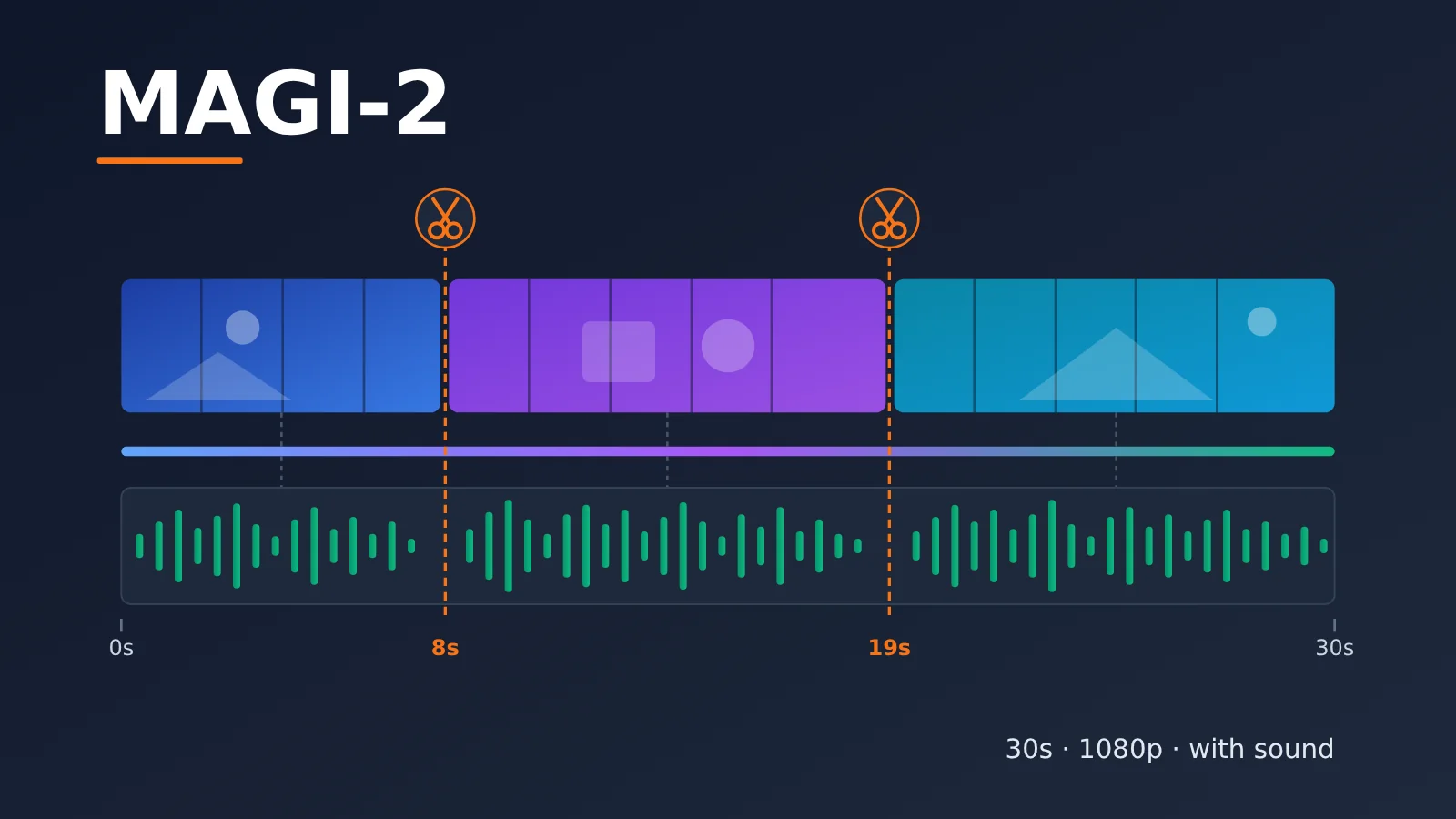
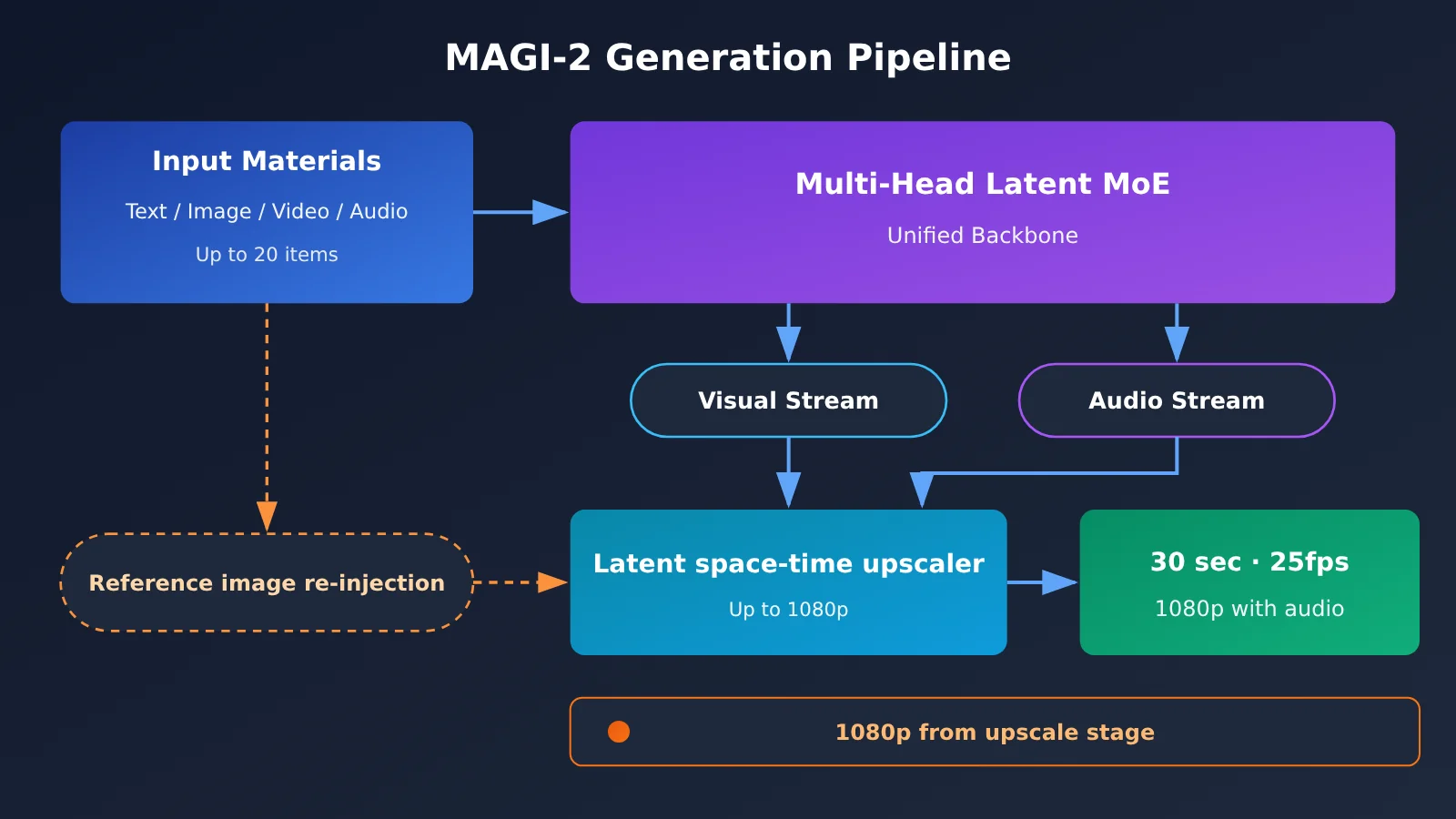
| Clip length | Up to 30 seconds, 25fps, supports 6 aspect ratios |
| Resolution | 1080p (generated by the upscaling stage, not native 1080p) |
| Audio | Generated in the same backbone as visuals: dialogue lip sync, Foley, ambient sound, music |
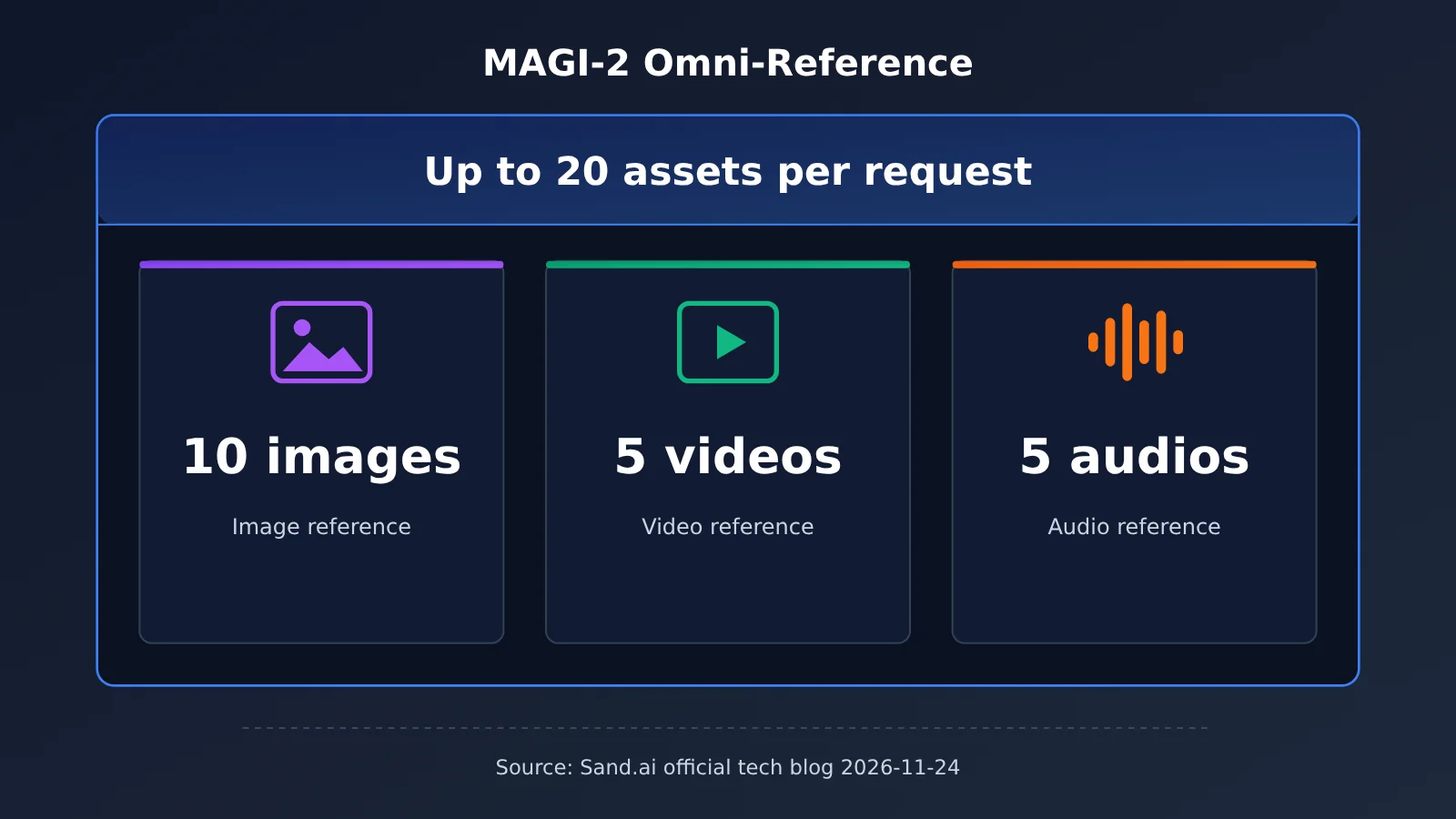
| Reference assets | Up to 20 per request (10 images + 5 videos + 5 audio clips) |
| Parameter scale | Blog says 480B total parameters, about 28B active; launch post says 400B open-source weights |
| Pricing | Launch post lists $0.08/sec, about $2.40 for 30 seconds |
| Open source | Blog says “will open source,” launch post says “coming soon”; no timeline, no license |
MAGI-2 Parameter Scale: 480B and 400B Coexist
Parameters need a special note. The official technical blog says 480B total parameters with about 28B active parameters, using a Multi-Head Latent MoE architecture. But the official launch post says “open-source weights with 400B parameters are coming soon.” The two numbers don’t match, and the vendor hasn’t explained why. This article won’t pick one for them; we’ll list both.
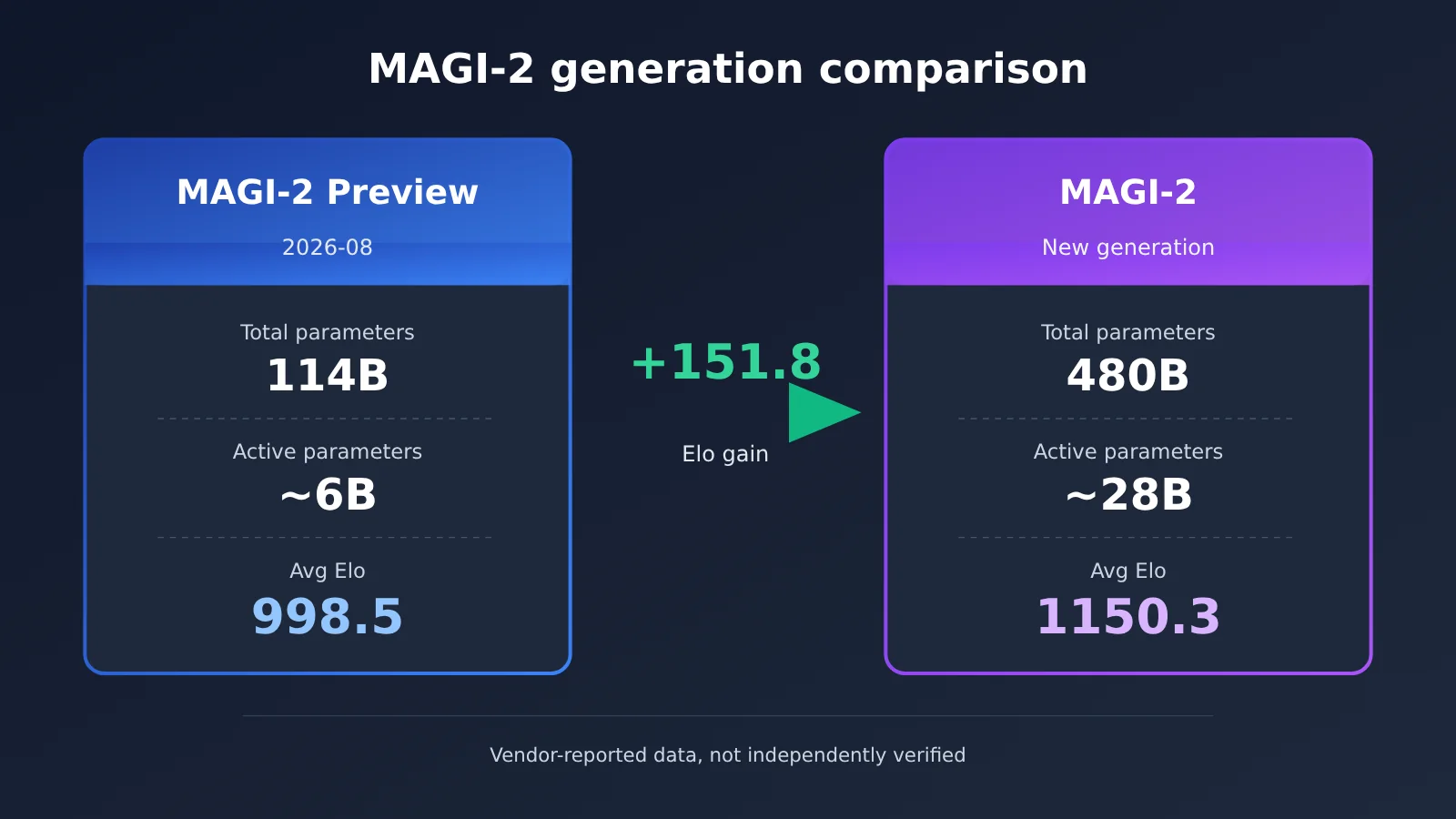
Third-party site orcarouter.ai also noticed this discrepancy in a November 24, 2026 article; the product page figure it quotes is 480B. Compared with the previous generation, MAGI-2 Preview from August 2026 had 114B total parameters and about 6B active. Based on the blog’s numbers, this generation is more than 4× larger, and pretraining data has expanded to 4T tokens (about 1 billion samples), roughly 3× that of Preview.
MAGI-2 Benchmarks: Elo 1150.3 Is Vendor-Reported
The official blog gives an average Elo across four AA Video Arena v2.1 tasks: image-to-video, silent image-to-video, silent text-to-video, and text-to-video. The average is 1150.3, up from 998.5 for Preview, a gain of 151.8. These figures are published by the vendor itself, not independent retest results, so take them with a grain of salt.
Breaking Down MAGI-2’s Three Core Capabilities
The official launch post sums MAGI-2 up in four phrases: precise shot control, high reference fidelity, flexible editing, and design for real creative workflows. Once you break those down into things you can actually test, it comes to the three items below.
Capability 1: MAGI-2 Generates 30 Seconds in One Go
What it can do: a single prompt produces a finished 30-second piece — no need to generate a bunch of 5-second clips first and stitch them together. There’s an example in the official blog: five classic paintings — The Starry Night, Water Lilies, A Sunday Afternoon on the Island of La Grande Jatte, and two others — used for a 30-second single-take style transfer, with the image transitioning continuously between several painting styles.
How to verify it: pay close attention to the frames after the 20-second mark, and check whether faces, clothing, and background text still match the opening. The most common failure in long videos is that the second half “swaps faces” or the text turns to mush. That’s exactly why the team re-injects the reference image during the upscaling stage, specifically targeting “small-face consistency and text legibility in 30-second long-form videos.”
Where it falls apart: distant small faces and tiny text inside the frame are precisely the cases the team itself flags for remediation — which tells you these were weak spots to begin with. Also, 1080p isn’t natively generated: the model first does spatio-temporal upscaling in latent space, then injects the original reference image back in. For product close-ups where detail matters a lot, it’s worth putting the 1080p output side by side with the lower-resolution version.
Capability 2: MAGI-2 Generates Audio and Video on the Same Backbone
What it can do: Video and audio are generated simultaneously by a single backbone, covering dialogue lip-sync, Foley, ambient sound, and music — it’s not a “render the picture first, dub it later” pipeline. The official blog also mentions something interesting: when you ask a character to speak another language, the model can directly generate dialogue in that target language.
How to verify: Make a short clip with both dialogue and action — for example, a person talking while closing a door. Check three things: whether the lip movements match the pronunciation; whether the door-closing sound lands on the exact frame where the door shuts; and whether the background music and ambient sound compete for the same sonic space.
When it falls apart: The official team openly admits that layered, physically realistic complex soundscapes are still a weak spot. Scenes with multiple people talking at once, noisy street environments, or rooms with heavy reverb are the most likely to expose problems. Simple soundscapes — a single person speaking to camera, a single ambient track — hold up relatively well.
Capability 3: MAGI-2’s 20 Reference Assets and Cut-Point Control
What it can do: omni-reference lets you feed in up to 20 media assets in a single pass — 10 images, 5 videos, and 5 audio clips. Combined with precise timeline control, you can specify “cut the shot at second X, to this shot size.” The team showcased a “flower world” example: reference images lock in the character’s face and outfit plus three different flower-field environments, then composition switches and occlusion transitions stitch them together. On top of that, MAGI-2 also supports targeted edits to existing video.
How to verify: Write a prompt with timecodes, like “0–8s medium shot, cut to close-up at 8s, cut to wide shot at 19s,” then go frame by frame and check whether the cuts land near the specified seconds and whether the shot sizes match. To verify reference fidelity, swap in three different scenes and see whether the same character’s facial features and clothing stay consistent.
When it falls apart: The more reference assets you supply, the higher the chance they conflict with each other — say, two reference images showing different hairstyles for the character. Third-party site orcarouter.ai noted on 2026-11-24 that the standard plan can only run one generation task at a time, with parallel capacity reserved for the enterprise tier. If you need to produce batches of clips, that directly affects your scheduling.
| Capability | What it can do | How to verify | Scenarios prone to failure |
|---|---|---|---|
| 30-second one-shot video | A single prompt produces the whole clip, no stitching needed | Compare faces and text after the 20-second mark against the opening | Small faces in wide shots, tiny text, product close-ups that demand fine detail |
| Audio and video on the same backbone | Lip-sync, Foley, ambient sound, and music all generated together | Dialogue against lip movement, action against sound placement | Multi-person dialogue, noisy soundscapes, heavy reverb |
| 20 assets + cut-point control | Lock the character, lock the scene, cut shot sizes by the second | Write timecoded prompts, check cut points frame by frame | Reference assets conflicting with each other, need for batch parallelism |
The “Accidental Capabilities” That Showed Up During Pretraining
The official blog also mentions a more interesting set of phenomena. After turning off prompt enhancement (PE), the pretrained model can still solve 9×9 Sudoku, navigate mazes, and complete symmetry patterns. Give it just three story beats, and it can work out camera positions and edit points on its own.
But the team immediately clarifies that these capabilities become “very hard to trigger again” after later fine-tuning. So you shouldn’t count on them as product features — they’re closer to a research observation showing the model has latent potential inside it.
Four Weaknesses MAGI-2 Officially Admits
This is the part I think is most worth reading in this article. A vendor’s self-reported shortcomings often tell you more about what a model is suited for than a promotional video does.
| Weakness | Official description | Real impact on creative work |
|---|---|---|
| Extremely fast motion | Occasional trajectory and continuity issues | Sports, racing, fight scenes, and rapid whip pans are prone to breaking |
| Mid-to-long-shot 2D animation | Local motion is too smooth | The texture of 2D animation is lost, and it looks like over-interpolated frames |
| Complex soundscapes | Lacking in layering and physical realism | Multi-source scenes need to be re-mixed in post |
| Post-training cost | RL makes visual reasoning, implicit narrative, and cross-lingual instruction following harder to trigger | Complex narrative prompts may not deliver as expected |
The fourth point deserves a bit more explanation. The team says reinforcement learning during post-training makes visual reasoning, implicit narrative, and cross-lingual instruction following — all learned during pretraining — harder to invoke, and internally they compare this phenomenon to an alignment tax. In other words, the post-training done to make outputs more stable and more aesthetically pleasing has squeezed out part of what the model could originally do.
For creators, this means that rather than hoping the model will “come up with” the plot on its own, it’s better to spell out time codes, shot sizes, and actions clearly in the prompt.
MAGI-2 Pricing: Three Separate Ledgers
Pricing is where numbers tend to get mashed together, so here it is broken into three separate ledgers.
Ledger one: MAGI-2’s per-second price. The official launch post lists $0.08 per second, which works out to $2.40 for a 30-second clip. The launch partner’s official account even shared a worked example: “this video cost $1.44,” which at $0.08/second comes to roughly 18 seconds. Third-party site onvid.ai, in an article dated 2026-11-24, states that the launch channel supports 4–30 seconds and $2.40 for 30 seconds — consistent with the launch post.
Ledger two: each vendor’s official rate card. Other video models publish their own rate cards on their own sites, and the billing basis differs — some charge per second, some per token, some per run. This article doesn’t treat the “dollars per run” figures from leaderboards as list prices; when you need a comparison, go by each vendor’s own rate card as of that day.
Ledger three: actual in-platform prices on APIYI. The table below lists the video models currently available, taken from the APIYI docs at api-capabilities/image-video-models, verified at 2026-11-25 09:45 (UTC+8).
| Model ID | In-platform billing | Duration | Audio | Best for |
|---|---|---|---|---|
wan3.0-video |
480P $0.0294 / 720P $0.0588 / 1080P $0.1176 per second | Up to 30 seconds | Audio track included by default | 30-second 1080p finished clips with sound |
doubao-seedance-2-5-260628 |
Per token: 720p/30s $8.1761, 1080p/5s $3.0873 | 4–30 seconds | Audio track included by default | Multiple reference images, high-quality ad spots |
MiniMax-H3 |
$0.03 per second, 768P only | 4–15 seconds | Audio track can’t be turned off | Short talking-head pieces, product clips |
oxygen-1.0 |
$0.02 per second, same price for 480p and 768p | 4–15 seconds | Built-in audio track | Low-cost batch drafts |
wan2.7-i2v |
720P $0.084 / 1080P $0.14 per second | — | Supports driving_audio lip-sync |
Driving lip movement with a specified audio track |
HappyHorse 1.1 |
720P $0.126 / 1080P $0.224 per second | — | — | Image-to-video with up to 9 reference images |
By rate card, wan3.0-video at 1080P for 30 seconds comes to about $3.53, and about $1.76 at 720P. Seedance 2.5 bills at 0.18x in the SeeDance2 group, with $0.135 per second reserved up front, and 1080p is only supported by the 2.5 and 2.0 standard editions.
As for MAGI-2 itself: it isn’t available on the platform yet — we’ll get it listed as soon as we can. Model versions and prices are subject to the platform’s model list.
💰 A pricing tip: run the same prompt at 480P and 1080P separately — use the lower resolution first to lock in composition and pacing, then render the final version. It saves real money. You can check live prices for every available model on the APIYI pricing page at apiyi.com, and a single token lets you switch among all the models in the table above.
MAGI-2 Impact Analysis
Impact on Video Creators
- The “stitching era” might be coming to an end: With a full 30-second shot generated in one pass and per-second shot switching, a 15–30 second ad spot has a real chance of having its shot composition completed from a single prompt — leaving post-production mainly for color grading and subtitles.
- Reference materials become core assets: The 20-asset cap lets character design sheets, multi-angle product shots, and brand music all participate directly in generation. Teams that organize these assets ahead of time will see the clearest payoff.
- Audio still needs a human check: The team openly acknowledges that complex soundscapes are a weak spot. For commercial deliverables, it’s worth keeping a remixing step in the pipeline before release.
Impact on Developers and the Open-Source Ecosystem
- The bar for open-weight releases is very high: onvid.ai estimates that 400B weights at 16-bit storage come to roughly 800GB, and the 114B preview build already requires 8 data-center GPUs. Even if the weights are released, self-hosting will basically be a big-lab and cloud-provider affair.
- The open-source timeline is undecided: The blog post and the launch post don’t tell the same story — there’s neither a schedule nor a license. Until a license is published, it’s not advisable to build a commercial plan on the assumption that “we’ll be able to self-host someday.”
- Third-party reviews need a source check: X user @chetaslua posted on 2026-11-24, arguing that MAGI-2 covers about 90% of Seedance 2.5’s use cases at nearly 6.5x lower cost. That’s a personal opinion — not official data, and not a reproducible test result.
MAGI-2 Alternatives Quick Start
Before MAGI-2 goes live, if you want to ship a 30-second clip with audio right now, you can start with one of the comparable models already available on APIYI. The invocation pattern is the same across models, so once you’re familiar with it, switching models is just a one-parameter change.
Three Rules Before You Call
- Endpoint: For the OpenAI-compatible interface, set
base_urltohttps://api.apiyi.com/v1and includeAuthorization: Bearer YOUR_API_KEYin the request headers. - One token for everything: A token created in the APIYI apiyi.com dashboard works with every model currently available — no need to open separate accounts for each video model.
- Model IDs are case-sensitive:
MiniMax-H3can’t be written asminimax-h3, and version numbers use dots, e.g.wan3.0-video. Wrong casing gives you a straight-up “model does not exist” error.
Endpoints and Parameters for the Three Models
- wan3.0-video: A single ID covers text-to-image, image-to-image, and all the other modes — up to 30 seconds, with an audio track by default. Set
modeltowan3.0-video; resolution options are 480P, 720P, and 1080P. For the exact endpoints and fields, check the image-video-models page in the APIYI docs. - Seedance 2.5: Create a task with
POST https://api.apiyi.com/seedance/api/v3/contents/generations/tasks, and setmodeltodoubao-seedance-2-5-260628. Supports up to 30 reference images, 4–30 seconds, audio track on by default. - MiniMax-H3: The endpoint is
POST /hailuo/v2/video_generation, on the same domain. Supports up to 9 reference images, 3 reference videos, and 3 reference audio clips; 768P only, and the audio track can’t be turned off.
Video generation is usually an async job: create the task first to get a task ID, then poll for status, and download the video file once it’s done. A polling interval of a few seconds is recommended — don’t hammer it.
🚀 Quick start: Register at APIYI apiyi.com first, use the free trial credits for new users to run one 480P
wan3.0-videojob, confirm the whole pipeline works end to end, then switch to 1080P or Seedance 2.5 for your production version.
How to Pick a Scenario
| What you need | Recommended model | Why |
|---|---|---|
| 30 seconds with audio, 1080P, controlled cost | wan3.0-video |
Up to 30 seconds, 1080P billed by the second, one ID for all modes |
| Lock characters with many reference images, ad-grade quality | doubao-seedance-2-5-260628 |
Up to 30 reference images, supports 30 seconds and 1080p |
| Talking-head or product shorts under 15 seconds | MiniMax-H3 |
$0.03/second, reference video and audio both accepted as input |
| Audio-driven lip sync | wan2.7-i2v |
The only model that supports driving_audio |
Google’s video models aren’t available on APIYI at the moment: the official VEO 3.1 channel was announced as discontinued on 2026-11-09, and the Sora 2 channels went offline at the same time. As for Kuaishou, the “video models coming soon” section of the docs only goes up to Kling 3.0 — Kling 4.0 isn’t in the list.
FAQ
Q1: What is MAGI-2?
MAGI-2 is an AI video generation model released by Sand.ai on 2026-11-24. It can turn text, images, video, and audio into a video up to 30 seconds long at 1080p with sound, and it supports specifying shot cuts and shot sizes by the second.
Q2: Is MAGI-2’s 1080p native?
No. According to the official technical blog, 1080p comes from a latent spatiotemporal upscaler, which re-injects the original reference image during the upscaling stage to improve face consistency on small faces and text legibility. So it’s a product of the upscaling stage, and for use cases that demand maximum detail, we’d recommend doing a side-by-side check.
Q3: Is MAGI-2 480B or 400B parameters?
Both numbers come from official sources. The technical blog says 480B total parameters with about 28B activated, while the release post says “400B parameter open-source weights coming soon.” The official sources don’t explain the discrepancy, and neither the open-source timeline nor the license has been announced.
Q4: What scenarios is MAGI-2 best suited for?
– **Series of short films with a fixed character**: Use a reference image to lock in the character’s appearance and clothing so they stay consistent across scenes.
– **Ad spots with a clear shot breakdown**: Specify cut points and shot sizes by timecode.
– **Single-person talking-head e-commerce videos**: Audio and video are generated together, with lip-sync matching the dialogue.
For extremely fast motion, mid-to-long-shot 2D animation, and multi-source soundscapes, MAGI-2 isn’t the first choice.
Q5: Can I call MAGI-2 through APIYI right now?
MAGI-2 isn’t listed yet, but we’ll get this model listed as soon as possible; model names and pricing are subject to the platform’s model list. Once it’s listed, invocation works the same as with existing models: the base_url is still `https://api.apiyi.com/v1`, you use the same token, and you only need to change the `model` parameter. For now, you can get a 30-second workflow with sound up and running on APIYI at apiyi.com using `wan3.0-video` or Seedance 2.5.
Q6: What are the known limitations of MAGI-2?
The official sources acknowledge four: occasional trajectory and continuity issues in extremely fast motion; local motion that’s too smooth in mid-to-long-shot 2D animation; insufficient layering and physical realism in complex soundscapes; and post-training RL making some pretrained capabilities harder to trigger. In addition, third-party orcarouter.ai mentions that the standard plan doesn’t support parallel generation.
Q7: Is it worth pausing existing projects for MAGI-2?
We don’t recommend it. The vendor-reported Elo gains are significant, but third-party retest data is still missing. The safer approach is to keep pushing existing projects forward with models that are already listed, while writing your prompts in a “timecode + shot size + action” structure so you can reuse them directly once MAGI-2 is listed. Switching models on APIYI at apiyi.com only takes changing one ID, so migration costs are low.
MAGI-2 Key Takeaways
- MAGI-2 generates in a single pass: up to 30 seconds, 25fps, 6 aspect ratios — no need to stitch multiple clips together.
- Audio and video share one backbone: dialogue lip-sync, foley, ambient sound, and music are all generated at once, though complex soundscapes still fall short.
- 20 assets plus cut points: 10 images, 5 videos, 5 audio clips, with cuts and shot sizes specifiable down to the second.
- 1080p isn’t native: it comes from latent spatiotemporal upscaling plus reference-image reinjection.
- Inconsistent specs: the blog says 480B, the launch post says 400B; open-sourcing has no timeline and no license.
- $0.08 per second: that’s $2.40 for 30 seconds — don’t mix it up with other models’ list prices or on-platform actual rates.
- Use alternatives for now: on APIYI apiyi.com, one token gets you
wan3.0-video, Seedance 2.5, andMiniMax-H3.
Summary
Three things make MAGI-2 worth watching:
- Length: a single 30-second take means one prompt can produce an entire ad storyboard.
- Integrated audio and video: sound and picture come from the same backbone, so voiceover and foley no longer have to be produced separately.
- Control: 20 reference assets plus second-level cut points turn “rerolling the slot machine” into a storyboard you can actually specify.
What you should keep a clear head about: the benchmarks are vendor-reported, 1080p comes from the upscaling stage, the four shortcomings are admitted by the vendor itself, and open-sourcing still has no timeline. The more practical move right now: use wan3.0-video for 30-second 1080P clips with sound; Seedance 2.5 for high-quality ads with many reference images; MiniMax-H3 for talking-head sales clips under 15 seconds. Once MAGI-2 goes live, you can switch straight over with the same token and the same OpenAI-compatible setup.
I’d recommend running your video generation pipeline end to end first on APIYI apiyi.com using the free trial credits — when the time comes, switching models just means changing one ID.
📚 References
-
Sand.ai Official Technical Blog: MAGI-2: parameters, architecture, capability demos, and limitations acknowledged by the official team
- Link:
sand.ai/blog/magi-2 - Details: the original source for the 480B parameters, omni-reference, the upscaling stage, and the four limitations
- Link:
-
MAGI Official Account Release Post: release timing, pricing, and open-source stance
- Link:
x.com/magiai_hq/status/2125290721003680155 - Details: the source for $0.08/second and “400B open-source weights coming soon”
- Link:
-
onvid.ai Third-Party Analysis (2026-11-24): duration range, 30-second pricing, and weight size estimates
- Link:
onvid.ai - Details: third-party figures, not official data
- Link:
-
APIYI Model and Video Model Docs: available video model IDs, billing, and endpoints
- Link:
docs.apiyi.com/models - Details: refer to this list for model IDs and pricing
- Link:
Author: APIYI Technical Team
Technical inquiries: Feel free to contact us through the APIYI website homepage. For more model documentation, visit the docs center at docs.apiyi.com.